Crunchbase Any Search Results Scraper
Pricing
$29.00/month + usage
Crunchbase Any Search Results Scraper
Scrape crunchbase and Download ANY Crunchbase search results in a json file (companies, funding, acquisition, peoples ...). Only PRO plan needed
Pricing
$29.00/month + usage
Rating
5.0
(1)
Developer

SASWAVE
Maintained by CommunityActor stats
26
Bookmarked
814
Total users
19
Monthly active users
11 hours
Issues response
3 months ago
Last modified
Categories
Share
Crunchbase Companies Scraper – Apify Actor
Scrape Crunchbase search results for companies, funding rounds, acquisitions, people, and more.
Export data as structured JSON for analytics, research, and business intelligence.
🚀 Overview
The Crunchbase Companies Scraper allows you to:
-
Download search results from Crunchbase with filters applied and specific columns selected.
-
Extract detailed information about companies, funding rounds, acquisitions, investors, and people.
-
Export results in structured JSON format ready for analysis, dashboards, or integration with CRMs.
-
Support large datasets with multi-page scraping.
Ideal for investors, market analysts, business developers, and data scientists who need up-to-date Crunchbase data.
⚡ Features
Scrape any Crunchbase search results, including:
Companies
Funding rounds
Acquisitions
People / executives
Export selected columns and data points in clean JSON format.
Support session-based authentication via cookies for full access to Crunchbase search results.
Easily integrate with APIs, databases, or data pipelines.
Perfect for market research, lead generation, competitive intelligence, and investment analysis.
INPUT
-
url: search url with filters setup and choossen columns selected
-
cookie: session cookies (check "How to extract cookies from your browser" section)
OUTPUT
- a list of objects. The objects contains data equal to the column selected in crunchbase search results view
How to extract cookies from your browser
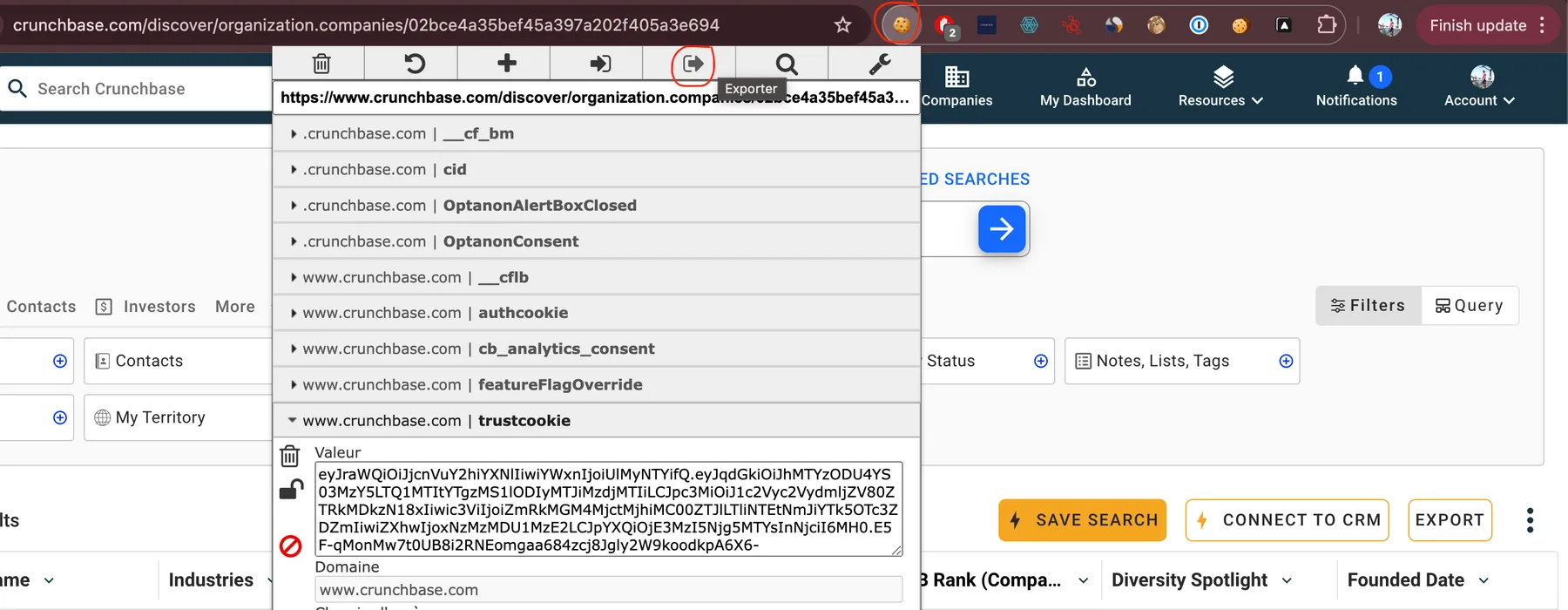
- install EditThisCookie chrome extension
- login to your account and go to your crunchbase home page
- Use the extension and click "export"
- Paste the cookies in the input "cookies" from the actor
The apify documentation has a tutorial on how to do it with screenshots, https://docs.apify.com/tutorials/log-in-by-transferring-cookies#export-your-cookies go to the export your cookies section
🛟 SUPPORT
Share your runs with the developer team and create issues on error to help us improve actor quality.
You might discover edge case we didn't test yet
We stay available anytime