
Coles Product Search Scraper
Pricing
from $1.20 / 1,000 results
Coles Product Search Scraper
Scrape product data from Coles.com.au search results, Australia's leading supermarket chain. Extract pricing, availability, brand information, images, and product details for market research, price monitoring, and competitive analysis across thousands of grocery items.
Pricing
from $1.20 / 1,000 results
Rating
0.0
(0)
Developer

Stealth mode
Maintained by CommunityActor stats
5
Bookmarked
128
Total users
6
Monthly active users
2 days ago
Last modified
Categories
Features
Share
Coles.com.au Product Search Scraper: Extract Australian Grocery Data
Excerpt: Scrape product data from Coles.com.au search results, Australia's leading supermarket chain. Extract pricing, availability, brand information, images, and product details for market research, price monitoring, and competitive analysis across thousands of grocery items.
Understanding Coles.com.au and Australian Grocery Market Intelligence
Coles operates over 800 supermarkets across Australia, serving millions of customers weekly. As one of Australia's two major grocery retailers, Coles product data provides critical insights into pricing strategies, product availability, promotional patterns, and consumer trends in the Australian market.
Search result pages contain concentrated product information—pricing, availability, brands, sizes, and promotional flags. For price comparison platforms, retailers, consumer apps, and market analysts, this data reveals competitive dynamics, seasonal pricing, stock levels, and product assortment strategies across Australia's largest grocery chain.
Manually tracking products across categories, locations, and time requires repetitive searches and data entry. This scraper automates extraction from search pages, delivering structured datasets for pricing analysis, inventory monitoring, and market intelligence.
What This Scraper Extracts and Target Users
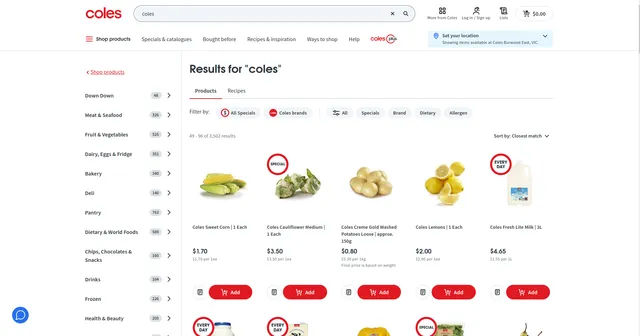
The Coles Product Search Scraper processes search result URLs—pages displaying multiple products from keyword or category searches. It captures essential grocery data including pricing, availability, product specifications, and promotional indicators.
Key Data Points:
- Product identification: ID, name, brand, description, size
- Pricing details: Current price, unit pricing, promotional pricing
- Availability data: Stock status, quantity, location restrictions
- Visual assets: Product images (multiple URIs)
- Classification: Merchandise hierarchy, online categories
- Promotional flags: Featured products, ad placements, ad sources
Primary Users:
Price Comparison Services build real-time grocery price databases. Retailers and Brands monitor competitor pricing and product positioning. Market Researchers analyze pricing trends, promotional strategies, and product availability patterns. Consumer Apps provide price tracking and shopping optimization tools. Supply Chain Analysts track stock availability and product distribution across regions.
Input Format
The scraper processes Coles search result pages (product listing pages), not individual product detail pages. It supports two scraping modes — use only one at a time:
- Scrape by URLs — scrape data directly from a list of Coles search result URLs.
- Scrape by search filters — scrape data using a keyword and additional filters (sort order, specials, page) instead of providing URLs.
There is also a General settings group that applies to both modes.
Example Screenshot:
1. Scrape by URLs
Use this mode when you already have specific search result URLs. When this mode is used, all options in the "Scrape by search filters" section will be disabled.
| Field | Type | Default | Description |
|---|---|---|---|
urls | array | (required) | URLs of the product search/category list pages to scrape. You can paste URLs one by one, or use the Bulk edit section to add a prepared list. Format: https://www.coles.com.au/search/products?q=[keyword]&page=[number]. Collect URLs from manual searches or construct them programmatically for systematic data collection. Coles typically shows 20-30 products per page — include multiple keywords and pagination URLs (page=1, page=2, etc.) for comprehensive datasets. |
ignore_url_failures | boolean | true | If true, the scraper continues running even when a URL fails instead of stopping the entire run. Recommended when processing multiple search queries or paginated results in bulk. |
Building URL Lists: Perform test searches on Coles to verify results match your targets before adding URLs to the list.
2. Scrape by search filters
Use this mode when you want to search using a keyword and additional filter attributes instead of scraping by URLs. If you use this mode, leave the urls field above empty.
| Field | Type | Default | Description |
|---|---|---|---|
keyword | string | — | The keyword to search for. |
sort_by | string ("", unitPriceAscending, priceAscending, priceDescending) | — | Sort results by Closest match (empty), Unit price ascending, Price ascending, or Price descending. |
filter_Special | string ("", all, multibuy, halfprice, onlineonly) | — | Filter by special offer type: Any (empty), All specials, Multi buy, Half price, Online only. |
page | integer | — | The page number to start scraping from. |
3. General settings
Applies to both scraping modes above, including Max Items, Max Retries, and Proxy.
| Field | Type | Default | Description |
|---|---|---|---|
max_items_per_url | integer | 20 | The maximum number of products to extract per URL/search. Coles typically shows 20-30 products per page. Keep at 20 for standard extraction, or increase (50-100) for comprehensive collection. |
proxy | object | { "useApifyProxy": false } | Proxy configuration used by the scraper. Set useApifyProxy: false if scraping from Australian IPs or if Coles doesn't restrict access. Enable proxies if you experience blocking or need distributed scraping. |
include_raw_data | boolean | false | If true, the scraper will include raw data from website before cleaning in the output. |
Complete Output Structure and Field Definitions
The scraper returns JSON data with each product as an object containing detailed fields. Understanding field purposes enables effective analysis and application.
Product Identification
ID: Unique numeric identifier of the product on Coles. Purpose: Database indexing, tracking products and prices over time, avoiding duplicates.
Listing URL: Direct link to the product page (null when not provided by the source). Purpose: Accessing complete details and verification of scraped data.
Name: Product name as displayed on Coles. Purpose: Product matching, keyword analysis, catalog building.
Brand: Brand of the product. Purpose: Brand-level price comparison, market share and assortment analysis.
Description: Full product description text. Purpose: Product matching, extracting extra details such as variant and pack size.
Size: Pack size or weight of the product (e.g., 130g). Purpose: Price-per-unit comparison and pack-size analysis.
Availability
Is Available: Whether the product can currently be purchased. Purpose: Stock monitoring and out-of-stock detection.
Availability Type: Channels in which the product is available (e.g., InStoreAndOnline). Purpose: Omnichannel availability analysis.
Available Quantity: Number of units currently in stock. Purpose: Inventory monitoring, demand and supply analysis.
Media
Image URLs: List of image paths of the product. Purpose: Downloading images, catalog enrichment, visual analysis. Note: paths are relative and need the Coles image host as prefix.
Images: List of image objects with alt text, type and URI. Purpose: Accessing image metadata such as image type and accessibility text.
Store Locations
Store Locations: List of in-store location objects (aisle, aisle side, shelf, facing, display order, description). Purpose: In-store navigation, shelf placement and merchandising analysis. Fields are null when aisle information is unavailable.
Purchase Restrictions
Purchase Restrictions: List of label/value pairs describing buying limits and age restrictions (retail limit, promotional limit, liquor and tobacco age restrictions, organisation restriction). Purpose: Compliance checks, bulk-buy and reselling analysis, identifying age-restricted products.
Category Classification
Merchandise Hierarchy: List of label/value pairs for the internal merchandise classification (trade profit centre, category group, category, sub category, class). Purpose: Standardized category analysis and benchmarking.
Online Categories: List of website category paths the product appears in, each with department, category, aisle and their IDs. Purpose: Analyzing online navigation placement, dietary and special-collection tags (e.g., Halal, Soy Free), category-level comparison.
Pricing
Currency: Currency of the listed price (AUD). Purpose: Correct financial interpretation when merging datasets from multiple markets.
Price: Current selling price. Purpose: Price tracking, competitor benchmarking, price history.
Price Was: Previous price before discount (0 when no previous price). Purpose: Calculating discount amount and percentage.
Unit Price: Price per standard measure (e.g., per 100g). Purpose: Fair comparison across different pack sizes and brands.
Unit Price Text: Unit price as displayed on the website (e.g., $1.96/ 100g). Purpose: Display and verification against the website.
Unit Price Details: List of label/value pairs describing how the unit price is calculated (quantity, measure quantity, measure units, measure type, weighted and incremental flags). Purpose: Recalculating or normalizing unit prices.
Promotions
Is On Special: Whether the product has an active promotion. Purpose: Filtering promoted products, promotion frequency analysis.
Promotion Type: Type of the promotion (e.g., SPECIAL). Purpose: Segmenting promotions by mechanic.
Special Type: Specific special mechanic (e.g., MULTI_SAVE). Purpose: Analyzing multi-buy, discount and other deal types.
Is Online Special: Whether the special applies only online. Purpose: Channel-specific promotion analysis.
Offer Description: Promotion text shown to shoppers (e.g., Buy 2 for $4). Purpose: Understanding deal conditions and competitor promotion strategy.
Multi Buy Promotion: List of label/value pairs describing the multi-buy deal (type, promotion ID, minimum quantity, reward price, unit price display). Purpose: Calculating effective per-unit price under multi-buy deals.
Other
Is Featured: Whether the product is featured on the listing page. Purpose: Analyzing promoted placement.
Source URL: Search or category page URL where the product was scraped. Purpose: Traceability and reproducing the scrape.
Raw Data
Raw Data: Complete original JSON object of the product as scraped, without modification. Purpose: Auditing, debugging, accessing fields not included in the cleaned output, and reprocessing without re-scraping.
Sample Output:
Implementation Guide
1. Define Target Products: Identify product categories, brands, or keywords. Test searches on Coles.com.au to verify results.
2. Build Search URLs: Copy URLs from test searches. For broad coverage, create URLs for different categories, brands, price ranges. Include pagination for complete datasets.
3. Configure Input: Set max_items_per_url based on needs. Enable ignore_url_failures for large URL lists. Proxy settings depend on scraping scale and location.
4. Execute Run: Launch via Apify console. Monitor progress—typical runs of 10 search pages complete in 2-4 minutes.
5. Validate Data: Check critical fields (name, pricing, availability). Verify pricing format matches expectations. Flag anomalies.
6. Export and Analyze: Export to JSON for database integration or CSV for analysis. Filter by availability for in-stock products only.
Handling Pagination: For categories with hundreds of products, systematically increment page numbers in URLs or set high max_items_per_url for automatic pagination.
Error Handling: Failed URLs typically indicate invalid search queries or removed categories. Verify URLs work in browser before troubleshooting scraper issues.
Strategic Applications
Dynamic Price Monitoring: Track competitor pricing across categories. Identify price changes, promotional patterns, seasonal fluctuations. Alert on price drops or increases for strategic response.
Promotional Intelligence: Featured and ad_source fields reveal promotional investments. Track which products get featured placement, promotional duration, and effectiveness through availability changes.
Stock Availability Tracking: Monitor out-of-stock patterns to identify supply chain issues or high-demand products. Regional availability data reveals distribution strategies and market prioritization.
Brand Performance Analysis: Aggregate data by brand to assess shelf space (product count), pricing positioning (premium vs. value), and promotional frequency.
Category Trends: Merchandise hierarchy analysis shows product assortment strategies. Track new product introductions, discontinued items, and category expansion.
Unit Price Comparison: Size and unit pricing data enable true value comparisons across package sizes and brands—critical for consumer apps and price optimization.
Geographic Pricing Variance: Location data reveals regional pricing strategies. Compare metro vs. regional pricing, state-level variations.
Maximizing Data Value
Time-Series Analysis: Scrape identical searches weekly to build historical pricing databases. Track price volatility, promotional cycles, seasonal patterns.
Competitive Benchmarking: Compare Coles data with Woolworths or IGA scrapers for complete market view. Identify pricing gaps and opportunities.
Demand Signals: Low stock combined with restrictions indicates high demand. Track these signals for trend forecasting.
Promotional Calendar: Build calendars of typical promotional periods by category (e.g., BBQ products summer discounts, baking supplies pre-holidays).
Quality Assurance: Validate pricing logic—unit prices should calculate correctly from price and size. Flag products with missing critical data.
Data Enrichment: Combine with nutritional databases, customer reviews, or social media sentiment for comprehensive product intelligence.
Automated Alerts: Set thresholds for price changes, stock-outs, or new featured products to trigger immediate notifications for rapid response.
Best Practices and Compliance
Refresh Frequency: Daily scraping captures price changes and promotions. Real-time monitoring may require hourly updates for flash sales.
Respectful Scraping: Space requests appropriately. Coles serves millions of customers—avoid overwhelming servers. Use reasonable delays between requests.
Data Storage: Archive historical data with timestamps. Track when products first appeared, pricing history, availability changes for comprehensive analytics.
Privacy Considerations: Product data is public, but respect terms of service. Use data for legitimate business intelligence, not disruptive purposes.
Validation Pipelines: Implement checks for reasonable prices (no negative values), valid availability states, complete product names. Flag anomalies for review.
Conclusion
The Coles.com.au Product Search Scraper transforms Australia's leading supermarket into actionable market intelligence. From pricing strategies to promotional patterns, availability monitoring to brand analysis, this tool delivers the data needed for competitive advantage in Australian grocery retail. Start extracting Coles product insights today.


