

Spotify Scraper - Play Counts, Monthly Listeners & Playlists
Pricing
from $2.80 / 1,000 spotify rows
Spotify Scraper - Play Counts, Monthly Listeners & Playlists
Scrape Spotify tracks, albums, artists, playlists, podcasts and episodes by URL or search: play counts, monthly listeners, followers, world rank, top cities, label, track lists with streams, credits and concerts. Charts, one row per track, monitor mode. $2.80 per 1,000 rows. No login.
Pricing
from $2.80 / 1,000 spotify rows
Rating
0.0
(0)
Developer

Top Api
Maintained by CommunityActor stats
0
Bookmarked
2
Total users
1
Monthly active users
4 days ago
Last modified
Categories
Share
What does Spotify Scraper do?
Spotify Scraper extracts Spotify play counts and stats from open.spotify.com: paste track, album, artist, playlist, podcast or episode links, or search terms, and get one row per item with its play count (streams), monthly listeners, followers, world rank, top cities, label, track list and more. Built for music marketers, A&R scouts, labels, playlist pitchers and analysts who track streams without copying numbers from the app by hand.
Also known as: Spotify play count scraper, Spotify stream count scraper, Spotify API alternative, Spotify playlist scraper.
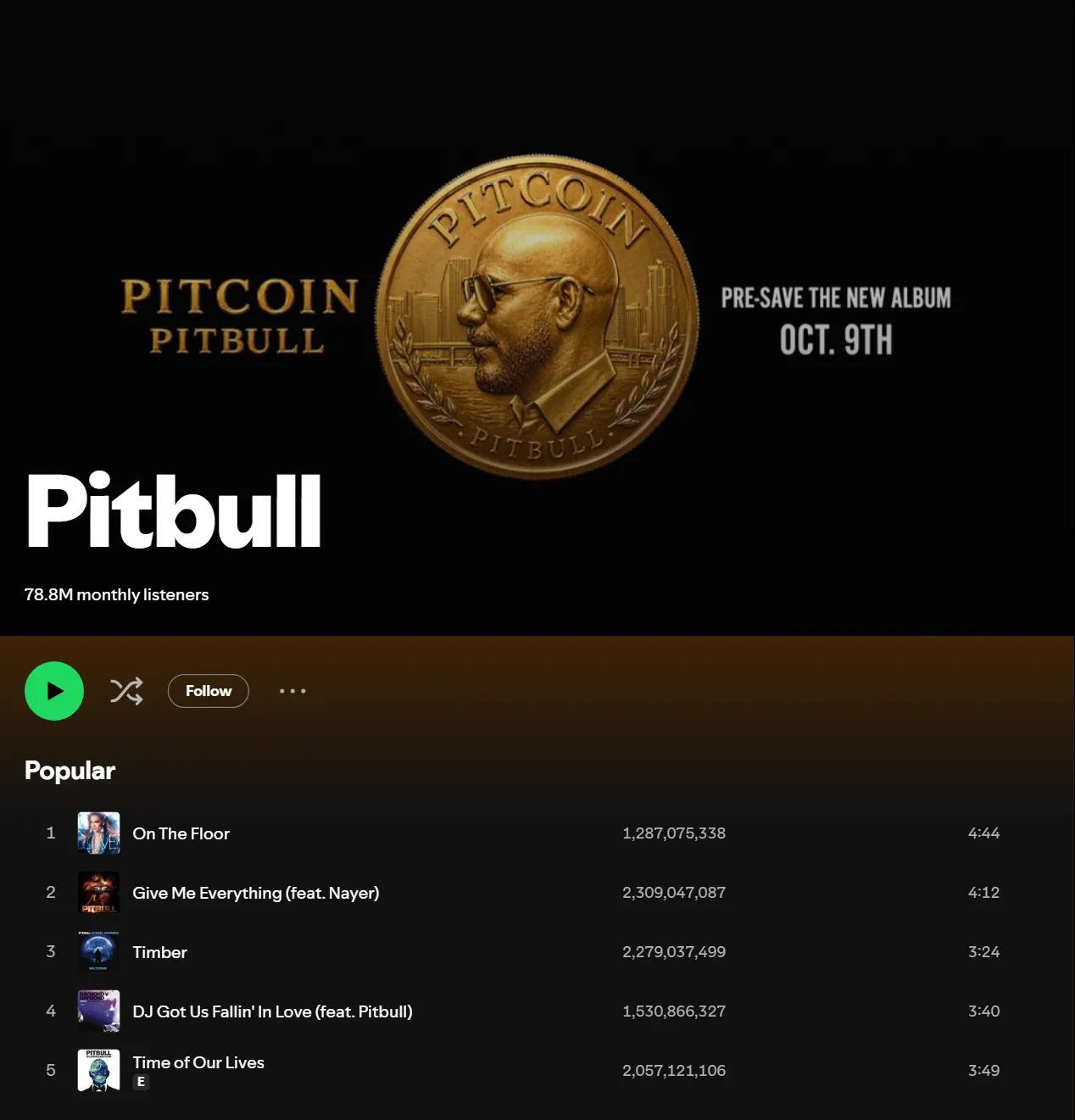
- Real Spotify play counts: the exact stream count of every track, the number Spotify shows, not the 1-100 popularity score of the official Web API
- Every Spotify object in one actor: tracks, albums, artists, playlists, podcasts, episodes and audiobooks by link,
spotify:URI, short link or bare id; user profiles from search - Search in eight result types: songs, artists, albums, playlists, podcasts, episodes, audiobooks and profiles, each result with its full row (profiles: name, username and picture, as the search shows them)
- Play counts on playlist tracks too: every playlist track carries its play count, date added, BPM and musical key
- Spotify Charts: Weekly Top Songs, Top Albums and Top Artists with current, previous and peak rank
- One row per track mode: expand albums, playlists and artists into one row per track for play-count reporting
- Monitor mode: schedule it and get only what changed, with the previous value and the difference
- No login, cookies or Spotify API key: you paste links or keywords, nothing else
- Export anywhere: JSON, CSV, Excel, XML; schedules, webhooks, Make, Zapier, n8n, Google Sheets, Slack, the Apify API and MCP
What data can you get from Spotify?
🎵 Track play count (playCount, streamCount) | 👥 Monthly listeners (monthlyListeners) | ❤️ Followers / playlist saves (followers) |
🌍 World rank (worldRank) | 🏙️ Top 5 cities with listeners (topCities) | ✅ Verified artist (verified) |
| 💿 Album label and copyright | 📅 Release date and precision | 🔢 Track and disc number, duration |
| 📋 Album and playlist track lists with play counts | ➕ Total album / playlist plays (totalPlayCount) | 🥁 BPM, key and Camelot key of playlist tracks |
🎧 30-second preview URL (previewUrl) | ✍️ Songwriter and producer credits (credits) | 🎤 Upcoming concerts: date, city and line-up |
| 📖 Artist biography and social links | 🔗 Related artists, discovered-on and appears-on | 💽 Full discography, latest and upcoming release |
| 📧 Playlist curator emails, handles and links | 🎙️ Podcast publisher, rating, topics, episodes | 🏆 Chart rank, previous and peak rank |
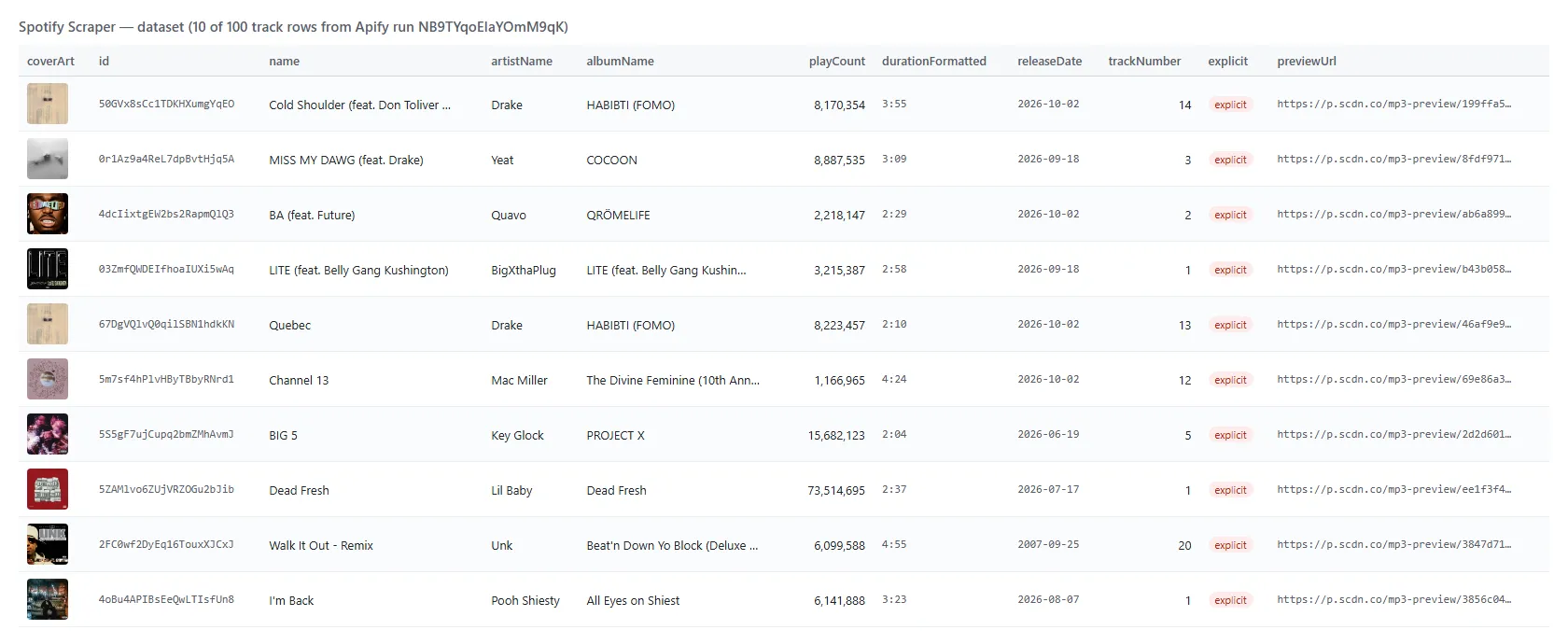
On a 100-track test run every row had a play count, duration, album, release date and preview URL. On 400 artists found by search, 100% had followers, 81% monthly listeners (Spotify sends none for artists without listeners this month) and 28% a world rank (Spotify ranks its top 500 only).
How to scrape Spotify with Spotify Scraper
- Create a free Apify account — $5 of monthly credit, no card needed.
- Open Spotify Scraper and click Try for free.
- Paste Spotify links into Spotify URLs, URIs or IDs, or type keywords into Search terms and pick what to Search for.
- Click Start. Rows stream into the dataset as they are found.
- Open the Storage tab and Export as JSON, CSV or Excel — or let a schedule run it for you.
⬇️ Input
| Parameter | Type | Description |
|---|---|---|
| 🔍 What to scrape | ||
urls | List | Track, album, artist, playlist, show, episode or audiobook links, spotify: URIs, short links or bare ids. Mix them freely. |
searchTerms | List | Keywords to search, e.g. lofi beats, Taylor Swift. |
searchType | Select | tracks, artists, albums, playlists, podcasts, episodes, audiobooks or users. Default: songs (tracks). |
searchTypes | Multi-select | Several result types at once, added to searchType. |
charts | Boolean | Add the current Spotify Charts (global Weekly Top Songs, Albums, Artists; 50 each). Default false |
trackRows | Boolean | One row per track instead of one row per album / playlist / artist. Default false |
idType | Select | What a bare id is (auto detects it). Default auto |
| 🎯 Filters (applied by Spotify) | ||
language | Select | Language of search results and genre names, e.g. en, es, de. Default en |
searchLanguages | Multi-select | Run each search again in these languages, on top of language, for more results. |
market | Text | Two-letter country code, applied when the run uses an Apify proxy. |
| ✂️ Refine results | ||
minPlayCount | Integer | Keep only tracks with at least this many plays. |
minMonthlyListeners | Integer | Keep only artists with at least this many monthly listeners. |
minFollowers (minSaves) | Integer | Keep only artists and playlists with at least this many followers / saves. |
excludeSpotifyOwned | Boolean | Skip Spotify's own editorial and algorithmic playlists. |
excludePlaylistIds | List | Playlists you already have; they are skipped. |
| ➕ Extra data | ||
includeTracks | Boolean | Albums and playlists carry their tracks with play counts; podcasts their episodes. Default true |
maxTracksPerItem | Integer | Tracks kept per album / playlist / podcast. Default 100, 0 = all |
includeDiscography | Boolean | Artist rows carry every release, not only the latest 10 of each kind. |
followAlbums, followSingles, followPopularReleases | Boolean | Also return each of an artist's albums / singles / popular releases as its own album row, for artist links, artists found by search and chart artists. These rows carry followedFrom (the artist's link) and count toward maxResults, not maxResultsPerQuery. |
includeCredits | Boolean | Songwriting and production credits on every track row, including the rows of trackRows (one small extra request per track). Not added to the track lists inside album and playlist rows. |
scrapePreviewUrls | Boolean | 30-second preview links on tracks. Default true |
includeConcerts | Boolean | Upcoming concerts on artist rows: date, city and line-up — charged as concerts ($0.001 per artist row with concerts). |
enrichConcertDetails, concertDetailsLimit | Boolean, Integer | Add venue, country, coordinates, genres and ticket sellers with links and availability (doors-open time when Spotify lists it) to the first N concerts per artist (default 20). No extra charge. |
maxAlbumsPerArtist, includeSingles | Integer, Boolean | With trackRows: how many of an artist's newest releases become track rows. Defaults 3, true |
| 🔁 Monitoring | ||
monitorMode | Boolean | Return only new rows and rows whose numbers changed since the last run. Pair with a daily schedule. |
monitorStoreName | Text | Memory for monitor mode; one name per schedule. |
| 📦 Output | ||
maxResults | Integer | Most rows per run. Default 100; 0 = no limit. |
maxResultsPerQuery | Integer | Most results per search term and type. Default 50; Spotify serves about 1,000 per search. |
compact | Boolean | Core fields only, sized for AI agents and MCP. Add-ons you turn on (concerts, credits, discography, raw) stay on the row. |
includeRaw | Boolean | Attach Spotify's full answer under raw. With trackRows, each track row gets Spotify's item for that track (its entry in the album or playlist; a track link gets the full track answer). |
| ⚙️ Advanced | ||
proxyConfiguration | Proxy | Not needed. Default: no proxy. |
maxConcurrency | Integer | Requests in flight. Default 6. |
Input JSON
Paste links for known items, search for new ones
A link always returns exactly that item. Search returns Spotify's own ranking for the keyword, and every result gets its full row with searchTerm and searchRank (profiles carry the name, username and picture the search shows). Do: urls: ["https://open.spotify.com/track/4uLU6hMCjMI75M1A2tKUQC"] · Don't: search for a song title when you already have its link (search can return covers and remixes first).
Use one row per track for play-count reports
With trackRows: true, an album, a playlist or an artist becomes one row per track with its play count, position, album and source. A 10,000-track playlist delivered 1,000 track rows in 8.3 seconds in testing. Leave it off when you want one row per album or playlist with the tracks inside.
Find playlist curators with filters
Search playlists with minFollowers: 200 and excludeSpotifyOwned: true to keep playlists run by people and brands; contactEmails, contactHandles and contactLinks come from the playlist description. Add searchLanguages to find more playlists for the same keyword.
⬆️ Output
Every Spotify item becomes one dataset item. Here is a table view of a 100-track run:
An artist row (shortened):
A playlist track inside a playlist row:
Each run also saves play_counts.csv in the run's key-value store: one line per track seen (artist, album, track, play count, source), ready for a spreadsheet.
Fields
| Field | Rows | What it is | Fill on test runs |
|---|---|---|---|
playCount / streamCount | track | Total plays as Spotify shows them; playCountText keeps Spotify's raw string | 100% (100 tracks) |
tracks[].playCount | album, playlist | Play count of every track in the list | 13/13 album, 50/50 playlist |
totalPlayCount | album, playlist | Sum over every track, when every track was read | album 3,108,388,224 |
monthlyListeners | artist | Monthly listeners | 81% of 400 searched artists |
followers | artist, playlist | Followers / saves | 100% |
worldRank | artist | Rank among the top 500 on Spotify, null otherwise | 28% |
topCities | artist | Top 5 cities with listener counts | 73% |
releaseDate | track, album | Release date and releaseDatePrecision | 100% of tracks and albums |
label, copyright | album | Record label and copyright lines. Rows from a track link carry the copyright under album.copyright; trackRows rows expanded from an album or artist carry label | 100% of albums |
bpm, key, mode, camelotKey | playlist tracks | Tempo and musical key | 100% / 99.8% of 1,000 |
previewUrl | tracks | 30-second MP3 preview | 100% of 100 track links |
credits | every track row (includeCredits) | Writers, composers, producers, engineers, performers | 6-42 per track |
authors, narrators, genres, rating, price | audiobook | Authors, narrators, publisher, genres, rating and rating count, price and currency | 3/3 test audiobooks |
concerts | artist (add-on) | Date, city, line-up | artists with shows (Pitbull 11/11) |
concerts[].venue, country, latitude, tickets | artist (enrichConcertDetails) | Venue, country, coordinates, ticket sellers with links and availability | first N concerts (3/3 with N = 3) |
chart | chart rows | Chart name, rank, previous and peak rank | 150 chart entries |
isNew, changed, previous*, delta* | monitor mode | What changed since the last run (kept with compact too) | monitor runs |
tracksAdded, tracksRemoved | playlist (monitor mode, includeTracks on) | Tracks added to or removed from the playlist since the last run, compared over the whole playlist (up to 10,000 tracks) whatever maxTracksPerItem is | monitor runs |
How can I use Spotify data?
- 🎯 Music marketers — track a release's play counts day by day and report growth per track
- 📊 Labels and A&R scouts — compare artists by monthly listeners, followers, world rank and top cities before signing
- 📬 Playlist pitching — find curator playlists by keyword and follower count, with the contact details in their descriptions
- 🎧 Playlist analysts — see which tracks a playlist added or removed, with play counts, BPM and key
- 🎤 Promoters — list an artist's upcoming concerts by date, city and line-up; turn on
enrichConcertDetailsfor venues and ticket links - 🤖 AI and research teams — feed compact rows into an LLM or a dataset of artists, tracks and charts
How much does it cost to scrape Spotify?
Spotify Scraper is pay-per-result: $2.80 per 1,000 rows ($0.0028 per track, album, artist, playlist, podcast, episode, audiobook or profile row), no start fee. One row per track mode is $0.074 per 1,000 track rows. The concerts add-on is $0.001 per artist row that carries concerts. Inputs that return nothing are not charged.
| Rows | Entity rows | Track rows (trackRows) |
|---|---|---|
| 10 | $0.028 | $0.00074 |
| 100 | $0.28 | $0.0074 |
| 1,000 | $2.80 | $0.074 |
| 10,000 | $28.00 | $0.74 |
There is nothing else to pay: Apify platform usage is included in these prices. Measured on 256 MB: 100 track links in 9.7 s, 100 artists from a search in 14 s, 1,000 track rows from one playlist in 8.3 s.
Integrations, API, scheduling & MCP
- Schedules: run Spotify Scraper hourly, daily or weekly from the Schedules tab; turn on
monitorModeto get only new or changed rows. - Webhooks: fire a URL when a run finishes — push rows to your CRM, Slack or a sheet.
- No-code: Make, Zapier, n8n, Google Sheets, Airtable, Slack via Apify integrations.
- API: call it from Node.js or Python with
apify-client— code on the API tab and the Apify API reference. - MCP / AI agents: connect Claude, Cursor or any MCP client through the MCP tab and ask for Spotify play counts in plain language.
More scrapers from TopApi
| 🎬 TikTok Scraper — videos, hashtags, profiles | 📹 TikTok Video Scraper — stats by video URL | 🔎 TikTok User Search Scraper |
| ▶️ YouTube Shorts Scraper — views and channels | 📸 Instagram Scraper — posts, reels, hashtags | 👤 Instagram Profile Scraper |
| 📇 Instagram Contact Scraper | 🐦 Twitter Profile Scraper — X followers and bio | 📈 SimilarWeb Scraper — website traffic |
| 🌐 Website Content Crawler | 🧭 All TopApi actors |
Limits & empty runs
- Search depth: Spotify serves about 1,000 results per search term and type; use more terms or
searchLanguagesto go wider. - Playlists: Spotify playlists hold up to 10,000 tracks. Preview URLs come from Spotify's embed player, which lists the first 100 tracks of a playlist (96 of 1,000 track rows had one on the 10,000-track test playlist; every album and track link had one).
- Numbers Spotify does not publish:
monthlyListenersis null for artists with no listeners this month,worldRankis null outside the top 500. Lyrics and audio features (danceability, energy) are not shown to signed-out visitors, so they are not in the rows;bpmandkeyare available on playlist tracks. - Profiles: user profiles are shown only to signed-in visitors; profiles come from search (
searchType: users) with name, username and picture. - Audiobooks: an audiobook row carries its authors, narrators, publisher, genres, rating, price and duration; chapters are not listed.
- Empty dataset: the run's status message says why — a link that does not exist (checked twice), filters that removed every row, or nothing new in monitor mode. Nothing is charged for an empty run.
FAQ
How many rows can Spotify Scraper collect in one run?
As many as you set in maxResults (0 = no limit). Each search term returns up to about 1,000 results per type, and one row per track mode reads playlists of up to 10,000 tracks. A run saves its progress, so a restart does not deliver or charge rows twice.
How do I get Spotify play counts for every track of an album or playlist?
Paste the album or playlist link: the row carries every track with its play count (maxTracksPerItem: 0 for all of them). For one row per track, turn on trackRows.
Can I run Spotify Scraper on a schedule to track play counts and monthly listeners?
Yes. Save your input as a task, open Schedules, pick the cadence and turn on monitorMode. Each run returns only rows whose play count, monthly listeners, followers, world rank, track count or playlist tracks changed, with previous* and delta* fields, and bills only those rows.
Can I integrate Spotify Scraper with other apps?
Yes — Make, Zapier, n8n, Google Sheets, Slack and more via Apify integrations, or use webhooks to trigger an action when a run finishes.
Can I use Spotify Scraper with the Apify API?
Yes. The API lets you start runs, fetch datasets and manage schedules. Use apify-client for Node.js or Python; the API tab has ready-to-paste code.
Can I use Spotify Scraper through an MCP server?
Yes. Open the MCP tab, connect your MCP client (Claude Desktop, Cursor, LibreChat…), and ask for Spotify data in plain language. Turn on compact to keep rows small.
Do I need a Spotify account, cookies or an API key?
No. Spotify Scraper reads what Spotify shows to any signed-out visitor; you pass links or keywords and nothing else.
How is Spotify Scraper different from Spotify's official Web API?
The official Web API needs a registered developer app and shows a relative 1-100 popularity score instead of play counts. Spotify Scraper returns the play count Spotify displays, plus monthly listeners, world rank and top cities.
Why did my Spotify Scraper run return no results?
The status message names the cause: a link that is not a track, album, artist, playlist, show, episode or audiobook (user profile links are skipped), an id that does not exist, filters that removed every row, or no changes in monitor mode. None of these is charged.
Is it legal to scrape Spotify?
Spotify Scraper reads only publicly available Spotify pages, the same data a signed-out visitor sees. Results may still contain personal data (for example a playlist owner's name), which is regulated (for example by GDPR); make sure you have a legitimate purpose. See Is web scraping legal?
Your feedback
We keep improving Spotify Scraper. Found a bug or missing a field? Open an issue on the Issues tab.


