

Trustpilot Reviews Scraper - Ratings, Replies & 200+ Reviews
Pricing
from $0.23 / 1,000 reviews
Trustpilot Reviews Scraper - Ratings, Replies & 200+ Reviews
Scrape Trustpilot reviews of any company by domain, URL or name: rating, title, full text, dates, verification, reviewer, country and the company reply. Reads past the 200-review page limit, every language, star/date/topic filters, monitor mode. No login. $0.23 per 1,000 reviews.
Pricing
from $0.23 / 1,000 reviews
Rating
0.0
(0)
Developer

Top Api
Maintained by CommunityActor stats
0
Bookmarked
7
Total users
5
Monthly active users
2 days ago
Last modified
Categories
Security
Limited permissionsShare
What does Trustpilot Reviews Scraper do?
Trustpilot Reviews Scraper extracts Trustpilot reviews from trustpilot.com and turns a list of companies (domains, Trustpilot review URLs or company names) into structured rows: one review with its star rating, title, full text, dates, verification label, reviewer, reviewer country and the company's reply. Built for reputation managers, customer-experience teams, market researchers and agencies who need Trustpilot reviews in a spreadsheet, a database or an AI pipeline without copying them page by page.
Trustpilot scraper - Trustpilot review scraper - Trustpilot reviews API - Trustpilot review extractor
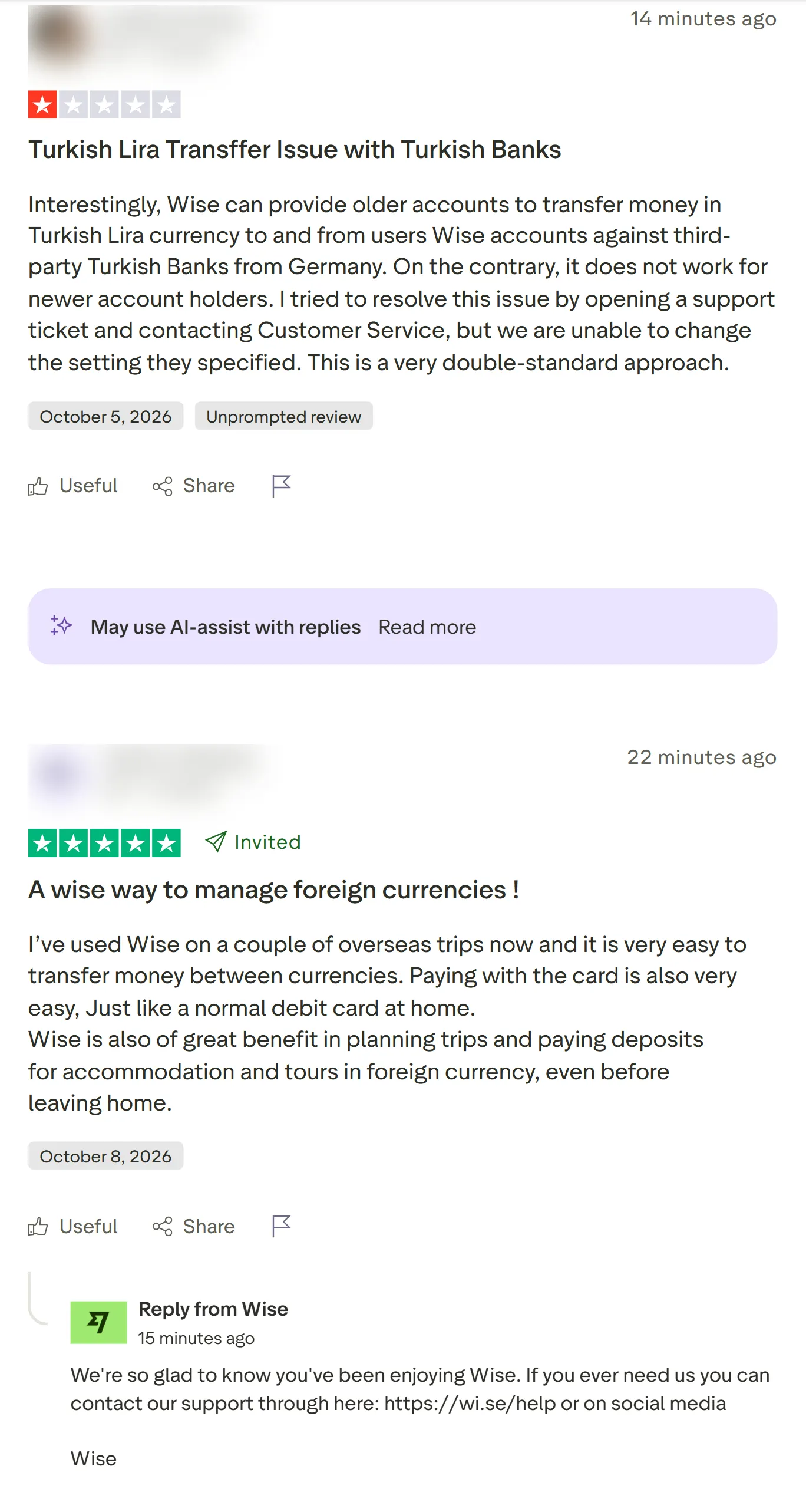
- Every review field Trustpilot shows: rating, title, full text, published / experience / updated dates, likes, verification level and source, the company's reply and its date
- Reviewer details: display name, profile link, avatar, country, how many reviews they have written and how many about this company
- Past the 200-review page limit: Trustpilot's pages stop at 200 reviews per list; the actor splits a company by language, star rating, review keyword, topic and sort order and merges the results without duplicates (2,309 of 2,761 reviews of one company on a measured run, back to 2009)
- Every language by default: Trustpilot's own page shows one language; the actor reads them all unless you pick some
- Company data on every row, plus an optional company-details row: TrustScore, review counts, star and language breakdown, reply rate, Trustpilot's AI summary and topic summaries, similar companies and the transparency report
- No login, cookies or Trustpilot API key: paste domains or names and run
- Monitor mode: schedule it and get only reviews no earlier run delivered
- Export anywhere: JSON, CSV, Excel, XML; schedules, webhooks, Make, Zapier, n8n, Google Sheets, Slack, the Apify API and MCP
What data can you get from Trustpilot reviews?
| 🆔 Review id and link (`reviewId`, `reviewUrl`) | ⭐ Star rating (`rating`) | 📝 Title and full text |
| 📅 Published, experience and updated dates | ✅ Verified flag, level and source | 👍 Likes (useful votes) |
| 👤 Reviewer name, id and profile link | 🌍 Reviewer country (`country`) | 🔢 Reviewer's review count |
| 💬 Company reply and reply date | 🗣️ Review language | 🏷️ Collection source (organic, invited) |
| 🏢 Company name, domain, Trustpilot id | 📈 TrustScore, stars, total reviews | 🗂️ Categories, claimed flag, website |
| 📊 Star and language breakdown* | 🤖 AI summary and topic summaries* | 🔍 Transparency report and reply rate* |
* in the optional company-details row. On a 400-review test run (Wise and Halfords) every review row had its id, link, rating, title, text, language, dates, reviewer, country, verification and company fields; 84% carried a company reply.
How to scrape Trustpilot reviews with Trustpilot Reviews Scraper
- Create a free Apify account - it comes with monthly free credit, no card needed.
- Open Trustpilot Reviews Scraper and click Try for free.
- Paste company domains or Trustpilot review URLs into Companies (or names into Company names) and set Max reviews per company.
- Pick filters if you want them: star ratings, languages, date range, keyword, verified only.
- Click Start. Reviews stream into the dataset as they are read.
- Open the Storage tab and Export as JSON, CSV or Excel - or let a schedule run it for you.
⬇️ Input
| Parameter | Type | Description |
|---|---|---|
| 🔍 What to scrape | ||
companyUrls | List | Domains (www.amazon.com), Trustpilot review URLs on any country host (https://de.trustpilot.com/review/zalando.de) or company website URLs. Filters written into a pasted review URL are kept. |
searchTerms | List | Company names looked up with Trustpilot's own search, e.g. Revolut. Up to 100 names per run. |
maxCompaniesPerSearch | Integer | Search matches scraped per name, best first, up to 20. Default 1. |
| 🎯 Filters (applied by Trustpilot) | ||
stars | List | Only these star ratings, e.g. ["1","2"]. Default: all. |
languages | List | Only these languages, e.g. ["en","de"]. Default: every language. |
date | Select | last30days, last3months, last6months, last12months. Default: any time. |
topics | List | Trustpilot topic ids, e.g. customer_service, delivery_service, refund. |
verified | Boolean | Verified reviews only. Default false. |
withReplies | Boolean | Only reviews the company answered. Default false. |
search | Text | Only reviews containing a word, e.g. refund. |
sort | Select | recency (newest first, default) or relevance. |
| ✂️ Refine results | ||
publishedAfter | Text | Only reviews published strictly after this date-time, e.g. 2026-09-01. |
lookbackDays | Integer | Only reviews from the last N days. 0 = no limit. |
countryOfReviewer | Text | Only reviewers from this country, e.g. US. |
| ➕ Extra data | ||
includeCompanyInfo | Boolean | Company name, domain, TrustScore, stars, review count, categories, claimed flag, website on every review. Free. Default true. |
includeCompanyDetails | Boolean | One extra row per company (star and language breakdown, reply stats, AI summary, topic summaries, similar companies, verification flags), charged as company-details at $0.001. Default false. |
includeTransparency | Boolean | Adds Trustpilot's transparency report to the company row. Same $0.001 company-details charge. Default false. |
| 🔁 Monitoring | ||
monitorMode | Boolean | Return only reviews no earlier run with the same companies and filters delivered. If a run stops early (for example at maxReviewsPerCompany or your maximum charge), later runs also deliver the older reviews it did not reach. With the company-details row on, that row comes (and is charged) on every run. Pair with a schedule. |
monitorStoreName | Text | Key-value store that remembers delivered reviews. Default trustpilot-reviews-monitor. |
| 📦 Output | ||
maxReviewsPerCompany | Integer | Default 100; 0 = every review the web pages reach. |
maxItems | Integer | Stop the whole run after this many reviews. 0 = no run limit. |
compact | Boolean | Core fields only (plus input), sized for AI agents and MCP. Applies to review rows; the company-details row always comes whole. |
fields | List | Return only these fields; rowType, reviewId and input always stay. Applies to review rows; the company-details row always comes whole. |
textMaxLength | Integer | Cut review text to N characters. 0 = full text. |
excludeEmptyFields | Boolean | Leave out empty fields. |
| ⚙️ Advanced | ||
proxyConfiguration | Proxy | Used when the direct connection fails, or from the start if you pick proxy groups or your own proxies. Datacenter by default. |
maxConcurrency | Integer | Pages read at the same time. Default 4. |
Input JSON
Paste the domain Trustpilot uses
Trustpilot lists a company under its website domain. Do: wise.com, www.booking.com or the review page URL https://www.trustpilot.com/review/www.amazon.com · Don't: Wise in Companies (that is a name - put it in Company names so Trustpilot's search finds the domain). booking.com and www.booking.com both work: Trustpilot forwards to its own spelling.
Leave languages empty to get every language
A company's Trustpilot page shows one language by default (on www.trustpilot.com, English). Amazon's page lists 30,657 English reviews; with languages left empty the actor reads from all 46,653 reviews in 39 languages, not only the English list (counts read on 2026-10-08). Trustpilot's 200-per-list limit still applies, so on a company that size you get the newest reviews in full and a share of older ones (see Limits & empty runs). Set languages only when you want fewer.
Use Newest first with a date cutoff for recurring runs
With sort: "recency" and publishedAfter or lookbackDays, reading stops as soon as it passes your cutoff, so a daily run of a busy company reads one or two pages. For a hands-off schedule, use monitorMode instead.
⬆️ Output
Every review becomes one dataset item. Here is the table view of run fgKrcbs6OXGteBesh (wise.com and halfords.com, 200 newest reviews each, reviewer names blurred):
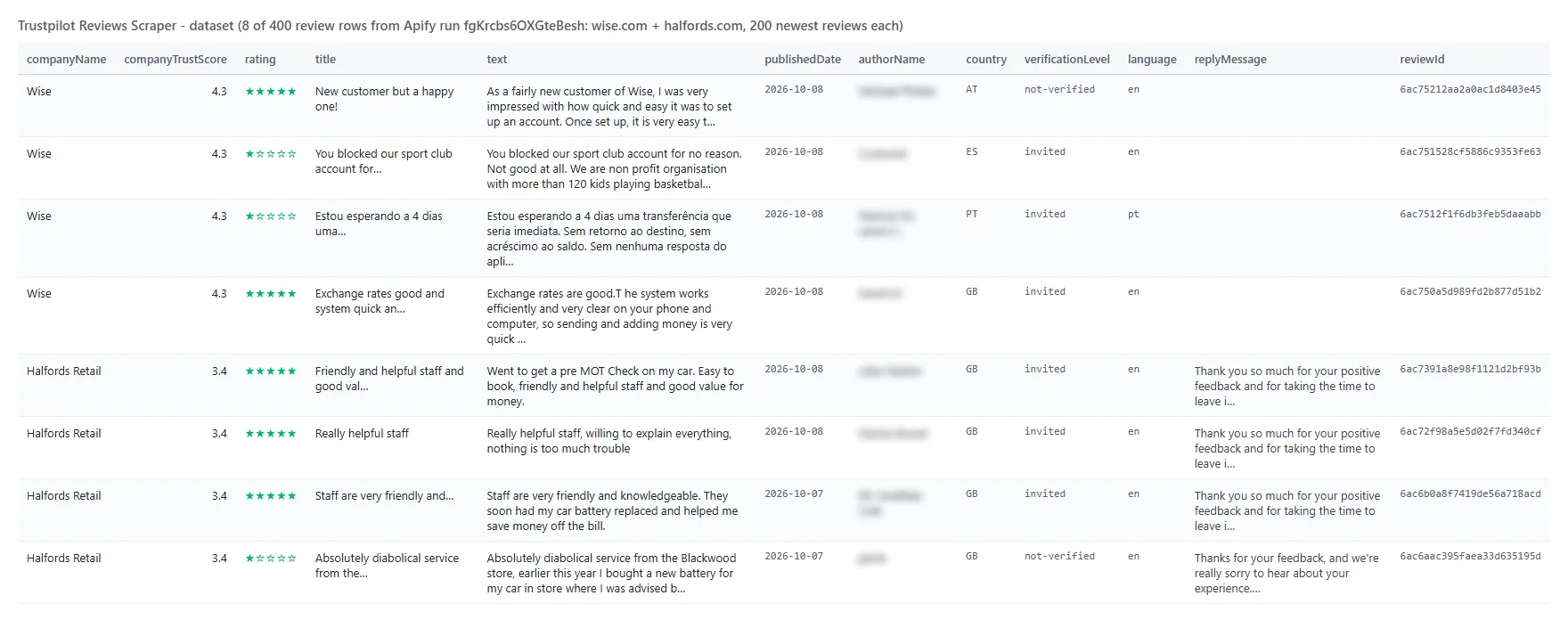
And one row from that run as JSON (company fields shortened):
With Company details row on, each company adds one item with rowType: "company": companyReviewsLast12Months, replyRate (Wise: 79%), averageDaysToReply, ratingDistribution, reviewsByLanguage, aiSummary, topicSummaries, similarCompanies, verification flags, claimed date, category path and description; with Transparency report on, also transparency (12-month totals, organic vs invited counts - Wise: 34.2% organic - monthly counts per star, reports and reviews taken offline).
Fields
| Field | Type | What it is | Fill (400 recent / 2,309 all-time) |
|---|---|---|---|
reviewId, reviewUrl | string | Trustpilot's review id and link | 100% / 100% |
rating | number | Stars, 1-5 | 100% / 100% |
title, text | string | Review title and full text | 100% / 100% |
language | string | Review language | 100% / 100% |
publishedDate | string | Published (ISO 8601) | 100% / 100% |
experienceDate | string | Date of experience | 100% / 51% |
updatedDate | string | Edited on, if ever | 2% / 12% |
likes | number | Useful votes | 100% / 100% |
isVerified, verificationLevel | bool, string | Verified label; verified / invited / redirected / not-verified | 100% / 72% |
verificationSource, reviewSourceName, source | string | How the review was collected | 100% / 100% |
authorName, authorId, authorProfileUrl | string | Reviewer | 100% / 100% |
authorImage | string | Reviewer avatar (when they set one) | 20% / 20% |
authorReviewCount, reviewsOnSameDomain | number | Reviews written, in total and about this company | 100% / 100% |
country | string | Reviewer country | 100% / 100% |
replyMessage, replyPublishedDate | string | Company reply | 84% / 55% |
company* | mixed | Company name, domain, id, TrustScore, stars, total reviews, categories, claimed, website, country, Trustpilot URL | 100% / 100% |
Older reviews carry fewer labels on Trustpilot itself (no experience date or verification level before Trustpilot added them), so the all-time column is lower.
How can I use Trustpilot reviews data?
- 🛡️ Reputation managers - pull every new 1- and 2-star review each morning and route it to the team that answers
- 📊 Customer-experience teams - track ratings, reply rate and topics month over month and against competitors
- 🔎 Market researchers - compare competitors' TrustScores, complaint themes and review volumes across countries and languages
- 🧭 Agencies - audit a prospect's Trustpilot profile (reply rate, organic vs invited share, review trend) before a pitch
- 🤖 AI and analytics teams - feed review text to sentiment, topic or LLM pipelines (
compactoutput,fieldspicker) - 📈 Product teams - search reviews for a feature or problem word (
search: "app",search: "refund") and read what customers say
How much does it cost to scrape Trustpilot reviews?
Trustpilot Reviews Scraper is pay-per-result: $0.23 per 1,000 reviews ($0.00023 per review), no start fee. The optional company-details row is $0.001 per company.
| Reviews | Cost |
|---|---|
| 100 | $0.023 |
| 1,000 | $0.23 |
| 10,000 | $2.30 |
| 100,000 | $23.00 |
Apify platform usage is included in the price. Measured at the default 512 MB: 200 reviews of one company in 7.9 s, 1,000 in 24 s, 10,000 in 5.1 min, and a full-depth run of a 2,761-review company (2,309 reviews) in 4.1 min.
Integrations, API, scheduling & MCP
- Schedules: run Trustpilot Reviews Scraper hourly, daily or weekly from the Schedules tab; turn on
monitorModeto get only reviews no earlier run delivered. - Webhooks: fire a URL when a run finishes - push new reviews to a help desk, Slack or a sheet.
- No-code: Make, Zapier, n8n, Google Sheets, Airtable, Slack via Apify integrations.
- API: call it from Node.js or Python with
apify-client- code on the API tab and the Apify API reference. - MCP / AI agents: connect Claude, Cursor or any MCP client through the MCP tab and ask for Trustpilot reviews in plain language.
More review and company research scrapers
Limits & empty runs
- 200 per list: Trustpilot's pages show 20 reviews a page and stop at page 10 of any filtered list. The actor goes past that by reading many smaller lists (each language, each star rating, review keywords, topics, the other sort order) and removing duplicates. On Cotswold Outdoor (2,761 reviews) a full-depth run returned 2,309, from 2009 to today. On companies with tens of thousands of reviews you get the newest reviews in full and a growing share of older ones as you raise the cap.
- Speed: measured on the default 512 MB: 200 reviews of one company in 7.9 s, 600 reviews of two companies in 11.5 s, 1,000 in 24 s, 10,000 in 5.1 min; full-depth runs slow down as the lists get smaller (2,309 reviews in 4.1 min).
- Residential proxy: not needed, as Trustpilot serves the default Proxy setting the same pages. If you pick the residential group, Trustpilot's browser check still runs on the actor's own connection and only the pages go through residential. The run stops early once its residential traffic and compute cost more than 75% of what it has charged plus $0.01 (the first pages). Pages already read are still delivered, and the run summary shows
costBreaker: true. Expect this on lists where most pages bring few new reviews. - Empty dataset: the domain has no Trustpilot page (status
not_foundin the run summary), your filters match nothing, or in monitor mode nothing is new (with the company-details row on, that row still comes and is charged on every run). The Output → Run summary record says which. - Not available: reviewers' e-mails or anything Trustpilot does not show on the page; per-location reviews of multi-location companies.
FAQ
How many reviews can Trustpilot Reviews Scraper collect in one run?
Up to maxReviewsPerCompany per company (default 100, 0 = every review the web pages reach; on large companies Trustpilot's 200-per-list limit can return fewer, see Limits & empty runs), for any number of domains or URLs and up to 100 company names. A full-depth run of a 2,761-review company returned 2,309 reviews in 4.1 minutes; a 10,000-review run of one company took 5.1 minutes.
Can Trustpilot Reviews Scraper get more than 200 reviews of a company?
Yes. Trustpilot shows 200 per list, so the actor reads each language and star rating as its own list, and splits further by review keyword, topic and sort order, then removes duplicates.
Can I get only new Trustpilot reviews on a schedule?
Yes. Save your input as a task with monitorMode: true, open Schedules and pick the cadence. Each run returns only reviews earlier runs did not deliver. If a run stops early (for example at Max reviews per company or your maximum charge), later runs also deliver (and charge) the older reviews it did not reach, up to that cap per run, until they catch up; to keep runs to recent reviews, add Last N days (e.g. lookbackDays: 2 on a daily schedule). A quiet day returns no reviews; with the company-details row or transparency report on, the company row still comes and is charged ($0.001) on every run.
Does Trustpilot Reviews Scraper get reviews in every language?
Yes - by default it reads every language a company has reviews in. Use languages to limit it.
Can I scrape Trustpilot reviews by company name?
Yes. Put names in Company names; Trustpilot's own search picks the best match (or the top N with maxCompaniesPerSearch).
Can I use Trustpilot Reviews Scraper with the Apify API?
Yes. Start runs, fetch datasets and manage schedules with apify-client for Node.js or Python.
Can I use Trustpilot Reviews Scraper through an MCP server?
Yes. Open the MCP tab, connect your MCP client and ask for reviews in plain language. Turn on compact to keep answers short.
Do I need a Trustpilot account, cookies or an API key?
No. Trustpilot Reviews Scraper reads the public review pages; you pass domains or names and nothing else.
Why did my Trustpilot reviews run return no results?
Most often the domain is not the one Trustpilot uses (search the name instead), the filters match nothing (for example withReplies on a company that never replies), or monitor mode found nothing new. The run summary lists the reason per company.
Is it legal to scrape Trustpilot reviews?
Trustpilot Reviews Scraper extracts only publicly available reviews; it does not log in or collect private data. Results contain reviewers' display names and countries, which can be personal data regulated by laws such as the GDPR. Make sure you have a legitimate purpose before you use them.
Your feedback
We keep improving Trustpilot Reviews Scraper. Found a bug or missing a field? Open an issue on the Issues tab.


![Trustpilot Scraper [$0.70/1K💰] | Reviews | Ratings avatar](https://images.apifyusercontent.com/mcW2vplLG6GYOoG4bodomGCfhKukaKvxaYH9Qo5uTx4/rs:fill:76:76/cb:1/aHR0cHM6Ly9hcGlmeS1pbWFnZS11cGxvYWRzLXByb2QuczMudXMtZWFzdC0xLmFtYXpvbmF3cy5jb20vZHRSN3FuVGJRck5pU0NtajctYWN0b3ItQjlha1FDZmxpN1d3R3M5Y1Mtd0R2YXZLZGpHai1UUlNULkwtNWFkYTljOTIucG5n.webp)


