

LinkedIn Jobs Scraper
Pricing
from $1.40 / 1,000 results
LinkedIn Jobs Scraper
[💰$2 / 1K] ⚡ Fast LinkedIn Jobs scraper. No login, no cookies, no proxy needed. Scrape job postings by keyword, location or search URL: title, company, location, remote, salary range, seniority, employment type, applicants, posting date and full description.
Pricing
from $1.40 / 1,000 results
Rating
0.0
(0)
Developer

Aboo Script
Maintained by CommunityActor stats
0
Bookmarked
2
Total users
1
Monthly active users
4 days ago
Last modified
Categories
Features
Share
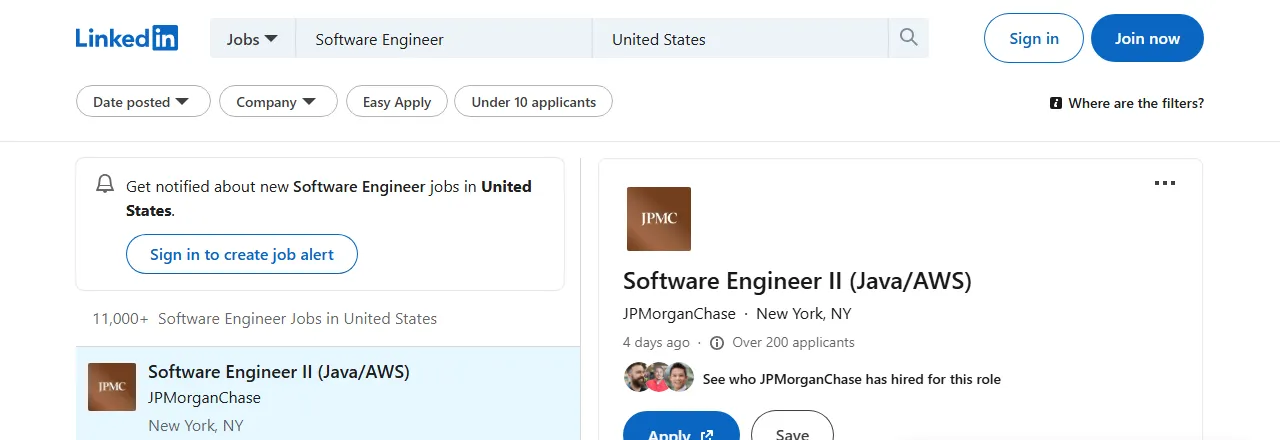
LinkedIn Jobs Scraper extracts job postings from LinkedIn Jobs into clean, structured data you can download as JSON, CSV, Excel, or HTML. Paste a LinkedIn job search URL or type a few keywords, and get the job title, company, location, salary range, seniority, employment type, number of applicants, and full job description for every result. No account or login required.
Introduction
LinkedIn Jobs is one of the largest job boards in the world, with millions of open positions posted by companies and recruiters in almost every country and industry. Its job data shows who is hiring, where, for which roles, and at what pay.
This actor collects the same public job information you see in your browser when you are not logged in, and turns it into a ready-to-use dataset. Use it as a simple LinkedIn Jobs API alternative: run it once, schedule it to run daily, or connect it to your own tools.
What data can you extract from LinkedIn Jobs?
- 🏷️ Job title, job ID, and full job description as plain text
- 🏢 Company name, company LinkedIn page, and company logo
- 📍 Location, city, country, latitude and longitude, and whether the job is remote
- 💲 Salary text plus minimum, maximum, currency, and pay period (when the employer shares it)
- 🎓 Seniority level, employment type, industries, education requirement, and required experience in months
- 👥 Number of applicants and hiring insights such as "Actively Hiring" or "Be an early applicant"
- 📅 Posting date, "posted ... ago" text, and the date the posting expires
- 🔗 Direct URL to each job posting
Use Cases
- 📈 Job market research: track which roles, skills, and locations are in demand and how salaries change over time.
- 🕵️ Competitor monitoring: follow which positions competing companies are hiring for and where they are expanding.
- 🤝 Recruiting and lead generation: find companies that are actively hiring and reach out with your services or candidates.
- 🗂️ Job board building: feed your own job board, newsletter, or alert service with fresh postings.
- 🤖 AI and automation: feed clean, structured job data into spreadsheets, dashboards, or AI workflows.
How to scrape LinkedIn Jobs step by step
- Paste one or more LinkedIn job search or job posting URLs into Start URLs, or type job keywords into Search queries.
- For search queries, optionally set Location, Date posted, Distance (miles), Easy Apply only, and Under 10 applicants.
- Set Maximum number of results to how many jobs you want per URL or per query.
- Click Start and wait for the run to finish.
- Download your data in JSON, CSV, Excel, or HTML from the Output tab.
Input
- Start URLs: LinkedIn job search pages (
https://www.linkedin.com/jobs/search?...) and single job pages (https://www.linkedin.com/jobs/view/...). Filters you apply on the website, such as keywords, location, date posted, company, Easy Apply, or under 10 applicants, are kept in the results. - Search queries: job keywords to search on LinkedIn, such as a job title or skill, one per line. Each query is scraped separately.
- Location: country, region, or city for search queries, for example "United States" or "London, England, United Kingdom".
- Date posted: only jobs posted in the past hour, 24 hours, week, or month. Default is any time.
- Distance (miles): search radius around a city location.
- Easy Apply only: only jobs you can apply to directly on LinkedIn.
- Under 10 applicants: only jobs with fewer than 10 applicants so far.
- Maximum number of results: how many jobs to collect for each start URL or search query. Use 0 for no limit.
- Proxy configuration: optional. The scraper works without a proxy; a proxy can speed up very large runs.
Location, Date posted, Distance, Easy Apply only, and Under 10 applicants apply to search queries only. Start URLs keep the filters that are already in the URL. You can use start URLs, search queries, or both in the same run.
Input Examples
Scrape a LinkedIn job search page:
Search by keywords and location:
Output
Each job is saved as one item in the dataset. Here is an example of a single item:
You can download the dataset in JSON, CSV, Excel, XML, or HTML, or access it through the Apify API.
Notes
- LinkedIn shows at most 1,000 jobs per search. For more results, split a broad search into smaller ones (for example by location or date posted).
- When you are not logged in, LinkedIn ignores the job type, experience level, remote/on-site, salary, and sort filters. Search URLs that contain them still work, but the results are not narrowed by those filters.
- LinkedIn always returns jobs for a search, even for very unusual keywords, by showing the closest matches it can find.
- Salary is only filled in when the employer publishes a pay range; otherwise salary fields are
null. applicantsCountis the number LinkedIn shows, so "Over 200 applicants" becomes 200 and "Be among the first 25 applicants" becomes 25.- Field labels such as seniority level and employment type are always in English, even for jobs posted on LinkedIn sites in other languages. The job description stays in the language the employer wrote it in.
- A job found by more than one search query or start URL in the same run is saved only once.
- Company pages, saved job collections, and other LinkedIn pages are not supported and are skipped.
Why use the LinkedIn Jobs Scraper?
- ✅ No login needed: works with public job data only, so there is no LinkedIn account at risk.
- 🎯 Keeps your filters: paste any LinkedIn job search URL from your browser and get the same jobs.
- 💲 Structured salaries: pay ranges are split into minimum, maximum, currency, and period, ready for analysis.
- 🧹 Clean data: numbers are real numbers, dates use one standard format, and descriptions are free of HTML.
- 💸 Pay for what you need: set a result limit per URL or query and keep every run small and cheap.
- 🔄 Ready for automation: schedule runs, export to Google Sheets, or connect to Make, Zapier, and n8n.
FAQ
How many results can I scrape?
You can set any number in Maximum number of results, or 0 for no limit. The actor keeps going until it reaches your limit or runs out of results. See Notes for the limit set by LinkedIn.
Do I need a LinkedIn account?
No. The actor only collects publicly available job postings. You do not need to log in or provide any account details.
Can I get only new jobs every day?
Yes. Set Date posted to "Past 24 hours" and use Apify Schedules to run the actor every day.
Why are some fields empty?
Some job postings simply do not show every piece of information, such as a salary range or an education requirement. When a field is not available on LinkedIn, it is returned as null.
Can I request a new feature or filter?
Yes. Right now the actor supports start URLs, search queries, location, date posted, distance, Easy Apply, and under 10 applicants. If you need other inputs or data, get in touch and they can be added.
Can I get a custom or private version?
Yes. The actor can be customized for your workflow, delivered as a private version, or a new scraper can be built for a different website. Use the contact details below.
Need to scrape other LinkedIn and jobs data?
- LinkedIn Ad Library Scraper: ads from the LinkedIn Ad Library with advertiser, creative, run dates, and targeting.
- LinkedIn Articles Scraper: public LinkedIn articles with author, text, and engagement.
- LVMH Jobs Scraper: job openings across LVMH brands and maisons.
- Tapestry Jobs Scraper: job openings at Tapestry brands (Coach, Kate Spade).
Need help or want a custom solution?
- 📧 Email: aboo.script@gmail.com
- 🧩 More scrapers: Apify profile
Image Credit
Image credit: LinkedIn


