

AI Google Ads Generator: RSA Headlines & Descriptions
Pricing
from $100.00 / 1,000 per success ads results
AI Google Ads Generator: RSA Headlines & Descriptions
Generate ready-to-use Google Ads (RSA) from a product description and an offer: headlines, descriptions, sitelinks, callouts, structured snippets, plus audience and scheduling suggestions. One ad per row.
Pricing
from $100.00 / 1,000 per success ads results
Rating
0.0
(0)
Developer

Acmee AI
Maintained by CommunityActor stats
0
Bookmarked
1
Total users
0
Monthly active users
2 months ago
Last modified
Categories
Share
📣 AI Google Ads Generator (RSA Headlines & Descriptions)
Describe your product and your offer once, and get ready-to-use Google Ads in seconds. Each run returns multiple complete Responsive Search Ads (RSA) - every one a different angle - with all the fields Google asks for, already within the character limits, plus a branded HTML campaign report.
🎯 One ad per row. Generate 5, 10 or 50 variations at once, export to CSV/Excel, and paste straight into Google Ads.
📄 Every run also ships a branded, client-ready report - share it as a link or email it, with the ICP, all ad groups and AI recommendations in one place. Not just raw rows.
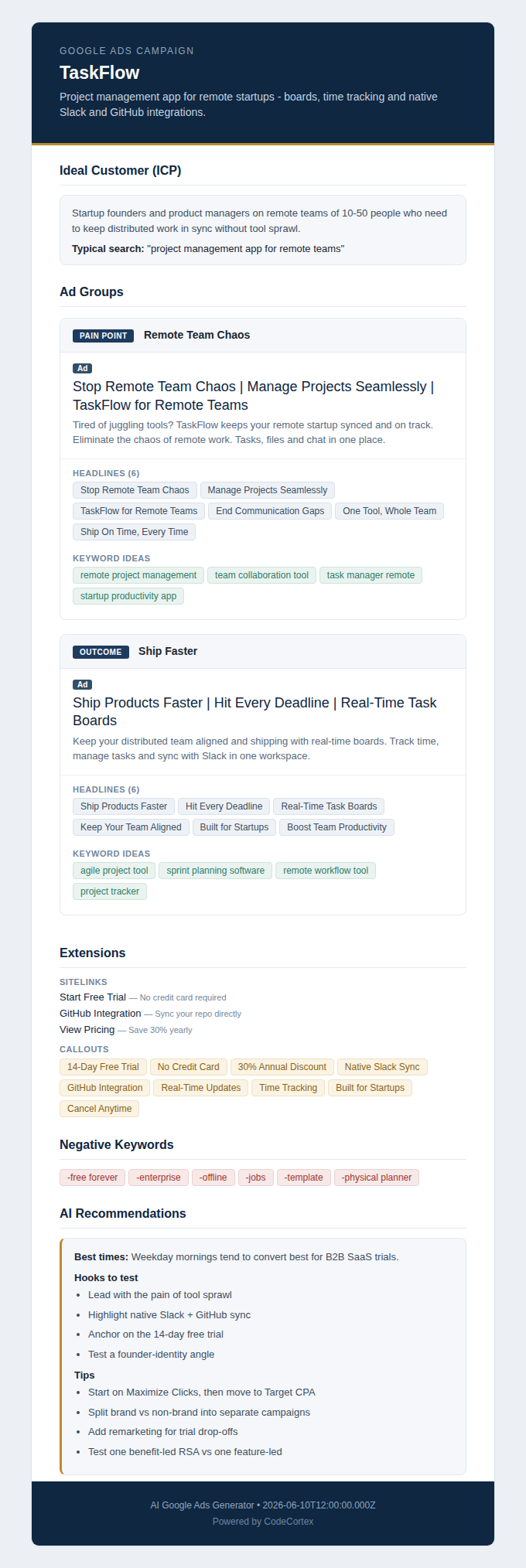
Preview of the HTML report - company, ICP, ad groups, extensions and recommendations. Click to open the full report.
What each ad includes (one row per ad)
| Field | Limit | |
|---|---|---|
| Headlines | 30 chars | up to 12-15 |
| Descriptions | 90 chars | up to 4 |
| Sitelinks | title 25 · desc 35×2 | 4 |
| Callouts | 25 chars | 6 |
| Structured snippet | header + values 25 chars | 6 values |
| Long headline | 90 chars | 1 |
| Ideas | — | keyword ideas, negative keywords, categories, tags |
| reportUrl | — | public link to the HTML campaign report |
Every field is validated against Google's limits in code - if anything is too long it's trimmed and the row is flagged (trimmed: true).
Plus a full campaign report
Every run also builds a branded HTML report (saved to the Key-Value Store, returned as a public reportUrl on every row) containing:
- Company summary and Ideal Customer Profile (ICP) + the typical search intent
- All ad groups (one per generated ad) with headlines, keywords and extensions
- AI recommendations: hooks to test, best times to run, and campaign tips
ℹ️ The audience/timing recommendations are AI best-practice suggestions, not measured performance data.
You can also have the report emailed by filling in the optional emails field.
How to use
Fill in just what matters:
- Product description (required) — e.g. "TaskFlow is a project management app for remote startups..."
- Offer (required) — e.g. "14-day free trial, 30% off the annual plan, no credit card required."
- Audience (optional) — e.g. "Startup founders and PMs on remote teams of 10-50 people."
- Competitor URLs (optional) — we read their positioning so your ads stand out
- Number of ads — how many to generate (each = one row)
- Emails (optional) — send the HTML report to these addresses
Example output (one ad)
(headlines/keywords arrays trimmed here for brevity; reportUrl is a signed public link)
FAQ
What is the reportUrl? A public, signed link to a branded HTML report with the ICP, all ad groups and AI recommendations. It opens in any browser, no token needed.
Are the audience/timing recommendations real performance data? No - they are AI best-practice suggestions to use as a starting point. Validate them against your own campaign data.
Will the copy fit Google Ads? Yes. The model is told the hard limits and the actor re-checks every field in code, trimming anything over the limit.
Can I generate many at once? Yes - up to 50 ads per run, each a distinct angle. Larger batches are generated in parallel.
Can I call it in real time?
Yes. The Standby endpoint POST /generate responds synchronously.
🔌 API integration
Batch run:
Standby (POST /generate):
The token goes in the Authorization: Bearer header, never in the URL.
Notes
Generated ad copy and recommendations are provided as a starting point and are not guarantees of performance. Always review copy and comply with Google Ads policies before publishing.


