

Instagram Follower Changes Tracker & Monitor
Pricing
from $0.04 / 1,000 followers
Instagram Follower Changes Tracker & Monitor
Instagram followers tracker and unfollowers checker — see who follows any public Instagram account and who just unfollowed. Your first check saves the current follower list, then every later check names the people who left and the ones who newly arrived. Run it daily and get the changes by email.
Pricing
from $0.04 / 1,000 followers
Rating
4.0
(1)
Developer

Andrey Afanasenko
Maintained by CommunityActor stats
3
Bookmarked
2.6K
Total users
38
Monthly active users
5 days ago
Last modified
Categories
Security
Limited permissionsShare

Get the first confirmed follower comparison automatically in about 4 hours — no return visits or Schedule setup. For one public account with up to 2,500 followers, explicitly turn on Get the first confirmed comparison automatically. The paid beta makes three background observations about two hours apart and returns their rows, progress, and final summary to the storage of the run you started. Each observation is billed separately at your paid plan's small-account price — $0.50 on Bronze through $0.30 on Diamond — so the Actor charge is up to $1.50 total. If an observation cannot track the account, later checks are not started.
Leave the switch off for the ordinary tracker: one check per run, larger accounts, multiple accounts, following changes, engagement insights, manual/API repeats, or your own Schedule. x402 continues to support ordinary single observations; the background beta does not support x402 yet.
✅ Works on public accounts — a private account's follower list can't be read by anyone (Instagram blocks it for everyone). No Instagram login or password. Your email is never stored. Built by an established Apify developer running 15+ public actors since 2024. 🆓 Free plan: 1 account, up to 15 runs a month, accounts up to 2,500 followers. Useful manual/API checks are spaced at least 6 hours apart; Daily schedules are supported. A chargeable full-list check uses $0.10 of Apify's shared $5 credit, so all 15 monthly runs fit inside it. An eligible scheduler-perk run or an oversize partial harvest may be explicitly waived.
✨ What you get on your first run
The default first run exports the current readable follower list and saves it as the baseline for later comparisons. Optional first-run insights are available when you enable their inputs:
- Track Following changes adds who the account follows that does not follow it back.
- Find Top Fans & Ghost Followers adds the engagement audit.
👉 Open the Actor input, enter one small public account, turn on Get the first confirmed comparison automatically, review the $1.50 maximum Actor charge, and press Start once. Leave that switch off if you prefer the persistent paid campaign task, manual/API checks, or a Schedule.
🎯 What it does
You give the actor one or more public Instagram accounts to watch and choose whether to track their followers, their following, or both. The first run lists every current follower and saves a baseline snapshot. Every later run compares against the previous snapshot and reports who joined and who left.
Each row tells you the tracked account, the change type (tracked on the first run, then new or lost), which list changed (followers or following), and the affected account's username, full name, profile picture, verified, and private flags, plus the timestamp it was recorded.
Turn on Track Following changes to see who doesn't follow the account back on run 1 (not_following_back rows). The count is exact. The first few names are free; a paid plan reveals every name.
Turn on Find Top Fans & Ghost Followers for an optional engagement audit. It checks who likes and comments on the account's recent posts. You get your top fans — the followers who engage the most (top_fan rows; first few names free). You get your ghost followers — followers who never engage with your recent posts (ghost_follower rows; exact count free, full list on a paid plan). And you get a count of how many non-followers engage with your posts. On a paid plan the audit is charged once per audited account — $0.20 on Bronze, $0.18 on Silver, $0.15 on Gold, $0.13 on Platinum, $0.10 on Diamond — and only when it actually runs; the result is cached for a week, so a run that reuses it is not charged again. On the free plan the audit is not charged. Ghosts are only counted when every analyzed post's like list can be read in full — so a real fan is never mislabeled a ghost.
The snapshot is stored in a key-value store that persists between runs, so tracking accrues the longer you run it. A daily Apify Schedule turns it from a one-off scraper into an automatic Instagram follower tracker.
🧭 When to use it
- Spot unfollowers — find out who unfollowed your Instagram account, with names and timestamps.
- See who doesn't follow you back — from your very first run. Exact count and first few names, free.
- Find your top fans and ghost followers — who engages most, and how many never engage. Counts free; full lists on a paid plan.
- Detect new Instagram followers automatically — get a dated list of every new follower between runs.
- Monitor competitor or creator following changes — see who a public account starts or stops following.
- Track follower gains and losses — keep a clean audience-change history for reporting.
- Build Instagram follower analytics — export rows to Apify datasets, API, MCP, or your own dashboard.
🚀 Get the first confirmed comparison
For one small public account, the paid beta can make all three required observations after one explicit launch. It does not create a Schedule: a low-memory background controller starts ordinary paid tracker runs about two hours apart, then stops after observation 3. Progress and results are copied back to the launcher's storage.
- Open the Actor input.
- Enter exactly one public account with up to 2,500 followers. Keep follower tracking on; keep following changes and the engagement audit off.
- Turn on Get the first confirmed comparison automatically (paid beta). Optionally enter your email for the final result.
- Review the explicit cost: three separately billed observations at your paid plan's small-account price, up to
$1.50in Actor charges on Bronze and less on higher plans. Press Start once. - Reopen that run's Storage later.
AUTOMATIC_COMPARISONshows progress; the original dataset andRUN_SUMMARYreceive the observations and final comparison.
If the profile is private, missing, over the beta cap, or a child run fails, the controller stops before launching any later observations. It never guesses by replacing a child whose start state is uncertain, which avoids a possible duplicate charge. An atomic per-account lock also rejects overlapping automatic workflows; after 6–12 hours you can launch a fresh one, or use ordinary checks at any time.
The ordinary manual mode remains available for every other case. A manual run gives you a snapshot; run 2 verifies possible changes and run 3 starts reporting confirmed changes. Once you have seen that flow work, add email and a Daily Schedule if you want future checks handled automatically.
Prefer to control each paid launch or campaign observation yourself? Open the persistent campaign tracker task and run it once for the baseline. Open that same task again in about 2 hours for run 2, then once more in about 2 hours for the first possible confirmed comparison. Each run is billed separately at your plan's account price; switch to Daily or stop the task when the time-sensitive window ends.
On the free plan, change counts and the first few names are free; a paid plan reveals every name. Scheduled and manual runs use the same plan limits.
- Open the ready-made task: Track who unfollowed you on Instagram. New to Apify? Sign up free first; the task opens automatically. Keep the automatic-comparison switch off in this ordinary mode.
- In Accounts to Track, enter one public Instagram username or profile URL and run it to save the baseline.
- Open the same task again tomorrow for run 2. One more check starts the confirmed change report.
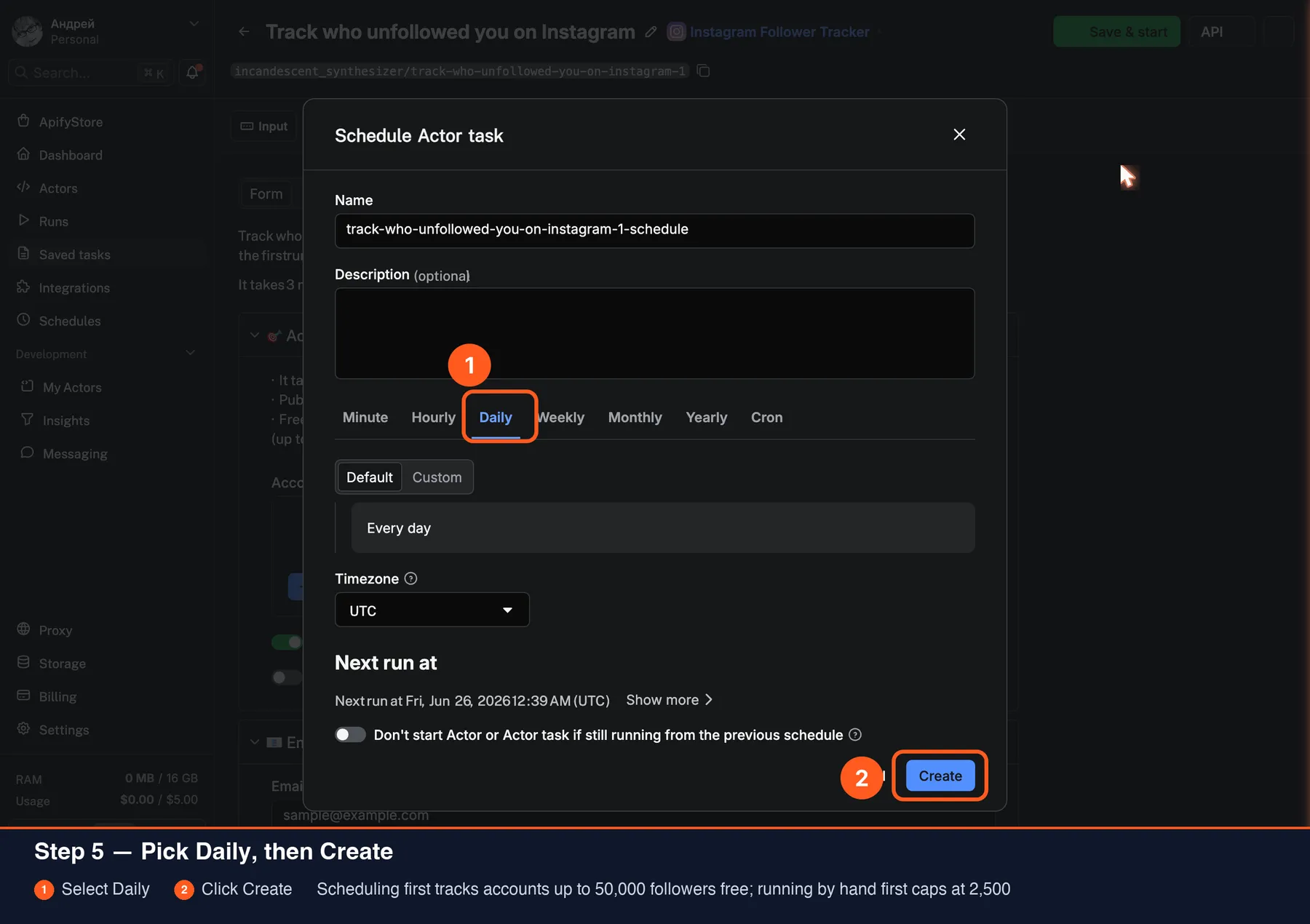
- For hands-off checks, optionally add Email me the changes and create a Daily schedule after the comparison flow is working.
🔒 Your email stays private. Used only for tracker alerts, then discarded; never stored, sold, or seen by us.
Already on the Actor page instead? Run the account once, then use the completed screen's Open tracker task action for the next observation.
Prefer screenshots? See the visual setup walkthrough.
📸 Visual setup walkthrough
Start with the comparison loop. Run the same task today and tomorrow; add automation only after you have seen it work. Tap an image to open the ready-made task.
Step 1 — Open the ready-made task and run it. 👉 Open the Instagram Follower Tracker setup — put the public Instagram handle in Accounts to Track and press Start. This saves the baseline.
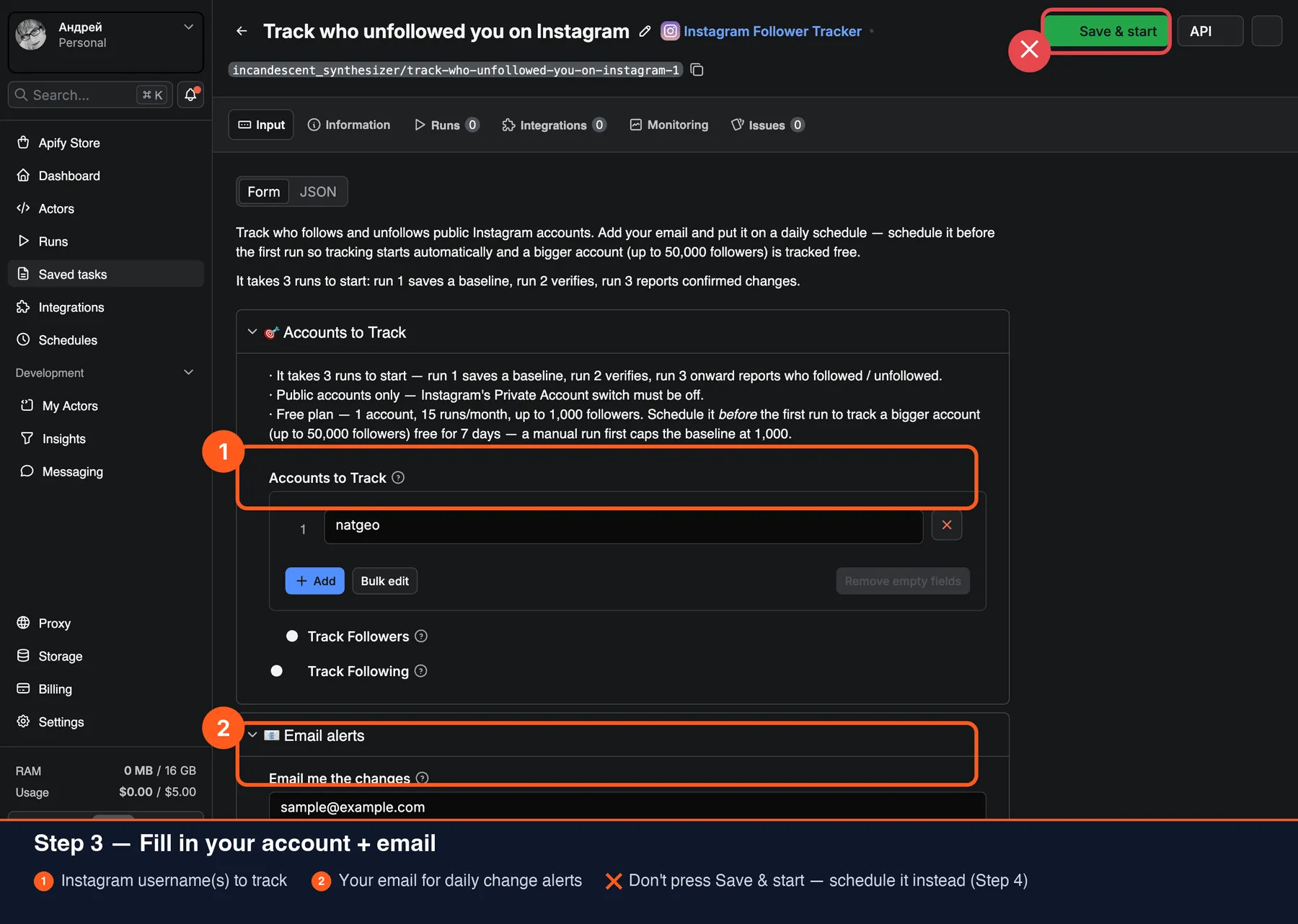
Step 2 — Reopen the same task tomorrow and press Start again. Run 2 verifies the list; one more observation starts the confirmed new / lost report.
Optional — automate later. Add your email and use top-right ⋯ → Schedule → Daily → Create when you want the task to make future observations for you.
⚡ Quick start
A minimal input (replace dubdotco with the account you want to track):
This runs a quick manual check — fine for a small account (up to 2,500 followers). Open the same task again tomorrow for the next observation; confirmed new / lost changes start from run 3. See Get the first confirmed comparison above.
To opt into the paid background beta instead:
This returns the launcher immediately while three ordinary paid observations continue in the background. Use an asynchronous Actor run and revisit its storage; do not use this mode with x402 or a synchronous API endpoint.
🆓 Free vs paid plan
| Free plan | Paid plan | |
|---|---|---|
| Accounts tracked | 1 (your trial account) | Unlimited |
| Tracking runs | 15 per month (resets monthly) | Unlimited |
| Non-scheduled check cadence | One useful observation every 6 hours | Anytime |
| Followers + following tracking | ✓ | ✓ |
| Scheduling | ✓ | ✓ |
| Automatic first confirmed comparison | — | Paid beta: 1 public account up to 2,500 followers; 3 observations at your paid plan's small-account price |
| How many newly followed / unfollowed | ✓ (counts) | ✓ (counts) |
| Who newly followed / unfollowed | First few unfollowers by name (free) | ✓ Every name |
| Who you follow that doesn't follow you back | Exact count + first few names (free) | ✓ Every name |
| Top fans (followers who engage the most) | Top 3 by name (free) | ✓ Top 10 with like/comment stats |
| Ghost followers (never engage with your posts) | Exact count (free) | ✓ Full list by name |
| Followers / following tracked per account | Up to 2,500 / 1,000 | Up to 150,000 / 1,000 |
How to get the free perks — three checks, and the actor tells you when each one is due.
- Run it once. You get the complete current follower list of your account, exported and saved as the baseline. Free.
- Come back after 6 hours. Every run's message names the exact moment your next free check unlocks, so you don't have to guess. This check verifies the list against the baseline.
- Run it once more. From here every check reports confirmed changes: how many people newly followed and unfollowed — free, always — plus the first few unfollowers by name, also free.
Why three? A follower list is reordered while it is being read, so a single reading is not evidence. A change has to be seen twice before it's reported, which is what keeps a false "unfollowed" out of your Output. Automatic tracking — where the actor makes those follow-up checks itself instead of you returning — is a paid feature; on the free plan you make them, and nothing else is withheld for it.
The actor allows up to 15 free-plan runs per month (resets monthly) for 1 account up to 2,500 followers / 1,000 following. Free manual/API checks are spaced at least 6 hours apart because a full-list reread a few minutes later costs the same but rarely adds a meaningful tracker observation; Daily schedules have their own cadence guard. Apify's $5 free credit is shared across all Actors, so it may run out sooner. A larger account saves its most-recent 2,500 followers without an actor charge. Every completed comparison shows how many people newly followed and unfollowed, plus the first few unfollowers by name. Upgrade to reveal every name, remove the cooldown, track unlimited accounts with no run limit, and follow much larger lists.
The monthly count stays exact even when several free runs start at once. If the count itself can't be checked, the free run stops before any work and charges nothing — just run it again. An aborted or timed-out free run counts as one of the 15. While an unusually large number of new free accounts run this Actor at once, free runs from new accounts may be reduced to one page of the followers list (25 accounts) for a short while. When the list is longer than that, the run is a preview: it saves no baseline and charges nothing, so your next run reads the full list. Paid plans are never affected.
💰 How much will tracking cost?
You're billed per follower checked, not per page of results. Apify's Pay Per Event price depends on your Apify plan, with a 10,000-follower minimum. Every run — the first baseline and each check after — costs the same because each one re-reads the whole list (Instagram exposes no incremental "followed-on" feed). Tracking the following list adds no extra charge; a following-only run still uses your plan's minimum account price.
Automatic first-comparison beta: three successful small-account observations cost 3 × $0.50 = $1.50 on Bronze through 3 × $0.30 = $0.90 on Diamond. The short launcher and low-memory background controller do not charge follower events; only each completed account observation does. If one observation cannot track the account, later observations are not started.
Price per 1,000 followers by Apify plan
| Apify plan | Per 1,000 followers | Up to 10,000 | 50,000 | 150,000 (max) |
|---|---|---|---|---|
| Free | $0.01 | $0.10 in Apify credits | — | — |
| Bronze | $0.05 | $0.50 | $2.50 | $7.50 |
| Silver | $0.045 | $0.45 | $2.25 | $6.75 |
| Gold | $0.04 | $0.40 | $2.00 | $6.00 |
| Platinum | $0.035 | $0.35 | $1.75 | $5.25 |
| Diamond | $0.03 | $0.30 | $1.50 | $4.50 |
The 10,000-follower minimum means a smaller full account check costs the same as 10,000. Free users can track up to 2,500 followers, so a chargeable full Free check consumes $0.10 of the shared $5 Apify credit — all 15 monthly Free runs together cost $1.50, so the platform credit is no longer what stops you before run 3, where confirmed changes begin. Eligible waived runs and oversize partial harvests say explicitly when they are not charged.
Accounts up to 150,000 followers are tracked in full on a paid plan. Unreachable accounts (private, not found, or error) and lists beyond the paid limit are never charged.
Multi-client example: seven small accounts cost 7 × $0.50 = $3.50 on Bronze or 7 × $0.30 = $2.10 on Diamond per task run. Replace the demos before running the multi-client task; each successful account check is charged independently.
⏱️ Large accounts take longer. The list is read page by page, so a 150,000-follower run can take up to ~1 hour; small accounts finish in well under a minute.
Your monthly cost = the per-run cost × how often you schedule it. For example, on Bronze:
| Account size | Weekly (~4.3 runs) | Daily (30 runs) |
|---|---|---|
| 5,000 followers | ~$2.15 | ~$15 |
| 50,000 followers | ~$10.75 | ~$75 |
| 150,000 followers | ~$32.25 | ~$225 |
Tracking a large account weekly instead of daily is the cheapest way to keep watching it.
The focused campaign task recommends a two-hour paid schedule while a launch is active. That is up to 12 separately billed runs per day at your plan's per-run price shown above. Disable it or switch to Daily as soon as the time-sensitive window ends.
🔧 How confirmation works
Run 1 saves the baseline. Run 2 verifies possible changes. From run 3 onward, confirmed changes are reported.
| Run | What it does | What you see in the Output |
|---|---|---|
| Run 1 — baseline | Reads the followers list end-to-end and saves it as the starting snapshot. | One tracked row per current follower (the whole list, streamed live as it's read). No new / lost rows yet. |
| Run 2 — first diff, held for confirmation | Re-reads the current list and compares it against run 1's snapshot. Any candidate changes (a new face, a disappeared follower) are held one more run before they're emitted. | Empty Output, plus a USER_MESSAGE in Storage that says "N possible changes spotted — confirming on the next run" and previews the candidate usernames (e.g. +3 candidate new: @alice, @bob, @charlie). The live status page shows the same preview while the run is in progress. |
| Run 3 onward — confirmed changes | Anything that's been present (or absent) for two runs in a row is now reported. | Confirmed new rows (accounts that appeared) and lost rows (accounts that disappeared) since the previous confirmation. |
Why three runs to the first confirmed change? A follower list can change while it is being read. For lists of up to 2,500 accounts the tracker checks it again before saving, but a stable account can still occasionally drop out of one read and return on the next. Requiring two consecutive observations before reporting a change filters that noise out — at the cost of one extra run of latency. A real follow / unfollow lands in the run after it was first seen, which is why confirmed rows start from run 3, not run 2.
Followers vs. following — one asymmetry. Followers get a baseline listing on run 1 (you see the whole list in the Output). Following gets no baseline listing — only its confirmed new / lost changes, starting from run 3.
Caps. Reliable up to 150,000 followers and 1,000 following per account; larger lists track the most-recent portion (see 🆓 Free vs paid plan and 🛠 Input for how free and paid differ). For a one-time, no-baseline export of an account's entire current followers or following list, use the Instagram Followers Scraper instead — this actor is designed for change-over-time monitoring, not a single-shot list dump.
📦 Output sample
Each current follower (on the first run) and each later followers / following change is pushed to the dataset as its own row — one account can be hundreds or thousands of rows, not a single item. Every row has the same shape (the list_type field says which list it came from); what a run produces just depends on whether it's the first run or a later one.
First (baseline) run → one tracked row per current follower (the whole list, streamed in batches as it's read), then the baseline snapshot is saved:
From run 3 onward → just the changes since the previous confirmed snapshot: a new row for each account that appeared and a lost row for each that disappeared:
Here the account gained a follower (new, list_type: "followers") and stopped following someone (lost, list_type: "following") in the same run. Both lists use the same row shape — list_type says which one. (The asymmetry: only the followers list gets a baseline tracked listing on run 1.)
The change type tells the three kinds apart:
tracked— a current follower, listed on the first (baseline) run (followers list only).new— an account that appeared in the list since the previous run.lost— an account that disappeared (unfollowed, or the target stopped following it); carries the last-known details from the previous snapshot.
Missing optional values (e.g. no profile picture) come back as null. The full per-field schema (types, descriptions, examples) is published in .actor/dataset_schema.json — that's also what AI agents see when they call the actor through Apify's MCP server.
🛠 Input
| Field | Purpose |
|---|---|
Instagram account to track (usernames) | One public Instagram username or profile URL to monitor. Free plan: 1 account, 15 runs per month. |
Email me the changes (notificationEmail) | After a successful first manual check, sends one setup reminder 24 hours later unless you run again first; later runs can email their follower-change results. Without email, check Output manually. Used only for tracker messages, then discarded. |
Get the first confirmed comparison automatically (automaticFirstComparison) | Explicit paid-beta opt-in for exactly one public account up to 2,500 followers. Starts 3 background follower observations about 2 hours apart; each uses your paid plan's small-account price, up to $1.50 total on Bronze and less on higher plans. Followers-only; no x402. Off by default. |
Track New followers & unfollowers (trackFollowers) | Track the followers list — new followers and unfollowers. On by default. |
Track Following changes (trackFollowing) | Optional: track the following list — accounts the target started or stopped following. Off by default. |
Find Top Fans & Ghost Followers (engagementAudit) | Optional engagement insights from recent likes and comments. On a paid plan, charged once per audited account ($0.20 Bronze → $0.10 Diamond), cached for a week; not charged on the free plan. Off by default. |
At least one of Track New followers & unfollowers / Track Following changes must be on. List size is handled automatically — large lists track the most-recent portion, and cost scales with the follower count (see 💰 How much will tracking cost?). Free per-account ceilings are 2,500 followers / 1,000 following (see 🆓 Free vs paid plan); a paid plan tracks the whole list and confirms changes.
🎯 Example tasks
Ready-to-run examples — each opens a pre-configured task you can run in one click (no setup):
- See who unfollowed you on Instagram — Take a snapshot of who follows a public Instagram account, then let each later check name the people who left and the ones who newly followed.
- Check your Instagram followers every day — Put a public Instagram account on a daily check and have each day's new followers and unfollowers named for you, without opening the app.
- See who unfollowed a competitor on Instagram — Watch a rival's public Instagram account between checks and find out which followers walked away and which ones arrived, each with name and handle.
- Get Instagram follower alerts by email — Have the new followers and unfollowers of a public Instagram account sent to your inbox after each check, with names and handles in the message.
- Track who unfollowed you on Instagram — Monitor any public Instagram account and see who unfollowed and who newly followed, refreshed every run with full profile details for each change.
- Detect new Instagram followers automatically — Get an automatic list of every new follower a public Instagram account gains between runs, each with name, handle, and verification status.
- See who an Instagram account starts following — Track which accounts any public Instagram profile starts or stops following over time — spot new partners, sponsors, and interests as they happen.
- Watch follower gains and losses on Instagram — Monitor follower gains and losses for any public Instagram account — confirmed new and lost followers listed run by run, with no manual checking.
- Track a brand's Instagram follower growth — Follow a brand or competitor's Instagram audience over time — every confirmed new follower and unfollower captured automatically between runs.
- See who doesn't follow you back on Instagram — Find every account you follow on Instagram that doesn't follow you back — from your very first run. Exact count and first names free; no login needed.
- Find your Instagram ghost followers — See which of your Instagram followers never engage with your posts — plus your top fans. Exact ghost-follower count free; full list on a paid plan.
- Monitor Instagram followers every 2 hours — Monitor a public Instagram account during a launch with paid checks every 2 hours. Run 3 can confirm changes in about 4 hours; up to 12 billed runs/day.
- Monitor followers after an Instagram export — Turn a one-time Instagram follower or profile export into ongoing monitoring. Save a baseline, then detect confirmed new followers and unfollowers.
- Integrate Instagram follower changes via API — Monitor public creator or brand accounts up to 150,000 followers. Reuse one task from your API and receive confirmed new and lost follower rows.
- Get your first Instagram follower comparison automatically — Paid opt-in: 3 checks ~2 hours apart for one public account ≤2,500 followers. Max Actor charge $1.50 on Bronze, down to $0.90 on Diamond.
- Monitor Instagram follower changes during a campaign — Track one Instagram account through a launch with paid checks every 2 hours. Run 3 can confirm changes in about 4 hours; up to 12 billed runs/day.
- Monitor Instagram followers for multiple clients — Monitor confirmed follower changes for multiple clients in one paid task. Seven small demo accounts cost $2.10/run today; replace them before running.
🤖 Programmatic / API use
For a one-off API call, start the Actor directly:
_acquisitionSource changes neither output nor price. It records this documented API path as aggregate product telemetry without putting the Instagram handle into the acquisition report.
For a production tracker, copy the API-ready task once, replace the demo handle, and call your copied task repeatedly. Its task ID is visible in the Console URL:
The REST API waits at most 60 seconds. If the returned status is still RUNNING, poll GET /v2/actor-runs/$RUN_ID?waitForFinish=60 with the same Bearer token before reading results. The first useful call writes tracked baseline rows, run 2 verifies the list, and run 3 onward returns confirmed new / lost rows. The run response contains defaultDatasetId; fetch https://api.apify.com/v2/datasets/$DATASET_ID/items?clean=true for the rows, or read RUN_SUMMARY from the run's default key-value store for counts, stage, cost, and next action. Paid task calls are unrestricted; free non-scheduled calls must be at least six hours apart.
Pay with USDC over x402 — no Apify account
An AI agent can run the paid launch workflow with a temporary Apify API token bought through x402. The token creates one temporary Apify account for 14 days. Reuse that same token for run 1, run 2, and run 3: its named storage keeps the baseline between calls. A different or expired token starts a new baseline.
Before buying the token, check the current per-run price above and fund the entire three-observation sequence at once. A safe token amount is the next whole dollar above 3 × per-run charge × 1.1 (minimum $1). The 10% margin covers ordinary platform usage; unused prepaid credit is non-refundable and expires with the token.
Buy the spend-capped token with Coinbase Agentic Wallet, keeping the returned token secret:
Then use the returned value as TOKEN and call this exact Actor endpoint three times with the same small public account and the same token — now, again in about 2 hours, and once more in about 4 hours:
The first response establishes the baseline; fetch its dataset for current followers. The second observation verifies candidate changes, and the third can return confirmed new / lost rows. If the remaining token balance is below the account's charge, the Actor now stops after the profile lookup, before fetching follower pages or charging the run. Check the balance with GET https://agi.apify.com/prepaid-tokens/balance using the same bearer token.
Use an Apify Schedule for a fixed cadence, or an Actor webhook to send each completed change set into your own pipeline. Each paid observation is billed independently, so choose the cadence that matches the monitoring job.
The actor is also exposed as a tool through Apify's MCP server at mcp.apify.com. Once your MCP-enabled client (Claude, ChatGPT, Cursor, …) is connected to your Apify token, an LLM can run it with instructions like "track who unfollows @dubdotco and report new unfollowers — and who @dubdotco starts or stops following — every day."
❓ FAQ
Q: How do I see who unfollowed me on Instagram?
A: Point this tracker at your account (or any public account) and run it once to save the follower baseline. Open the same task again tomorrow for run 2; from run 3 onward every observation lists exactly who unfollowed (lost rows) and who newly followed (new rows), each with the handle, name, and timestamp. Add a Daily schedule later if you want those observations made automatically.
Q: Is there a free Instagram follower tracker? A: Yes — this one allows 1 account and up to 15 runs per month on accounts up to 2,500 followers. You get the readable current-follower list on the first run, plus the count of new and lost followers and the first few unfollowers by name on later runs. Apify's $5 free credit is shared across Actors, so it can run out before the actor-level limit. See 🆓 Free vs paid plan for the full breakdown.
Q: My run came back empty — why can't I track this account? A: The account is almost certainly private. A follower or following list can only be read for a public account — Instagram blocks every app and tool from reading a private account's list, so no tracker can do it. To confirm, open the profile while logged out of Instagram: if you can't see its followers there, neither can the actor. Switch to a public account (yours, a competitor's, or any public creator) and it tracks normally. Private or not-found targets are never charged, and a brief lookup blip is retried automatically before you ever see an empty result.
Q: Can I see who I follow that doesn't follow me back?
A: Yes — turn on both Track New followers & unfollowers and Track Following changes, and your very first run flags every account you follow that isn't following you back (not_following_back rows in the Output). You get the exact count and the first few names free; a paid plan reveals every name. One caveat for honesty: this is only shown when your full followers list was read (accounts up to the plan's follower cap), so the number is never inflated by followers we couldn't page in.
Q: Can I find my ghost followers and my most active followers?
A: Yes — turn on Find Top Fans & Ghost Followers. The first run (plus a weekly refresh) checks who liked and commented on the account's recent posts. Top fans are the followers who engage the most (top_fan rows, top 3 named free); ghost followers are followers who never engaged with any analyzed post (ghost_follower rows — the exact count is free, the full list needs a paid plan). It also counts engaged non-followers. Honesty note: ghosts are only reported when every analyzed post's like list could be read in full, so the audit may be skipped for accounts with very high-like posts — top fans still work there (comments are always read in full). Recent-post data also isn't available for every account; when it isn't, the audit quietly skips and the rest of the run is unaffected.
Q: Can I use the Instagram API to track followers instead? A: Instagram's official Graph API only returns follower counts and aggregate insights for accounts you own and have connected — it does not give you the list of which accounts follow or unfollow an arbitrary public profile, and it has no "followed-on" history to diff. This actor reads the public follower/following lists directly and computes new/lost changes run over run, so you get the named changes the official API can't provide.
Q: What are the best Instagram unfollower tracker alternatives? A: Most "who unfollowed me" mobile apps require you to log in with your Instagram password, which risks your account and only covers your own profile. This actor is different: it reads public follower lists (no login, no password), tracks any public account (yours, a competitor's, a creator's), runs on a schedule, and exports clean rows to the dataset, email, or your own code via the API. If you only need a one-time list export rather than change tracking, see the Instagram Followers Scraper in the related-actors table below.
Q: Can I get followers/following in chronological order (by the date each follow happened)? A: No — and no tool truly can. Instagram does not attach a "followed on" date to the follower/following data, so there's nothing to sort by. What you almost certainly want instead is what changed — and that's exactly what this actor gives you: run it on a schedule, and from run 3 onward each run lists who newly followed and who unfollowed since last time, with the detection timestamp. That's a forward-looking chronological record of changes.
Q: How much does it cost? A: The price depends on your Apify plan. Per 1,000 followers it is Free $0.01, Bronze $0.05, Silver $0.045, Gold $0.04, Platinum $0.035, or Diamond $0.03, with a 10,000-follower minimum. That makes a small paid account $0.50 on Bronze through $0.30 on Diamond per run, and $0.10 on Free. The first baseline and every later check use the same plan price because each run re-reads the list. See How much will tracking cost? for the complete table. Unreachable and over-limit accounts are not charged; an oversize Free account exports its most-recent 2,500 followers without an actor charge. Tracking the following list adds no extra charge.
Q: Does tracking following cost extra? A: No. The bill is based on the account's follower count; its following list (up to 1,000 accounts) is included at no extra charge. If you track only following, the run uses your plan's 10,000-follower minimum: $0.50 on Bronze through $0.30 on Diamond, or $0.10 of shared credits on Free.
Q: A follower changed their username — will that look like an unfollow? A: No. Accounts are matched on their stable internal ID, not their username, so a rename is not reported as a loss + a gain.
Q: What happens when Instagram limits how many followers are shown for an account? A: Instagram caps the visible followers list for some Meta Verified and Business accounts — you can see the note in the app itself ("We limit the number of followers shown for certain Meta Verified and Business accounts"). For those accounts, the tracker follows the visible portion of the list (the most recent followers, where new follows and unfollows actually appear) and tells you exactly how much is visible versus what Instagram hides. Billing reflects the followers actually read, not the larger number on the profile. No tool can read the hidden part — it's an Instagram restriction, not a tracker limit — and if Instagram lifts it, full-list tracking resumes automatically. The following list is not affected by this limit.
Q: How fast is it? A: Reading a list is paginated, so time scales with its size — small accounts finish in well under a minute, a few thousand followers take a minute or two, and a very large account (up to 150,000) can take up to ~1 hour. Multiple accounts add up roughly linearly.
📡 Live status & storage records
While the run is in progress, the actor exposes:
| Storage key | Type | What it holds |
|---|---|---|
status.html | HTML page | Live progress — including the running follower-collection count while a large list is read — plus change counts, cost, elapsed time, and the next action for this run. Open it from the run's Live Status Output tab, or from Storage as status.html. |
report.html | HTML page | Durable result report for change, locked-value, limit, and recovery runs. Email buttons open this page when it exists, and RUN_SUMMARY.reportUrl stores the link. |
RUN_SUMMARY | JSON | Aggregate run statistics — accounts checked, new/lost counts per list, followers written on baseline runs, baselines created, cost, timings, and a coarse request summary. |
AUTOMATIC_COMPARISON | JSON | Paid-beta controller progress: workflow status, completed observations, next observation time, child run IDs, explicit limits, and any safe-stop diagnosis. Written only when the automatic first-comparison switch is on. |
API_USAGE | JSON | Request count for this run, split into data fetches, searches and other requests. Useful for monitoring automation cost. |
USER_MESSAGE | JSON | Contextual note — baseline established, test-run hint, or unknown-input guidance. |
SKIPPED_ACCOUNTS | JSON | Targets skipped this run (private, not found, list hidden by its owner, error, or too large) with reasons. |
FREE_LIMITS_APPLIED | JSON | Which free-plan limits were applied this run (e.g. account or run-count cap reached). Written only on free-plan runs that hit a limit. |
The cross-run snapshots themselves live in a named key-value store, instagram-follower-tracker-state, which persists between runs in your own Apify account.
Reading the USER_MESSAGE. Every run writes a one-line message you can open from the run's Storage tab. The common ones and what to do next:
| Message | What it means · what to do |
|---|---|
| "Run 1 of 3 — baseline saved…" | First run; your current follower list is saved as the baseline. Schedule it daily — confirmed changes start at run 3. |
| "Run 2 of 3 — N possible changes, confirming on the next run" | Possible changes were held one run to filter noise. Wait for (or run) the next one — anything real is confirmed and listed. |
| "Audience stable — no changes since the last run ✅" | Both lists read and diffed cleanly; nothing changed. Nothing to do. |
| "Saved the most recent part — free plan size limit" | The account is larger than the free plan tracks in full; the most-recent 2,500 followers were saved (not charged). Upgrade to track the whole readable list. |
| "Couldn't finish reading — please re-run" | Instagram briefly rate-limited the read or a page timed out (the unread list isn't charged). Re-run in a few minutes — a daily schedule rides this out. |
| "That account is private…" / "Couldn't find that account…" | The account can't be tracked: it's private (a follower list can only be read for a public account) or the handle wasn't found (check the spelling). Transient lookup blips are retried automatically before you ever see this. |
| "@name's followers list is hidden by its owner" | The account is public, but its owner has hidden the list, so Instagram doesn't show it. Running again or scheduling won't change that (not charged). Track an account whose list is visible. |
| "Monthly free-run limit reached (15 runs)" | All 15 free runs this month are used (not charged). Upgrade for no run limit, or wait for the monthly reset. |
| "Free plan: this run could not start" | The free plan's monthly run count couldn't be checked, so the run stopped before any work (not charged). Run it again in a minute. |
| "Free plan: a reduced run for new accounts" | Many new free accounts are running this Actor right now, so this run read only the most recent followers as a preview (not charged) and saved no baseline. Your next run reads the full list. |
| "Too soon for another free check" | The last successful free manual/API observation was under 6 hours ago. This run fetched nothing and cost nothing; wait for the shown time, use a Daily schedule, or upgrade for unrestricted checks. |
🔗 Other related actors (same author)
This actor is part of a family of focused Instagram tools — pick the one that matches your goal:
| You start with… | You want to… | Use this actor |
|---|---|---|
| A public account | Track who follows / unfollows it over time | This actor |
| A public account | Pull and enrich its full followers / following list once | Instagram Followers Scraper |
| A username or URL | Scrape and enrich profiles, posts, and contact info | Instagram Profile Scraper |
| A seed account | Discover similar / related accounts | Instagram Related Profiles Scraper |
| A reel link or a creator handle | Read what their reels say and show — transcript, on-screen text, hook | Instagram Reel Script Extractor |
| A post or reel link | Get the accounts that liked or commented on it | Instagram Likes Scraper |
| A post or reel link | Export what the comments say — every comment and reply as a row, @mentions split out | Instagram Comments Scraper |
| A keyword or a hashtag | Find the accounts in that niche | Instagram Influencer Search |
| An AI agent (Claude, Cursor, ChatGPT) | Query Instagram from inside your agent — MCP tools it picks by intent | Instagram Profile MCP Server |
| A list of usernames you already have | Get the email, phone and website each one publishes | Instagram Email Scraper |
Use this one for change-over-time monitoring; use the Followers Scraper when you need a one-time enriched export of an entire list.
🛟 Support & feedback
- Open an issue on the actor's Issues tab — fastest way to get a fix shipped.
- Feature requests in the same tab; we read every one.
- Ratings & reviews on the Apify Store page help other users find the actor.
⚖️ Is it legal to track Instagram followers?
Yes — the actor reads publicly available follower and following lists from public Instagram accounts and does not bypass authentication, access private content, or act on your behalf. Use it in compliance with Instagram's Terms of Service and applicable privacy laws (GDPR, CCPA) — for any outreach built on the results, ensure you have a legitimate basis and a clear opt-out.


