
![Argos Scraper [$4💰] | UK Prices | Stock | Product Data avatar](https://images.apifyusercontent.com/ZJ2oe2SWyLo3zVIADzeRV-iIFTpZVpzQCqSEg0AWDQ0/rs:fill:250:250/cb:1/aHR0cHM6Ly9hcGlmeS1pbWFnZS11cGxvYWRzLXByb2QuczMudXMtZWFzdC0xLmFtYXpvbmF3cy5jb20vZHRSN3FuVGJRck5pU0NtajctYWN0b3IteGRhdGRVS01wZ2E3VVAyT2stSFNoemY1M2ZPdC1hcmdvcy1sb2dvLXBuZ19zZWVrbG9nby01MDQzOTIucG5n.webp)
Argos Scraper [$4💰] | UK Prices | Stock | Product Data
Pricing
from $3.90 / 1,000 results
Argos Scraper [$4💰] | UK Prices | Stock | Product Data
Argos scraper for UK product data: extract prices, was-prices, ratings, reviews, availability and delivery from argos.co.uk categories, search, clearance and product pages — no official Argos API needed. Optional detail mode adds descriptions, features, specs and images. From $0.004 per result.
Pricing
from $3.90 / 1,000 results
Rating
0.0
(0)
Developer

Ahmed Jasarevic
Maintained by CommunityActor stats
0
Bookmarked
1
Total users
1
Monthly active users
a day ago
Last modified
Categories
Share
Extract Argos UK product prices, was-prices, stock availability, ratings and reviews for price monitoring, back-in-stock alerts and UK retail market research — no official Argos API needed. Run it once to build a product database, or schedule it in monitor mode to track price drops and stock changes over time, from $0.004 per result.
What You Can Do With Argos Product Data
- Argos price monitoring — track current prices, was-prices and price movement across categories, search results or specific products
- Price drop alerts — monitor mode detects price drops and price rises between runs, with the exact price delta
- Back-in-stock notifications — get notified the moment an out-of-stock item is available again
- UK retail market research — analyze Argos assortment, pricing and ratings for competitor analysis and category intelligence
- Building structured product databases — export clean Argos product records (price, availability, specs, images) to a dataset
- Retail arbitrage & bargain hunting — spot clearance and price drops relative to was-prices across the catalog
Scrape Argos Product Data Without an Official API
Argos (part of the Sainsbury's Group) does not offer a public product/pricing API, and its site is protected by Akamai, which blocks datacenter IPs. This actor handles that for you: pass category URLs, search keywords or direct product IDs, and it returns normalized product data as JSON in an Apify dataset. A RESIDENTIAL proxy group is required and configured by default via the Apify proxy.
Track Argos Price Drops and Price Changes Over Time
Set mode to monitor and the actor compares every product against the previous run (state is persisted in a key-value store) and pushes only what changed — enriched with changeType, previousPrice, priceDelta, firstSeenAt, lastSeenAt and changeCount. Schedule the actor with notifyOn set to price-drop or price-rise and you get a rolling price-change feed for your watchlist.
Monitor Argos Stock Availability and Get Back-in-Stock Alerts
The same monitor mode tracks stock status per product. Use notifyOn with back-in-stock or out-of-stock to report only the availability changes that matter, and keep separate watchlists independent by giving each its own stateStoreName.
Build a Structured Argos Product Database
Enable detail to fetch every full product page (JSON-LD + HTML) and enrich records with description, features, specs, availability, delivery options, images and breadcrumbs. Combined with category plus recurse on hub pages, you can walk whole departments and assemble a structured Argos catalogue dataset for analysis or resale intelligence.
How It Works
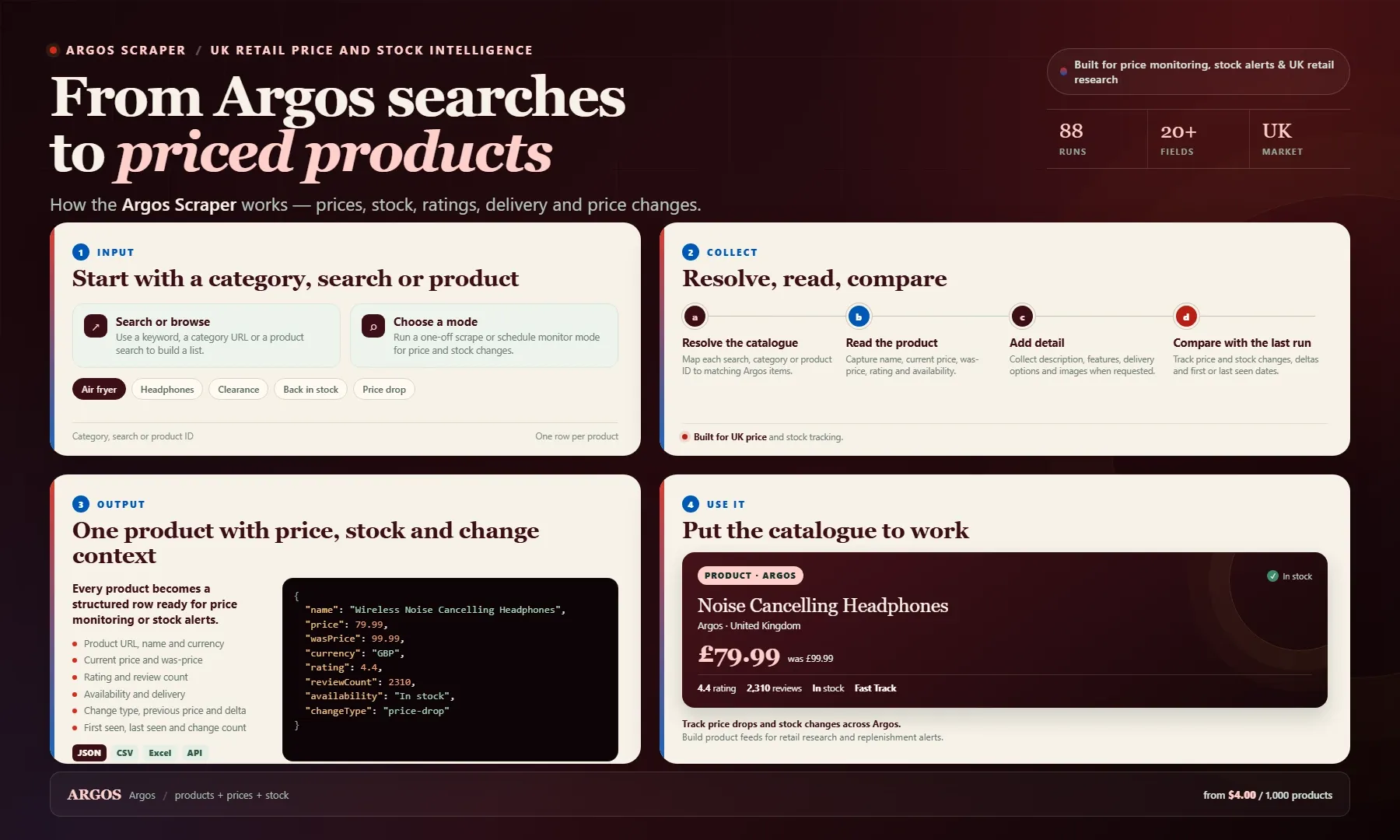
Looking for an Argos scraper or a practical UK product data alternative? Search by keyword, browse a category URL, or paste product IDs and URLs. Each row includes product name, current price, was-price, currency, rating, review count, availability, delivery, change type, previous price, price delta and first or last seen dates.
Use the dataset for price monitoring, stock alerts, catalogue building and UK retail research. Export as JSON, CSV or Excel, or pull results through the Apify API. Pay from $4.00 per 1,000 products, plus optional detail and monitoring events.
Scraper Input: Category, Search and Product URLs
| Field | Type | Required | Default | Notes |
|---|---|---|---|---|
startUrls | array | No | — | Category/browse, search, clearance or single product URLs, one per line |
category | string | No | — | Scrape a whole browse category, e.g. c:30049 or a full browse URL |
search | string | No | — | Scrape Argos search results, e.g. wireless headphones |
product | array | No | — | Direct product catalogue numbers or product URLs, one per line |
mode | enum | No | scrape | scrape = push every product. monitor = compare with previous run and push only changes (price, stock/availability) |
notifyOn | array | No | ["any-change"] | Monitor reporting filter: new, price-drop, price-rise, back-in-stock, out-of-stock, availability-change, changed. Empty = any change |
stateStoreName | string | No | argos-monitor-state | Key-value store that persists price/stock state between monitor runs. Use a different name per watchlist |
resetState | boolean | No | false | Delete stored state before this run so every product is treated as new (fresh baseline) |
pages | integer | No | 0 | Max listing pages to walk per category/search (0 = walk to the end) |
maxProducts | integer | No | 2000 | Stop after this many unique products |
recurse | integer | No | 0 | On category hub (CLP) pages, follow subcategory links up to this depth (0 = no recursion) |
maxHubs | integer | No | 150 | Max subcategory links followed per hub page |
detail | boolean | No | false | Fetch full product pages (JSON-LD + HTML) for description, features, specs, availability, delivery, images, breadcrumbs. Slower, more data per product |
detailConcurrency | integer | No | 8 | Parallel product-detail requests when detail is enabled |
proxyConfiguration | object | No | Apify RESIDENTIAL | Argos (Akamai) blocks datacenter IPs — a residential proxy group is required. Defaults to Apify RESIDENTIAL; own proxy URLs can be pasted |
maxRetries | integer | No | 4 | Retries per URL on block, timeout or network error |
timeoutMs | integer | No | 30000 | Per-request timeout in milliseconds |
concurrency | integer | No | 5 | Parallel page/product fetches |
delayMs | integer | No | 300 | Pause between listing pages to stay polite |
Output Data: Prices, Ratings, Availability and More
Every product is pushed as one record to the Apify dataset. Fields are documented per run mode:
| Mode | Documented fields |
|---|---|
scrape (base) | product URL, name, current price, was-price, currency (GBP), rating, review count, availability, delivery |
scrape + detail: true | adds description, features, specs, images and breadcrumbs from the full product page |
monitor | adds changeType, previousPrice, priceDelta, firstSeenAt, lastSeenAt and changeCount per changed product |
The exact result set depends on the run mode. Run a small test scrape first to see the live field names before building your pipeline.
Example Input
Monitor example — report only price drops and back-in-stock items for a watchlist:
Example Output
Illustrative record based on documented fields (base scrape + monitor enrichment):
Integrations & Automation
The actor runs on the Apify platform, so you get the Apify API, webhooks and scheduled runs out of the box, plus Apify's integration panel (Zapier, Make, Google Sheets, Slack and others).
Recommended schedules for recurring use:
- Price monitoring — run
monitordaily to catch price drops and rises across your product watchlist - Stock / back-in-stock alerts — run
monitorhourly or every few hours for high-demand items; each monitoring event is billed at $0.0005 - Product database refresh — run
scrapeweekly (or per sale season) withdetail: trueto refresh descriptions, specs and images
Related Actors
- Argos.co.uk Scraper (Pay Per Result) — Argos product data extractor with XLSX/CSV/JSON output
- Argos UK Product Scraper — search, category and product-page scraping for Argos.co.uk
- Argos UK Product Search & Catalog — Argos UK product search results and catalog listings
- Argos Price Tracker — Argos price snapshots via keyword search
FAQ
Why use this actor instead of the official Argos API?
Argos does not offer a public API for product prices, stock or catalogue data. Its site is protected by Akamai and blocks datacenter IPs, which is exactly what this actor handles — residential proxies are configured by default and per-URL retries handle blocking and timeouts.
Is there an Argos price history or price tracker?
There is no official Argos price history. Monitor mode builds your own: state persists across runs and every changed product is enriched with previousPrice, priceDelta, firstSeenAt, lastSeenAt and changeCount, so a scheduled run gives you a continuous price-change log.
How can I check Argos stock and get back-in-stock alerts?
Run in monitor mode with notifyOn set to back-in-stock (and optionally out-of-stock). Availability is compared with the previous run and only changed products are pushed, so a scheduled monitor gives you restock alerts without re-processing the whole catalogue.
How do I scrape an entire Argos category or department?
Pass a browse category URL (or c:ID) to category, set recurse to follow subcategory hub pages, and cap the run with maxProducts and pages. With detail: true you also get specs, images and breadcrumbs for each product.
What proxies does this actor need for Argos?
Argos uses Akamai protection that blocks datacenter IPs, so a RESIDENTIAL proxy group is required. The default configuration uses the Apify proxy with the RESIDENTIAL group — you can also paste your own residential proxy URLs.
What alternatives to this actor exist for Argos data?
On Apify's Store there are several other Argos actors, mostly plain scrapers or snapshot services (prices range from roughly $0.40 to $7.80 per 1,000 results across the category). Off-platform commercial Argos APIs also exist. This actor is differentiated by its stateful monitor mode, which tracks price deltas and stock changes across runs instead of only returning point-in-time snapshots.
SEO Keywords
argos scraper, argos.co.uk scraper, argos product scraper, argos price tracker, argos price monitoring, argos price drop alerts, argos price history, argos price comparison, argos stock checker, argos stock availability, argos back in stock alerts, argos restock alerts, argos product data, argos product database, argos data extraction, argos api alternative, argos scraping api, argos clearance tracker, argos sale tracking, uk retail price monitoring, uk e-commerce data, argos ratings and reviews, argos product specs, uk price intelligence
For AI Agents & LLM Apps
Purpose: Returns Argos UK product records (price, was-price, currency, rating, review count, availability, delivery) for category, search or product-URL inputs; with mode: "monitor" it returns only products that changed since the previous run, enriched with price/stock change metadata.
Minimal working input:
Variant input (monitor / watchlist):
Output fields: url, name, price, wasPrice, currency, rating, reviewCount, availability, delivery; plus description, features, specs, images, breadcrumbs when detail is true; plus changeType, previousPrice, priceDelta, firstSeenAt, lastSeenAt, changeCount in monitor mode.
Behaviors an agent should know:
- Residential proxy required. The default
proxyConfigurationuses ApifyRESIDENTIAL. A run with datacenter-only exits will fail — do not override the proxy config unless you supply working residential proxies. - Bound your run to control cost.
maxProducts(default 2000) andpages(default 0 = walk to the end) cap the results. Leaving them unset on a large category can produce a long, expensive run. detail: trueis extra-billed — each full product page adds a separate detail event ($0.001 per event) on top of the $0.004 result price.- Monitor mode state is sticky. The key-value store named by
stateStoreNamepersists across runs; the same store name reuses the previous baseline. UseresetState: trueor a freshstateStoreNameto start a new baseline. notifyOnfiltering. Inmonitormode an emptynotifyOnarray means "report every detected difference" (same asany-change). Set specific values to restrict what's pushed.- Inputs are complementary, not mutually exclusive —
startUrls,category,searchandproductcan be combined in one run.
Billing model (pay-per-event): $0.004 per result, $0.001 per detail event (when detail is enabled), $0.0005 per monitoring event (in monitor mode), plus a per-GB actor-start event. ~$4 per 1,000 results in scrape mode.
Legal & Compliance Disclaimer
This actor is an independent tool and is not affiliated with, endorsed by, or sponsored by Argos Limited or the Sainsbury's Group. It reads publicly available pages on argos.co.uk (category, search and product pages) and does not require a customer account or login to run.
Users are responsible for ensuring their use of this actor complies with argos.co.uk's Terms of Service and applicable law, including UK data-protection rules (e.g. UK GDPR) where relevant. Respect robots/terms, request rates, and do not use extracted data in ways that violate the source site's terms.
![Zalando Scraper [💰$1.5/1K] | Fashion | Products | Prices avatar](https://images.apifyusercontent.com/B8T0r_GVcXSqZJV6XdYmuIQCbexB6MfweEnzuMf6yRM/rs:fill:76:76/cb:1/aHR0cHM6Ly9hcGlmeS1pbWFnZS11cGxvYWRzLXByb2QuczMudXMtZWFzdC0xLmFtYXpvbmF3cy5jb20vZHRSN3FuVGJRck5pU0NtajctYWN0b3ItcHJCWXNoT2h4SXNhYWhVUTgtaGJNMUpYUjFoRy16YWxhbmRvLWxvZ28ucG5n.webp)

![eBay Sold Items Scraper [Only $2.5/1K💰] | Price Tracker avatar](https://images.apifyusercontent.com/-lAtPmRtMzOeKC080CniNOk9HBrsCVQm-0qq4us54KE/rs:fill:76:76/cb:1/aHR0cHM6Ly9hcGlmeS1pbWFnZS11cGxvYWRzLXByb2QuczMudXMtZWFzdC0xLmFtYXpvbmF3cy5jb20vZHRSN3FuVGJRck5pU0NtajctYWN0b3ItcmtDSGE0eEN6RkJiTUJ0elMtRUdvaDJhcENoaC00YXhqbzlvcGtib0M0OEZZby1lYmF5X1BORzIyLndlYnA.webp)


![Zimmo Scraper [Only $1.5💰] | Belgian Property | Prices avatar](https://images.apifyusercontent.com/IEt6LPBafYAEWs9sp-WGv7m7O0Nv95DifmshNNsmgqc/rs:fill:76:76/cb:1/aHR0cHM6Ly9hcGlmeS1pbWFnZS11cGxvYWRzLXByb2QuczMudXMtZWFzdC0xLmFtYXpvbmF3cy5jb20vZHRSN3FuVGJRck5pU0NtajctYWN0b3Itb3N2Y3pLeWh0em9xcXdPemktbmhHZGExTlFobS11bm5hbWVkLnBuZw.webp)
![Tumblr Scraper [💰$2.5/1K] | Posts | Images | Tags avatar](https://images.apifyusercontent.com/AqYkwxiNr-uxsXkGH9dqw-804YbLMOB9V2ekrKXZzgI/rs:fill:76:76/cb:1/aHR0cHM6Ly9hcGlmeS1pbWFnZS11cGxvYWRzLXByb2QuczMudXMtZWFzdC0xLmFtYXpvbmF3cy5jb20vZHRSN3FuVGJRck5pU0NtajctYWN0b3ItdndNTXFaMFZ2SWN2S1BPWmEtbEJNTmwzZzBsTi0zNjYxNTEucG5n.webp)


![Allegro Scraper [Only $1.4💰] | Prices | Sellers | GTIN avatar](https://images.apifyusercontent.com/Bb1vyACLj2p7b0cUMfxlbb3FFZUC1NSirLSS1JK_EfY/rs:fill:76:76/cb:1/aHR0cHM6Ly9hcGlmeS1pbWFnZS11cGxvYWRzLXByb2QuczMudXMtZWFzdC0xLmFtYXpvbmF3cy5jb20vZHRSN3FuVGJRck5pU0NtajctYWN0b3ItbzVzSGE4V2N0R2RiNklVT20tc0NMZ25kaEk4ei1pbWFnZXNfJTI4MyUyOS5wbmc.webp)

![Gumroad Scraper [💰$4/1K] | Products | Sales | Digital avatar](https://images.apifyusercontent.com/G8FWHHeiYtFmTG_8tcXkJD0PcmAvuDvlpbd0LH-kTe4/rs:fill:76:76/cb:1/aHR0cHM6Ly9hcGlmeS1pbWFnZS11cGxvYWRzLXByb2QuczMudXMtZWFzdC0xLmFtYXpvbmF3cy5jb20vZHRSN3FuVGJRck5pU0NtajctYWN0b3ItbVVNWDBGSlVSUXloT3h4Y1ktTjlsekxNVnVkZS1pbWFnZXNfJTI4NyUyOS5wbmc.webp)