

Mercari Japan Scraper [$1/1K💰] | Listings & Sold Comps
Pricing
from $0.75 / 1,000 results
Mercari Japan Scraper [$1/1K💰] | Listings & Sold Comps
Scrape Mercari Japan listings, item details, seller ratings and sold comps through the internal JSON API. Search by keyword, category, brand or seller; export clean JSON or CSV. No browser, login or API key.
Pricing
from $0.75 / 1,000 results
Rating
0.0
(0)
Developer

Ahmed Jasarevic
Maintained by CommunityActor stats
0
Bookmarked
2
Total users
1
Monthly active users
6 days ago
Last modified
Categories
Features
Share
Mercari Japan Scraper
Scrape Mercari Japan (jp.mercari.com) listings, item details, seller stats and sold comparables from public marketplace pages - no account required.
Build A Mercari Japan Price And Resale Dataset
- Search live listings by keyword, category, brand or seller
- Collect sold-out listings for price comparables and resale research
- Enrich every item with description, photos, condition, shipping and seller ratings
- Track JPY prices, likes, comments and listing status over time
- Export clean JSON, CSV or Excel for sourcing, pricing or market research
How It Works
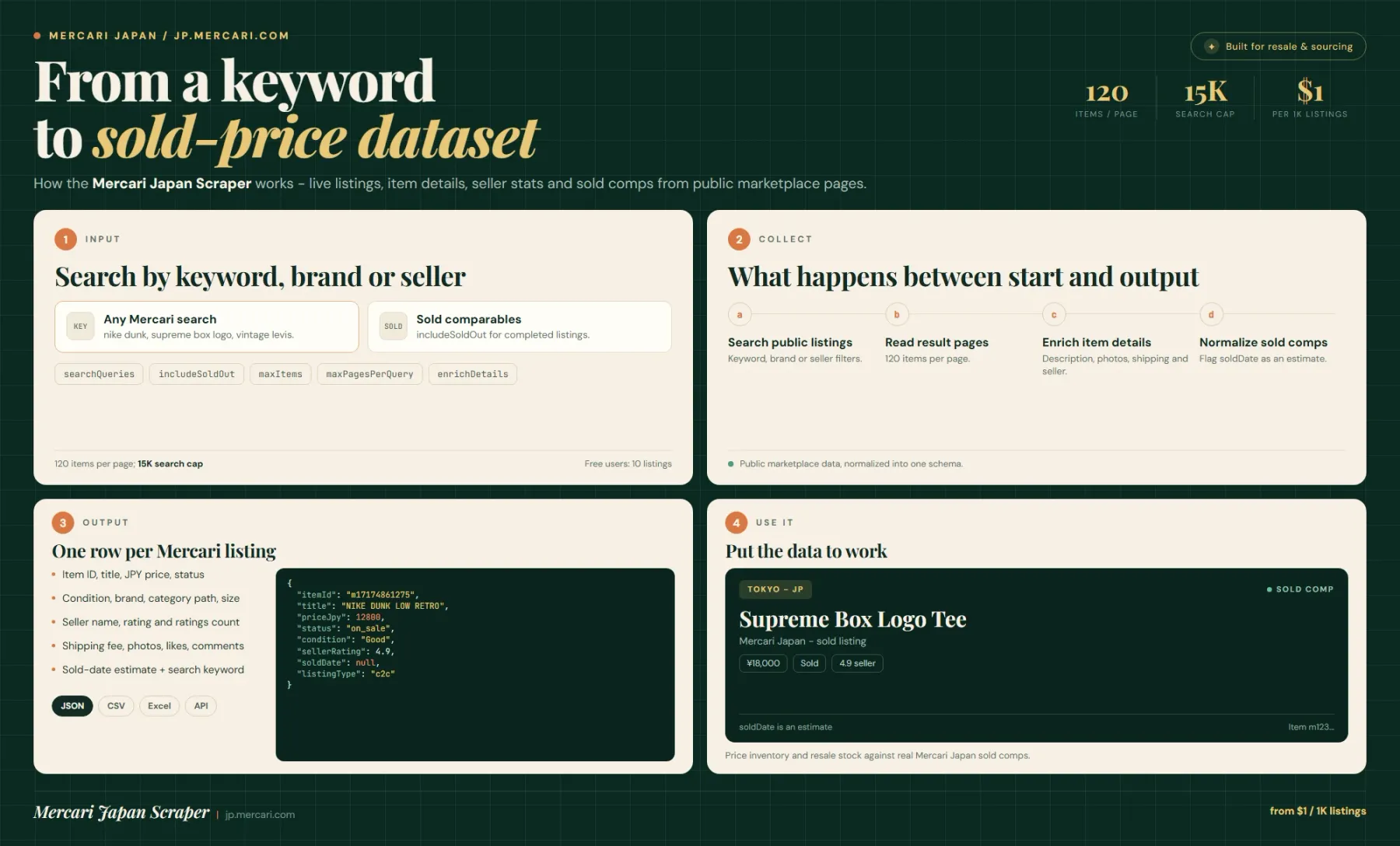
The Actor collects publicly available Mercari Japan listings, item details, seller stats and sold comparables and normalizes them into one schema. Provide keywords, category or brand filters, seller IDs or direct item URLs; the Actor follows the results, enriches each item with the published details and writes one row per listing.
- Search results can include up to 120 items per page.
- Detail enrichment adds the description, category path, photo set, shipping fee and seller profile.
- Sold listings are included when
includeSoldOutis enabled;soldDateis an estimate. - Enable
proxyif Mercari rate-limits your network; a Japan residential proxy group is the safest option.
Search Mercari By Keyword, Category, Brand Or Seller
Use one or more targeting modes in the same run:
searchQueries— keywords such asnike dunk,supreme box logoorvintage levis 501categoryIds— numeric Mercari category IDs; leave keywords empty to browse a categorybrandIds— numeric brand IDs such as857for NikesellerIds— scrape every listing from specific sellersitemIds/itemUrls— fetch specific listings directly and skip search
Refine results with includeOnSale, includeSoldOut, sort, priceMin, priceMax and conditionIds. maxItems caps saved listings, while maxPagesPerQuery controls how deep each keyword or filter combination is paginated.
enrichDetails is on by default. It adds detail work per item for the description, full category path, photo set, shipping fee and seller profile. Turn it off for a faster, cheaper card-only run.
Collect Sold Comps And Understand Sold Dates
Set includeSoldOut: true to collect sold-out listings alongside live ones. Sold price is the last listed price (priceJpy), which is the value Mercari exposes for a completed sale.
Mercari does not publish an explicit sold timestamp. For sold listings the updated field is bumped when the transaction closes, so the Actor reports soldDate from updated and sets soldDateIsEstimate: true. Use it as a close approximation, not an audited sale date.
Broad on-sale searches are capped by Mercari at numFound = 15000. Narrow by category, brand or price band to reach more inventory, and use maxPagesPerQuery within that window.
Extract Item Details, Seller Ratings And Shipping
With detail enrichment enabled, each row can include:
description,photos,photoCount,likesandcommentscondition,conditionIdandconditionNotebrand,category,categoryPathandcategoryPathStringsize,color,shippingPayer,shippingMethod,shippingFeeJpyandfreeShippingsellerName,sellerRating,sellerRatings,sellerNumRatings,sellerNumSellItemsandsellerIsOfficial
listingType is shop when the item is sold by a Mercari shop and c2c otherwise. source tells you whether the row came from a search result or an item detail record.
Input
| Field | Type | Default | Description |
|---|---|---|---|
searchQueries | array | empty | Keywords to search. The UI prefills nike dunk. |
categoryIds | array | empty | Numeric Mercari category IDs. |
brandIds | array | empty | Numeric Mercari brand IDs. |
sellerIds | array | empty | Mercari seller/user IDs. |
itemIds | array | empty | Direct item IDs such as m17174861275. |
itemUrls | array | empty | Direct item URLs; the ID is extracted automatically. |
includeOnSale | boolean | true | Include active listings. |
includeSoldOut | boolean | false | Also collect sold-out listings for comps. |
sort | string | relevance | relevance, newest, price_asc, price_desc or likes. |
priceMin | integer | 0 | Minimum price in JPY; 0 means no minimum. |
priceMax | integer | 0 | Maximum price in JPY; 0 means no maximum. |
conditionIds | array | empty | Mercari condition IDs 1–6. |
maxItems | integer | 50 | Maximum listings saved. Free users are capped at 10. |
maxPagesPerQuery | integer | 3 | Result pages per keyword/filter combination (120 items each). |
concurrency | integer | 20 | Parallel workers, maximum 50. |
enrichDetails | boolean | true | Collect full details for each item. |
proxy | object | disabled | Optional Apify Proxy configuration. |
A keyword run:
A direct item run:
Output
One dataset item per listing. Prices are in JPY and titles/descriptions are usually Japanese.
| Field group | Fields |
|---|---|
| Identity | itemId, url, title, priceJpy, currency |
| Status | status, statusRaw, isSold, soldDate, soldDateIsEstimate, listedAt, updatedAt |
| Condition | condition, conditionId, conditionNote |
| Classification | brand, brandId, categoryId, category, categoryPath, categoryPathString |
| Variants | size, sizeId, color |
| Shipping | shippingPayer, shippingPayerCode, shippingMethod, shippingFeeJpy, shippingTotalFeeJpy, shippingFromArea, shippingDuration, freeShipping |
| Engagement | likes, comments |
| Seller | sellerId, sellerName, sellerRating, sellerRatings, sellerNumRatings, sellerNumSellItems, sellerIsOfficial, sellerAccountCreatedAt |
| Media and text | photos, thumbnails, photoCount, description, hashTags |
| Listing metadata | listingType, isShopItem, shopName, itemType, searchKeyword, queryLabel, source, scrapedAt |
Pricing
Each saved listing is billed at $0.001, or $1 per 1,000 listings. A standard Actor Start event costs $0.00005 per run. The current build uses the platform's Actor Start and default-dataset result events; it does not add a separate item event.
Pricing tiers: $0.001 on FREE and BRONZE, $0.0008 on SILVER, $0.00075 on GOLD, PLATINUM and DIAMOND. A 1,000-item run therefore costs about $1.00 in result charges plus the start event and Apify platform usage.
Free users get a 10-item preview. Paying users can request up to 5,000 items. Detail enrichment does not add a separate event charge; it adds detail work per item, so it increases compute time but not the per-result price.
Schedule Mercari Price Tracking
- Daily keyword monitoring — save a task per product niche and diff
itemIdandpriceJpyagainst the previous run. - Sold comps — run weekly with
includeSoldOut: trueand usesoldDateas an approximate close date. - Seller monitoring — pass
sellerIdsto track a shop's inventory and pricing. - New-listing alerts — sort by
newest, schedule hourly or daily, and send newitemIdvalues to Slack, email or a webhook. - Deduplication —
itemIdis the stable key when keywords or categories overlap.
Related Actors
- Mercari Japan Scraper — keyword and category search with seller data.
- Mercari Japan Scraper — Listings, Prices & Sold Data — listings and sold-price research.
- Mercari Listings Scraper — listings, details and seller profiles.
- Buyee Scraper — Yahoo Auctions Japan and Mercari listings through Buyee.
FAQ
Does the Actor require a Mercari account?
No. The Actor collects publicly available marketplace data and does not need a Mercari account.
Can I monitor prices over time?
Yes. Schedule the Actor and compare itemId and priceJpy between runs to track new listings, price changes and sold comps.
Why is soldDate marked as an estimate?
Mercari does not expose an explicit sale timestamp. For sold listings, updated is bumped when the transaction closes, so the Actor uses it as the closest available proxy and flags it with soldDateIsEstimate: true.
Why are some item details missing?
Some listings do not publish full item details. The Actor still returns the search-summary fields for those listings.
Why did a run return zero results?
A run can return zero results when the filters are too narrow or Mercari temporarily limits your network. Enable proxy, preferably a Japan residential group, or retry later from another IP.
Are prices converted to USD?
No. priceJpy and currency: "JPY" are kept as published. Convert downstream if you need another currency.
Can I scrape Mercari US?
No. This Actor targets jp.mercari.com only.
Is there a free preview?
Yes. Free users are capped at 10 saved listings. Paying users can request up to 5,000.
For AI Agents & LLM Apps
Returns Mercari Japan listings as one row per itemId.
Minimal keyword run:
Sold comps:
Direct items:
Output fields: itemId, url, title, priceJpy, currency, status, statusRaw, isSold, soldDate, soldDateIsEstimate, listedAt, updatedAt, condition, conditionId, conditionNote, brand, brandId, categoryId, category, categoryPath, categoryPathString, size, sizeId, color, shippingPayer, shippingPayerCode, shippingMethod, shippingFeeJpy, shippingTotalFeeJpy, shippingFromArea, shippingDuration, freeShipping, likes, comments, sellerId, sellerName, sellerRating, sellerRatings, sellerNumRatings, sellerNumSellItems, sellerIsOfficial, sellerAccountCreatedAt, photos, thumbnails, photoCount, description, hashTags, listingType, isShopItem, shopName, itemType, searchKeyword, queryLabel, source, scrapedAt.
Behaviors an agent should know:
itemIdis the unique key for deduplication.priceJpyis an integer in Japanese yen, not USD.soldDateis an estimate derived fromupdated.description,photosand seller ratings requireenrichDetails: true.- Free runs stop at 10 items; paid runs can reach 5,000.
- A temporary access error is surfaced as an error, not as an empty dataset.
Legal & Compliance Disclaimer
This Actor is independent and is not affiliated with, endorsed by or sponsored by Mercari. It reads publicly reachable listings and item data that Mercari serves to any visitor; it does not log in, bypass a paywall or access private account data. Mercari's public pages can change without notice. You are responsible for complying with Mercari's terms of use, robots directives and applicable law, including data-protection rules, when you store, republish or commercialize the data.
SEO Keywords
mercari japan scraper, mercari jp scraper, mercari api, mercari sold comps, mercari sold listings, mercari price tracker, mercari japan data, scrape mercari japan, mercari listings api, mercari item details, mercari seller data, mercari japan resale, mercari price data, mercari csv, mercari json, japan marketplace scraper, mercari product data, mercari market research, mercari arbitrage, mercari scraping tool


