

PagineGialle Scraper $1.5/1K💰 | Italy B2B Leads | Reviews
Pricing
from $1.50 / 1,000 business scrapeds
PagineGialle Scraper $1.5/1K💰 | Italy B2B Leads | Reviews
Collect Italian business leads from PagineGialle.it — Italy's Yellow Pages. Get phones, emails, websites, addresses, opening hours and customer reviews for B2B prospecting, CRM enrichment, local SEO and Italian market research.
Pricing
from $1.50 / 1,000 business scrapeds
Rating
0.0
(0)
Developer

Ahmed Jasarevic
Maintained by CommunityActor stats
0
Bookmarked
1
Total users
0
Monthly active users
a day ago
Last modified
Categories
Share
PagineGialle Scraper - Italian Business Leads, Phones and Reviews
The PagineGialle Scraper collects public business listings from PagineGialle.it, Italy's Yellow Pages directory. It returns business names, categories, addresses, cities, provinces, postal codes, phones, emails, websites, coordinates, opening hours, feature flags, listing URLs and optional customer reviews.
Use it for Italian B2B prospecting, CRM enrichment, local SEO research, supplier discovery, review monitoring and market mapping. Search by keyword and location, resolve exact listing URLs, or run both modes in one job. Reviews are written to a separate dataset and joined by the PagineGialle location ID.
Main Use Cases for Italian Business and Review Data
- Italian B2B lead generation - build local business lists by category and city with phones, emails and websites.
- CRM enrichment - append addresses, opening hours, coordinates and public contact details to existing Italian accounts.
- Local SEO research - compare category coverage, website presence and contact completeness across cities.
- Supplier and vendor discovery - find restaurants, pharmacies, lawyers, contractors and other local providers.
- Review monitoring - collect ratings, review text, dates, publishers and business replies in a separate dataset.
- Territory planning - group businesses by province, city and distance from a search center.
- Market and franchise research - measure listing density and category mix before opening or expanding a location.
How It Works
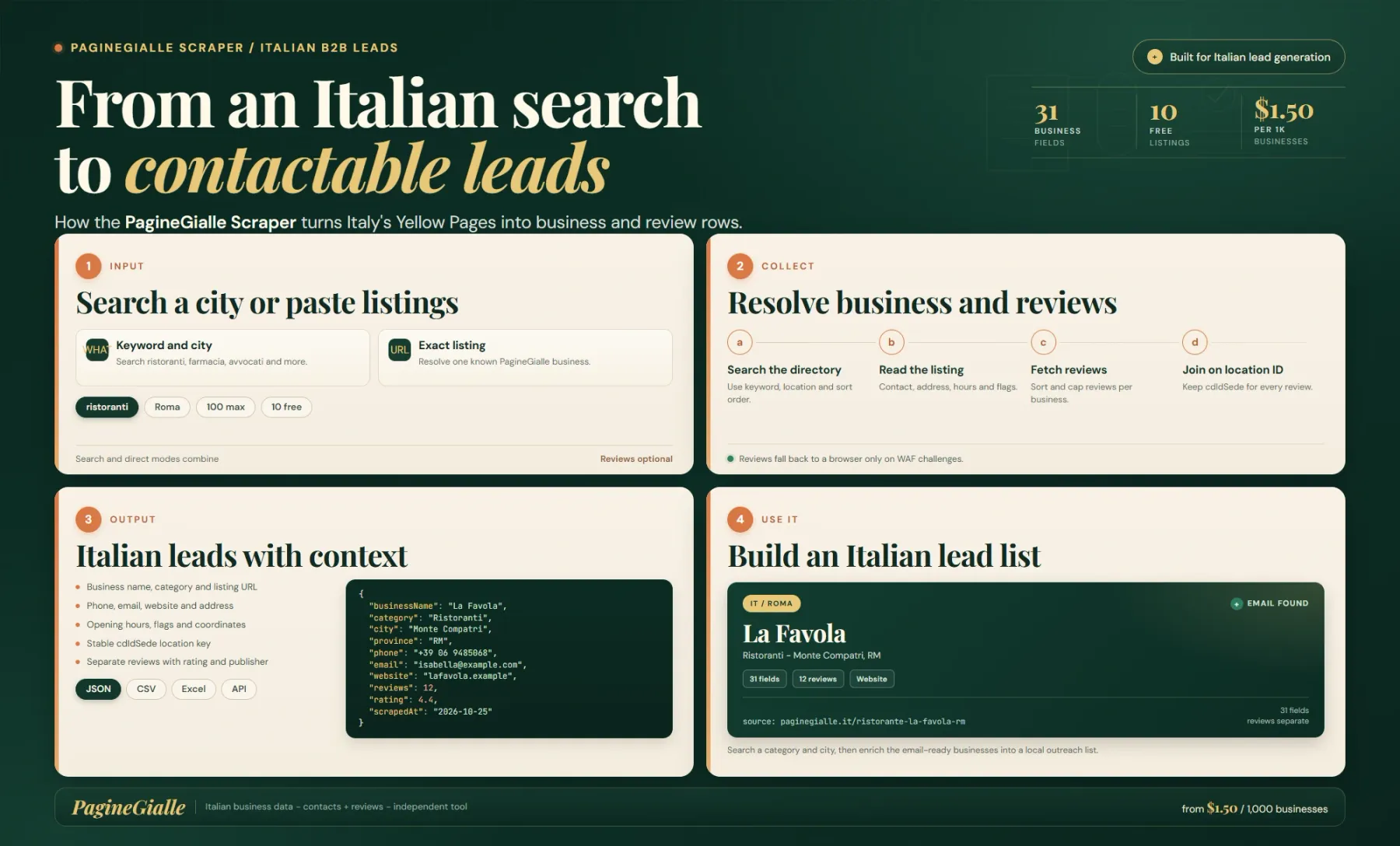
Choose a mode: search for keyword discovery, direct for exact listing URLs, or both to combine them. In search mode, what is the category or keyword and where is the city, province or region. If where is omitted, the Actor falls back to Roma. In direct mode, every URL in urls is resolved as one business.
Search results are paginated until maxItems is reached or the result pages run out. Each business row includes the name, category and code, full address, province, postal code, main phone and additional phone objects, public email, website, coordinates, distance from the search center, geolevel, listing URL, description, opening status, closing time and weekly opening hours.
Flags such as email, web, video, reservation and ecommerce show which contact and commerce features the listing exposes. The cdIdSede location ID is the stable join key for reviews, and userDetail plus urldetailMobile preserve the detail-page identifiers used by PagineGialle.
With includeReviews enabled, the Actor fetches reviews over plain HTTP first and only falls back to a headless browser when the source returns an AWS WAF challenge. reviewsSort controls date or rating order, while maxReviewsPerBusiness caps saved reviews. Review rows include the business name, rating, label, reviewer, text, date, publisher, answers, thumbs-up count and cdIdSede.
Direct URLs are always resolved even when maxItems is lower, so a mixed run can save more rows than the search cap suggests. The free preview is limited to 10 search results. Empty review datasets are possible when a business has no reviews or the review endpoint is blocked; the business row remains valid.
Input
Search mode needs a business type and a location. Direct mode needs listing URLs. The default auto mode chooses the right path from the fields you supply.
| Field | Type | Required | Default | What it does |
|---|---|---|---|---|
mode | string | No | Auto | Input mode: search, direct, both, or auto based on what and urls. |
what | string | No | Empty | Business type or keyword for search mode, such as ristoranti, farmacia or avvocati. |
where | string | No | Roma | City, province or region for keyword search. |
sortBy | string | No | relevance | Search order: relevance, city, name or popularity. |
maxItems | integer | No | 100 | Maximum search results. Set to 0 for unlimited. Direct URLs are always resolved. |
urls | string[] | No | Empty | Exact PagineGialle listing URLs for direct or both mode. |
includeReviews | boolean | No | false | Fetch business reviews into the separate reviews dataset. |
reviewsSort | string | No | date_desc | Review order: date_desc, rating_desc or rating_asc. |
maxReviewsPerBusiness | integer | No | 20 | Maximum reviews kept per business. |
A search run with what and where is the fastest way to validate coverage. Use direct URLs when you already have a precise list, because each URL becomes one business regardless of the search cap. Review collection adds events and may trigger a slower browser fallback; test a small batch before collecting reviews for a whole city.
Output
The default dataset contains one row per business. Reviews are written to a separate dataset. Contact, location, hours, flags and identifiers are kept distinct for filtering and joining.
| Field group | Fields | What you get |
|---|---|---|
| Identity | type, businessName, category, categoryCode | Record type, business name and PagineGialle category and code. |
| Location | address, city, province, postalCode, country, latitude, longitude, distance, geolevel | Postal address, administrative area, coordinates and search-distance fields. |
| Contact | phone, phones, email, website | Main phone, additional phone objects, public email and website. |
| Listing details | listingUrl, description, openingStatus, closingTime, openingHours, logo, imageUrl, flags | Listing URL, description, opening state, weekly hours, imagery and feature flags. |
| Join keys | cdIdSede, userDetail, urldetailMobile, sourceUrl, scrapedAt | Stable location ID, detail identifiers, source request and observation timestamp. |
| Review dataset | reviewId, cdIdSede, businessName, userName, text, rating, ratingLabel, date, answers, thumbsUp, publisher | Separate review rows joined to businesses by cdIdSede. |
Email, website, coordinates, distance, description and opening status can be null. phones and openingHours are arrays, and flags is an array of feature labels. The review dataset can be empty even when businesses were collected. Do not treat a missing email as a failed listing, and do not infer an address or phone from another branch of the same business.
Pricing
Pricing is pay-per-event. A small start event is charged per run, each saved business has a business event, and each saved review has its own event.
| Event | FREE | BRONZE | SILVER | GOLD+ |
|---|---|---|---|---|
| Actor start, per run | $0.00005 | $0.00005 | $0.00005 | $0.00005 |
| Business result | $0.0015 | $0.0015 | $0.0015 | $0.0015 |
| Review result | $0.0005 | $0.0005 | $0.00049 | $0.00048 |
Business data costs $1.50 per 1,000 listings. Reviews cost $0.50 per 1,000 on FREE, falling slightly on higher tiers. A 1,000-business run with 20 reviews each costs about $11.50 before the start fee. The free preview is limited to 10 search results; direct URLs are always resolved.
Example Input
This searches for restaurants in Rome, keeps up to 100 businesses and collects up to 20 recent reviews per business in a separate dataset.
Example Output
Values are illustrative and shortened. A review row uses the same cdIdSede and adds rating, ratingLabel, userName, text, date, publisher, answers and thumbsUp. Reviews are not nested inside the business row.
Integrations and Automation
Call the Actor from the Apify API, Apify MCP, a scheduled task, Zapier, Make, n8n or a custom worker. Export businesses and reviews as JSON, CSV, Excel, XML or HTML, or load them into Google Sheets, Airtable, a CRM, Postgres or a local search index.
For lead generation, filter on email and website presence, then deduplicate on normalized phone or listingUrl. Keep phones as an array until you choose a primary number. Use province and city for territory routing rather than free-text address parsing.
For review monitoring, join on cdIdSede, normalize date, and keep publisher because PagineGialle can aggregate reviews from several sources. Compare rating distributions over time instead of relying on a single average.
Related Actors
- Kompass Scraper - B2B company firmographics, phones, emails and NACE codes.
- Europages Scraper - European supplier and company profiles with contact data.
- Hotfrog Scraper - local business leads with phones, websites and addresses.
FAQ
Do I need a PagineGialle account?
No. The Actor reads public business listings and optional public reviews. It does not log in, claim a listing or access private analytics.
What is the difference between search and direct mode?
Search mode discovers businesses by keyword and location. Direct mode resolves exact listing URLs. Both mode combines them, and auto mode chooses based on the fields you provide.
Why are reviews in a separate dataset?
Reviews have their own shape and price event. Keeping them separate avoids duplicating business fields and lets you join only the businesses you need using cdIdSede.
Why is a business missing an email or website?
The listing may not publish one, or the source may hide it behind a contact form. Null is a valid value and should not be replaced with a guessed address.
Can direct URLs exceed maxItems?
Yes. Direct URLs are always resolved, so a run with many direct URLs can return more rows than the search cap. Use urls deliberately.
Why did a review run return no reviews?
The business may have no reviews, or the review endpoint may have been blocked. The business row is still valid. Retry later or reduce concurrency before assuming the listing has no reviews.
For AI Agents and LLM Apps
The Actor returns source-linked Italian business listings with contact details, location, hours, feature flags and separate review rows. It is suitable for local lead generation, CRM enrichment and review analysis through the Apify API or Apify MCP.
- One default-dataset row represents one business listing. Use
cdIdSedeorlistingUrlas the key. - Reviews are a separate dataset and share
cdIdSede. Do not assume a business row contains nested reviews. phonesandopeningHoursare arrays, andflagsis an array of feature labels. Handle empty arrays explicitly.- Email, website, coordinates and description can be null. Null means the source did not expose the value, not that the business lacks it.
- The free preview is limited to 10 search results, and direct URLs are resolved regardless of that cap.
Legal and Compliance
This Actor is an independent tool and is not affiliated with, endorsed by or sponsored by PagineGialle or Italiaonline. It reads publicly visible listing data for B2B research, local SEO and legitimate outreach. The terms of the source directory and applicable privacy law still apply.
Business listings can include personal data such as names, phone numbers, email addresses and review author names. Use the data for a lawful purpose, keep a documented basis where required, honor deletion and opt-out requests, and do not use review data to harass individuals or publish unsupported claims.
SEO Keywords
PagineGialle scraper, PagineGialle business data, Italian Yellow Pages scraper, Italian B2B leads, PagineGialle API alternative, Italy business directory, PagineGialle reviews, Italian company contacts, local business scraper Italy, PagineGialle dataset, Italian phone directory, PagineGialle email scraper, Italy lead generation, PagineGialle listing data, Italian local SEO data, business reviews Italy, PagineGialle phone numbers, Italian supplier discovery, PagineGialle scraping tool, Italy market research data


![Skool Scraper [💰$1.5/1K] | Members | Hidden Emails | Profiles avatar](https://images.apifyusercontent.com/ARaqApbXnhDpP7-Y-Sq5lNjGQjsucXLL0fqQYzrUUlw/rs:fill:76:76/cb:1/aHR0cHM6Ly9hcGlmeS1pbWFnZS11cGxvYWRzLXByb2QuczMudXMtZWFzdC0xLmFtYXpvbmF3cy5jb20vZHRSN3FuVGJRck5pU0NtajctYWN0b3ItcmFXUkJzaVNJTWlLbWZ0ZWEtQ2Q5TWxYYXVHMS1iY0U2Y29lSDhFM1ZIV0EyTi1za29vbC53ZWJw.webp)
![FindLaw Lawyer Scraper [Only $0.9/1K💰] | Leads | Legal Data avatar](https://images.apifyusercontent.com/TAwv4dbulYCqRJ1E7rO7t1JGW27TdYWwLgDNRCl0Fek/rs:fill:76:76/cb:1/aHR0cHM6Ly9hcGlmeS1pbWFnZS11cGxvYWRzLXByb2QuczMudXMtZWFzdC0xLmFtYXpvbmF3cy5jb20vZHRSN3FuVGJRck5pU0NtajctYWN0b3Itc3lmeXJHdWg4NnFiaFllS0ktZDFVTDg5eDN6Qi04M2ZmYmYxZC1hNjM0LTRhNDktODg5Yi02YzA5YWQzMzc1NmZfdGh1bWIuanBn.webp)


![Bilibili Downloader [💰$2.5] | Videos | Streams | Batch DL avatar](https://images.apifyusercontent.com/iRvq2mMo24sC7S77b-cz_mdL8AdAPQpp0vEDLTAkfNs/rs:fill:76:76/cb:1/aHR0cHM6Ly9hcGlmeS1pbWFnZS11cGxvYWRzLXByb2QuczMudXMtZWFzdC0xLmFtYXpvbmF3cy5jb20vZHRSN3FuVGJRck5pU0NtajctYWN0b3Itd0tyNVFEbEJ3MVVmN3k5dzktRVNPZU9aNmJzMy12RUxjOXFUVGk0UEZxTnRGVS1hY3Rvci1iQXlkZGNxb1A4TVZQUURldi1vS0FoUzBjRzBaLWJpbGliaWxpLWxv.webp)