

Verified Website Screenshot & PDF
Pricing
from $8.00 / 1,000 standard renders
Verified Website Screenshot & PDF
Bulk website screenshots and webpage-to-PDF conversion across desktop, tablet, and mobile, with a verification manifest and SHA-256 hash for every render.
Pricing
from $8.00 / 1,000 standard renders
Rating
0.0
(0)
Developer

Hussein Al-Mansori
Maintained by CommunityActor stats
0
Bookmarked
2
Total users
1
Monthly active users
2 months ago
Last modified
Categories
Share
Verified Website Screenshot & PDF API

Bulk website screenshots and webpage-to-PDF conversion, with proof that each render is complete. Send up to 20 public URLs and get full-page screenshots (PNG, JPEG, or WebP) and PDFs across desktop, tablet, and mobile. Every render returns a structured manifest — readiness checks, dimensions, timing, warnings, and SHA-256 hashes — so a workflow, automation, or AI agent can use, retry, or reject the result without a person looking at it.
A screenshot is an image. A verified render is evidence.
What you get
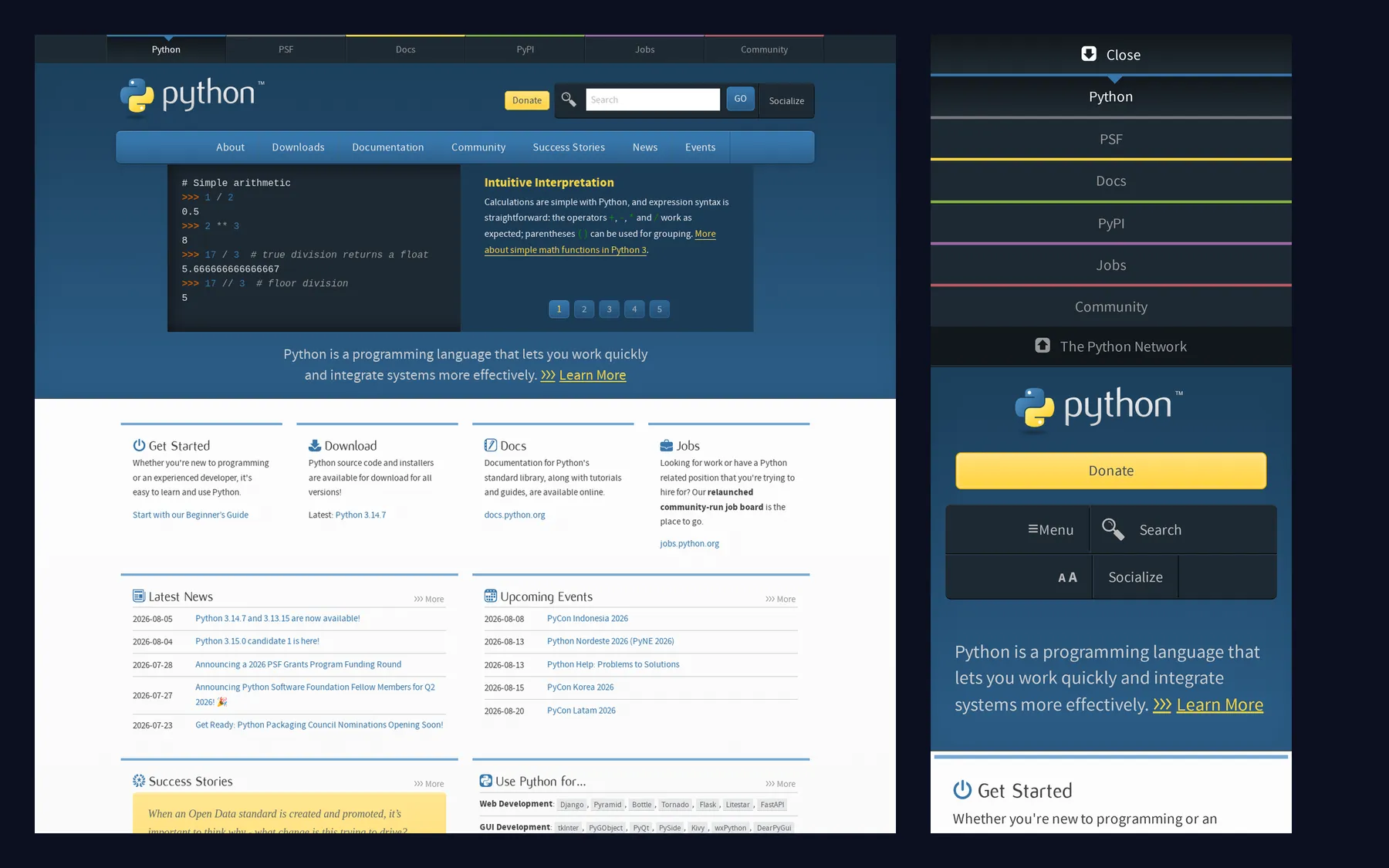
One URL captured on desktop and mobile in a single run. Real output from this Actor.
Every file arrives with a manifest that says exactly what happened (shortened for readability):
File URLs intentionally omit tokens. Use the same Apify bearer token you called the API with when downloading private storage records.
Why this Actor is different
verified,warning, andfailedare objective outcomes, not adjectives. Fonts, document completion, network quiet, lazy content, visible images, optional selectors, and browser errors are each checked within strict bounds and reported individually.- Every file carries a SHA-256 hash, byte count, and decoded dimensions, so you can prove the artifact you stored is the one that was produced.
- A verified pack is all-or-nothing. The screenshot and PDF must both exist and validate before you are billed for the pair.
- One manifest shape for every URL and device, so a single parser handles all results, including failures.
- You are never charged twice. Completed work is rebuilt from the dataset after a platform migration rather than repeated, and a failed render is never billed.
Quick start
- Enter one or more public URLs.
- Keep the default desktop PNG settings.
- Run the Actor and open Output → Render manifests or Screenshots.
For screenshot plus PDF evidence on desktop and mobile:
Common workflows
- AI-agent evidence: attach a source URL, image, PDF, timestamp, hash, and verification status to research output.
- Client reports: render up to 20 client pages across desktop, tablet, and mobile in one batch.
- QA evidence: store consistent multi-device release artifacts without operating Chromium.
- Archiving: create a visual and print representation with a structured provenance record.
- No-code automation: start a run, wait for it, then use the manifest file URL in the next workflow step.
Input reference
Only urls is required. Unknown properties are rejected.
| Input | Default | Contract |
|---|---|---|
urls | required | 1–20 unique HTTP(S) URLs, max 2,048 characters; fragments removed, queries preserved, no credentials |
output | screenshot | screenshot, pdf, or verifiedPack |
devices | desktop | Unique subset of desktop, tablet, mobile, custom; URLs × devices ≤ 60 |
customViewport | none | Required only for custom: width 320–2560, height 200–1440, DPR 1–3 |
fullPage | true | Screenshot only; PDFs always print the complete document |
imageFormat | png | png, jpeg, or webp |
imageQuality | format default | 1–100, accepted only for JPEG/WebP |
waitForSelector | none | CSS selector ≤ 512 characters; fixed 10-second wait |
postLoadDelayMs | 500 | 0–5,000 ms |
colorScheme | light | light or dark |
locale | en-US | One of the 10 values shown in the input form |
timezone | UTC | One of the 10 values shown in the input form |
hideCookieBanners | false | Hides strongly identified OneTrust, Cookiebot, Quantcast, or Usercentrics containers; never clicks consent |
userAgentPreset | automatic | automatic, desktopChromium, or mobileChromium; arbitrary strings rejected |
pdf | A4 portrait | A4/Letter/Legal, orientation, print backgrounds, and 0–50 mm margins |
Choose PNG or JPEG for full-page captures. WebP cannot encode long pages — see Limits.
The exact URLs × devices count and all cross-field combinations are validated before Chromium starts, so invalid input costs you nothing.
Fixed device presets
| Device | Viewport | DPR | Emulation |
|---|---|---|---|
| Desktop | 1440 × 900 | 1 | desktop, no touch |
| Tablet | 768 × 1024 | 2 | mobile layout and touch |
| Mobile | 390 × 844 | 3 | mobile layout and touch |
Output and verification
One dataset row represents one URL + device operation, including failures. Generated files are
stored in the default key-value store under predictable screenshot- and pdf- keys. The
SUMMARY record contains requested, verified, warning, failed, charged, skipped, and duration
totals.
verified means every required bounded check passed and every promised file validated. warning
means usable files exist but the page returned an HTTP error, did not settle, hit the lazy-load
limit, had visible image failures, blocked an unsafe subresource, or raised a page error. failed
means no complete promised deliverable exists.
Explicit modifications are never silent. Motion suppression, a changed user agent, each hidden
cookie-banner vendor/selector, and any clamped capture appear in modifications.
API and MCP
Runs also work from Apify Console, schedules, webhooks, API clients, and MCP. The input and output schemas expose stable defaults and storage locations to agent tooling. A low-latency request-response interface is planned for a future release.
Pricing
| Event | Price |
|---|---|
Screenshot or PDF (standard-render) | $0.008 |
Screenshot + PDF pack (verified-pack) | $0.015 |
You are charged per URL × device operation:
- One URL on desktop as a screenshot: $0.008
- One URL on desktop, tablet, and mobile: 3 × $0.008 = $0.024
- Twenty URLs on three devices: 60 × $0.008 = $0.480
- One verified pack on three devices: 3 × $0.015 = $0.045
A verified pack costs less than buying the screenshot and PDF separately. Complete results are charged even when they carry a warning, because the promised files exist and are usable. Failed and partial results are never charged.
Limits
- Public pages only; ports 80, 443, 8080, and 8443.
- 30-second navigation timeout and 60-second total job timeout.
- At most 10 redirects, 50 MB page transfer, 30,000 CSS-pixel document height, and 25 MB per file.
- A capture is limited to 60 megapixels after the device scale factor is applied. A taller page is
not rejected — the capture is clamped to the top of the page, marked
warning, and acaptureClampedmodification records how much was captured. Desktop reaches the full 30,000-pixel height; mobile at DPR 3 reaches about 17,000 and tablet at DPR 2 about 19,500. - WebP cannot encode long full pages. The format caps either axis at 16,383 pixels after the device scale factor, so a full-page WebP fails above roughly 16,000 CSS pixels on desktop, 8,100 on tablet, and 5,400 on mobile. Use PNG or JPEG for full-page captures.
- Lazy-load scrolling stops at 30 steps, 10 seconds, or 30,000 pixels.
- CAPTCHAs, login flows, paywall bypasses, proxies, arbitrary scripts, headers, cookies, credentials, browser arguments, filesystem paths, video, and visual diffs are out of scope.
Errors and retries
INVALID_INPUT, INVALID_URL, BLOCKED_DESTINATION, DNS_FAILURE, NAVIGATION_FAILED,
NAVIGATION_TIMEOUT, SELECTOR_TIMEOUT, PAGE_CRASHED, PAGE_TOO_TALL,
TRANSFER_LIMIT_EXCEEDED, OUTPUT_TOO_LARGE, OUTPUT_GENERATION_FAILED, STORAGE_FAILURE,
BUDGET_EXHAUSTED, and INTERNAL_ERROR are stable error codes that will not change meaning.
Every failed manifest includes an actionable message and a retryable flag. Retry only when that
flag is true — it means the failure looked transient and the same URL is worth submitting again.
Troubleshooting
| Symptom | Cause | Fix |
|---|---|---|
OUTPUT_GENERATION_FAILED on a long page with imageFormat: "webp" | WebP cannot encode more than 16,383 pixels on an axis | Use png or jpeg, or set fullPage: false |
Result is warning instead of verified | A readiness signal was uncertain — often a page that never stops making network requests | Read warnings and readinessChecks. The files are usable; decide per your tolerance |
Storage URL returns 401 | Returned links deliberately omit credentials | Send your Apify bearer token in the Authorization header when downloading |
NAVIGATION_TIMEOUT on a heavy site | The page did not load within the 60-second budget | Retry later, or capture a lighter entry point on the same site |
| Screenshot is shorter than the page | The capture exceeded the 60-megapixel budget and was clamped | Lower deviceScaleFactor, use a narrower viewport, or capture in sections |
Security and acceptable use
Every hostname is resolved before the initial navigation, each redirect, and each HTTP(S) or WebSocket subrequest. Every A and AAAA answer must be globally routable. Private, loopback, link-local, metadata, multicast, reserved, and unspecified targets are blocked. Browser-reported remote IP addresses are checked again as defense in depth. Service workers are disabled so they cannot bypass request interception.
URLs are redacted to remove query strings in logs. Submitted URLs remain only in the user-owned manifest. Never use this Actor for unauthorized access, access-control bypass, harassment, illegal content, or attacks. You are responsible for authorization to capture each submitted page.
FAQ
Why is a result marked warning?
The files are usable, but one or more readiness or page-quality signals were uncertain. Read the
warnings and readinessChecks arrays before deciding to use or retry it.
Does hiding a cookie banner accept cookies?
No. The Actor only hides a small set of strongly identified vendor containers and records the
selector. It never clicks a consent button.
Can I send authentication headers or cookies?
No. This version intentionally supports public pages only.
Are PDFs affected by fullPage?
No. PDFs always print the complete document using your pdf settings.
What happens to a page taller than the capture budget?
You still get a file. The capture is clamped to the top of the page and marked warning, with a
captureClamped modification recording how much was captured.
Support and changelog
Use the Actor's Issues tab for reproducible failures on supported pages, and include the run ID and job ID — never tokens or credentials. Issues are triaged within 1–2 business days. Release changes are recorded in CHANGELOG.md.


