

Booking.com Hotel Price Calendar Scraper
Pricing
from $2.75 / 1,000 hotel dates
Booking.com Hotel Price Calendar Scraper
Track a hotel and its comp set on Booking.com across every check-in date: nightly rate, stay total, pre-discount price, taxes, room type, cancellation policy, rooms left. Sold-out dates flagged; currency, language and tax regime verified in every response. Not affiliated with Booking.com.
Pricing
from $2.75 / 1,000 hotel dates
Rating
0.0
(0)
Developer

Aleksandr Kobtsev
Maintained by CommunityActor stats
0
Bookmarked
47
Total users
18
Monthly active users
a month ago
Last modified
Categories
Security
Limited permissionsShare
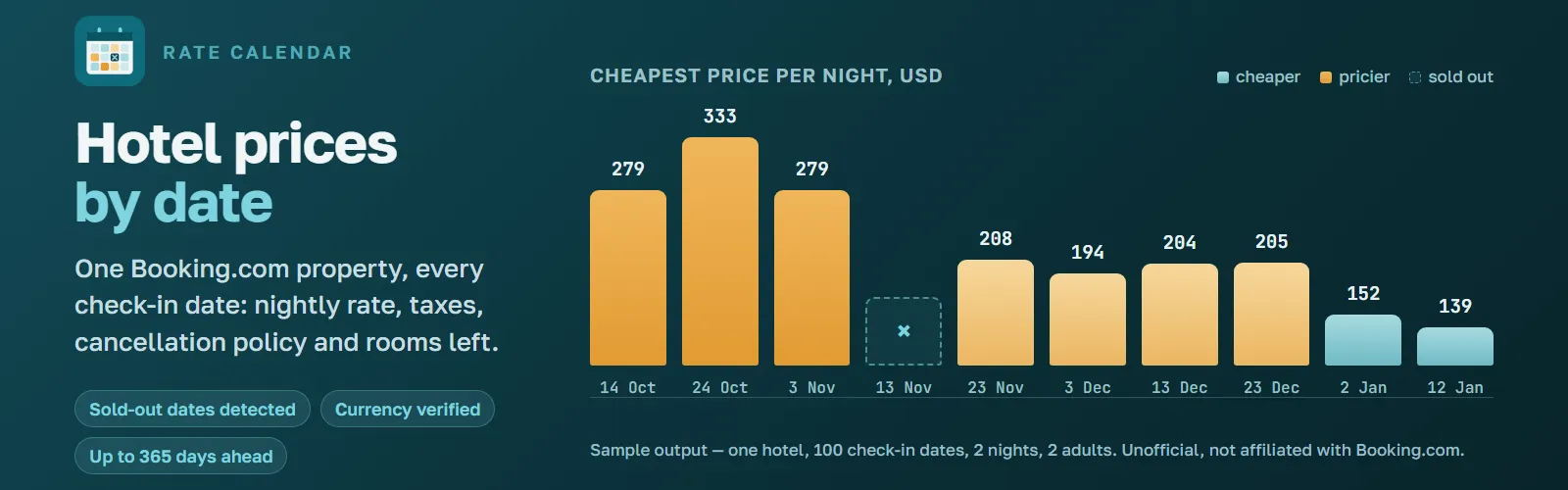
Track your own property and your comp set on Booking.com across every check-in date in a range, and get prices and availability by date: nightly rate, total for the stay, pre-discount price, taxes, room type, cancellation and prepayment policy, and how many rooms are left. One dataset row per hotel and per date, up to 365 days ahead, in 12 currencies and 7 languages.
You bring the hotel page URLs. There is no login, no Booking.com account and no partner API involved, and this Actor does not search for hotels: it prices the ones you name. Run it once, put it on a schedule, or call it from the API, and forward the result to Google Sheets, Slack, Make, Zapier or an MCP client.
Who is this Booking.com scraper for?
Prices below are shown two ways: what you pay on the free plan, and what you pay on Gold and above. Each figure includes every charge: the per-date price, the start charge and the per-row storage charge. The unit price drops on Apify's Silver plan and again on Gold; the free plan and Bronze pay the same.
| You are | What you run | Free plan | Gold and above |
|---|---|---|---|
| A revenue manager watching a comp set | 10 hotel URLs, 90 dates | $3.91 per run | $2.56 per run |
| A short-let or small hotel owner | your own property, 60 dates, daily | $10.07 per month | $7.37 per month |
| Building a rate-shopping or BI product | any number of URLs through the API | $4.26 per 1,000 hotel-dates, plus $0.08 a run | $2.76 per 1,000, plus $0.08 a run |
| Researching travel prices | one pull, 365 dates | $1.63 | $1.09 |
If you need to find hotels rather than price known ones, start with the companion
Booking.com Scraper. It lists the hotels
of a city, region or airport with their prices, and the hotelUrl of each row goes straight
into this Actor.
If one price per date is enough, the companion Booking.com Hotel Price Monitor returns the cheapest rate, sold-out dates and rooms left over plain HTTP, at $1.00 per 1,000 hotel-dates on Gold and above. This Actor reads the full room table: every rate, with its room type and terms.
If you want what guests wrote rather than what a room costs, the companion Booking.com Reviews Scraper returns the reviews of a hotel, one row per review, with the score, the text, the reviewer's country and the kind of trip.
What makes this different from other Booking.com scrapers?
Most Booking.com Actors answer "which hotels are in this city, and what is the headline price today". They bill one row per property. This one answers "what does this property cost on the 10th, the 11th, the 12th of next month, and what were the terms", and it bills one row per hotel and date, with every rate on that date inside it.
- It verifies before it bills. Booking.com switches currency and language to match the visitor's address. Every response is checked against what you asked for: the currency on every single rate, the language, and the check-in date the page echoes back. A page that answers for the wrong dates is rejected and never charged.
- It tells sold-out from broken. Four page states are recognised on real pages: rooms with prices, genuinely sold out, the decoy page Booking.com serves to suspected bots, and a delisted property whose URL now redirects to a city page. Only the first two reach your dataset. The decoy is retried on a fresh session, the delisted URL is named in the run output, and neither is billed.
- A run that collects nothing fails. It does not finish green with an empty dataset, which is the failure that costs you a day before you notice it.
- It is watched. A scheduled job re-parses live Booking.com pages against a recorded baseline three times a day and alerts on a markup change, so a break surfaces in hours and not in your Issues tab a week later.
- It survives layout changes without waiting for a release. Every CSS selector can be
overridden from the input, for example
{"price": ".new-price-class"}.
What data can you extract from a Booking.com hotel page?
One row per hotel and check-in date. The flat cheapest* fields repeat the headline rate
so a CSV or Excel export stays readable; offers holds every rate the page showed.
| Row field | What it is |
|---|---|
| hotelUrl, hotelId, hotelName | The property, as Booking.com identifies it. hotelId is the stable join key. |
| checkIn, checkOut, nights | The stay this row priced. |
| adults, rooms, childrenAges | The occupancy it was priced for. Change it and the prices change. |
| currency, language | Confirmed against the response, not just requested. |
| soldOut | true when the property has no availability for that date. A real answer, and a billed row. |
| minPricePerNight | The headline number: the cheapest rate that sleeps your adults, divided by nights. |
| pricesIncludeTaxes | Whether these prices already contain local tax. See the section below. |
| offersCount | How many rates the page offered. 16 to 48 on the properties measured. |
| cheapestRoomType, cheapestTotalPrice, cheapestStrikeoutPrice | That same rate, flattened. |
| cheapestTaxesAndCharges, cheapestCancellationPolicy, cheapestPrepaymentPolicy, cheapestRoomsLeft | Its terms, flattened. |
| offers | Every rate on the date. Fields below. |
| scrapedAt | When it was collected, ISO-8601 UTC. |
Each entry in offers carries roomType, totalPrice, pricePerNight, strikeoutPrice, currency, taxesAndCharges, cancellationPolicy, prepaymentPolicy, occupancy and roomsLeft.
The example was captured from a Georgian address, where Booking.com quotes tax-inclusive
prices, and its offers array is cut to the first of its 20 entries. On the default Apify
proxies the same row reads pricesIncludeTaxes: false with the tax fields null; the
section on tax below explains why.
A sold-out date comes back with soldOut: true, offersCount: 0 and
minPricePerNight: null, so a gap in your calendar means "no rooms", never "the scrape
missed a day".
What to do with it. Put the run on a daily schedule, send the dataset to Sheets or
BigQuery, and key rows on hotelId plus checkIn. Two columns then answer the morning
question on their own: a change in minPricePerNight is a rate move, and a change in
soldOut is your comp set filling up. scrapedAt keeps the history straight.
Do Booking.com prices include tax? 175 USD or 207 USD for the same room
Booking.com quotes a rate with or without local tax depending on the country it infers from the address the request came from. The gap is the whole VAT. Measured on one Georgian property, same date, same room, two runs minutes apart: 175 USD from one exit address and 207 USD from another, 18 percent apart, with 48 rates on the page both times.
Both are genuine Booking.com prices. The damage comes from mixing them without saying so,
which is why every row states pricesIncludeTaxes.
On the default Apify datacenter proxies the flag reads false, and it reads false
consistently, so a calendar built on them compares correctly with itself. If you need the
tax-inclusive quote, run through your own proxies in the country you want to buy from.
Booking.com takes the regime from the address and ignores the URL parameters that look
like they should control it. That was verified rather than assumed: sb_price_type=total
and cc1 both changed nothing.
How much does it cost to scrape Booking.com prices?
One billed row is one hotel on one check-in date, with every rate that property offered on it. That is the whole unit. Thirty dates are thirty rows on every property, always, so the bill is predictable before you start.
| Event | Price | When |
|---|---|---|
| Hotel date | $0.00425, falling to $0.00275 by plan | Per row that reaches the dataset |
| Actor start | $0.02 per GB | Once per run. The Actor needs 4 GB, so $0.08 |
| Result | $0.00001 | Per stored row, about one cent per thousand rows |
The hotel-date price steps down with your Apify plan: $0.00425 on the free plan and on Bronze, $0.0035 on Silver, and $0.00275 on Gold and above.
What that means for real jobs, all three charges included:
| Job | Rows | Free plan | Gold and above |
|---|---|---|---|
| One hotel, a month ahead | 30 | $0.21 | $0.16 |
| One hotel, a quarter ahead | 90 | $0.46 | $0.33 |
| One hotel, a year ahead | 365 | $1.63 | $1.09 |
| Ten competitors, a quarter ahead | 900 | $3.91 | $2.56 |
| One property, 60-date window, refreshed daily for a month | 1,800 | $10.07 | $7.37 |
The start charge is flat, so it dominates a tiny run and disappears on a large one: one date works out near $0.084 per row, thirty dates near $0.0069. Put many hotels into one run instead of starting a run per hotel.
Sold-out dates are charged, because "no rooms on that date" is a real answer and the reason people monitor availability. Nothing else is: not a blocked or challenged request, not a page in the wrong currency or language, and not a page the parser could not read. The $0.08 start charge is the exception, since it is taken before any of that is known.
Set Maximum total charge on the run to cap spending. The Actor stops cleanly at the
budget and lists the dates it did not reach in the FAILED_CHUNKS key-value store record,
so you can finish them later without paying twice for what you already have.
How this compares. Actors that return every rate per date bill per rate, not per date. For one hotel over 30 dates at roughly 34 rates a date, that is about 1,020 billable units against this Actor's 30. On the Store in September 2026 the same job came to $3.06 at one of them and $4.08 plus platform usage at another on the free plan, against $0.21 here, and to $1.22 and $4.08 on Gold, against $0.16. Calendar Actors that return one nightly price per day charge less per hotel: they give the headline rate and whether the date is open, not every rate with its room type, tax status, cancellation and prepayment terms and rooms left. Actors cheaper still per 1,000 sell a search-listing row: one property, one headline price.
How to scrape Booking.com hotel prices by date
- Open the hotel on Booking.com and copy the page URL. Anything like
https://www.booking.com/hotel/ge/radisson-blu-batumi.htmlworks. Dates, language and tracking parameters already in the link are ignored. - Paste one or more URLs into Hotel page URLs.
- Choose the first check-in date, how many dates to cover, nights per stay, guests, currency and language.
- Run it. Download the dataset as JSON, CSV or Excel, or read it through the API.
- For a price history, put the run on a daily schedule and keep every run's dataset.
| Field | Default | What it does |
|---|---|---|
hotelUrls | required | Booking.com hotel page links, one per line. |
startDate | tomorrow | First check-in date, YYYY-MM-DD (UTC). Today is allowed; a past date is moved to today. |
days | 30 | Number of consecutive check-in dates, per hotel. Each hotel and date pair is one billable row, so 5 URLs over 30 dates is 150 rows. |
nights | 1 | Length of stay for every check-in date. |
adults | 2 | Adult guests. Occupancy changes prices, so compare like for like. |
childrenAges | [] | Age of each child, e.g. [5, 9]. Booking.com prices children by age, so a count alone is not enough. |
rooms | 1 | Rooms to price. |
currency | USD | Verified in every response. A wrong currency means the date is rejected and not charged. |
language | en-gb | Language of room names and policies. Also verified. |
datesConcurrency | 3 | Dates fetched in parallel per browser tab. |
datesPerSession | 100 | Dates taken from one browser session before a fresh one starts. Measured stable at 100. |
proxy | Apify datacenter | Measured on Booking.com: 10 of 10 dates, zero rejections. Apify residential groups are refused in the first seconds, before any row is charged; the $0.08 start charge still applies. For a specific country, or a residential address, choose Custom proxies and supply your own. The country also decides pricesIncludeTaxes. |
dryRun | false | Owner-only switch used by the maintainer's own monitoring. It is ignored for everyone else. |
selectorOverrides | {} | Emergency hatch: map a selector name to a CSS selector, e.g. {"taxes": ".prd-taxes-new"}. Use it when the run log says a selector stopped matching. |
Ready-made examples
Each one is a saved configuration you can open and run without filling the form in.
| Example | What it shows |
|---|---|
| Rate shopping: track a London hotel comp set | Four competing hotels, 60 dates, GBP |
| Monitor rates for revenue management | One property, 90 dates, schedule it daily |
| Track a competitor hotel for 90 days | The starting point for a comp set of one |
| Export a 180-day rate calendar to CSV | Half a year in one run, the cheapest cost per row |
| Find sold-out weekends at a seaside resort | Two-night stays, 90 dates, seasonal coast |
| Monitor sold-out dates for one property | Availability rather than price |
| Compare weekend and weekday rates | Where the weekend premium sits |
| Check 7-night stay prices by arrival date | Length of stay changes the price |
| Hotel prices for a family with children | Ages sent, because Booking prices children by age |
How fast is it, and what does it not do?
Measured on the default Apify datacenter proxy: 14 dates for one hotel in 68 seconds, 30 dates in 250 seconds. A full year is therefore roughly 30 to 50 minutes per hotel, and ten hotels over a year is several hours. The run timeout ships at 3 hours, so raise it in the run options before a job that large and size it from the slow end of that range.
- Prices are what Booking.com showed for that occupancy, currency and language at scrape time. They move constantly. Scrape on a schedule if you need a trend.
totalPriceis the price for the whole stay as displayed.pricePerNightis derived from it by dividing bynights.taxesAndCharges,strikeoutPriceandoccupancyarenullwhen Booking.com does not print them. The tax line in particular depends on the point of sale, as described above.occupancyis the guest count as Booking.com words it, in the language you picked. Booking.com serves three layouts of the room table and words it differently in each:Max persons: 2from a guests column,Guests: 2 adultsfrom the rate's own terms, orSleeps: 2 adultsprinted once for the room type and carried to each of its rates.minPricePerNightand thecheapest*fields come from the cheapest rate whose guest count reaches the adults you asked for per room. Booking.com also lists rates for fewer guests, such as single occupancy or a dorm bed; they stay inoffersand never take the headline. A rate with no guest count is kept, children are not counted, and if no rate on the page is big enough, the cheapest rate of any size is used.roomsLeftis how many rooms the booking form lets you pick, and that list stops at nine. At the ceiling the field isnull, because nine would read as an exact count and it is not one. Measured: half the rates on a live page sit at the ceiling.datesPerSessionhas a floor of 10. Below it the hotel page is re-warmed for almost every date, which costs about eleven times the traffic and returns the same data.- English (US) is not offered. With the US locale Booking.com ignores the requested currency and prices the property in its local one, which would make every row unusable. Use English (UK). The room descriptions are identical.
- Member-only Genius discounts need a logged-in session and are not included.
- It does not collect reviews, photos, guest names or any personal data.
FAQ: scraping Booking.com hotel prices
Can I scrape several hotels at once? Yes, one URL per line. Each hotel gets its own browser session.
How far ahead can it price? Up to 365 check-in dates per hotel per run.
Do I need a Booking.com account or an API key? No. It reads publicly visible pages.
What if Booking.com changes the page? A scheduled watchdog re-parses live pages
against a recorded baseline three times a day, so the break is usually known before you
hit it. Parsing errors are reported in the log and never billed. You can also put the new
selector into selectorOverrides and run again without waiting for a release.
What if a hotel URL is dead? Delisted properties redirect to a city page. That is
detected on the first attempt, the URL is skipped without retries and named in the
FAILED_CHUNKS key-value store record.
Does it work for apartments and hostels? Yes. Prices and policies are verified on hotels, hostels and guest houses in Georgia, Czechia and India. On apartments the parser is verified on a sold-out date in Spain, which proves the availability path but not the rate table. Booking.com serves the same room markup for all of them, so apartments are expected to work. If one does not, open an issue with the URL.
Can I get a currency that is not in the list? Not yet. The twelve supported currencies are the ones whose price notation on Booking.com has been verified, which is what makes a wrong-currency response catchable. Ask in Issues if you need another.
Is it legal to scrape Booking.com? This is an unofficial tool, not affiliated with,
endorsed by or connected to Booking.com or Booking Holdings Inc. It reads publicly visible
pages and collects no personal data. Booking.com's terms of service restrict automated
access, and you are responsible for making sure your use complies with those terms, with
the law in your jurisdiction and with the site's robots.txt. See
Apify's stance on web scraping legality.
Found a problem?
Open an issue on the Issues tab with the hotel URL and the run ID. Breakages in Booking.com markup are the expected failure mode of any scraper, and this one is instrumented to catch them early. Reports get read.


