
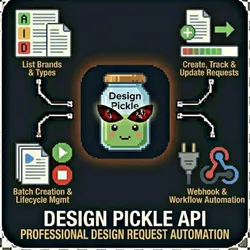
Design Pickle API - Professional Design Request Automation
Pricing
from $0.01 / 1,000 results
Design Pickle API - Professional Design Request Automation
Automate your Design Pickle design requests with this powerful Apify actor. Submit design requests, track status, manage brands, and download completed designs - all programmatically via the Design Pickle API. Unlimited Graphic Design Request Automation
Pricing
from $0.01 / 1,000 results
Rating
0.0
(0)
Developer

John Rippy
Actor stats
0
Bookmarked
2
Total users
1
Monthly active users
9 hours ago
Last modified
Categories
Share
Design Pickle API
Built by John Rippy | johnrippy.link
🏆 2025 Zapier Automation Hero of the Year — Project Phoenix: A 95-step AI sales pipeline cutting development time by 50%. Read more →
Professional Design Request Automation - Submit, Track & Download Designs
Automate your Design Pickle design requests with this powerful Apify actor. Submit design requests, track status, manage brands, and download completed designs - all programmatically via the Design Pickle API.
What is Design Pickle?
Design Pickle is a subscription-based unlimited graphic design service. With this actor, you can automate the entire design request workflow - from submission to completion tracking.
Features
- List Brands - Retrieve all your configured brand profiles
- List Request Types - See all available design types for your subscription
- Create Design Requests - Submit new design requests with specifications
- Track Request Status - Monitor pending, in-progress, and completed designs
- Update Requests - Append additional information to existing requests
- Cancel/Complete Requests - Manage request lifecycle
- Batch Creation - Submit multiple design requests in one run
- Webhook Support - Send results to Zapier, Make, n8n, or any webhook
Use Cases
Marketing Agencies
- Automate client design request submissions
- Batch create social media graphics for campaigns
- Track design queue across multiple clients/brands
E-commerce Operations
- Automatically submit product image requests
- Create seasonal promotional graphics at scale
- Manage design requests for multiple storefronts
Content Teams
- Schedule recurring design requests
- Integrate with content calendars
- Automate blog and social media graphic creation
Automation Workflows
- Connect Design Pickle to Zapier/Make workflows
- Trigger design requests from form submissions
- Auto-submit requests when new products are added
Input Parameters
| Parameter | Type | Required | Description |
|---|---|---|---|
| task | string | Yes | Operation to perform (see tasks below) |
| apiKey | string | Yes* | Design Pickle API integration key (*not needed for demoMode) |
| requestId | string | No | Request ID for get/update/cancel/complete |
| requestTypeId | string | No | Request type ID for filtering or creating |
| brandId | string | No | Brand ID to associate with request |
| title | string | No | Title for new design request |
| description | string | No | Detailed description of design needs |
| dimensions | string | No | Desired dimensions (e.g., '1080x1080') |
| fileUrls | array | No | URLs to reference images/assets |
| additionalNotes | string | No | Extra notes for update_request |
| statusFilter | string | No | Filter: all, pending, in_progress, review, completed, cancelled |
| maxResults | integer | No | Maximum results to return (default: 20) |
| batchItems | array | No | Array of items for batch creation |
| webhookUrl | string | No | URL to send results to |
| demoMode | boolean | No | Run with sample data (default: true) |
Available Tasks
| Task | Description |
|---|---|
list_brands | Retrieve all configured brand profiles |
list_request_types | Get available design request types |
get_request_type | Get details of a specific request type |
create_request | Submit a new design request |
list_requests | List design requests with optional status filter |
get_request | Get full details of a specific request |
update_request | Append additional information to a request |
cancel_request | Cancel a pending request |
complete_request | Mark a request as complete |
batch_create | Create multiple requests in one run |
Getting Your API Key
- Log in to your Design Pickle account
- Navigate to Settings > Integrations
- Click Generate Integration Key
- Copy the key and use it as the
apiKeyinput
Note: API access is restricted to company administrators only.
Example Usage
List Your Brands
{"task": "list_brands","apiKey": "your-integration-key"}
Create a Design Request
{"task": "create_request","apiKey": "your-integration-key","brandId": "brand_123","requestTypeId": "social_media","title": "Instagram Post - Product Launch","description": "Create an engaging Instagram post announcing our new product. Use bright colors and include the product image. Text should say 'NEW ARRIVAL' with the product name below.","dimensions": "1080x1080","fileUrls": ["https://example.com/product-image.jpg","https://example.com/brand-guidelines.pdf"]}
List Pending Requests
{"task": "list_requests","apiKey": "your-integration-key","statusFilter": "pending","maxResults": 50}
Update a Request with Additional Info
{"task": "update_request","apiKey": "your-integration-key","requestId": "req_abc123","additionalNotes": "Please also include our tagline 'Quality You Can Trust' at the bottom"}
Batch Create Multiple Requests
{"task": "batch_create","apiKey": "your-integration-key","batchItems": [{"title": "Facebook Ad - Product A","description": "Create Facebook ad for Product A launch","brandId": "brand_123","requestTypeId": "ad_creative","dimensions": "1200x628"},{"title": "Instagram Story - Product A","description": "Create Instagram story for Product A launch","brandId": "brand_123","requestTypeId": "social_media","dimensions": "1080x1920"},{"title": "Email Header - Product A","description": "Create email header graphic for Product A announcement","brandId": "brand_123","requestTypeId": "email_graphic","dimensions": "600x200"}]}
Output
Results are saved to the default dataset:
Request Created
{"task": "create_request","success": true,"request": {"id": "req_abc123","title": "Instagram Post - Product Launch","description": "Create an engaging Instagram post...","status": "pending","brandId": "brand_123","brandName": "My Brand","requestTypeId": "social_media","requestTypeName": "Social Media Graphics","dimensions": "1080x1080","createdAt": "2025-01-10T12:00:00Z","updatedAt": "2025-01-10T12:00:00Z"}}
Completed Request with Deliverables
{"task": "get_request","success": true,"request": {"id": "req_abc123","title": "Instagram Post - Product Launch","status": "completed","deliverables": [{"id": "del_001","fileName": "instagram_post_v1.png","fileUrl": "https://cdn.designpickle.com/...","fileType": "image/png","createdAt": "2025-01-11T14:30:00Z"}],"completedAt": "2025-01-11T14:30:00Z"}}
Webhook Integration
Send results to Zapier, Make, n8n, or any webhook URL:
{"task": "create_request","apiKey": "your-integration-key","title": "New Design Request","description": "Details here...","webhookUrl": "https://hooks.zapier.com/hooks/catch/123456/abcdef/"}
The webhook receives the same JSON output as the dataset.
Demo Mode
Test the actor without API credentials:
{"task": "list_requests","demoMode": true}
Demo mode returns realistic sample data so you can test your integration before connecting your Design Pickle account.
Pricing
Pay-per-result pricing:
| Operation | Cost |
|---|---|
| List brands/request types | $0.01 |
| Create request | $0.05 |
| Get/Update/Cancel/Complete request | $0.02 |
| Batch create (per request) | $0.05 |
Error Handling
The actor returns structured error responses:
{"task": "create_request","success": false,"error": "title and description are required for create_request"}
Common errors:
- Missing API key
- Invalid request ID
- Missing required fields (title, description for create_request)
- API rate limits exceeded
Related Actors
- Design Huddle - Template-based design automation
- AI Image Studio - AI-generated images with Leonardo AI
Support
- Design Pickle API Docs: design-pickle.readme.io
- Issues: Report on Apify