
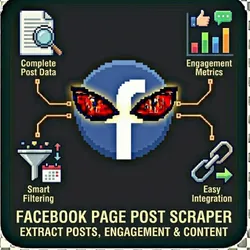
Facebook Page Post Scraper
Pricing
from $0.01 / 1,000 results
Facebook Page Post Scraper
Powerful Facebook Page scraper that extracts posts, engagement metrics (likes, comments, shares), images, videos, and posting dates from any public Facebook Page. Perfect for competitive analysis, content research, and social media monitoring.
Pricing
from $0.01 / 1,000 results
Rating
0.0
(0)
Developer

John Rippy
Actor stats
0
Bookmarked
22
Total users
6
Monthly active users
20 hours ago
Last modified
Categories
Share
Facebook Page Post Scraper - Public Page Content, Engagement & Audience Insights
Scrape public Facebook Page posts with full engagement metrics. Extract post content, images, videos, reaction breakdowns (like, love, haha, wow, sad, angry), comments, shares, and posting patterns. Essential for competitive social media analysis, content research, and brand monitoring.
Features
- Post Content - Full text, images, image galleries, videos, shared links
- Engagement Metrics - Likes, comments, shares, and total reactions
- Reaction Breakdown - Like, Love, Haha, Wow, Sad, Angry counts
- Comment Extraction - Top comments with author data and engagement
- Video Data - Video thumbnails, duration, and view counts
- Link Posts - Shared URL, title, and description extraction
- Date Filtering - Scrape posts within specific date ranges
- Content Type Filter - Text only, images, videos, links, or all
- Posting Pattern Analysis - Frequency and timing insights
- Anti-Detection - Residential proxies for reliable access
- No Login Required - Works with public Facebook Pages
- Demo Mode - Test with sample data before going live
Who Should Use This Actor?
Social Media Managers
Analyze competitor posting strategies. Track what content types, topics, and posting times drive the most engagement on competitor pages.
Marketing Agencies
Build competitive social media reports for clients. Compare engagement metrics across competitor pages and identify content gaps.
Brand Managers
Monitor competitor Facebook activity. Track campaign launches, promotional posts, and messaging changes.
Content Creators
Research top-performing content in your niche. Identify viral post formats, trending topics, and engagement patterns to inform your own strategy.
PR & Communications Teams
Monitor brand mentions, crisis responses, and public sentiment on competitor or industry pages.
Market Research Analysts
Analyze audience engagement patterns across industries. Identify which content resonates with different demographics.
Quick Start
Demo Mode (Free Test)
{"demoMode": true}
Scrape a Facebook Page
{"pageUrls": ["https://www.facebook.com/Nike"],"maxPostsPerPage": 25,"includeComments": false,"demoMode": false}
Multiple Pages with Comments
{"pageUrls": ["https://www.facebook.com/Nike","https://www.facebook.com/Adidas","https://www.facebook.com/Puma"],"maxPostsPerPage": 50,"includeComments": true,"maxCommentsPerPost": 20,"demoMode": false}
Date-Filtered Posts
{"pageUrls": ["https://www.facebook.com/Nike"],"dateFrom": "2025-12-01","dateTo": "2025-12-31","maxPostsPerPage": 100,"contentType": "all","demoMode": false}
Input Parameters
| Parameter | Type | Default | Description |
|---|---|---|---|
pageUrls | array | - | Facebook Page URLs to scrape |
pageUsernames | array | - | Facebook Page usernames/handles |
maxPostsPerPage | number | 25 | Max posts per page (1-100) |
includeComments | boolean | false | Scrape top comments for each post |
maxCommentsPerPost | number | 10 | Max comments per post (1-50) |
dateFrom | string | - | Only posts after this date (YYYY-MM-DD) |
dateTo | string | - | Only posts before this date |
contentType | string | all | Filter: all, text_only, with_images, with_videos, with_links |
skipSponsored | boolean | true | Skip sponsored/boosted post indicators |
proxyConfiguration | object | Residential | Proxy settings |
demoMode | boolean | true | Return sample data for testing |
webhookUrl | string | - | Webhook URL for results delivery |
Output Format
{"postId": "fb-post-123456789","pageUrl": "https://www.facebook.com/Nike","pageName": "Nike","postUrl": "https://www.facebook.com/Nike/posts/123456789","content": "Just Do It. The new Air Max 2026 is here. Available now at Nike.com #AirMax #Nike","contentType": "image","imageUrls": ["https://scontent.xx.fbcdn.net/..."],"videoUrl": null,"videoDuration": null,"videoViews": null,"sharedLink": null,"sharedLinkTitle": null,"publishedAt": "2025-12-15T14:30:00.000Z","reactions": {"total": 45230,"like": 28500,"love": 12400,"haha": 890,"wow": 2100,"sad": 140,"angry": 200},"commentsCount": 3456,"sharesCount": 8901,"comments": [{"author": "Jane Smith","text": "These look amazing! When do they drop in Europe?","likes": 245,"date": "2025-12-15T15:00:00.000Z"}],"isSponsored": false,"scrapedAt": "2026-01-28T10:30:00.000Z"}
Pricing (Pay-Per-Event)
| Event | Description | Price |
|---|---|---|
page_scraped | Per page scraped | $0.05 |
post_scraped | Per post extracted | $0.005 |
comment_scraped | Per comment extracted | $0.002 |
Example costs:
- 3 pages with 25 posts each: (3 x $0.05) + (75 x $0.005) = $0.525
- 1 page with 100 posts + 10 comments each: (1 x $0.05) + (100 x $0.005) + (1000 x $0.002) = $2.55
- 10 pages with 50 posts each: (10 x $0.05) + (500 x $0.005) = $3.00
- Demo mode: $0.00
Common Scenarios
Scenario 1: Weekly Competitor Report
{"pageUrls": ["https://www.facebook.com/YourBrand","https://www.facebook.com/Competitor1","https://www.facebook.com/Competitor2"],"maxPostsPerPage": 50,"includeComments": true,"maxCommentsPerPost": 5,"demoMode": false}
Schedule weekly for ongoing competitive monitoring.
Scenario 2: Viral Content Research
{"pageUrls": ["https://www.facebook.com/IndustryLeader"],"maxPostsPerPage": 100,"contentType": "with_videos","demoMode": false}
Identify top-performing video content from industry leaders.
Scenario 3: Campaign Launch Tracking
{"pageUrls": ["https://www.facebook.com/Competitor"],"dateFrom": "2025-11-15","dateTo": "2025-12-15","maxPostsPerPage": 100,"includeComments": true,"maxCommentsPerPost": 20,"demoMode": false}
Track competitor campaign launches and audience reaction.
Webhook & Automation Integration
Webhook Configuration
{"pageUrls": ["https://www.facebook.com/YourCompetitor"],"maxPostsPerPage": 10,"webhookUrl": "https://your-endpoint.com/webhook"}
Zapier / Make.com / n8n
- Create a webhook trigger in your automation platform
- Copy the webhook URL to
webhookUrl - Route results to Google Sheets, Slack, Airtable, etc.
Popular automations:
- New competitor posts -> Slack channel (real-time monitoring)
- Engagement data -> Google Sheets (competitive dashboard)
- Top comments -> Airtable (sentiment tracking)
- Weekly digest -> Email to marketing team
Apify Scheduled Runs
Schedule daily or weekly runs for continuous competitor monitoring.
Official API Alternatives
Facebook Graph API
Facebook offers the Graph API for Page data:
- Pros: Official, real-time, structured data
- Cons: Requires Facebook developer app, Page tokens, limited to pages you manage or have permissions for
- Best for: Managing your own page data programmatically
Alternative Social Media Tools
- Sprout Social - Social management ($249+/month)
- Hootsuite - Social analytics ($99+/month)
- Brandwatch - Social listening (enterprise pricing)
- CrowdTangle - Facebook insights (Meta-owned, restricted access)
This Scraper's Advantages
- Any public page - Not limited to pages you manage
- Reaction breakdown - Full like/love/haha/wow/sad/angry counts
- Comment extraction - Top comments with engagement data
- Date filtering - Focus on specific campaign periods
- Content type filtering - Analyze specific post formats
- Pay-per-result pricing (vs monthly subscriptions)
FAQ
Q: Do I need a Facebook account?
A: No. This scraper works with public Facebook Page data. No login required.
Q: Can I scrape private profiles or groups?
A: No. Only public Facebook Pages are supported. Private profiles and closed groups are not accessible.
Q: What reaction types are tracked?
A: All six Facebook reactions: Like, Love, Haha, Wow, Sad, and Angry, plus total reaction count.
Q: Can I filter by engagement level?
A: The scraper returns all posts with engagement data. Filter high-engagement posts in post-processing by sorting on reaction counts.
Q: How far back can I scrape posts?
A: Public Facebook Pages typically show posts going back several years. Use dateFrom and dateTo to target specific periods.
Common Problems & Solutions
"Page not found"
- Verify the Facebook Page URL is correct
- The page may be private, deactivated, or region-restricted
- Try using the page username instead of full URL
"Rate limited"
- Wait 10-15 minutes between runs
- Reduce
maxPostsPerPage - Facebook is protective of automated access
"Comments not loading"
- Set
includeComments: true(defaults to false) - Some posts may have comments disabled
- Reduce
maxCommentsPerPostif getting rate limited
"Demo data showing"
- Set
demoMode: false- no account required
📞 Support
- Actor Arsenal: Full Actor Catalog
- Developer: John Rippy
Built by John Rippy | Actor Arsenal
