
Multi-Carrier Package Tracking (USPS, UPS, FedEx) avatar
Multi-Carrier Package Tracking (USPS, UPS, FedEx)

Pricing

from $0.01 / 1,000 results

Go to Apify Store
Multi-Carrier Package Tracking (USPS, UPS, FedEx)

Multi-Carrier Package Tracking (USPS, UPS, FedEx)

Track Packages Across All Major Carriers Managing shipments from multiple carriers is a pain. Different APIs, different authentication methods, different response formats. USPS uses XML, UPS requires OAuth, FedEx has its own auth flow. The Multi-Carrier Package Tracking tracks all

Pricing

from $0.01 / 1,000 results

Rating

0.0

(0)

Developer

John Rippy

John Rippy

Maintained by Community

Actor stats

0

Bookmarked

2

Total users

1

Monthly active users

2 days ago

Last modified

Share

"One API, Three Carriers" by John Rippy | johnrippy.link

๐Ÿ† 2025 Zapier Automation Hero of the Year โ€” Project Phoenix: A 95-step AI sales pipeline cutting development time by 50%. Read more โ†’


Track Packages Across All Major Carriers

Managing shipments from multiple carriers is a pain. Different APIs, different authentication methods, different response formats. USPS uses XML, UPS requires OAuth, FedEx has its own auth flow.

What if you could track any package with a single API call?

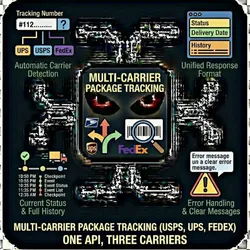
The Multi-Carrier Package Tracking actor automatically:

  • Detects the carrier from the tracking number format
  • Authenticates with the appropriate carrier API
  • Returns unified, structured tracking data

USPS, UPS, or FedEx โ€” just paste the tracking number.


Features

Automatic Carrier Detection

No need to specify which carrier โ€” the actor analyzes the tracking number format and routes to the correct API:

CarrierExample PatternDetection
UPS1Z999AA10123456784Starts with "1Z" + 16 chars
USPS9400111899223456789012Starts with 94/92/93 + 20 digits
FedEx79464479013812-15 digits

Unified Response Format

All carriers return the same structured data:

  • Current status and location
  • Estimated and actual delivery dates
  • Full event history with timestamps
  • Error handling with clear messages

Demo Mode

Test integrations without API credentials. Enable demoMode: true to get realistic sample data.


Quick Start

Track Multiple Packages

{
"trackingNumbers": [
"1Z999AA10123456784",
"9400111899223456789012",
"794644790138"
],
"demoMode": true
}

Production Mode with API Credentials

{
"trackingNumbers": ["1Z999AA10123456784"],
"demoMode": false,
"uspsUserId": "YOUR_USPS_USER_ID",
"upsClientId": "YOUR_UPS_CLIENT_ID",
"upsClientSecret": "YOUR_UPS_CLIENT_SECRET",
"fedexApiKey": "YOUR_FEDEX_API_KEY",
"fedexSecretKey": "YOUR_FEDEX_SECRET_KEY"
}

Output Format

{
"trackingNumber": "1Z999AA10123456784",
"carrier": "UPS",
"status": "Delivered",
"statusDetail": "DELIVERED",
"estimatedDelivery": null,
"deliveredDate": "2025-01-13T14:23:00Z",
"lastUpdate": "2025-01-13T14:23:00Z",
"location": "Austin, TX 78701 US",
"events": [
{
"timestamp": "2025-01-13T14:23:00Z",
"status": "Delivered",
"location": "Austin, TX 78701 US",
"details": "Left at front door"
},
{
"timestamp": "2025-01-13T08:15:00Z",
"status": "Out For Delivery",
"location": "Austin, TX 78701 US",
"details": "On UPS vehicle for delivery"
},
{
"timestamp": "2025-01-12T22:45:00Z",
"status": "Departed Facility",
"location": "Dallas, TX 75261 US",
"details": "Departed UPS facility"
}
]
}

API Credentials Setup

USPS Web Tools (Free)

  1. Go to USPS Web Tools Registration
  2. Create a free account
  3. Copy your User ID

UPS Developer Portal

  1. Go to developer.ups.com
  2. Create an app to get Client ID and Secret
  3. Enable the Tracking API

FedEx Developer Portal

  1. Go to developer.fedex.com
  2. Create a project
  3. Get your API Key and Secret Key

Use Cases

E-commerce Order Tracking

Build customer-facing tracking pages that work with any carrier your suppliers use.

Shipping Automation

Trigger workflows when packages are delivered or delayed:

  • Send delivery confirmation emails
  • Update inventory systems
  • Alert customers about delays

Logistics Dashboards

Monitor all shipments across carriers in a unified view.

Customer Support

Quickly look up any tracking number without switching between carrier websites.


Pay-Per-Event Pricing

You only pay for what you use. No monthly fees. No API key costs.

EventDescriptionPrice
tracking_lookupEach tracking number queried$0.005

Cost Examples

UsageMonthly Cost
100 lookups$0.50
1,000 lookups$5.00
10,000 lookups$50.00

Demo mode is free โ€” test all you want before going live.


Tracking Number Patterns

UPS

  • 1Z + 16 alphanumeric characters (e.g., 1Z999AA10123456784)
  • T + 10 digits (e.g., T1234567890)
  • 9 digits (e.g., 123456789)

USPS

  • 22 digits starting with 94 (Priority Mail)
  • 22 digits starting with 92 (First Class)
  • 22 digits starting with 93 (Certified Mail)
  • International: 2 letters + 9 digits + US (e.g., LZ123456789US)

FedEx

  • 12 digits (e.g., 794644790138)
  • 15 digits
  • 22 digits starting with 96 (FedEx Ground)

API Integration

JavaScript/Node.js

import { ApifyClient } from 'apify-client';
const client = new ApifyClient({ token: 'YOUR_API_TOKEN' });
const run = await client.actor('localhowl/multi-carrier-tracking').call({
trackingNumbers: ['1Z999AA10123456784'],
demoMode: true
});
const { items } = await client.dataset(run.defaultDatasetId).listItems();
console.log(items);

cURL

curl -X POST "https://api.apify.com/v2/acts/localhowl~multi-carrier-tracking/runs?token=YOUR_API_TOKEN" \
-H "Content-Type: application/json" \
-d '{
"trackingNumbers": ["1Z999AA10123456784"],
"demoMode": true
}'

Python

from apify_client import ApifyClient
client = ApifyClient("YOUR_API_TOKEN")
run = client.actor("localhowl/multi-carrier-tracking").call(run_input={
"trackingNumbers": ["1Z999AA10123456784"],
"demoMode": True
})
items = client.dataset(run["defaultDatasetId"]).list_items().items
print(items)

Webhook Integration

Send tracking updates directly to your automation platform:

{
"trackingNumbers": ["1Z999AA10123456784"],
"demoMode": false,
"webhookUrl": "https://hooks.zapier.com/hooks/catch/12345/abcde/"
}

Supported Platforms

  • Zapier: Use "Catch Hook" trigger
  • Make (Integromat): Use "Webhook" trigger
  • n8n: Use "Webhook" node
  • Custom endpoints: Any HTTPS POST endpoint

Error Handling

The actor handles errors gracefully:

{
"trackingNumber": "INVALID123",
"carrier": "Unknown",
"status": "Error",
"error": "Unable to detect carrier from tracking number format. Please verify the tracking number."
}

Common errors:

  • Missing API credentials for the detected carrier
  • Invalid tracking number format
  • Package not found in carrier system
  • API rate limits or timeouts

Limitations

  • Real-time delays: Carrier APIs may have 15-60 minute delays
  • Historical data: Only current tracking info, not archived shipments
  • Rate limits: Built-in delays respect carrier API limits
  • International: Limited support for non-US international tracking

Support


Built by John Rippy | johnrippy.link

๐Ÿ† 2025 Zapier Automation Hero of the Year โ€” Project Phoenix: A 95-step AI sales pipeline cutting development time by 50%. Read more โ†’


Keywords

package tracking api, usps tracking api, ups tracking api, fedex tracking api, multi carrier tracking, shipping tracking, delivery tracking, package tracker, shipment tracking api, logistics api, ecommerce shipping, order tracking
