
PageSpeed Insights & Core Web Vitals Monitor (Bulk, Alerts)
Under maintenancePricing
from $4.80 / 1,000 page audited (lighthouse + core web vitals)s
PageSpeed Insights & Core Web Vitals Monitor (Bulk, Alerts)
Under maintenanceBulk PageSpeed Insights checker, no coding: paste URLs and your free Google API key in the form, click Start, download Excel. Lighthouse scores and Core Web Vitals (LCP, INP, CLS, real-user CrUX data) with history and regression alerts.
Pricing
from $4.80 / 1,000 page audited (lighthouse + core web vitals)s
Rating
0.0
(0)
Developer

Alpine Data Labs
Maintained by CommunityActor stats
0
Bookmarked
2
Total users
1
Monthly active users
12 hours ago
Last modified
Categories
Share
PageSpeed Insights Bulk Checker & Core Web Vitals Monitor
Check PageSpeed Insights for many URLs at once. Each check returns the Lighthouse scores (performance, SEO, accessibility and best practices), the lab metrics and Core Web Vitals from real users (LCP, INP and CLS from the Chrome UX Report), with a pass/fail assessment. Every page gets one Excel-ready row. Schedule it weekly or after a deploy: the Actor remembers the last scores and flags pages that got slower. It uses your own free Google API key, so you never share a quota with other users.
How to use it (no code needed)
- Fill in the form: paste your page addresses into 1. Which pages? (one per line, e.g.
example.com) and your free key into 2. Your Google API key (free) (get one in 2 minutes). Everything else is optional and already set. - Click Start.
- Download the results as Excel, CSV or JSON from the Output tab, or open the Core Web Vitals and Lighthouse tabs.
- Optional: schedule it (Schedules → e.g. every Monday) to monitor your pages and get only the ones that got slower.
If something is missing or wrong (for example no key or an invalid key), the run stops with a plain message and nothing is charged.
What you get
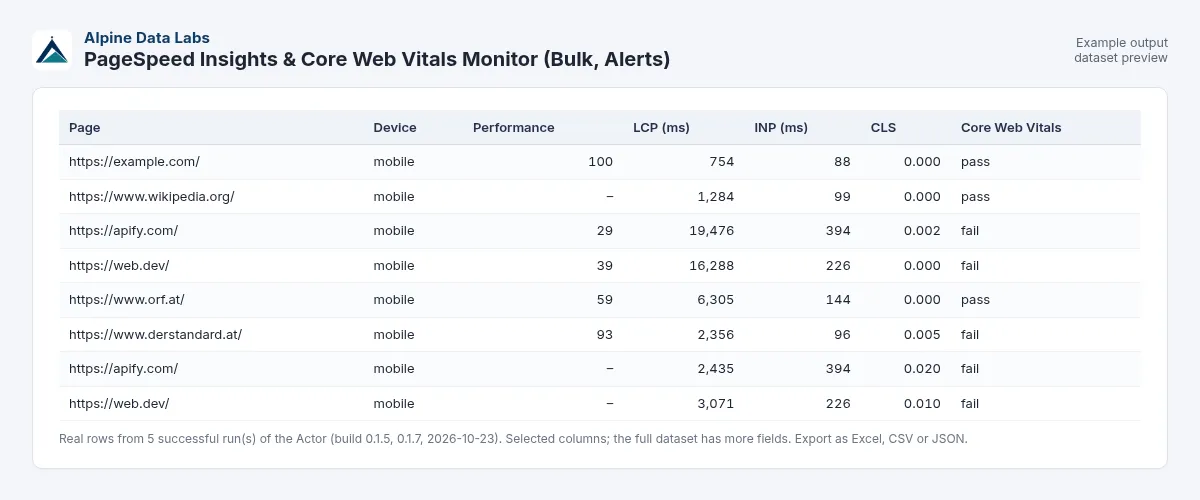
One row per page and device. These are real results from a test run on 23 Oct 2026 (mobile, full audit):
| Page | Device | Performance | Core Web Vitals | LCP lab (ms) | INP real users (ms) | CLS lab | LCP real users (ms) | CLS real users | SEO | Top opportunity |
|---|---|---|---|---|---|---|---|---|---|---|
| https://apify.com/ | mobile | 41 | fail | 16346 | 396 | 0.002 | 2435 | 0.02 | 85 | Reduce unused JavaScript (save ~2.5 s) |
| https://web.dev/ | mobile | 50 | fail | 3906 | 228 | 0.121 | 3072 | 0.01 | 92 | Render-blocking requests (save ~2.3 s) |
Both pages fail the Core Web Vitals assessment:
- apify.com because of INP (396 ms is above the 200 ms limit);
- web.dev because of LCP (3.1 s is above 2.5 s) and INP (228 ms is above 200 ms).
Lab scores reflect a single throttled mobile load and vary from run to run.
Other columns include:
- the accessibility and best-practices scores;
- FCP, TBT, Speed Index and server response time;
- real-user FCP and TTFB, and whether the real-user data is for the URL or the whole site;
- the top 3 opportunities (for example "Reduce unused JavaScript (save ~1.2 s)");
- page weight in KB and the number of requests;
- the previous score;
- a link to the full PageSpeed Insights report.
Monitor pages and get alerts on regressions
- Turn on a schedule (Actor → Schedules, for example every Monday) or trigger the Actor from your deploy pipeline.
- Compare with the previous run is on by default. Every row shows
prevPerformanceScore,deltaandregression. - A page counts as a regression in either case:
- its performance score drops by at least the Regression threshold (default 5 points);
- its Core Web Vitals go from pass to fail.
- Turn on Only output pages that got worse: the dataset then contains only regressions, so an email or Slack integration fires only when something got slower. Unchanged pages are still checked, remembered and charged (a short summary is saved in the key-value store as
UNCHANGED_CHECKS). You pay per page checked; alerts are free filtering of the output. - Use a different Monitor name for each client or site to keep their histories separate.
Use cases
- SEO and web agencies: weekly Core Web Vitals and Lighthouse reports for all client sites in one spreadsheet.
- E-commerce teams: check the key product and category pages after every release and catch slow templates early.
- Developers: a performance budget check after a deploy, with an alert on regressions.
- Site migrations and redesigns: compare before and after for every URL in the sitemap.
Input fields in plain words
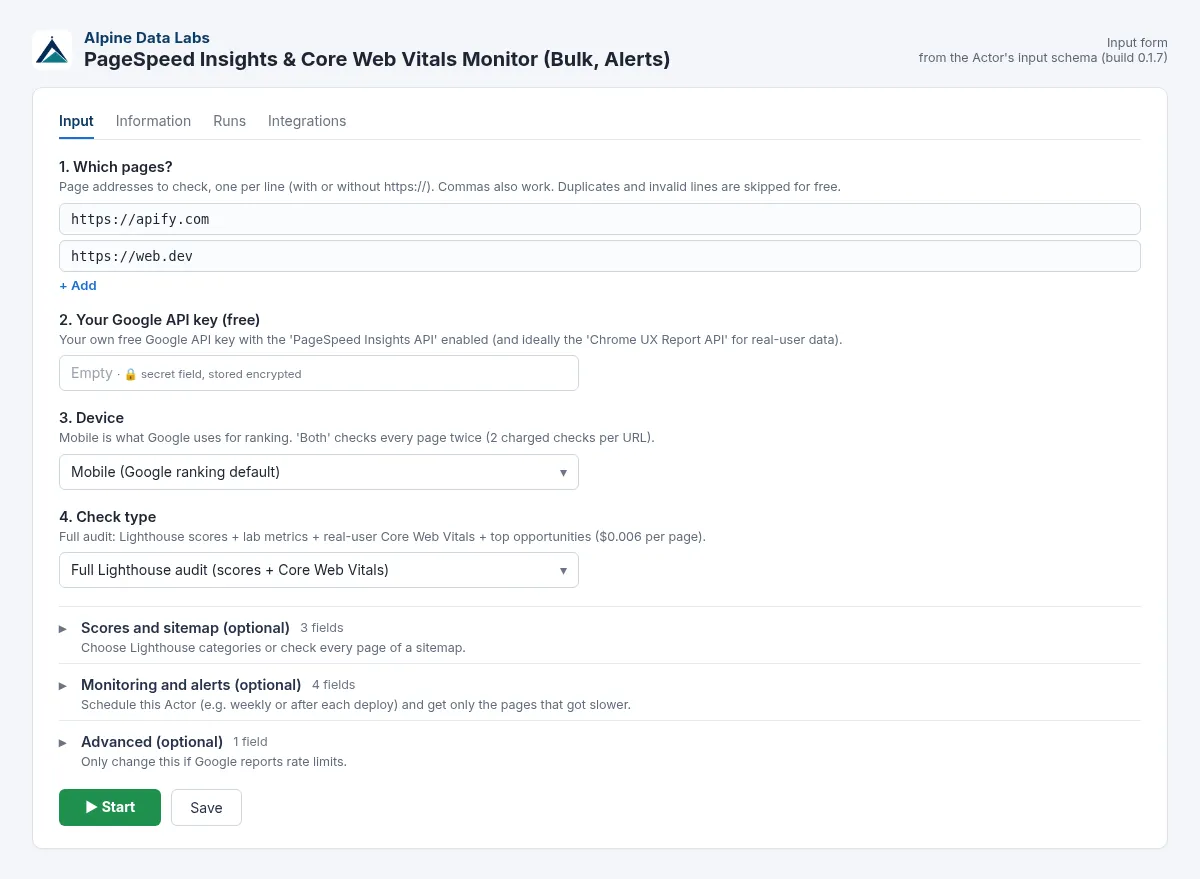
| Form field | What it does | Default / example |
|---|---|---|
| 1. Which pages? | URLs or domains, one per line or comma-separated. Duplicates and invalid lines are skipped for free. | 2 example pages / example.com |
| 2. Your Google API key (free) | Your free key (stored encrypted, never shown in logs). | required, AIzaSy… |
| 3. Device | Mobile (what Google uses for ranking), desktop, or both (2 checks per URL). | Mobile |
| 4. Check type | Full Lighthouse audit or Field data only (real-user Core Web Vitals, cheaper). | Full Lighthouse audit |
| Scores and sitemap (optional): Lighthouse categories | Performance, SEO, accessibility, best practices. Any combination costs the same. | all 4 |
| Scores and sitemap (optional): Sitemap URL | Adds the pages of a sitemap.xml or sitemap index. A bare domain tries /sitemap.xml. | empty / https://example.com/sitemap.xml |
| Scores and sitemap (optional): Max pages | Limit per run. Protects your budget. | 100 |
| Monitoring and alerts (optional): Compare with the previous run | Shows the previous score, the change and a regression flag. | on |
| Monitoring and alerts (optional): Only output pages that got worse | Output only regressions (all pages are still checked and charged). | off |
| Monitoring and alerts (optional): Regression threshold (score points) | Score drop that counts as a regression. | 5 |
| Monitoring and alerts (optional): Monitor name | Separate histories, e.g. one per client. | default |
| Advanced (optional): Parallel checks | Number of pages checked at the same time. | 4 |
Pricing
You pay per successful check. Google's API is free with your own key, and Apify platform usage is included in the price.
| Event | Price | Per 1,000 |
|---|---|---|
| Page audited: full Lighthouse audit of one URL on one device | $0.006 | $6.00 |
| Field data checked: real-user Core Web Vitals only (Field data only mode) | $0.002 | $2.00 |
Examples:
- 200 pages, mobile only, full audit: 200 × $0.006 = $1.20.
- The same 200 pages on mobile and desktop: 400 checks = $2.40.
- 1,000 full audits = $6.00.
- 200 pages in Field data only mode: 200 × $0.002 = $0.40.
The pre-filled example (2 pages, mobile, full audit) costs $0.012.
Volume discount: prices above are for the Apify Free and Starter plans. On the Scale plan you pay 10 % less ($0.0054 per audit, $0.0018 per field-data check), on Business and higher plans 20 % less ($0.0048 and $0.0016).
Always free:
- invalid or duplicate URLs;
- pages Google cannot load (404, blocked, timeout);
- a missing or invalid API key, a disabled API or a used-up quota;
- pages without real-user data in field-data mode.
Alert mode: Only output pages that got worse doesn't change the price. You pay per page checked; alerts are free filtering of the output. Example: a weekly monitor of 50 pages on mobile costs 50 × $0.006 = $0.30 per run (about $1.20 per month), whether it finds 0 or 5 regressions.
Set Max charge per run in the run options to cap the cost. The Actor stops cleanly at the limit.
FAQ
How do I get a free Google PageSpeed Insights API key?
- Open https://console.cloud.google.com and sign in with any Google account.
- At the top, click the project picker → New project. Give it a name (for example "PageSpeed") → Create, then select the new project.
- Open the menu → APIs & Services → Library. Search for PageSpeed Insights API → Enable.
- Recommended: in the Library, also search for Chrome UX Report API → Enable. This gives the freshest real-user data and is required for Field data only mode.
- Go to APIs & Services → Credentials → + Create credentials → API key. Copy the key; it starts with
AIza. - Optional but good practice: click the key → API restrictions → Restrict key → tick PageSpeed Insights API and Chrome UX Report API → Save. Leave Application restrictions on None, because website or IP restrictions block server-side calls.
- Paste the key into 2. Your Google API key and click Start.
The key is free. No billing account is needed for these APIs. Google allows about 25,000 PageSpeed checks per day per project.
Why do I need my own API key?
Google's shared keyless quota is almost always used up (HTTP 429). With your own key you get your own free quota, and your data stays tied to your Google project. The key is stored encrypted by Apify and never written to logs or results.
The run failed with "API key not valid" or "API not enabled". What now?
Nothing was charged. Read the message: it says exactly what to fix. Usually you need to enable the PageSpeed Insights API in the same project as the key, or copy the full key again. After enabling an API, wait 1–2 minutes.
What is the difference between lab data and field data (CrUX)?
- Lab data (Lighthouse) is a single simulated load on a throttled phone. It is good for debugging and comparing.
- Field data is the 75th percentile of real Chrome users over the last 28 days. Google uses it for the Core Web Vitals ranking signal.
The full audit gives you both.
Why is there no real-user data for some pages?
The Chrome UX Report only covers pages and sites with enough Chrome traffic. If the exact URL has too little data, the Actor uses the data for the whole site and sets fieldDataSource = origin. Small sites often have none: the full audit still returns the Lighthouse scores, and field-only checks without data are free.
How does the Core Web Vitals assessment work?
It is pass when all three are true:
- real-user LCP ≤ 2.5 s;
- INP ≤ 200 ms;
- CLS ≤ 0.1.
These are Google's "good" thresholds at the 75th percentile. If INP has no data, the assessment uses LCP and CLS.
Do I pay for pages that alert mode hides?
Yes. You pay per page checked; alerts are free filtering of the output. Each page is fully audited and stored as history whether or not it is shown. Hidden unchanged pages are listed in the key-value store record UNCHANGED_CHECKS. Errors, invalid inputs, pages Google cannot load, and key or quota problems are always free. To spend less on a large monitor, use Field data only mode ($0.002 per page) or lower Max pages.
Why do scores differ from run to run?
Lighthouse lab scores vary by a few points because of network and server noise. That is why the default regression threshold is 5 points. For decisions, look at the field data and the trend over several runs.
Can I check a whole website?
Yes. Paste the sitemap URL (or just the domain) into Sitemap URL and set Max pages.
Can I use it via API, Make, Zapier, n8n or an AI agent (MCP)?
Yes. The API takes the same input as the form; see For developers at the end.
Funktioniert das auch für deutsche Websites (Website-Geschwindigkeit testen)?
Ja. Sie können jede öffentliche Website prüfen, z. B. .at, .de oder .ch. Der API-Schlüssel wird wie oben beschrieben angelegt.
Limits
- Only public pages that Google can load. Login-protected pages, intranets and localhost cannot be checked.
- One full audit takes about 10–30 s on Google's side. With 4 parallel checks, 100 pages take about 10–15 minutes.
- The quota is 25,000 PageSpeed checks per day per Google project. The Chrome UX Report API has no daily cap but allows about 150 queries per minute.
- Lab scores have natural noise of a few points.
- Data comes from Google: if Google changes the PageSpeed Insights API, fields may change.
Data source and legal notes
Data comes from the official Google PageSpeed Insights API v5 and the Chrome UX Report API, called with your own API key and subject to Google's API terms. The Actor checks only public pages and collects no personal data. PageSpeed Insights, Lighthouse and Chrome are trademarks of Google LLC; this Actor is not affiliated with or endorsed by Google.
Support
Found a problem or missing a column? Open an issue in the Issues tab. Alpine Data Labs usually answers within one working day.
For developers: API, webhooks, Make/Zapier/n8n
You don't need this section to use the Actor. The form and the API take the same input: every form field has a JSON name (for example urls = 1. Which pages?, googleApiKey = 2. Your Google API key (free), strategy = 3. Device, mode = 4. Check type), and a JSON input sent via the API, a webhook, a schedule, a saved task or Make/Zapier/n8n gives exactly the same result as the form. Field names, output fields and file names stay stable, so existing workflows and websites that call the Actor keep working. Keep your Google key out of shared code; pass it in the run input or store it in a saved task.
Minimal input:
cURL (start a run and get the results in one call; replace <YOUR_APIFY_TOKEN> with your token from Apify Console → Settings → API & Integrations):
JavaScript (npm install apify-client):
Python (pip install apify-client):
Integrations: Schedules run a saved task automatically (e.g. every morning). Webhooks (Integrations tab → "Run succeeded") send the finished run to your own URL. Ready-made Make, Zapier and n8n modules start the Actor and read its results. AI agents can use it as a tool through the Apify MCP server (mcp.apify.com).
Full example input
Example output (one row, real run on 23 Oct 2026)
The run returns more columns than shown here, such as FCP, Speed Index, TTFB, the previous score and the change since the last run. INP_ms is real-user data, because Lighthouse cannot measure INP in the lab.


