
Bulk Website Screenshot & URL to PDF: Full Page, Mobile
Pricing
from $3.00 / 1,000 screenshot or pdf files
Bulk Website Screenshot & URL to PDF: Full Page, Mobile
Bulk website screenshots and URL to PDF, no coding: paste URLs in the form, click Start, download the files. Full-page or viewport PNG/JPEG, desktop or mobile, cookie banners removed. $3.75 per 1,000 files.
Pricing
from $3.00 / 1,000 screenshot or pdf files
Rating
0.0
(0)
Developer

Alpine Data Labs
Maintained by CommunityActor stats
0
Bookmarked
2
Total users
1
Monthly active users
2 days ago
Last modified
Categories
Share
Take bulk website screenshots (full page, PNG or JPEG) and convert any webpage to PDF, for one URL or a thousand at once. Paste web addresses, click Start, and download the images and PDFs. Desktop or mobile layout. Cookie banners and pop-ups are removed automatically, so they don't cover the page. No login, no API key, no coding.
How to use it (no code needed)
Everything is set in the input form. You don't need code, JSON or an API key.
- 1. Which web pages? (URLs or domains): type or paste the addresses, one per line (or use + Add / Bulk edit).
https://is optional, soapify.comandwww.example.com/pricingboth work. The form already contains two working examples. - Pick the options in the form: 2. Image format (PNG or JPEG), 3. Full-page screenshot (on = whole page, off = visible area only), 4. Device (Desktop or Mobile phone). Tick Also save the page as PDF under PDF export (optional) if you need PDFs. Everything else has sensible defaults.
- Click Start. Most pages take 3–15 seconds. Note: Start with the pre-filled example is a small paid run: 2 screenshots × $0.005 = $0.01 (with Also save the page as PDF: 2 files per page = 2 × $0.005). An empty input is not free either: with no web address (empty form or
{}via the API) the Actor takes a paid example screenshot of https://apify.com (~$0.005 = 1 screenshot event at the base price). - Open the Output tab: click a Screenshot or PDF link to download it, Thumbnails shows previews, and Export downloads the table as Excel, CSV or JSON with a download link for every file. Optional: click Save as a new task and then Schedule to capture the same pages every day or week.
If an input is wrong (for example no valid web address), the run stops with a plain-English message and nothing is charged.
What you get: screenshots, webpage PDFs and a results table
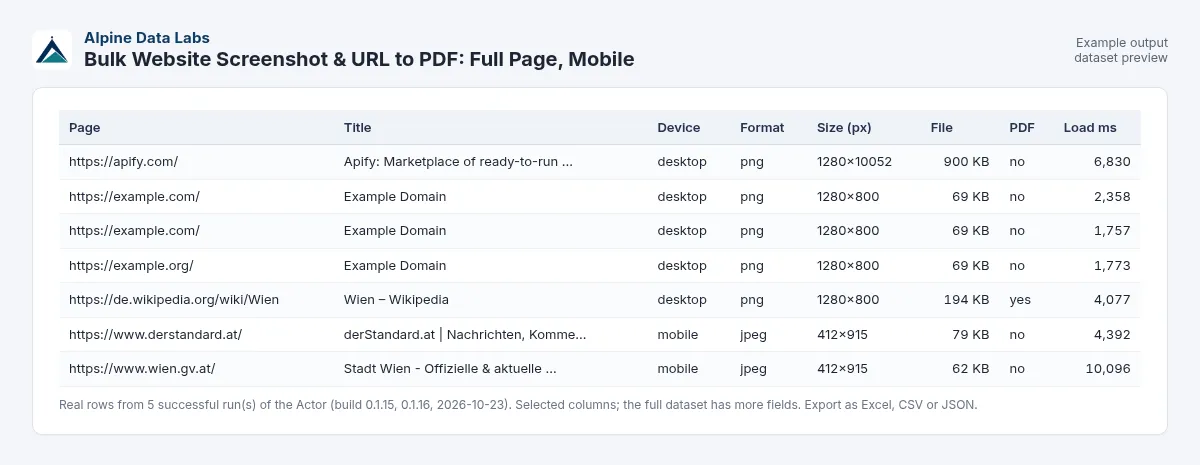
| URL | Status | Page title | Screenshot | Width × height | Image size | HTTP | Cookie banner removed |
|---|---|---|---|---|---|---|---|
| https://apify.com/ | ok | Apify: Marketplace of ready-to-run tools for AI | apify-com-b2cbec-001.png | 1280 × 10052 | 918 KB | 200 | yes |
| https://www.wikipedia.org/ | ok | Wikipedia | wikipedia-org-72e64c-002.png | 1280 × 1103 | 245 KB | 200 | no banner |
| https://example.com/does-not-exist | failed | 404 | (free: "the site returned HTTP 404 (page not found)") |
(Real rows from test runs on 23 Oct 2026, full page, desktop, PNG.)
The files are saved in the run's key-value store. Each row has a download link (screenshotUrl, pdfUrl) that works without logging in. Rows also contain the final URL after redirects, the device, the format, the PDF size, the load time, truncated (true if a very long page was cut at Max page height; fullPageHeight then shows the real height) and an errorMessage that explains in plain words why a page failed.
Monitor how a page looks over time: click Schedule to capture your homepage, a competitor's pricing page or a landing page every day or week. Send the results to Google Drive, Slack, email, Make, Zapier or n8n under Integrations.
Use cases
- Bulk website screenshots for SEO audits, client reports, web-design portfolios and mockups.
- Mobile screenshots to check a responsive layout on a phone-sized screen.
- URL to PDF converter: archive articles, terms and conditions, price lists or documentation as searchable PDFs (A4 or US Letter).
- Visual proof and archiving: what a page showed on a given date (prices, legal notices; switch off Block ads and trackers to keep the ads).
- AI agents and automations: a website screenshot API for n8n, Make, Zapier or your own code. Send URLs, get image links back.
- QA: quick before/after screenshots of many pages after a release.
Input fields in plain words
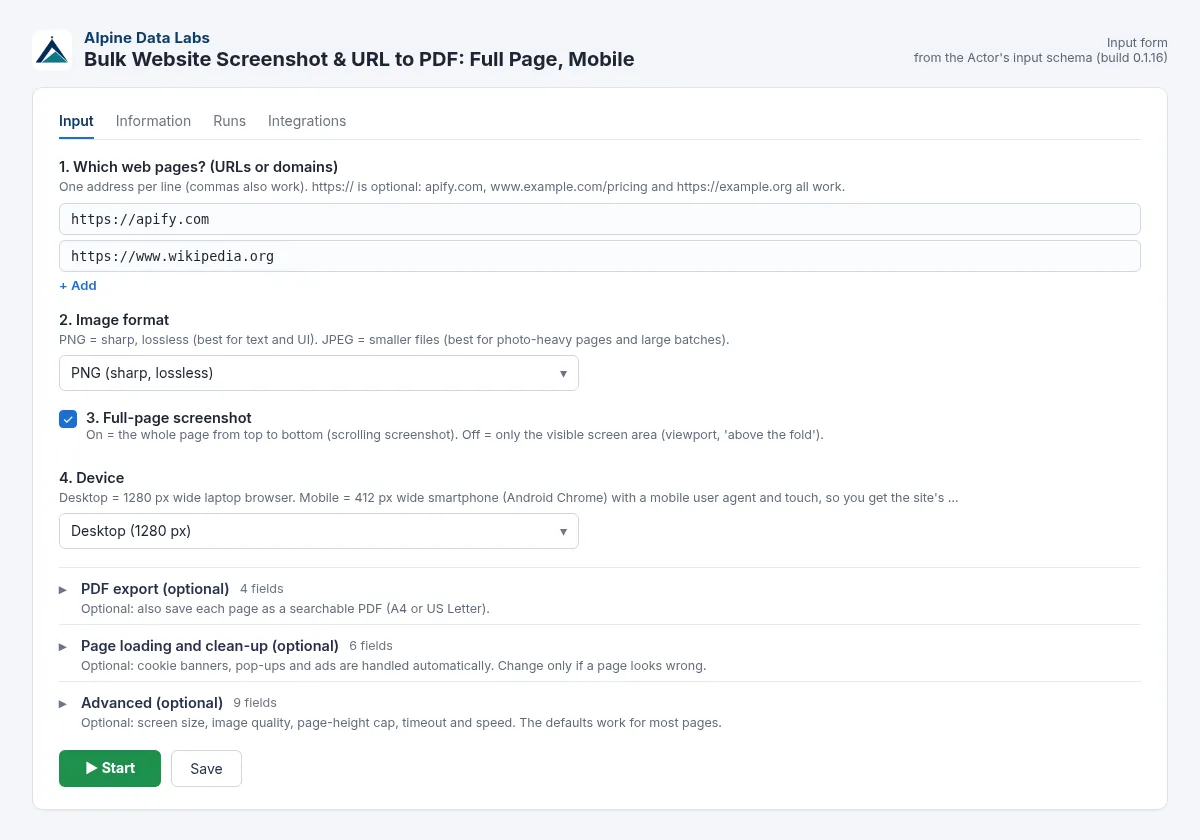
The names below are exactly as they appear in the form. Sections marked (optional) are folded away; you only open them if you need them.
| Form field | What it does | Default / example |
|---|---|---|
| 1. Which web pages? (URLs or domains) | Web addresses, one per line (commas work too). Duplicates are removed; invalid lines are skipped for free. | apify.com, https://example.org/about |
| 2. Image format | PNG (sharp, lossless) or JPEG (smaller). | PNG |
| 3. Full-page screenshot | On = the whole scrolling page. Off = only the visible screen area. | on |
| 4. Device | Desktop (1280 px) or Mobile phone (412 px, mobile browser, touch). | Desktop |
| PDF export (optional): Also save the page as PDF | Adds a searchable PDF per page. | off |
| PDF export: PDF paper size / PDF look | A4 or US Letter. "As printed" uses the site's print layout; "As on screen" looks like the website. | A4, as printed |
| PDF export: Save the screenshot image | Switch off to get PDFs only. | on |
| Page loading and clean-up (optional): Remove cookie banners and consent pop-ups | Accepts common consent tools and hides cookie overlays. | on |
| Page loading and clean-up: Close pop-ups and overlays | Closes or hides big newsletter, paywall-teaser and ad pop-ups. | on |
| Page loading and clean-up: Block ads and trackers | Blocks ad networks and tracking scripts, so pages load faster and look cleaner. Switch off to capture the ads too. | on |
| Page loading and clean-up: Wait until | Network idle (recommended), page loaded, or HTML ready. | Network idle |
| Page loading and clean-up: Extra delay before the screenshot (seconds) | Extra seconds before the shot, e.g. for animations. | 1 |
| Page loading and clean-up: Hide these elements (CSS selectors) | One selector per line, e.g. chat widgets. | #chat-widget |
| Advanced (optional): Custom viewport width (px) / Custom viewport height (px) | Custom size in pixels (0 = device default). | 0 (e.g. 1920) |
| Advanced: JPEG quality (1-100), High resolution (2x, retina) | Image quality and retina-sharp pixels. | 80, off |
| Advanced: Scroll down first to load lazy images | Loads lazy images before the shot. | on |
| Advanced: Max page height (px) | Full-page shots are cut at this height. | 15,000 (max 20,000) |
| Advanced: Timeout per page (seconds), Capture error pages (404, 403, 500...), Accept invalid HTTPS certificates, Pages in parallel | Per-page timeout, whether to capture error pages (off = free), whether pages with a bad certificate are captured, parallel pages. | 30, off, on, 3 |
Pricing
You pay only for files that were saved (pay per event). There is no monthly fee and no start fee.
| What | Price | Per 1,000 |
|---|---|---|
| One saved file (one screenshot image or one PDF) | $0.005 | $5.00 per 1,000 files |
- Screenshot only: 1 URL = 1 file = $0.005.
- Screenshot + PDF: 1 URL = 2 files = $0.01.
- PDF only: 1 URL = 1 file = $0.005.
Example: 1,000 screenshots = $5.00. 500 pages as full-page PNG plus PDF = 1,000 files = $5.00. The pre-filled example (2 pages, screenshots only) costs $0.01. An empty input runs 1 example screenshot (~$0.005).
Volume discount by Apify plan: Free and Starter plans pay $0.005 per file. On the Scale plan the price is $0.0045 (−10 %), on Business and higher $0.004 (−20 %), so 1,000 files cost $4.50 or $4.00. Apify applies the discount automatically.
One price, even for very long pages: full-page screenshots are capped at Max page height (default 15,000 px), so an endless news homepage costs the same $0.005 as a short page. The row then says truncated: true.
Free: invalid inputs, unreachable or non-existent sites, pages that time out before showing anything, and pages that return an HTTP error (404, 403, 500…) unless you switch on Capture error pages. To cap your cost, set Max charge per run in the run options. The Actor then stops cleanly when the limit is reached.
Platform usage (browser time) is included in the per-file price. The default memory is 1 GB, which handles 1 page at a time; with 2 GB or more, several pages run in parallel (about 600 MB each). A page that crashes the browser is retried once on its own.
FAQ and common mistakes
How do I take a full page screenshot of a website? Leave Full-page screenshot on (the default). The Actor scrolls through the page once so that lazy-loaded images appear, then captures everything from top to bottom, up to 15,000 px (about 15 screen heights). Longer and endless-scroll pages, such as news homepages or long Wikipedia lists, are cut there: the row says truncated: true, fullPageHeight shows the real page height and the note explains the cut. You can change this under Max page height (500 to 20,000 px). The price per file stays the same.
Why is my screenshot cut off at the bottom? The page is taller than Max page height (default 15,000 px). Raise it up to 20,000 px, or capture the page as PDF instead (PDFs are not cut).
How do I take a website screenshot on mobile? Set Device to Mobile phone. The page is loaded at 412 px width with a mobile browser user agent and touch support, so you get the site's real mobile layout. For tablet or Full-HD sizes, set a custom viewport width (768 or 1920).
How do I convert a URL to PDF, or many web pages to PDF at once? Switch on Also save the page as PDF, choose A4 or US Letter, and paste as many URLs as you like (up to 1,000 per run). The text in the PDFs stays selectable and searchable. Switch off Save the screenshot image if you only need PDFs.
Why is there still a cookie banner, a pop-up or a login wall on my screenshot? Removal is best effort. It covers the common consent tools (OneTrust, Cookiebot, Usercentrics, Didomi, Quantcast, TrustArc, Sourcepoint, consentmanager, Complianz, CookieYes, iubenda, Borlabs and others) plus buttons labelled "Accept all", "Alle akzeptieren", "Tout accepter" and similar. Unusual banners may stay. Add their CSS selector under Hide these elements. Paywalls and logins are not bypassed.
A page failed with HTTP 403 or "blocked". Why? Some sites block automated browsers (anti-bot protection). We do not try to get around this. These pages are free and listed in the status message.
Where are my files, and how long are they kept? In the run's key-value store (Output tab → Files, or the links in the table). Apify keeps run storage according to your plan's data retention (usually 7+ days). Download the files or send them to Google Drive or S3 with an integration.
Is this a website screenshot API? Yes. Start it via the Apify API, the n8n/Make/Zapier integrations, or as an MCP tool for AI agents. You get JSON with links to the images.
Webseite als PDF speichern / Screenshot der ganzen Webseite erstellen? Ja. Paste the addresses, switch on Also save the page as PDF (A4) and leave Full-page screenshot on. It works for German, Austrian and Swiss sites; cookie banners are clicked away automatically.
Limits
- Up to 1,000 URLs per run. Each page has a 30-second loading timeout (adjustable up to 180 s); after it, the Actor captures what is shown.
- The total time per page grows with your settings (loading timeout, extra wait, scrolling, screenshot and PDF); a page that is stuck beyond that is reported as failed (not charged) and only that page is closed.
- HTTPS pages are loaded only on port 443 or on a port written in your URL (for example
https://example.com:8443/). - Public pages only: no logins, no paywalls, no CAPTCHAs, no proxy rotation. Sites with strong anti-bot protection may return 403 (free).
- Private and internal network addresses (localhost, 10.x, 172.16–31.x, 192.168.x, cloud metadata such as 169.254.169.254) are blocked, including via redirects, embedded images/frames, scripts, pop-ups and WebSockets. Every host name is looked up and checked when the browser connects (all of its addresses must be public), and the connection goes to exactly the checked address, so DNS tricks cannot switch to an internal address later. A page that leads there fails with not a public website and is not charged.
- Full-page screenshots are cut at Max page height (default 15,000 px, max 20,000 px); cut rows say
truncated: true. Pages taller than 20,000 px cannot be captured in full as one image. Ads and trackers are blocked by default. Very heavy pages (huge images, WebGL) can exceed memory; use viewport-only or more memory. - Videos, canvas animations and some web fonts may look different from your own browser. Cookie and pop-up removal is best effort.
- Each run starts with a fresh browser, so pages show the "first visit" version (no saved logins or preferences).
Data source and legal notes
This Actor opens public web pages in a normal headless Chrome browser, as a visitor would, and saves what is shown. It does not log in, does not bypass paywalls, CAPTCHAs or bot protection, and blocks private network addresses. The files are stored only in your own Apify run storage. Only capture pages you are allowed to capture, respect the websites' terms of use and copyright, and do not use it to collect personal data. Screenshots of third-party pages are for your own documentation, analysis or archiving. All trademarks and website names belong to their owners; Alpine Data Labs is not affiliated with them.
Support
Is something not working, or a cookie banner not removed? Open an Issue on the Actor page (Issues tab) and include the URL. We usually respond within one working day. Built by Alpine Data Labs.
For developers: API, webhooks, Make/Zapier/n8n
You don't need this section to use the Actor. The form and the API take the same input: every form field has a JSON name (for example urls = 1. Which web pages?, format = 2. Image format, fullPage, device, savePdf, maxPageHeight), and a JSON input sent via the API, a webhook, a schedule, a saved task or Make/Zapier/n8n gives exactly the same result as the form. Field names, output fields and file names stay stable, so existing workflows and websites that call the Actor keep working.
Minimal input:
cURL (start a run and get the results in one call; replace <YOUR_APIFY_TOKEN> with your token from Apify Console → Settings → API & Integrations):
JavaScript (npm install apify-client):
Python (pip install apify-client):
Integrations: Schedules run a saved task automatically (e.g. every morning). Webhooks (Integrations tab → "Run succeeded") send the finished run to your own URL. Ready-made Make, Zapier and n8n modules start the Actor and read its results. AI agents can use it as a tool through the Apify MCP server (mcp.apify.com).
Full example input (all main options)
Example output (one row, JSON)


