

Amazon Best Selling Categories Scraper
Pricing
Pay per usage
Amazon Best Selling Categories Scraper
Discover Amazon categories and subcategories from Best Sellers, New Releases, Most Wished For, Most Gifted, and Movers & Shakers. Export structured breadcrumbs, node keys, and parent chains—plus optional NODE_TREE JSON.
Pricing
Pay per usage
Rating
0.0
(0)
Developer

Amazon Scraper
Maintained by CommunityActor stats
0
Bookmarked
53
Total users
3
Monthly active users
4 months ago
Last modified
Categories
Share
Amazon Best Sellers Category Tree Scraper
Build an Amazon BrowseNode / category navigation dataset by parsing the left-side navigation (“category tree”) on Amazon list pages.
This actor is designed for category discovery (not product extraction):
- Discover categories and subcategories up to a chosen depth (
maxChildLevels) - Emit one dataset row per discovered node (not per visited page)
- Optionally build a frontend-friendly
NODE_TREEJSON in Key-Value Store (nodeTreeEnabled)
Supported locales
- United States (US):
www.amazon.com - Australia (AU):
www.amazon.com.au - Canada (CA):
www.amazon.ca - France (FR):
www.amazon.fr - Germany (DE):
www.amazon.de - India (IN):
www.amazon.in - Italy (IT):
www.amazon.it - Japan (JP):
www.amazon.co.jp - Spain (ES):
www.amazon.es - United Kingdom (GB):
www.amazon.co.uk
Supported roots & URL patterns
Supported “root” list pages (slugs):
bestsellersnew-releasesmost-wished-formost-giftedmovers-and-shakers
Supported URL shapes:
- Modern
/gp/<rootSlug>pages:https://www.amazon.com/gp/bestsellershttps://www.amazon.com/gp/new-releases/digital-text/ref=...
- Legacy
/zgbs/pages (US common when users copy from browser):https://www.amazon.com/Best-Sellers/zgbs/ref=...https://www.amazon.com/Best-Sellers-Clothing-Shoes-Jewelry/zgbs/fashion/ref=...
Input
Configure the actor run via Apify input:
categoryUrls(string[], required): Amazon category URLs to start from.- Recommended: provide an array of URLs.
- Backward-compatible: a newline-separated string is still accepted.
maxChildLevels(number): How many child levels to discover (minimum 1).retries(number): Retry count for blocked/empty pages.nodeTreeEnabled(boolean): When enabled, after the crawl finishes the actor reads the default dataset and generates a domain-keyed category NodeTree JSON saved to the default key-value store under keyNODE_TREE.
Example input
Depth semantics (important)
Key idea: requests are pages, dataset rows are nodes.
- A visited page has a
currentLevel(input URLs are level0) - The page contains a parsed
childrenlist (those are the discovered nodes for the next level) - The actor emits dataset rows for those child nodes
Practical expectations (one input URL):
maxChildLevels: 1- Requests: level
0only (usually 1 page) - Dataset rows: level
1nodes (often ~40 on US Best Sellers)
- Requests: level
maxChildLevels: 2- Requests: level
0+ level1pages - Dataset rows: level
1+ level2nodes
- Requests: level
Where to get categoryUrls
Use “bestseller-style” list pages on Amazon, for example:
- All categories entry:
https://www.amazon.com/gp/bestsellers
- A specific department entry:
https://www.amazon.com/gp/bestsellers/digital-text
- A different root:
https://www.amazon.com/gp/new-releases/digital-text
Output
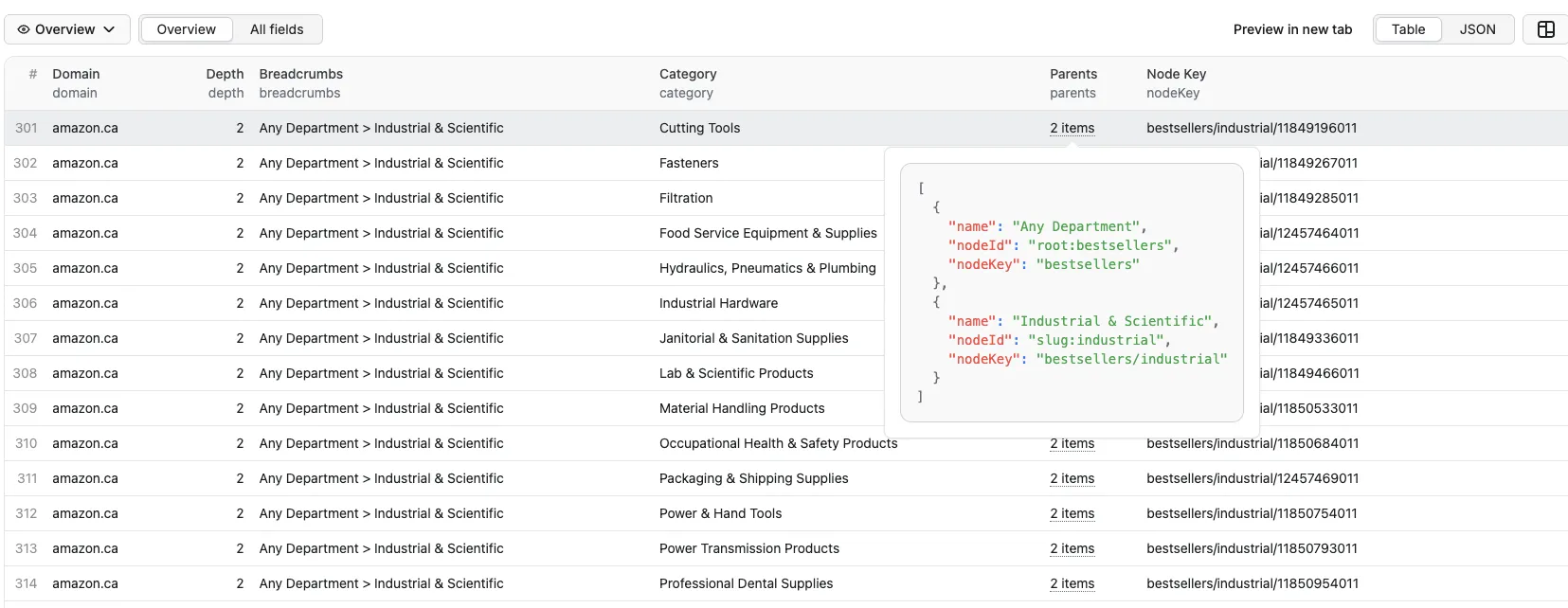
The actor stores results in the default dataset as one row per discovered node:
- Fields:
domain,depth,breadcrumbs,category,parentNodeKey,parents,nodeKey
Breadcrumb semantics:
breadcrumbsis the parent path (does not include the currentcategory)- The separator is
> parentsis the ordered breadcrumb chain with frontend-friendly IDs (root:*,slug:*,browseNode:*)
Example dataset row:
About NODE_TREE
If you want a ready-to-render navigation structure (tree/cascader), enable:
nodeTreeEnabled: true
At the end of the run, the actor writes a multi-root NODE_TREE document into Key-Value Store:
Node ID conventions (important)
To support multiple roots (Best Sellers / New Releases / ...) and cross-root merging, nodes use namespaced IDs:
- Root nodes:
root:<rootSlug>- e.g.
root:bestsellers,root:new-releases
- e.g.
- Slug nodes:
slug:<slug>- e.g.
slug:digital-text
- e.g.
- BrowseNode nodes (digits only):
browseNode:<id>- e.g.
browseNode:8624102011
- e.g.
Benefits:
- Globally unique IDs (prevents slug vs numeric collisions)
- The same slug can exist under multiple roots and still be treated as the same node (via
parentIds/childrenByRoot)
Node fields
Semantics:
id/idType: unique node identity (see namespaced IDs above).title: display label, derived frombreadcrumbs/categorywhen possible; falls back to the raw ID suffix.kind:root: root list node (e.g.root:bestsellers)department: a node whose minimal observed level is 1 under any root (e.g.slug:digital-text)category: all deeper nodes
level: the minimal observed path depth across all roots (based onnodeKeyByRoot).- For rendering, prefer using traversal depth under the chosen
rootId.
- For rendering, prefer using traversal depth under the chosen
parentIds: the set of direct parent node IDs (multi-parent is allowed).- Example:
slug:digital-textcould have bothroot:bestsellersandroot:new-releasesas parents.
- Example:
childrenByRoot[rootId]: the direct children list scoped to a root view.- This is the recommended field for frontend tree rendering.
- Root scoping avoids mixing children from different roots.
nodeKeyByRoot[rootId]: canonicalnodeKeyfor this node under a given root (useful for URL building and UI instance keys).urlByRoot[rootId]: fully built Amazon URL for that root (based onhttps://<domain>/gp/<nodeKey>).
Use Cases
AI Knowledge Bases (e.g. Gemini Gems, ChatGPT GPTs)
Feed the NODE_TREE JSON directly into an AI knowledge base to give your custom AI assistant a structured understanding of Amazon's product taxonomy. This lets users ask natural-language questions like "what subcategories exist under Electronics?" and get accurate, structured answers.
How to set it up:
- Run the actor with
nodeTreeEnabled: trueto generate theNODE_TREEJSON. - Download the JSON from the Key-Value Store.
- Upload it as a knowledge source in your Gem / GPT / RAG pipeline.
E-commerce Market Research
Map the full category hierarchy across multiple Amazon locales to identify market gaps, compare category structures between regions, or track how Amazon reorganizes its taxonomy over time.
Product Listing & SEO Tools
Use the category tree to build browse-node pickers in seller tools, auto-suggest the correct Amazon category path for a product, or validate that a listing is placed in the right node.
Price & Trend Monitoring
Use discovered category URLs as seeds for downstream scrapers that track bestseller rankings, pricing trends, or new-release velocity within specific categories.
Catalog Enrichment & Classification
Map your internal product catalog to Amazon's browse node IDs to enrich product metadata, improve search relevance, or power recommendation engines.
Troubleshooting
- “Input is empty or url format is not valid”: Provide at least one
categoryUrlsentry, and make sure each URL matches one of the supported list patterns. - 404 pages: Missing categories are logged as warnings during the run.


