

Instagram Transcript API & Profile Scraper - AI Video to Text
Pricing
from $1.00 / 1,000 results
Instagram Transcript API & Profile Scraper - AI Video to Text
Instagram Reels Transcript API for converting video audio into structured text using AI. Extract transcripts, timestamped segments, media URLs, and metadata from public Reels and videos. Also supports public profile post scraping for creator research, competitor research, and automation workflows.
Pricing
from $1.00 / 1,000 results
Rating
4.5
(13)
Developer

APISmith
Maintained by CommunityActor stats
25
Bookmarked
3.3K
Total users
782
Monthly active users
3 days ago
Last modified
Categories
Share
Instagram Transcript API and Profile Scraper
Extract Instagram Reel and video transcripts, process URLs in batch, or collect structured posts from public Instagram profiles.
Use this Actor when you want production-ready Instagram transcript data without building your own scraping, media extraction, and speech-to-text pipeline. Start with one URL in the Apify Console, inspect the dataset output, then scale the same workflow to batches, Tasks, schedules, or API calls.
If your workflow depends on Instagram content for AI, research, monitoring, or internal tools, this Actor gives you a faster path from public Instagram content to clean, structured data. It is designed to be easy to try, predictable to integrate, and practical for both small tests and larger automation workflows.
This Actor has two modes:
| Mode | What it does | Use it when you need |
|---|---|---|
| Instagram transcript extraction | Transcribes one or more public Instagram Reels, videos, or posts and returns transcript text, timestamped segments, media URLs, and post metadata. | Instagram transcript API, Instagram Reel transcript, Instagram video transcript, Instagram video to text, LLM ingestion, captions, subtitles, or AI-ready content data. |
| Instagram profile scraper | Scrapes public posts from one or more creator profiles and returns structured post metadata. This mode does not generate transcripts. | Creator research, competitor research, recurring content collection, Instagram post scraper workflows, or content analysis. |
The main use case for this Actor is still Instagram transcript extraction. The profile scraper mode was added to support a more complete Instagram content collection workflow when you also need to collect posts from public creator profiles. In practice, you can start with transcripts and expand into profile-based collection without switching tools.
What can this Actor do?
With this Actor, you can:
- Extract Instagram transcript text from a public Reel, video, or post URL
- Convert Instagram video to text for AI, search, captions, and content analysis
- Process multiple Instagram URLs in one batch run
- Get timestamped transcript segments for subtitle and alignment workflows
- Extract media URLs, thumbnail URLs, creator metadata, and engagement metrics
- Scrape public Instagram profile posts from one or more usernames
- Filter profile scraping results by publish date or relative time
- Limit the number of profile posts returned
- Skip pinned posts when collecting recent creator content
- Optionally include share count for eligible premium usage
- Export results from Apify datasets in JSON, CSV, Excel, XML, RSS, or HTML
- Run the Actor from the Apify Console, API, SDKs, Tasks, schedules, and webhooks
Instead of stitching together separate tools for Instagram scraping, media download, transcription, and data cleanup, you can get transcript-ready and analysis-ready output from one Actor run. That means less integration work and a shorter path from Instagram URL to usable data.
What data can I extract?
The Actor returns structured Instagram data that is ready for databases, LLM ingestion, analytics pipelines, and automation tools.
| Data category | Fields |
|---|---|
| Post identity | Post URL, shortcode, Instagram media ID, internal post ID |
| Transcript data | Full transcript text, timestamped transcript segments |
| Media data | Thumbnail image URL, video URL, audio URL |
| Engagement data | Like count, comment count, optional share count when available |
| Creator data | Creator user ID, username, full name, avatar URL |
| Run status | Error message field, extraction timestamp |
Transcript fields are returned when you use videoUrl or bulkUrls. Profile scraping with usernames collects public post metadata and does not generate transcripts.
How do I try it?
You can test the Actor directly in the Apify Console without writing code.
- Open the Actor on Apify.
- Click Try for free.
- In the Input form, choose the workflow you want:
- Paste one Instagram URL into Video URL to transcribe a single Reel, video, or post.
- Add multiple URLs into Bulk URLs to run batch transcription.
- Enter one or more usernames into Usernames to scrape public profile posts.
- For profile scraping, set Results limit and optionally add a date filter in Only posts newer than.
- Click Start.
- Open the Dataset in the Storage tab to preview, download, or export the results.
The fastest way to evaluate the Actor is to run a single Instagram URL first. You can confirm the transcript text, timestamped segments, media URLs, and metadata before spending time or budget on a larger batch. If the output fits your workflow, the same setup can be reused for batch runs or saved as an Apify Task.
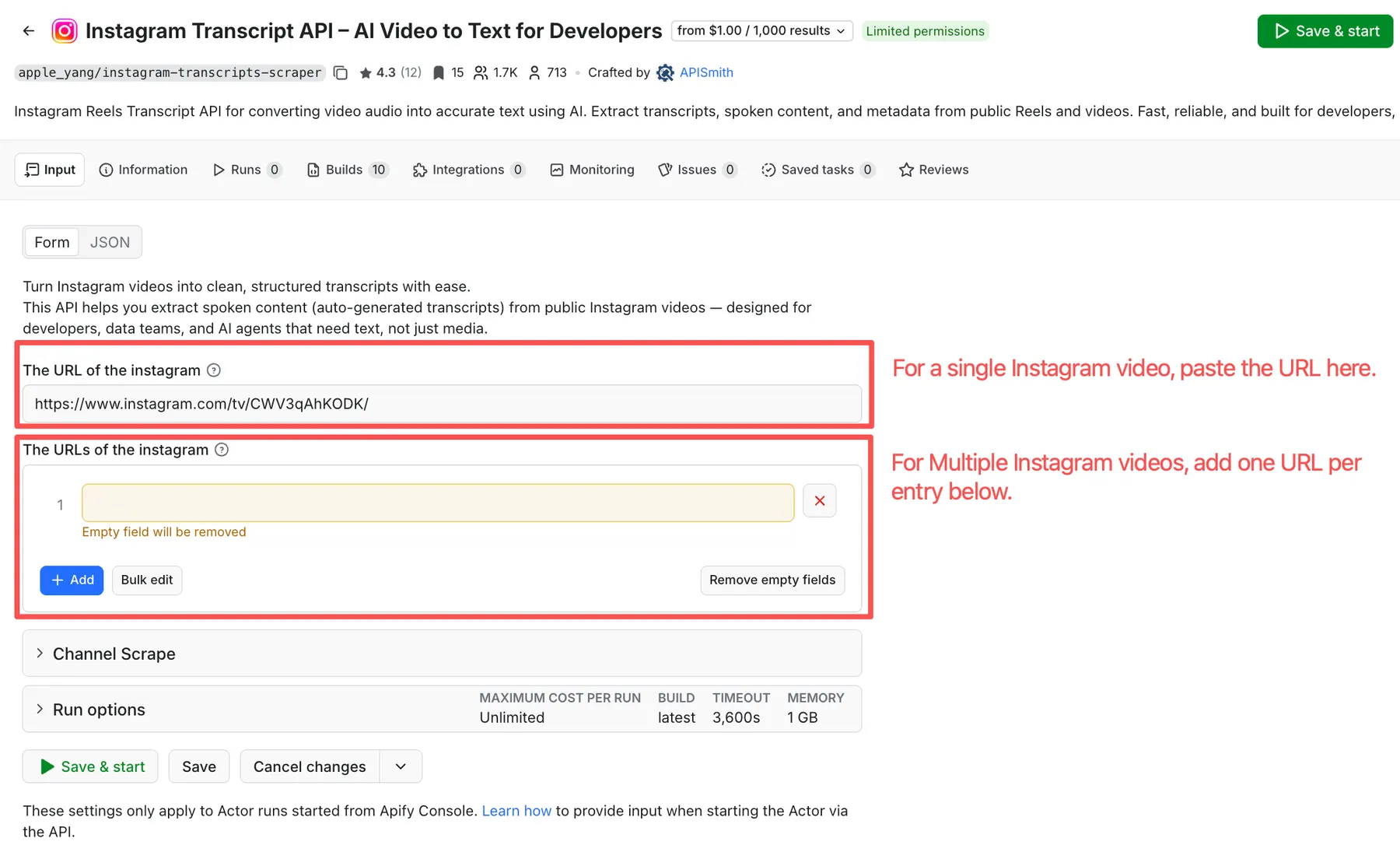
Table of Contents
- Input workflows
- Complete input parameter reference
- Input examples for API users
- Output overview
- Complete output field reference
- Output example
- Common use cases
- Pricing
- Why choose this Actor
- FAQ
- Notes and limitations
- Support
Input workflows
Choose the input mode based on the task you want to complete.
Transcribe one Instagram Reel or video
Use this mode when you already have one Instagram URL and need an Instagram transcript, media URLs, and post metadata.
In the Apify Input form:
- Add the URL to Video URL
- Leave Bulk URLs and Usernames empty
- Optionally provide
sessionidif needed
API field:
videoUrl
Batch transcribe multiple Instagram URLs
Use this mode when you have a list of Instagram Reels, videos, or posts and want one dataset item per URL.
In the Apify Input form:
- Add URLs to Bulk URLs
- Use the bulk edit option if you already have a prepared list
- Leave Video URL and Usernames empty
- Optionally provide
sessionidif needed
API field:
bulkUrls
Scrape public creator profile posts
Use this mode when you want to collect public posts from one or more Instagram creator profiles. This is useful for creator research, competitor research, recurring content collection, social media intelligence, and content analysis workflows.
This mode does not generate transcripts.
In the Apify Input form:
- Add one or more usernames to Usernames
- Set Results limit to control how many posts to collect
- Use Only posts newer than to collect recent posts only
- Use pinned-post settings if you want to avoid older pinned content
- Enable share count only if your plan supports it
API fields:
usernamesresultsLimitonlyPostsNewerThanskipPinnedPostsincludeSharesCount
Collect only recent posts
Use onlyPostsNewerThan with usernames to collect posts newer than a specific date or relative time window.
Supported relative formats:
<number> dayor<number> days<number> weekor<number> weeks<number> monthor<number> months<number> yearor<number> years
Use the singular form for 1 and the plural form for numbers greater than 1.
Examples:
1 day1 week1 month1 year7 days2 weeks3 months2 years
Supported absolute formats:
YYYY-MM-DD- Full ISO timestamp, such as
2026-07-01T10:30:00Z
All time values are interpreted in UTC.
Complete input parameter reference
| Field | Type | Required | Default | Description | When to use it |
|---|---|---|---|---|---|
videoUrl | string | No | Not set | A single public Instagram Reel, video, or post URL to transcribe. | Use when you need one Instagram Reel transcript or Instagram video transcript. |
bulkUrls | array of strings | No | [] | Multiple public Instagram Reel, video, or post URLs to process in one run. | Use for batch Instagram transcript scraping. URLs can be added one by one or through bulk edit in the Apify form. |
usernames | array of strings | No | [] | One or more public Instagram usernames to scrape. | Use for Instagram profile scraper, Instagram post scraper, or Instagram creator scraper workflows. This mode does not generate transcripts. |
resultsLimit | integer | No | 12 | Maximum number of profile posts to return. | Use with usernames to control dataset size, runtime, and cost. |
onlyPostsNewerThan | string | No | Not set | Date filter for profile scraping. Accepts relative values using days, weeks, months, or years, and absolute dates in YYYY-MM-DD or ISO format. | Use with usernames when you only want newer posts. |
skipPinnedPosts | boolean | No | false | Skip pinned posts while scraping profiles. | Use when pinned posts are old or not relevant to recent-content analysis. |
includeSharesCount | boolean | No | false | Include share count when available. This is a premium-only option. | Use when share count is required for engagement analysis and your plan supports it. |
sessionid | string | No | "" | Instagram session ID for authenticated access. It can improve scraping stability and may help the Actor retrieve a higher-quality video URL when Instagram makes one available. | Use when runs are unstable, URLs fail often, or you want to give the Actor the best chance of retrieving higher-quality media. Store it securely. |
At least one of videoUrl, bulkUrls, or usernames should be provided.
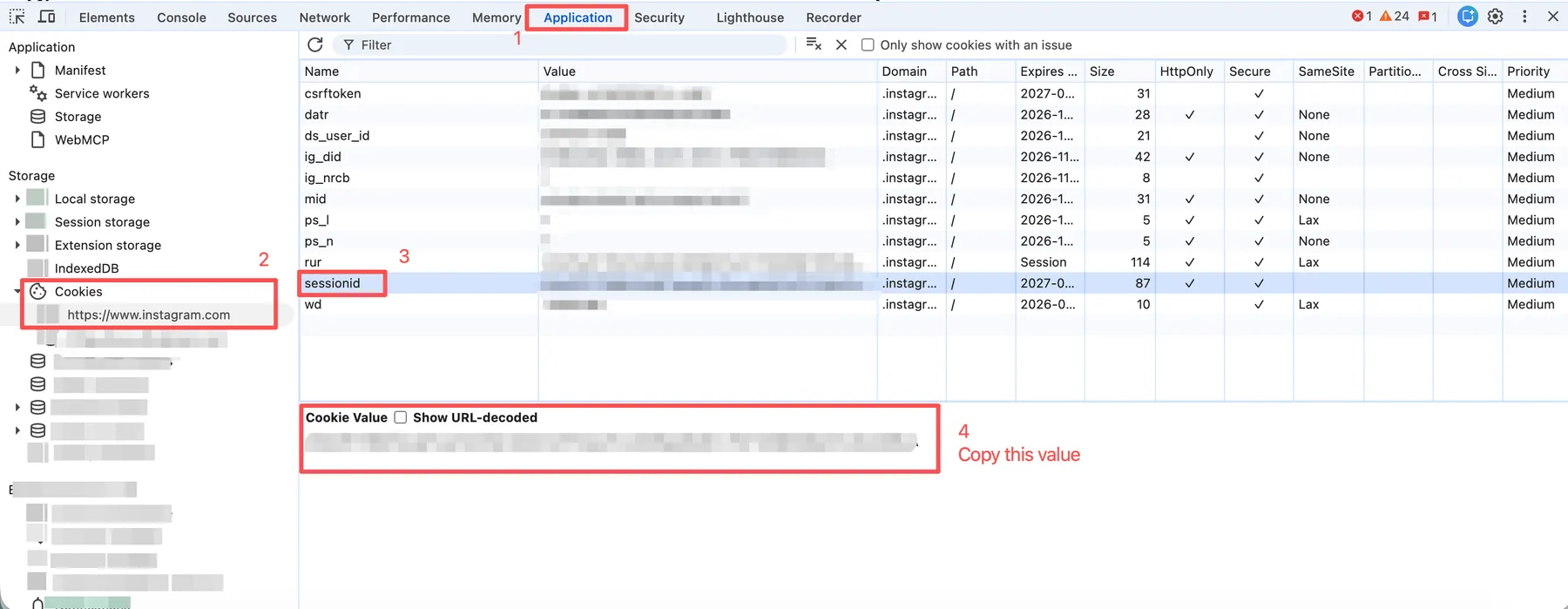
How to get sessionid
sessionid is optional, but it can help when scraping is unstable or when you want to give the Actor the best chance of retrieving a higher-quality video URL.
In Chrome, log in to Instagram, open Developer Tools, go to Application -> Storage -> Cookies -> https://www.instagram.com, then copy the value of the sessionid cookie and pass it as the sessionid input.
Quick Start
Higher-quality video retrieval is not guaranteed. If a higher-quality video is not returned, the target post may not have one available, or Instagram may not have returned it due to a temporary or access-related issue.
Input examples for API users
The Apify Console form is the fastest way to test the Actor. Use JSON input when running the Actor through the API, SDKs, saved Tasks, or advanced Apify settings.
Single Instagram URL
Batch Instagram URLs
Scrape one public profile
Scrape multiple profiles with a date filter
Scrape posts from the last 2 weeks
Run with the Apify Python client
Output overview
The results are stored in an Apify dataset. You can preview the dataset in the Storage tab or export it as JSON, CSV, Excel, XML, RSS, or HTML.
For transcript extraction, each dataset item represents one processed Instagram URL and can include:
- Instagram URL and identifiers
- Thumbnail, video URL, and audio URL
- Creator username, full name, user ID, and avatar URL
- Like count and comment count
- Full Instagram transcript text
- Timestamped transcript segments
- Error message field for failed items
- Extraction timestamp
For profile scraping, each dataset item represents a collected public Instagram post from the requested profile workflow. Profile scraping focuses on post and creator metadata and does not generate transcript text or timestamped transcript segments.
Because the output is already structured, you can send it directly to your database, spreadsheet, search index, BI workflow, or LLM pipeline without first cleaning raw HTML or media responses.
Complete output field reference
| Field | Type | Description |
|---|---|---|
url | string | Instagram post, Reel, or video URL. |
code | string | Instagram shortcode. |
pk | string | Instagram internal post ID. |
id | string | Combined Instagram media identifier. |
title | string | Title-like text returned for the post, often a caption excerpt or hashtag. |
img | string | Thumbnail or preview image URL. |
videoUrl | string | Direct video file URL when available. |
audioUrl | string | Direct audio file URL when available. |
createTime | integer | Instagram creation timestamp. |
likeCount | integer | Number of likes when available. |
commentCount | integer | Number of comments when available. |
userPk | string | Creator Instagram user ID. |
userName | string | Creator username. |
userFullName | string | Creator display name. |
avatarUri | string | Creator avatar image URL. |
text | string | Full Instagram transcript text. Present for transcript extraction when transcription succeeds. |
segments | array of objects | Timestamped transcript segments. |
segments[].start | number | Segment start time in seconds. |
segments[].end | number | Segment end time in seconds. |
segments[].text | string | Transcript text for the segment. |
errMsg | string | Error message. Empty string usually means the item processed successfully. |
timestamp | string | Actor response timestamp in ISO format. |
Output example
Common use cases
Use this Actor when Instagram content is valuable, but manual copying, downloading, and transcribing would slow down your workflow.
| Use case | How this Actor helps |
|---|---|
| AI and LLM pipelines | Turn Instagram Reel and video content into transcript text that can be summarized, embedded, classified, or searched. |
| Dataset creation | Collect structured transcript and post metadata for analysis without building a custom Instagram scraping pipeline. |
| Knowledge base creation | Convert creator videos into text that can be stored, indexed, and reused in internal tools. |
| Subtitle and caption workflows | Use timestamped segments to support captions, subtitles, clipping, and video understanding workflows. |
| Creator research | Scrape public creator profile posts and analyze posting patterns, topics, and engagement signals. |
| Competitor research | Collect recent public posts from relevant profiles for repeatable content analysis. |
| Social media intelligence | Combine transcript text, metadata, media URLs, and engagement metrics for trend or campaign analysis. |
| Automation workflows | Run the same setup through Apify Tasks, API clients, schedules, webhooks, or dataset exports. |
For most users, the simplest first test is clear: run one Instagram URL, check whether the transcript and metadata match your workflow, then scale to batch URLs or profile scraping.
Pricing
This Actor uses pay-per-event pricing, so you can start small and scale only when the output fits your workflow. The exact price for your run is shown in the Actor's Pricing tab on Apify; this section explains what you pay for before you try it.
There are two possible cost components:
- Result pricing: charged for each dataset item returned by the Actor.
- Audio-to-text pricing: charged only when the Actor performs speech recognition to generate an Instagram transcript.
There is no separate platform-usage fee listed for this Actor. In other words, the pricing is designed to stay tied to the work you actually run: returned results for all modes, plus speech recognition only for transcript extraction.
How pricing applies by mode:
| Mode | Input fields | Cost components |
|---|---|---|
| Transcript extraction | videoUrl or bulkUrls | Result pricing + audio-to-text pricing |
| Profile scraper | usernames | Result pricing only |
The result price is currently $1.00 / 1,000 results, which is as low as $0.001 per returned result. Profile scraping uses this result-based pricing only, making it a low-cost way to test creator and competitor research workflows.
Transcript extraction also includes audio-to-text pricing because the Actor performs speech recognition to generate the transcript. Audio-to-text pricing depends on your Apify subscription plan, with higher tiers receiving better rates. This keeps small tests accessible while giving higher-volume users lower unit costs.
If you only need profile post metadata, use usernames and you will not trigger audio-to-text pricing. If you need transcripts, use videoUrl or bulkUrls and you will get the full transcript workflow in one run.
For a quick test, start with one Instagram URL in videoUrl or a small resultsLimit for profile scraping. This lets you verify the output structure before running larger batches, and keeps your first run easy to evaluate.
Because pricing is tied to returned results and transcript processing, you can control cost directly through your input: use fewer URLs, lower resultsLimit, or profile scraping mode when transcripts are not needed.
Check the Actor's Pricing tab on Apify for the current rates for your plan.
Why choose this Actor
- Built for the core job most users need first: reliable Instagram transcript extraction
- Saves engineering time by combining Instagram scraping, media extraction, speech recognition, and structured output in one workflow
- Starts at
$0.001per returned result for result-based pricing - Lets you test with one URL before scaling to batch transcription or recurring profile collection
- Keeps profile scraping cost simple by charging only for returned results, with no audio-to-text cost in that mode
- Returns structured, AI-ready output that is easy to send into LLM pipelines, databases, search indexes, and automation tools
- Includes timestamped transcript segments for captions, subtitles, clipping, and content analysis
- Provides media URLs, creator data, post metadata, and error status in one dataset item
- Adds profile scraping when you need public creator post collection without paying for speech recognition
- Works with Apify datasets, exports, API clients, Tasks, schedules, and webhooks
This makes the Actor useful as both a quick transcript API for individual Instagram videos and a scalable data collection component for larger content intelligence workflows.
FAQ
Does it support Instagram Reels?
Yes. The Actor supports public Instagram Reels, videos, and supported post URLs.
Does it support batch transcription?
Yes. Use Bulk URLs in the Apify Input form or bulkUrls in JSON input to process multiple Instagram URLs in one run.
Does it support Instagram profile scraping?
Yes. Use Usernames in the Apify Input form or usernames in JSON input to scrape public creator profile posts. Profile scraping does not generate transcripts.
Does it require sessionid?
sessionid is optional. A valid Instagram session ID can improve stability and access success for some runs. It may also help the Actor retrieve a higher-quality video URL when Instagram makes one available.
This is not guaranteed. If a higher-quality video is not returned, it usually means either the target post does not have a higher-quality version available, or Instagram did not return it due to a temporary or access-related issue.
How does onlyPostsNewerThan work?
Use onlyPostsNewerThan with profile scraping to collect only posts newer than a time restriction. It supports relative values using days, weeks, months, and years, such as 7 days, 2 weeks, 3 months, or 1 year. It also supports absolute dates such as 2026-07-01 and full ISO timestamps. All time values are interpreted in UTC.
Can I skip pinned posts?
Yes. Set skipPinnedPosts to true when pinned posts are old or not relevant to the collection. This is useful when you want recent posts only and do not want older pinned content mixed into the dataset.
Does it scrape Stories?
No. This Actor is for public Instagram Reels, videos, supported post URLs, and public profile post scraping. Stories are not listed as a supported workflow.
What happens if one URL fails in a batch?
Failed items can include an errMsg value, so your pipeline can inspect errors per item instead of treating the whole dataset as a single success or failure.
Can I automate it with Apify Tasks?
Yes. You can save a configured input as an Apify Task and run it manually, on a schedule, through the Apify API, or as part of a larger automation workflow.
Does profile scraping generate Instagram transcripts?
No. Transcript extraction and profile scraping are separate workflows. Use videoUrl or bulkUrls when you need transcript output. Use usernames when you need public profile post collection.
Can I include share count?
Yes, use includeSharesCount: true when eligible. Share count is a premium-only option.
Notes and limitations
- Only public Instagram content is supported.
- Transcript quality depends on the source audio, language, background noise, and available speech signal.
- Some media URLs may be temporary or expire.
- A valid
sessionidcan improve stability and may help retrieve higher-quality video URLs, but it does not guarantee higher-quality media for every post. - Treat
sessionidas sensitive authentication data. Do not share it publicly or commit it to code. includeSharesCountis available for paying users only.- Free users may have limits on video duration or batch size.
- Make sure your usage complies with Instagram's terms, Apify's terms, and applicable laws.
Support
Questions, feedback, or feature requests?
Email: support@apismith.online


