

X (Twitter) Video & Media Downloader
Pricing
from $1.05 / 1,000 media files
X (Twitter) Video & Media Downloader
Download X (Twitter) videos, photos, GIFs, and X Article images in your preferred quality. Save actual files to Apify Storage and get direct CDN links, post details, engagement metrics, translations, and author data. No X login, cookies, or API key required.
Pricing
from $1.05 / 1,000 media files
Rating
0.0
(0)
Developer

Arjun Data
Maintained by CommunityActor stats
0
Bookmarked
3
Total users
1
Monthly active users
19 days ago
Last modified
Categories
Share
Download videos, photos, GIFs, and X Article images at your selected quality from public X posts. Save actual files to Apify Storage—not only temporary media links—and receive complete post or Article content, engagement metrics, X-provided translations, and the author's public profile.
Paste tweet IDs or x.com / twitter.com status URLs. X Articles are supported through the public status post that contains the Article. The Actor saves one dataset row per requested post and, by default, stores every attached media file in the run's Key-Value Store.
What you get
- Selectable MP4 quality for videos and animated GIFs
- Selectable
original,large,medium,small, orthumbnailphoto quality - Media files stored in Apify with a directly accessible
stored_url - X CDN source URL, preview image, dimensions, duration, aspect ratio, and MP4 variants
- Full post text, including long-form Note Tweet text when available
- X Article detection, title, preview, summary, full plain text, publication dates, and outbound links
- X Article cover and body images included in the same media and storage workflow
- Replies, reposts, quotes, likes, bookmarks, and view counts
- Hashtags, cashtags, mentions, expanded links, conversation, and reply references
- X-provided translation text, source language, target language, and translated entities
- Author bio, location, account age, audience counts, verification, professional category, affiliation, avatar, banner, and profile URL
Only the requested focal post is saved. Replies returned alongside it by X are not emitted as separate results.
How to download X media
- Paste one or more X post URLs or numeric post IDs into X post IDs or URLs.
- Keep Store media files enabled to copy the selected files into Apify Storage, or disable it for metadata and X CDN links only.
- Choose the preferred video and image quality.
- Run the Actor.
- Open Media Downloads for one row per file or Post Details for one row per post.
Input example
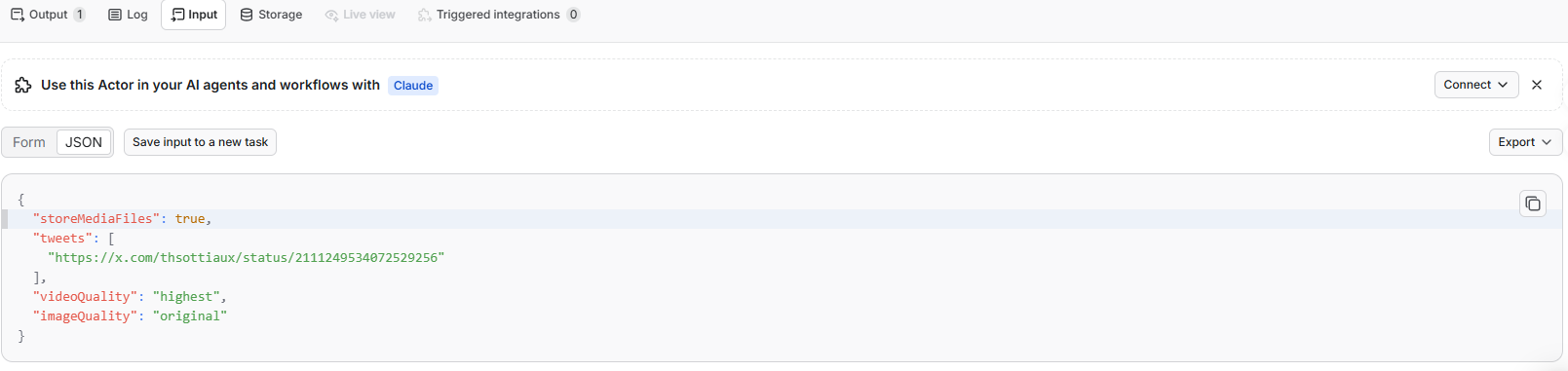
Paste an X post URL or ID, keep Store media files enabled, and choose the preferred video and image quality.
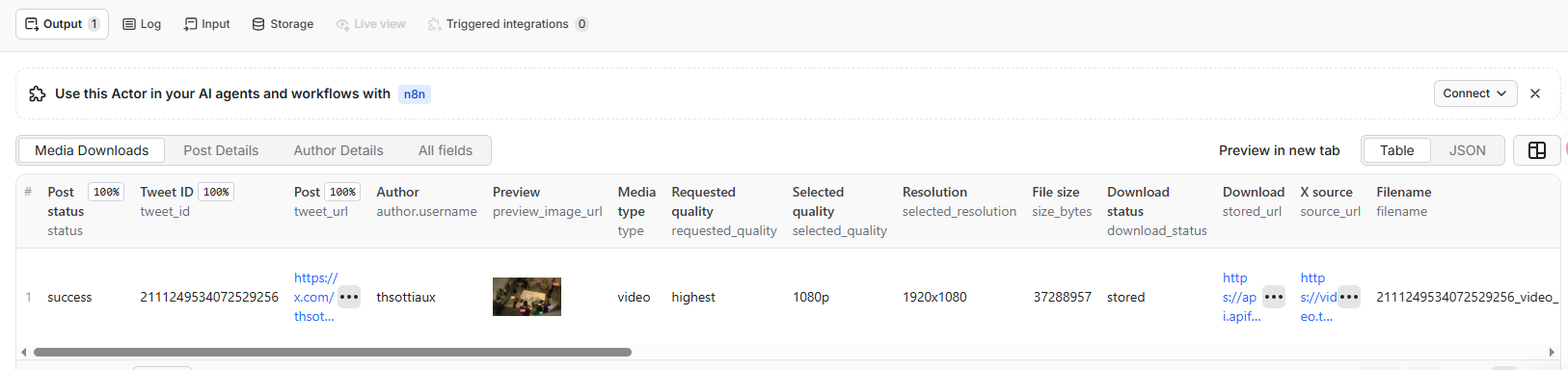
Download result
Open Media Downloads after the run. A stored download status confirms the file was copied to Apify Storage. Use the Download link for the stored file or X source for the original CDN file.
Input
Use tweets for one or more IDs or links. Equivalent URLs and IDs are deduplicated. For an X Article, provide its outer /status/{tweet_id} URL or numeric post ID. Direct /i/article/{article_id} URLs are not currently accepted as input. An invalid value returns an invalid_input result without stopping valid posts in the same run.
There is no fixed limit on the number of input posts. Unique posts are processed sequentially and normally produce one Dataset item each. When storeMediaFiles is enabled, one post can also create several media records in the Key-Value Store, so split large download jobs across runs to control runtime, traffic, and storage use.
storeMediaFiles defaults to true:
truedownloads media into the run's default Key-Value Store and returnsstored_url,storage_key, file size, and download status.falseskips file transfer and returns the same post details plus X CDNsource_urlvalues.
videoQuality accepts highest, 1080p, 720p, 480p, 360p, or lowest. X exposes discrete MP4 variants, so the Actor selects the nearest available resolution that does not exceed the requested p value. imageQuality accepts original, large, medium, small, or thumbnail.
Reliability
No X login, cookies, API key, or proxy setup is required. Apify Proxy routing and temporary network, server, access, and rate-limit failures are handled automatically. Each post-detail request is attempted up to five times. If one post still cannot be retrieved, the Actor writes an uncharged request_failed item and continues with the remaining inputs.
Media downloads are handled separately from post extraction. If a photo or video transfer fails, the post details remain available and that media item reports download_status: "failed" with a download_error.
Output example
For an X Article, article contains the Article-specific content and media[].origin identifies cover and body images:
These are abridged snapshots from real runs. Post and Article text plus long CDN/storage URLs are shortened for readability, and engagement and follower counts change over time. text remains the outer post text; article.text contains the full X Article body. source_url points to the selected media version on X's CDN. stored_url points to the file copied into Apify Storage. Optional values that X does not return are represented by null.
Dataset views
- Media Downloads is the default view. It expands attached media so every post photo, video, GIF, Article cover, or Article body image appears as its own row with preview, selected resolution, size, status, and download link. The
originvalue istweet,article_cover, orarticle_body. - Post Details keeps one row per requested post. It flattens selected
articleandauthorvalues into readable table columns while the stored JSON remains nested. - Author Details presents selected fields from the nested
authorobject as profile columns. It remains one row per requested post, so the same author can appear more than once.
Result and download statuses
Post status values:
success— the post was found and parsedinvalid_input— the supplied value was not a valid numeric post ID or status URLnot_found— the post is deleted, private, withheld, or unavailablerequest_failed— post details were still unavailable after five automatic attempts
Per-media download_status values:
stored— the file was downloaded and saved in Apify Storagefailed— the file transfer or storage operation failed; seedownload_errornot_requested—storeMediaFileswas disabledunavailable— X did not provide a downloadable MP4 or original image URL
Dataset results can be exported as JSON, JSONL, CSV, Excel, XML, or RSS. Stored media remains available according to the Key-Value Store retention of the run.
Pricing
This Actor uses transparent pay-per-event pricing. Platform usage generated by the Actor run—including compute, proxy, storage operations, and data transfer—is included and is not passed through as a separate charge.
| Event | When it is charged | Price |
|---|---|---|
Actor start (apify-actor-start) | Automatically at run start; one event at up to 1 GB of memory | $0.00005 |
Post detail (tweet-detail-result) | Once for each successfully retrieved post | $0.0005 |
Media file (media-file-stored) | Once for each photo, video, or GIF successfully copied to Apify Storage | $0.0015 |
invalid_input, not_found, and request_failed post records are not charged as post-detail results. An X Article and its outer post together count as one successful post-detail result. Each successfully stored Article cover or body image counts as one media-file event, just like post media. Media with failed, not_requested, or unavailable download status is not charged as a stored file. Set storeMediaFiles to false when you only need post metadata and X CDN links; no media-file-stored events are then generated.
Example totals at the Actor's current 512 MB default memory, including its $0.00005 start event:
- One successful post without stored files: $0.00055
- One successful post with one stored file: $0.00205
- One successful post with four stored files: $0.00655
The Actor page's Pricing tab is the final source for the currently active rates.
Run with the Apify API
Replace YOUR_APIFY_TOKEN with your Apify API token:
The run response contains defaultDatasetId and defaultKeyValueStoreId. Use them to retrieve structured results and stored media through the Apify API. You can also schedule runs, trigger them from webhooks, or connect results to other Apify integrations.
Common use cases
- Download reusable copies of public X videos, photos, and GIFs.
- Extract and archive X Article titles, summaries, full text, links, and images.
- Archive post text, engagement metrics, translations, and author metadata together.
- Collect media source variants for editorial, research, or content-analysis workflows.
- Feed post and author records into data pipelines through the Apify API.
Continue your X research workflow
| Goal | Actor |
|---|---|
| Discover public accounts by keyword, profession, niche, or location | X (Twitter) People Search Scraper |
| Expand from a known profile through X's native Similar to recommendations | X (Twitter) Similar Accounts Finder — No Login |
| Export followers or accounts followed by one or more profiles | X Followers & Following Scraper — No Login |
| Inspect account origin, signup source, and username-change history | X Twitter Account Origin Intelligence |
| Monitor profile, username, verification, and follower changes over time | X (Twitter) Profile & Username Change Monitor |
FAQ
Do I need an X account or API key?
No. X authentication and Apify Proxy routing are handled automatically.
What is the difference between a regular post, a Note Tweet, and an X Article?
A regular post returns its content in text. A long-form Note Tweet also uses text and has is_longform: true. An X Article has is_article: true; its outer post remains in text, while its title, summary, full body, links, dates, and image totals are grouped in the article object.
Can I enter a direct x.com/i/article/... URL?
Not currently. Enter the public /status/{tweet_id} link that contains the Article, or enter that numeric post ID. The result includes the direct Article URL in article.url.
Will the selected video resolution always be exact?
Not always. X exposes a fixed set of MP4 variants. For a requested p value, the Actor selects the nearest available resolution that does not exceed it and reports both the requested and selected quality.
What happens if one media download fails?
The post record is still saved. The affected media item contains download_status: "failed" and a readable download_error, while other media files continue downloading.
Limitations and responsible use
- Deleted, private, withheld, or otherwise unavailable posts may return
not_found. - Direct
/i/article/{article_id}URLs are not accepted as input; use the Article's outer status URL or post ID. - Download quality is limited to the image sizes and MP4 variants supplied by X.
- Media URLs and public post fields can change or expire after collection.
- This Actor is independent and is not affiliated with or endorsed by X Corp.
Use public content lawfully. Respect copyright, privacy, X's terms, Apify's terms, and any rights attached to the downloaded media.
Support
If a run fails, a post field is missing, or a media file cannot be downloaded, open an issue on the Actor page and include the Apify run ID, input, and expected behavior. Do not include passwords, cookies, tokens, or other secrets.


