

Website AI Readiness Audit: Visitor Experience + AI Search
Pricing
$500.00 / 1,000 website audits
Website AI Readiness Audit: Visitor Experience + AI Search
Scored AI-readiness report per website, in plain English. Checks whether visitors can get answers (chat/FAQ), find contact and pricing, plus speed, SEO, and AI search visibility (GPTBot/ClaudeBot access, llms.txt, Schema.org). For agencies and site owners.
Pricing
$500.00 / 1,000 website audits
Rating
0.0
(0)
Developer

Radu Coman
Maintained by CommunityActor stats
0
Bookmarked
2
Total users
1
Monthly active users
a month ago
Last modified
Categories
Share
One scored, plain-English report per website: is it ready for visitors who arrive with questions, and for the AI search engines that answer them?
Most "AI readiness" checkers test one thing: whether AI crawlers can technically read your site. This audit covers that too, but it starts from the question that actually costs you leads: when a real visitor lands with a question, can they get an answer - or do they leave and ask ChatGPT instead?
It is the only audit in this category that renders each site in a real browser, reads the actual page content with an AI (Google Gemini), and writes a verdict a business owner understands - not a JSON of checkmarks.
$0.50 per audited website, all checks included. You are not charged for Apify platform usage, and a site the Actor cannot reach costs you nothing.
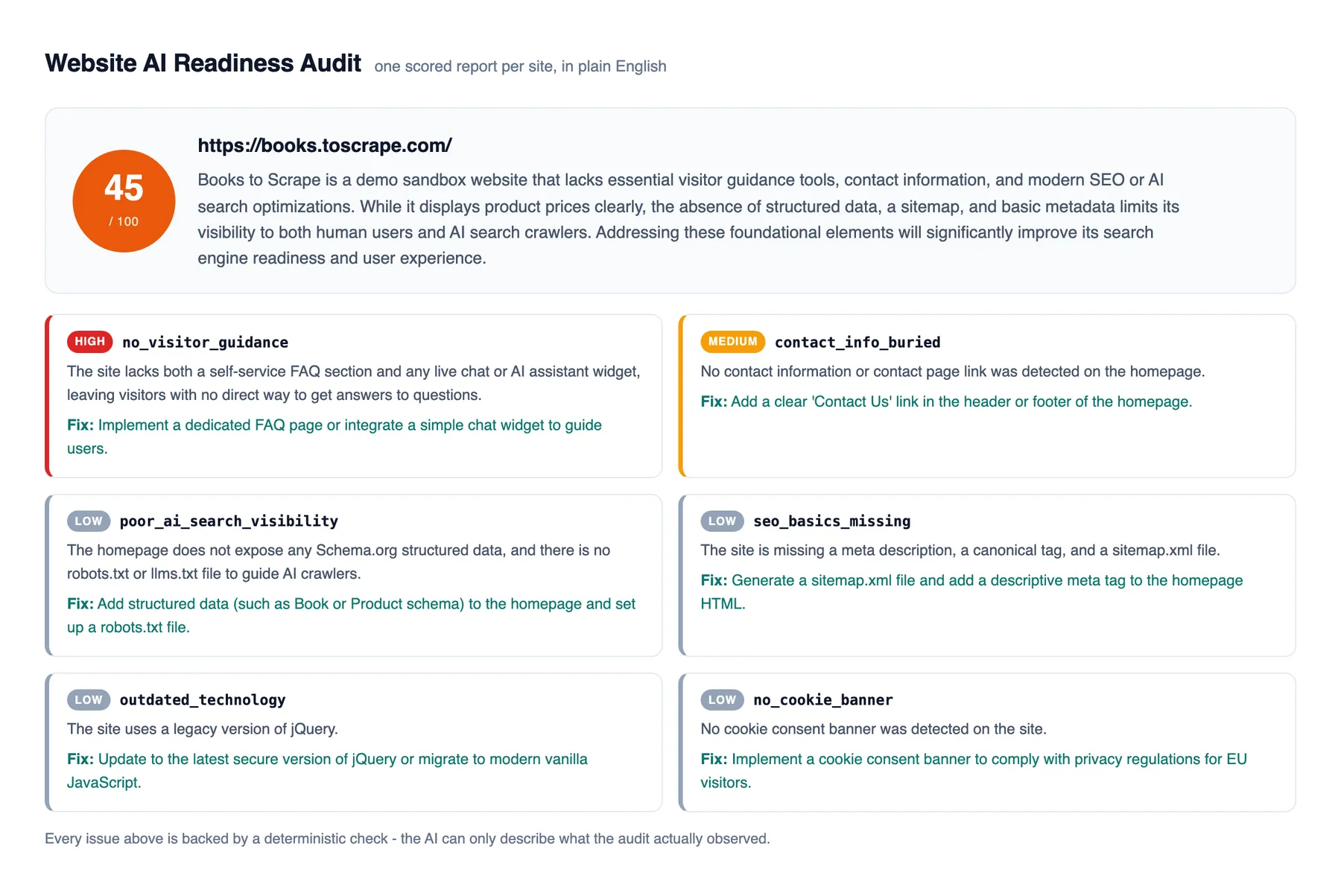
Who it is for
- Agencies and freelancers - audit a prospect list before outreach. The report names concrete, fixable problems on each site, so it doubles as the conversation opener.
- Site owners - a second opinion on what a first-time visitor (and an AI crawler) actually experiences, in language you do not need a developer to translate.
- SEO and GEO consultants - visitor-experience findings plus the AI-search checks (crawler access, llms.txt, structured data) in one run.
What it checks
Visitor experience (does the site serve a human with a question?)
- Visitor guidance - live-chat and assistant widgets (Intercom, Crisp, Tawk.to, HubSpot, Tidio, Zendesk and more), FAQ pages and sections. A site with neither leaves every question unanswered.
- Findability - how many clicks to reach contact information and pricing, or whether they are missing entirely.
- Performance - mobile performance score and Largest Contentful Paint via Google PageSpeed Insights.
- Cookie consent - whether a consent banner is present (relevant for EU audiences).
AI search visibility (can AI search engines read and cite the site?)
- AI crawler access - whether robots.txt blocks GPTBot, ClaudeBot, PerplexityBot, Google-Extended and other AI crawlers. A blocked crawler means the site cannot be cited by that AI product.
- llms.txt - presence of the emerging AI-guidance file.
- Structured data - Schema.org markup (JSON-LD or microdata) on the homepage.
Fundamentals
- SEO basics - title, meta description, H1 structure, canonical URL, Open Graph tags, robots.txt, sitemap.xml.
- Technology - CMS and framework detection (WordPress, Shopify, Wix, Webflow, Next.js and more), including legacy technology worth upgrading.
How the report is produced
The Actor visits the homepage in a real browser (JavaScript rendered, like a visitor sees it), discovers and visits the key pages (contact, pricing, FAQ, about), and runs the checks above. An AI layer (Google Gemini) then reads the findings and the actual page text and produces a 0-100 readiness score, a 2-3 sentence summary in plain English, and a prioritized issue list - each issue with what was observed on your site and one actionable fix.
Honesty guarantee: the AI can only report issues that the deterministic checks actually observed. If the code did not find the problem, the report cannot claim it.
Input
- websites - one homepage URL per line. You are charged per successfully audited site; unreachable sites are skipped and not charged.
- maxPagesPerSite - the Actor visits the homepage plus key pages (contact, pricing, FAQ, about), up to this limit.
- runPerformanceCheck - PageSpeed adds up to a minute per site; disable it for faster runs.
Output
One dataset item per audited site:
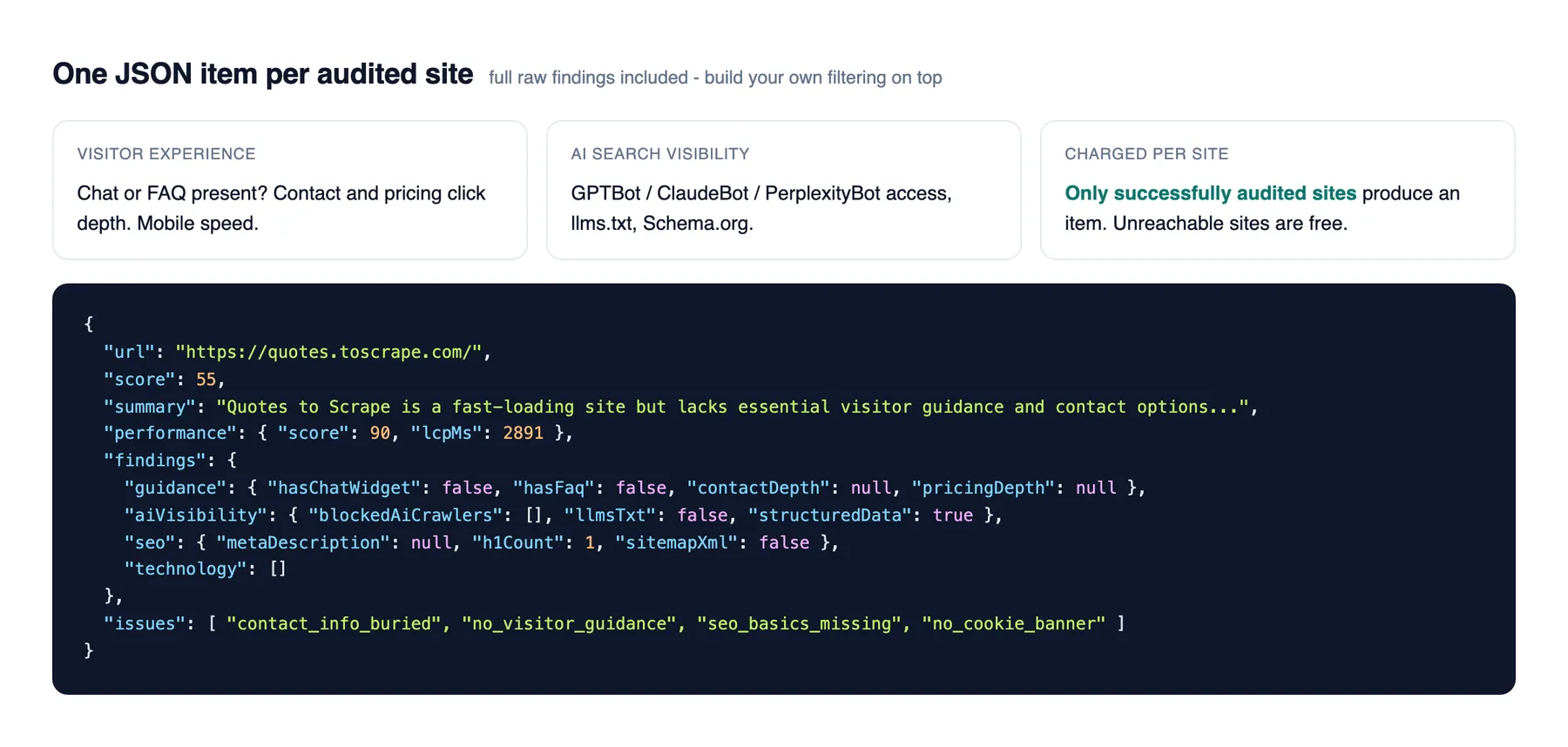
The full deterministic findings are always included (guidance, findability depths, SEO, AI visibility, technology), so you can build your own filtering or scoring on top.
Typical uses
- Prospecting: run 50 local businesses, sort by score ascending, contact the bottom 20 with their own report.
- Pre-campaign check: verify the site can convert a visitor with questions before paying for traffic to it.
- Client reporting: attach the plain-English summary to your monthly report; the raw findings back every claim.
For AI agents and MCP users
This Actor is built to be called by AI agents (for example through the Apify MCP server). Typical requests it answers:
- "Audit this website and tell me what to fix."
- "Check whether example.com is ready for AI search. Is it blocking GPTBot or ClaudeBot?"
- "Is this site AI-ready? Can a visitor with a question get an answer there?"
- "Run a website audit on this lead before I write the outreach email."
- "Score these 10 websites and rank them by AI readiness."
Minimal input: { "websites": ["https://example.com"] }. The output is one JSON item per site with a 0-100 score, a plain-English summary you can quote directly, an issues array (type, severity, what was observed, one recommended fix), and the full raw findings. Unreachable sites produce no item and are not charged. A typical audit takes 1-3 minutes per site; set runPerformanceCheck to false for faster runs.
Automate it
The Actor works with Apify's official integrations, so a prospect list can be audited on a
schedule without writing code. In Make, Zapier or n8n, the whole flow is four
steps: read the websites from a Google Sheet, "Run an Actor" with
{ "websites": ["<the sheet's website column>"] }, fetch the run's dataset items, then send
each report by email. One row in, one plain-English report out.
No vendor recommendations
The report never names or links a product. Recommendations describe what to fix, not what to buy - and an issue is only ever reported when the deterministic checks actually observed it on your site.


