
Amazon Sponsored Products & Search Results Scraper
Pricing
from $0.08 / 1,000 product results
Amazon Sponsored Products & Search Results Scraper
Scrape Amazon search results for any keyword at $0.10 per 1,000 products: position, ASIN, title, price, list price, rating, review count, Prime, sponsored flag and badges, up to 20 pages per search, on amazon.com and amazon.ca. No login; only-new-products mode.
Pricing
from $0.08 / 1,000 product results
Rating
0.0
(0)
Developer

Aurelix
Maintained by CommunityActor stats
0
Bookmarked
2
Total users
1
Monthly active users
12 minutes ago
Last modified
Categories
Security
Limited permissionsShare
What is Amazon Sponsored Products & Search Results Scraper?
Every product on Amazon's search results for your keywords (position, sponsored flag, ASIN, price, rating, badges) for $0.10 per 1,000 products, no login.
For sellers, PPC managers and product researchers. Paid Apify plans pay $0.08 per 1,000. Sister to our Amazon Best Sellers Scraper.
| Search by | Keywords or Amazon search URLs (filters kept), optional department and sort |
| Marketplaces | amazon.com and amazon.ca |
| Depth | Every result page Amazon shows for a search (up to 20), sponsored results included or not |
| Output | 24 fields per product incl. position and sponsored flag; JSON, CSV, Excel, API |
| Automate | Only-new-products mode, schedules, Slack/webhook digest, Zapier, Make, n8n, MCP |
| Price | $0.10 per 1,000 products ($0.08 per 1,000 products on paid Apify plans) |
| Login needed | No |
Daily monitor: only what's new, every morning
Set it once, get only the new products every morning. With Only new products on, the first run returns everything that matches; each later run skips products that earlier runs already returned, so you pay only for new ones.
- Paste this input into the Input tab (JSON view) and click Save as a new task; it appears under Saved tasks.
- Open the task from Saved tasks and click Schedule.
- Choose Daily, pick the hour, and save.
Cost example: 2 searches, about 10 new products a day over about 4 results pages ≈ $0.22/month on the free plan ($0.21 on paid plans): one run a day for 30 days, start fee included. The first run returns everything that matches, so it costs more.
Add a Slack incoming-webhook URL in slackWebhookUrl (or any URL in webhookUrl) to get a short digest of each run's new products; nothing is sent when a run finds nothing.
Why Amazon Sponsored Products & Search Results Scraper users pick this one
- Organic and sponsored rank. position, organic_position and a sponsored flag on every row.
- List price and badges. Best Seller, Amazon's Choice and deal badges beside the price.
- Up to 20 pages. Every result page Amazon shows for a keyword.
- Only new products. Daily runs return the ASINs that just entered a search.
- Refused pages retried. Fresh sessions, optional residential add-on; nothing is ever solved.
Get started in 3 steps
- Type keywords into 'Searches', e.g. 'coffee grinder', or paste an Amazon search URL with your filters.
- Optionally pick the marketplace, department, sort order and how many results per search (Amazon shows up to 20 pages); switch sponsored results off if you only want organic ones.
- Click Start, or schedule it daily to track rank moves. Download JSON, CSV or Excel, or send results to Google Sheets, Zapier, Make or n8n.
▶ Try it with the example input
The form opens with an example input already filled in.
How much does it cost to scrape Amazon search results?
Pay per event: you pay only for what the run returns, plus a small start fee. Bronze, Silver, Gold and higher Apify plans pay less per result.
| Products | Free plan | Paid plans (Bronze, Silver, Gold) |
|---|---|---|
| 100 | $0.015 | $0.013 |
| 1,000 | $0.11 | $0.085 |
| 10,000 | $1.01 | $0.81 |
Totals include the $0.005 start fee per run, rounded to the cent (amounts under $0.10 to four decimals). Apify's free plan includes $5 of credit a month, enough for about 50,000 products.
Searches that return nothing (including Amazon's no-match pages that show only ads) and products already returned in 'Only new products' mode are never charged as products. In 'Only new products' mode each results page read costs $0.0003, and a search stops at the first page with nothing new. In our daily checks a keyword needed 1.0-1.4 pages (Amazon reshuffles results), so 20 keywords cost about $0.011-0.013 a day plus any new products ($0.10 per 1,000). After 10 searches in a row with no results the run stops, so a list of mistyped keywords cannot run up costs. The opt-in residential fee is different: it applies to every request sent over residential, even if Amazon returns no matches or refuses the request. A product that appears both as an ad and organically is one row (and one charge), with both positions.
Billing events
| Event | Free plan | Paid plans (Bronze, Silver, Gold) |
|---|---|---|
product-result | $0.10 per 1,000 products | $0.08 per 1,000 products |
residential-page | $0.012 per residential request (opt-in) | $0.012 per residential request (opt-in) |
only-new-page | $0.0003 per page read with 'Only new products' on | $0.0003 per page read with 'Only new products' on |
apify-actor-start | $0.005 per run | $0.005 per run |
Amazon Sponsored Products & Search Results Scraper vs alternatives
| This Actor | junglee/Amazon-crawler | apt_marble/amazon-search-results-scraper | |
|---|---|---|---|
| Price per 1,000 products, free plan | $0.10 | $5.00 | $0.60 |
| Price per 1,000 products, paid plans | $0.08 | $4.00 Bronze to $0.80 Diamond | $0.60 |
| Start fee per run | $0.005 | None | None |
| Amazon marketplaces | 2 (.com, .ca) | Many (proxy country setting) | 22 |
| Result pages per search | Up to 20 | Notes that Amazon sometimes limits a search to 7 pages | not stated |
| Sponsored flag and organic position | ✓ | Sponsored flag (categoryPageData.isSponsored); organic po... | ✓ |
| Ad + organic duplicate merged into one row | ✓ | not stated | not stated |
| Only new products since last run | ✓ | not stated | not stated |
| Product detail pages, offers, sellers | ✗ | ✓ | ✗ |
| CAPTCHA solving | Never | Optional solver input | not stated |
Prices checked regularly on each Actor's Store page.
What data you get
Amazon Sponsored Products & Search Results Scraper turns Amazon's search results for any keyword into clean rows, exactly in the order a shopper sees them: position on the page (sponsored included), organic position, ASIN, title, current price, struck-through list price, star rating, rating count, Prime delivery, the sponsored flag, badges such as Best Seller, Amazon's Choice and Limited time deal, the 'bought in past month' note, image and product link. Type keywords as you would in the search box, or paste a search URL with its filters; pick a department and sort order; read every result page Amazon shows for the search (up to 20).
- search_keyword, search_url, marketplace, total_results_text (Amazon's '1-48 of over 10,000 results' line), page
- position (every card, sponsored included), organic_position, sponsored
- asin, title, product_url, image_url
- price, price_text, list_price (struck-through List or Typical price), currency
- rating, reviews_count, prime_eligible, badges, bought_past_month
- new_entry ('Only new products' mode), source_url, scraped_at in ISO 8601 UTC
| position | sponsored | asin | title | price | rating | reviews_count |
|---|---|---|---|---|---|---|
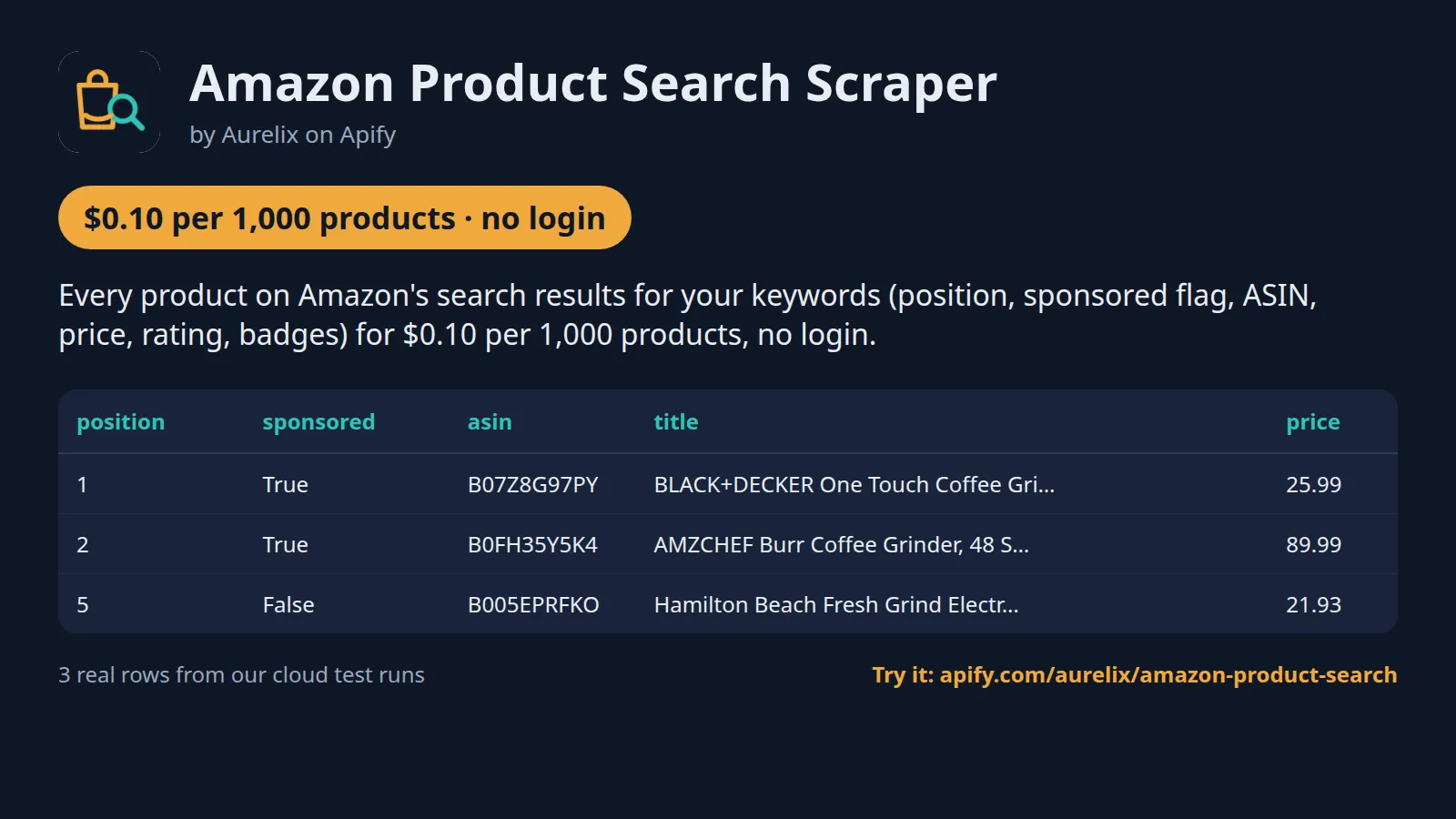
| 1 | True | B07Z8G97PY | BLACK+DECKER One Touch Coffee Grinder, 2/3 Cup Coffee Bea... | 25.99 | 4.5 | 19831 |
| 2 | True | B0FH35Y5K4 | AMZCHEF Burr Coffee Grinder, 48 Settings, Less Static Mes... | 89.99 | 4.5 | 1462 |
| 5 | False | B005EPRFKO | Hamilton Beach Fresh Grind Electric Coffee Grinder For Up... | 21.93 | 4.5 | 64332 |
One full product record, exactly as a real run returned it (long text and lists shortened here). From a real run:
Use cases
- Sellers and brands tracking where their products rank for their main keywords, organic and sponsored
- PPC managers seeing which competitors buy ads on a keyword and at what price
- Product researchers sizing a niche: prices, ratings and review counts of every result page
- Price monitoring of a keyword's top results, with list prices and deal badges
- Catalog and ASIN discovery for later detail scraping
Input
| Field | Type | What it does | Default |
|---|---|---|---|
searches (Searches) | array | Keywords as you would type them into Amazon's search box, e.g. 'coffee grinder' or 'usb c cable 6ft', or Amazon... | |
maxResultsPerSearch (Results per search) | integer | Most products to return per search, e.g. 100. | 100 |
marketplace (Amazon marketplace) | string | Which Amazon keywords are searched on. | "com" |
category (Department) | string | Limit keyword searches to one department, e.g. Electronics; 'All departments' = Amazon's default. | |
sort (Sort by) | string | Order of the results, as in Amazon's 'Sort by' menu. | "relevance" |
includeSponsored (Include sponsored results) | boolean | Keep sponsored (ad) results, each flagged with sponsored = true. | true |
All 12 fields, with examples: see the Input tab.
Use it from AI agents (MCP), the API or no-code
Copy this to your AI assistant
Connect an AI agent in 3 steps
- Add
https://mcp.apify.com/?tools=aurelix/amazon-product-searchas an MCP server in Claude, Cursor, VS Code or another MCP client. - Sign in with your Apify account when the client asks; clients without sign-in send
Authorization: Bearer <YOUR_APIFY_TOKEN>(Console > Settings > API & Integrations). - Paste the prompt above into your agent and add what you want, e.g. "show me the results as a table".
API
Start a run and read the dataset with Apify's REST API or the Python and JavaScript clients:
No-code: schedule it in 3 clicks
Send the results to Google Sheets, Zapier, Make, n8n, Slack or any webhook URL.
- Fill in the input, then click Save as a new task.
- In the task, click Schedule and pick daily or weekly (Apify Schedules).
- Turn on Only new products so each run returns only what is new, and paste a Slack or webhook URL into Slack webhook URL / Webhook URL to get a digest of the new items (count plus the top 10) after every run.
Prefer n8n or Make? Ask in the Issues tab and we will share a ready-made workflow for it.
FAQ
Can I scrape Amazon search results without login?
Yes. It never logs in, so you need no Amazon account, password or cookies; only a free Apify account to run it.
Is there a Amazon search results API?
You can use this Actor as one. Start it with Apify's REST API or the Python and JavaScript clients and read the results as JSON (see the code above), or call it from an AI agent through MCP.
How much does it cost to scrape Amazon search results?
About $0.11 for 1,000 products on Apify's free plan and $0.085 on paid plans, start fee included. The free $5 monthly credit covers about 50,000 products.
Can I export Amazon search results data to Excel or Google Sheets?
Yes. Download the results as Excel, CSV, JSON, XML or HTML from the run's Storage tab, or send them to Google Sheets with Apify's Google Sheets integration or the API.
Is it legal to scrape Amazon search results?
It reads only public data any logged-out visitor can see: Amazon search result pages, which Amazon's robots.txt does not disallow. It goes at a polite pace, never logs in and never solves CAPTCHAs or bot challenges. It returns product listing fields only (title, price, rating, rating count, badges, links); no reviews, reviewer or seller personal data. To have a record removed, open an issue on this Actor's Issues tab; if Amazon formally asks us to stop, this Actor will stop. You are responsible for using the data lawfully, incl. anti-spam and privacy laws; this is not legal advice.
What is the difference from Amazon Best Sellers Scraper?
This Actor reads search results: what a shopper sees after typing a keyword, sponsored listings included, in page order. Amazon Best Sellers Scraper reads Amazon's ranked Best Sellers and New Releases lists by category, with rank changes. Use this one for keyword rank and ads, that one for category best-seller rank.
How many results can I get per keyword?
Every page Amazon shows for the search, up to 20, and at most 1,000 products per search. How many pages Amazon shows depends on the keyword: 'coffee grinder' had 7 pages of about 48 organic products plus ads, 'usb c cable' 20 pages of 16. Set 'Results per search' to stop earlier.
What do position and organic_position mean?
position counts every product card from the top of page 1, sponsored included, the way a shopper scrolls. organic_position counts only organic results. A product shown both as an ad and organically appears once, with sponsored = true and its organic position filled in.
Is prime_eligible reliable?
It is true when the search card carried a Prime delivery offer, and empty otherwise (never guessed). What Amazon shows depends on the visitor: in our test runs of version 0.1.6 a US residential session saw the Prime line on 97 of 100 'coffee grinder' cards, while datacenter sessions saw it on 8 of 600 cards. If Prime matters to you, turn on 'Residential fallback' and choose the RESIDENTIAL proxy group (paid add-on).
Why do some runs show no sponsored results?
Amazon decides per visitor whether to show ads. Datacenter sessions (the default) do see some ads, but fewer than residential ones: in our test runs of version 0.1.6, a datacenter run saw 11 ads, all on 2 of its 22 result pages, while a US residential session saw 12 ads on page 1 of 'coffee grinder' alone. The sponsored flag reports what the page showed; it never guesses. For ad research, choose the RESIDENTIAL proxy group (paid add-on, $0.012 per residential request).
Which marketplaces work?
amazon.com and amazon.ca. amazon.co.uk and amazon.de refused logged-out search requests from Apify's datacenter proxies in our tests, so other marketplaces are not offered; if you need them, ask on the Issues tab.
Does it solve CAPTCHAs or bot challenges?
No. When Amazon answers with a robot check, a challenge page or its 'Continue shopping' page, nothing is solved or clicked: that proxy session is dropped and the page is retried on up to 5 fresh datacenter sessions. If you turn on 'Residential fallback' (a paid add-on), up to 3 residential sessions are tried next; the residential fee ($0.012) applies to every request sent over residential, even if Amazon returns no matches or refuses the request. Each search starts on datacenter; within a search, once a page needed residential, that search's later pages try residential first. If Amazon refuses 2 searches in a row on every session, the run stops early ('Amazon is refusing this run') so it does not keep spending. If every session is refused, the products already read are kept and the run status says 'Partial'.
Switching from another Amazon search scraper
- From junglee/Amazon-crawler (Amazon Product Scraper): its
categoryOrProductUrlswith search URLs →searches(paste the same /s?k= URLs or just the keywords);maxItemsPerStartUrl→maxResultsPerSearch. This Actor returns search-card fields only, no product-detail pages, offers or sellers, which is why it costs $0.10 instead of $5.00 per 1,000. - From apt_marble/amazon-search-results-scraper:
keywords→searches,maxResultsPerKeyword→maxResultsPerSearch,sortBy→sort,excludeSponsored: true→includeSponsored: false. Its price filters have no equivalent field; paste a search URL with Amazon's own price filter instead. - From memo23/amazon-search:
queries→searches,includeSponsored→includeSponsored,sortBy→sort; incremental monitoring →onlyNewProducts. - Field names:
asin,title,price,ratingmatch most scrapers; the rating count isreviews_count, the ad flag issponsored, and rank isposition/organic_position.
How it compares, honestly
- Price: $0.10 per 1,000 ($0.08 on paid plans) vs junglee $5.00 ($4.00 Bronze), apt_marble $0.60 on every plan, memo23 $1.00 ($0.30 Gold). scrape.badger charges $0.09 on every plan: cheaper than this Actor on the free plan, dearer on paid plans (Store API, read when this page was written). Residential retries are an opt-in add-on here, $0.012 per residential request.
- Marketplaces: 2 here (amazon.com, amazon.ca); apt_marble lists 22, memo23 21, scrape.badger 20. Pick one of those for Europe or Asia.
- Ads and organic results: every row carries
sponsored, and a product Amazon shows both as an ad and organically is one row with both positions, so a rank table never counts it twice. - Challenges: junglee's input offers a CAPTCHA solver; this Actor never solves CAPTCHAs or bot challenges and drops the refused session instead.
- Reliability: rivals finished 98.2%-100% of their public runs in the last 30 days (Store API). This Actor is new; it is checked daily by an automated health run.
Limits (stated honestly)
- amazon.com and amazon.ca only (amazon.co.uk and amazon.de refused logged-out search pages from Apify's datacenter proxies in our tests); rivals cover 20 or more marketplaces.
- Up to 20 result pages and 1,000 products per search; Amazon shows fewer pages for many keywords.
- Search results are personalised by location and change through the day; a run is a snapshot from a US (or Canadian) visitor's view at that moment.
- Some cards show no price (e.g. only other sellers' offers); price is then empty, never guessed. Rating counts shown only in thousands ('1.4K') stay empty rather than rounded.
- prime_eligible and sponsored follow what Amazon served: some sessions get pages without Prime lines or ads, and then no product is marked Prime or sponsored.
- If Amazon keeps refusing every proxy session, results already read are kept and the run status says 'Partial'.
Works great with
- Then: Amazon New Releases & Best Sellers: take the categories your search results fall into (e.g. from the Best Seller badge) and track their top 100 daily
- Then: Google Trends by Region: check whether search interest in the keyword is rising before you stock or advertise
Recent changes
- 0.1: First release: Amazon search results on amazon.com and amazon.ca with position, organic position, sponsored flag, list price, badges and Prime; departments, sort, up to 20 pages, only-new-products mode, opt-in residential fallback.
The full history is on the Changelog tab.
Tested daily
An automated health check runs this Actor every day on a fixed input and checks that at least 37 products come back with asin, title, product_url, position, sponsored, source_url filled in; a failed check alerts the maintainer straight away.
Your feedback
Missing a field, found a bug or need another filter? Open an issue on the Issues tab; we aim to answer within a day. If this Actor saved you time, a short review helps other people find it.


