
Google Maps Scraper
Pricing
from $3.00 / 1,000 results
Google Maps Scraper
Google Maps Scraper: Extract business data from Google Maps search results: names, addresses, phones, websites, ratings, reviews, opening hours, and 20+ fields. Covers any location or category. Grid search mode finds thousands of places per city.
Pricing
from $3.00 / 1,000 results
Rating
1.0
(1)
Developer

Automly
Maintained by CommunityActor stats
0
Bookmarked
223
Total users
8
Monthly active users
3 days ago
Last modified
Categories
Share
What is Google Maps Scraper?
Google Maps Scraper is a tool that lets you scrape Google Maps business listings and turn them into leads: names, phone numbers, websites, addresses, ratings, review counts, categories and opening hours. Turn on one option and it also works as a Google Maps email scraper, adding the emails and social profiles each business publishes on its own website. Type a search like "dentists in Chicago", click Start, and download your list as Excel, CSV or JSON.
- Speed: 1,000 New York restaurants in 22 seconds with Grid Search in our test; a search of 200 places usually finishes in under a minute
- Grid Search: find thousands of places in a city, not just the first 200
- Lead-ready: phone, website and full address on every place, plus a Contacts download built for prospecting
- Emails and social profiles: optional, taken from each business's own website
- Reviews and photos inside each place: optional, as many as you ask for
- Popular times and more: optional place page details, like how busy a place is right now
- Filters: only certain categories, a minimum rating or review count, with or without a website, open places only
- Any location: a city, county, state, postal code or an area you draw on the map
- No login: no Google account or API key needed
- Free to try: the $5 of free usage every Apify account gets each month covers about 1,500 places
What can Google Maps Scraper do?
- Build a Google Maps lead list of local businesses with phone numbers and websites
- Use it as a Google Maps email extractor: find emails and social media profiles of local businesses (Facebook, Instagram, LinkedIn and more)
- Scrape all restaurants, dentists, plumbers or any business type in a city
- Get thousands of places in one city with Grid Search
- Scrape Google Maps for any area you draw, from a neighborhood to a whole region
- Export Google Maps phone numbers and websites to Excel or Google Sheets
- Get ratings, review counts and opening hours for competitor research
- Add reviews with owner replies and photos to every place
- See popular times and how busy a place is right now
- Find Google Maps businesses without a website, or only the ones with 4.5 stars and up
- Read places you already know from their Google Maps links or place IDs
- Run many searches in one go, each with its own ranked list
- Get results in any language Google Maps supports
What data can you extract from Google Maps places?
| Business name | Phone number (local and international) | Website |
| Full address, and the address without the business name | Street, city, postal code, state, country | Neighborhood |
| Rating | Number of reviews | Main category and all categories |
| Opening hours for each day | Price level and price range | Reservation link |
| Short description and tagline | Owner name shown on the listing | Services and attributes (takeout, Wi-Fi, accessibility) |
| Latitude and longitude | Time zone | Google Maps link |
| Place ID and CID | Photo and number of photos | Temporarily or permanently closed |
| Search query that found it | Rank in the results | |
| Feature ID and Knowledge Graph ID | Unclaimed listing (no owner) | When it was scraped |
| Emails from the business's website* | Phone numbers from the website* | Facebook, Instagram, LinkedIn, X, YouTube, TikTok and Pinterest profiles* |
| Popular times, busy now** | Review counts per star** | Review topics** |
| People also search for** | Plus code** | Menu link and photo categories** |
| Reviews with text, rating, date, likes, owner reply and reviewer*** | Photos with their date*** |
* With Add emails and social profiles turned on. ** With Add place page details turned on. *** With Reviews per place or Photos per place above 0.
How to scrape Google Maps places
- Create a free Apify account (no credit card needed).
- Open Google Maps Scraper.
- Add one or more search queries, like
plumbers, and a Location, likeAustin, TX(or put the city in the query:plumbers in Austin Texas). - Set Max Places Per Search, turn on Enable Grid Search if you want more than about 200 places, add any filters or extras, and click Start.
- When the run finishes, download your places as Excel, CSV, JSON, HTML or XML.
How much does it cost to scrape Google Maps places?
Google Maps Scraper costs $3.00 per 1,000 places, plus $0.01 per run start. You also pay the Apify platform usage of the run.
For example, 1,000 places cost $3.01 ($3.00 for the places plus $0.01 for the start), plus platform usage. A place found by two different queries appears once for each query, and is charged once for each.
With Add emails and social profiles on, each place where contact details are found on its website costs extra from 17 October 2026 (see the Pricing tab); until then it is included. Places with no website, or none found, are not charged for it.
The other extras (place page details, reviews, photos) may also cost extra per place, review or photo saved; the Pricing tab always shows the current prices. Filters cost nothing extra: places they skip are not saved and not charged.
Every Apify account gets $5 of free usage each month, enough for about 1,500 places. See the Pricing tab for details.
Input
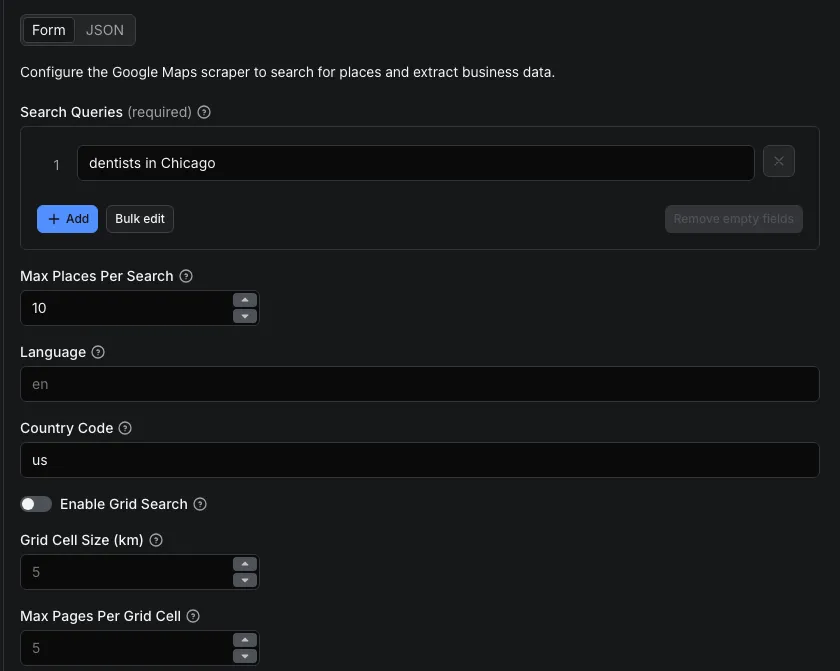
| Setting | What it does |
|---|---|
| Search Queries | What to search on Google Maps, like restaurants in new york. Each query runs on its own |
| Location | Where to search, like Austin, TX, 10001 or Germany. Only places inside it are kept |
| Max Places Per Search | How many places to get per query (default 100, up to 10,000) |
| Language | Language of the results, like en, fr or ar (default en) |
| Country Code | Country preference, like us, ae or eg (default us). Put the city or region in the query too |
| City, County, State, Postal code | Another way to name the location, in parts |
| Custom search area | An exact area as GeoJSON: a polygon, or a point with a radius in km |
| Google Maps links, Place IDs | Places you already know, one row each, or a Google Maps search link read as it is |
| Only these categories | Keep places with one of these categories, like dentist |
| Name must match the search term | Keep places whose name contains, or is exactly, the search term |
| Minimum rating, Minimum number of reviews | Keep well-rated or well-reviewed places only |
| Website | All places, only places with a website, or only places without one |
| Skip closed places | Leave out temporarily or permanently closed places |
| Add emails and social profiles | Also add the emails, phone numbers and social media profiles published on each business's own website (costs extra per place where they are found) |
| Add place page details | Popular times, review counts per star, review topics, people also search for, plus code, menu link |
| Reviews per place | How many reviews to add to each place (0 adds none), with sort order, a start date and an option to leave out reviewer details |
| Photos per place | How many photo links to add to each place (0 adds none) |
| Enable Grid Search | Search the city in smaller areas to get far more than about 200 places |
| Grid Cell Size (km) | Size of each smaller area, from 0.5 to 50 km (default 5) |
| Max Pages Per Grid Cell | How deeply each smaller area is searched, from 1 to 11 (default 5). Raise it for busy city centers |
| Custom Search Bounds | The area to cover, as south, west, north and east edges. Use it for any place, it replaces the city list |
Example: 4.5-star dentists in Austin with a website, their popular times and 10 newest reviews each.
Example: up to 1,000 restaurants inside a custom area of New York, with Grid Search.
Output
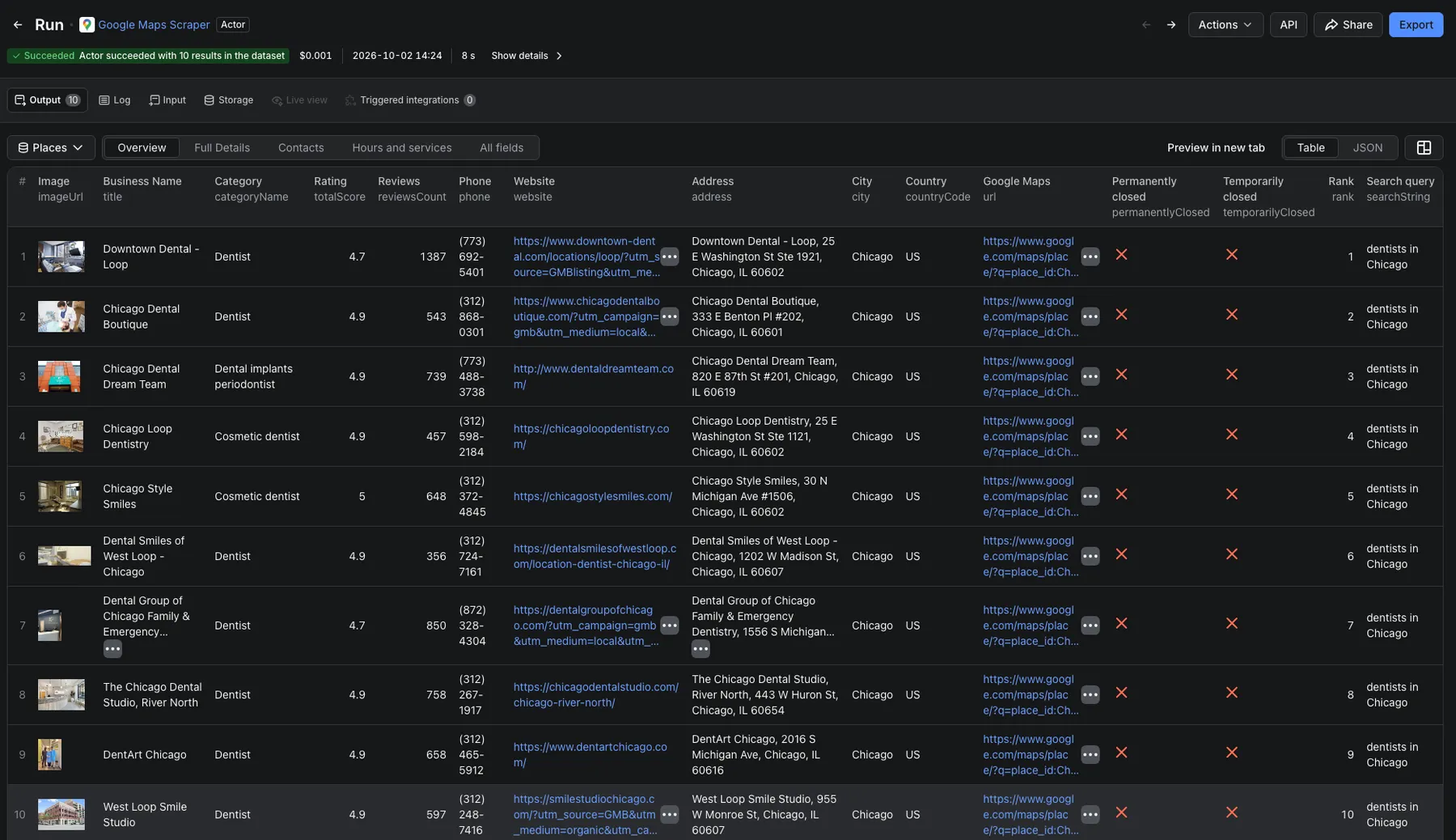
You get one row per place. View them in Apify Console in tables (Overview, Contacts, Hours and services, Full Details, Place page details and Reviews, one row per review), or download them as Excel, CSV, JSON, HTML or XML. The Contacts CSV or Excel download keeps just the prospecting columns. Here is a real row, shortened:
placeId identifies the same business across runs, so you can match and update your lists. rank is the place's position in the search. With Grid Search it is the order places were found, not Google's own ranking.
How can I use Google Maps data?
- Lead generation: build prospect lists of local businesses with phone numbers, websites and addresses
- Sales territory planning: find every business of a type in a city, then split them by neighborhood or postal code
- Competitor research: compare ratings, review counts, prices and opening hours in any area
- Market research: see how many businesses of a kind a city has, and where they cluster on the map
- Local SEO: check how your listing ranks for a search and how it compares with nearby rivals
Grid Search: find thousands of places in a city
One Google Maps search returns up to about 200 places. A city has far more. Grid Search searches the city in many smaller areas and puts the results together, so you get thousands of places from one query.
- A place found twice is kept once, so your list has no duplicates within a query.
- Only places inside the area are returned. You don't pay for places outside it.
- Smaller areas find more places. Set Grid Cell Size (km): 5 for a quick scan, 2 for a thorough one, 1 for the most complete list. Smaller sizes take longer.
Cities detected automatically: Cairo, New York, London, Dubai, Paris, Tokyo, Istanbul, Riyadh, Mumbai, Berlin, Los Angeles, Chicago, Singapore, Bangkok, Rome, Jeddah, Alexandria, Doha, Amman and Beirut. Put the city name in your query (dentists in London) and Grid Search covers the whole city.
Any other place: add a Custom Search Bounds area with its south, west, north and east edges. It applies to every query in the run. If neither a known city nor a custom area is given, the query runs as a normal search. If the area is too large for the chosen size, the run tells you to pick a larger size or a smaller area.
Search any city, postal code or area you draw
Type a Location (Austin, TX, 10001, Bavaria, Germany) or fill in City, County, State or Postal code, and every search term runs there. Only places inside the area are kept, so you can search for pizza instead of pizza in Austin. Turn on Grid Search to cover a large area such as a state in full.
For an exact area, draw it as GeoJSON in Custom search area (coordinates as longitude, latitude), for example a 3 km circle around a point:
Polygons and multi-polygons work too; geojson.io draws them for you.
Filters: only the places you want
- Only these categories:
dentistkeeps dentists and skips the spa next door. A category matches when it holds every word you give, sorestaurantmatchesChinese restaurant. List every name a category can have. - Name must match the search term: keep only
Starbuckslocations when you search forStarbucks. - Minimum rating and Minimum number of reviews: keep well-known, well-rated places.
- Website: only places with a website, or only places without one (leads for web designers).
- Skip closed places: leave out places marked temporarily or permanently closed.
Skipped places are not saved, not charged and do not count toward Max Places Per Search, so you still get the number you asked for when there are enough.
Popular times, reviews and photos
- Add place page details adds what a place's own page shows:
popularTimesHistogram(how busy it usually is each hour of the week),popularTimesLiveTextandpopularTimesLivePercent(how busy it is right now),reviewsDistribution(reviews per star),reviewsTags(topics reviewers mention),peopleAlsoSearch,plusCode,menuandimageCategories. - Reviews per place adds a
reviewslist to each place: text, rating, date, likes, the owner's reply and the reviewer's name, profile and review count. Sort them by newest, most relevant, highest or lowest rating, keep only reviews newer than a date (2025-01-01or3 months), and turn off Include reviewer details to keep reviewers' profiles out. - Photos per place adds
images(each photo link at full size with the date it was added) andimageUrls.
Places from links or place IDs
Already have a list? Paste Google Maps links (place links, share links, ?cid= links) into Google Maps links, or place IDs (ChIJ..., the placeId of any result) into Place IDs. Each gives one row with the same fields as a search, plus any extras you turned on. A Google Maps search link (/maps/search/pizza/@40.75,-73.98,15z) is read like a search term at that spot on the map.
Google Maps email scraper: emails and social profiles from business websites
Turn on Add emails and social profiles to turn a Google Maps list into a full lead list. For every place with a website, the actor reads the business's own website (its home page and pages such as Contact and About) and adds three fields:
emails: the email addresses published there, the business's own domain firstphones: phone numbers listed there, in international format (+15125550123)socialProfiles: links to the business's profiles, by network
Only what a business publishes on its own public website is added: no guessed addresses and no other sources. When a website has no contact details or cannot be opened, the fields stay empty and the place is not charged for them; the run's status tells you for how many places nothing was found. The Website contacts tab of the Output shows these columns side by side. Runs take longer with this option.
Monitor businesses on a schedule
Schedule the actor to run every week or month with the same queries. Match places by placeId to spot new businesses, closures (permanentlyClosed, temporarilyClosed) and changes in rating or review count. Send each run to Google Sheets, Slack or email with an integration.
Google Maps scraper API: use it from your own code
Run Google Maps Scraper from your own code with the Apify API or the Python and JavaScript clients:
Scrape more local business data
| Actor | What it does |
|---|---|
| Website Email Scraper | Finds emails and contacts on websites. Feed it the websites from your Google Maps list to add emails to your leads |
| Google Maps Reviews Scraper | Gets all the reviews of a place, not just a sample, with ratings, dates and owner replies |
| Trustpilot Reviews Scraper | Scrapes Trustpilot reviews, ratings, company replies and company data |
Use with AI agents (MCP)
This actor works as a tool for AI agents. Connect any MCP-compatible AI assistant or agent to the Apify MCP server at https://mcp.apify.com (sign in with your Apify account), and it can find this actor, fill in the input and read the results by itself. Ask in plain words, for example "Find plumbers in Denver with their phone numbers and ratings", and the agent runs automly/google-maps-scraper with an input like {"searchStringsArray": ["plumbers in Denver"], "maxCrawledPlacesPerSearch": 50}. Every input and output field has a plain description, so the agent knows what to type and what each column means. Agent runs cost the same as runs you start yourself.
FAQ
How much does it cost to scrape Google Maps?
$3.00 per 1,000 places plus $0.01 per run start, plus the Apify platform usage of the run. See the cost section above and the Pricing tab. The $5 of free usage every month covers about 1,500 places.
How many places can I get from one Google Maps search?
One search returns up to about 200 places. Turn on Grid Search for more: it covers a city in smaller areas and can return thousands of places from one query, up to 10,000 per query.
Is there a free Google Maps scraper?
You can use Google Maps Scraper for free within the $5 of free usage every Apify account gets each month. That covers about 1,500 places, and you don't need a credit card to sign up. After that you pay per place, see the cost section above.
Can I get emails from Google Maps?
Yes. Turn on Add emails and social profiles and the scraper works as a Google Maps email scraper: for each place with a website it adds the emails, phone numbers and social profiles the business publishes there. Google Maps listings themselves don't show emails, so places without a website get none.
How do I find businesses on Google Maps without a website?
Set Website to Only places without a website. You get local businesses that have a phone and address on Google Maps but no site, a common lead list for web designers and agencies.
Is there a Google Maps scraper API?
Yes. Every run can be started and read through the Apify API, with Python and JavaScript clients; see the Python example above. You don't need a Google Maps API key.
Where does a search look?
Where the query says. coffee near Lyon, France returns places in Lyon. Name a city or area in every query. A query without one, like just coffee, is placed wherever Google Maps chooses.
Can I scrape Google Maps in another language or country?
Yes. Set Language (for example fr or ar) to get names, categories and attributes in that language, and Country Code for your market. Country Code is a preference, not a border, so also put the city or region in your query.
Can I run several searches at once?
Yes. Add as many lines to Search Queries as you like. Each query runs on its own and gets its own ranked list. A place found by two queries appears once under each.
Do I need a Google account or API key?
No. You don't need a Google account, a Google Maps API key or any cookies.
Is the output the same as Google Maps Scraper by Compass?
The common field names match Google Maps Scraper by Compass, including title, phone, website, totalScore, reviewsCount, placeId, cid, fid, kgmid, phoneUnformatted, openingHours, additionalInfo, plusCode, reviewsDistribution, popularTimesHistogram, peopleAlsoSearch, reviewsTags, imageUrls and claimThisBusiness, and so do most inputs (locationQuery, placeIds, startUrls, categoryFilterWords, placeMinimumStars, website, skipClosedPlaces, maxReviews, maxImages), so your existing workflows keep working. For emails and social profiles, turn on Add emails and social profiles.
Can I scrape private information?
No. You get only what a business shows on its public Google Maps listing and, with Add emails and social profiles on, on its own public website. Fields they don't show are left empty.
Can I connect Google Maps Scraper to other tools or AI agents?
Yes. Use the Apify API and the Python or JavaScript clients, or connect it to Make, Zapier, n8n, Google Sheets, Slack and webhooks with integrations. AI assistants and agents can run it through the Apify MCP server at mcp.apify.com.
Is it legal to scrape Google Maps?
This scraper only collects public business listings: the name, phone, address, website, hours and ratings a business chose to publish on Google Maps. It does not collect private data such as personal email addresses. Reviews, when you ask for them, carry the reviewer's public name and profile; turn off Include reviewer details to leave the profiles out. Some listings, like those of sole traders, can still contain personal data, which may be protected by laws such as GDPR. Only scrape it for a legitimate reason, and ask a lawyer if you are unsure. You can read more in Is web scraping legal?
Google Maps Scraper is an independent tool. It is not affiliated with, endorsed by or sponsored by Google.
Something isn't working. What should I do?
Open the Issues tab and tell us your search query and what you expected.
Your feedback
Have an idea or found a problem? Tell us on the Issues tab. If Google Maps Scraper saved you time, a short review on the Reviews tab helps other people find it.


