

Walmart Scraper
Pricing
from $0.99 / 1,000 results
Walmart Scraper
Scrape Walmart products by keyword, category, search link, product link or item ID: price, was price, unit price, stock, seller, fulfillment, variants, specs, images and reviews. No login. Export to CSV, JSON or Excel, schedule runs or use the API.
Pricing
from $0.99 / 1,000 results
Rating
0.0
(0)
Developer

Automly
Maintained by CommunityActor stats
0
Bookmarked
13
Total users
5
Monthly active users
21 hours ago
Last modified
Categories
Share
Walmart Scraper - Products, Prices, Stock & Reviews
What is Walmart Scraper?
Walmart Scraper is a tool that lets you scrape products, prices, stock, sellers, variants and customer reviews from Walmart.com. Add a keyword, a Walmart search or category link, product links or item IDs, narrow results with Walmart's own sort options, price range and filters such as brand or customer rating, click Start, and download the data as Excel, CSV or JSON.
- 🛒 Keyword to full product data in one run: search results, full product details and customer reviews together
- 🎨 Every variant with its own price and stock: each size, color or pack, at no extra charge
- 📍 Store on every row: each product records the Walmart store it was priced for, because prices and stock differ by store
- 🔓 No login: no Walmart account, cookies or API key needed
- 💸 Free to try: the $5 of free usage every Apify account gets each month covers up to about 1,000 products or reviews
Filters and output fields were last verified against live Walmart pages on 12 September 2026.
What can Walmart Scraper do?
- Scrape Walmart products by keyword search
- Scrape Walmart search results with sort, price range and facet filters
- Scrape a Walmart category or browse page into a product list
- Get Walmart product details by product URL or item ID
- Get Walmart price, was price, rollback savings and unit price
- Check Walmart stock, pickup and delivery availability with delivery dates
- Get Walmart demand signals: units bought since yesterday, shoppers with the item in their cart, units left and best-seller status
- Get Walmart product variants with per-variant price and stock
- Scrape Walmart product specifications, descriptions and images
- Get Walmart seller name, seller ID, seller rating and Walmart vs. marketplace offers
- Scrape Walmart customer reviews with rating, text, date and verified purchase
- Get Walmart UPC, brand, model number and category breadcrumbs
- Track Walmart price drops on a schedule, with a
scrapedAttimestamp on every row - Use it as a Walmart API alternative with no API key or daily call limit
What data can you extract from Walmart?
| 🔖 Item ID, name, brand, model, UPC | 💲 Price, was price, savings, unit price | 📦 In stock, units left, order limit |
| 🚚 Shipping, pickup and delivery dates | ↩️ Return policy | 🏪 Seller name, ID, rating, storefront |
| ⭐ Rating and review count | 📊 Rating breakdown (1 to 5 stars) | 🔥 Bought since yesterday, in carts, best seller |
| 🎨 Variants with price and stock | 📋 Specifications and description | 🖼️ Images |
| 🗂️ Category path | 🏷️ Badges (rollback, best seller) | 📢 Sponsored flag |
| 💬 Reviews: rating, title, text, date | ✅ Verified purchase, incentivized | 📍 Store ID, ZIP code and city |
How to scrape Walmart products
- Create a free Apify account.
- Open Walmart Scraper.
- Enter keywords in Search keywords, such as
laptopororganic whole milk, or paste Walmart links or item IDs. - Pick a Sort by order and any filters, set Maximum products, and turn on Fetch full product details and Scrape customer reviews if you want them, then click Start.
- When the run finishes, download the data as Excel, CSV, JSON or XML, or fetch it from the API.
How much does it cost to scrape Walmart products?
You pay per row in the dataset: a product row or a customer review row. The price gets lower on paid Apify plans:
| Apify plan | Products or reviews per 1,000 |
|---|---|
| Free | $4.55 |
| Starter (Bronze) | $4.00 |
| Scale (Silver) | $3.00 |
| Business (Gold) and higher | $0.99 |
Each run also has a tiny start fee. The Apify platform usage of the run is paid separately, on top of the row price. Failed rows and empty pages cost nothing.
- 1,000 products from a search cost $4.55 on the Free plan and $0.99 on Business.
- 200 products with details and 10 reviews each (2,200 rows) cost about $10.01 on the Free plan.
Every Apify account gets $5 of free usage each month, enough for up to about 1,000 products or reviews. Maximum products keeps a run's cost under control, and you can also set a maximum cost per run. See the Pricing tab for details.
⬇️ Input
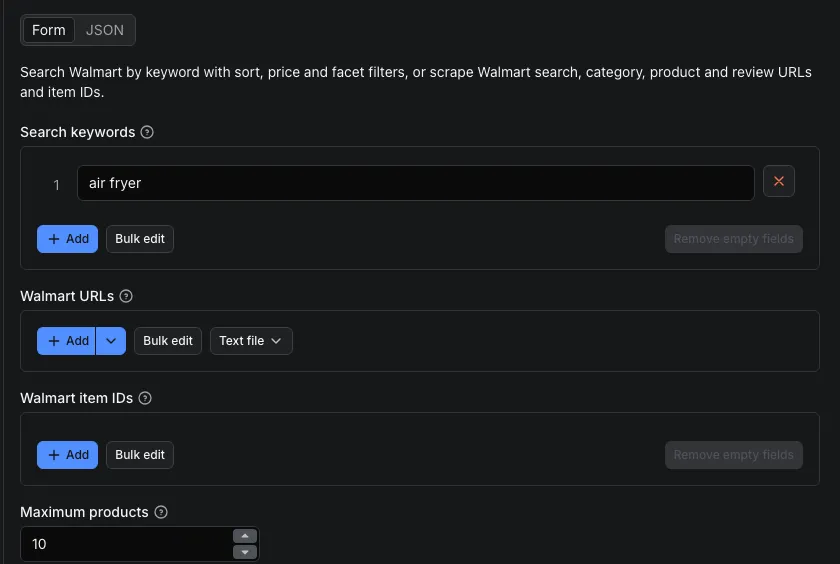
| Setting | What it does |
|---|---|
| Search keywords | Keywords, one search each, like laptop or air fryer |
| Walmart URLs | Walmart search, category (/browse/, /cp/), product or reviews (/reviews/product/) links |
| Walmart item IDs | The number at the end of a product link, like 19295554951. Each gives a product detail row |
| Maximum products | Unique product rows across all inputs (default 100, up to 10,000). Review rows do not count. Product links and item IDs come first, searches fill the rest |
| Sort by | Best match, price low to high, price high to low, best seller, highest rating or newest |
| Minimum price ($) / Maximum price ($) | Price range in dollars |
| Facet filters | Walmart filters as type:value, like brand:HP or customer_rating:4 - 5 Stars; the encoded form from a filtered Walmart link also works |
| Maximum pages per search | How many result pages to read per search (default 10, up to 25) |
| Include sponsored products | Keep sponsored products, flagged with isSponsored |
| Fetch full product details | Add brand, UPC, model, descriptions, specifications, images, seller rating, fulfillment options, return policy, rating breakdown and every variant |
| Scrape customer reviews | Add one review row per customer review |
| Maximum reviews per product / Reviews sort | Default 10 reviews, up to 1,000; sorted by relevance, most helpful, newest or highest rating |
| Include raw Walmart data | Add Walmart's original product and review data to each row. Rows become much larger |
| Speed | Higher is faster. The default works for most runs |
Connection settings - the default works for most runs.
Sort, price and facet filters also apply to pasted search or category links that do not already set them.
Example: the 200 cheapest HP laptops rated 4 stars and up, with full details.
Example: details and 50 newest reviews for two item IDs.
⬆️ Output
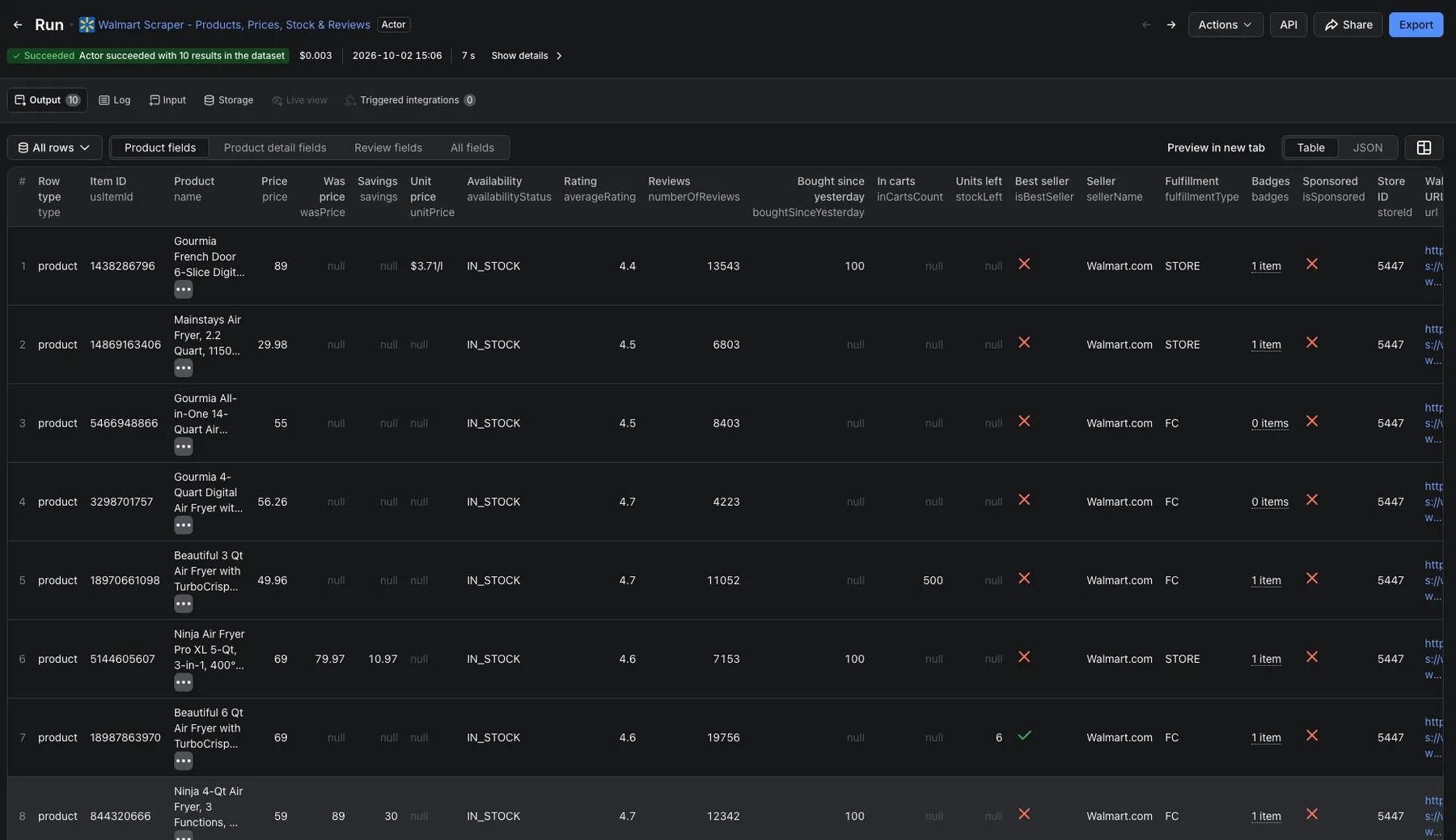
You get one product row per item and, optionally, one review row per customer review, joined on usItemId. A real product row from a laptop search with details on, trimmed to the common fields:
Rows also carry the product url, productId, images, description, specifications, listPrice, unitPrice, orderLimit, topPositiveReview, topNegativeReview and, for marketplace sellers, sellerAverageRating and sellerStoreFrontUrl.
Product rows also carry the demand badges Walmart shows, as numbers: boughtSinceYesterday, inCartsCount, stockLeft and isBestSeller. Walmart rounds the counts down into buckets such as 100+ or 10K+, so read them as lower bounds. The counts are empty when Walmart shows no badge, which is the case for most products. stockLeft is the "Only N left" badge Walmart shows in search results, so a detail row keeps it only when it was priced for the same store.
A review row for the same item:
Missing values come back as null or an empty array; nothing is made up. With details or reviews on, dataset order can differ from search order, so sort by searchRank and filter on type. The Overview, Details and Reviews tabs show the most useful columns as tables.
How can I use Walmart data?
- Price monitoring and repricing: daily
price,wasPriceandsavingsperusItemId, with the store each price came from - Stock and fulfillment checks:
inStock, shipping, pickup and delivery options with delivery dates and order limits - Marketplace seller intelligence: seller name, ID, rating and storefront, Walmart vs. third-party, sponsored placement
- Catalog enrichment: UPC, brand, model, specifications, images, variants and category path by item ID
- Review mining: review text, rating, date, verified-purchase flag and helpful votes across a whole search or category
- Deal research: rollback, clearance and best-seller badges with Sort by price low to high and a price range
What are the limits?
- You cannot choose a store or ZIP code. Walmart assigns the store itself and ignores store settings in the link, so rows within one run can be priced for different stores; in one measured run, six detail rows came from four stores. Every product row records the store it was priced for (
storeIdandzipCode; detail rows addstoreCityandstoreState), so you can filter by store after the run. - Walmart shows a limited number of results per search. For a broad keyword such as
laptop, results ran out after page 10, about 400 products. Category pages can go up to 25 pages. Use more keywords, facets or price ranges to cover more. - Not supported: seller storefront pages, brand pages, deals pages and walmart.ca. Such links are named in the log and skipped.
- Reviews are the ones Walmart lists with text, with no star-rating filter.
Scrape more Walmart and e-commerce data
| Actor | What it gets |
|---|---|
| Walmart Reviews Scraper - Ratings, Text & Verified Buyers | Walmart customer reviews by product link, item ID, keyword or category |
| Amazon Scraper - Product Prices, BSR & Sales Estimates | Amazon products with Best Sellers Rank and monthly sales estimates in 20 stores |
| Target Scraper - Target.com Products, Prices & Stock | Target.com products: prices, availability, ratings, specs and promotions |
| eBay Scraper - Listings, Prices, Shipping & Sellers | eBay listings and item details across 8 marketplaces |
| Shopify Scraper - Products, Prices, Variants & Stock | Any public Shopify store's product catalog |
🤖 Use with AI agents (MCP)
This actor works as a tool for AI agents. Connect any MCP-compatible AI assistant or agent to the Apify MCP server at mcp.apify.com (sign in with your Apify account), and it can find this actor, fill in the input and read the results by itself. Ask in plain words, for example "Get prices and ratings for the top laptops on Walmart", and the agent runs automly/walmart-scraper with an input like {"searchTerms": ["laptop"], "maxResults": 40}. Every input and output field has a plain description, so the agent knows what to type and what each column means. Agent runs cost the same as runs you start yourself.
❓FAQ
How much does it cost to scrape Walmart?
$4.55 per 1,000 products or reviews on the Free plan, down to $0.99 on Business, plus the run's platform usage. See How much does it cost to scrape Walmart products? above.
Do I need a Walmart API key or account?
No. There is no login, cookie or API key, and no daily call limit. You only need a free Apify account.
Can I get prices and stock for a specific Walmart store or ZIP code?
Not in this version. Walmart picks the store itself and ignores store settings in the link. Each product row carries the storeId and zipCode it was priced for, so you can filter on the store you got.
What is the difference between a search row and a product detail row?
A search row has price, was price, rating, seller, fulfillment type and badges. With Fetch full product details on, a row adds brand, UPC, model, descriptions, specifications, images, seller rating and storefront, fulfillment options with delivery dates, return policy, rating breakdown, top positive and negative review, and every variant with its own price and stock.
Does it return product variants?
Yes. Sizes, colors and pack counts come back under variants, each with its own usItemId, price, availability, URL and image, at no extra charge per variant.
Can I scrape Walmart reviews?
Yes. Turn on Scrape customer reviews, or paste a /reviews/product/ link, and each review becomes its own row joined to the product on usItemId, sorted by relevance, helpfulness, newest or highest rating. For reviews only, with more filters, use Walmart Reviews Scraper.
How many products can I get from one keyword?
It depends on the query. For a broad keyword such as laptop, Walmart showed about 400 products, and category pages can go up to 25 pages. The run stops when results run out, so split large searches with facets or price ranges.
Are sponsored products included?
Not by default; sponsored products repeat organic results and are dropped. Turn on Include sponsored products to keep them, flagged with isSponsored: true and without duplicates of organic rows.
Does it estimate Walmart sales?
Not directly. Walmart publishes no sales rank and no sold count. You get the demand badges Walmart does show, as numbers you can build estimates on: units bought since yesterday, shoppers with the item in their cart, units left and best-seller status. The counts are Walmart's rounded buckets, so treat them as lower bounds.
Can I connect Walmart Scraper to other tools or AI agents?
Yes. Start runs and download results with the Apify API or the Python and JavaScript clients, send results to Make, Zapier, n8n, Google Sheets or Slack with Apify integrations and webhooks. AI assistants and agents can run it through the Apify MCP server, see the Use with AI agents (MCP) section above.
Is it legal to scrape Walmart?
Walmart Scraper only collects public product data that any shopper can see, and it never logs in. The Ninth Circuit held that accessing publicly available web data does not violate the Computer Fraud and Abuse Act (hiQ Labs v. LinkedIn, 2022). Reviews can still contain personal data, which may be protected by laws such as GDPR, so only scrape for a legitimate reason and ask a lawyer if you are unsure. You can read more in Is web scraping legal?
Walmart Scraper is an independent tool. It is not affiliated with, endorsed by or sponsored by Walmart.
Something isn't working?
Open the Issues tab with your input and what you expected, or tell us which field you need.
⭐ Your feedback
Have an idea or found a problem? Tell us in the Issues tab. If Walmart Scraper saved you time, a short review on the Reviews tab helps other people find it.


