

Google Search Scraper
Pricing
from $3.20 / 1,000 scraped search result pages
Google Search Scraper
Google results from any country domain with the real destination URL resolved, plus the people-also-ask and related-search blocks. Positions are compared between runs for the domains you track, so it doubles as a rank tracker. Example: two keywords on google.fr, scheduled weekly.
Pricing
from $3.20 / 1,000 scraped search result pages
Rating
0.0
(0)
Developer

Badr Bouargan
Maintained by CommunityActor stats
0
Bookmarked
2
Total users
0
Monthly active users
9 days ago
Last modified
Security
Limited permissionsShare
Google Search Scraper with Rank Tracking
Scrape Google search results — organic results, ads, People Also Ask and related searches — for any query, from any country, in any language. The Actor remembers positions between runs and tells you which of your pages moved up and which moved down.
What you can do with it
- Track your rankings: list your domains, schedule a daily run, and read the gains and losses in a column.
- Watch competitors: see who occupies the top ten on your money keywords, and when that changes.
- Do keyword research: People Also Ask questions and related searches come with every page.
- Build link prospect lists: the exact URL of every result, not just the homepage.
- Compare markets: the same keyword through 33 national Googles, desktop or mobile.
No API key. Requests go through Apify's Google SERP proxy.
Why this Actor
- Any search, anywhere. 33 country domains are in the list (
google.com,google.co.uk,google.de,google.co.jp,google.com.br,google.ma…), and any other works by pasting a full Google URL. - Exact result URLs. Google now hides every result link behind an encrypted redirect. This Actor follows Google's own redirect for each result, so you get
https://site.com/the/real/page, not just the homepage. - Rank tracking built in. For the domains you follow, every row carries the previous position, the change and the movement label.
- Mobile or desktop, with country and language control.
How to use it in 3 steps
- Type your searches in Search queries, one per line, exactly as in Google (
best running shoes,site:example.com pricing) — or paste a full Google URL. - Pick a Google domain and, if you want, a country and language (
us,en). - Press Start and export the results as Excel, CSV or JSON.
The input is tidied for you: a block of lines pasted into one item is split, extra spaces, bullets and duplicates are removed, www.google.fr/search?q=… without https:// is understood, and US or USA becomes us. An unreadable country or language code is ignored with a warning instead of sending Google a wrong parameter. An empty input runs the demo search (1 page of best running shoes) instead of failing.
How it works
- Each query becomes a Google results page request through the SERP proxy.
- The page is parsed structurally — by links, headings and blocks, never by CSS class names, which Google changes constantly.
- Every result's redirect is resolved to its true destination in parallel, outside the SERP proxy, which keeps that step nearly free.
- Tracked domains are compared with the previous run, stored in a named key-value store that survives runs.
Step-by-step tutorial
- Put one query per line in Queries, or paste a full Google URL to reuse your own parameters.
- Pick a Google domain, and optionally a Country and Language (
glandhl). - Set Pages per query — about ten results per page, so 3 pages gives the top 30.
- To follow your own site, list it in Tracked domains (
example.com) and create an Apify Schedule to run daily. - Press Start, then export as Excel, CSV or JSON.
Input example
Output example
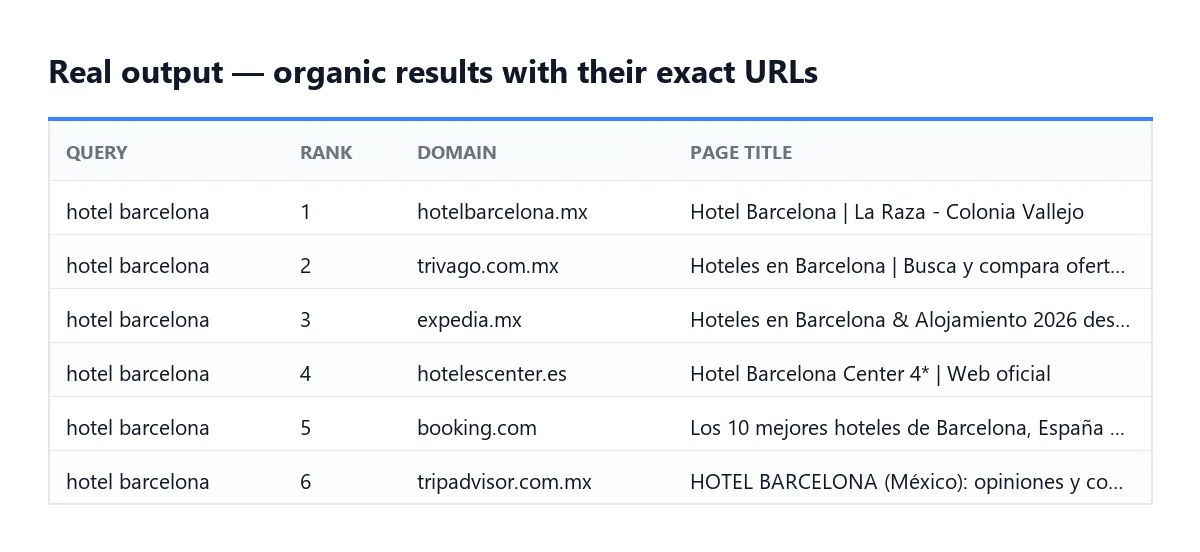
Every row as JSON:
The Rank tracking dataset view shows only the tracked domains with their movement.
Each row also carries a searchQuery object in the format of the Store's reference Google scraper (term, url, device, page, type, domain, countryCode, languageCode, locationUule), and each result its emphasizedKeywords (the words Google shows in bold). Turn off One row per result to get one row per results page with organicResults and paidResults arrays.
Advanced search filters
Build precise searches without writing Google operators yourself:
| Field | Google operator | Example |
|---|---|---|
| Force exact match | "…" | "best seo tools" |
| Site / Related to site | site: / related: | site:example.com |
| Words in title / text / URL | intitle: / intext: / inurl: | intitle:tutorial |
| Before date / After date | before: / after: | after:2024-01-01, or "3 months" |
| File types | filetype: | (filetype:pdf OR filetype:doc) |
| Quick date range | tbs=qdr: | d10, w2, m6, y1 |
| Search language | lr= | pages in French only |
| Unfiltered results | filter=0 | include results Google hides |
Add-ons
- 📢 Paid results (ads) extraction —
focusOnPaidAds: the ads shown for each query. Billed per results page where at least one ad was captured. - 🔍 Full website content —
websiteContentScraper: {"enable": true}: each organic result page is read and attached aswebsiteContent(title,text,markdown,length), for content gap analysis and SERP benchmarking. Billed per page actually read; pages that show no text without JavaScript are not billed. - Save HTML —
saveHtml(into the dataset) orsaveHtmlToKeyValueStore(a link inhtmlSnapshotUrl), free.
Not available (accepted in the input for compatibility, ignored, never billed): Google AI Mode, full AI Overview, ChatGPT, Perplexity, Microsoft Copilot and Gemini search, business leads enrichment, email verification, link prospecting tool, icon image data.
Pricing
Pay per event: you pay for each Google results page successfully read and parsed (about ten organic results, with People Also Ask and related searches at no extra charge), plus a tiny start fee. Platform costs — the Google SERP proxy and compute — are included, so there is nothing else to pay.
| Event | Free | Starter | Scale | Business |
|---|---|---|---|---|
| Scraped search result page (~10 results) | $4.50 / 1,000 | $3.80 / 1,000 | $3.50 / 1,000 | $3.20 / 1,000 |
| Add-on: Paid results (ads), per page with ads | $6.50 / 1,000 | $5.00 / 1,000 | $4.00 / 1,000 | $3.50 / 1,000 |
| Add-on: Full website page scraped | $8.00 / 1,000 | $5.00 / 1,000 | $4.00 / 1,000 | $3.00 / 1,000 |
Example: the top 30 results of 100 keywords (300 pages) on the Free plan = $1.35.
Plus $0.00005 per run start. Pages that fail are never charged: they are listed in the FAILED_INPUTS record. Set a maximum cost per run and the Actor stops cleanly before exceeding it. Each run also writes a RUN_SUMMARY record (pages charged, results, failures, whether the budget stopped the run).
FAQ
Why do some rows have isExactUrl: false? Google's redirect could not be followed for that result, so the address was rebuilt from the text Google displays. Domain, title, position and snippet remain correct.
Are ads always included? They are collected when Google shows them, but the no-JavaScript layout the Actor reads does not always contain them.
How does rank tracking start? The first run records positions; from the second run on you get previousPosition, positionChange and rankMovement. Use a Schedule for a daily history.
Can I scrape a country that is not in the list? Yes — paste the full Google URL (for example https://www.google.com.sg/search?q=...&hl=en) as a query.
Why is the Google SERP proxy required? Google returns no usable results to ordinary datacenter addresses; this was tested. The proxy group is preselected for you. If you change it to something that does not exist, the Actor falls back to GOOGLE_SERP.
What it can and cannot do
| ✅ Can | ❌ Cannot |
|---|---|
| Organic results with exact URLs, ads when shown, People Also Ask, related searches | Google AI Overview / AI Mode, ChatGPT, Perplexity, Copilot, Gemini answers |
| 33 Google domains in the list, any other through a pasted URL; desktop or mobile | Google Images, News, Shopping or Maps tabs (see the Google Maps scrapers for places) |
| Rank tracking between runs for your domains | More than about 10 results per page (Google's no-JavaScript page) |
Troubleshooting
| Symptom | Fix |
|---|---|
fetchFailed in FAILED_INPUTS | Google's SERP proxy was slow: run again or raise Attempts per page. Not billed |
Some isExactUrl: false | Google's redirect could not be followed; title, domain and position stay correct |
| No ads | The no-JavaScript page does not always show ads; the ads add-on is billed only for pages where ads were captured |
No previousPosition | Normal on the first run: positions are compared from the second run on (same device, country and language) |
maxTotalChargeReached | Your maximum cost per run was reached; the remaining pages were not fetched nor billed |
Use it via API
Replace YOUR_API_TOKEN with your token from Apify Console → Settings → API & Integrations.
Python (pip install apify-client)
JavaScript (npm install apify-client)
cURL (waits for the run and returns the rows)
Integrations
-
AI agents (MCP): add the Actor to Claude, Cursor or any MCP client through the Apify MCP server —
https://mcp.apify.com/?actors=badr_xba/google-search-scraper— and let your agent search Google. -
Schedules: a daily run builds your own rank-tracking history, without a subscription to an SEO suite.
-
API: pull each run's dataset as JSON, CSV or Excel.
-
Webhooks: notify your service, or your Slack, as soon as positions change.
-
Make, Zapier and n8n: trigger a run from a new keyword and push the rows to your SEO dashboard, a sheet or Slack.
-
Google Sheets: send each run's results to a sheet from the Integrations tab, or export the CSV.
Support
Open an issue on the Actor's Issues tab for a bug, a missing SERP feature or a country that misbehaves.
Did this Actor do the job? Leaving a short review on its Store page takes a minute and helps other people find it — and tells me which feature to build next.
Legal
This Actor reads public search result pages, the same ones any visitor sees, and collects no personal data. Automated access may conflict with Google's Terms of Service; how you use the results is your responsibility.
En français
Récupère les résultats de recherche Google — résultats naturels, annonces, « Autres questions posées » et recherches associées — pour n'importe quelle recherche, depuis n'importe quel pays et dans n'importe quelle langue (33 Google nationaux, et n'importe quel autre en collant son URL). Google chiffre désormais l'adresse de chaque résultat : l'Actor suit la redirection de Google pour restituer l'adresse exacte de la page, pas seulement le domaine. Il mémorise les positions d'un run à l'autre et signale ce qui monte et ce qui baisse pour les domaines suivis. Aucune clé API.


