
Docs to Markdown + AI Embeddings → Vector DB Crawler
Pricing
$0.00005 / actor start
Docs to Markdown + AI Embeddings → Vector DB Crawler
Turn any documentation site into clean Markdown, intelligently chunked content with embeddings (Azure/OpenAI), and directly upsert into MongoDB Atlas, Pinecone, Weaviate, Qdrant, or Milvus — ready for RAG, AI assistants, and semantic search in minutes.
Pricing
$0.00005 / actor start
Rating
5.0
(1)
Developer

Badruddeen Naseem
Maintained by CommunityActor stats
0
Bookmarked
8
Total users
0
Monthly active users
5 months ago
Last modified
Categories
Share
🧩 Docs to Markdown + AI Embeddings → Vector DB Crawler
Web Crawler | Clean Markdown Output | Smart Chunking | Embeddings | Vector Database Ingestion
Crawl documentation websites, convert pages into high-quality Markdown, intelligently chunk content for RAG pipelines, generate embeddings (OpenAI or Azure OpenAI), and optionally upsert everything directly into your vector database — all in one Apify Actor.
What does this Actor do?
This Actor transforms any documentation website into clean, chunked Markdown content with AI-generated embeddings, then directly uploads it to your vector database of choice. Instead of manually converting documentation, chunking content, generating embeddings, and managing database connections, this Actor handles the entire pipeline in minutes.
The Actor can process:
- Complete documentation sites through intelligent web crawling
- Multi-level documentation hierarchies (guides, API docs, tutorials, etc.)
- Automatic content chunking using semantic understanding
- AI embeddings generation via Azure OpenAI or OpenAI
- Direct upserts to multiple vector database backends
Why use this Actor?
Documentation is one of the most valuable assets for building AI-powered applications. Whether you're creating RAG systems, AI assistants, semantic search engines, or knowledge bases, you need your documentation in a vector database—but the process is time-consuming and error-prone.
This Actor eliminates the manual work. Instead of spending days converting documentation to Markdown, chunking content intelligently, calling embedding APIs, and managing database connections, you can have production-ready embeddings in your vector database within minutes.
Here are some ways you could use this Actor:
- Build custom AI assistants trained on your documentation
- Create semantic search across your entire knowledge base
- Power RAG systems for intelligent question-answering
- Index competitor or reference documentation for research
- Create searchable knowledge bases for internal teams
- Populate vector databases for generative AI applications
If you would like more inspiration on how this Actor could help your business or organization, check out our industry pages.
🔌 Integrations
| Provider | Apify Actor | Azure OpenAI | OpenAI | MongoDB Atlas | Pinecone | Weaviate | Qdrant | Milvus / Zilliz |
|---|---|---|---|---|---|---|---|---|
| Supported | ✓ | ✓ | ✓ | ✓ | ✓ | ✓ | ✓ | ✓ |
Who is this Actor for?
This Actor is ideal for:
- AI engineers building RAG or semantic search systems
- Teams turning docs into AI assistants or chatbots
- SaaS companies indexing product documentation
- Developers migrating docs into vector databases
How to use this Actor
Getting your documentation into a vector database is straightforward:
- Click Try for free to open the Actor
- Enter your documentation site URL (for example,
https://docs.example.com) - Configure your embedding model:
- Select Azure OpenAI or OpenAI
- Provide your API key and model name
- Choose your vector database:
- MongoDB Atlas
- Pinecone
- Weaviate
- Qdrant
- Milvus
- Enter your database connection details
- Click Run
- When the Actor finishes, your documentation will be automatically upserted into your vector database
🚀 Quick Start (5 minutes)
Minimal configuration to crawl docs and store embeddings in MongoDB:
🧩 Docs & Website Crawler → Semantic RAG Flow
Crawler → RAG Pipeline
🕵️ Research Crawl Walkthrough
The first phase in your workflow is Research Crawl — a human-in-the-loop content curation step before generating embeddings.
It ensures high-quality RAG input, avoids noisy embeddings, and reduces costs.
1️⃣ Start Crawling (Research Mode)
- Run the Actor with embeddings disabled
- Crawler uses Playwright to render JS-heavy pages
- Main content is extracted using:
- Mozilla Readability
- Turndown → Markdown
- Pages are chunked (paragraph-aware)
- Duplicate URLs are automatically removed
- Pagination & infinite scroll are handled
- Only the content is stored; no embeddings are generated yet
✅ Safe exploratory crawl — fast, cost-efficient, and focused on content discovery.
2️⃣ What Happens After Crawling
The Actor outputs:
a) Dataset
- Stores all chunks per page
- Each record contains:
url,title,chunk,chunkIndex,docId,chunkId
- Location on Apify: Dataset tab → your chosen dataset
b) Key-Value Store (HTML Research File)
- HTML research interface:
{datasetName}-full.html
Example:demo-full.html - Markdown archive:
{datasetName}-full.md
Example:demo-full.md - Location on Apify: Key-Value Stores tab → your chosen store
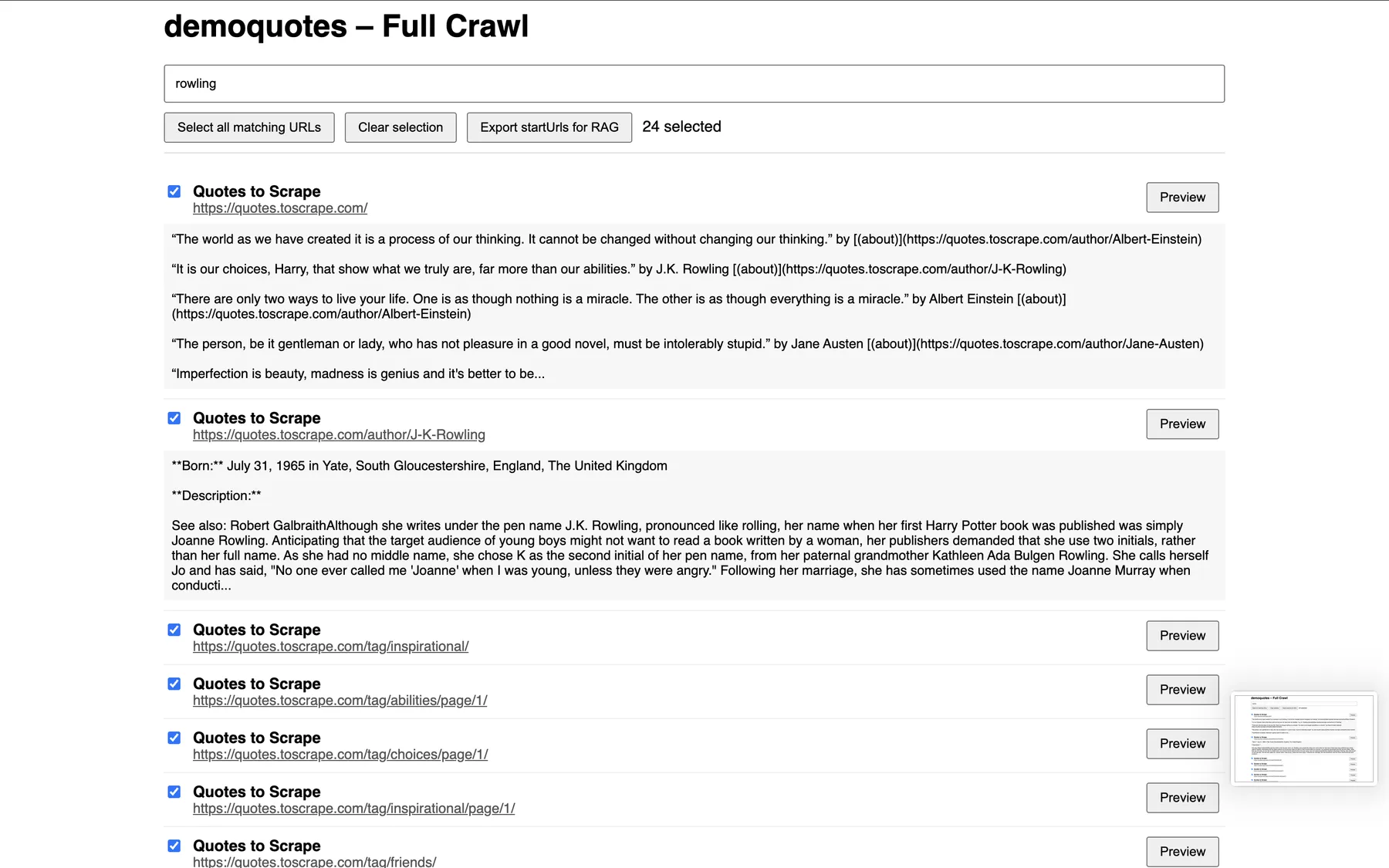
3️⃣ How to Work on the Research HTML
- Download HTML from Key-Value Store
- Open in a browser
- Use search box to filter by keyword (title, URL, content)
- Expand page previews to check relevance
- Select URLs with checkboxes or “Select all matching URLs”
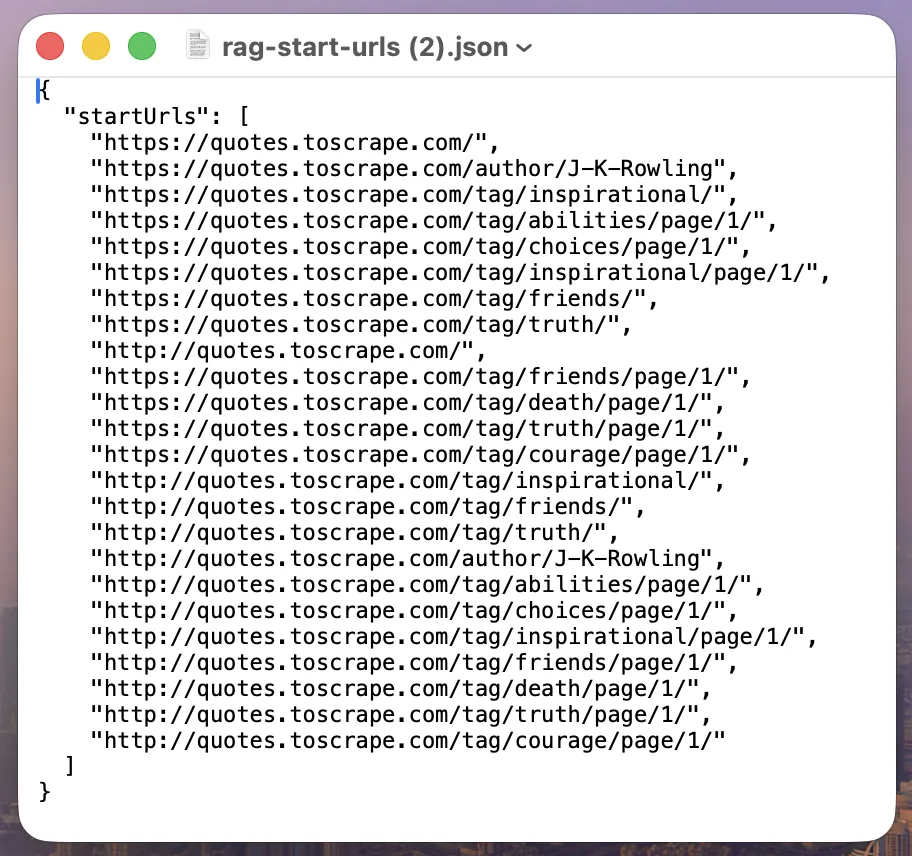
- Export curated URLs as JSON for RAG ingestion
Only export the pages you want to embed — keeps embeddings high-quality and cost-efficient.
DEMO: Click to see the full quotes (crawled site).
4️⃣ Next Steps After Research
- Feed JSON export into Actor as
startUrls - Enable embeddings (Azure OpenAI / OpenAI)
- Enable vector DB ingestion (MongoDB, Pinecone, Weaviate, Qdrant, Milvus)
- The Actor now generates embeddings only for curated URLs
- RAG system retrieves accurate, relevant content
5️⃣ Summary of Research Crawl
| Step | Purpose | Output |
|---|---|---|
| Crawl (research mode) | Explore site content | Dataset + Markdown + HTML |
| Review (Research HTML) | Search, preview, select | Curated URL list |
| Export | Feed curated URLs | startUrls.json |
| RAG Ingestion | Generate embeddings + vector DB | Semantic search-ready vectors |
🚀 How It Works
- Crawl – Playwright-based crawler for modern JS-heavy sites
- Extract – Clean content via Mozilla Readability → Turndown → Markdown
- Chunk – Paragraph-aware chunking optimized for RAG
- Embed – Generate embeddings per chunk (Azure OpenAI or OpenAI)
- Store – Optionally upsert chunks + embeddings into a vector database
- Track – URL deduplication and resume-safe crawling via Key-Value Store
🧠 Key Features
- 🔍 High-quality content extraction (no navs, footers, ads)
- 📝 Clean Markdown output (headings, lists, code blocks preserved)
- 🧩 Intelligent chunking (configurable size, overlap, limits)
- 🧠 Embedding generation with Azure OpenAI or OpenAI
- 🗄️ Direct vector DB ingestion (MongoDB, Pinecone, Weaviate, Qdrant, Milvus)
- 🌐 Smart crawling (pagination, infinite scroll, robots.txt)
- 🧹 Resume-safe deduplication
- 📊 Optional live debug metrics for retrieval quality
⚡ Streaming vs Batch Mode
| Mode | Description | Memory Usage | Speed | Record Style |
|---|---|---|---|---|
streamChunks: true | Push individual chunks as they are created | Low | Faster | Many small records |
streamChunks: false | Push all chunks of a page together | Higher | Slower | Cleaner per-page |
🗄️ Supported Vector Databases
| Database | Auto Create Collection | Batch Upsert | Notes |
|---|---|---|---|
| MongoDB Atlas | Yes | Yes | Atlas Vector Search |
| Pinecone | Yes | Yes | Namespace support |
| Weaviate | Yes | Yes | Cloud & self-hosted |
| Qdrant | Yes | Yes | Cloud & self-hosted |
| Milvus / Zilliz | Yes | Yes | Cloud & self-hosted |
- MongoDB Atlas — Popular NoSQL database with vector search capabilities
- Pinecone — Managed vector database purpose-built for similarity search
- Weaviate — Open-source vector database with built-in generative search
- Qdrant — High-performance vector similarity search engine
- Milvus — Open-source vector database for AI applications
Features
- Intelligent chunking — Splits documentation semantically, not just by character count
- Multiple embedding providers — Use OpenAI or Azure OpenAI
- Automatic crawling — Discovers and processes all pages in your documentation site
- Clean Markdown output — Removes navigation, ads, and irrelevant content
- Direct database integration — Upserts directly to your vector database
- Metadata preservation — Maintains page titles, URLs, and hierarchy information
⚙️ Input Configuration
Required
startUrls
One or more URLs to begin crawling from.
| Option | Default | Description |
|---|---|---|
linkGlobs | Extensive (broad) | URL patterns to include in crawling |
excludeGlobs | Blogs, changelogs | URL patterns to exclude |
nextPageSelectors | .next, rel=next | CSS selectors for detecting pagination |
chunkSize | 1000 | Maximum characters per chunk |
maxChunksPerPage | 50 | Safety limit for very large pages |
handleScroll | true | Enables handling of infinite scroll |
respectRobotsTxt | true | Respects website's robots.txt rules |
🧠 Embedding Provider Setup (Actor Input)
Azure OpenAI
- API Key – Your Azure OpenAI API key
- Azure Endpoint – Example:
https://your-resource.openai.azure.com/ - Deployment Name – Azure deployment name (not model name)
OpenAI
- API Key – Your OpenAI API key
🗄️ Vector Database Accounts (Required)
- Milvus / Zilliz Cloud – https://cloud.zilliz.com/login
- MongoDB Atlas – https://www.mongodb.com/products/platform/atlas-database
- Pinecone – https://www.pinecone.io
- Qdrant Cloud – https://cloud.qdrant.io/
- Weaviate – https://weaviate.io/
🔐 Vector Database Authentication (Actor Input)
Milvus / Zilliz
- Vector DB Provider: Milvus
- API Key: username:password
- Host / Connection String: Public endpoint
- Collection Name: Database name (auto-created if missing)
MongoDB Atlas
- Vector DB Provider: MongoDB
- API Key: Not required
- Host / Connection String:
mongodb+srv://<username>:<password>@<cluster-url>/<database>?retryWrites=true&w=majority- URL-encode special characters in password
- Ensure network access allows your IP (0.0.0.0/0 to allow all)
- Index / Collection Name: Database name
Pinecone
- Vector DB Provider: Pinecone
- API Key: Pinecone API key
- Index Name: Index name (auto-created)
Qdrant
- Vector DB Provider: Qdrant
- API Key: Qdrant API key
- Host: Cluster endpoint
- Collection Name: Auto-created if missing
Weaviate
- Vector DB Provider: Weaviate
- API Key: Weaviate API key
- Host: Cluster endpoint
- Collection Name: Must start with a capital letter (auto-created)
🧪 Example Input (Python Docs → MongoDB Atlas)
Tips for using this Actor
- Start small — Test with a single documentation section first to verify output quality
- Adjust chunk size — Smaller chunks (300-500 tokens) work better for precise retrieval; larger chunks (1000+) retain more context
- Choose the right embedding model —
text-embedding-3-smallis cost-effective;text-embedding-3-largeprovides better quality - Monitor your vector database quota — Large documentation sites can create thousands of vectors
- Use metadata filters — Tag your vectors with source, category, or version for better filtering
- Test with a sample — Generate embeddings for 10-20 pages first to validate before processing your entire site
Is it legal to scrape documentation sites?
Documentation sites are typically published for public consumption. However, you should always respect the website's robots.txt file and terms of service.
Note that personal data is protected by GDPR in the European Union and by other regulations around the world. You should not scrape personal data unless you have a legitimate reason to do so. If you're unsure whether your reason is legitimate, consult your lawyers.
💰 Pricing
How much will it cost?
Apify provides $5 in free usage credits every month on the Apify Free plan. Depending on your documentation size and embedding model, you can process small documentation sites entirely free.
For regular use, consider the $49/month Starter plan, which gives you enough credits for multiple documentation crawls and embedding generations each month.
For enterprise-scale documentation processing, the $499/month Scale plan provides substantial credit allowances and priority support.
Is it legal to scrape documentation sites?
Documentation sites are typically published for public consumption. However, you should always respect the website's robots.txt file and terms of service.
Note that embedding costs depend on your embedding provider (OpenAI/Azure). This Actor only covers the crawling portion—embedding API calls are charged by your embedding provider.
We also recommend that you read our blog post: is web scraping legal?.
For more information, visit the Actor page.
Built with ❤️ for the AI + documentation community.
Happy crawling 🚀


