
Google Images Scraper
Pricing
from $1.96 / 1,000 images
Google Images Scraper
[$3.50/1K images] Scrape Google Images search results: image URL, thumbnail, title, alt text, source site, page URL, width, height, aspect ratio, orientation, format. Many search terms and 213 countries per run, Google's size, color, type, time and licence filters. No run fee.
Pricing
from $1.96 / 1,000 images
Rating
5.0
(1)
Developer

BlueskyScraper
Maintained by CommunityActor stats
0
Bookmarked
2
Total users
2
Monthly active users
3 days ago
Last modified
Categories
Share
Tested head-to-head — 18 Oct 2026
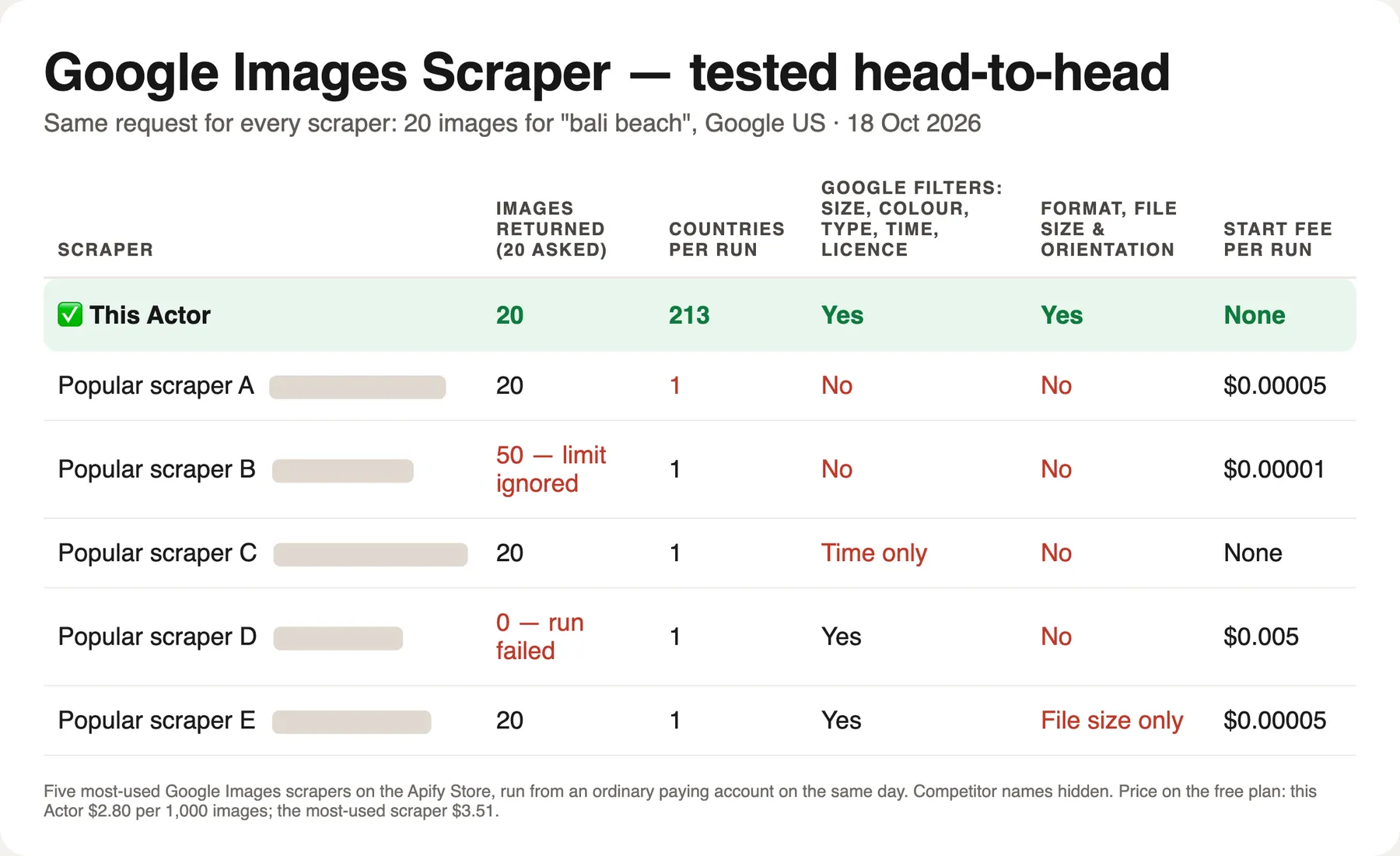
Same request for every Actor: 20 images for "bali beach", Google US:
| This Actor | Five most-used Google Images Actors | |
|---|---|---|
| Images returned (20 asked) | 20 | 0 (run failed) to 50 (limit ignored) |
| Countries per run | 213 | 1 |
| Google filters: size, colour, type, time, licence | Yes | 2 of 5 (one has the time filter only) |
| File format, file size and orientation | Yes | None (one gives file size only) |
| Start fee per run | None | None to $0.005 |
| Price per 1,000 images on the free plan | $2.80 | $0.11 to $3.51 (the most-used one: $3.51) |
Not the cheapest per image — the cheapest Actor returned 50 images when 20 were asked and gives no filters — but the only one with every country, every Google filter and the file facts in the same row.
What is Google Images Scraper?
Google Images Scraper is a Google Images API for image search results. Type one or more search terms, pick one or more countries, and get one row per image from Google Images with the direct image URL, Google's thumbnail, title, alt text, source website, page URL, page domain and image domain — plus width, height, aspect ratio, orientation, file format and file size read from the image file itself. Every search term runs in every country you list, with that country's local results, in one run.
One row is one image. Results are read from Google Images through a licensed data provider, so there are no proxies, CAPTCHAs or browser sessions to manage on your side, and no Google account or API key is needed. Google's own image search tools are built in: size, color (including transparent background and black and white), type (clip art, line drawing, GIF), time and Creative Commons licence, plus SafeSearch.
- 💰 $0.0028 per image ($2.80 per 1,000) on the free plan, down to $0.00196 on paid plans — no start fee
- 🌍 213 countries and any number of search terms in one run (terms × countries)
- 📏 Width, height, aspect ratio, orientation and format in the same row — no second tool
- 🎛️ Google's image filters: size, color, type, time, usage rights, SafeSearch
- 🆓 Error rows are free — an unknown country or a search with no images costs nothing
- 🤖 Works from the Apify API, MCP server (Claude, ChatGPT, Cursor), n8n, Make and Zapier
What data can Google Images Scraper extract?
| Field | Example | What it means |
|---|---|---|
🔍 query | bali beach | Search term the image was found for |
📍 country | United States | Country of the search (countryCode: US) |
position | 5 | Position in the Google Images results (1 = first) |
🏷️ title | 10 Best Beaches in Bali - Which Bali Beach is Right For You? | Title Google shows under the image |
alt | 10 Best Beaches in Bali - … | Alt text Google reports for the image. Google repeats the page title here for almost every result, so this column usually matches title |
sourceName | Hoteles.com | Website name Google shows as the source |
🖼️ imageUrl | https://cdn.sanity.io/images/…-1600x1066.jpg | Direct URL of the full-size image file |
thumbnailUrl | https://encrypted-tbn0.gstatic.com/images?q=tbn:… | Google's thumbnail of the image |
🔗 pageUrl | https://en.hoteles.com/go/indonesia/best-bali-beaches | Web page that contains the image |
pageDomain | en.hoteles.com | Domain of that page, without www |
imageDomain | cdn.sanity.io | Domain that hosts the image file (often a CDN) |
imageFileName | b7aace…-1600x1066.jpg | File name from the image URL |
📏 imageWidth | 1600 | Width in pixels, read from the image file |
📏 imageHeight | 1066 | Height in pixels, read from the image file |
aspectRatio | 1.501 | Width ÷ height |
aspectRatioLabel | 16:9 | Simple ratio when the size is one (16:9, 4:3, 1:1, 4:5…) |
orientation | landscape | landscape, portrait or square |
imageFormat | jpeg | Format detected from the file bytes: jpeg, png, webp, gif, avif, heic, bmp, svg |
fileSizeBytes | 314893 | File size when the host reports it |
sizeSource | image | Where the size came from: image, thumbnail (shape only) or empty |
filters | type: gif; safesearch: on | Google Images filters used for this search, or none when the search ran without filters |
language | English | Google interface language of the search |
googleUrl | https://www.google.com/search?q=bali%20beach&udm=2&… | The Google Images search that was read — open it to compare |
scrapedAt | 2026-10-02T00:40:44.460Z | When the row was produced |
How width and height are measured. Google Images does not hand out image dimensions in its results, so the Actor reads the first bytes of each image file (the header, not the whole picture) and takes the size, format and file size from there. Some hosts refuse such requests (Instagram previews are the usual case). For those images the aspect ratio and orientation come from Google's thumbnail, which keeps the original shape, sizeSource says thumbnail, and width and height stay empty. In our tests the file size was read for 16 of 20 images of the default search, 34 of 40 in a two-country run, 74 of 100 in a 100-image search and 10 of 10 in a GIF search; every image got an orientation.
💰 How much does it cost to scrape Google Images?
Google Images Scraper uses pay-per-event pricing. You pay for image rows only:
| Apify plan | Price per image | Per 1,000 images |
|---|---|---|
| Free | $0.0028 | $2.80 |
| Bronze | $0.00252 | $2.52 |
| Silver | $0.00224 | $2.24 |
| Gold | $0.00196 | $1.96 |
| Platinum | $0.00196 | $1.96 |
| Diamond | $0.00196 | $1.96 |
- No start fee and no charge per run. Proxy and compute are included.
- About 20% cheaper than the market leader on the free plan ($2.80 vs $3.50 per 1,000 images, checked 18 October 2026), and cheaper again on paid plans.
- $1 = about 357 images on the free plan. Apify's free plan includes $5 of monthly credit — about 1,785 images a month.
- Error rows are free: an unknown country or language, a search term with no letters, a search that returns no images.
- Reading width, height and format costs nothing extra. Switch it off only if you want faster runs.
- The default run (one search term, United States, 20 images) costs $0.07. It finished in 28 seconds in our test; an identical repeat came back in 5 seconds.
Example budgets on the free plan:
| Job | Images | Cost |
|---|---|---|
| 1 search term × 1 country × 20 images | 20 | $0.07 |
| 10 search terms × 3 countries × 100 images | 3,000 | $10.50 |
| 500 product names × 1 country × 10 images | 5,000 | $17.50 |
How to scrape Google Images with Google Images Scraper
- Open the Actor and click Try for free (an Apify account is free).
- In 🔍 Search terms, type one search per line — exactly what you would type into Google Images.
- In 📍 Countries, add one or more countries by name or two-letter code.
- Set 💯 Max images per search (1–200).
- Optionally pick Google's filters: 📐 Size, 🎨 Color, 🖼️ Type, 🕒 Time, ©️ Usage rights and 🛡️ SafeSearch.
- Click Start. Rows appear in the Overview table with image previews; download them as CSV, Excel, JSON or HTML, or read them through the API.
⬇️ Input
Search terms in several countries (default)
Every search term runs in every country: ["bali beach", "ubud rice terrace"] × ["US", "ID", "DE"] is six searches in one run. Countries accept a name or a two-letter code; all 213 countries Google serves are supported. Each country returns its own local Google Images results.
Language is optional. Empty means each country's main language (Germany → German, Indonesia → Indonesian, Japan → Japanese); set "language": "en" to search every country with the English interface.
Max images per search goes up to 200. Google Images shows about 100 images on the first screen; the Actor reads up to 200 per search. Search operators (site:, filetype:, intitle:…) are not accepted — type plain words and use the filters below.
🎛️ Google Images filters
These are the filters from the Tools menu of Google Images, and Google applies them before it returns results:
| Field | Values |
|---|---|
imageSize | any, large, medium, icon |
color | any, black_and_white, transparent, or a color: red, orange, yellow, green, teal, blue, purple, pink, white, gray, black, brown |
imageType | any, clipart, line_drawing, gif |
timeRange | any, past_day, past_week, past_month, past_year |
usageRights | any, creative_commons |
safeSearch | true / false |
Filters combine: "imageSize": "large", "color": "transparent" returns large images with a transparent background. In our test the GIF search above returned 10 GIF files out of 10, and in a transparent-background search for "bali beach" 93 of 100 image URLs pointed to PNG or WebP files (19 of 100 in the same search without the filter). A filter that leaves nothing gives one free error row for that search, not a failed run.
📏 Image size and format
"readImageDetails": true (default) adds imageWidth, imageHeight, aspectRatio, aspectRatioLabel, orientation, imageFormat, fileSizeBytes and sizeSource. Set it to false to get links only, a few seconds faster. The price is the same either way.
Tip on short searches. Each search has a fixed data cost whether it brings back 1 image or 100. The Actor works best with 10 or more images per search. Lists of hundreds of terms with only 1–3 images each can be stopped early by a built-in cost guard. The images already delivered stay in the dataset, and the stop note itself is a free row.
⬆️ Output
One row per image. A real row from the default search:
The dataset has three table views:
- Overview — image preview, title, page URL, source, width, height, orientation, format.
- Image size & format — image URL, image domain, file name, width, height, aspect ratio, ratio label, orientation, format, file size and where the size came from.
- Sources & SEO — title, alt text, source name, page domain, image domain, page URL, thumbnail and filters: who ranks in Google Images for your terms.
imageFormat is the format of the file as it is served at imageUrl. Some CDNs serve a WebP or AVIF file behind a .jpg address, so the format can differ from the file extension. That is what you get when you download the URL.
Use cases for Google Images data
Image SEO and rank tracking
See which pages and domains own the image results for your keywords in each country, with position, title and alt text. Track your own domain's images over time and study the titles and file names of the images that rank above yours.
Visual content research
Collect reference images for a brief, a mood board or a product shoot, filtered by size, color, orientation or type. Large, landscape and transparent PNGs for a design team are one input away.
AI and machine learning datasets
Build lists of candidate images for a classifier or a vision model: thousands of labelled image URLs with dimensions, format and source page, ready for your own downloader and licence review. The Creative Commons filter narrows the list to images Google marks as CC-licensed.
Brand and copyright monitoring
Search your brand, product or photographer name and see which websites show the images, in which countries, with the page URL for each. Useful for finding unlicensed reuse — then check each page.
Product and catalog enrichment
Run hundreds of product names and take the top images for each one, with the source domain, so a merchandiser can pick images to license or request from the brand.
Integrations
Apify API (JavaScript)
Apify API (Python)
One HTTP call
POST https://api.apify.com/v2/acts/lergassy~google-images-scraper/run-sync-get-dataset-items?token=YOUR_APIFY_TOKEN with the input JSON as the body returns the rows directly. That is the simplest way to use it as a Google Images search API from any language.
No-code tools
Connect the Actor to Google Sheets, n8n, Make, Zapier or a webhook from the Integrations tab. A scheduled run every morning for a list of keywords gives an image-SEO tracker without code.
MCP server
AI agents can call Google Images Scraper through the Apify MCP server (https://mcp.apify.com) from Claude, ChatGPT, Cursor and other MCP clients. The agent passes search terms, countries and filters, and gets back flat rows with image links, dimensions and sources.
Error items / Troubleshooting
Problems become free error rows instead of failed runs:
| Error row | What to do |
|---|---|
Unknown country "…" | Use a country name or a two-letter code (US, GB, DE, ID) |
Unknown language "…" | Leave it empty, or use a name or code (English, en) |
Search operators such as site: … are not supported | Type plain words; use the filters instead |
Google Images returned no images for this search | The filters or the term leave nothing; loosen the filters |
Stopped early to cap data cost | Raise Max images per search, or split a very long list |
An error row looks like { "type": "error", "input": "Narnia", "error": "Unknown country \"Narnia\"… Not charged.", "scrapedAt": "…" }. A run summary (searches, images, sizes read, errors) is saved in the key-value store as SUMMARY.
❓ FAQ
Is it legal to scrape Google Images?
The Actor collects what Google Images shows any visitor: links, titles, alt texts and the pages images appear on. It does not log in or bypass anything. The images themselves belong to their owners. A link in this dataset is not a licence. Before you reuse, publish or train on an image, check its licence on the source page or ask the owner. If you are unsure, consult a lawyer about your use case.
Does the Creative Commons filter mean I can use the images?
No guarantee. It is Google's own usage rights filter. It limits results to images Google has marked as Creative Commons licensed — in our test, mostly Wikimedia Commons, Flickr and similar sites. Google's marking can be wrong or outdated, and CC licences come with conditions such as attribution or non-commercial use. Read the licence on pageUrl for every image you use.
Does Google Images Scraper download the image files?
No. It returns links and metadata, not files. To download Google Images in bulk, export the dataset and feed the imageUrl column to a downloader (for example wget -i urls.txt, a Python script or a no-code tool). The Actor reads only the first bytes of each file to measure its size and format. It does not store the pictures.
How many images can I get per search?
Up to 200 per search term per country. Google Images shows about 100 images on its first screen. A search with filters may return fewer, and that is Google's answer, not an error. Use more search terms or more countries to collect more.
Why are width and height empty for some images?
Some websites refuse requests for their image files from outside a browser (Instagram previews do this). For those images sizeSource is thumbnail: the aspect ratio and orientation come from Google's thumbnail, and width, height and format stay empty.
How fresh are the results?
Each search is read from Google Images live when you run it. An identical search (same term, country, language, filters and number of images) repeated within 3 days is answered from a short cache and returns the same snapshot, at the same price. Change any input to force a new read.
Does it work without proxies?
Yes. You do not configure proxies, cookies or a browser, and Google blocks do not fail your run. Proxy and compute costs are included in the per-image price.
How much does it cost to scrape 1,000 Google Images results?
$3.50 on the Apify free plan, $2.18 on Bronze, down to $0.94 on Diamond. There is no start fee. Error rows and empty searches are free.
Can I use Google Images Scraper with the Apify API?
Yes. Every input field is available through the API, and the run-sync-get-dataset-items endpoint returns the rows in one call (see Integrations). Client libraries exist for JavaScript and Python.
Can I use it through an MCP server?
Yes. Add the Apify MCP server to Claude, ChatGPT, Cursor or any MCP client and ask for Google Images results. The agent sees the input fields with their descriptions and calls the Actor directly.
Can I integrate it with other apps?
Yes: Google Sheets, n8n, Make, Zapier, Slack, Airbyte, webhooks and anything that can call an HTTP API. You can also schedule runs from the Apify Console.
Do I get one row per image?
Yes. Every row is one image result for one search term in one country, with a type of image. Duplicates of the same image file within a search are removed. The only other row type is a free error row.
Your feedback
Found a search that returns something different from Google Images in your browser, or need another field? Open an issue in the Issues tab with the input you used. We read every issue. If the Actor saves you time, a review on the Store helps other people find it.
You might also like
| Actor | What it does |
|---|---|
| Google Shopping Scraper | Google Shopping products with prices, sellers and ratings in 45 countries |
| People Also Ask Scraper | Google "People also ask" questions for any keyword, country and language — content and SEO research |
| Pinterest Scraper | Pinterest pins with full-size images, outbound links and pinners, by keyword, board or profile |
| Keyword Search Volume Checker | Google search volume, CPC and keyword difficulty for your image keywords |


