

Taobao & Tmall Scraper — Prices, Shops & Ratings
Pricing
from $1.68 / 1,000 search results
Taobao & Tmall Scraper — Prices, Shops & Ratings
Get Taobao and Tmall search results and product cards with no login: prices in CNY, shop ratings, category ids, discount type and the latest review. 12 storefronts.
Pricing
from $1.68 / 1,000 search results
Rating
0.0
(0)
Developer

BlueskyScraper
Maintained by CommunityActor stats
0
Bookmarked
10
Total users
5
Monthly active users
2 days ago
Last modified
Categories
Features
Share
Taobao and Tmall search results, category listings, product cards and reviews with no login and no proxy of your own: prices in CNY, Tmall vs Taobao and official-store status, brand from Taobao's own brand filter (never the shop name), pack size from the title, buyer review tags, shop ratings, the review-count label, and as many reviews as you ask for.
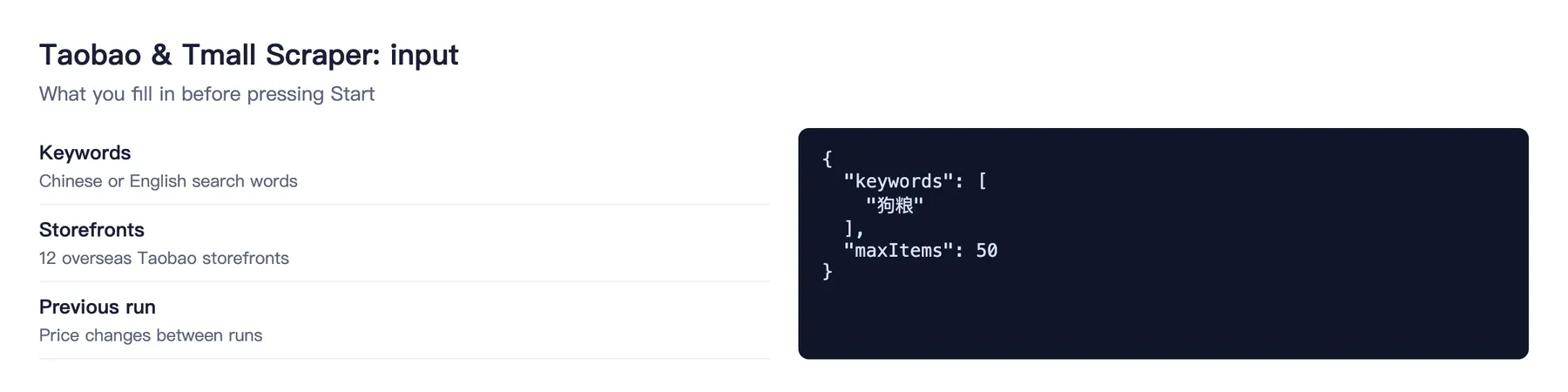
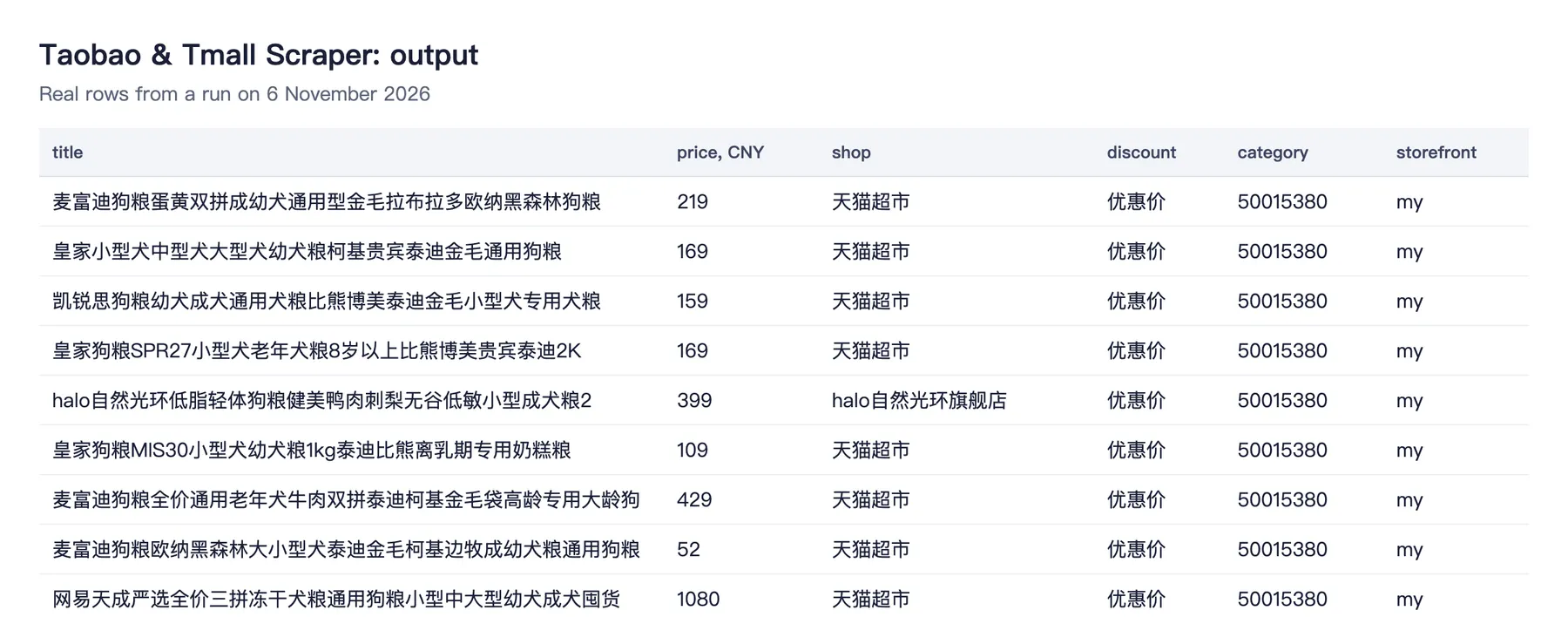
Tested head-to-head on 6 November 2026
The same keyword (狗粮) and a 20-row limit went through this Actor and four popular Taobao Actors.
| This Actor | Others | |
|---|---|---|
| Filled fields per row | 91% | 41–63% |
| Time for 20 rows | 6 s | 10–27 s |
| Price per row, Free plan | $0.0024 | $0.002–$0.006 |
What works, measured on 5 November 2026
| Data | Status |
|---|---|
| Search by keyword | ✅ 18–20 items per request, three categories verified (dog food, cat litter, rice cooker) |
| Price | ✅ price and priceOriginal in CNY (priceFen for exact cents), plus displayCurrency of the storefront |
| Title | ✅ full title as Taobao prints it in the listing |
| Shop | ✅ shopName, shopId; card mode adds seller type, credit level, opening date, item count and 物流/服务/商品描述 ratings |
| Category | ✅ categoryId and rootCategoryId |
| Discount type | ✅ 天猫U先, 优惠价 and the like |
| Marketing bullets | ✅ sellPoints from the listing |
| Item id | ✅ numeric itemId plus itemIdStr — the SEO form used in item links |
| Product card | ✅ price, location, item type (Taobao/Tmall), images, free shipping, area limit |
| Card completeness flag | ✅ cardComplete and cardAttempts: the storefront sometimes returns a thin variant, so a card is re-requested up to three times |
| Latest review | ✅ one review per card: score, text, date, buyer's SKU |
| Review count | ✅ reviewCount from the SEO block — Taobao prints «900+用戶購後寫下真實評論» |
| Positive rate | ✅ positiveRate (好評率, 0–100) when Taobao prints it |
| Tmall or Taobao | ✅ card: platform (tmall / taobao, from Taobao's own item type and seller type B/C). Search rows: platformHint from Tmall-only shop names, platform stays null |
| Store type and official status | ✅ storeType (flagship, tmall_supermarket, authorized_store, multi_brand_store, tmall_store, taobao_shop), isOfficialStore, officialStatusSource says where it came from |
| Brand | ✅ with splitByBrand: brandId, brandName from Taobao's brand filter, brandSource: "taobao_brand_filter". Brand and shop are separate fields; a shop name is never copied into the brand |
| Pack size / format | ✅ massLabel, massGrams or volumeMl, packCount, packFormat read from the title (massSource: "title"). A title with several sizes (1.5kg/3kg/10kg) is a multi-variant listing: massGrams stays null and the sizes go to massCandidates |
| Buyer review tags | ✅ reviewTags [{tag, count}] — what buyers say (价格很实惠 · 362), on search rows and cards |
| Category path | ✅ card: categoryPath (names) and frontCategoryIds — feed those ids to categoryIds |
| Category listing | ✅ categoryIds — e.g. newest products of a category every week (sorts: ["new-des"] + previousDatasetId → isNew) |
| Coupon | ✅ card: hasCoupon (a shop coupon is offered); couponAmount is null — Taobao shows the amount only after login |
| Review count | ✅ reviewCountLabel exactly as printed («1萬+», «400+»), reviewCount = its lower bound, reviewCountIsExact: false. It is a rounded label, not a count |
| Reviews | ✅ maxReviewsPerItem: newest reviews as type: "review" rows — rating, text, date (Beijing time), photos, follow-up, seller reply and the variant the buyer bought (variantText, variant). Up to 1 000 per product |
| Sales rank | ✅ salesRank with the sort order "Sales": the product's place in Taobao's sales ranking. A rank, not a number of sales |
| Sales label (月销 / 已售) | 💲 with paidSalesAndPages: salesLabel word for word as Taobao prints it, salesLabelWindow (month, 30d, unspecified), salesCountAtLeast (from «1万+» → 10000) and salesLabelCaveat — a rounded label, never an exact sales count. Taobao prints it only on some products; without it salesLabel is null with salesLabelReason. Free path: no label (Taobao shows it only to logged-in visitors) |
| Result pages 2+ | 💲 with paidSalesAndPages + maxPaidSearchPages |
| Variants (SKU list) | 💲 with includeSkuDetails: skus [{skuId, name, props, price, stock}], skuCount, specValues, stock, inStock, reviewCountExact, favoriteCount, sevenDayReturn. SKUs are a list inside the product row — a variant is never a product row. Free path: no SKU list (variantsAvailable: false) |
| Full description, specs | ⛔ only the SEO summary is public: title, price, shop, review |
| Storefront fallback | ✅ when a storefront answers with an empty page, the actor moves to the next one instead of repeating the same address; requests.storefrontFallbacks shows how often |
| Search pagination | ⛔ page 2 is closed to a logged-out visitor (?page=2 is ignored, /<keyword>_2.htm redirects to the home page, the infinite-scroll call asks for a login). Depth comes from sort orders, storefronts and splitByBrand (one more page per brand), until maxItems is reached |
| Card by numeric item id | ⛔ the storefront answers with a generic shell — use itemIdStr from a search row |
Depth, measured: one keyword × 12 storefronts × 4 sort orders gave 126 unique items for 狗粮 and 68 for 猫砂 with 24 requests.
Modes
search — keyword in, rows out. Each row is one product: price, title, shop, category, discount type, plus seenOn showing which storefront and sort order surfaced it.
detail — item link in, card out. Accepts https://world.taobao.com/item/<itemIdStr>.htm, a bare itemIdStr, or a numeric id (numeric ids are rejected with an explanation, not silently dropped).
search + includeDetails — search, then fetch the card for every found item and merge both into one row. Billed once, at the card price.
categoryIds (in search) — a category listing instead of a keyword: https://world.taobao.com/category/206507001.htm or 206507001. Card rows give you the ids in frontCategoryIds.
splitByBrand (in search) — after the normal search, one request per brand Taobao lists for the keyword (up to 24). Every product found that way gets its brand; you also get more products than one page.
maxReviewsPerItem — reviews for every product row (search or card), and also for a numeric item id in the card mode (the card itself does not open by numeric id, the reviews do). Each review row is billed like one search row. Reviews come in pages of 20; a last page smaller than 3 is not asked. On the Apify Free plan a run returns up to 20 review rows.
Paid options
Both are off by default; without them the Actor works and costs exactly as before. They use a licensed data partner, so on the Apify Free plan you get 1 paid search row and 1 full card with SKUs a day (counted per account in a small key-value store taobao-free-paid-quota); any paid plan removes the limit. Until 24 November 2026 they already work and are billed at the regular row prices (a paid search row as a search row, a full card as a product card); from 24 November 2026 their own prices below apply.
paidSalesAndPages— result pages 2…N+1 for each keyword (maxPaidSearchPages, default 3), then the popular sort for sales labels when the margin allows. A page that brings fewer than 10 new products stops the paging. Rows:rowSource: "everyinfra_search",resultPage,priceBasis(page= shown price,list= crossed-out price,promotion= promo price).includeSkuDetails— the full card for every product row (and for numeric ids in the card mode). Prices of SKUs are mostly converted from USD by the source (skuPriceBasis: "converted") and can differ from the page by 1–4 %.
Rows from paid options carry provenance.via: "everyinfra".
Daily panel and weekly new products
- Daily: schedule the search with your keywords,
sorts: ["", "sales-des"],splitByBrand: trueand yesterday's dataset inpreviousDatasetId— you get price moves,salesRankand brand per product. - Weekly new products per category:
categoryIds+sorts: ["new-des"]+ last week's dataset inpreviousDatasetId;isNew: truemarks the products that were not there last week.
Storefronts and sort orders
Twelve overseas storefronts: my (Malaysia), sg, th, jp, kr, au, ph, ca, mo, nz, vn, kh. Each has its own catalogue and its own display currency; the CNY price is present in every row regardless.
Seven sort orders: relevance, sales, price ascending, price descending, newest, bid, total score. Different sort orders return different sets of items, which is how you get past the 20-item page.
Price tracking between runs
Pass the dataset id of a previous run as previousDatasetId and every row gains previousPrice, priceChange, priceChangePercent, priceDirection, daysSincePrevious and isNew.
A product card shows the price of its default variant, while a search result shows the listing's display price — often another variant. With includeDetails the row keeps both: price (card) and searchPrice (search). When one run has cards and the other has search rows, the change is computed on the search price (priceComparedOn: "search"), so a variant difference is never reported as a price drop.
Example row
A card row (type: "detail") adds platform, storeType, categoryPath, hasCoupon, reviewCountLabel, reviewTags, shop, images, location, itemType, latestReview (with variant), payments, card.
A review row:
Free rows
Rows of type error, warning and notice are never charged: an empty input, a numeric id that cannot open a card, a card that came back without product data, a storefront that refused. You always see why a row is missing instead of getting silence.
Price
Pay per event, no subscription.
| Event | Free | Bronze | Silver | Gold |
|---|---|---|---|---|
| Search row (and each review row) | $0.0024 | $0.00216 | $0.00192 | $0.00168 |
| Product card row | $0.0048 | $0.00432 | $0.00384 | $0.00336 |
| Run start | $0.009 | $0.009 | $0.009 | $0.009 |
Paid search row (paidSalesAndPages) — from 24 Nov 2026; before that billed as a search row | $0.0045 | $0.0045 | $0.0045 | $0.0045 |
Full card with SKUs (includeSkuDetails) — from 24 Nov 2026, replaces the row's own price; before that billed as a product card | $0.015 | $0.015 | $0.015 | $0.015 |
Notes
The actor reads overseas storefronts of the same platform, which serve product data publicly. Prices, titles and shop ratings are product facts; reviews are user-generated content (author names come masked by Taobao) — use them accordingly. Reviews beyond the one on the public card come from a licensed data partner. The storefront rate is throttled by requestDelaySecs, default half a second between requests.
FAQ
Do I need a login, cookies or my own proxy? No. Paste your input and press Start.
How do I use the data elsewhere? Export the dataset as JSON, CSV or Excel, schedule the Actor, or call it through the Apify API, n8n, Make and the Apify MCP server for AI agents.
What if there is no data for my input? You get a free row with type error or notice that explains why. Data rows are the only rows you pay for, plus the small run start fee.
Something looks wrong? Open an issue on the Issues tab with the run link. We read every one.
You might also like
| Actor | What it does |
|---|---|
| 1688 Scraper | The wholesale side of the same market: 1688.com factory prices, MOQ and suppliers, search in English |
| 1688 Product Details Scraper | Full 1688 product pages: variants with images, specs, stock, weight |
| 1688 Image Search Scraper | Find the 1688 factory listings behind any product photo |
| Alibaba Scraper | Alibaba.com products, suppliers and buying requests |


