
TikTok Followers Scraper: Followers, Following & Unfollows
Pricing
from $0.35 / 1,000 profiles
TikTok Followers Scraper: Followers, Following & Unfollows
Export TikTok followers and following lists with no login: bio, e-mail, followers, likes, country, language, linked Instagram/YouTube and when each follow happened. Filter leads and influencers, track new followers and unfollows on a schedule. 100 accounts a request. CSV, Excel, API.
Pricing
from $0.35 / 1,000 profiles
Rating
0.0
(0)
Developer

BlueskyScraper
Maintained by CommunityActor stats
0
Bookmarked
19
Total users
9
Monthly active users
3 days ago
Last modified
Categories
Features
Share
TikTok Followers Scraper exports the followers list and the following list of any public TikTok account — no TikTok login, no cookies, no browser extension, no API key. Every row is a full profile: username, name, bio, e-mail found in the bio, followers, following, likes, videos, country, app language, verified badge, linked Instagram and YouTube, and when the follow happened. Filter the list down to leads or influencers, or schedule it to get new followers and unfollows of the accounts you track. $0.50 per 1,000 accounts, no start fee, no subscription.
Use it as a TikTok followers API: one call returns clean JSON (or CSV / Excel) for as many accounts as you like.
🧪 Tested head-to-head — 14 November 2026
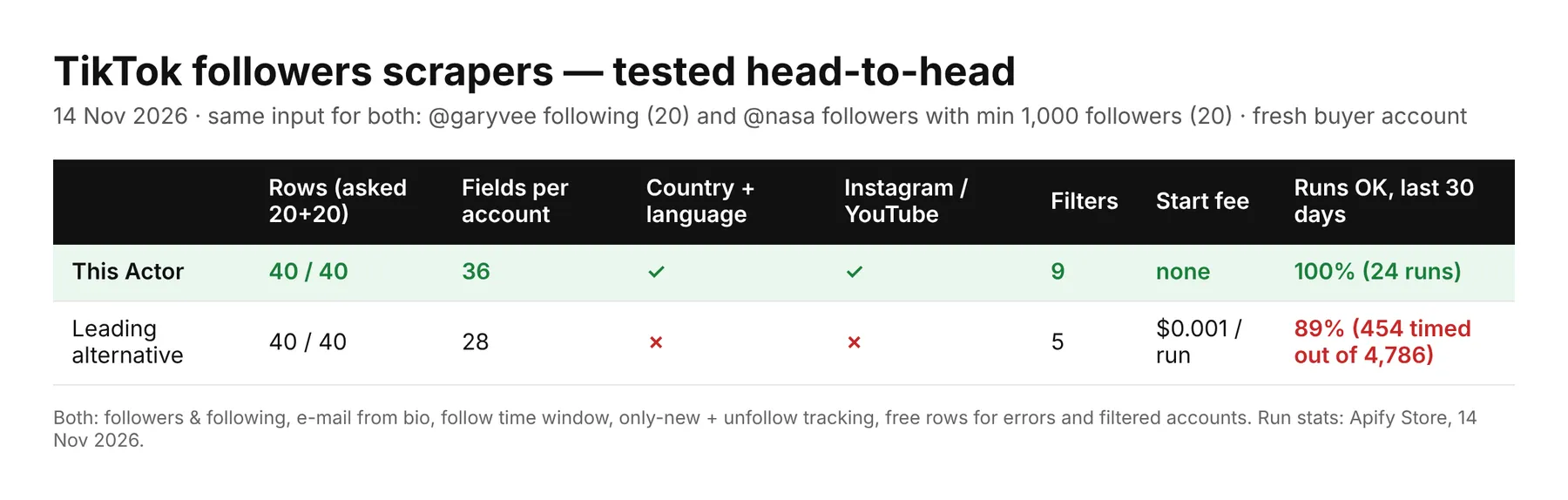
Same input for every tool (@garyvee following and @nasa followers with a 1,000-follower filter, 20 accounts each), run from a fresh buyer account:
| This Actor | Leading alternative | |
|---|---|---|
| Fields per account | 36 | 28 |
| Country and app language of every account | ✅ | ❌ |
| Linked Instagram and YouTube channel | ✅ | ❌ |
Size of the list (listTotal) on every row | ✅ | ❌ |
| Filter by country, language, linked socials, private accounts | ✅ | ❌ (followers, verified, e-mail, keywords only) |
| Runs succeeded, last 30 days (Apify Store) | 100% | 89% (454 of 4,786 timed out) |
| Start fee | none | $0.001 per run |
| Free rows for errors, hidden lists, filtered accounts | ✅ | ✅ |
| Only new followers + unfollows on a schedule | ✅ | ✅ |
What does TikTok Followers Scraper do?
- 👥 Followers — who follows an account, newest followers first.
- ➡️ Following — whom an account follows: the creators, brands and friends it watches, latest follows first.
- 🔁 Both lists of many accounts in one run — every row says which account it belongs to (
ofProfile) and which list (list). - 🌍 Country and app language of every account — see where an audience really lives, not just how big it is.
- 📧 E-mail in bio in its own column, plus the Instagram username and YouTube channel linked to the profile — ready for outreach.
- 🕒 When each follow happened — every row has the follow window (
followedAfter/followedBefore), the first and last account of every batch the exact second (followedAt); turn on Exact follow time to get the exact second on every row. - 🎯 Filters — min / max followers, verified only, only with e-mail, only with linked Instagram/YouTube, skip private accounts, keywords in bio or name, countries, languages. Skipped accounts are free.
- 🔎 Deep search — for rare matches (verified accounts among a million followers) the whole list is read.
- 🆕 Only new followers and 👋 Detect unfollows — schedule it and get just the changes since the previous run.
- 📊 Exact numbers — the tracked profile's exact follower count (
sourceFollowers, not "2.1M") and every account's followers, likes and videos.
Who uses it
| You are | What you do with it |
|---|---|
| Brand / agency | Vet an influencer before paying: is the audience real, in the right country, speaking the right language? Look at country, language, followers and videos of their followers. |
| Growth / lead gen | Turn a competitor's or a niche creator's followers into a lead list: filter Only with e-mail + Countries + Min followers, export to CSV or a CRM. |
| Influencer marketing | Find creators a brand already follows (following list of the brand), or creators with 10k–100k followers in a niche (filters + keywords in bio). |
| Creator / social media manager | Track your own new followers and unfollows every day; see who followed after a video went viral (follow time). |
| Researcher / analyst | Audience geography and language of public accounts, follower overlap between accounts, growth tracking with exact follower counts. |
How it works
- Add TikTok accounts:
nasa,@khaby.lameorhttps://www.tiktok.com/@nasa. - Pick Which list: followers, following or both, and Results per input (how many accounts per list).
- Optional: Filters (who to keep) or Track followers on a schedule (only new / unfollows).
- Run. Open the Accounts, Leads or Changes table in the Output tab, or download CSV, Excel, JSON, XML or HTML.
The Actor reads TikTok's own follower lists through a data API, 100 accounts per request, with retries — no browser, no proxy to set up. About 1,000 followers in 40 seconds (2,000 in 80 s, measured 14 Nov 2026).
⬇️ Input
| Field | What it does |
|---|---|
TikTok accounts (profiles) | Usernames or profile links, any number. Each list is exported separately. |
Which list (listType) | followers, following or both. |
Exact follow time (exactFollowTime) | followedAt to the second on every row (paid add-on from 29 Nov 2026). Without it: the follow window on every row, exact time on the first and last account of each batch, free. |
| Min / Max followers | Keep accounts with at least / at most this many followers (e.g. 1,000–100,000 for micro-influencers). |
| Verified accounts only | Only accounts with a verified badge. |
| Only accounts with an e-mail in the bio | Lead lists. |
| Only accounts with Instagram or YouTube linked | Creators who work across platforms. |
| Skip private accounts | Leave out private accounts. |
| Keywords in bio, name or username | coach finds coaching and #coach. |
| Countries | Two-letter codes: US, GB, ID, DE… |
| App languages | en, es, id, pt… |
| Deep search | Read the whole list for rare matches (paid per 100 accounts read past the free part, from 29 Nov 2026). |
| Only new followers | Tracking: return only accounts that were not in the list at the previous run. |
| Detect unfollows | Tracking: also return accounts that left the list (change = unfollowed). |
| Results per input | Cap per account and list (default 100). |
| Maximum rows per run | Hard ceiling on the whole run — and on the bill. |
| Monitoring mode — store name | Generic "only rows not delivered before" for any input (use Only new followers for follower tracking). |
Input examples
Followers of two accounts, 1,000 each:
Lead list — US and UK followers of a niche creator with an e-mail in the bio and 1k–100k followers:
Creators a brand follows, with their Instagram / YouTube:
Daily tracker — new followers and unfollows (save as a task and add a schedule):
Indonesian-speaking micro-creators among a big account's followers, whole list:
⬆️ Output
One row per account. A real row (following list of @garyvee, 14 Nov 2026):
A tracking run returns only changes:
Output fields
| Field | Description |
|---|---|
type | follower, following, notice or error (notice and error rows are free) |
username, nickname, url, id, secUid | The account: @handle, display name, profile link, TikTok user ID and stable profile key |
bio, email | Bio text and the first e-mail address found in it |
followers, following, likes, videos | The account's exact numbers |
country, language | Account country (ISO code) and app language |
verified, verifiedAs | Verified badge and its label (e.g. Popular creator, institution account) |
isPrivate | Private account |
instagram, youtubeChannel, youtubeChannelId | Linked Instagram username and YouTube channel |
avatarUrl | Profile picture (time-limited link) |
ofProfile, list, position | Whose list it is, followers / following, place in the list (1 = newest) |
followedAt | Exact time of the follow (ISO 8601) |
followedAfter, followedBefore | The follow happened between these two times (window of the batch) |
followTimePrecision | exact or window |
change | Tracking: new or unfollowed |
unfollowedAfter, unfollowedBefore | Unfollowed rows: still in the list at the previous run, gone at this one |
sourceNickname, sourceUserId, sourceFollowers, sourceFollowing | The tracked profile, with its exact follower and following counts |
listTotal | Size of the list as TikTok reports it |
notice, accountsRead | Notice rows: why a list stopped early, the tracking baseline |
sourceInput, scrapedAt, error | Your input, collection time, why an input could not be read (free row) |
Tables in the Output tab: Accounts (with avatars), Leads (e-mail, bio, links), Changes (tracking) and Inputs that could not be read.
🕒 When did each follow happen?
TikTok lists followers newest first in batches, and every batch tells when its first and last account followed. So every row carries a window — followedAfter … followedBefore — and the first and last account of each batch carry the exact second in followedAt. For a big account a window is a few minutes (100 new followers of @nasa arrive in ~15 minutes); for a slow following list it can be months.
Exact follow time (from 29 November 2026) reads the list two accounts at a time, so every row gets followedAt to the second — e.g. coinkrewe followed by @garyvee on 2026-09-17 20:18:30 UTC. It is a paid add-on because it takes 50× more requests. It works without filters and without unfollow detection (rows there keep the window).
🎯 Filters and Deep search
Filters are applied to every account read; skipped accounts are free. Each run reads about the first 1,000 accounts for free, plus ~16 more for every account it returns. That is plenty for common filters (country, min followers, keywords). When matches are rare and the free part runs out, the list stops with a free notice row that says how many accounts were read.
Turn on Deep search to read the whole list (TikTok shows up to ~10,000 accounts per list): each further page of 100 accounts read costs $0.0035 (from 29 Nov 2026) — a whole 10,000 list ≈ $0.35 — and matching accounts cost as usual.
🔁 Track new followers and unfollows
- Add the accounts (yours, competitors', creators you work with) and turn on Only new followers — or Detect unfollows for both directions.
- Save as a task and add a schedule (every hour, every morning…).
- The first run returns the latest accounts as a baseline (and a free notice saying so). Every later run returns only changes:
change=neworunfollowed. - Send them to Google Sheets, Slack, e-mail or your CRM with an integration or webhook.
The snapshot of every list is kept in your Apify account (key-value store tiktok-followers-state). Only new followers stops reading as soon as it meets an account it already knows, so a daily check usually costs one request. Detect unfollows reads the whole list every run (lists up to 10,000 accounts; past the free part $0.0035 per 100 accounts from 29 Nov 2026) — unfollows can only be told from old followers when the whole list is read.
💰 How much does it cost?
| Row | Price |
|---|---|
| Profile | $0.0005 — $0.50 per 1,000 |
| + Exact follow time (per row, from 29 Nov 2026) | $0.0016 — $1.60 per 1,000 |
| Deep search / unfollow check: 100 more accounts read (from 29 Nov 2026) | $0.0035 per page of 100 accounts — $0.35 for a whole 10,000-account list |
No start fee, no proxy or compute charge on top. Error rows are never billed. Maximum rows per run is a hard ceiling on the bill.
| Task | Cost |
|---|---|
| 1,000 followers of an account | $0.50 |
| The latest 10,000 followers | 10 × $0.50 |
| 100 followers with exact follow time (from 29 Nov) | 100 × ($0.0005 + $0.0016) = $0.21 |
| Lead list: 200 matches found in a 10,000 list with Deep search | 200 × $0.0005 + ~58 paid pages × $0.0035 ≈ $0.30 |
| 10 accounts tracked daily, ~50 new followers each per day | ~$7.50 per month |
Apify Bronze, Silver and Gold plans pay 10–30% less per account. Accounts that are not found, private accounts, hidden lists, accounts skipped by filters and all notice rows are free. Maximum rows per run and Apify's Max cost per run cap the bill — the run stops green with everything written paid for.
🔌 Integrations and API
Python
JavaScript
cURL — run and get the rows in one call:
AI agents (MCP) — add https://mcp.apify.com/?tools=blueskyscraper/tiktok-followers-scraper to Claude, ChatGPT, Cursor or any MCP client and ask: "Find fitness creators with 10k–100k followers who follow @gymshark and have an e-mail in their bio."
No-code — Make, n8n, Zapier, Google Sheets, Slack, Airbyte and webhooks through Apify integrations: run on a schedule, push new followers to a sheet or a channel.
❓ FAQ
Do I need a TikTok account, cookies or an API key?
No. The Actor reads public lists that TikTok shows to any visitor. You only need an Apify account.
How many followers can I get?
TikTok shows roughly the latest 10,000 accounts of a list to anyone. You get them newest first; set Results per input. For bigger accounts schedule Only new followers to keep up after that.
How fast is it?
100 accounts per request — about 1,000 followers in 40 seconds per list (2,000 in 80 s measured), and three lists are read at the same time.
Can I get the exact time someone followed?
Yes: every row has the follow window, and the first and last account of every batch the exact second. Exact follow time puts the exact second on every row (paid add-on from 29 November 2026).
Why does a following list return an error row?
The account hid the list of accounts it follows (a TikTok privacy setting). Its followers are still available. Error rows are free.
Can I scrape private accounts?
No. TikTok shows a private account's lists only to its approved followers; you get a free error row.
Why does the follower count on the profile differ from the rows I get?
The profile counter and the list are kept separately by TikTok and often differ — and TikTok shows only about the latest 10,000 of a list. sourceFollowers is the exact counter; listTotal is what the list reports.
How do filters affect the price?
Accounts skipped by filters are free. About the first 1,000 accounts of a run are read for free, plus ~16 for every returned account; past that the list stops with a free notice, or reads on with Deep search ($0.0035 per 100 accounts read).
How does unfollow detection work?
Each run reads the whole list and compares it with the previous run's snapshot in your account. Accounts that left get a row with change = unfollowed and the window when it happened. The first run only saves the snapshot.
Where is the tracking state kept? Can I reset it?
In your own key-value store tiktok-followers-state (one record per account and list). Delete the record or the store in Apify Console to start over.
What does "Monitoring mode — store name" do then?
It is the generic "don't deliver the same row twice" switch shared by our social scrapers. For follower tracking use Only new followers / Detect unfollows — they understand list order and unfollows.
Can I export to Excel or Google Sheets?
Yes: CSV, Excel, JSON, XML and HTML from the Output tab or the API, or push rows to Google Sheets with an integration.
What does a row cost if the account has no e-mail?
The same $0.50 per 1,000 — e-mail, Instagram and YouTube columns appear only when TikTok has them. Use Only accounts with an e-mail in the bio to pay only for leads with an e-mail.
Is there a limit on the number of input accounts?
No. Each list is a separate job; three lists are read at the same time.
Limitations (honest)
- About the latest 10,000 accounts of a list — TikTok does not show more to anyone.
- E-mail is found only when the person wrote it in the bio; nothing is guessed.
countryis the account's registration region as TikTok reports it, not GPS.- Exact follow time, Deep search and unfollow checks of long lists are paid add-ons from 29 November 2026; until then the window, the free part and lists that fit the free part work as described.
- Avatar links expire after a few days — download them if you need to keep them.
Is it legal to scrape TikTok followers?
The Actor collects only public profiles and lists that TikTok shows to any visitor, without logging in. Follower lists contain personal data (usernames, bios, e-mails): process them in line with GDPR, CCPA, CAN-SPAM and other privacy and anti-spam laws, have a lawful reason, and do not contact people who did not agree to it.


