

Proxy & IP Quality Checker
Pricing
from $0.60 / 1,000 ip checks
Proxy & IP Quality Checker
Check IP quality for scraping: residential, mobile, datacenter or VPN detection, Tor and blocklist checks, geolocation, and block risk for Google, Amazon, Cloudflare and social media.
Pricing
from $0.60 / 1,000 ip checks
Rating
0.0
(0)
Developer

Redify
Maintained by CommunityActor stats
0
Bookmarked
1
Total users
0
Monthly active users
a day ago
Last modified
Categories
Share
Proxy & IP Quality Checker
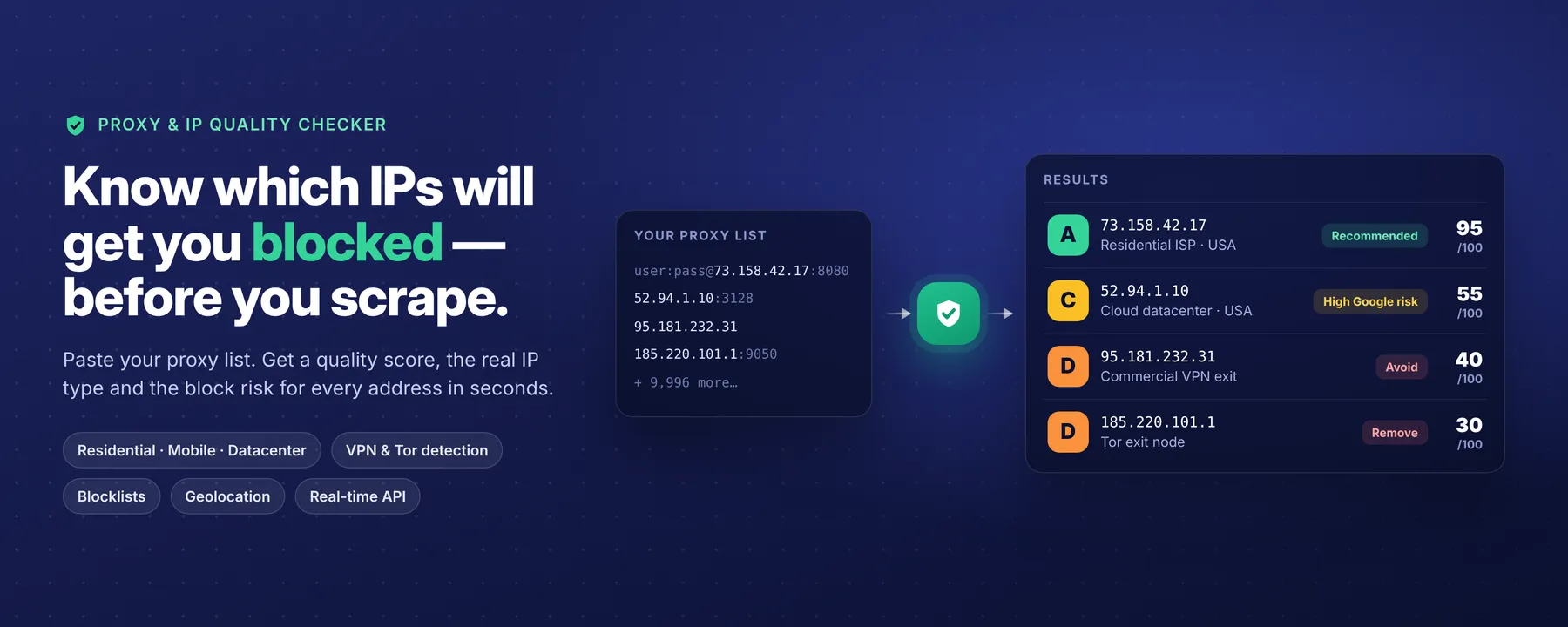
Know which IPs will get you blocked — before you scrape.
Paste your proxy list and get, for every IP, a quality score from 0 to 100, its real type (residential, mobile, datacenter, VPN or Tor), its block risk on Google, Amazon, Cloudflare and social media, and a clear verdict: keep it or drop it.
Run it on 100,000 IPs in one batch, or call it in real time from your scraper. You only pay for the IPs you check.
🚫 The problem: bad proxies cost you money
You bought "residential" proxies. Some of them are actually datacenter ranges. Others are recycled addresses already on blocklists. Half your pool sits in the same subnet, so one ban takes them all down.
You only find out after the fact: captchas, 403 errors, empty pages, wasted compute and wasted proxy bandwidth.
This Actor checks every IP before you use it, so you send traffic only through the addresses that will actually get through.
✅ What you get for every IP
| 🎯 Quality score and grade | A 0–100 score and an A–F grade, plus a riskScore for teams used to fraud-score tools |
| 🏠 Real IP type | Residential, mobile, datacenter, business or anonymizer, with a confidence level |
| 🕵️ VPN detection by name | Private Internet Access, NordVPN and Mullvad exits identified from the providers' own server lists |
| 🧅 Tor and blocklists | Tor exits, Spamhaus DROP and ASN-DROP, botnet C2 servers, IPs recently reported for attacks or bot activity |
| ☁️ Cloud provider details | AWS, Google Cloud, Oracle, Cloudflare, Fastly, DigitalOcean and Linode, with service and region when available |
| 🚦 Block risk per target | Separate risk levels for general websites, Google Search, Amazon, Cloudflare/Akamai-protected sites and social media |
| 🌍 Geolocation | Country, region, city, coordinates and time zone |
| 🔌 Network and connection | ISP, ASN, organization, shared (CGNAT) or dedicated, dynamic or static, Googlebot/Bingbot detection |
| 💬 Plain-English explanation | Every score lists the exact reasons behind it, so you can trust and verify it |
📊 Plus a report on your whole pool
A single bad IP is a problem. A badly built pool is a bigger one. After each run you also get:
- Pool grade and diversity score: how well your IPs are spread across subnets and providers.
- Distribution by type, country, ASN and /24 subnet.
- Automatic warnings, for example: "A single /24 subnet makes up 40% of the pool: one range ban can take out a large share of your IPs."
- Two ready-to-use lists:
CLEAN_IPS(keep these) andFLAGGED_IPS(remove these). Drop them straight into your scraper config.
💡 Who is it for?
- Scraping teams checking a new proxy provider before committing to a contract.
- Developers who want to filter dead-weight IPs out of their rotation automatically.
- Proxy buyers verifying that "residential" really means residential.
- Anyone automating the web who wants fewer captchas and fewer bans.
⚡ Why this Actor
- Just send IPs. No proxy credentials, no traffic through your proxies. Nothing leaves your control.
- Paste proxy lists as they are.
1.2.3.4:8080,user:pass@1.2.3.4:8080,http://user:pass@1.2.3.4:3128,1.2.3.4:8080:user:passand[2001:db8::1]:80all work. The IP is extracted for you. - Fast at scale. All data is indexed in memory, so each lookup takes microseconds. 100,000 IPs in one run is routine.
- Fair billing. Duplicates, invalid lines and private or reserved IPs are never charged.
- Respects your budget. Set a maximum cost per run: the Actor stops cleanly and keeps every result already computed.
- Always fresh data. Blocklists refresh every 1 to 12 hours, geolocation weekly. No stale database.
- Batch or real-time. Use the Console, schedule runs, or call the built-in HTTP API from your code.
🚀 How to use it
Option 1: Batch run (no code)
- Paste your IPs or your proxy list into IP addresses, one per line.
- Click Start.
- Download your results from the Output tab as JSON, CSV or Excel.
- Open the Storage tab for the pool report,
CLEAN_IPSandFLAGGED_IPS.
Input example:
| Option | Default | What it does |
|---|---|---|
ips | — | Your IPs or proxy list, one per line |
reverseDns | false | Adds the PTR hostname of each IP. Slightly better detection, slower runs |
minScore | 0 | Saves only IPs at or above this score to the dataset. The pool report still covers every IP |
includeInvalid | false | Also lists the input lines that are not valid IPs |
Option 2: Real-time API
The Actor runs as an always-on HTTP API. Open the API → Endpoints tab to get your URL and try it from your browser.
Add reverseDns=true to the URL (or "reverseDns": true in the body) to include hostnames.
Option 3: From your code
You can also connect the Actor to Make, Zapier, n8n, webhooks or Google Sheets through Apify integrations.
📦 Output example
A datacenter proxy sold as a "premium" IP, caught on an official AWS range:
For a commercial VPN exit, threats.isVpn is true and threats.vpnProvider names the provider (for example "Private Internet Access VPN"), with a lower score and a VPN-specific recommendation.
Shortened for readability. Each result also includes network, hostname, the full threats object and checkedAt. Risk levels are low, medium, high and very_high.
🧮 How the score works
No black box. Every IP starts at 100, and points are removed for each risk signal. Each deduction appears in reasons.
| Signal | Penalty |
|---|---|
| Botnet C2 server (abuse.ch Feodo Tracker) | −80 |
| Spamhaus DROP range | −70 |
| Tor exit node | −60 |
| Recently reported for attacks or bot activity (2+ feeds / 1 feed) | −55 / −40 |
| Spamhaus ASN-DROP network | −50 |
| Official cloud provider range | −45 |
| Other hosting / datacenter network | −35 |
| Unknown network owner | −35 |
| Commercial VPN exit (confirmed / likely) | −25 / −15 |
| Server-style hostname on a non-hosting network | −10 |
| Corporate or institutional network | −10 |
No reverse DNS record (when reverseDns is on) | −5 |
Grades: A ≥ 85 · B ≥ 70 · C ≥ 50 · D ≥ 30 · F < 30.
recommendedUse is true only for clean residential, mobile or business IPs scoring 70 or more.
💰 Pricing
$0.90 per 1,000 IPs checked. That's it.
- Duplicates, invalid entries and private or reserved IPs are free.
- Set a maximum cost per run and you will never pay more.
- Real-time API calls also include standard Apify platform usage.
❓ FAQ
How do I know if my proxy is residential or datacenter?
Check the type field. hosting.source tells you how a datacenter was detected: an official cloud range, a known hosting network, or the network's name.
Do I need to share my proxy credentials? No. Only the IP address is analyzed. Credentials in pasted proxy lines are ignored and never used.
Can it detect VPNs?
Yes. Private Internet Access, NordVPN and Mullvad exits are named in threats.vpnProvider: confirmed when the exact IP is a known server, likely when it shares its /24. For any other VPN or proxy, isProxyOrVpnLikely is true whenever the IP sits on a hosting network, a Tor exit or a proxy-style hostname.
Does it test my proxies against Google or Amazon? No. The block risk is an estimate based on how anti-bot systems treat each IP type and reputation signal. Your actual success also depends on request rate, headers and browser fingerprint. In return, checks are instant and never burn your proxy bandwidth.
Why do mobile IPs score so well? Mobile carriers share each IP between many real users (CGNAT). Websites avoid banning them because they would block real customers too.
What do shared and dynamic mean?
shared: true means many users exit through the same IP (mobile CGNAT, VPN, Tor). dynamic: true means the hostname points to a rotating consumer address. null means the signal could not be determined reliably. We never guess.
How fresh is the data? Tor exits refresh every hour, attack feeds every 6 hours, Spamhaus and VPN server lists every 12 hours, cloud ranges daily and geolocation weekly.
📚 Data sources
Public, regularly refreshed sources only:
- ASN, country and city: DB-IP Lite (CC BY 4.0). City-level location is approximate, as with any IP geolocation database.
- Official IP ranges from AWS, Google Cloud, Oracle Cloud, Cloudflare, Fastly, DigitalOcean and Akamai Linode
- Official Googlebot and Bingbot ranges from Google and Microsoft
- Server lists published by Private Internet Access, NordVPN and Mullvad
- Tor Project exit list
- Spamhaus DROP and ASN-DROP
- abuse.ch Feodo Tracker
- blocklist.de, CINS Army, Emerging Threats and GreenSnow attack feeds
🤝 Support
Found an IP that looks misclassified, or need a feature? Open an issue in the Issues tab. Include the IP and what you expected, and it will be looked into.
IP geolocation and ASN data by DB-IP, licensed under CC BY 4.0.


