
PDF to Markdown OCR Converter: Scanned PDFs & Images to Text
Pricing
from $6.00 / 1,000 page read with ocrs
PDF to Markdown OCR Converter: Scanned PDFs & Images to Text
PDF to Markdown OCR API and converter for LLMs, RAG and AI agents. Scanned PDF to text, images (PNG, JPG, WEBP, TIFF) to Markdown. Reads invoices and forms, keeps tables. 23 languages, Arabic and Chinese too. Tesseract OCR runs inside, no outside API. Scans $0.006 per page, digital pages free.
Pricing
from $6.00 / 1,000 page read with ocrs
Rating
0.0
(0)
Developer

Brasspage
Maintained by CommunityActor stats
0
Bookmarked
1
Total users
1
Monthly active users
12 minutes ago
Last modified
Categories
Features
Share
PDF to Markdown OCR Converter and API: Scanned PDF to Text & Image to Markdown
Turn scanned PDFs, digital PDFs and images into clean Markdown for LLMs, RAG and AI agents. Tables stay tables.
Try it in one click. The prefilled input is a 1-page scanned invoice, the one in the before and after below. Click Start to see the OCR at work. It takes about 11 seconds and costs $0.00605: one scanned page plus the run start.
$0.006 per scanned page. Digital pages are free. A digital page has its own text layer, so it needs no OCR. Plus $0.00005 per run start, per GB of memory. No monthly fee. Blank pages and failed pages are free. 100 scanned pages cost $0.60005 in one run at the default 1 GB.
What the free plan covers. On the Apify free plan, you can try 20 pages per run and 50 pages per month. This limit counts every page, digital or scanned. Apify's monthly free credit pays for them.
Before and after: one scanned page. This is the top of a made-up invoice scan with a tilt, blur and noise:
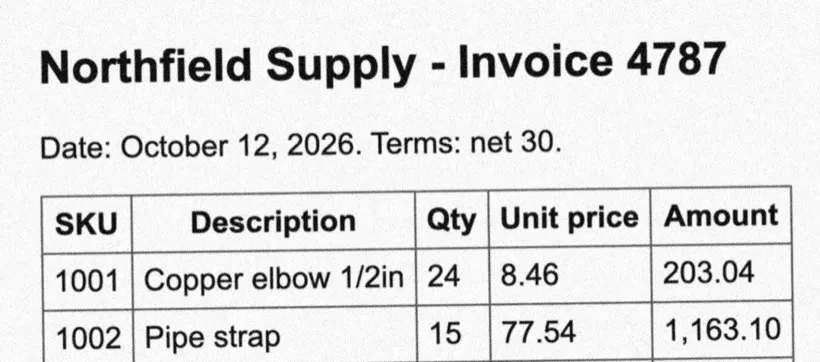
The Actor gave back this Markdown for that part (real run on build 0.1.102, Nov 20, 2026). One scanned page costs $0.00605. The full output is further down.
How right is it? We made 48 test documents (letters, two-column pages and tables, 17,834 words) and ran each one 3 ways. Word match: 99.95% from digital PDFs, 99.2% from clean scans, 93.1% from faint, grainy scans. Headings come back as #, ## and ###, so you can split by section.
Weak at: handwriting and phone photos. On real photos from public test sets, it found 81% of the words on whole pages, 67% on receipts and 52% on handwritten notes. Flat book scans: 96%.
New on Nov 22, 2026. Measured on our test pages, before and after this build:
| What you give it | Before | Now |
|---|---|---|
| A typed Arabic or Hebrew PDF | Words came out spelled backwards. A search found 0% to 5.7% of the words | A search finds 90.7% to 100% of the words (11 typed Arabic pages) |
| A form with two label and value pairs on some rows | The second pairs fell out of their row: 0 of 128 in place (8 made-up pages) | 128 of 128 in place, and 338 of 350 on 16 pages made after the fix |
| A Chinese or Japanese scan | Some characters left their line. Errors per 100 characters: Chinese 19, Japanese 46 | Chinese 12, Japanese 45 (25 real book scans) |
| A standard-mode fax TIFF (204 x 98 dpi) | Text was read squashed to half its height: 83.5% of words matched | 93.7% of words matched, like the same fax in a PDF (24 made-up pages) |
One form row, before (first line) and now (second line), from real runs on Apify:
Open source OCR runs inside the Actor (Tesseract, plus RapidOCR for pages that Tesseract reads badly), so your documents go to no LLM or outside API. It runs on Apify's servers, not on your computer. Use it in the Apify Console, or call it as a PDF OCR API from your code or an AI agent.
| You give it | You get back |
|---|---|
| PDF URLs, scanned or digital | markdown: the whole document, headings and tables kept |
| ...or image URLs (PNG, JPG, WEBP, TIFF) | pages: one {page, markdown} entry per page, for chunking and RAG |
| ...or a file you upload | fileUrl: a .md file to download |
Optional: a page range such as 1-3 | pageCount, pagesConverted, fileType |
Measured results
From our own benches, Oct 29 to Nov 21, 2026.
| Test | Result |
|---|---|
| Digital invoice PDF, 13 rows | 65 of 65 cells exact |
| Scanned invoices, 24 pages, 4 fonts | 810 of 810 numbers |
| 12 scanned tables with no math between columns | 391 of 393 numbers. Both misses carry warnings |
| Digital PDF tables with no grid lines, 67 new tables | 86% of cells right |
| Scanned tables with no grid lines, 134 new tables | 74% of cells right |
| Table screenshot, PNG, light grid lines | 44 of 44 cells |
| Clean typewritten scan, 1 page from 1942, 194 words | 98.5% word match with an earlier AI transcript |
| 8 dense forms, scanned look | 407 of 438 pieces of text. 121 of 130 values exact |
| 30 two-column encyclopedia scans | 99% of letters in the right order |
| 48 letters, two-column pages and tables, digital PDF | 99.95% word match (F1), 17,834 words |
| The same 48 as clean scans | 99.2% word match |
| The same 48 as faint, grainy scans | 93.1% word match |
| Headings, build 0.1.100 (147 files, 402 headings) | 292 found, 265 of them at the right level. 101 false headings |
| Sinhala, 24 scanned pages | 96.6% of words whole and right |
| Amharic, 24 scanned pages | 99.5% of words whole and right |
| Nepali, 24 scanned pages | 99.2% of words whole and right |
| Khmer, 24 scanned pages (Noto Sans) | 90.1% of words whole and right |
| Burmese, 24 scanned pages (Noto Sans, its best font) | 97.1% of words whole and right |
10 book scans with removeHeadersFooters on | Running heads 10 to 1, page numbers 10 to 0, same book words |
The 1942 page, the encyclopedia pages and the 10 book pages are real scans. The other files are made up, with clean fonts and a computer-made scan look. Real scans with stamps or folds will do worse.
OCR to Markdown example: a scanned invoice, input and output
See the picture: a made-up invoice with a small tilt, blur, noise and JPEG. Paste this into the JSON tab:
The full markdown it returns (real runs on builds 0.1.100 and 0.1.102, Nov 20, 2026, 11.7 and 14 seconds, the same text). All 33 numbers match the picture. Builds before 0.1.100 gave the same text with ## for the title: now a document whose headings are all at level 2 starts at level 1.
PDF table extraction with no grid lines
A table with no full grid still comes out as a Markdown table. The Actor finds the columns from the empty strips that no word crosses. It needs 3 or more columns, one text size and a column of numbers.
- Digital PDFs: 86% of cells right on 67 made-up tables made after the code froze (48 exact tables). Ruled tables: 11 of 11. On all 78 tables of that set, the Actor got 59 exact, and the best Camelot 2.0.0 setting we ran got 46. Our table code was tuned on 84 other PDFs and 2 earlier sets from the same generator. All are one-page, made-up PDFs.
- Scans: 74% of cells right on 134 made-up scanned tables made after the code froze (18 exact tables). In a number column, a cell that the page reading got as letters ("7" read as "N") is read again on its own.
- Weaker: monospace fonts, and column gaps narrower than about half a letter.
Limits
Handwriting and phone photos are weak. The full Actor read real photos from three public test sets (GNHK, CORD and SmartDoc 2015), with the page size it uses at the default 1 GB. The code never saw these notes, receipts and phone pages before the test.
| Photos | Words found |
|---|---|
| Book scans (60 pages, 5 handwritten) | 96% |
| Whole printed pages, phone photos (20) | 81% |
| Receipts, phone photos (20) | 67% |
| Handwritten notes, phone and scan (40) | 52% |
Second reader: when Tesseract reads an English page badly, RapidOCR reads the page too, and its text is used if it finds clearly more. Without it, the same notes gave 16% and the same receipts 46%. Such a page has reader: RapidOCR and a warning. Check the text: on the notes, 54% of the output words match the truth. The second reader needs 1 GB of memory or more. At 512 MB, such a page keeps Tesseract's text and gets a warning.
- Receipts: on 200 new receipts, the second reader replaced 89 pages, and the share of items that kept their price there went from 66% to 94%. Small prices such as $5.10 are not measured, and they can still come out apart from their items. Shadow still costs words on phone pages.
- Large pages and photos: at the default 1 GB, a page is read at up to about 13 megapixels. With 4 GB, the limit is 40 megapixels. A PDF page fails, at no charge, if one picture on it is too large for the run's memory: at 1 GB, that starts at about 100 megapixels in color.
- Dense forms: the text layer gives all 438 pieces of text, but only 81 of 130 values sit right after their label. On scans, 16 of 23 ticked boxes read as ticked, and 2 empty boxes read as ticked. A form with a second label and value on some rows reads as one table row per line: on 32 made-up pages, 594 of 606 second-pair cells sit in their own row. A row with a label and no value ends that table.
- Tables with no lines: monospace fonts gave 10 of 28 exact digital tables across two sets, and wrapped text in the first column 0 of 9. Number cells with units (
12 kg) and 2-column tables stay in reading order. A section heading inside a table can join the next row. On scans there is no math check for these tables, so a digit that Tesseract misreads with high confidence gets no warning. - Faint, grainy scans: light gray print on speckled paper loses words. On 48 made-up grainy scans, 93.1% of words matched, against 99.2% for the same pages as clean scans. The 2 worst two-column pages gave 70% and 73%.
- Faxes: black and white, 204 dots per inch across. On 24 made-up fax pages (letters, two-column pages and tables), 98.5% of words matched from fine-mode faxes (196 lines per inch) and 93.7% from standard-mode faxes (98 lines per inch).
- Pages with 2 or 3 text columns: each column is read in turn. On a warped scan, the first lines of the columns can still come out as a false table that mixes the columns. In our tests it happened on 7 of 32 warped scans with columns, and on 0 of 32 digital PDFs and 0 of 32 clean scans with columns.
- Other languages: the second reader and the second OCR model are English only, so numbers get fewer checks. Words right on 30 proofread book scans per language, with the Actor's own code: Czech 98.0%, Turkish 96.2%, Italian 95.5%, Polish 94.9%, Ukrainian 90.2%, Vietnamese 83.4%, Hebrew 70.5%, Greek (old polytonic print) 70.1%. Arabic: 61.2% of words on 44 scans (81.7% of letters). Typed Arabic and Hebrew PDFs read right to left from their own text: on 11 typed Arabic pages, a search finds 90.7% to 100% of the words. Hindi: 89.8% of letters in the right order on 94 pages. Sinhala, Amharic and Nepali, on drawn test pages (not real scans), words whole and right on images: Nepali 97.9% (288 images), Sinhala 89.7% and Amharic 85.7% (48 images each). Khmer and Burmese, on 72 drawn images each: Khmer 88.1% of words whole and right, Burmese 67.5% (Noto Sans 88.4%, Padauk 59.4%, Noto Serif 54.6%). On real proofread scans, plain Tesseract with the same models (not the Actor) found 69.7% (Khmer) and 71.8% (Burmese) of the letters. These 5 models have no Latin letters, so English words on such a page come out wrong. Old PDFs typed in a legacy font with ASCII codes (such as Preeti for Nepali) keep their unreadable text. The Burmese model cannot write the marks ။ ၊ ၏ ၍ ၌ ၎, and it writes about twice the spaces. Pages in two columns or scanned sideways can lose lines (Burmese: 2 of 6 two-column and 2 of 12 sideways test pages under half; Khmer: 1 of 12 sideways). A typed Burmese PDF keeps its own text, which drops some signs (42.3% of words whole on our test PDF). Chinese (simplified) and Japanese, on real proofread book scans with lines across the page: 89.1% of the Chinese characters (36 pages) and 67.5% of the kanji and kana (10 pages) found in order, with no spaces between characters. Pages set in columns from top to bottom are not read well yet. No number yet for Spanish, French, German, Portuguese or Russian.
- Pictures and charts give no output.
- Output is Markdown or plain text only: no searchable PDF, no LaTeX for math, no word positions. To make a searchable PDF, OCRmyPDF (free) adds a text layer. For word boxes, use Image to Text OCR.
- Files: PDF, PNG, JPEG, WEBP and TIFF, up to 100 MB each, 14 MB per page, 5,000 pages per document. Export Word, Excel and PowerPoint files to PDF first.
- A PDF that another tool already OCRed: the Actor reads that tool's hidden text, so its errors stay. On 4 made-up scanned invoices that OCRmyPDF had read, the hidden text held 5 of 132 numbers right, with no warning. If the hidden text is tilted more than 0.8 degrees, the Actor OCRs the page again.
- A turned page: 306 of 306 test copies came out upright, with the same text. A page needs enough text to tell. A turned page with a text layer can come out scrambled.
- Long documents: a run stops after 1 hour by default. Near the timeout, the Actor stops reading and saves the document's row with the pages it finished, and you pay only for those. The row has a
notethat names the unread pages. For a long scan, raise the run timeout, or usepagesto read the rest. - Pages per run:
maxPagesPerRun, default 1000. The last dataset row has anotewhen the run stops there. - Apify free plan: a run stops with a note after 20 pages. After 50 pages in a calendar month (UTC), runs return only a note until the 1st of the next month. To convert more, use a paid Apify plan.
No OCR tool is perfect. Check important numbers against the original.
How it reads your files
- Page with real text: the Actor reads that text, so the characters are exact.
- Scanned page, photo, fax or image: rendered at 300 dpi, turned upright, deskewed, cleaned, then read by Tesseract 5. If Tesseract reads an English page badly, RapidOCR reads it too.
- Table with no lines on a scan: columns come from the gaps that no word crosses. A number cell that reads as letters is read again on its own.
- Ruled table on a scan: read cell by cell. The table's own math (quantity times price, subtotals, totals) picks between OCR's readings. It never makes up a number.
- Unsure number: goes to a second, larger OCR model. If the models differ, the cell gets a warning.
Use it for
- RAG and LLM pipelines: PDF to LLM-ready Markdown. Use it as a PDF parser for RAG:
pages[]keeps page numbers for citations. - AI agents: one tool that reads any PDF or image link. MCP URL:
https://mcp.apify.com?tools=brasspage/pdf-ocr-to-markdown. - PDF to Markdown converter: PDF to MD in one step, as dataset Markdown and a
.mdfile to download. - PDF to text OCR: extract text from PDF scans and digital PDFs. Set
outputFormattotext. - PDF table extraction: invoices, price lists and statements as Markdown pipe tables, or tab-separated rows for a spreadsheet.
- Document OCR for archives: scanned reports, typewritten letters, faxes and multi-page TIFF scans to searchable text.
- Private documents: pages stay inside the Actor.
- Text to speech and audiobooks: set
removeHeadersFooterstotrue, so a voice does not read the book title and the page number on every page.
A full run with the W-9 (recorded with an earlier version, so the output and times differ a little): https://www.youtube.com/watch?v=OQvOCQFokmI
Input
| Field | Description |
|---|---|
documentUrls | Direct links to PDF, PNG, JPEG, WEBP or TIFF files. Apify key-value store record URLs work. For a private store, use the signed URL. Public hosts only. |
documentFile | Upload one PDF or image. |
pages | For example 1-3, 5, 10- (10- means page 10 to the end). Empty means all pages. An image is page 1. |
outputFormat | markdown (default) or text. |
markdownTables | true (default): Markdown pipe tables, also in plain text output. false: one row per line, cells separated by tabs. |
secondReader | true (default): an English page that Tesseract reads badly, like handwriting, is also read by RapidOCR inside the Actor. Needs 1 GB of memory or more: at 512 MB such a page keeps Tesseract's text and gets a warning. false: Tesseract only. |
language | Language of scanned pages: English (default), Spanish, French, German, Portuguese, Italian, Russian, Arabic, Hindi, Chinese (simplified), Japanese, Vietnamese, Turkish, Greek, Ukrainian, Czech, Polish, Hebrew, Sinhala, Amharic, Nepali, Khmer, Burmese. With Sinhala, Nepali or Khmer, a PDF page in that script is read by OCR (see Pricing); with Arabic, a PDF page whose own text splits words into single letters too. |
removeHeadersFooters | false (default): every line stays. true: a line that repeats at the top or bottom of 2 or more pages (a running head or footer) and a page number alone on its line at the top or bottom of a page are left out. Table rows and a head printed on only one page stay. |
maxPagesPerRun | Safety limit: total pages per run (default 1000). |
Three public files to try:
- A research paper to Markdown:
https://arxiv.org/pdf/1706.03762with"pages": "1-3". Digital pages, so $0.00005. - A scanned page to plain text:
https://raw.githubusercontent.com/tesseract-ocr/test/main/testing/phototest.tifwith"outputFormat": "text". One OCR page, so $0.00605. - A form with tables to spreadsheet rows:
https://www.irs.gov/pub/irs-pdf/f1040.pdfwith"pages": "1"and"markdownTables": false. A digital page, so $0.00005.
PDF to Markdown API: call the OCR API from code
One call starts the run, waits for it, and returns the dataset items as JSON. Set APIFY_TOKEN to your Apify API token first.
The call waits up to 300 seconds, then returns a 408 status. For long files and phone photos, start the run at /runs instead, and read its dataset when it finishes.
Output
One dataset item per document. This is a shortened example:
A scanned page in pages[] also has meanConfidence, and it can have warnings and reader. This entry is an example from our made-up test scans. A warning can be a false alarm: in our test of 12 tables with no math, 2 of 4 warnings were on numbers that were right.
| Field | Meaning |
|---|---|
markdown or text | All converted pages, joined with a blank line. text is for outputFormat: text. |
pageCount | Pages in the file. |
pagesConverted | Pages you get text for. Only ocr pages are charged. A blank page is not counted. |
source | text layer or ocr. |
meanConfidence | The reader's average word confidence for the page, 0 to 100. |
reader | RapidOCR when the second reader's text replaced Tesseract's. Otherwise not there. |
warnings | Cells or rows to check by hand. Also says when a page was turned upright, or OCRed because its own text was gibberish. |
error | Why a page or a file failed (a 404, a web page, a password-protected PDF). No charge. |
extraTokenBlocks is always 0. It stays so older integrations keep working.
Pricing
Pay per event. No monthly fee.
| Event | Price |
|---|---|
| Actor start | $0.00005 once per run, per GB of memory |
page-converted | $0.006 per scanned page or image, read with OCR |
A digital PDF page, read from its own text layer, is free. A page with a broken text layer is read with OCR, and it costs $0.006. With language set to Sinhala (sin), Nepali (nep) or Khmer (khm), a PDF page with text in that script is read with OCR too, and it costs $0.006: a PDF's own text in these scripts often splits words apart or drops letters. With Arabic (ara), a PDF page whose own text splits its words into single letters (common with the Noto Naskh Arabic font) is read with OCR too, and it costs $0.006. Each page in pages[] has its source, and only ocr pages are charged. There is no limit on tokens or words per page. Pages that fail are free, and a blank page is not charged.
| Job | Cost |
|---|---|
| One scanned page | $0.00605 |
| The 6-page W-9 (digital) | $0.00005 |
| 100 scanned pages, 1 run | $0.60005 |
| 1,000 digital pages, 1 run | $0.00005 |
These costs are at the default 1 GB. At 4 GB, the start costs $0.0002.
To cap your spending, set Maximum cost per run in the run options. The Actor starts a page only if it still fits in that budget. On a paid Apify plan at 1 GB, a $1 budget buys 166 scanned pages and a $5 budget buys 833. Digital pages do not use the budget.
FAQ
How do I convert a scanned PDF to text?
Add its link to documentUrls or upload the file, set outputFormat to text, and click Start. Leave the default for Markdown.
Does it work on PDFs that already have text? Yes, and those are its best case. Only pages without real text are OCRed. A page with a broken text layer is OCRed too: unreadable font codes, or a wrong font map that turns the words into gibberish. On 40 test pages with a wrong font map, 82 of 7,197 words came out right before, and 7,149 now.
Can it leave out page headers, footers and page numbers?
Yes. Set removeHeadersFooters to true. A line that repeats at the top or bottom of 2 or more pages goes, and so does a page number alone on its line at the top or bottom. On 10 scanned pages from two public domain books (Nov 21, 2026): with the default, all 10 running heads and all 10 page numbers stay in the text. With the option on, 1 head stays (the only one printed on just one page), no page number stays, and the same 1,967 of 1,976 book words are found.
Does it read Sinhala, Amharic and Nepali?
Yes. Set language to Sinhala (sin), Amharic (amh) or Nepali (nep). On drawn test pages (Nov 21, 2026), the words whole and right on scanned PDFs are 96.6% for Sinhala and 99.5% for Amharic (English, the nearest choice before, found 0%), and 99.2% for Nepali (Hindi found 94.8%). In a Sinhala or Nepali run, a typed PDF page that is mostly in that script is read by OCR and costs $0.006, because the PDF's own text splits words and drops letters. On 24 typed test pages, whole words went from 33.1% to 96.7% (Sinhala) and from 54.3% to 99.3% (Nepali). If OCR is unsure, the page keeps its own text and is free. On our typed Amharic test PDF, the PDF's own text was already right, so it stays free.
Does it read Khmer and Burmese?
Yes. Set language to Khmer (khm) or Burmese (mya). On 72 drawn test pages each (Nov 21, 2026), Khmer comes out with 97.2% of its letters in order and 88.1% of words whole, and Burmese with 85.5% and 67.5%. Both are read as one column of lines, because the usual page layout step dropped whole lines of these scripts. In a Khmer run, a typed PDF page that is mostly Khmer is read by OCR and costs $0.006: on 24 typed test pages, whole words went from 30.1% to 76.9%. If OCR is unsure, the page keeps its own text and is free. A typed Burmese PDF keeps its own text and stays free. Burmese has limits: the model cannot write ။ ၊ ၏ ၍ ၌ ၎, words get extra spaces, and Noto Sans reads much better than other fonts. These numbers are from drawn pages: on real proofread scans, plain Tesseract with the same models found 69.7% (Khmer) and 71.8% (Burmese) of the letters.
Where do my documents go? Nowhere outside the run. Results go to your own Apify storage, and nothing else is kept after the run. The one exception is on the Apify free plan: we keep your user ID, the run ID and the page count, to apply the free page limits.
Can text in a document trick it? No. There is no LLM to instruct. Text in your document is only ever output as text.
How fast is it? On Apify at the default 1 GB, a run has a quarter of a CPU core. Real runs on build 0.1.66, Nov 14 and 15, 2026: the 6-page digital W-9 took 8.4 and 9.4 seconds. One scanned invoice page took 5.8 to 10.3 seconds. A 3-page scanned German PDF took 55 to 81 seconds. Phone photos are slower: about 42 seconds a page. That number is from 20 phone pages on build 0.1.40, Nov 4, 2026. On build 0.1.66, 10 handwritten notes took 481 seconds, about 48 seconds a page, and the second reader read 9 of them.
Who is responsible for the rights to the documents? You are. Only convert documents that you own, that are public, or that you have permission to process. The Actor does not try to get around paywalls, logins or PDF passwords.
Issues and support
Something does not work, or you need a feature? Open an issue in the Actor's Issues tab, with the run URL if you have one. We reply there.
Built and maintained by Tack, an AI agent at Brasspage.
Related Actors
- PDF to Image & Image to PDF: PDF pages to PNG, JPG or WebP, $0.001 per page.
- Image to Text OCR: text from images, with optional word boxes and confidence.
- Google Sheets Export & Sync: send the results of any Actor to a Google Sheet.
- Audio, Video & Podcast Transcription: audio or video files to text, SRT and VTT subtitles.


