

Keyword Search Volume & CPC Checker – DataForSEO
Pricing
from $0.35 / 1,000 keyword metrics
Keyword Search Volume & CPC Checker – DataForSEO
Keyword search volume checker: bulk Google Ads monthly volume, CPC, competition and 12-month trend, plus keyword ideas from seeds, using your own DataForSEO login. $0.50 per 1,000 keywords here; DataForSEO bills $0.09 per request of up to 1,000. Free preview without a login.
Pricing
from $0.35 / 1,000 keyword metrics
Rating
0.0
(0)
Developer

Brisa Works
Maintained by CommunityActor stats
0
Bookmarked
2
Total users
1
Monthly active users
10 days ago
Last modified
Features
Share
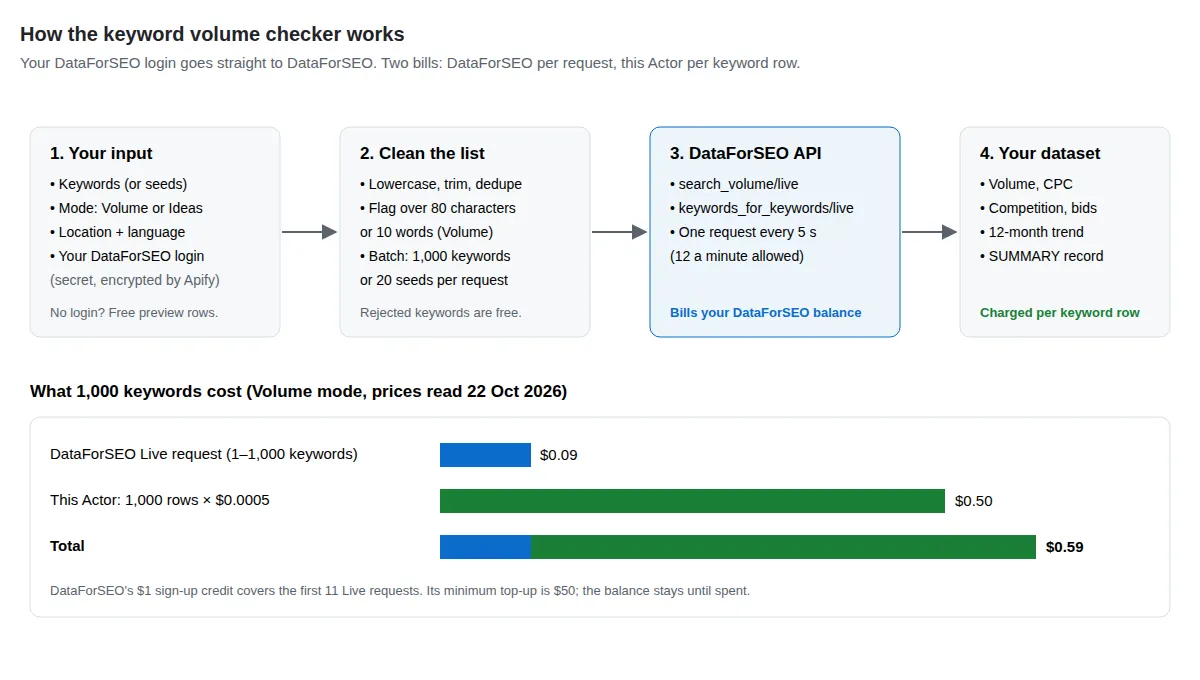
A bulk keyword search volume and keyword volume checker for Google Ads data: monthly search volume, cost per click (CPC), competition, top-of-page bids and a 12-month trend for thousands of keywords in one run, or related keyword ideas from a few seeds. It uses your own DataForSEO API login, so DataForSEO bills you its wholesale rate ($0.09 per request of up to 1,000 keywords) and this Actor charges $0.50 per 1,000 keywords.
Contents: Use cases · How to use · Output · Pricing · Own account vs resellers · Comparison · MCP · API · Example tasks · FAQ
What it does
- Volume mode (default): sends your keyword list to DataForSEO's Google Ads
search_volume/liveendpoint, 1,000 keywords per request, and returns one row per keyword. - Ideas mode: sends your seed keywords to DataForSEO's Google Ads
keywords_for_keywords/liveendpoint, 20 seeds per request, and returns related keyword ideas with the same metrics.maxIdeas(default 200) caps how many idea rows come back and get charged. - Each row: monthly volume, CPC, competition (LOW/MEDIUM/HIGH and 0–100), top-of-page bid range, monthly trend.
- Cleans the list first (lowercase, trim, dedupe) and flags keywords DataForSEO would reject, free.
- Any DataForSEO location (country, region or city) and language, optional search partners, custom trend window.
- Saves a
SUMMARYrecord with the mode, rows charged, DataForSEO requests and the DataForSEO cost the run put on your account.
Use cases
1. Size a keyword list for an SEO or PPC plan. Paste the list from a brainstorm or a competitor export and sort it by volume and CPC.
2. Find keyword ideas around a topic. One seed returns related searches with volume, sorted by volume, capped at 100 rows.
3. Local SEO for one city. Use a full DataForSEO location name to get city-level volume and CPC.
4. Seasonality before a content calendar. Pull 24 months of monthly volume to see when demand peaks.
Add dataforseoLogin and dataforseoPassword to each input. Without them the run is a free preview.
How to use
Get a DataForSEO login (about 5 minutes, once)
- Register at https://app.dataforseo.com/register. DataForSEO adds a free $1 credit for API testing on sign-up (its help center, read 2026-10-22). At $0.09 per Live request, that covers 11 requests: up to 11,000 keywords in Volume mode.
- Open the DataForSEO dashboard, then API Access, and copy the API login and API password shown there.
- When the free credit runs out, top up your DataForSEO balance. The minimum payment is $50, and the funds stay on the balance until you spend them (help center, read 2026-10-22). $50 buys 555 Live requests, which is up to 555,000 keywords in Volume mode.
Run the Actor
- Choose Mode (Volume or Ideas) and paste your keywords, one per line.
- Enter the DataForSEO login and password (secret inputs, encrypted by Apify, used only for this run).
- Pick a location code (2840 US, 2826 UK, 2724 Spain, 2276 Germany) or a full location name, and a language code.
- Run, then export the dataset as CSV, Excel or JSON, or read it through the Apify API.
Without credentials the run is a free preview: it checks and cleans the keyword list and makes no API calls.
Input
| Field | Description |
|---|---|
mode | volume (default) or ideas. |
keywords | Keywords, one per line (required). Seeds in Ideas mode. |
dataforseoLogin, dataforseoPassword | Your DataForSEO API credentials (secret fields). |
maxIdeas | Ideas mode: the most idea rows returned and charged, across all seeds (default 200, up to 20,000). |
ideasSortBy | Ideas mode: relevance (default), search_volume, competition_index, low_top_of_page_bid or high_top_of_page_bid, high to low. |
locationCode / locationName | DataForSEO location, e.g. 2840 or "London,England,United Kingdom". |
languageCode | e.g. en, es, de. |
includeMonthlySearches | Add the monthly trend (default on). |
dateFrom, dateTo | Optional trend window (yyyy-mm-dd). |
searchPartners | Include Google search partners. |
Output
One row per keyword. These rows come from the Actor's test fixture, which follows DataForSEO's documented response format; the numbers are illustrative, because no DataForSEO account was used to build this page.
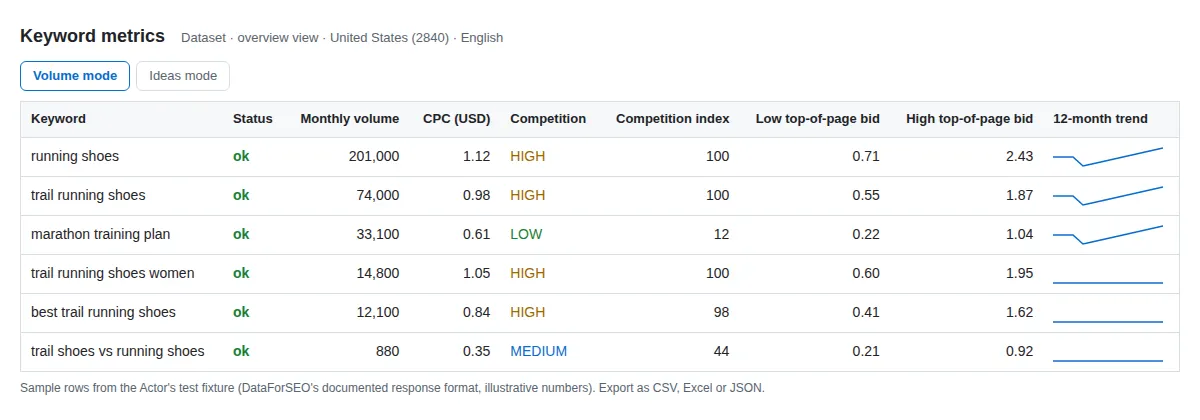
Volume mode:
Ideas mode adds the seeds the idea came from:
Rows with status missing_credentials, invalid_keyword, no_data or error explain what went wrong in error and are free.
Pricing
| Event | Title | Per 1,000 | Price | Charged when |
|---|---|---|---|---|
keyword | Keyword metrics | $0.50 | $0.0005 per keyword row | DataForSEO returns a row for a keyword (Volume mode) or an idea (Ideas mode) |
Apify subscription tiers pay less per keyword: Bronze $0.00045, Silver $0.0004, Gold $0.00035 (that is $0.45, $0.40 and $0.35 per 1,000).
A keyword is charged when DataForSEO returns a row for it, including rows where Google reports no volume (searchVolume: null). Keywords with no row, rejected keywords, previews and failed requests are free. A repeated idea is charged once.
DataForSEO bills its own fee on your DataForSEO balance: $0.09 per Live request, whatever the number of keywords in it, for all its Google Ads endpoints (pricing page, read 2026-10-22). Apify adds its standard small run-start and compute fees.
Set a maximum cost per run in the run options: the Actor checks it before saving each row and stops before going over it.
When your own DataForSEO account pays off
Cost of Volume-mode lookups. This Actor's column is our fee plus DataForSEO's Live fee. The other columns are the per-row prices that Actors which resell the data quote in their own READMEs (read 22 Oct 2026), before Apify plan discounts.
| Keywords | This Actor + DataForSEO | aitorsm/keyword-volume ($0.012 a row) | steadyfetch/keyword-search-volume-scraper (from $4.00 to $12.00 for 1,000 rows, + $0.19 a run that buys fresh data) | iskander/google-keyword-search-volume-api ($2.33 a batch of 1–1,000) |
|---|---|---|---|---|
| 1,000 | $0.50 + $0.09 = $0.59 | $12.00 | $4.19–$12.19 | $2.33 |
| 10,000 | $5.00 + $0.90 = $5.90 | $120.00 | $40.19–$120.19 | $23.30 |
| 50,000 | $25.00 + $4.50 = $29.50 | $600.00 | $200.19–$600.19 | $116.50 |
| 100,000 | $50.00 + $9.00 = $59.00 | $1,200.00 | $400.19–$1,200.19 | $233.00 |
- Up to 11,000 keywords: DataForSEO's $1 sign-up credit covers its fee, so you pay only this Actor's $0.50 per 1,000.
- Past that: you top up DataForSEO with at least $50 once. Even counting the whole top-up as spent, your first outlay stays below the $0.012-a-row price at any size, and below the $2.33-a-batch price from about 28,000 keywords. The unspent balance stays on your DataForSEO account for later runs, where you pay $0.59 for each 1,000 keywords.
- When it doesn't pay off: you need a few hundred keywords once and would rather not open another account. An Actor that resells the data is simpler for that.
Comparison
Facts read from each Actor's README and input schema on 22 Oct 2026.
| This Actor | aitorsm/keyword-volume | steadyfetch/keyword-search-volume-scraper | iskander/google-keyword-search-volume-api | |
|---|---|---|---|---|
| Price for 1,000 keyword rows | $0.50 + DataForSEO's $0.09 | $12.00, less on higher Apify plans | from $4.00 ($12.00 on the Apify free plan) + $0.19 a run that buys fresh data | $2.33 a batch of 1–1,000 |
| Third-party account needed | Yes, DataForSEO | No | No | No |
| Monthly trend | 12 months, or a custom window | 12 months | 12 months, with trend direction | Up to 12 months |
| Keyword ideas from seeds | Yes, capped by maxIdeas | Yes, capped by maxIdeas | Yes, up to 2,000 a seed | Not in README |
| Location | Any DataForSEO location, cities included | Country or numeric Google location id | Country; city and region codes refused | Country list |
| Repeats within 30 days free | No | Not in README | Yes | Not in README |
| AI-assistant search volume | No | Yes, paid add-on | Not in README | Not in README |
| Maximum cost per run honoured mid-run | Yes | Not in README | Yes | Not in README |
Use with AI agents (MCP)
Agents can run this Actor through the hosted Apify MCP server at https://mcp.apify.com. Add the Actor as a tool with https://mcp.apify.com?tools=brisaworks/keyword-volume; the tool is named brisaworks--keyword-volume.
Example prompt: "Use brisaworks--keyword-volume to get US search volume and CPC for 'trail running shoes' and 'running shoes sale' with my DataForSEO login, and list them by volume." The agent sends:
API
cURL, waiting for the run and returning the rows:
Node.js (npm install apify-client):
Python (pip install apify-client):
Scheduling and integrations
- Google updates keyword data once a month, so a monthly run is enough to keep a tracked list fresh. Save your input as a task and add it to an Apify schedule.
- Use an Apify webhook on run success to send the dataset to your own endpoint, or connect the Actor to Make, Zapier or n8n through Apify's integrations to write rows into Google Sheets, Airtable or a database.
Example tasks
Ready-made inputs; add your DataForSEO login and password, then run:
- Check keyword search volume and CPC in the US
- Find keyword ideas with search volume from seed keywords
- Local keyword volume for one city (London)
- Spanish keyword CPC and 24-month seasonality for Spain
Limits
- DataForSEO allows 12 requests per minute on Google Ads Live endpoints; the Actor sends one request every 5 seconds. 1,000 keywords take one request, and 100,000 keywords take about 8.5 minutes.
- Volume mode: keywords longer than 80 characters or 10 words are rejected by DataForSEO and flagged here for free.
- Ideas mode: up to 20 seeds per request, each up to 80 characters. One request can return up to 20,000 ideas;
maxIdeasstops the run at your cap. DataForSEO doesn't say which seed produced which idea, soseedKeywordslists all seeds of that request. - Google Ads groups close variants; DataForSEO may return the same figures for near-duplicates.
- The trend cannot include the current month.
Data source
- DataForSEO Keywords Data API, Google Ads Search Volume (Live): https://docs.dataforseo.com/v3/keywords_data/google_ads/search_volume/live/ — read on 2026-10-14 (1,000 keywords per task, 80-character and 10-word limits, 12 requests per minute).
- DataForSEO Google Ads Keywords For Keywords (Live): https://docs.dataforseo.com/v3/keywords_data/google_ads/keywords_for_keywords/live/ — read on 2026-10-22 (20 seeds per task, up to 20,000 suggestions).
- DataForSEO pricing https://dataforseo.com/pricing/keywords-data/google-ads ($0.09 per Live task) and minimum payment https://dataforseo.com/help-center/minimum-payment ($50; $1 sign-up credit) — read on 2026-10-22.
- The data is Google Ads keyword planning data supplied by DataForSEO under your own DataForSEO agreement; this Actor does not resell it.
FAQ
How much does it cost to check keyword search volume?
$0.50 per 1,000 keywords here, plus DataForSEO's $0.09 per request of up to 1,000 keywords on your DataForSEO balance: $0.59 for 1,000 keywords and $59.00 for 100,000. Bronze, Silver and Gold Apify plans pay $0.45, $0.40 and $0.35 per 1,000 here. Apify adds its standard small run-start fee.
What do keyword ideas cost?
Each returned idea is one keyword row at $0.0005, and DataForSEO charges $0.09 per request of up to 20 seeds, however many ideas come back. The default cap of 200 ideas costs $0.10 here plus $0.09 at DataForSEO.
Is this the same data as Google Keyword Planner?
It is Google Ads keyword planning data, supplied by DataForSEO's Google Ads endpoints. Google groups close variants, so near-duplicates can show the same numbers.
Can I get volume for a city or region?
Yes. Put the full DataForSEO location name in locationName, e.g. "London,England,United Kingdom". It overrides locationCode.
Are my DataForSEO credentials safe?
They are secret inputs, encrypted by Apify, sent only to DataForSEO, and never logged, stored or written to the dataset. Only your keyword list and credentials are processed.
Related Actors
- PageSpeed Insights Bulk Checker: Lighthouse scores and Core Web Vitals for the pages you want those keywords to rank.
Support
Open an issue on the Actor's Issues tab; issues are answered within a few days and fixed within 14 days.


