

LinkedIn Profile Posts Scraper
Pricing
from $1.00 / 1,000 post scrapeds
LinkedIn Profile Posts Scraper
Scrape LinkedIn profile posts with automatic pagination. No cookies needed. Get rich post data including engagement metrics, content categories, hashtags, mentioned companies/profiles, and computed fields not available in other actors.
Pricing
from $1.00 / 1,000 post scrapeds
Rating
5.0
(1)
Developer

Capable Cauldron
Maintained by CommunityActor stats
1
Bookmarked
28
Total users
5
Monthly active users
a month ago
Last modified
Categories
Share
Scrape every post from any LinkedIn profile with no cookies and no login. You get the text, media, article links, a full reaction breakdown, comment and repost counts, and 55 enriched fields per post including computed engagement totals, content category, hashtags and mentioned companies. Give it one or more profile usernames, set how many posts you want, and it paginates on its own.
Nothing touches your own LinkedIn account. Built on Apify, so you can schedule runs to track a profile over time, trigger them from the API or a webhook, and push results to Google Sheets or your warehouse. Click Try for free to open it in Console. Apify's free plan includes $5 of monthly credit, which buys about 1,600 posts.
See it run in 21 seconds:
What can LinkedIn Profile Posts Scraper do?
- 🔓 No account needed, so there is no risk to your LinkedIn profile
- 📜 Automatic pagination: ask for 10 posts or 2,000 and the Actor handles paging
- 👥 Many profiles per run, one username or hundreds
- 🧮 55 fields per post, pre-computed so you don't have to:
- total engagement (reactions + comments + reposts)
- content category (text, image, video, article, document, carousel, poll)
- hashtags extracted and counted
- mentioned companies and profiles as structured objects
- reaction breakdown (like, love, celebrate, support, insight, funny, curious)
- ISO-8601 dates for clean sorting, word and character counts
- 🔁 Repost filter: keep only the profile's own writing with
includeReposts: false - 💸 Hard cost cap on dataset items
- 📤 Export to CSV, Excel, JSON or XML, or pull results via API
What data can you extract from LinkedIn posts?
Grouped by what you would use them for:
| Group | Fields |
|---|---|
| Identity | activity_urn, share_urn, full_urn, post_url, post_type, is_repost, is_shared_content |
| Content | text, content_category, word_count, char_count, hashtags, hashtag_count |
| Media | media_type, media_url, media_thumbnail |
| Article / document | has_article, article_url, article_title, article_subtitle, has_document, document_title, document_page_count |
| Author | author_name, author_headline, author_username, author_profile_url, author_profile_picture |
| Engagement | total_reactions, reaction_like, reaction_love, reaction_celebrate, reaction_support, reaction_insight, reaction_funny, reaction_curious, num_comments, num_reposts, total_engagement |
| Mentions | mentioned_companies, mentioned_profiles |
| Dates | posted_date, posted_relative, posted_timestamp, posted_date_iso |
| Run metadata | profile_username, scraped_at |
Three pre-built dataset views in Console: Overview, Engagement Metrics and Content Analysis.
How to scrape LinkedIn posts from a profile
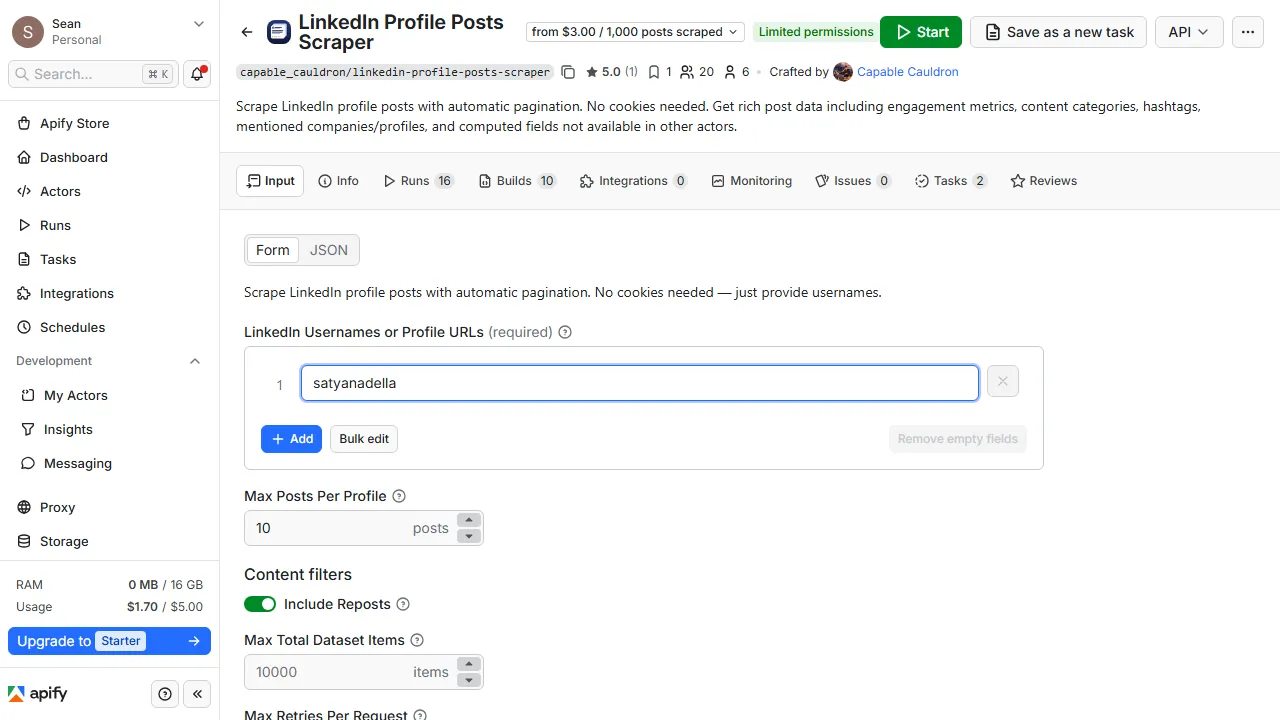
- Click Try for free to open the Actor in Apify Console.
- Enter one or more usernames. That is the last part of a profile URL, e.g.
satyanadellafromlinkedin.com/in/satyanadella. Full URLs and member IDs work too. - Set Max posts per profile. 100 is enough to see what the data looks like.
- Turn off Include reposts if you only want the profile's own writing.
- Click Start. Posts stream into the dataset as each page arrives.
- Open the Storage tab and export as CSV, Excel or JSON, or fetch the dataset from the API.
How much does it cost to scrape LinkedIn posts?
Pricing is per event. There is no charge for compute time.
| Event | When it fires | Price |
|---|---|---|
post-scraped | Each post added to your dataset | $0.003 |
profile-processed | Each profile that was read. A profile that could not be found or read is free | $0.01 |
| Actor start | Standard Apify fee per run | $0.00005 |
Volume discounts on paid Apify plans bring the per-post price down to $0.001.
Worked examples
- 100 posts from 1 profile costs $0.31
- 1,000 posts from 10 profiles costs $3.11
- 5,000 posts from 50 profiles costs $15.51
Apify's free plan ($5/month) covers about 1,600 posts. Nothing is charged on top. maxDatasetItems is a hard ceiling; the run stops as soon as it is reached.
You are never charged for a profile that could not be read, such as a misspelled name or a profile with no public posts.
Input
| Field | Type | Required | Default | Description |
|---|---|---|---|---|
usernames | array | yes | — | LinkedIn usernames, profile URLs or member IDs, e.g. ["satyanadella", "williamhgates"] |
maxPostsPerProfile | integer | no | 100 | Posts to collect per profile, 1–2,000 |
includeReposts | boolean | no | true | When false, returns only posts the profile authored (see below) |
maxDatasetItems | integer | no | 10,000 | Hard cap on total posts across all profiles |
maxRetries | integer | no | 3 | Retries for a failed request |
Filtering out reposts
A LinkedIn feed mixes three kinds of posts:
post_type | What it is | Kept when includeReposts: false? |
|---|---|---|
regular | Written by the profile | Yes |
repost | Someone else's post, reshared as-is | No |
quote | Someone else's post with added commentary | No |
Set includeReposts to false for voice analysis, content audits or training data where reshared material is noise. Every row also carries is_shared_content so you can verify the filter yourself.
You still get the full count you asked for. Filtering happens per page, and the Actor keeps paginating until it has maxPostsPerProfile original posts. The only exception is a profile that does not have that many, in which case you get everything available and the log says how many were filtered. Reshare-heavy profiles take a little longer to reach the count.
Output
One item per post. This is what the input above produces:
A run summary is saved to the key-value store as OUTPUT, and its message is shown as the run's status in Console:
status is SUCCESS, PARTIAL_SUCCESS (some profiles could not be read in full), NO_RESULTS, STOPPED (the run could not continue, and the message says why) or VALIDATION_ERROR (a problem with the input). When something goes wrong, reason names it, message says what to do, and each entry in profiles carries its own reason.
Popular use cases (ready-to-run templates)
Each link opens a pre-filled run you can start in one click:
- Top GTM leaders' LinkedIn posts
- Track competitor LinkedIn posts and engagement
- Analyze what makes LinkedIn posts go viral
- Reverse-engineer a creator's content strategy
- Export LinkedIn posts to Google Sheets
- Find B2B sales triggers in LinkedIn posts
- Monitor executives' LinkedIn activity
- LinkedIn posts for AI agents and RAG pipelines
- Benchmark LinkedIn engagement across profiles
- Track LinkedIn hashtag performance
- Analyze B2B social selling posts
API and integrations
Run it from your own code with the Apify API. Swap in your token; the Actor id stays as written.
Python
JavaScript
CLI
Connect results to Google Sheets, Airtable, Slack, Make, Zapier or n8n from the Actor's Integrations tab, run it on a Schedule to track a profile weekly, or fire a webhook when a run finishes.
FAQ
Is it legal to scrape LinkedIn posts?
This Actor collects posts that are publicly visible on LinkedIn, without logging in. You are responsible for how you use the data, including compliance with LinkedIn's terms and the data-protection laws that apply to you (GDPR, CCPA). The Actor is an independent tool and is not affiliated with or endorsed by LinkedIn.
Do I need LinkedIn cookies or an account?
No. The Actor reads public post data without a session, so there is nothing to export or refresh and your own account is never involved.
Why did I get fewer posts than I asked for?
The profile has fewer posts than maxPostsPerProfile, or maxDatasetItems was reached across all profiles. With includeReposts: false, a profile that mostly reshares may not have enough original posts. Occasionally the feed stops responding part way; the posts collected so far are kept and the profile is marked PARTIAL. The run's status message and the profiles list in OUTPUT say which.
What happens if a profile can't be found?
That profile is skipped with the message "No public posts could be found for this profile", you are not charged for it, and the rest of the run continues. Check the spelling, or paste the full profile link.
Can I scrape company pages?
This Actor is built for personal profiles (linkedin.com/in/...). Company page URLs are not supported.
How far back does it go?
As far as the profile's activity feed allows. Set maxPostsPerProfile up to 2,000 to walk a long history.
Can I scrape LinkedIn posts with Python?
Yes. See the Python snippet under API and integrations. The apify-client package is on PyPI; pass the same input you would use in Console.
How do I also get the comments on each post?
Feed the post_url values into LinkedIn Comment Scraper. That Actor needs your LinkedIn cookies because LinkedIn hides comments from anonymous visitors.
Other Actors by capable_cauldron
| Actor | What it does |
|---|---|
| LinkedIn Comment Scraper | Comments and replies from any LinkedIn post, with commenter name, headline and profile URL |
| Multi-Channel Ad Intelligence | Competitor ads from the Meta, Google, LinkedIn and TikTok ad libraries in one normalized dataset |
| Investor Database Search | 145,000+ VCs, angels and family offices with partner emails, filtered by stage, industry and geography |
| TikTok Shop USA Scraper | TikTok Shop US products, shops, shoppable video stats and creator profiles in one run |
| LinkedIn Post Comments Scraper | Comments, replies and everyone who reacted on any LinkedIn post, no cookies needed |
Support
Found a bug or need a field that isn't here? Open an issue on the Actor's Issues tab. Issues are usually answered within 24 hours. If you need a custom version (company pages, comment threads, a private deployment), describe it in an issue and we will scope it.


![LinkedIn User Comments & Reactions Scraper [NO COOKIES] ✅ avatar](https://images.apifyusercontent.com/aVgnaXwZpbMZWahdGYJE_U3cde7ask2Fak-EWcYZZVo/rs:fill:76:76/cb:1/aHR0cHM6Ly9hcGlmeS1pbWFnZS11cGxvYWRzLXByb2QuczMudXMtZWFzdC0xLmFtYXpvbmF3cy5jb20vc0NDU2R3bm1LTUoxUTJzVG4tYWN0b3ItRklEV1pwRkVjaUJhaFNzMlQtZEl4YU9xME5kTy1jek5tY3kxd2NtbDJZWFJsTDNKaGQzQnBlR1ZzWDJsdFlXZGxjeTkzWldKemFYUmxYMk52Ym5SbGJuUXZiSEl2.webp)

![Profile Posts Scraper for LinkedIn [No Cookies] avatar](https://images.apifyusercontent.com/2r1MxY4feneklD8BD7qTRtzsL_II2yIB-xqoqgYECkI/rs:fill:76:76/cb:1/aHR0cHM6Ly9hcGlmeS1pbWFnZS11cGxvYWRzLXByb2QuczMudXMtZWFzdC0xLmFtYXpvbmF3cy5jb20vdFhKaEQ5SFNvdTY4N2NEUTQtYWN0b3ItTFFRSVhOOU90aGY4ZjdSNW4tOFpidkNJbW9JUy1hbS1sb2dvLnBuZw.webp)


