
Germany Real Estate Scraper ($0.80/1K)
Pricing
from $0.48 / 1,000 listings
Germany Real Estate Scraper ($0.80/1K)
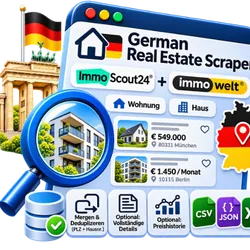
Search ImmoScout24 and Immowelt at once for Wohnungen and Häuser in Germany. One search, one dataset: merged, deduplicated on postcode and house number, newest first. Optional full details and price history. Residential proxy included. Export to JSON, CSV or Excel.
Pricing
from $0.48 / 1,000 listings
Rating
0.0
(0)
Developer

Carabain Digital
Maintained by CommunityActor stats
0
Bookmarked
2
Total users
1
Monthly active users
2 days ago
Last modified
Categories
Security
Limited permissionsShare
What is Germany Real Estate Scraper?
Germany Real Estate Scraper searches two property portals in Germany with one query (ImmoScout24 and Immowelt) and returns one clean dataset of Immobilien (Wohnungen and Häuser): merged, deduplicated across sites and sorted newest first. Export as JSON, CSV or Excel. Costs $0.80 per 1,000 listings; full details are an add-on at $2 per 1,000 and price history at $1 per 1,000. A residential proxy is built in.
- 🌍 2 sites, one run: ImmoScout24 and Immowelt are searched in parallel, usually in seconds for 100 listings
- 🧹 Cross-site dedup: the same home on several portals (same postcode, house number and listing type) appears once, with an
also_onlist of the other sites - 📅 Newest first across all sites, with a total Max listings cap and an optional cap per site
- 🎯 Pick the sites you want under Sites
- 🛡️ A blocked or failing site never fails the run: it is retried on a fresh proxy session, then skipped and logged; the others still deliver
- 📈 Optional price history: the same shared store as our single-site Actors
- 🤖 Agent friendly: one flat schema for all sites, works through the Apify MCP server
Which sites are included?
| Site | Country | Single-site Actor | Default | Notes |
|---|---|---|---|---|
| ImmoScout24 | Germany | immoscout24-listings | yes | Largest German portal; German residential proxy; filters use ImmoScout24's own location box (districts, no postcodes) |
| Immowelt | Germany | immowelt-listings | yes | At most 10,000 results per search; DataDome protected, so a few proxy exits are refused and retried on a fresh one |
Results per site are capped by each site, not by this Actor (ImmoScout24 and Immowelt (10,000 per search)). Asking for more returns what the site offers.
What data can I extract?
| 🆔 Stable listing ID, source site and URL | 💶 Asking price or monthly rent |
| 📍 Address, postcode, city, region, country | 🏠 Property type, listing type and status |
| 📐 Living area and plot area | 🛏 Rooms and bedrooms |
| ⚡ Energy label | 📅 Date listed |
| 🧑💼 Agent name, phone and link (where the site shows them) | 🖼 Photos |
🔁 also_on: other sites with the same home | 📖 Description, coordinates, build year (add-on) |
Every site fills what it has; the rest is null. Site-specific extras are kept as extra fields.
How do I scrape German real estate?
- Create a free Apify account and open this Actor.
- Enter a Location (for example
Berlin) and choose For sale or For rent. - Optionally set price, property type, rooms, living area and Max listings.
- Optionally change Sites, and switch on Full details and/or Price history.
- Click Start and download the listings from the Output tab as JSON, CSV, Excel, XML or HTML.
How much does it cost to scrape German property sites?
You pay per home that ends up in your dataset: $0.80 per 1,000 unique listings, after duplicates are removed. No subscription, the proxy is included.
- Add-on: Full details, $2.00 per 1,000 listings, off by default. Charged only for listings that were actually enriched. One price for both sites, while the single-site Actors charge $1 each.
- Add-on: Price history, $1.00 per 1,000 listings, off by default. Charged only for listings that already had history (the first run is free).
- The monthly credit of Apify's free plan covers thousands of listings.
- You are charged for the listings in the dataset, not for the (more numerous) listings fetched before deduplication and the Max listings cut. Set a maximum cost per run in the run options.
Input
See the Input tab for all options. The shared fields are the same as in our single-site real-estate Actors, except Start URLs (they are site-specific: for those use the single-site Actors).
| Field | Description |
|---|---|
Location (location) | City or postcode, sent to every selected site. Commas run separate searches |
Listing type (listing_type) | sale (default) or rent |
Min / Max price (min_price, max_price) | Asking price, or rent per month, in euro |
Property type (property_type) | any, house, apartment, land, commercial, parking, room |
Min rooms (min_rooms) | At least this many rooms |
Min living area (min_living_area_m2) | At least this many m2 |
Sites (sites) | immoscout24, immowelt (default: immoscout24, immowelt) |
Max listings (limit) | Cap on the merged dataset; every site gets a fair share |
Max listings per site (limit_per_site) | Optional cap per site (default: Max listings) |
Full details (includeDetails) | Paid add-on: detail page data |
Price history (trackHistory, historyStoreName) | Paid add-on: history in your own named store |
Proxy (proxyConfiguration) | Apify RESIDENTIAL, country DE by default; the Actor applies it only to the sites that need it |
Example input:
Location
All sites are in Germany, so one location works everywhere. The Actor sends it to every selected site as is:
- Several places: a comma list runs one search per place on every site (the per-site limit is divided over the places). A place that a site rejects is skipped for that site.
- No location means everything on the selected sites. Country names are not accepted as location.
- If every selected site rejects the input, the run fails with an input error so you notice.
- Some filters differ per site: ImmoScout24 has no
commercial, Immowelt noroom, ImmoScout24 does not take postcodes; a site that does not know the filter is skipped.
Output
Listings are stored in the default dataset, one item per unique home. Export them as JSON, CSV, Excel, XML or HTML. Every site uses the same field names (id is <source>:<site id>). Example (shortened):
(shortened; all real-estate fields are present, null when the site has none. Values above are illustrative.) status is available, under_offer, sold or rented.
How duplicates are removed
Two listings are the same home when they have the same postcode, house number (with addition) and listing type (sale or rent), on different sites. The first one is kept (order: ImmoScout24, Immowelt) and the other sites go in also_on. Listings without postcode or house number are never merged, and two listings of the same site are never merged (flats in one building).
Sorting
With Max listings, every site gets a fair share: listings are taken in turns from each site (each in its own newest-first order), so sites without exact dates are not pushed out. The result is then sorted newest first by listed_at; items without a date keep their site order.
Price history: track price and status changes
Switch on Price history (trackHistory) to follow listings over time. The Actor keeps a small history record per listing in a named key-value store in your own Apify account (default name realestate-history; change it with historyStoreName). We run no database and hold none of your data.
- Shared with the single-site Actors. Our single-site real-estate Actors use the same default store name and listing IDs, so a listing tracked there continues its series here, and the other way round.
- The first run starts the series. Listings seen for the first time are not charged for the add-on.
- Every later run adds
first_seen_at,previous_price,price_change,price_change_pct,status_changedandprice_history(the last 20 points) to each listing you saw before. - History runs once over the merged list, after deduplication, so a home on two sites is tracked under the site it was kept from.
- Do not run two runs on the same store at the same time: the last writer wins per record. If you delete the store, history silently starts empty.
What can I do with German real estate data?
- 📈 Market research: compare asking prices and rents per city and portal
- 🔔 Alerts and feeds: new listings and price drops to Slack, e-mail or your own site
- 🏢 Investors and agents: find new listings, compare price per m2, benchmark competitors
- 🧠 AI and analytics: feed listing data into valuation models
Tips for best results
- Both sites are fast; 100 listings usually take a few seconds. Immowelt may need a retry on a fresh proxy exit, which the Actor does for you.
- Use a district name for ImmoScout24 (it does not take postcodes); with a postcode, only Immowelt answers.
- For a daily feed, schedule a run with a high Max listings and Price history on.
- Need a search URL you built on one site? Use that site's own Actor (immoscout24-listings, immowelt-listings); this Actor takes filters, not URLs.
Frequently asked questions
Can I use Germany Real Estate Scraper with the Apify API?
Yes. Use the Apify API or the Apify clients. Python:
Can I use Germany Real Estate Scraper through an MCP server or with AI agents?
Yes. Add the Apify MCP server to your AI agent (Claude, ChatGPT, Cursor and others) and let it call carabain-digital/germany-real-estate with call-actor. The input is small and every field has a description, so an agent can fill it from a request such as "find the 20 newest apartments for rent in Berlin" (location, listing_type, property_type, limit). A small run finishes in seconds; the agent then reads the dataset with get-dataset-items. Add-ons are off by default, so an agent pays only the base price unless it asks for more.
Can I integrate the data with other apps?
Yes: Make, Zapier, Google Sheets, Slack, Airbyte and webhooks, via Apify's integrations.
Why are there fewer listings than Max listings?
Each site returns what matches your search, duplicates across sites are removed, and sites that do not know a filter are skipped. A narrow search or a site's own ceiling can leave you with fewer.
Why does one site return nothing?
Either it has no match for your search, or it was blocked and skipped after retries. The run log lists skipped sites. If all selected sites fail, the run fails so you notice. Try again later or open an issue.
Is it legal to scrape property portals?
The Actor only collects publicly visible listing data. Listings can contain personal data (for example an agent's name or phone number), and rules such as GDPR may apply to how you store and use it. Check your use case with a lawyer. See also Is web scraping legal?
Germany Real Estate Scraper not working? / Feedback
Open an issue in the Issues tab of this Actor with the run link and the input you used; I usually answer within a few days.
Other scrapers by us
The two single-site Actors behind this one are linked in the table above: immoscout24-listings, immowelt-listings. They are cheaper per home when you need one site only, and take search URLs.
⭐ Does it work well for you? A review on the Store page helps others find this Actor and helps us keep it maintained.


