

cars-data.com — Car Specs API (103k+ variants, 20 languages)
Pricing
from $2.10 / 1,000 searches
cars-data.com — Car Specs API (103k+ variants, 20 languages)
230 spec types per variant — engine & fuel, performance, EV/hybrid, safety (32 specs), comfort & interior (47), exterior, chassis, dimensions & weights, consumption (WLTP/NEDC/EPA). Search, localized specs in 20 languages, filters, compare. Pay-per-event, no API key.
Pricing
from $2.10 / 1,000 searches
Rating
0.0
(0)
Developer

CarsDataCom
Maintained by CommunityActor stats
0
Bookmarked
21
Total users
5
Monthly active users
an hour ago
Last modified
Categories
Share
Car Specs API — 103k+ vehicle variants, 20 languages, EV data
The car-specs data source built for AI agents. Search, full localized specs,
side-by-side compare, and structured filters over 103,372 vehicle
variants, 1,357 models, 5,428 generations, 230 spec types,
across 20 languages (including Arabic, RTL) — from cars-data.com.
No other car-specs provider covers this many European generations in this many languages. This Actor is also auto-exposed as an MCP tool, so it works directly inside Claude, Cursor, and Windsurf — not just the Apify Store.
At a glance
- 4 modes —
search,get_specs,compare,filter, one Actor - 20 languages — including Arabic (RTL)
- EV & hybrid ready — dedicated fuel/power filters, battery + range specs
- 230 spec types per variant, each with a
confidencescore andlast_synced_at
What it does
Pick a mode and this Actor calls the matching cars-data.com endpoint and
pushes the result to the run's dataset:
mode | What it does | Required input |
|---|---|---|
search | Free-text search by brand/model/generation name | query |
get_specs | Full localized specs for one variant — 230 spec types, with confidence + freshness | variantId |
compare | Side-by-side specs for 2-4 variants | variantIds |
filter | Structured filter: fuel, body, drive, power, price, year, EV | (all optional) |
Every get_specs/compare result carries a confidence score per spec value
and a last_synced_at timestamp — so you can be honest about data freshness
instead of presenting stale or uncertain values as fact.
What's in the 230 specs
| Category | Specs | Examples |
|---|---|---|
| Safety | 32 | ABS, airbags, ADAS, crash rating |
| Interior | 32 | seat material, layout, storage |
| Fuel & Engine | 24 | displacement, cylinders, injection |
| Exterior | 22 | lights, wheels, roof, body trim |
| Comfort | 15 | climate control, seats, infotainment |
| Exterior Sizes | 15 | length, width, height, wheelbase |
| Chassis | 14 | suspension, brakes, steering |
| Electric / Hybrid | 14 | battery capacity, range, charging, heat pump, V2L/V2H/V2G |
| Performance | 14 | 0-100, top speed, power-to-weight, derived ratios |
| Interior Sizes | 12 | headroom, legroom, shoulder room |
| Weights | 9 | kerb weight, payload, towing |
| General | 6 | body type, doors, seats |
| Consumption (WLTP) | 4 | combined, low/medium/high phases |
| Consumption (EPA) | 3 | city, highway, combined (US cycle) |
| Consumption (NEDC) | 3 | combined/city/highway, older cycle |
| Luggage / Load | 3 | boot capacity, sill height |
| Service & Warranty | 3 | service interval, warranty terms |
| Costs & Taxes | 1 | road tax band |
| Drive | 1 | driven wheels |
| Emissions | 1 | CO₂ |
| Transmission | 2 | gearbox type, number of gears |
All 21 categories, summing to exactly 230 — the number of spec types that actually
carry data in production (232 are defined; two carry no value yet). Counted on
cars_prod, not estimated.
Example input — search
Example output (one item, search for "tesla model 3"):
Example input — full specs
Example output (specs trimmed — a real run returns every spec field the
variant carries, up to 230, each with value, unit, and confidence; the
other fields are the actual headline numbers, not buried in specs):
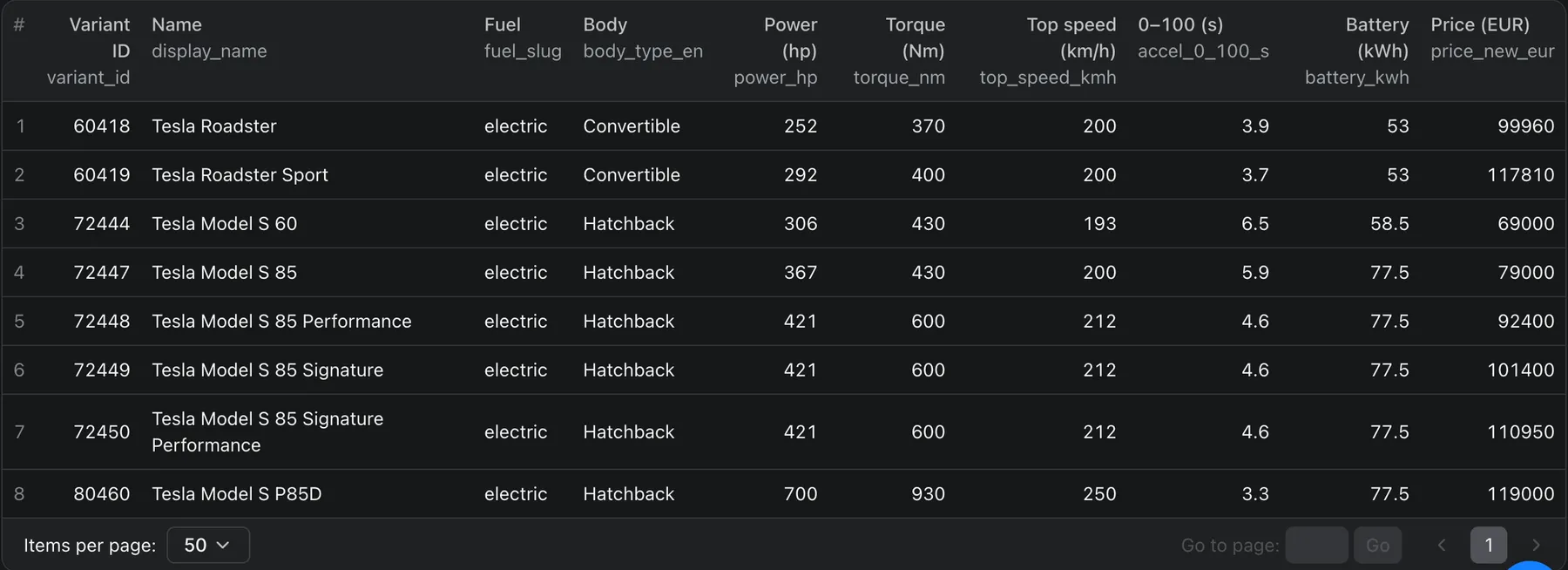
That same shape also drives the Overview table view — get_specs runs render
brand, model, power, torque, top speed, battery and price as columns, not just
raw JSON.
Example input — compare
Example output: an array of the same shape shown above, one entry per compared variant — so you can diff headline numbers or spec-by-spec across 2-4 cars.
Example input — filter (electric, 200+ hp)
Example output (real EV-filter results):
That same data, as the Actor's built-in Overview dataset view renders it:
Pricing
Pay-per-event — no subscription, no rental. You are charged only for
completed runs, per the event triggered by your chosen mode (search,
spec-lookup, compare, or filter). See this Actor's Pricing tab
for exact per-event rates.
Data & attribution
Data comes from cars-data.com's multilingual vehicle-specs database.
Output is licensed for use within your own application/workflow, not for
resale or reconstruction of the underlying dataset — see
cars-data.com/api/terms.
Try it first: a free MCP server, 40 cars
There is also a remote (streamable HTTP) MCP server at
https://api.cars-data.com/mcp — no local install, no API key, connect it
directly from your AI assistant. It exposes the same 6 tools: search_cars,
get_specs, compare_variants, filter_cars, list_generations,
get_images.
It answers from a fixed 40-car sample, not from the catalogue. Five brands x two models x two generations x two variants, covering all 10 fuel types, with every spec, every image and all 20 languages — enough to see exactly what the data looks like before you pay for any of it.
This Actor is the full catalogue — 103,372 variants, billed per result. If you need more than the sample, that is what you are here for. For a one-off bulk export rather than per-lookup reads, see cars-data.com/en/api.
Cursor — add to .cursor/mcp.json (Cursor Settings → MCP → Add):
Windsurf — same shape, in ~/.codeium/windsurf/mcp_config.json
(Windsurf Settings → Manage MCPs → View raw config):
Claude (claude.ai or Claude Desktop) — Settings → Connectors → Add
custom connector → paste https://api.cars-data.com/mcp.
ChatGPT — Settings → Connectors → Advanced → paste
https://api.cars-data.com/mcp as a custom MCP connector (availability
depends on your ChatGPT plan/workspace).
![🚗 mobile.de [$0.59/1K💰] Fast Scraper · Finance · Dealer GPS avatar](https://images.apifyusercontent.com/CCGG37ztaNAW2oKg0fgvPAGDkxzESBzTHCX-ptCDQ9I/rs:fill:76:76/cb:1/aHR0cHM6Ly9hcGlmeS1pbWFnZS11cGxvYWRzLXByb2QuczMudXMtZWFzdC0xLmFtYXpvbmF3cy5jb20vclB1SjNjc1NCUjVsaTVmd1QtYWN0b3ItREtRNHJySGpvbWxHS3NZSVQtUm8wQlowbW8wWC1tb2JpbGUtZGUucG5n.webp)


