

Trustpilot reviews scraper
Pricing
from $0.45 / 1,000 reviews
Trustpilot reviews scraper
Easily filter and extract thousands of reviews with data such as title, description, score, reviewer, country, company response, and much more from companies on Trustpilot.com and download them to multiple file formats.
Pricing
from $0.45 / 1,000 reviews
Rating
4.1
(12)
Developer

Scraper Labs
Maintained by CommunityActor stats
89
Bookmarked
3K
Total users
52
Monthly active users
1.2 days
Issues response
16 days ago
Last modified
Categories
Share
Trustpilot Reviews Scraper: bypass the 200-review limit
The most reliable and actively maintained Trustpilot scraper on Apify. While other scrapers often fail after 200 reviews (page 10), this actor is engineered to bypass those limits and scale with your needs.
37 million reviews extracted · 650,000+ runs · 98%+ success rate · 3,000 users Not a new listing. This Actor has been maintained continuously for four years, and two thirds of everything it has ever scraped was collected in the last twelve months.
⚡ Why choose this Trustpilot scraper?
⭐ Proven at scale: Collected 37 million reviews extracted across 650,000+ runs, at a 98%+ success rate. Used by 3,000 people and bookmarked by 88.
✅ 200+ Review Bypass: Specifically optimized to handle large-scale data extraction beyond the standard Trustpilot limitations.
🛡️ Active Maintenance: Monitored for real-time error tracking. When Trustpilot changes, I update the scraper accordingly.
⚡ Smart Proxy Management: Supports both Datacenter and Residential proxies.
📊 Comprehensive Data: Extracts 20+ data points, including verified status and full company responses - Including features not supported by the official Trustpilot API.
💰 Cost-Effective: A fraction of the cost of Trustpilot's Enterprise API.
🤖 AI-Ready: Structured JSON output perfect for sentiment analysis and LLM training.
🔍 Comparison: This Actor vs. Others
| Feature | This Scraper | Standard Scrapers |
|---|---|---|
| Review Limit | Unlimited Extraction | Hard limit at 200 reviews |
| Maintenance | Active (I update as soon as possible) | Often broken/unmaintained |
| Official API | $20/mo (98% lower cost) | 1000$+ Enterprise Cost |
| Data Depth | 20+ Data Points | Basic fields only |
| Track Record | Since 2022 · 37M+ reviews scraped | Often launched this year |
🚀 What you can do with Trustpilot review data
💬 Display reviews: Show Trustpilot reviews directly on your own website. Run it on a schedule and serve from your own database — see the FAQ on live display.
😁 Competitor Analysis: Analyze competitor reviews to determine why customers are happy or unhappy.
🧑💻 Response Tracking: Analyze how your competitors respond to their customers.
📊 Persona Research: Determine your target audience and analyze your customers' persona.
🗣️ Brand Monitoring: Monitor mentions and sentiment of your brand.
🪙 Lead Generation: Find new leads by identifying active reviewers in your niche.
📈 Market Research: Conduct deep-dive market research across entire industries.
🤖 Machine Learning: Research reviewer behavior or detect fake reviews using AI analysis.
📂 Aggregator Sites: Collect company information and trust scores for multiple companies at once.
📊 Trustpilot review data fields you get
This actor provides clean, structured data across two main datasets.
Reviews Dataset (Full Field List)
| Field | Description | Type |
|---|---|---|
companyName | The name of the company being scraped | String |
companyPageUrl | The specific Trustpilot URL for the filtered results | String |
businessUnitId | The unique ID identifying the company on Trustpilot | String |
reviewId | The unique ID of the specific review | String |
reviewUrl | Direct link to the individual review | String |
reviewTitle | The headline/title of the review | String |
reviewDescription | The actual text content of the review | String |
reviewRatingScore | Star rating (1-5) | Integer |
reviewDate | Date and time the review was posted | ISO Date |
reviewDateOfExperience | The actual date the customer had their experience | ISO Date |
reviewLabel | Trustpilot's label (e.g., "verified") | String |
isReviewVerified | Whether the review is officially verified | Boolean |
reviewer | The name of the reviewer | String |
reviewerId | Unique ID of the reviewer profile | String |
reviewersCountry | The reviewer's country (ISO code) | String |
reviewLanguage | The detected language of the review (e.g., "en") | String |
reviewCompanyResponse | The official response from the company | String |
scrapedDateTime | Timestamp of when the data was extracted | ISO Date |
scrapedAtReviewPageNumber | The page number where this review was found | Integer |
reviewerNumberOfReviews | (optional) Total reviews posted by this reviewer — requires includeReviewerMetadata: true | Integer |
reviewerProfileIsVerified | (optional) Whether the reviewer's profile is verified — requires includeReviewerMetadata: true | Boolean |
companyReplyPublishedDate | (optional) When the company first published its reply — requires includeReplyAnalysis: true | ISO Date |
companyReplyUpdatedDate | (optional) When the company reply was last updated — requires includeReplyAnalysis: true | ISO Date |
reviewSource | (optional) Platform that collected the review (e.g. "InvitationApi") — requires includeExtendedMetadata: true | String |
reviewVerificationSource | (optional) How the review was verified (e.g. "invitation") — requires includeExtendedMetadata: true | String |
reviewLikes | (optional) Number of likes the review received — requires includeExtendedMetadata: true | Integer |
reviewPhotoUrls | (optional) URLs of photos attached to the review — requires includeReviewPhotos: true | String[] |
Company Information Dataset
| Field | Description |
|---|---|
company | Official company name |
rating | Average TrustScore (1-5) |
isCompanyVerified | Whether the company is verified by Trustpilot |
category | Primary business category |
OfficialTotalReviewCount | Total reviews (Note: Trustpilot's count may include hidden reviews) |
replyAverageDaysToReply | (optional) Avg. days to reply to negative reviews — requires includeCompanyResponseMetrics: true |
replyPercentage | (optional) % of negative reviews that received a reply — requires includeCompanyResponseMetrics: true |
companyUsesAIResponses | (optional) Whether the company uses AI-generated responses — requires includeCompanyResponseMetrics: true |
ℹ️ Company Not Found: If the searched company domain does not exist on Trustpilot, a minimal record is still saved to the
companyInformationdataset withisCompanyFound: false(see output example below). No review data will be collected.
📄 Output Examples
Sample company information data:
Company not found on Trustpilot:
If the domain does not exist on Trustpilot, the actor saves the following record to the companyInformation dataset and stops gracefully — no error is thrown and no review data is collected.
Sample Trustpilot review data:
📖 How to scrape Trustpilot reviews
Collecting reviews from companies on trustpilot.com becomes a breeze using this product. You can easily filter for the specific reviews you need and save them to Excel, CSV, XML, JSON and other formats.
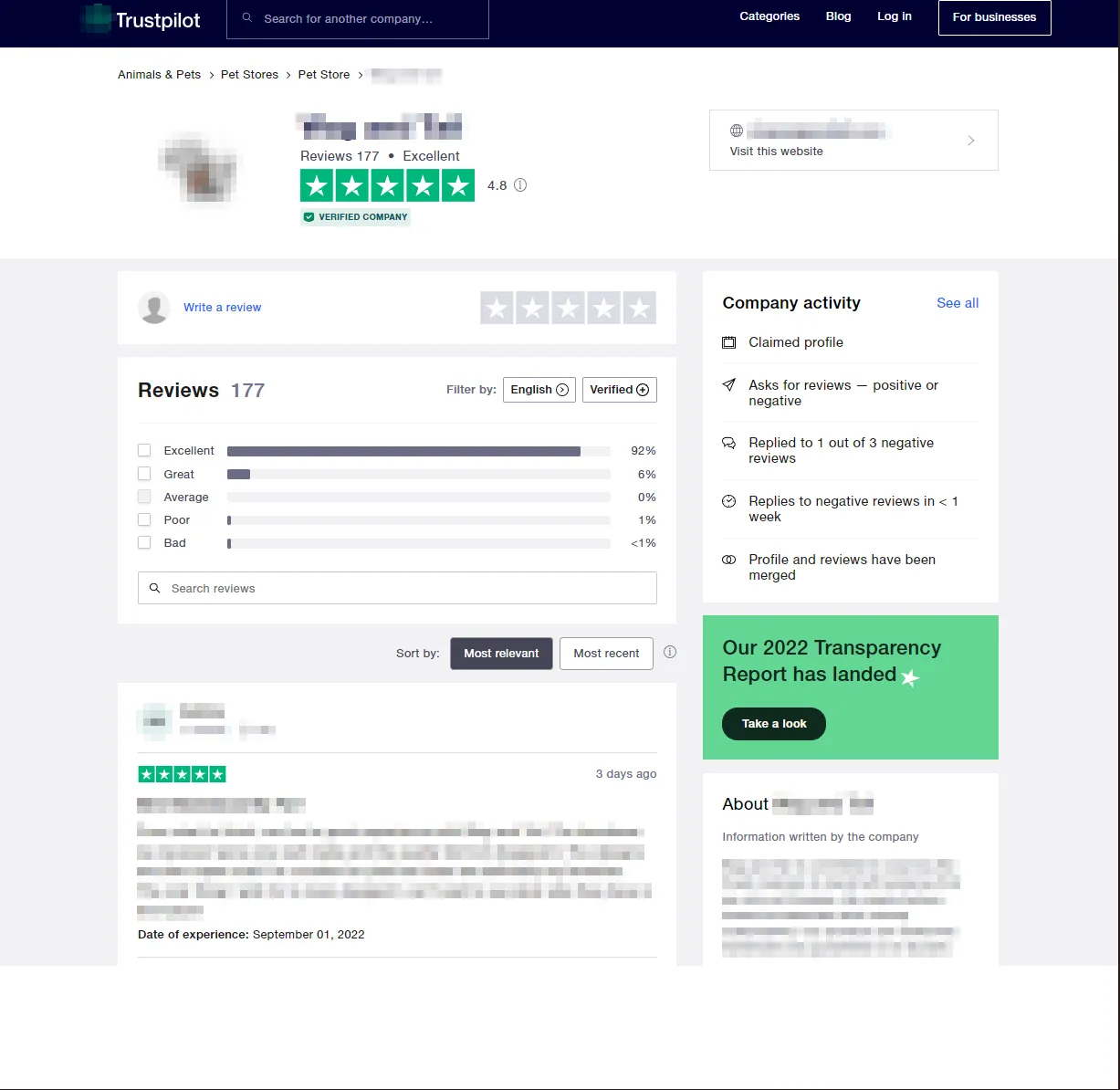
Quick start: scrape Trustpilot reviews in 5 steps
- Click "Try for free" at the top of this page. If you are not signed in to Apify yet, you will be asked to create a free account first.
- Enter the company domain in the
companyWebsitefield — for exampleshopwagandtail.com. You do not need the full Trustpilot URL, just the domain the company is reviewed under. - Choose what to collect with
contentToExtract:companyInformationAndReviewsfor everything (the default),reviewsfor review data only,companyInformationfor business details only, orbulkCompanyInformationto pull statistics for many domains at once. - Narrow the results if you need to. Set
filterByStarRating,filterByLanguage,filterByCountryOfReviewers,filterByDatePeriodorfilterByVerifiedReviews. These are applied by Trustpilot itself, so filtering here gets you more of the reviews you actually want rather than fewer. - Click "Start" and collect your data. When the run finishes, open the Storage tab and select Datasets to download the results as JSON, CSV, Excel, XML, HTML table or JSONL. For large companies, raise the run timeout first — see the performance note below.
Every parameter is documented in full underneath.
Input Parameters:
-
🏢 [companyWebsite]: Enter the domain (e.g.,
shopwagandtail.com). For multiple companies, separate with a comma (e.g.,apple.com, samsung.com). Note: RequiresbulkCompanyInformationmode for multiple domains. -
📝 [contentToExtract]:
companyInformationAndReviews: Full data extraction (Default).reviews: Only review data.companyInformation: Only business details.bulkCompanyInformation: Fast extraction of stats for multiple domains.
-
🔀 [sortBy]: Choose
recency(default) for the newest reviews orrelevancefor the most relevant, detailed reviews first. -
⭐ [filterByStarRating]: Filter by
1,2,3,4, or5stars. Note: Only one star-rating can be selected at a time. -
📅 [filterByDatePeriod]: Filter reviews by when they were posted using Trustpilot's native date filters
-
💬 [filterByLanguage]: Filter by language code (e.g.,
da,en,es). Note: Only one language can be selected per run. -
📍 [filterByCountryOfReviewers]: Filter by reviewer's country using ISO Alpha-2 codes (e.g.,
US,DK). Find ISO country codes here. -
✅ [filterByVerifiedReviews]: Set to
trueto only collect verified reviews. -
🔢 [startFromPageNumber]: You can specify the page number (eg. 7) that the scraper should start from. If this is left blank it will scrape from page 1.
-
🔢 [endAtPageNumber]: You can specify the page number (eg. 12) that the scraper should scrape last. If this is left set to 0 it will continue scraping to and including the last page or until the timeout is hit.
-
🌐 [proxies]: List of custom (non-Apify) proxy URLs to use for requests. Example:
["http://user:pass@proxy1.example.com:8000"]. Use this if you have your own proxy provider. -
🗺️ [apifyProxyCountry]: Force all Apify proxy IPs to a specific country (2-letter ISO code, e.g.
"US","GB"). Only applies whenuseApifyProxyis enabled. Default: random country.
Optional Data Enrichment
These flags are false by default. Enable them to add extra fields to the output datasets.
-
👤 [includeReviewerMetadata]: Adds
reviewerNumberOfReviews(total reviews posted by this reviewer) andreviewerProfileIsVerifiedto each review. -
💬 [includeReplyAnalysis]: Adds
companyReplyPublishedDateandcompanyReplyUpdatedDateto reviews that have a company response. -
🔍 [includeExtendedMetadata]: Adds
reviewSource(e.g."InvitationApi"),reviewVerificationSource, andreviewLikesto each review. -
📈 [includeCompanyResponseMetrics]: Adds reply metrics to the
companyInformationdataset:replyAverageDaysToReply,replyPercentage,companyUsesAIResponses, and more. -
📷 [includeReviewPhotos]: Adds
reviewPhotoUrls(array of photo URLs) to reviews that have attached photos. -
📅 [extractExperienceDate]: Set to
falseto omit thereviewDateOfExperiencefield from each review. Default:true.
💡 Pro Tip on Performance: For large-scale scraping (500+ reviews), it is highly recommended to use Datacenter or Residential proxies and setting the timeout to more than 3600 seconds (1 hour).
Adjusting Timeout: The default timeout is 3600 seconds (1 hour), which is sufficient for most companies. However, for very large review sets, you should increase the Timeout setting to match your needs. If you need help estimating the required time for your specific use case, feel free to open an issue.
Here is an example of the inputs:
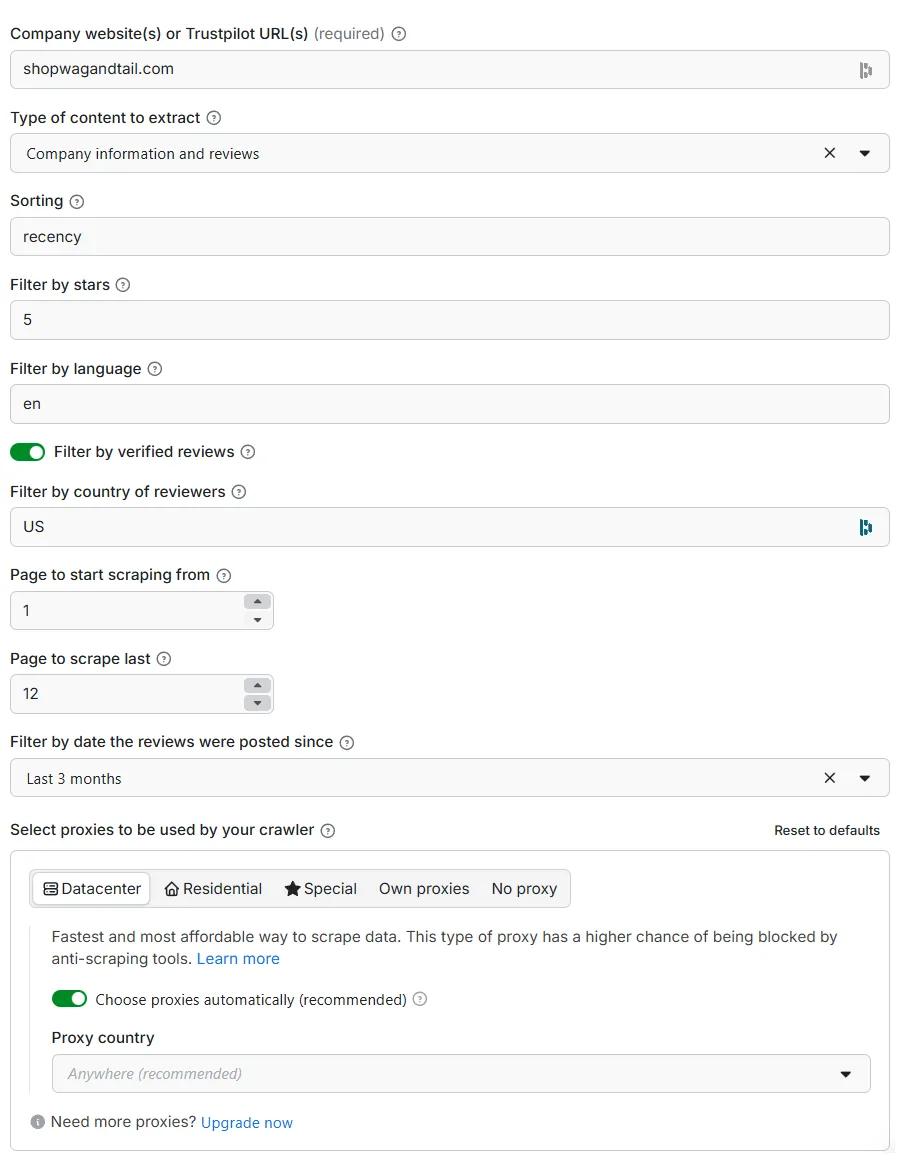
Here is an example of the input in JSON format:
Scrape multiple different trustpilot companies
A task can be set up for each company that you want to scrape as detailed here: https://docs.apify.com/platform/actors/running/tasks
📂 Where to find your extracted data?
Once the run is finished, your data is automatically saved and accessible in two ways:
1. Quick Preview (Temporary)
Click the Output tab at the top of your run page for an immediate view of the scraped reviews. Note: Data in the Output tab (Default dataset) expires after 7 days.
2. Permanent Storage (Recommended)
For long-term access, navigate to the Storage tab and select Datasets. Here you will find your data organized into named datasets that never expire:
| Data Type | 📍 Dataset Name | 📄 Available Formats |
|---|---|---|
| Full Reviews | reviews | JSON, CSV, Excel, HTML Table, RSS, JSONL |
| Company Details | companyInformation | JSON, CSV, Excel, HTML Table, RSS, JSONL |
💡 Pro Tip: Always use the named datasets under the Storage tab for your final export to ensure you have the complete, non-expiring data for your analysis.
🔌 Trustpilot API access & integrations
Use the scraper wherever you already work — no glue code required.
- AI agents & MCP clients: reachable through the Apify MCP server at
https://mcp.apify.com, so an agent can call this Actor directly as a tool. - JavaScript / TypeScript: the official
apify-clientpackage on npm. - Python: the official
apify-clientpackage on PyPI. - Any other language: the standard Apify REST API, with both synchronous and asynchronous runs.
- No-code: schedule runs and push results straight to Google Sheets, Slack, Zapier, Make, or a webhook of your choice.
Ready-made snippets for every option are on the API tab of this Actor.
❓ Frequently asked questions about scraping Trustpilot
Web scraping is a cat-and-mouse game. This Actor has extracted over 37 million reviews across more than 650,000 runs, and is actively monitored and updated as Trustpilot changes. The answers below are kept current with how it actually behaves.
Can I get more than 200 reviews from one company? Yes. Trustpilot's own web interface stops paginating at roughly 200 reviews (page 10, at 20 per page), which is where most scrapers stop. This Actor is built specifically to go past that limit and retrieve the full review history.
How does this compare to Trustpilot's official API? This Actor costs a fraction of Trustpilot's enterprise pricing and does considerably more. The official API is limited to a company's own reviews, so it cannot be used for competitor analysis, market research across an industry, or historical backfills of companies you do not own. It also does not expose several of the fields you get here, including reviewer metadata, verification source and reply timing. This Actor works on any public company page on Trustpilot, with no contract and no per-seat licensing.
Can I filter by star rating, language, country or date?
Yes, and filtering happens on Trustpilot's side rather than after the fact, so the page limit applies to the reviews you actually want. Use filterByStarRating, filterByLanguage, filterByCountryOfReviewers, filterByDatePeriod and filterByVerifiedReviews. Note that one star rating and one language can be selected per run — use separate runs to combine several.
Which export formats are supported? JSON, CSV, Excel, XML, HTML table and JSONL, all through the standard Apify dataset export. You can also pull results straight from the API.
Can I use this to show Trustpilot reviews live on my website? Not by calling it on page load — this is the most common misunderstanding, so it is worth being clear about. A run takes at least ~15 seconds and much longer for large companies, so it is far too slow to sit in front of a visitor waiting for a page.
The pattern that works is a scheduled sync. Run the Actor on a schedule that suits how often the company gets reviews (daily is plenty for most), write the results into your own database, and serve your website from that. You can automate the hand-off with an Apify webhook that fires when a run finishes, or by pulling the dataset from the API. Your pages then load instantly, and you stay in control of caching and formatting.
Why doesn't the number of reviews match what Trustpilot shows? Trustpilot's headline review count includes reviews that are not actually displayed on the page — deleted, hidden, or filtered by their own moderation. The Actor collects what Trustpilot serves, so a small gap between their stated total and your dataset is expected. It is a property of the platform, not a fault in the extraction.
Do I need proxies? For small runs, no. For anything sustained, yes — Trustpilot may temporarily block IPs that show high activity without them. Datacenter proxies are cheaper and adequate much of the time; residential proxies cost more per gigabyte but survive harder blocking. Start with datacenter and escalate only if you see blocks.
Enable Datacenter proxies like this:
And Residential proxies like this:
How long does a large run take, and will it time out? It depends far more on the company than on the settings. A few hundred reviews takes a couple of minutes. Tens of thousands, with company data and filters, is measured in tens of minutes. The default run timeout is 3600 seconds, which covers most companies — raise it before starting if you are pulling 500+ reviews.
One thing to know if you are calling this from code: Apify's synchronous API endpoint has its own 300-second cap, independent of your run timeout. For anything large, start the run asynchronously and collect the results with a webhook or a follow-up API call instead.
What happens if a company is not found on Trustpilot? The run completes and reports the company as not found rather than failing, so a single bad domain in a bulk list does not break the whole run.
How do I report a bug or request a feature? Open an issue on the Actor. I read them all and typically respond within 24 hours. If Trustpilot changes something and the Actor breaks, that is the fastest way to get it fixed — bug reports from users are how several improvements got made.
🛠️ Need a custom feature?
If you need specific data points or a custom integration, don't hesitate to open an issue or contact me. I'm constantly improving the scraper based on user feedback.
🧑⚖️ Legal disclaimer
Please note that this product is not a product of Trustpilot, anyhow affiliated with or endorsed by Trustpilot.


