


Video to Text
Pricing
from $0.30 / transcript
Video to Text
💎 $0.3/video any length — Convert any video to text. 1000+ sites, auto language detection, timestamps, downloadable subtitles, and instant translation to 100+ languages.
Pricing
from $0.30 / transcript
Rating
1.9
(2)
Developer

CheapGET
Actor stats
9
Bookmarked
160
Total users
4
Monthly active users
16 hours ago
Last modified
Categories
Share
Video To Text - Get Readable Text from Any Video Fast



Download accurate video transcripts — cheap and fast, with timestamps, translations, and no login required.
🏆 Key Features
🎤 AI-Powered Transcription
-
🤖 Advanced AI Model: State-of-the-art speech recognition with optimized performance and accuracy
-
🌍 Auto Language Detection: Automatically detects spoken language from 100+ supported languages
-
⏱️ Time-Stamped Segments: Precise timestamps for each segment with millisecond accuracy (HH:MM:SS.mmm format)
-
🎯 High Accuracy: Optimized for various accents, speaking styles, and audio quality conditions
🌐 Multi-Language Translation
-
📝 100+ Languages: Support for all major world languages including regional variants
-
🔄 AI Translator: Advanced translation service with context preservation
-
⚡ Parallel Processing: Multi-threaded translation for faster processing of long transcripts
-
🎯 Context-Aware: Maintains meaning and context across segment boundaries
📊 Full Video Details
-
📹 Video Info: Title, description, duration, publish date, and platform name
-
👤 Creator Info: Author name, channel ID, and profile link
-
📈 Engagement Stats: Views, likes, dislikes, comments, and shares (when available)
-
🎵 Audio Info: Track titles and artist names when music is detected
-
🖼️ Thumbnail: High-quality video thumbnail image
💰 Pricing
| Resource | Cost | Description |
| --------------- | -------- | --------------------------------------------------------------------------------------------------- |
| Actor Start | $0.005 | One-time charge when the Actor starts running |
| Actor Usage | $0.00001 | Charged for Actor runtime, proxy and storage. Cost depends on resource consumption during execution |
| Transcript | $0.30 | Per video — includes AI speech recognition and subtitle generation with timestamps |
| Translation | $0.10 | Per video when translation is requested — includes AI text translation to your chosen language |
Example Cost:
-
Transcribing 10 videos without translation
-
Cost: $0.005 + (10 × $0.30) = $3.005 + minimal runtime fees
-
Transcribing 10 videos with translation to Spanish
-
Cost: $0.005 + (10 × $0.30) + (10 × $0.10) = $4.005 + minimal runtime fees
🎯 Use Cases
🎬 Content Creators & Video Producers
Automatically generate subtitles and transcripts for your YouTube, TikTok, or Instagram videos. Repurpose spoken content into blog posts, social captions, or newsletters without manual transcription.
🌍 Multilingual Localization
Translate video content into 100+ languages to reach global audiences. Each segment preserves the original timing, making it ready to sync back as subtitles in any target language.
📰 Read What People Say in Videos
Get the full text of any interview, speech, or video discussion so you can read it, search it, or quote it — without watching the whole thing.
🎓 Study and Learn from Lectures
Turn class recordings, webinars, and training videos into readable text. Great for taking notes, studying for exams, or making video content accessible to everyone.
🌟 Why Choose This Actor
Built for anyone who needs video text fast — content creators, students, journalists, or anyone who'd rather read than watch. No software to install, no accounts to create.
| Feature | Video To Text | Rev.ai | Otter.ai | Descript |
| :---------------- | :-------------------- | :--------------- | :--------------- | :--------------- |
| Pricing | ✅ Pay per use | ⚠️ Per minute | ⚠️ Monthly plans | ⚠️ Subscription |
| Platforms | ✅ 1000+ sites | ❌ Upload only | ❌ Upload only | ❌ Upload only |
| Languages | ✅ 100+ languages | ⚠️ 30+ languages | ⚠️ English focus | ⚠️ Limited |
| Translation | ✅ Included | ❌ Not supported | ❌ Not supported | ❌ Not supported |
| Timestamps | ✅ Millisecond | ✅ Yes | ✅ Yes | ✅ Yes |
| Setup Time | ✅ Instant | ⚠️ Account req. | ⚠️ Account req. | ⚠️ Complex setup |
| Starting Cost | ✅ $0.30 | ⚠️ $0.02/min | ⚠️ $8.33/month | ⚠️ $12/month |
🚀 Quick Start
-
Paste your video URL — from YouTube, TikTok, Instagram, or any supported site
-
Click Start — the AI detects the language, transcribes the speech, and optionally translates it
-
Download your results — get the full text, timestamped segments, and video info
💻 Input Parameters
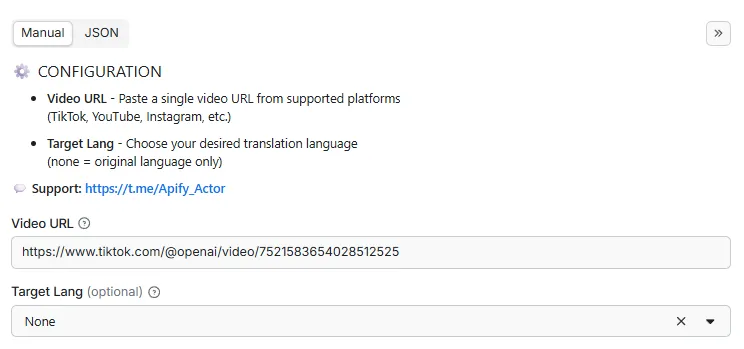
| Parameter | Type | Required | Description |
|---|---|---|---|
video_url | string | ✅ Yes | Video URL to download and transcribe. AI will detect speech and generate timestamped subtitles |
translate | string | ❌ No | Select a chosen language to translate the transcript |
📝 Example Input
📤 Output Structure
| Field | Type | Description |
|---|---|---|
processor | string | URL of the Apify actor that processed this data |
processed_at | string | ISO 8601 formatted timestamp (UTC) when the data was processed |
platform | string | Source platform name |
title | string | Original title of the video |
description | string | Video description |
author | string | Video creator or uploader username/name |
author_id | string | Author's channel or user ID |
author_url | string | URL to the author's channel or profile page |
duration | number | Video duration in seconds |
audio_title | string | Track name if the video contains music |
audio_artist | string | Artist name if the video contains music |
view_count | integer | Number of views on the video |
like_count | integer | Number of likes on the video |
shares_count | integer | Number of shares/reposts |
dislike_count | integer | Number of dislikes on the video |
comment_count | integer | Number of comments on the video |
categories | array | Video categories |
tags | array | Video tags |
published_at | string | ISO formatted timestamp when the video was published |
thumbnail | string | Video thumbnail image URL |
transcript | object | AI-generated transcript with speech recognition and timestamped subtitles in original language |
translation | object | AI-translated transcript with timestamped subtitles in chosen language |
📤 Example Output
🔌 Integrations
Connect this tool to your apps and workflows using the Apify API.
🐍 Python SDK
🟨 JavaScript / Node.js SDK
🌐 REST API (curl)
Ⓜ️ Make.com Integration
Get Started with Make.com (1000 Free Credits) 🎁
🎱 N8N.io Integration
Open Source Workflow Automation ⚡
📚 API Documentation
-
Python API - Full Python client guide with examples
-
JavaScript API - Node.js and browser guide
-
API Reference - Complete REST API documentation
🏗️ Metadata (JSON-LD)
🚀 Performance Tips
Get the best results and save money with these tips:
💰 Save Money
-
Test First: Try 1-2 videos to check output quality before running a big batch
-
Skip Translation: Leave
translateempty if you only need the original transcript — saves $0.10 per video -
Run in Parallel: Process multiple videos at once to save overall runtime costs
⚡ Go Faster
-
Short Videos: Videos under 5 minutes process fastest, typically completing in 30-60 seconds
-
Direct Links: Use the direct video URL for faster processing
🛡️ Get Better Results
-
Clear Audio: Best results come from videos with clear speech and minimal background noise
-
Public Videos: Only publicly accessible videos can be processed
-
Language Detection: Works best with at least 10 seconds of clear speech
❓ FAQ
What video platforms are supported?
Over 1000 platforms including YouTube, TikTok, Instagram, Twitter, Facebook, Vimeo, Twitch, LinkedIn, Pinterest, Snapchat, and many more.
How long does processing take?
-
Short videos (0-5 min): 30-60 seconds
-
Medium videos (5-15 min): 1-3 minutes
-
Long videos (15+ min): 3-10 minutes
-
With translation: Add 30-60 seconds
Can I transcribe videos in any language?
Yes! The AI supports 100+ languages with automatic detection — English, Chinese, Spanish, French, German, Japanese, Korean, Arabic, Hindi, and many more.
What if the video has no speech?
You'll get an error message: "Transcription failed. No speech detected in the video."
How does translation work?
The original transcript is created first with timestamps, then each segment is translated while keeping the timing intact. This means your translated text stays in sync with the video.
What formats can I get the results in?
Results come in JSON format by default. You can also export to CSV or Excel using Apify's built-in download options. The timestamped segments make it easy to create SRT or VTT subtitle files.
Are private videos supported?
No — only publicly accessible videos can be processed.
Is this free to try?
Yes — you can try it with Apify's free tier. After that, each run starts at $0.005, Actor Usage is $0.00001, each transcript costs $0.30 per video, and optional translation adds $0.10.
🏷️ SEO Keywords
🔑 Primary Keywords: video to text, turn video into text, transcribe video free, video transcript online, speech to text from video
🔍 Long-Tail Keywords: turn youtube video into text free, transcribe tiktok video to text, get text from any video online, video to text with timestamps, free video transcription tool
🏢 Industry Keywords: video transcript, speech recognition, video captions, auto subtitle generator, video translation tool
🌍 Location Keywords: video transcription english, video to text spanish, transcribe video any language, video transcript worldwide, multi-language transcription, video to text french german
💡 Use Case Keywords: study video content, read video as text, translate video to another language, save video transcript, search video by text
⚖️ Legal & Compliance
This tool uses publicly available content only. It does not bypass authentication, access private content, or violate platform terms of service. You are responsible for:
-
Data Rights: Making sure you have permission to use the transcribed content from video owners.
-
Privacy Compliance: Following GDPR, CCPA, and other applicable privacy laws when using transcribed content.
-
Platform Terms: Respecting the platform's terms of service and usage policies.
-
Ethical Use: Using transcribed content responsibly and in compliance with all applicable laws.
Need help or have compliance questions? Contact us.
🔗 Related Actors
💼 Jobs
-
Best Job Search - Search jobs on LinkedIn, Indeed, Glassdoor & more — free, fast, with salary info
-
Glassdoor Job Search - Find Glassdoor jobs with salaries, ratings & company reviews
-
Indeed Job Search - Search Indeed jobs with salary, location & company details
-
LinkedIn Job Search - Find LinkedIn jobs with company info & applicant counts
🎬 Videos
-
Best Video Downloader - Download videos from 1000+ sites — fast, free, any quality
-
TikTok Video Downloader - Save TikTok videos without watermark — free and instant
-
YouTube Video Downloader - Download YouTube videos in any quality — fast and cheap
-
Video Subtitles Downloader - Get subtitles from any video — instant download in multiple languages
-
TikTok Live Recorder - Record TikTok live streams and save them to watch later
-
TikTok Video Lookup - Get full TikTok video details with hidden SEO data and music info
-
YouTube Niche Scraper - Find YouTube videos by keyword and get channel details, contact info, and stats
-
Video To Text - Turn any video into readable text with AI transcription
-
Instagram To Text - Turn Instagram videos into text — captions, reels & stories
📱 Social Media
-
Instagram Explore - Get trending Instagram Explore posts with topic labels, media links, and engagement counts.
-
Instagram Post - Get recent Instagram posts from any public profile with captions and media.
-
Instagram Profile - Check any Instagram profile for bio, followers, business info, and more.
-
Social Media Marketing - Generate ready-to-post social media content from any source
-
Find Any Company On LinkedIn - Look up any company on LinkedIn — employees, jobs & details
-
Find Anyone On LinkedIn - Find anyone's LinkedIn profile — work history, skills & contact
-
X Community Profile - Check any X community's members, rules & activity
-
X User Profile - Look up any X user's profile, followers & posts
-
Reddit User Profile - Check any Reddit user's profile, karma & activity
-
Reddit Community Profile - Look up any subreddit's rules, wiki & community info
-
Reddit Community Post - Browse posts from any subreddit with comments & votes
-
Reddit Post Search - Search Reddit for posts on any topic with full comments
-
Reddit Community User - Find active users in any subreddit with profile details
💬 Telegram
-
Telegram Group Member - Find members of any public Telegram group
-
Telegram Channel Message - Get messages from any Telegram channel with full details
-
Telegram Profile - Look up any Telegram user, group, bot or channel profile
📍 Local & Real Estate
-
Google Business Profile - Find any business on Google — reviews, hours, contact & photos
-
Zillow Real Estate - Search Zillow homes with prices, photos & neighborhood info
-
US Real Estate - Search US property listings with prices, details & agent info
🤝 Support & Community
-
💬 Telegram Support Group — Ask questions and get help
-
📧 Email Support — Direct support for any issues
-
🐛 Report Issues — Bug reports and feature requests
-
⭐ If this tool helped you, please leave a review on the Apify Store!
Last Updated: April 22, 2026


