


YouTube Video Downloader
Pricing
Pay per event
YouTube Video Downloader
Download YouTube videos in 4K, HD, or audio-only. Includes Shorts and YouTube Music with captions, comments, and thumbnails. Paste a link, no app needed.
Pricing
Pay per event
Rating
2.7
(4)
Developer

CheapGET
Actor stats
2
Bookmarked
153
Total users
10
Monthly active users
9 hours ago
Last modified
Categories
Share
YouTube Video Downloader - Download YouTube Videos in 4K, HD & Audio



Download YouTube videos in 4K, HD, or audio-only — cheap and fast, with no login required.
🏆 Key Features
📥 Multi-Quality Video Downloads
-
🎬 4K/2160p Quality: Ultra HD video downloads with maximum resolution and clarity.
-
📺 HD/720p Quality: High definition videos optimized for standard viewing and sharing.
-
📱 SD/480p Quality: Standard definition for faster processing and mobile-friendly sizes.
-
📋 Metadata Only: Get full video info without downloading files — fastest and cheapest option.
📊 Full Video Details
-
🎯 Engagement Stats: Views, likes, dislikes, shares, and comment counts with exact numbers.
-
📹 Technical Specs: Video resolution (width/height), FPS, duration, and format info.
-
🎵 Audio Info: Track titles, artists, and audio details when available.
-
🏷️ Content Tags: Categories, tags, and platform info for each video.
👤 Channel & Creator Info
-
📊 Creator Details: Channel name, channel ID, and uploader info.
-
🔗 Profile Links: Full creator profile URLs and channel pages.
-
📈 Channel Data: Author details and platform-specific identifiers.
💬 Comment Collection
-
🗨️ Full Comments: Get all video comments with author names and text.
-
📊 Comment Stats: Like counts and reply info per comment.
-
⏰ Timestamps: When each comment was posted in ISO format.
💰 Pricing
| Resource | Cost | Description |
| --------------- | -------- | --------------------------------------------------------------------------- |
| Actor Start | $0.0001 | One-time charge when the Actor starts running |
| Actor Usage | $0.00001 | Charged for runtime, proxy, and storage. Cost depends on resources used |
| Metadata | $0.10 | Charged per video lookup. One-time fee per video processed without download |
| Download | $0.25 | Charged per video download and storage. One-time fee per video downloaded |
Example Cost Calculation:
-
Looking up info for 10 videos without downloads
-
Cost: $0.0001 + (10 × $0.10) = $1.0001 + runtime fees
-
Downloading 5 videos in HD quality
-
Cost: $0.0001 + (5 × $0.25) = $1.2501 + runtime fees
🎯 Use Cases
Save Videos to Watch Offline
Download your favorite YouTube videos in 4K, HD, or SD to watch later without an internet connection.
Get Video Details Fast
Look up video info like views, likes, comments, and channel details — without downloading the whole file.
Archive Content You Love
Save videos and their full details before they get taken down or become unavailable.
Build a Personal Collection
Download music videos, tutorials, or entertainment content to build your own video library.
Check Video Stats
Look up any YouTube video to see its engagement numbers, tags, categories, and creator info.
🌟 Why Choose This Actor
Built for everyday users who want fast, affordable YouTube downloads, this tool saves videos in any quality with full details — no app install needed.
| Feature | YouTube Video Downloader | Online Download Sites | YouTube Premium |
| :---------------- | :----------------------- | :-------------------- | :---------------- |
| Pricing Model | ✅ Pay per use | ⚠️ Ads / limits | ❌ $13.99/month |
| Quality | ✅ 4K/HD/SD | ⚠️ Often limited | ✅ Up to 4K |
| Video Details | ✅ Full info | ❌ None | ❌ None |
| Comments | ✅ Included | ❌ Not available | ❌ Not available |
| No Ads | ✅ Ad-free | ❌ Full of ads | ✅ Ad-free |
| Setup Time | ✅ Instant | ✅ Instant | ⚠️ Account needed |
| Min. Cost | ✅ $0.10 | ⚠️ Free but risky | ❌ $13.99/month |
🚀 Quick Start
-
Paste a YouTube URL — enter any YouTube video, Short, or Music link
-
Click Start — hit the ▷ Start button and wait for results
-
Download your video — save results as JSON, CSV, or download the video file
💻 Input Parameters
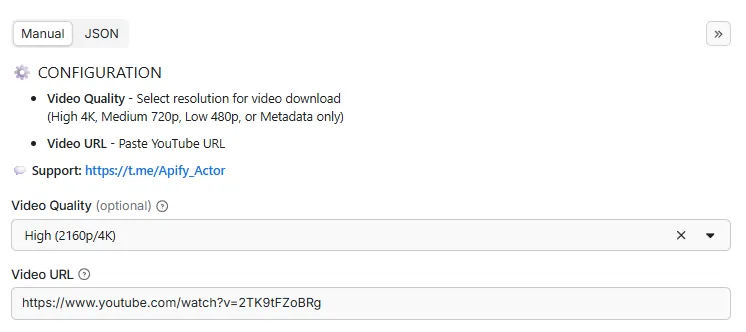
| Parameter | Type | Required | Description |
|---|---|---|---|
video_url | string | ✅ Yes | Enter the video URL |
video_quality | string | ❌ No | Choose the video quality for download: High (4K), Medium (720p), Low (480p), or Metadata only |
max_comments | integer | ❌ No | Maximum number of comments to get. Set to 0 to skip comments |
📝 Example Input
📤 Output Structure
| Field | Type | Description |
|---|---|---|
processor | string | URL of the Apify actor that processed this data |
processed_at | string | ISO 8601 formatted timestamp (UTC) when the data was processed |
id | string | Unique video identifier from the source platform |
thumbnail | string | Direct link to the source platform thumbnail image |
platform | string | Source platform where the video was hosted |
title | string | Video title |
description | string | Full video description or caption |
duration | number | Video length in seconds |
published_at | string | ISO 8601 timestamp of when the video was published |
author | string | Username or display name of the video creator |
author_id | string | Unique identifier of the video creator on the platform |
author_url | string | Direct link to the creator's profile page |
categories | array | List of categories assigned to the video |
tags | array | Hashtags and keywords associated with the video |
view_count | number | Total number of video views |
like_count | number | Total number of likes or favorites |
shares_count | number | Number of times the video has been shared or reposted |
dislike_count | number | Total number of dislikes (if available) |
comment_count | number | Total number of comments on the video |
width | number | Video resolution width in pixels |
height | number | Video resolution height in pixels |
fps | number | Video frame rate (frames per second) |
audio_title | string | Title of the audio track or background music |
audio_artist | string | Artist name of the audio track or background music |
comments | array | List of video comments with author, text, likes, and timestamp, limited by max_comments when set |
video | string | Direct download link to the stored video file when video download is enabled |
📤 Example Output
🔌 Integrations
Connect this tool to your favorite apps via the Apify platform.
🐍 Python SDK
🟨 JavaScript / Node.js SDK
🌐 REST API (curl)
Ⓜ️ Make.com Integration
Get Started with Make.com (1000 Free Credits) 🎁
🎱 N8N.io Integration
Open Source Workflow Automation ⚡
📚 More Info
-
Python Docs - Complete Python client guide with examples
-
JavaScript Docs - Node.js and browser guide
🏗️ Metadata (JSON-LD)
🚀 Performance Tips
Get the best results from your video downloads with these tips:
💰 Cost Optimization
-
Test First: Start with Metadata Only mode to check video info before downloading
-
Skip Downloads: Use Metadata mode if you only need video details — it's the cheapest option
-
Comments Optional: Set max_comments to 0 if you don't need comments to save time
⚡ Speed Optimization
-
Metadata Mode: Fastest option — gets all video info without downloading the actual file
-
Quality Selection: Lower quality (480p) downloads faster than 4K
-
Proxy Rotation: The tool automatically rotates proxies for the best performance
🛡️ Data Quality Tips
-
Public Videos: Only public videos can be downloaded — private or age-restricted content won't work
-
Recent Content: Newer videos usually have more complete info and engagement numbers
-
Comment Availability: Some creators disable comments on their videos
📊 Best Practices
-
Rate Limits: The tool handles YouTube rate limits automatically with smart proxy rotation
-
Live Data: Engagement numbers like views and likes reflect real-time values at the moment of lookup
-
File Storage: Downloaded videos are stored with public URLs you can share or download
❓ FAQ
What video qualities are supported?
You can download videos in High (4K/2160p), Medium (720p/HD), Low (480p/SD), or get Metadata Only without downloading files.
Is this free?
No, but it's very affordable. Each run starts at $0.0001, Actor Usage is $0.00001, video metadata costs $0.10 per video, and downloads cost $0.25 per video. No subscriptions or monthly fees — you only pay for what you use.
Can I download private or age-restricted videos?
No, only publicly available videos can be downloaded. Private, unlisted, or age-restricted content won't work.
How long does it take?
Processing time depends on the quality you pick:
-
Metadata only: ~5-10 seconds
-
SD (480p) downloads: 1-2 minutes
-
HD (720p) downloads: 2-4 minutes
-
4K (2160p) downloads: 5-10 minutes
Can I get comments from any video?
Yes, you can get all available comments including author names, comment text, like counts, and timestamps. Some creators disable comments though, so not every video will have them.
What output formats are available?
Results come in JSON format by default. You can also download as CSV or Excel using Apify's built-in export features.
How accurate is the video info?
All data comes directly from YouTube, so it's 100% accurate. Engagement numbers like views and likes reflect real-time values at the time of lookup.
Can I download entire playlists?
Currently, the tool processes one video at a time. For playlists, you need to provide individual video URLs.
What happens if a video is deleted?
If a video is deleted or unavailable, the tool will return an error. Make sure the video URL is valid before running.
🏷️ SEO Keywords
🔍 Primary Keywords: youtube video downloader, download youtube videos, save youtube video, free youtube downloader, youtube video saver
📝 Long-Tail Keywords: download youtube videos in 4K for free, save youtube shorts without app, get youtube video comments and likes, download youtube music videos cheap, youtube video info lookup tool
🏢 Industry Keywords: video downloader online, youtube save tool, youtube video checker, video download service, youtube comment finder
🌍 Location Keywords: youtube download united states, youtube video save uk, youtube download worldwide, youtube download india, youtube save any country, youtube download global
💡 Use Case Keywords: save youtube videos offline, download youtube tutorials, get youtube video stats, check youtube video views, download youtube video with comments
⚖️ Legal & Compliance
This tool accesses publicly available data only. It does not bypass authentication, access private content, or violate platform terms of service. You are responsible for:
-
Data Rights: Making sure you have permission to download and use the content
-
Privacy Compliance: Following GDPR, CCPA, and other applicable privacy laws when handling personal data
-
Platform Terms: Respecting YouTube's terms of service and usage policies
-
Ethical Use: Using downloaded content responsibly and in compliance with applicable laws
Need help or have compliance questions? Contact us.
🔗 Related Actors
💼 Jobs
-
Best Job Search - Find jobs on LinkedIn, Indeed, and Glassdoor — fast and cheap, with salary info
-
Glassdoor Job Search - Search Glassdoor jobs with salary ranges, company ratings, and reviews
-
Indeed Job Search - Find Indeed jobs with salaries, company details, and apply links
-
LinkedIn Job Search - Search LinkedIn jobs with applicant counts, company info, and seniority levels
🎬 Videos
-
Best Video Downloader - Download videos from 1000+ sites with quality options and thumbnails
-
TikTok Video Downloader - Save TikTok videos without watermarks plus audio, comments, and hashtags
-
YouTube Video Downloader - Download YouTube videos in multiple qualities with comments and details
-
Video Subtitles Downloader - Get subtitles from any video URL as downloadable text files
-
TikTok Live Recorder - Record TikTok live streams with chat, gifts, and viewer stats
-
TikTok Video Lookup - Get full TikTok video details with hidden SEO data and music info
-
YouTube Niche Scraper - Find YouTube videos by keyword and get channel details, contact info, and stats
-
Video To Text - Turn any video or audio into text with timestamps and language detection
-
Instagram To Text - Turn Instagram video content into searchable text transcripts
📱 Social Media
-
Instagram Explore - Get trending Instagram Explore posts with topic labels, media links, and engagement counts.
-
Instagram Post - Get recent Instagram posts from any public profile with captions and media.
-
Instagram Profile - Check any Instagram profile for bio, followers, business info, and more.
-
Social Media Marketing - Generate ready-to-post marketing content from any source with multiple tones
-
Find Any Company On LinkedIn - Look up any company on LinkedIn — employees, locations, and company details
-
Find Anyone On LinkedIn - Find anyone on LinkedIn — work history, skills, education, and contact info
-
X Community Profile - Check any X Community's description, members, creator info, and activity
-
X User Profile - Look up any X user's verification, followers, pinned tweets, and account details
-
Reddit User Profile - Look up any Reddit user's karma, trophies, activity, and account info
-
Reddit Community Profile - Check any subreddit's rules, wiki, pinned posts, and community details
-
Reddit Community Post - Browse subreddit posts with comments, votes, authors, and engagement stats
-
Reddit Post Search - Search Reddit posts by keyword and get results with comments and votes
-
Reddit Community User - Find active users in any subreddit with karma, trophies, and profile info
💬 Telegram
-
Telegram Group Member - Find members in any public Telegram group with profile details
-
Telegram Channel Message - Get messages from any Telegram channel with views, replies, and reactions
-
Telegram Profile - Look up any Telegram user, group, bot, or channel profile
📍 Local & Real Estate
-
Google Business Profile - Find local businesses on Google with reviews, ratings, photos, and contact info
-
Zillow Real Estate - Search Zillow listings with prices, photos, valuations, and property details
-
US Real Estate - Find US property listings with prices, specs, agent details, and market info
🤝 Support & Community
📧 Support: Contact Us 💬 Community: Telegram Group
Last Updated: April 22, 2026


