

Company Enrichment from Website: Emails, Phones & Tech
Pricing
from $7.50 / 1,000 companies
Company Enrichment from Website: Emails, Phones & Tech
Company enrichment by domain: emails, phones, social profiles, tech stack and hiring signals from each site. Enrich Google Maps or CRM leads. Pay per company.
Pricing
from $7.50 / 1,000 companies
Rating
0.0
(0)
Developer

Clean Yield
Maintained by CommunityActor stats
0
Bookmarked
2
Total users
1
Monthly active users
15 days ago
Last modified
Categories
Features
Share
For sales teams and agencies with a list of company websites: get one row per company with email and phone when published, social profiles, tech stack and hiring signals.
💲 USD 10 per 1,000 companies (Free plan · from USD 7 on higher plans) (USD 1 per 100) · you only pay for valid results (sites that are down, parked or blocked are free) · Lite version with no per-result charge
🎁 Try it before you pay: the Lite version has no per-result charge (up to 25 companies per run). Apify's free plan also includes $5/month to spend in the Store — that covers about 500 companies with this Actor (USD 0.01 per company). Large B2B data platforms charge about USD 200–1,500 per 1,000 extra credits on top of a subscription; here it is USD 10 per 1,000 companies, no subscription.
How to use the company enrichment tool
- Paste company websites, domains or emails in Domains or website URLs (for example
plausible.ioorhttps://www.katzsdelicatessen.com). - Click Start. Each company takes about 2 seconds (median 1.8 s on our test set, 2026-11-04).
- Get one row per company with email, phone, social profiles, tech stack and hiring signals. Download it as JSON, CSV or Excel, or read it through the API.
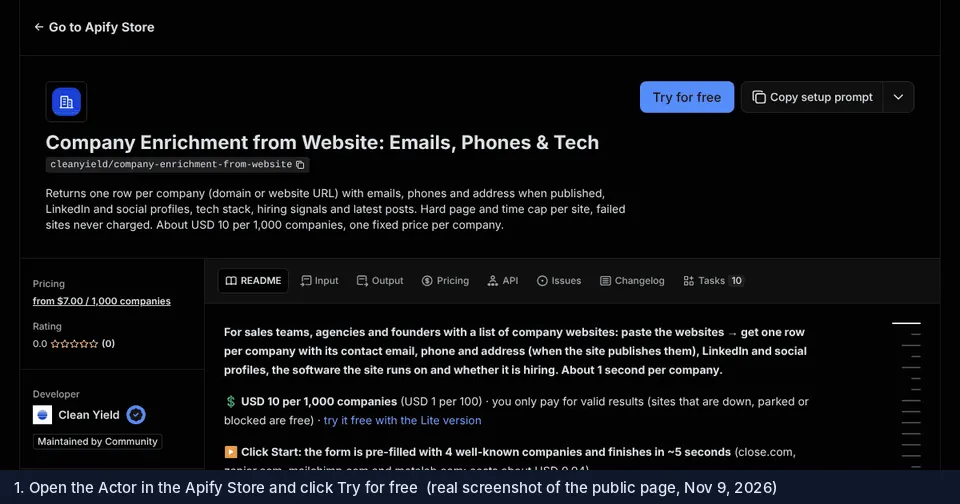
▶️ Click Start: the form is pre-filled with 4 well-known companies and finishes in ~5 seconds (close.com, zapier.com, mailchimp.com and metalab.com; costs about USD 0.04).
What the demo returns
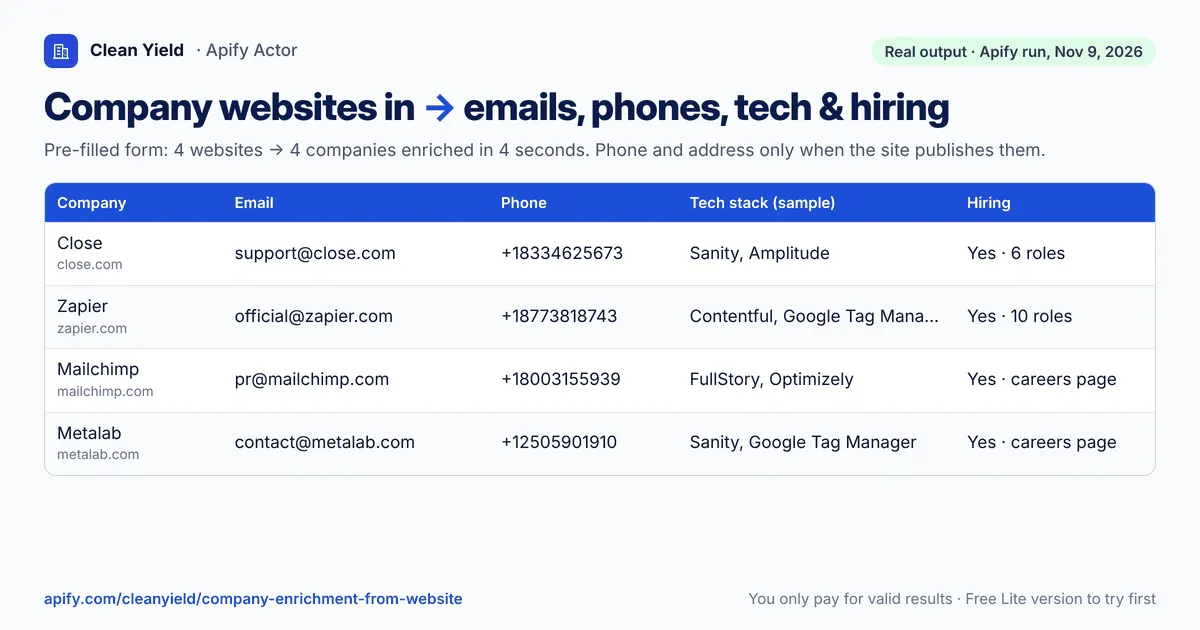
Real output of the pre-filled demo, run on Apify on 2026-11-09 (4 of 4 companies enriched in 4 seconds):
| Company | Phone | Social profiles | Software on the site (sample) | Hiring | |
|---|---|---|---|---|---|
| Close (close.com) | support@close.com | +18334625673 | LinkedIn, X, Facebook, YouTube | Sanity, Amplitude, Microsoft Advertising | Yes, 6 open roles |
| Zapier (zapier.com) | official@zapier.com | +18773818743 | LinkedIn, X, Facebook, Instagram, YouTube, GitHub, Reddit | Contentful, Google Tag Manager, Optimizely | Yes, 10 open roles |
| Mailchimp (mailchimp.com) | pr@mailchimp.com | +18003155939 | LinkedIn, X, Facebook, Instagram, YouTube, Pinterest | FullStory, Optimizely, OneTrust | Yes (careers page) |
| Metalab (metalab.com) | contact@metalab.com | +12505901910 | X, Instagram | Sanity, Google Tag Manager, Next.js | Yes (careers page) |
Phone and address come back only when the company publishes them on its site (2 of these 4 publish an address).
One item from that run (shortened):
What does Company Enrichment from Website do?
Email extractor and company enrichment by domain. Turn a list of domains or website URLs into one clean row per company: generic and role emails (info@, sales@, ventas@), phone numbers in E.164 (WhatsApp marked), LinkedIn/X/Facebook/Instagram/YouTube/TikTok/GitHub/Pinterest/Threads/Telegram profiles, tech stack (Shopify, HubSpot, WordPress, Intercom...), hiring signals (careers page, ATS, open roles) and the latest blog posts. Built for lead-gen agencies, SDR teams and Clay / n8n / Make users who enrich account lists. Also works as a website contact details scraper, a lead scraper for emails, phone numbers and social media links, a domain enrichment API, a tech stack lookup and a "is this company hiring?" checker.
Why use this email extractor and company enrichment tool?
- 📇 More contacts, no junk: 86% of companies with at least one email and 58% with a phone on our fixed test set of 65 real sites (2026-11-04), from contact, legal notice/Impressum, privacy, about and team pages in 6 languages, page footers, structured data and obfuscated emails — every address validated (real TLD, no placeholders, no regulators or agencies).
- ✅ One row per company, fixed price, no runaway runs: no surprise bills from crawling thousands of pages of one site. A hard cap of 10 pages and 15 seconds per domain that is always enforced, the maximum cost printed before the run starts, and nothing charged for sites that fail.
- ☎️ Company phone numbers that actually show up: read from contact, legal notice, footer and structured data, normalized to E.164 with country, deduplicated across formats and with junk (IDs, years, test numbers) filtered out.
- 🧹 Clean, normalized output: phones in E.164 (deduplicated across formats, vanity numbers like 1-800-4HOTDOG converted), emails classified as
generic/role/personal, Cloudflare-protected emails decoded, junk removed (posthog-js@1.8.0,logo@2x.png,555-01xx,+1 234 567 8910). - 📈 Buying signals next to the contacts: is the company hiring (and on which ATS, with open roles counted from Greenhouse, Lever and Ashby public APIs), which tools it uses, what it published last.
- 🔁 Built for monitoring: schedule it and get only companies that changed — started hiring, added HubSpot, new post, new contact.
- ⚡ Fast: median 1.8 s per company (p90 3.1 s, max 5.9 s) on 64 real company websites (2026-11-04); sync mode for Clay, n8n and Make.
- 🎯 Pro mode in one checkbox: buying-intent score 0–100, estimated size, fit with your ideal customer, a "why now" line and a one-sentence AI insight per company.
- 🔒 GDPR-friendly by default: personal emails are omitted unless you turn them on; robots.txt respected; bot challenges never bypassed.
- 🤖 AI-agent ready: pay-per-result only (no usage fees), works through MCP without an Apify account.
This Actor vs typical alternatives
Measured head-to-head on 2026-11-05: this Actor and a widely used contact scraper, run on Apify with the same 10 real domains from our fixed test set (testset/cases.json: SaaS, restaurants, ecommerce, LATAM), same 10-page budget per site. Our full-set numbers (65 domains) are in "Measured quality".
| Same 10 domains, same page budget | Typical alternative (measured) | This Actor |
|---|---|---|
| Output | one row per site (merged contacts) | one row per company + name, country, tech, hiring |
| Expected fields filled (68 checks) | 47% | 100% |
| Contact fields correct (emails, phones, socials) | 79% | 100% |
| Companies with at least one email / confirmed phone | 8 / 2 of 10 | 10 / 6 of 10 |
| Unique emails found | 11 | 27 |
| Phones normalized (E.164), junk filtered | ✗ (mixed formats, IDs and years as "uncertain" phones) | ✓ |
| Run time for the 10 companies | 71 s | 5 s |
| Cost per 1,000 companies | ~USD 16 (pay per page) | USD 10, fixed |
| Monitor mode (only changes) + alerts | ✗ | ✓ |
Measured quality
Measured on a fixed test set of 65 real domains (SaaS, ecommerce, restaurants and small businesses, LATAM, US and Europe, plus a domain that does not exist), checked against the raw HTML of each site. Last run: 2026-11-04, version 1.1.0.
| Metric | Result |
|---|---|
| Successful runs | 100% (65/65) |
| Complete results (all required fields) | 100% |
| Key fields correct (426 of 428 checked by hand) | 99.5% |
| Companies with at least one email / phone | 86% / 58% |
| Time per company (median / p90 / max) | 1.8 s / 3.1 s / 5.9 s |
Every version is measured on the same set before it is published. What changed and when: CHANGELOG.
Use cases
Enrich Google Maps leads with emails & phones
Already have a list of businesses exported from Google Maps? Paste it as it is. This Actor does not scrape Google Maps: it takes your exported list and reads each business's own website to add emails, phones and social profiles.
- No reformatting: paste the JSON rows in
rows, give a CSV or Google Sheet link incsvUrl, or thedatasetIdof a run in your Apify account. It accepts the output of popular Google Maps scrapers with their own field names; the website column (website,url,domain…) is detected automatically. - No guessing between branches: contacts come from the business's own main pages (home, contact, about, legal). Pages of individual branches and store locators are not read, so a row is never matched to another branch's page. If the company's own contact page lists several branches,
phones[]lists them all, as published.primaryEmailis never another branch's mailbox (only one named exactly after the row's city, likemiami@for Miami); other branches' mailboxes stay inemails[]because the site publishes them. - Your columns stay: every result keeps the original row in
row(name, address, rating…), next to the emails and phones found. - Not charged: rows without a website, or whose "website" is a Google Maps link, a social profile or a delivery/booking site. Rows with the same website are returned and charged once.
- Same price per company as a list of domains (USD 10 per 1,000 companies today on the Free plan; see How much does it cost).
- Measured on 50 real Google Maps businesses (Nov 10, 2026; restaurants, clinics, salons, plumbers): 89.7% of the contact and social fields checked by hand were found, and 98.9% of the returned values were correct. Sites behind a bot challenge are skipped, not bypassed.
Example input:
Return only your ideal customers
Add an idealCustomer profile and turn on Only return companies that match my ideal customer (screenByIdealCustomer). Each company is scored 0–100 (icpScore, share of your criteria it meets); companies at or above minIcpScore (100 = all criteria) are returned at the normal price, and the rest are left out of the dataset and listed in the SCREENED_OUT record.
More use cases
- Enrich a lead or account list: paste domains from your CRM or a spreadsheet and get emails, phones and LinkedIn per company.
- Tech-stack prospecting: find which accounts run Shopify, Magento, HubSpot, Intercom or Tiendanube, and target them.
- Hiring signals: companies hiring (and how many open roles) are buying — route them to your SDRs.
- Personalized outreach: open with their latest blog post or their new job openings.
- Account monitoring: weekly alerts when a target account starts hiring, adds a tool or publishes.
What data can you get from a company website?
| Field | Example | Source |
|---|---|---|
companyName | Plausible Analytics (from og:site_name, ld+json Organization, title or domain — slogans and "Inc." removed) | Website: og:site_name, structured data or page title, cleaned |
emails[] | { "email": "hello@plausible.io", "type": "generic", "isCompanyDomain": true, "foundOn": "https://plausible.io/contact" } | Website: contact, legal, privacy, about and team pages (foundOn); type deduced |
phones[] | { "phone": "+12122542246", "national": "(212) 254-2246", "country": "US", "source": "tel-link", "isWhatsApp": false } | Website: tel: links, structured data or page text (source); E.164 deduced |
primaryEmail, primaryPhone | the best email (company-domain generic inbox first) and phone (E.164) — ready for a spreadsheet or CRM column | Deduced: best of emails[] and phones[] |
contactPageUrl | the contact page (or legal notice) that was read | Website |
socialProfiles | linkedin, x, facebook, instagram, youtube, tiktok, github, pinterest, threads, telegram, discord, reddit — canonical company URLs | Website: links on the company's pages |
address | from ld+json: street, locality, region, postal code, ISO country | Website: structured data (ld+json) |
technologies[] | { "name": "Shopify", "category": "ecommerce" } — ~170 signatures in 14 categories | Deduced: signatures found in the site's HTML and scripts |
hiring | { "isHiring": true, "careersUrl": "https://job-boards.greenhouse.io/n26", "atsProvider": "greenhouse", "openRolesCount": 36, "evidence": "36 open role(s) on the public greenhouse job board" }; isHiring is null when it cannot be known (no careers page or job board found) | Website careers page, or the public Greenhouse, Lever or Ashby job board API (only a board that belongs to this website) |
latestPosts[] | { "title": "...", "url": "...", "publishedAt": "2026-10-22T10:00:00.000Z" } | Website: blog feed or sitemap |
language, country | en, EE (ISO 639-1 / ISO 3166-1) | Deduced: language tag or page text; country from address, domain ending, phone prefixes and language |
row, duplicateRows | only with rows/csvUrl/datasetId: your original row unchanged (e.g. the Google Maps columns) and how many more rows had the same website | Your input |
sourcesChecked[] | every request made (type, URL, HTTP status, ms) — full transparency | This run (log of requests) |
changeType, changes[] | monitor mode only: new / changed and what changed | This run (compared with the previous monitor run) |
pro | Pro mode only: buyingIntentScore (0–100), buyingSignals[], estimatedSize, icpFitScore, whyNow, trend (see Pro mode) | Deduced with fixed, published rules from this row |
icpScore | only with idealCustomer: share of your criteria the company meets (0–100) | Deduced: your criteria checked against this row |
insight | Pro mode only: one sentence written by AI from this row's facts only | AI (Claude Haiku), only from this row's facts |
schemaVersion | 1.1.0 — fields are only added, never renamed (CHANGELOG) | This Actor |
Source: Website = read from the company's own public pages; Deduced = worked out from those values with fixed rules, no AI; AI = written by AI (Pro mode only).
How much does it cost to enrich companies?
The price depends on your Apify plan. Higher Apify plans pay less per result, so the price shown at the top of the Store page can be another plan's price. Main result, per 1,000 companies:
| Your Apify plan | Today | From Nov 24, 2026 |
|---|---|---|
| Free | USD 10 | USD 10 |
| Starter (Bronze) | USD 9 | USD 9 |
| Scale (Silver) | USD 8 | USD 8 |
| Business (Gold) and higher | USD 7 | USD 7.50 |
Pay per result (pay per event), with no subscription or platform usage fees. Failed, blocked or empty sites are free. One price per company, no matter how many pages are read (at most maxPagesPerDomain, default 10). The log shows the maximum cost of the run before it starts.
| Companies returned | Cost |
|---|---|
| 100 companies | USD 1 |
| 1,000 companies | USD 10 |
| 10,000 companies | USD 100 |
Pro mode adds USD 0.02 per company (USD 20 per 1,000) on top of the base price, only for companies returned.
Ideal customer filter (screenByIdealCustomer): companies that pass are charged the normal price. Companies screened out are not returned and today are not charged. A screening fee of USD 0.0035 per screened-out company (USD 3.50 per 1,000 on the Free plan, lower on higher plans) will apply only after it appears on the Pricing tab with Apify's 14-day notice; this page will show the start date.
Monitor mode today: you pay only for new or changed companies (normal price). From November 24, 2026: + USD 0.005 per watched company per monitor run (Apify's 14-day notice for price changes), charged once per company read successfully in each monitor run, changed or not; failed sites and duplicate domains are never charged. Example from that date: watching 500 accounts weekly costs about USD 2.50 per run plus the companies that changed.
Apify subscribers get a lower price per company (tiers on the Pricing tab; the Gold tier is USD 7 per 1,000 companies today and USD 7.50 from November 24, 2026). Set Maximum cost per run and the Actor stops exactly there, never charging a watched company that does not fit in it.
What counts as a valid (charged) result
A company is charged only if its website could be read and the row has domain + companyName + at least one contact datum (email, phone, social profile or address) or one signal (careers page/ATS, a blog post, or a business technology beyond hosting/CDN). Everything else is free and listed with its reason in the FAILED_DOMAINS record of the run's key-value store:
| Status | Meaning |
|---|---|
invalid_domain | the input is not a domain or URL |
unreachable | DNS does not resolve, invalid TLS certificate, connection error or timeout |
blocked | HTTP 401/403/429 or a bot challenge (Cloudflare and similar) — never bypassed |
not_found | the home page returns 404/410 |
parked | the domain is parked or for sale |
robots_disallowed | robots.txt disallows the site for all crawlers |
no_data | the site was read but had nothing useful |
Limits
- Contacts only when the company publishes them. On our fixed test set of 65 real domains (2026-11-04), 86% of companies had at least one email and 58% a phone. The address comes only from the site's structured data.
- Company contacts, not people. Emails that look personal (jane@company.com) are left out by default (
includePersonalEmailsturns them on). It does not return names or job titles. - Job sites and aggregators are not companies. For Indeed, Wellfound, Remotive and similar job sites, or pages that link job boards of several companies, the Actor never reports another company's job board or the contacts in its job ads: only the site's own board and contact or legal pages.
- Reads the HTML, no browser. Content that only appears after JavaScript runs can be missed.
- Bot challenges are not bypassed. Those sites come back as
blocked(about 14% of large-brand sites in our tests, very few small-business sites). - At most 10 pages and 15 seconds per company by default (
maxPagesPerDomain,domainTimeoutSecs). - Never charged: sites that are down, parked, blocked or empty. Maximum cost per run stops the run exactly there.
FAQ
Is it legal to scrape company websites?
This Actor reads only public pages of the company's own website, without login, respects robots.txt and never bypasses bot challenges. Company contact data (info@, sales@, the main phone) is generally low risk. Emails that identify a person (jane@company.com) are personal data under GDPR, so they are omitted by default; if you turn on includePersonalEmails, you are responsible for having a legal basis (e.g. legitimate interest) and for informing those people where required (GDPR art. 14). Nothing is stored outside your own Apify storage.
What happens if a website fails or comes back incomplete?
It is not charged. Down, parked, blocked (403, Cloudflare challenge) and empty sites are listed with the reason in FAILED_DOMAINS, and every run stores a RUN_STATS record (successes, failures by reason) in its key-value store. One bad domain never fails the whole run.
How many pages does it read per website?
At most maxPagesPerDomain (default 10): the home page, then the pages most likely to have contact data — contact, legal notice/Impressum, privacy policy, about, team and terms, in English, Spanish, Portuguese, German, French and Italian — plus careers (or the ATS public job API), blog or feed and the sitemap, found through same-site links and common paths. Requests to the same site go a few at a time, and every request follows the robots.txt of its host, including its Crawl-delay (on a site that asks for a long pause, fewer pages are read within the per-domain time limit). robots.txt does not count. That is why runs are fast and the price is fixed.
Why is a site "blocked"?
Some sites (often large brands behind Cloudflare) show a bot challenge or refuse automated requests. We report them as blocked and do not try to get around it. In our tests about 14% of large-brand sites and very few small-business sites do this.
Does it work for JavaScript-heavy sites?
It reads the HTML the server sends (fast and cheap, no browser). Most company sites include contacts, links, structured data and scripts in that HTML; content that only appears after JavaScript runs may be missed.
Will the output format change?
No. The output schema is stable and versioned (schemaVersion: "1.1.0", outputVersion: 1): fields are only added, never renamed or removed, and every change is in the CHANGELOG.
Why do I see fewer emails than another scraper?
We return one deduplicated row per company and drop what is not a real company inbox: placeholders (your@email.com), image names (logo@2x.png), package versions, regulators and agencies found in legal texts. Personal emails (jane@company.com) are omitted by default for GDPR and counted in personalEmailsOmitted; turn on includePersonalEmails to get them.
How do I know what a run will cost?
The log prints the maximum cost before the run starts (number of companies × price, plus Pro mode and watched companies in monitor mode if on), and Maximum cost per run stops it exactly there. Failed, blocked and empty sites are free.
Is this an official tool of any of the platforms it detects?
No. Not affiliated with or endorsed by LinkedIn, X, Facebook, Instagram, Greenhouse, Lever, Ashby, Shopify, HubSpot or any other brand named on this page; their names are used only to describe the data found on public company websites.
Is there a free version or a free trial?
Yes, two ways. The Lite version has no per-result charge: up to 25 results per run, no monitor mode or alerts, and only Apify's platform usage applies. For this full version, the USD 5 of monthly credit in Apify's free plan covers about 500 companies at the base price, and you only pay for valid, complete results.
Related Actors: if you use this, you'll also like…
- ATS Jobs Scraper: Greenhouse, Lever, Ashby, Workday & More — see which of these companies are hiring right now and for which roles: a buying signal to time your outreach.
- FMCSA Carrier Lookup: USDOT & MC Number, New Authority Leads — selling to US trucking companies? Get them (with USDOT, phone, authority and insurance on file) from official FMCSA data, then enrich their websites here.
Every Clean Yield Actor has the same rules: one clean row per result, you only pay for valid results, and a Lite version with no per-result charge to try it first. All of them: apify.com/cleanyield.
Support
Found a bug or need a feature? Open an issue in the Issues tab: we usually answer within 12 hours. Need a custom version (another source, extra fields, a different output format)? Describe it in an issue and we will tell you if we can build it.
Did this Actor help you? A short review on Apify helps other users find it (and tells us what to improve).
Technical documentation
Everything below is reference: a complete output item, Pro mode, monitor mode, every input field, switching from other scrapers, code examples, migration, use inside your own Actor and AI agents.
Output example
A complete real item from an earlier run (plausible.io; sourcesChecked and latestPosts shortened):
Pro mode: who to call first and why
Turn on Pro mode (one checkbox) and every company also gets:
| Field | What it tells you |
|---|---|
pro.buyingIntentScore | 0–100, easy to sort: hiring (more for 20+ open roles), a post in the last 30 days, sales/marketing tools (HubSpot, Intercom, Calendly...), selling online, being reachable, and in monitor mode started hiring / new tools / new posts. Every point comes with its reason in pro.buyingSignals[]. |
pro.estimatedSize | 1-10, 11-50, 51-200, 201-1000 or 1000+, with the public evidence used ("72 open roles", "phones in 5 countries"). |
pro.icpFitScore | 0–100 = share of your ideal-customer criteria that the company meets (idealCustomer: countries, languages, technologies to have or not have, hiring, minimum open roles, keywords, sizes, has contact), with icpMatched / icpMissed. |
pro.whyNow | one line with the concrete reason to reach out today: "72 open roles on lever.", "Started hiring (3 open roles)." |
pro.trend | in monitor mode, what changed since you started monitoring (up to 90 snapshots per company): open roles +15, tools added, new posts. Nobody else has this history: it grows with every scheduled run. |
insight | one sentence by AI (Claude Haiku) using only the facts in the row, for example "Blue Bottle Coffee is hiring 72 people on Lever and runs Zendesk — a good moment to pitch support tooling." If the AI is not available the field is null and nothing extra is charged for it. |
Pro mode does not read more pages, so it is just as fast. Price: see the pricing section above.
Schedule it: monitor companies and get only what changed
- Turn on Monitor mode (optionally give it a Monitor state name, e.g.
my-accounts-weekly). - Add a Slack webhook or a webhook URL (Zapier, Make, n8n — use it to send emails too) for alerts.
- Open Schedules → Create schedule → daily or weekly → select this Actor with your input.
Each run compares every company with its previous profile and outputs only companies that are new or changed (each item has changeType: new or changed, and a changes list). Until November 24, 2026 you pay only for those. Starting November 24, 2026: USD 0.005 per watched company per monitor run (each company read successfully, changed or not; sites that fail are free), plus the normal price for each new or changed company returned. Detected changes: started_hiring, stopped_hiring, open_roles_changed, job_board_changed (for example from Lever to Greenhouse), technology_added, technology_removed, new_post, contact_added, contact_removed, social_changed, company_info_changed. Hosting/framework changes are ignored, and a contact is only reported as removed if the page where it was seen was read successfully — no false alarms from a flaky page.
With Pro mode, monitored companies also get pro.trend (open roles, tools and posts since the first run, up to 90 snapshots) and buying_intent signals from the changes.
Example Slack alert: Tiendanube (tiendanube.com): Started hiring; Added HubSpot; Removed Intercom.
Input example and configuration
Input example (JSON)
Configuration: all input fields
| Field | Description |
|---|---|
domains | Company domains or website URLs (also accepts emails: their domain is used). Bulk: thousands per run. |
rows, csvUrl, datasetId, websiteColumn | A Google Maps export or any spreadsheet, as it is: JSON rows, a CSV/Google Sheet link or a dataset ID from your account. The website column is detected automatically (or set websiteColumn); the original row comes back in row. Rows without a company website are skipped and not charged. |
sections | Which parts to collect: contacts, social, technologies, hiring, posts (default: all). Fewer sections = fewer pages read. |
includePersonalEmails | Off by default: only generic/role inboxes; personal-looking emails are omitted and counted in personalEmailsOmitted. |
maxPagesPerDomain | Hard cap of pages per company (default 10): home + contact, legal notice/Impressum, privacy, about, team, terms, careers or ATS API, blog/feed, sitemap — in order of how likely they are to have contacts. |
maxPosts | Latest blog posts per company (default 5, 0 disables). |
domainTimeoutSecs | Max time per company (default 15 s); returns what was found when reached. |
maxResults | Stop after this many companies (cost cap). |
maxConcurrency | Companies processed in parallel (default 10). |
respectRobotsTxt | On by default. |
monitorMode, monitorStateName, notifyWebhookUrl, notifySlackWebhookUrl | Monitor mode and alerts (see Schedule it). |
idealCustomer, screenByIdealCustomer, minIcpScore | Your ideal customer, e.g. { "countries": ["US"], "technologies": ["Shopify"], "mustBeHiring": true, "sizes": ["11-50", "51-200"] }: adds icpScore (0–100); with screenByIdealCustomer only companies with icpScore ≥ minIcpScore (default 100) are returned (see Return only your ideal customers). |
proMode | Pro mode extras (see Pro mode), including which ICP criteria matched or missed. |
savedListName, saveList | Give your company list a name and the Actor remembers it for the next (scheduled) runs; new domains are added to it. |
outputFormat | standard (default) or leader-compatible (see Migrating from other scrapers). |
startUrls, maxRequestsPerStartUrl | Aliases of domains and maxPagesPerDomain, so the input of other contact scrapers works as is. |
proxyConfiguration | Optional; off by default (company websites are read directly). |
Switching from another scraper? Paste your current input as is
startUrls ([{ "url": "https://acme.com" }]), urls and maxRequestsPerStartUrl are accepted unchanged, and outputFormat: "leader-compatible" returns the usual contact-scraper field names (emails, phones, linkedIns, twitters, whatsapps...) next to ours. Your integration keeps working; the bill becomes one fixed price per company.
| Typical field | Here |
|---|---|
startUrls[].url / urls | domains (both accepted) |
maxRequestsPerStartUrl / maxPagesPerSite | maxPagesPerDomain |
emails, phones (string lists) | emails[], phones[] (classified, E.164) + primaryEmail, primaryPhone |
linkedIns, twitters, facebooks, instagrams... | socialProfiles.linkedin, .x, .facebook, .instagram... |
Full mapping in Migrating from other scrapers.
Usage examples: API, Python, JavaScript and integrations
Bulk input is fine: thousands of domains in one run, 10 in parallel by default, a few requests at most per site, strict time limits and your budget cap.
Python
JavaScript
Sync mode (Clay, n8n, Make, HTTP)
One HTTP call returns the company profile directly (typically 2–6 s for one domain, always under ~20 s thanks to the per-domain time limit):
An empty array means the site could not be enriched (and was not charged).
n8n, Make and Clay
Ready-made templates in this Actor's repository: n8n "Enrich company domains from Google Sheets" and "Weekly buying signals to Slack", Make "Enrich new CRM accounts", Clay "HTTP API enrichment column". To send results to Google Sheets automatically, use the n8n Sheets template (reads domains from a sheet, writes one row per company with email, phone, LinkedIn and hiring) or Make's Google Sheets module after Run an Actor. Monitor mode already sends alerts to Slack or any webhook, and every run saves a visual dashboard (record DASHBOARD, link in SUMMARY) you can open and share. Or use the official Apify node/app → Run an Actor → cleanyield/company-enrichment-from-website.
Migrating from other scrapers
Coming from a contact details scraper? Paste the same input and choose the output you need — your integration keeps working.
| Their input | Here | Their output field | Here (outputFormat: "leader-compatible") | Here (standard) |
|---|---|---|---|---|
startUrls [{ "url": "https://acme.com" }] | same (or domains: ["acme.com"]) | emails (strings) | emails | emails[].email + type, primaryEmail |
maxRequestsPerStartUrl | same (= maxPagesPerDomain) | phones (strings) | phones (E.164) | phones[].phone + national, country, isWhatsApp |
maxDepth, sameDomain | not needed: same site only, best pages picked for you | linkedIns, twitters, facebooks, instagrams, youtubes, tiktoks, pinterests, discords, threads, telegrams, reddits | same names (lists) | socialProfiles.linkedin, .x, .facebook... |
useBrowser | not needed (HTML first, fast) | whatsapps | whatsapps (wa.me links) | phones[].isWhatsApp |
proxyConfig | proxyConfiguration | url, domain, originalStartUrl, depth | same | url, domain |
Differences you will notice: one row per company instead of one row per page (no deduplication step), fixed price per company instead of per page, phones normalized to E.164, emails classified and validated. With leader-compatible, our extra data (technologies, hiring, posts, emailDetails, phoneDetails) comes in the same row with our own field names.
For developers: use it inside your own Actor
Building an Actor, an agent tool or a SaaS that needs company data? Call this one and focus on your product:
- Fast and synchronous:
run-sync-get-dataset-itemsanswers in seconds per domain, with a hard time limit per domain. - Stable schema: fields are only added, never renamed; every item has
schemaVersion(CHANGELOG). - Clear price: a fixed price per valid company, nothing for failures; your users' runs never get surprise bills.
Use with AI agents / MCP
This Actor charges only per result (no usage fees), so AI agents can run and pay for it through the Apify MCP server without an Apify account.
Example request to your assistant:
"For these 20 domains, tell me which companies are hiring, which ATS they use, their tech stack and a generic contact email."
"Find a contact email and phone for bakery-sonnenschein.de, acme.com.ar and joespizzanyc.com and give me a table."
"Which of these 50 accounts should my SDRs call first this week? Use Pro mode and sort by buying intent."
For agents: input domains (list of domains or URLs), optional sections to read fewer pages, proMode: true for scores. One output item per company; read primaryEmail, primaryPhone, socialProfiles, hiring.isHiring, technologies[].name, and in Pro mode pro.buyingIntentScore and pro.whyNow. Companies that could not be read are not returned and not charged.


