

Amazon Buy Box & Seller Offers Tracker API
Pricing
from $2.99 / 1,000 offers
Amazon Buy Box & Seller Offers Tracker API
Get all Amazon seller offers per ASIN with Buy Box winner, prices, FBA status, and stock data. Tracks price changes, buybox rotations, and new sellers across amazon.com, .de, .co.uk, .fr, .it, .es, .co.jp, .ca. Perfect for repricing and analytics.
Pricing
from $2.99 / 1,000 offers
Rating
0.0
(0)
Developer

ClearPath
Maintained by CommunityActor stats
0
Bookmarked
29
Total users
11
Monthly active users
7 days ago
Last modified
Categories
Share
Amazon Buybox API | Track Seller Offers and Price Changes Across 8 Domains
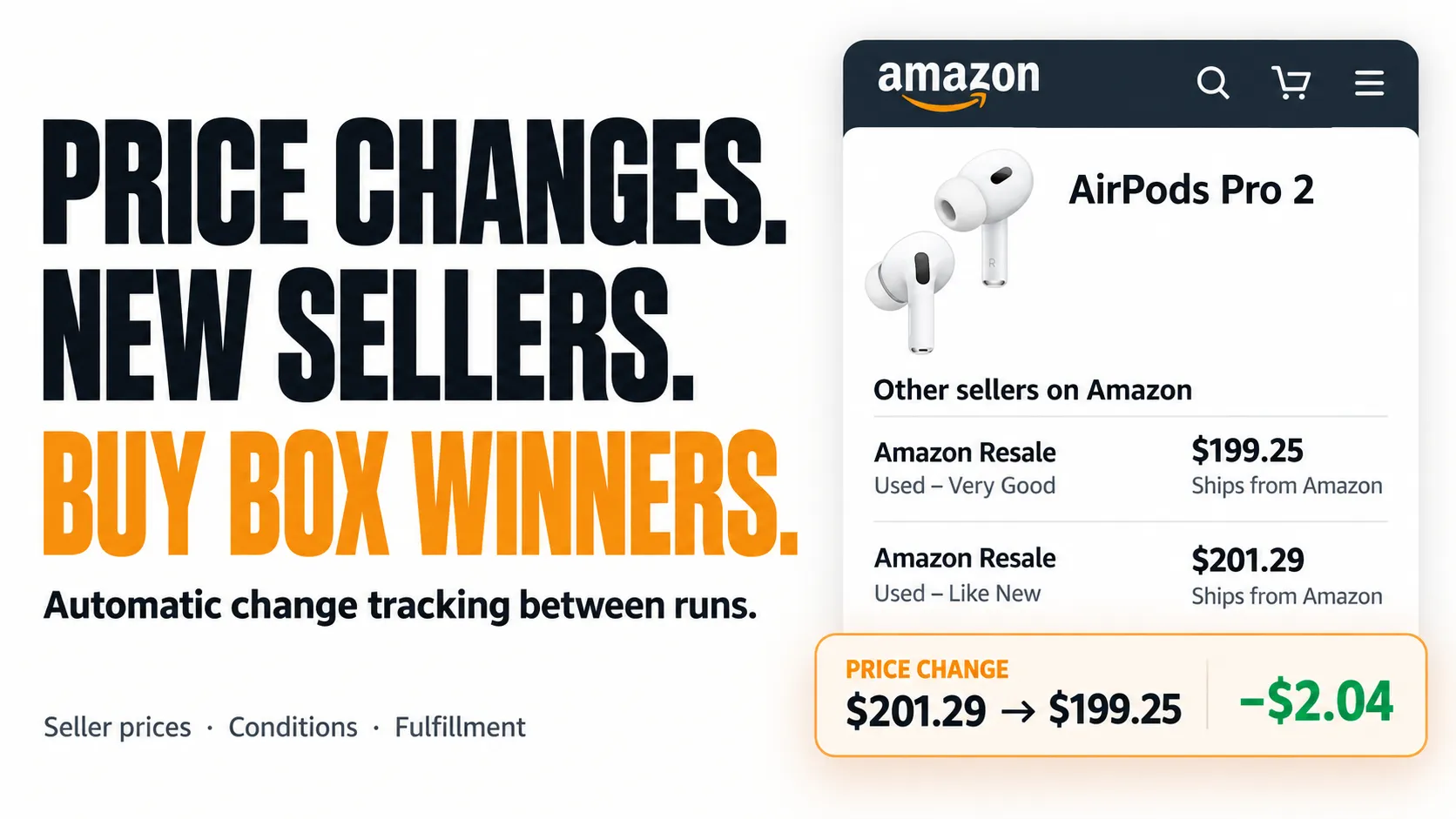
From Clearpath, creators of Shopify Product Scraper, Coles Scraper and Woolworths Scraper. Product, seller and store-level data from the same team.
Why choose this actor?
See exactly how seller prices changed. Repeated runs return the previous price, current price and difference for matching offers. Find price drops and increases directly in your exported data.
Track new competitors and Buy Box changes. Identify newly appearing sellers and changes to the featured seller, with the previous Buy Box winner included. The first run establishes your baseline; later runs reveal changes.
Keep the offer details that explain the price. Compare seller names, item conditions, fulfillment by Amazon and ships-from information alongside prices. Collect available offers across eight Amazon markets, with an optional per-product limit.

Quick start
Start with one Amazon product and collect its available seller offers:
Open actor input and replace the ASIN with your product. Run the same product and market again, or schedule recurring runs, to compare changes. Keep the condition filter consistent. maxOffersPerProduct: 0 removes the optional offer limit. Export JSON, CSV or Excel. The hero uses a historical offer example; prices change.
| Clearpath Retail |
 Amazon Buy Box Amazon Buy Box➤ You are here  Home Depot Home DepotUS prices, stock, aisle & bay  Coles ColesAustralian prices and store stock  Woolworths AU Woolworths AUAustralian prices and store stock  idealo idealoEuropean offers and price history |
Also from Clearpath: Shopify Products and Shopify Store Leads.
Copy to your AI assistant
Copy this block into ChatGPT, Claude, Cursor, or any LLM to start using this actor.
Pricing
Offer charges: $2.99 per 1,000 exported offers. Platform usage is included. No monthly subscription.
Each seller offer exported counts once, including offers returned by repeated monitoring runs. All 8 Amazon domains and change tracking are included.
Set your maximum run budget in Apify Console to control spending. The Actor stops when the remaining budget cannot cover another offer.
What Data You Get
Each offer in the dataset includes:
- Price data — current price, original/list price, currency, price delta vs last run
- Seller info — seller name, seller ID, ships-from location, FBA status
- Buybox status — whether this offer holds the buybox, and whether the winner changed
- Product context — ASIN, condition (New, Used - Like New, Refurbished, etc.), total offer count
- Change tracking — price changed flag, previous price, new seller flag, first-seen timestamp
How Amazon Buybox Monitoring Works
- First run — collects all offers and saves a snapshot per ASIN
- Subsequent runs — compares current offers against the saved snapshot
- Change detection — flags price changes (with delta), new sellers, and buybox winner switches
- Per-offer granularity — tracks each seller's offer independently, even when a seller has multiple offers at different conditions
Schedule runs hourly, daily, or weekly depending on how closely you need to track competition.
Supported Amazon Domains
| Domain | Country | Currency |
|---|---|---|
| amazon.com | United States | USD ($) |
| amazon.de | Germany | EUR (€) |
| amazon.fr | France | EUR (€) |
| amazon.co.uk | United Kingdom | GBP (£) |
| amazon.it | Italy | EUR (€) |
| amazon.es | Spain | EUR (€) |
| amazon.co.jp | Japan | JPY (¥) |
| amazon.ca | Canada | CAD ($) |
Mix domains freely in one run — pass URLs from different Amazon sites and each product is fetched with the correct locale and proxy.
Input Parameters
| Parameter | Type | Required | Default | Description |
|---|---|---|---|---|
productUrls | string[] | Yes | — | Amazon product URLs or bare ASINs. Domain auto-detected from URLs. |
amazonDomain | enum | No | amazon.com | Default domain for bare ASINs. Ignored when URLs contain a domain. |
condition | enum | No | all | Filter offers by condition: all, new, used, usedLikeNew, usedVeryGood, usedGood, usedAcceptable, collectible, refurbished. |
maxOffersPerProduct | integer | No | 0 | Max offers per ASIN. 0 = all offers. |
proxyConfiguration | object | No | Apify Residential | Proxy country auto-set from domain (.de → DE, .co.jp → JP). |
Quick Start
Single product
Multiple products across domains
Bare ASINs on a specific domain
Output
Offer fields
Monitor fields (2nd+ run)
On scheduled runs, every offer includes change tracking:
| Field | Type | Description |
|---|---|---|
priceChanged | boolean | Whether this seller's price changed since last run |
previousPrice | number | Last known price for this seller + condition |
priceDelta | number | Price difference. Negative = price drop. |
buyboxWinnerChanged | boolean | Whether the buybox winner is a different seller |
previousBuyboxWinner | string | Seller name of the previous buybox holder |
isNewSeller | boolean | First time this seller appears for this ASIN |
firstSeenAt | string | ISO timestamp when the seller was first observed |
Use Cases
For Amazon Sellers
- Track competitor pricing — monitor every seller on your listing, detect undercuts within hours
- Buybox win rate — log buybox winner changes over time to understand rotation patterns
- Repricer validation — verify your repricing tool is working by comparing expected vs actual prices
For E-commerce Analysts
- Cross-market pricing — compare the same ASIN across US, EU, UK, and JP simultaneously
- Seller landscape — identify how many sellers compete per product, FBA vs FBM distribution
- Price history — schedule daily runs to build a price trend dataset
For Arbitrage and Resale
- Price gap detection — spot products priced differently across Amazon domains
- New seller alerts — detect when new sellers enter a listing (often signals supply changes)
- Condition-based analysis — track used/refurbished pricing separately from new offers
How to Extract Amazon Buybox Data with Python
How to Extract Amazon Buybox Data with JavaScript
Advanced Usage
Monitor buybox changes on a schedule
Set up a daily schedule in the Apify Console. On each run, the Actor loads the previous state and enriches every offer with change flags. Filter the dataset for buyboxWinnerChanged: true to see only products where the winner shifted.
Filter by condition to track used market
Cap offers per product
When a listing has 50+ sellers and you only need the top offers:
Data Export
Export results from the Apify Console or API in:
- JSON — structured data for programmatic use
- CSV — spreadsheet analysis and reporting
- Excel — pivot tables, charting, dashboards
Proxy Configuration
The Actor uses residential proxies by default. Proxy country is auto-matched to the Amazon domain — .de routes through Germany, .co.jp through Japan, etc.
Default configuration (recommended):
FAQ
How many products can I process per run? No limit. Pass as many ASINs or URLs as you need. Each product is processed sequentially.
How many offers does it return per product?
All of them by default. Amazon shows up to 10 offers per page; the Actor paginates through all pages automatically. Use maxOffersPerProduct to cap if needed.
Does it work for products with no buybox?
Yes. If no buybox winner exists, all offers are returned with isBuyboxWinner: false.
What happens if a product has zero offers? It's skipped gracefully. No error, no empty record in the dataset.
Are prices in local currency?
Yes. amazon.de returns EUR, amazon.co.jp returns JPY, amazon.co.uk returns GBP, etc. The currency field tells you which.
How does change tracking work?
The Actor stores a snapshot after each run in a named key-value store. On the next run, it compares current offers against the snapshot by offer ID. Only real changes are flagged — same data across runs produces priceChanged: false for every offer.
Is condition text normalized across languages? Yes. German "Neu", French "Neuf", Japanese "新品" are all normalized to "New". Used sub-conditions are normalized too (e.g., "Usato - Come nuovo" becomes "Used - Like New").
Can I mix domains in one run? Yes. Pass full URLs from different Amazon sites. Each URL is processed with the correct locale, currency, and proxy country.
Support
- Email: max@mapa.slmail.me
- Bugs and feature requests: Issues tab on this Actor's page


