
Crypto Prices & OHLC History Export - No Login
Pricing
from $0.26 / 1,000 coin snapshots
Crypto Prices & OHLC History Export - No Login
Export crypto prices, market cap, 24h volume and change for coins by name or ticker, or OHLC candle history from Binance, Kraken or CoinGecko. Public data, no login or API key. Clear not-found rows and run summary.
Pricing
from $0.26 / 1,000 coin snapshots
Rating
0.0
(0)
Developer

Cliqto Media
Maintained by CommunityActor stats
0
Bookmarked
2
Total users
1
Monthly active users
10 days ago
Last modified
Categories
Share
Export crypto prices for the coins you choose: current price, market cap, 24h volume and 24h change, or OHLC candle history from Binance, Kraken or CoinGecko. No login and no API key.
Add coins by name or ticker (bitcoin, eth), click Start, and get one row per coin in about 5 seconds. A run with 2 coins costs about $0.0021.
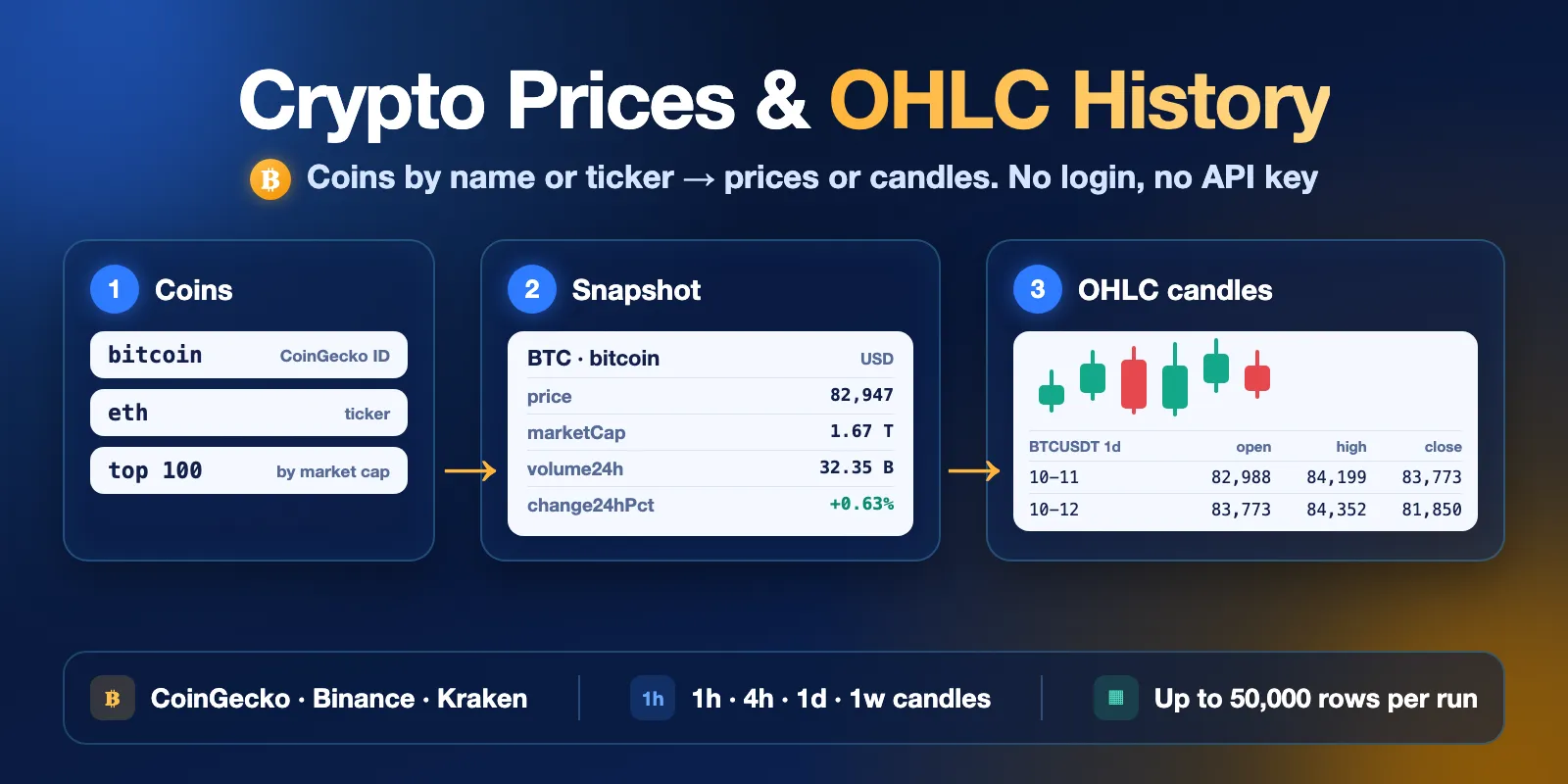
Table of contents
- What it does
- Quick start
- Use cases
- Input
- Output
- Pricing and limits
- API, export and integrations
- Troubleshooting
- FAQ
- Support
What it does
The Actor has two modes:
snapshot— one row per coin with the current price, market cap, market cap rank, 24h volume, 24h change, 24h high and low, supply and all-time high. Data comes from the CoinGecko public API. You can list coins, take the top N coins by market cap, or both.history— price history for each coin. Withbinanceorkrakenyou get OHLC candles (open, high, low, close, volume) for1h,4h,1dor1w. Withcoingeckoyou get daily or hourly price, market cap and volume.
You can write a coin as a CoinGecko ID (bitcoin, ethereum) or as a ticker (btc, ETH, $sol). The Actor finds the coin and shows how it matched it in matchedBy.
Good fit
- Daily price and market cap table for a list of coins in a spreadsheet.
- OHLC candles for charts, back-tests or reports, back to 2017 on Binance.
- Top 100 coins by market cap, ready to export as CSV or Excel.
Not a fit / limits
- Not real-time. Prices are as fresh as the public API at run time (CoinGecko updates about every minute). Do not use it for trading signals.
- Not investment advice. The Actor only copies public market data.
- No order books, trades, wallets, DEX pools or derivatives.
- Kraken keeps only about 720 recent candles per pair. Use
binancefor long history.
Quick start
- Open the Input tab.
- Keep the prefilled
coins:bitcoinandethereum. Or add your own. - Keep
mode=snapshot. - Click Start.
- Open the Output tab and check the Prices (snapshot) view:
price,marketCap,volume24h,change24hPct.
Expected result: 2 rows, one for Bitcoin and one for Ethereum, in about 5 seconds.
For candles, set mode = history, choose exchange and interval, and set days.
Use cases
| Buyer job | Input path | Output entity | Key fields | Next integration |
|---|---|---|---|---|
| Track prices of my coins every day | coins, mode: snapshot | coin snapshot | price, marketCap, volume24h, change24hPct | Google Sheets, CSV, scheduled run |
| Top coins by market cap | topN: 100 | coin snapshot | marketCapRank, price, marketCap | Excel, BI tool |
| Candles for charts or back-tests | mode: history, exchange: binance, interval, days | OHLC candle | timestamp, open, high, low, close, volume | Python, pandas, database |
| Long price and market cap history | mode: history, exchange: coingecko, interval: 1d, days: 365 | history point | timestamp, price, marketCap, volume | Spreadsheet, chart |
Input
Input fields
| Field | Plain name | Type | Required | Default / prefill | Allowed values | Effect | Example | Recommendation |
|---|---|---|---|---|---|---|---|---|
mode | Mode | string | no | default and prefill snapshot | snapshot, history | Current values or history | history | Start with snapshot |
coins | Coins | array of strings | yes, unless topN > 0 | prefill ["bitcoin", "ethereum"]; no runtime default | CoinGecko ID or ticker; up to 250 in snapshot, 25 in history | Which coins to export | ["btc", "solana"] | Use IDs when a ticker is shared by many coins |
topN | Top coins by market cap | integer | no | 0 (off) | 0–250 | Snapshot only: adds the top N coins | 100 | Combine with coins for extra coins |
vsCurrency | Currency | string | no | usd | 63 CoinGecko codes; Binance and Kraken: usd, eur, gbp, jpy, try, brl, aud, cad, chf, btc, eth, bnb, sol, xrp | Price currency | eur | Binance quotes usd in USDT |
exchange | History source | string | no | binance | binance, kraken, coingecko | History only: where candles come from | kraken | binance for long history |
interval | Candle size | string | no | 1d | 1h, 4h, 1d, 1w | History only: one row per interval | 1h | CoinGecko: 1d, or 1h up to 90 days |
days | Days back | integer | no | 30 | 1–1825 (CoinGecko 1–365) | History only: how far back from now | 365 | Fewer days = fewer rows = lower cost |
maxRows | Max rows | integer | no | 10000 | 1–50000 | History only: stop after this many candles | 2000 | Keep it low to cap cost |
Empty input: the run fails with a clear message (INVALID_INPUT) and writes no rows. Add at least one coin or set topN.
Duplicates: if two entries mean the same coin (btc and bitcoin), the coin is exported once. The second entry is marked skipped in RUN_SUMMARY.
Unknown coins: the Actor writes a not_found row with the reason and goes on with the other coins.
Interacting settings
| When | Input A | Input B | Effective behavior | Example | Cost/result effect |
|---|---|---|---|---|---|
| Snapshot with both | coins | topN | Listed coins first, then top coins; no duplicates | coins: ["dogecoin"], topN: 10 | Up to 11 rows |
| History | days | interval | Rows ≈ days × candles per day, per coin | days: 30, interval: 1h | 720 rows per coin |
| History | maxRows | coins | Stops at maxRows in total, coin by coin | 25 coins, maxRows: 1000 | Last coins may be partial or skipped |
| History on Kraken | days | interval | Only about 720 recent candles | 1h, days: 90 | About 30 days, status SOURCE_LIMIT |
| Ticker shared by several coins | coins | — | Coin with the largest market cap wins | uni | Check coin and matchedBy |
Input examples
Prices of a few coins
Expected behavior: the Actor looks up both coins on CoinGecko and saves 2 rows.
Expected output: coin snapshots with price, marketCap, volume24h, change24hPct.
Limit or cost note: about $0.0021 per run.
Daily candles for 30 days
Expected behavior: BTCUSDT and ETHUSDT daily candles from Binance.
Expected output: about 60 candle rows with open, high, low, close, volume. The newest candle has isClosed: false.
Limit or cost note: about $0.008 per run.
Output
The default Dataset has 3 views: Prices (snapshot), History (OHLC candles) and Not found & errors. Every row has recordType: snapshot, candle or status. Views choose columns; they do not filter rows, so not_found rows also appear in Prices (snapshot) with empty price cells. To keep only one kind, filter by recordType or status in your spreadsheet or code.
Output fields
| Field | Meaning | Type | Can be empty? | Example / enum | Source / notes |
|---|---|---|---|---|---|
recordType | Row kind | string | no | snapshot, candle, status | — |
status | Row result | string | no | ok, not_found, error | — |
query | Your entry | string | yes | btc | As you typed it, trimmed, lower case, without $; empty for topN rows |
matchedBy | How the coin was found | string | yes | id, symbol, topN, ticker | — |
coin | CoinGecko ID | string | yes | bitcoin | Empty for Binance/Kraken tickers not checked on CoinGecko |
symbol, name | Ticker and name | string | yes | BTC, Bitcoin | — |
vsCurrency | Price currency | string | no | usd | — |
price | Price (last close for candles) | number | yes | 82947 | — |
marketCap, marketCapRank | Market cap and rank | number | yes | 1667051393162, 1 | Snapshot and CoinGecko history |
volume24h | 24h trading volume | number | yes | 32352326234 | Snapshot |
change24h, change24hPct | 24h price change and percent | number | yes | 521.38, 0.63249 | Snapshot |
high24h, low24h | 24h high and low | number | yes | 84074, 81018 | Snapshot |
circulatingSupply, totalSupply, maxSupply | Supply | number | yes | 20097687 | maxSupply is empty when there is no cap |
ath, athDate, atl, atlDate | All-time high and low | number / string | yes | 126080 | Snapshot |
exchange, pair, quoteAsset, interval | Candle source | string | yes | binance, BTCUSDT, USDT, 1d | History |
timestamp, timestampMs | Data time (candle open time in history) | string / number | no for data rows | 2026-09-14T00:00:00.000Z | UTC |
open, high, low, close | OHLC prices | number | yes | 76842.01 | Empty for CoinGecko history except open/close |
volume, quoteVolume, trades | Candle volume, quote volume, trade count | number | yes | 15413.49 | trades only on Binance and Kraken |
isClosed | Candle is final | boolean | yes | true | The newest candle is still open and can change |
message | Why a row is not_found or error | string | yes | No CoinGecko coin has this ID or ticker. | Status rows |
source, sourceUrl, fetchedAt | Where and when | string | no | coingecko | — |
Output entities and surfaces
| Situation | Dataset/API/KVS/live view | Result shape | User action |
|---|---|---|---|
| Normal item | Dataset rows with recordType snapshot or candle (views Prices (snapshot), History (OHLC candles) show their columns) | One row per coin or per candle | Export or read the fields |
| Coin not found | Dataset rows with recordType: status (view Not found & errors shows their columns) | status: not_found row with message; after 20 such rows, one more row lists the rest | Fix the entry or use the CoinGecko ID |
| Partial result | Dataset + RUN_SUMMARY in the key-value store | Rows saved so far; RUN_SUMMARY.status is PARTIAL with reason (MAX_ROWS, SOURCE_LIMIT, SOME_NOT_FOUND, CHARGE_LIMIT) | Read reason and message |
| Source down or blocked | RUN_SUMMARY, run status FAILED | status: ERROR, reason: SOURCE_ERROR, no fake rows | Run again later |
Output example
This example is trimmed and shows one snapshot row from the first input example. null means the field does not apply to this row kind or the source has no value.
A candle row from the second example:
Pricing and limits
Pricing unit
You pay per event (pay-per-event). The platform usage is included in these prices.
| Event | When it is charged | Price (Free plan) | Gold plan |
|---|---|---|---|
| Actor start | Once per run | $0.0015 | $0.0015 |
| Coin snapshot | One saved snapshot row | $0.0003 | $0.000255 |
| History candle | One saved candle or history point | $0.0001 | $0.000085 |
| Coin lookup with no match | One requested coin that matched no coin or pair | $0.0002 | $0.0002 |
Bronze and Silver plans pay prices between Free and Gold.
A run where no coin is found costs the start fee plus $0.0002 per coin. A run that fails on invalid input costs only the start fee. If a source is down, you pay the start fee and only the rows that were saved. Rows not_found and error are free, apart from the small lookup fee. Set Max cost per run to stop early: the Actor saves only the rows that fit in it and reports CHARGE_LIMIT.
Cost examples
| Scenario | Input scope | Expected item/event count | Base charge | Optional charge | Stop/cap behavior |
|---|---|---|---|---|---|
| Prefill | 2 coins, snapshot | 2 snapshots | $0.0021 | none | — |
| Top 100 | topN: 100 | 100 snapshots | $0.0315 | none | — |
| One coin, daily candles for a year | days: 365, 1d | 366 candles | $0.0381 | none | maxRows |
| 25 coins, hourly for 30 days | 1h, days: 30 | 18,000 candles | $1.80 | none | maxRows |
| Largest run | maxRows: 50000 | 50,000 candles | $5.00 | none | Stops at maxRows |
| Nothing found | 1 unknown coin | 1 lookup with no match | $0.0017 | none | — |
Free-plan prices. The real number of rows depends on how much history the exchange has.
Limits
- Snapshot: up to 250 coins plus
topNup to 250 per run. - History: up to 25 coins and 50,000 rows per run. Binance has data back to 2017, Kraken only about 720 recent candles, CoinGecko up to 365 days.
- A run stops source work after about 4 minutes and keeps what it saved.
API, export and integrations
- API: start a run with
POST https://api.apify.com/v2/acts/cliqtomedia~crypto-market-data/runsand the input JSON. Read rows from the run's default Dataset. - Export: download the Dataset as JSON, CSV, Excel, XML or RSS from the Output tab or the API.
- Scheduling: create a schedule in Apify Console (for example every day at 00:05 UTC) to build a daily price table.
- Webhooks / no-code: use Apify integrations for Google Sheets, Zapier, Make or a webhook after each run.
Use with AI agents (MCP)
- MCP server URL with only this Actor:
https://mcp.apify.com?tools=cliqtomedia/crypto-market-data. - Smallest useful input:
{"mode": "snapshot", "coins": ["bitcoin", "ethereum"]}. - Key output fields:
coin(CoinGecko ID),price(invsCurrency),marketCap,change24hPct(24h change in percent),timestamp(UTC time of the value). - A snapshot run takes about 5 seconds and costs about $0.0021 for 2 coins. History is up to 25 coins and 50,000 rows per run. Data is not real-time and is not investment advice.
Troubleshooting
A coin is not_found
Symptom: a row with status: not_found and a message.
Likely reason: a typo, or the ticker is not listed on CoinGecko (snapshot) or the pair is not on the exchange (history).
Check: open the coin on coingecko.com; the ID is the last part of the URL (/coins/the-graph).
Action: use the CoinGecko ID, another currency, or another exchange.
A ticker returns a different coin
Symptom: coin is not the coin you meant.
Likely reason: many coins share the same ticker. The Actor picks the one with the largest market cap.
Check: matchedBy is symbol.
Action: use the CoinGecko ID instead of the ticker.
Kraken history is shorter than days
Symptom: RUN_SUMMARY.reason is SOURCE_LIMIT.
Likely reason: Kraken returns only about 720 recent candles.
Action: use exchange: binance or a larger interval.
The run failed with SOURCE_ERROR
Symptom: run status FAILED, RUN_SUMMARY.status is ERROR.
Likely reason: the public API was down or limited requests for a while.
Action: run again in a few minutes. You pay only the start fee and saved rows.
FAQ
Do I need an account or API key on CoinGecko, Binance or Kraken?
No. The Actor uses public endpoints. No login, no API key.
Is the data real-time?
No. You get the values at run time. CoinGecko updates about every minute. The newest candle has isClosed: false and can still change.
Why does my history have fewer rows than days × interval?
The coin may be newer than your period, the exchange may not have old data, or maxRows stopped the run. Check RUN_SUMMARY for each coin.
Where does the data come from?
Data provided by CoinGecko, and public market data from Binance and Kraken. The Actor does not change the values; it only renames fields to one schema.
Is this investment advice?
No. This is a data export tool. It does not give buy or sell signals.
Support
For bugs, questions or feature requests, use the Issues tab of this Actor. Include the run ID, the input mode and the error text. Never send API tokens, passwords or account data.


