
eBay Sold Listings Scraper - Sold Prices & Dates
Pricing
from $2.25 / 1,000 sold listing saveds
eBay Sold Listings Scraper - Sold Prices & Dates
Get eBay sold and completed listings by keyword: sold price, sale date, shipping, condition, bids, listing type and photo. Use your own eBay session or your own key from a sold-data API. 8 eBay sites.
Pricing
from $2.25 / 1,000 sold listing saveds
Rating
0.0
(0)
Developer

Cliqto Media
Maintained by CommunityActor stats
0
Bookmarked
2
Total users
1
Monthly active users
18 hours ago
Last modified
Categories
Share
Get eBay sold and completed listings by keyword: the real sold price, sale date, shipping, condition, bids, listing type, photo and item link, from 8 eBay sites. eBay shows sold results only to signed-in users, so you choose the access: your own eBay session (cookies from your browser) or your own key from a sold-data API.
A first run with the prefilled search iphone 13 and your eBay session saves 20 sold listings in about 10 seconds and costs about $0.10. Without your cookies or an API key the run stops at once with a message about what to paste (you pay only the $0.005 start).
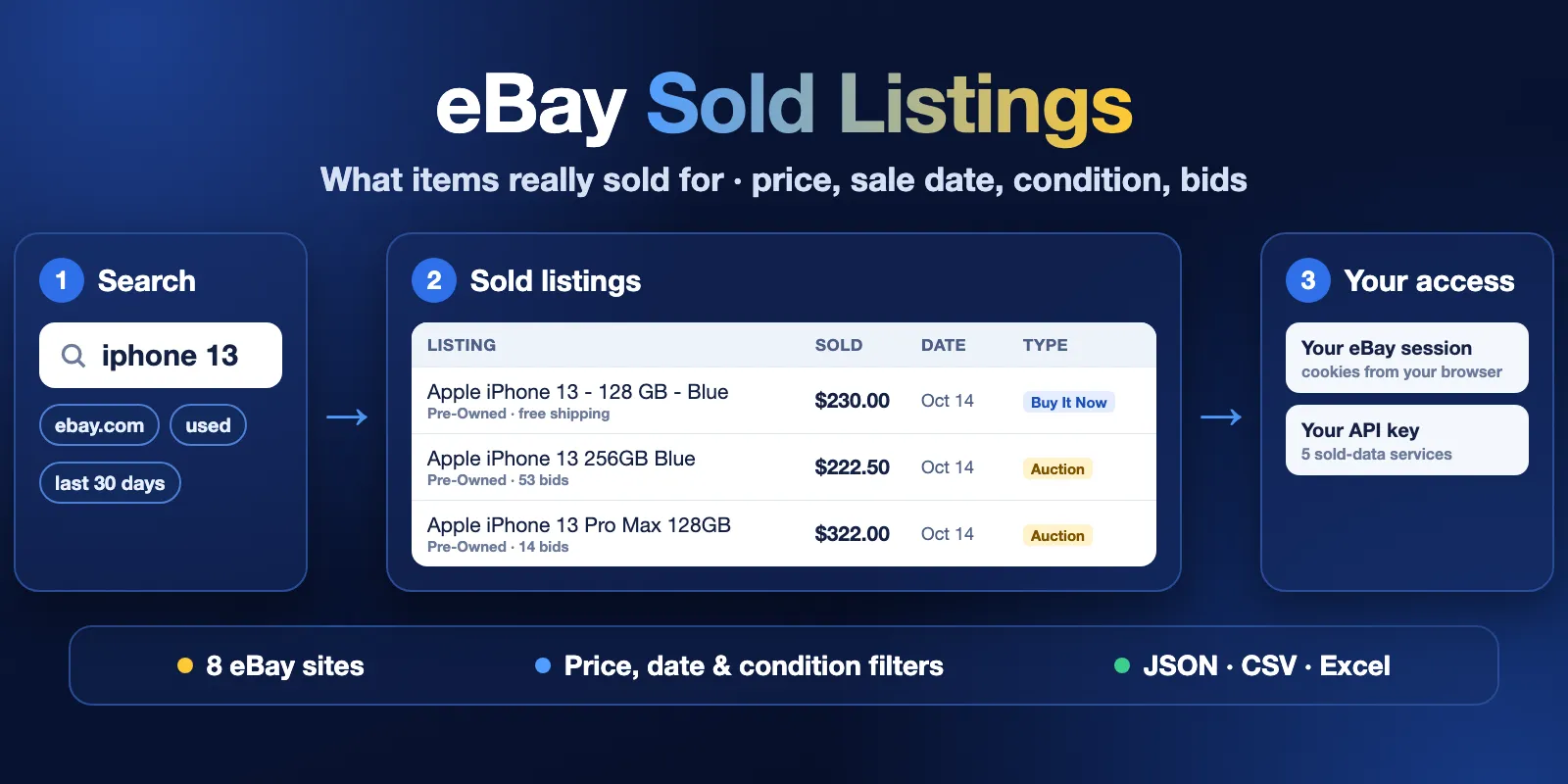
Table of contents
- What it does
- Quick start
- How to get your eBay cookies and User-Agent
- Sold-data API services (bring your own key)
- Use cases
- Input
- Output
- Pricing and limits
- API, export and integrations
- Troubleshooting
- FAQ
- Related Actors
- Support
What it does
You give one or more search words, like you type them on eBay. The Actor opens the eBay Sold items search for each word and saves one row for every sold listing: price, sale date, shipping, condition, number of bids, listing type, photo and link. You can filter by price, condition, buying format and sale date.
eBay shows sold listings only to signed-in visitors. The Actor does not create accounts and does not sign in for you. It reads the data in one of two ways:
| Data source | How it works | Who pays the data | eBay sites |
|---|---|---|---|
| My eBay session (default) | You paste the cookies and User-Agent of your own browser where you are signed in to eBay. The Actor reads the eBay sold search pages with your session. | Free (only this Actor's price) | all 8 |
| Your API key | You paste your own key from one of 5 sold-data services. The Actor calls that service and turns its answer into the same rows. | You pay the service directly | see the table |
Good fit
- Resellers and flippers: check what an item really sold for before you buy or list it.
- Price research and appraisal: collect recent sold prices for a model, with condition and date.
- Market analysts: compare auction and Buy It Now prices, or watch how prices change week by week with a schedule.
Not a fit / limits
- Only sold and completed listings. For active listings use eBay search or another Actor.
- eBay shows mostly the last 90 days of sales; a few older sales can appear. You cannot ask for older periods.
- With your eBay session, the seller name is not shown on eBay's sold result cards, so
sellerisnull. Paid shipping is often not shown either; thenshippingisnull(it is0for free shipping). Some API sources return them. - We tested your eBay session live on ebay.com, and API keys live on ebay.com, ebay.co.uk and ebay.de. The other sites use the same page format but were not tested live with a session.
- For an accepted best offer, eBay hides the real amount. The row shows the listed price and
priceType=best_offer_listed. - The field names are this Actor's own. They are not the same as other eBay sold Actors, so check your integration after you switch.
Quick start
- Open the Input tab. The search
iphone 13, the siteebay.com (US)and Max sold listings per query = 20 are already filled in. - Keep Data source = My eBay session. Paste your eBay cookies and your browser User-Agent (see the guide). Or pick an API service and paste your API key.
- Click Start.
- Open the Output tab. You see the Sold listings table with title, sold price, date, condition and type.
Expected result: 20 rows of sold iPhone listings from ebay.com, mostly newest sales first.
How to get your eBay cookies and User-Agent
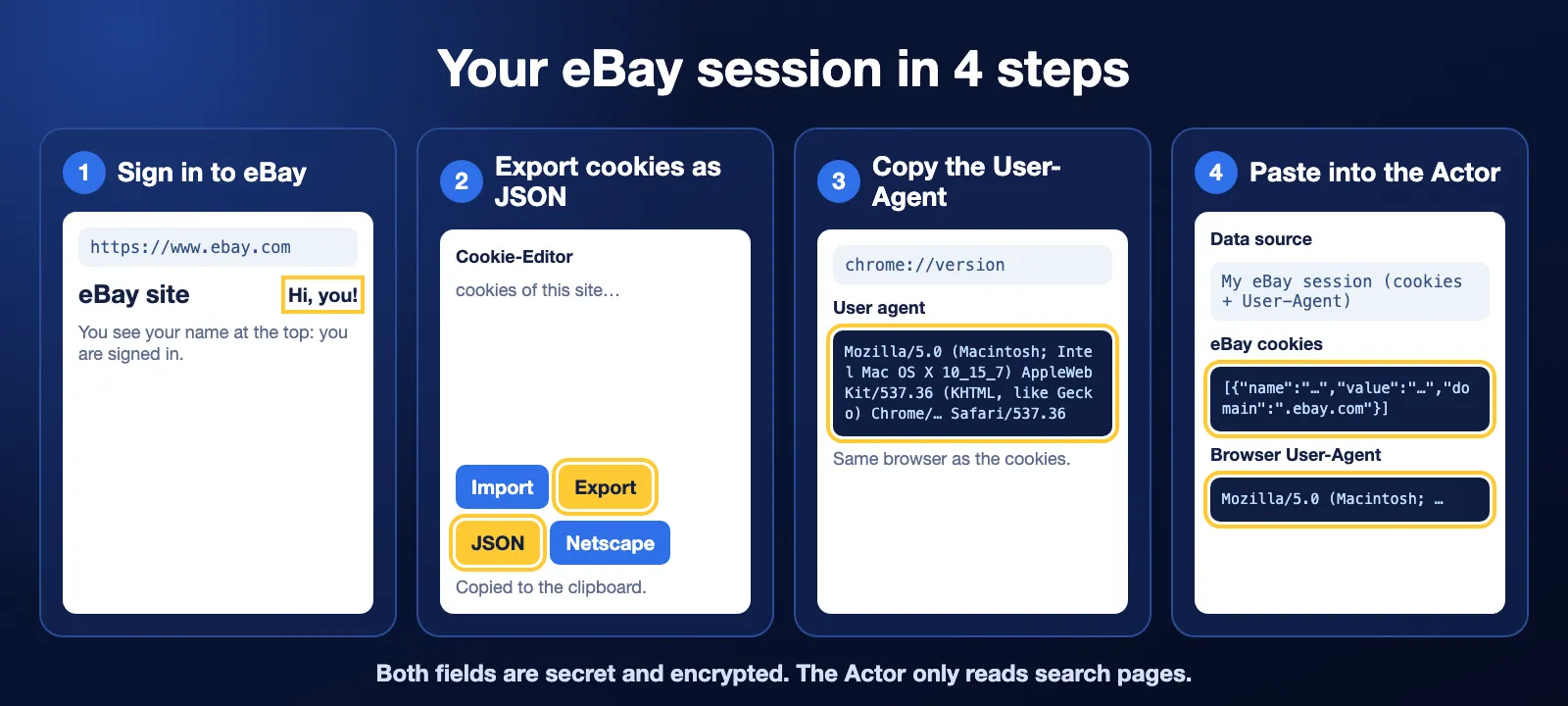
Use the browser where you are already signed in to the eBay site that you want to search (for example ebay.com). The cookies and the User-Agent must come from the same browser.
Cookies
- Install the free Cookie-Editor extension: Chrome, Firefox, Edge.
- Open the eBay site (for example
https://www.ebay.com) and check that you see your name at the top: you are signed in. - Click the Cookie-Editor icon in the toolbar.
- Click Export at the bottom, then JSON. The cookies are now copied.
- In the Actor input, paste them into eBay cookies (
ebayCookies).
User-Agent
- In the same Chrome, open
chrome://versionin the address bar. - Copy the full User agent line, for example
Mozilla/5.0 (Macintosh; Intel Mac OS X 10_15_7) AppleWebKit/537.36 (KHTML, like Gecko) Chrome/…. - In Firefox or Safari, open a "what is my user agent" page and copy the text.
- Paste it into Browser User-Agent (
userAgent).
Keep your session safe
- Both fields are secret: Apify stores them encrypted. The Actor deletes its copy of the input when the run starts and never writes cookies to the log or the results.
- The Actor only reads search pages. It never buys, bids, sends messages or changes your account.
- It reads one page at a time with 2.5–5 seconds between pages and 6–12 seconds before each new search, from one residential IP in the site's country.
- Automated reading can still make eBay show a security check (captcha) or sign you out. Use a modest number of searches per run (we tested up to 20). If eBay shows a check, the run stops at once to protect the account. Use it at your own risk.
- Cookies expire. When eBay signs you out, export them again.
- eBay's User Agreement limits automated access to its site. You decide whether to use your account this way and you are responsible for it.
Sold-data API services (bring your own key)
Pick one service, create an account on its site, copy your API key from its dashboard and paste it into API key (apiKey). You pay the service directly; this Actor only adds its own small fee per page (see Pricing). The Actor reads your remaining quota first (where the service shows it) and never asks for more than is left.
Service (dataSource) | Free plan | Cheapest paid plan | Rows per request | About $ per 1000 rows | eBay sites | Sign up |
|---|---|---|---|---|---|---|
CompSniper (compsniper) | 100 requests / month | $9 / month for 2,000 requests | up to 240 | $0.02–0.08 | all 8 | pricing, sign up |
trawl (trawl) | 250 credits / month | $20 / month for 3,000 credits | up to 100 per credit | about $0.07 | com, co.uk | pricing, sign up |
OpenWebNinja (openwebninja) | 100 requests / month | $25 / month for 10,000 requests, or $0.005 per request | up to 60 | about $0.04–0.08 | all 8 | pricing |
eBay Sold Listings API (esl) | 50 requests / month | $9.99 / month for 3,000 requests | up to 240 (we saw 24–60) | $0.01–0.14 | all 8 | pricing, sign in |
SoldComps (soldcomps) | 100 requests / month | $9 / month for 2,000 requests, or $3 per 1,000 requests | up to 240 | $0.01–0.02 | all 8 | pricing, sign up |
Prices as of October 15, 2026, when this Actor was prepared. Check the current prices on the provider's site. Each service has its own terms of use, and some (for example SoldComps and OpenWebNinja) limit reselling or bulk export of their data. Read them before you use the data in your product.
How to get a key (same idea for every service): sign up on the service's site → open its dashboard or API keys page → create or copy the key → paste it into apiKey and choose the same service in Data source.
Use cases
| Buyer job | Input | Output | Key fields | Next step |
|---|---|---|---|---|
| Price check before buying or listing | queries: one model, maxItems: 50 | sold listings | soldPrice, condition, soldAt | median price in a spreadsheet |
| Auction vs fixed price | buyingFormat: auction or buy_it_now | sold listings | listingType, bids, soldPrice | compare two runs |
| Weekly price tracking | soldWithinDays: 7, a schedule | sold listings of the last week | soldAt, soldPrice, itemId | Google Sheets or a webhook |
| Clean list for one exact model | strictTitleMatch: true, minPrice | only matching titles | title, soldPrice, epid | your pricing tool via API |
Input
Input fields
| Field | Plain name | Type | Required | Default / prefill | Allowed values | What it changes | Recommendation |
|---|---|---|---|---|---|---|---|
queries | Search queries | array of strings | yes | prefill ["iphone 13"] | 1–20 searches | one eBay sold search per line; repeated lines are removed | short, specific words, like on eBay |
site | eBay site | string | no | com | com, co.uk, de, fr, it, es, ca, com.au | marketplace and currency | the site whose cookies you pasted |
maxItems | Max sold listings per query | integer | no | default 100, prefill 20 | 1–2000 | stops each search after this many saved rows | start small; each row is paid |
soldWithinDays | Sold within the last N days | integer | no | empty = all eBay shows | 1–90 | keeps only recent sales; stops paging when sales get older | 7 or 30 for fresh prices |
condition | Condition | string | no | any | any, new, used | eBay condition filter | used for resale prices |
minPrice | Min price | number | no | empty | ≥ 0, site currency | eBay price filter (without shipping) | removes accessories and parts |
maxPrice | Max price | number | no | empty | ≥ 0, site currency | eBay price filter (without shipping) | removes bundles |
buyingFormat | Buying format | string | no | all | all, auction, buy_it_now | only auctions or only fixed price | auction for market value |
strictTitleMatch | Every query word must be in the title | boolean | no | false | true / false | drops titles that miss any query word | turn on for exact models |
dataSource | Data source | string | no | ebayCookies | ebayCookies, compsniper, trawl, openwebninja, esl, soldcomps | where the data comes from | see the table above |
ebayCookies | eBay cookies | secret string | for ebayCookies | empty | Cookie-Editor JSON export | your eBay session | export again when expired |
userAgent | Browser User-Agent | secret string | for ebayCookies | empty | full User-Agent text | must match the browser of the cookies | copy from chrome://version |
apiKey | API key | secret string | for an API source | empty | your key from that service | the service you pay | check your plan's quota first |
Empty input: the run stops with a clear message if queries is empty, or if the cookies, User-Agent or API key for the chosen source is missing.
Interacting settings
| When | Settings | What happens | Cost effect |
|---|---|---|---|
| Filters drop rows | minPrice, maxPrice, condition, buyingFormat | eBay (or the API) filters before sending the page | fewer rows; each page read is still charged |
| Date window | soldWithinDays + maxItems | stops at whichever comes first | old pages are not read |
| Exact titles | strictTitleMatch | rows are dropped after the page is read | fewer paid rows, same pages |
| Cookies and site | ebayCookies + site | the cookies must be from the same eBay site | wrong site → the run stops at once, before any page |
| API site support | dataSource + site | trawl covers only com and co.uk | other sites → the run stops at once |
Input examples
First run (prefill)
Expected: 20 sold iPhone listings from ebay.com. Cost: about $0.097 on the Free plan (1 start + 1 page + 20 rows).
Used auctions of the last week, with your API key
Expected: up to 100 used auction sales from the last 7 days with bids. The service uses your own quota; the Actor checks it first.
Output
Results are in the run's Dataset, view Sold listings. Download as JSON, CSV, Excel or HTML, or read them by API.
Output example
One full row from the prefill run with your eBay session. null means eBay or the API did not show that value; it is never a guess.
Output fields
| Field | Meaning | Type | Can be null? | Example |
|---|---|---|---|---|
itemId | eBay item number | string | no | 920040007475 |
title | listing title | string | rarely | Apple iPhone 13 - 128 GB - Blue (Unlocked) |
url | item page on the chosen site | string | no | https://www.ebay.com/itm/920040007475 |
soldPrice | sale price without shipping | number | when not shown | 230 |
soldPriceMax | highest price of a price range (variation listing) | number | yes, if not a range | null |
priceType | sold = price paid; range = variations from soldPrice to soldPriceMax; best_offer_listed = a best offer was accepted below this listed price | string | no | sold |
currency | ISO currency code | string | when no price | USD |
shipping | shipping cost; 0 = free shipping | number | yes, when not shown (often for paid shipping with your eBay session) | 0 |
totalPrice | soldPrice + shipping when both are known | number | yes | 230 |
soldAt | sale (end) date, YYYY-MM-DD; eBay shows no time | string | rarely | 2026-10-14 |
condition | condition as on eBay | string | yes | Pre-Owned |
bids | number of bids for auctions | integer | yes, if not an auction | 14 |
listingType | auction, buy_it_now or best_offer | string | yes | buy_it_now |
bestOfferAccepted | true when eBay marks "Best offer accepted" | boolean | yes, if unknown | false |
seller | public seller username | string | yes (always null with your eBay session) | null |
sellerFeedbackScore | seller feedback count | integer | yes | null |
sellerPositivePercent | seller positive feedback % | number | yes | null |
location | item location | string | yes | United States |
image | main photo URL | string | yes | https://i.ebayimg.com/…/s-l1600.webp |
epid | eBay catalog product id | string | yes | 22049282568 |
site | eBay site searched | string | no | com |
query | search that found the row | string | no | iphone 13 |
source | data source used | string | no | ebayCookies |
fetchedAt | when the row was saved (ISO 8601) | string | no | 2026-10-15T01:11:41.395Z |
Run summary
Every run also writes a RUN_SUMMARY record in the Key-value store. It shows the status of each search (complete, no_results, error), how many rows were saved or skipped (duplicates, older than soldWithinDays, title mismatch), why the run stopped, the pages read and, for an API source, your quota before and after.
| Situation | What you get | What to do |
|---|---|---|
| Normal | rows in the Dataset, status COMPLETE | open the Dataset |
| No sold listings for the search and filters | 0 rows, status NO_RESULTS, run Succeeded | widen the filters or check the words |
| Stopped early (your max cost per run, run time limit, API quota) | saved rows, status PARTIAL with the reason, run Succeeded | raise the limit or lower maxItems |
| Session expired, captcha, wrong key, source down | saved rows (if any), clear error, run Failed | see Troubleshooting |
Pricing and limits
This Actor uses pay per event. You pay for what the Actor did; Apify platform usage is included.
| Event | When it is charged | Free | Bronze | Silver | Gold+ |
|---|---|---|---|---|---|
| Actor start | once per run (per GB of memory; default 1 GB) | $0.005 | $0.005 | $0.005 | $0.005 |
| Sold listing | each row saved to the Dataset | $0.0036 | $0.0032 | $0.0027 | $0.00225 |
| eBay results page | each eBay sold search page read with your eBay session (up to 240 listings), even if your filters keep none | $0.02 | $0.02 | $0.02 | $0.02 |
| API results page | each results page read from your API service | $0.005 | $0.005 | $0.005 | $0.005 |
Why a page fee: one eBay page is about 2–4 MB through a residential IP in the site's country. That cost is the same when your filters keep 0 rows. Blocked or failed requests are not charged.
The API services charge you separately with your own key (see their prices above).
Cost examples (Free plan, your eBay session)
| Run | Pages | Rows | Price |
|---|---|---|---|
| Prefill: 1 search, 20 rows | 1 | 20 | $0.005 + $0.02 + $0.072 = $0.097 |
| 1 search, 100 rows | 1 | 100 | $0.005 + $0.02 + $0.36 = $0.385 |
| 1 search, 1000 rows | 5 | 1000 | $0.005 + $0.10 + $3.60 = $3.705 |
| 5 searches, no sold listings match | 5 | 0 | $0.005 + $0.10 = $0.105 |
- Max cost per run: set it in the run options. The Actor stops before a page or row it cannot pay for, keeps what it saved and ends Succeeded with status
PARTIAL. - Failed run: you pay only the start and the pages that were really read before the stop.
- Limits we tested: up to 4000 rows in one run (about 7 minutes) and 20 searches in one run. eBay usually gives about 2000 sold rows per search (9 pages). A run stops reading at 30 minutes and saves a summary.
- Speed: about 240 rows in 5 seconds; 1000 rows in about 30 seconds (1 GB memory). Each new search waits 6–12 seconds.
API, export and integrations
- API: start a run with
POST https://api.apify.com/v2/acts/cliqtomedia~ebay-sold-listings/runsand the input JSON; read rows from the run's Dataset. - Export: JSON, CSV, Excel, XML or HTML from the Output tab.
- Scheduling: create a Task with your input and add a schedule (for example weekly with
soldWithinDays: 7). - Webhooks / no-code: send the Dataset to Google Sheets, Make, Zapier or n8n with Apify integrations.
Use with AI agents (MCP)
- MCP server with only this Actor:
https://mcp.apify.com?tools=cliqtomedia/ebay-sold-listings - Smallest useful input (the agent also needs the user's secret access fields):
- Key output fields:
soldPrice(sale price without shipping),currency,soldAt(sale date),condition,listingType(auction,buy_it_now,best_offer). - A 20-row run takes about 10 seconds and costs about $0.10 on the Free plan. Keep
maxItemssmall; each row is paid. The run needs the user's own eBay session or API key; without them it stops with a clear message.
Troubleshooting
"eBay asked to sign in: the cookies are expired or signed out"
Symptom: the run fails at the first page. Reason: eBay ended the session, or you exported the cookies while signed out. Action: sign in to the eBay site in your browser, export the cookies again and paste them.
"eBay refused the request or showed a security check (captcha)"
Symptom: the run stops after some pages; saved rows stay in the Dataset. Reason: eBay wants to check that a person is using the account. Action: open the eBay site in the same browser, pass the check, export fresh cookies and keep the same User-Agent. Use fewer searches per run.
"eBay showed active listings instead of sold ones"
Reason: the session is not signed in, so eBay ignored the Sold filter. Action: export the cookies again while signed in.
The cookies are for another site
Symptom: the run fails in 1 second with a message about the site.
Action: pick the same site as the eBay site of your cookies, or export cookies from the site you want.
"did not accept your API key" or "has no requests left"
Action: copy the key again from the service dashboard, or top up your plan on the service's pricing page. The Actor checks the quota before it starts and never asks for more than is left.
0 rows with status NO_RESULTS
This is a normal result: eBay has no sold listings for these words and filters in the last 90 days. Remove a filter or use shorter words. You pay the start and the pages read.
FAQ
Do I need an eBay account?
Yes, for the default My eBay session source: eBay shows sold listings only to signed-in users. If you do not want to use your account, use an API service with your own key.
Is it safe for my eBay account?
The Actor only reads search pages, slowly, from one IP in your site's country, and stops at the first security check. It never buys or changes anything. But any automated use can draw eBay's attention, so use it at a modest volume and at your own risk.
Why is shipping or seller empty?
With your eBay session, eBay's sold result cards do not show the seller and often do not show the paid shipping amount. The Actor writes null instead of guessing. Some API sources return them.
How fresh and complete is the data?
Rows come live from eBay (or the API) at run time, mostly newest sales first (eBay's own sort). eBay keeps mostly 90 days of sales and shows at most about 2000 results per search; use narrower words or filters for more.
Why do I see other models (for example iPhone 12) for "iphone 13"?
eBay's own search also returns related items. Turn on strictTitleMatch to keep only titles with every word.
Related Actors
- Historical FX Rates Converter — convert sold prices from ebay.co.uk, ebay.de and other sites into one currency on the sale date.
Support
For a bug or a question, open an issue on the Issues tab. Add the run ID, the data source and the error text. Never post cookies, your User-Agent together with cookies, or API keys.


