
LEI Lookup & Change Monitor (GLEIF)
Pricing
from $1.75 / 1,000 lei records
LEI Lookup & Change Monitor (GLEIF)
Look up LEI codes or search legal entities by name in GLEIF data: legal name, jurisdiction, entity and registration status, renewal dates, addresses, direct and ultimate parent or reporting exception, and change alerts between runs.
Pricing
from $1.75 / 1,000 lei records
Rating
0.0
(0)
Developer

Cliqto Media
Maintained by CommunityActor stats
0
Bookmarked
2
Total users
1
Monthly active users
a day ago
Last modified
Categories
Share
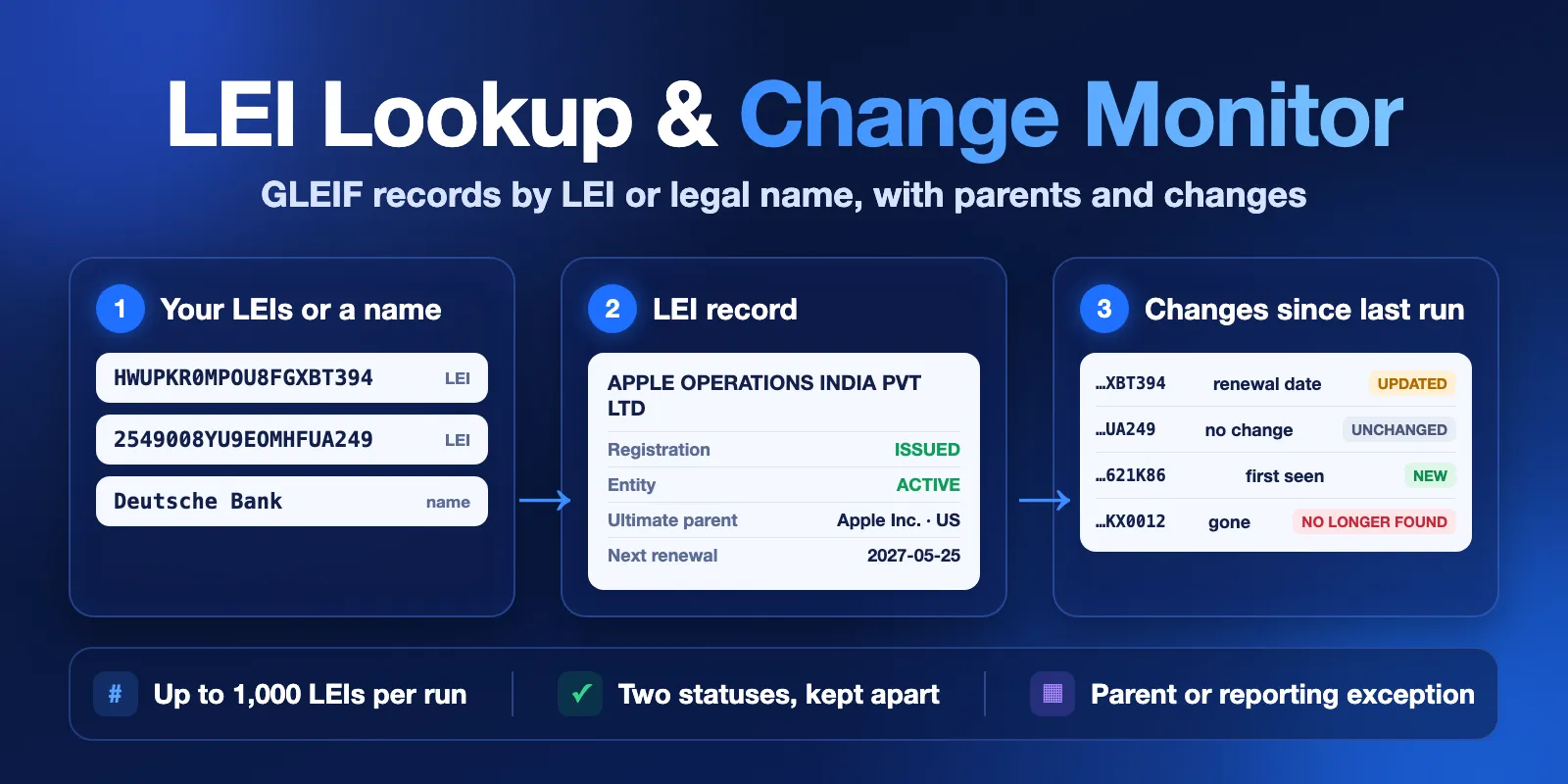
LEI Lookup & Change Monitor checks Legal Entity Identifiers (LEI) in the public GLEIF data. Add up to 1,000 LEI codes, or search by legal name. You get one row per entity with the legal name, jurisdiction, legal form, entity status and registration status, renewal date, addresses, the issuer (LOU) and the direct and ultimate parent or the reporting exception. It can also show what changed since your last run.
It is made for KYC and onboarding teams, compliance analysts and data teams who keep LEI lists up to date. No login or API key is needed. The form example (3 LEIs) finishes in a few seconds and costs about $0.0085.
Contents
- What it does
- Quick start
- Input
- Output
- Pricing
- Use cases
- Change monitoring
- API and integrations
- Limits
- Troubleshooting
- FAQ
- Data source and licence
- Support
What it does
The Actor reads the public GLEIF API live. It has two ways to find entities, and you can use both in one run:
- LEI lookup. Each LEI is an exact match. The Actor checks the ISO 17442 check digits first. A code with wrong check digits gets an
errorrow (INVALID_LEI) and no request. A valid code that GLEIF does not know gets anot_foundrow. No input is lost. - Name search. GLEIF searches the words in legal names and other names (trade, previous and transliterated names). The Actor reads up to 200 candidates, puts exact and close name matches first and returns
maxResultsrows. You can filter by country and registration status.
With includeParents on (default), each row also has the direct and ultimate accounting-consolidation parent: the parent LEI, name, country and registration status. When an entity reports no parent, you get the reporting exception reason instead, for example NATURAL_PERSONS or NON_CONSOLIDATING.
Good fit
- Check the LEI of a counterparty, supplier or fund before onboarding or a trade report.
- Find LEIs that lapsed or must be renewed soon (
registrationStatus,daysUntilRenewal). - Find the LEI of a company when you only know its name.
- See the parent company, or the reason the entity gives for not reporting one.
- Watch a list of LEIs and get only the changes on each run.
Not a fit / limits
- This is reference data, not a counterparty approval. The Actor never says that an entity is safe, approved or risky.
- A missing LEI is not a risk signal. Many legal entities do not need an LEI.
LAPSEDmeans the LEI registration was not renewed on time. It does not mean that the company was dissolved. ReadentityStatusfor that.- A reporting exception is not proof that the entity has no parent. It is the reason the entity gave for not reporting one.
- No children list, no full ownership tree, no ISIN, BIC or other code mappings, and no bulk Golden Copy download.
Quick start
- Open the Input tab. The form already has three LEIs: Apple Inc., Microsoft Corporation and Deutsche Bank AG.
- Click Start.
- Open the Overview view in the Output tab. Check
legalName,registrationStatus,entityStatusandnextRenewalDate. - Replace the codes with your own list (up to 1,000), or clear the list and type a name in
legalName.
Expected result: three complete rows in a few seconds. All three companies report a reporting exception instead of a parent.
Input
Add LEI codes, a name, or both. A run with neither is rejected with INVALID_INPUT and makes no request.
| Field | Type | Default | Allowed values | What it does |
|---|---|---|---|---|
leis | array of strings | none (form example: 3 LEIs) | up to 1,000 codes of 20 characters | Exact lookup. Lower case, spaces and duplicates are cleaned up. You can paste several codes separated by commas or new lines into one entry. Codes with wrong check digits get an INVALID_LEI row without a request. |
legalName | string | none | any text | Name search in legal and other names, for example Deutsche Bank. LEIs that are already in leis are not repeated. |
country | string | none | ISO 3166-1 alpha-2, e.g. DE, US, GB | Name search only: country of the legal address. |
registrationStatus | string | ANY | ANY, ISSUED, LAPSED, PENDING_TRANSFER, PENDING_ARCHIVAL, MERGED, RETIRED, ANNULLED, DUPLICATE, TRANSFERRED, CANCELLED | Name search only: keeps LEIs with this registration status. |
maxResults | integer | 10 | 1–200 | Maximum entities from the name search. |
includeParents | boolean | true | Adds the direct and ultimate parent or the reporting exception. Off: parent fields are null and the run needs fewer requests. | |
monitorKey | string | none | 1–40 letters, digits or dashes, e.g. supplier-watchlist | Turns on change monitoring. See Change monitoring. |
previousDatasetId | string | none | Dataset ID of an earlier run of this Actor | Compares with that Dataset instead of a saved snapshot. Use either this or monitorKey. |
onlyChanges | boolean | true | With a comparison: unchanged LEIs are not written, so you see only changes. Not-found and error rows are always written. No effect without a comparison. |
country, registrationStatus and maxResults change only the name search. They do not filter the leis list.
Input examples
Check a subsidiary and see its parent:
Find German entities named "Deutsche Bank" with a current LEI:
Watch a supplier list and see only changes:
Output
Each Dataset row is one LEI. Use the Overview, Ownership and Changes views, or export all fields. The key-value store has a RUN_SUMMARY record with the run status, counts, search totals and the data source.
Row status
status | Meaning | Charged |
|---|---|---|
complete | GLEIF has a record for this LEI. Parent data is there if you asked for it. | LEI record |
partial | The record was found, but some parent details could not be read. Read statusReason. | LEI record |
not_found | A valid LEI that GLEIF has no record for. Often a typo that still passes the check digits, or a very new code. | LEI check |
error | INVALID_LEI (wrong length, characters or check digits) or a source failure (SOURCE_UNAVAILABLE, RATE_LIMITED, DEADLINE_REACHED, …). | free |
Two statuses, kept apart
| Field | Values | Meaning |
|---|---|---|
registrationStatus | ISSUED, LAPSED, RETIRED, MERGED, ANNULLED, DUPLICATE, PENDING_TRANSFER, PENDING_ARCHIVAL, … | State of the LEI registration. LAPSED = not renewed on time. |
entityStatus | ACTIVE, INACTIVE, null | State of the legal entity. null when GLEIF publishes none, for example for annulled LEIs. |
A LAPSED LEI with entityStatus: "ACTIVE" is common. The company exists, but it did not pay to renew its LEI.
Parent types
directParentType / ultimateParentType | Meaning |
|---|---|
parent | A parent LEI is reported. …ParentLei, …ParentName, …ParentCountry and …ParentRegistrationStatus are filled. |
reporting_exception | The entity gave a reason for not reporting a parent: …ParentExceptionReason, e.g. NATURAL_PERSONS, NON_CONSOLIDATING, NO_KNOWN_PERSON, NON_PUBLIC. Not proof that no parent exists. |
not_reported | GLEIF has neither a parent link nor an exception for this level. |
not_available | GLEIF publishes no parent data at all for this record, for example for some retired LEIs after a merger. |
null | You turned includeParents off. |
Output example
A trimmed row for the subsidiary example above:
All fields
| Field | Meaning | Example |
|---|---|---|
status, statusReason, errorCode | Row result, see above | "complete", null, null |
input, inputType | Your value and where it came from (lei or search) | "2549008YU9EOMHFUA249", "lei" |
searchQuery, searchRank | Name search text and position (1 = best match); null for LEI rows | "Deutsche Bank", 1 |
lei, checksumValid | The LEI in upper case, and whether its check digits are valid | "2549008YU9EOMHFUA249", true |
legalName, legalNameLanguage | Registered legal name and its language | "APPLE OPERATIONS INDIA PRIVATE LIMITED", "en" |
otherNames | Other names with type, e.g. PREVIOUS_LEGAL_NAME, TRADING_OR_OPERATING_NAME | [{"name": "Apple Computer, Inc.", "type": "PREVIOUS_LEGAL_NAME"}] |
jurisdiction | Legal jurisdiction (country or subdivision) | "IN", "US-CA" |
legalFormCode, legalFormOther | ISO 20275 legal form (ELF) code, or free text when there is no code | "YSP9", null |
entityCategory, entitySubCategory | GENERAL, BRANCH, FUND, SOLE_PROPRIETOR, … | "GENERAL" |
entityStatus | ACTIVE, INACTIVE or null | "ACTIVE" |
entityCreationDate | Date the entity was formed | "2023-05-10T12:00:00Z" |
entityExpirationDate, entityExpirationReason | When and why the entity ended (DISSOLVED, CORPORATE_ACTION, OTHER) | null |
successorLei, successorName | Successor entity after a merger | null |
registrationStatus | LEI registration status | "ISSUED" |
initialRegistrationDate, lastUpdateDate, nextRenewalDate | LEI registration dates | "2027-05-25T14:07:19Z" |
daysUntilRenewal | Days from the run date to nextRenewalDate; negative = overdue | 225 |
managingLou | LEI of the issuer (Local Operating Unit) that manages the record | "5493001KJTIIGC8Y1R12" |
corroborationLevel | How the issuer checked the data: FULLY_CORROBORATED, PARTIALLY_CORROBORATED, ENTITY_SUPPLIED_ONLY | "FULLY_CORROBORATED" |
registeredAt, registeredAs | Business register (GLEIF RA code) and the entity's ID in it | "RA000394", "U72100KA2023PTC173466" |
legalAddressLines, legalCity, legalRegion, legalPostalCode, legalCountry | Legal address | "Bangalore", "IN-KA", "560067", "IN" |
hqAddressLines, hqCity, hqRegion, hqPostalCode, hqCountry | Headquarters address | |
directParentType, directParentLei, directParentName, directParentCountry, directParentRegistrationStatus, directParentExceptionReason | Direct parent, see Parent types | "parent", "HWUPKR0MPOU8FGXBT394", "Apple Inc." |
ultimateParentType, ultimateParentLei, ultimateParentName, ultimateParentCountry, ultimateParentRegistrationStatus, ultimateParentExceptionReason | Ultimate parent, same shape | |
hasDirectChildren, hasUltimateChildren | Whether GLEIF links child entities; null if unknown | false |
changeType, changedFields, previousValues | Change since the last run, see Change monitoring; null without a comparison | "updated", ["nextRenewalDate"] |
provider, sourceUrl, gleifRecordUrl | Data source, API URL and public GLEIF page of the record | "GLEIF" |
goldenCopyDate, fetchedAt | GLEIF data publish date and our read time | "2026-10-12T00:00:00Z" |
null means GLEIF has no value. Arrays are empty ([]) when there is nothing.
Moving from another GLEIF scraper
If your workflow used other field names, map them like this:
| Common field name | Field in this Actor |
|---|---|
creationDate | entityCreationDate |
url | gleifRecordUrl |
scrapedAt | fetchedAt |
registeredAtId | registeredAt |
validationSources | corroborationLevel |
legalAddress (one string) | legalAddressLines + legalCity + legalPostalCode + legalCountry |
isLapsed | registrationStatus == "LAPSED" |
legalFormName | not included; use legalFormCode with the ISO 20275 ELF code list |
Run summary
RUN_SUMMARY.status is one of COMPLETE, PARTIAL, NOT_FOUND (no LEI has a record), NO_RESULTS (empty name search), NO_CHANGES (monitoring, nothing changed), CAPPED (stopped at your maximum cost), ERROR, INVALID_INPUT or CANCELLED. counts has rows by status, charged events and change types. warnings explains duplicates, a cut search and a new monitoring baseline.
Pricing
Pay per event. Platform usage is included.
| Event | Price | When |
|---|---|---|
| Actor start | $0.001 | Once per run (per GB of memory; the default 256 MB counts once) |
| LEI record | $0.0025 (Free plan); $0.0024 Bronze; $0.00225 Silver; $0.0021 Gold and higher | Each complete or partial row |
| LEI check | $0.0005 | Each not_found row, and each unchanged LEI that is not written because onlyChanges is on |
INVALID_INPUT runs, error rows and INVALID_LEI rows are free apart from the start. An empty name search costs only the start.
| Run (Free plan prices) | Events | Cost |
|---|---|---|
| 3 LEIs (form example) | start + 3 records | $0.0085 |
| Name search, 10 results | start + 10 records | $0.026 |
| 100 LEIs | start + 100 records | $0.251 |
| 1,000 LEIs | start + 1,000 records | $2.501 |
| 50 valid LEIs that GLEIF does not know | start + 50 checks | $0.026 |
| Monitoring 1,000 LEIs, nothing changed | start + 1,000 checks | $0.501 |
| Monitoring 1,000 LEIs, 20 changed | start + 20 records + 980 checks | $0.541 |
Set a maximum cost per run in the run options to cap your spend. The Actor stops before an event that does not fit, writes what it has and reports CAPPED. A 1,000-LEI lookup needs a limit of at least $2.51.
Use cases
| Buyer job | Input | Output | Key fields |
|---|---|---|---|
| Check counterparty LEIs (KYC, onboarding) | leis | one row per LEI | status, registrationStatus, entityStatus, legalName, jurisdiction |
| Find lapsed or soon-to-expire LEIs | leis | one row per LEI | registrationStatus, nextRenewalDate, daysUntilRenewal, managingLou |
| Find an LEI by company name | legalName + country | ranked rows | searchRank, lei, legalName, legalCity, registrationStatus |
| See the parent company | leis + includeParents | Ownership view | directParentType, directParentName, ultimateParentName, ultimateParentExceptionReason |
| Watch a list for changes | leis + monitorKey | Changes view | changeType, changedFields, previousValues |
Change monitoring
- Add your LEIs and a
monitorKey, for examplesupplier-watchlist. Run once. Rows getchangeType: "initial". This run is the baseline. - Run again with the same key, for example on an Apify schedule. Each LEI is now
new,updated,unchangedorno_longer_found. - Open the Changes view. For
updatedrows,changedFieldslists what changed andpreviousValuesshows the old values.
Tracked fields: legal name and other names, jurisdiction, legal form, category, entity status and expiration, successor, registration status, last update and renewal dates, issuer, corroboration, register ID, legal and HQ address, and the parent and exception fields. A field that was not requested this time (for example parents when includeParents is off) is not reported as a change.
The snapshot is saved in a key-value store named lei-gleif-lookup-monitor in your Apify account, one record per key (up to 20,000 LEIs). With onlyChanges on, a run with no changes writes no rows and ends with NO_CHANGES. previousDatasetId works the same way but compares with the Dataset of an earlier run.
API and integrations
Start a run with the same JSON input through the Apify API (POST /v2/acts/cliqtomedia~lei-gleif-lookup/runs), then read the Dataset. Export to CSV, Excel or JSON, or use the Overview, Ownership and Changes views. Join rows to your data on lei.
For monitoring, save the input as a task and add an Apify schedule. Connect the run to email, Slack, Google Sheets or a webhook with the usual Apify integrations, and send only the rows with a changeType other than unchanged.
Use with AI agents (MCP)
AI agents can call this Actor through the Apify MCP server: add https://mcp.apify.com?tools=cliqtomedia/lei-gleif-lookup to your MCP client (Claude, Cursor, VS Code and others). The MCP server needs your Apify account (OAuth sign-in or an Apify API token); GLEIF needs no key. The smallest useful input:
Key output fields for an agent: status, legalName, registrationStatus, entityStatus, nextRenewalDate, directParentType, ultimateParentName. A call with 10 LEIs usually finishes in a few seconds and costs about $0.026. Name search results are ranked by name match, so an agent should confirm an entity by lei. The output is reference data and never a counterparty approval.
Limits
- Up to 1,000 LEIs per run. In our test, 1,000 LEIs took about 20 seconds with parents.
- Name search: up to 200 candidates are read and ranked;
maxResultsup to 200. If GLEIF has more matches,RUN_SUMMARY.search.truncatedistrue. Addcountry,registrationStatusor a longer name. - The name search matches words. Symbols, HTML or very short words give unrelated results. Always check
legalNameandleibefore you use a search result. - The Actor sends at most one request per second to GLEIF, and stops source work after 240 seconds.
- Data is as fresh as the GLEIF API, which follows the daily Golden Copy.
goldenCopyDateshows the publish date.
Troubleshooting
| Symptom | Check | Action |
|---|---|---|
INVALID_LEI error row | checksumValid, statusReason | The code has the wrong length, characters or check digits. Copy it again from the source. |
not_found for a code you trust | checksumValid is true | GLEIF has no record. The code may have a typo that still passes the check, or it is very new. Search by name to find the right LEI. |
LAPSED registration | entityStatus | The LEI was not renewed. The company may still be active. |
| Parent fields are empty | directParentType, directParentExceptionReason | Read the type: an exception reason, not_reported or not_available is a valid answer. |
partial rows | statusReason | Parent names could not be read this time. Run the same LEIs again. |
| Search found the wrong company | searchRank, legalName, legalCountry | Add country, use the full legal name, or look up by LEI. |
CAPPED | RUN_SUMMARY.counts.notWrittenCapped | Raise the maximum cost per run, or split the list. |
ERROR or SOURCE_UNAVAILABLE rows | RUN_SUMMARY.message, http | GLEIF did not answer. Run again later; error rows are free. |
FAQ
Do I need a GLEIF account or API key?
No. GLEIF data is open. You only need your Apify account.
Does this Actor tell me if a counterparty is safe?
No. It returns public reference data from GLEIF. Your own policy decides what a status means for you. A missing or lapsed LEI is not, on its own, a sign of risk.
Why are some parents shown as an exception and not as a company?
Entities report their parents to their LEI issuer. When they do not, they give a reason, like NATURAL_PERSONS (owned by people) or NON_CONSOLIDATING. The Actor shows that reason. It does not guess a parent.
How fresh is the data?
Each run reads GLEIF live. goldenCopyDate is the date of the GLEIF data, and fetchedAt is when the Actor read it.
What licence does the data have?
GLEIF publishes LEI data under the CC0 1.0 licence. Read the GLEIF terms of use for your case. Do not use the GLEIF name or logo in a way that suggests a link with GLEIF.
Data source and licence
Data: Global Legal Entity Identifier Foundation (GLEIF), from the GLEIF API, published under CC0 1.0. Each row links to the public GLEIF LEI search page of the record. This Actor is independent. It is not affiliated with or endorsed by GLEIF.
Support
Use the Issues tab of this Actor. Add the run ID, the input mode (LEIs, name search or monitoring) and the statusReason or errorCode you saw. Do not send API tokens or private data.


