LLM Web Data Extractor for OpenAI, Anthropic, Gemini Keys
Pricing
from $1.40 / 1,000 page extracteds
LLM Web Data Extractor for OpenAI, Anthropic, Gemini Keys
Turn public web pages into structured JSON with your own OpenAI, Anthropic or Gemini API key. List the fields you want or paste a JSON Schema; get one clean row per page with the tokens your key used. No login, no scraping code.
Pricing
from $1.40 / 1,000 page extracteds
Rating
0.0
(0)
Developer

Cliqto Media
Maintained by CommunityActor stats
0
Bookmarked
2
Total users
1
Monthly active users
8 days ago
Last modified
Categories
Security
Limited permissionsShare
Turn public web pages into structured JSON with your own OpenAI, Anthropic or Google Gemini API key: give page URLs and the fields you want, and get one row per page with the values and the tokens your key used. A typical run reads one page in a few seconds and costs $0.008 on Apify (run start $0.005 + $0.003 for one page with data); your LLM tokens are billed by your provider.
Use it when you need the same fields from many different sites and do not want to write selectors. The smallest run is one URL, two field names and your API key.
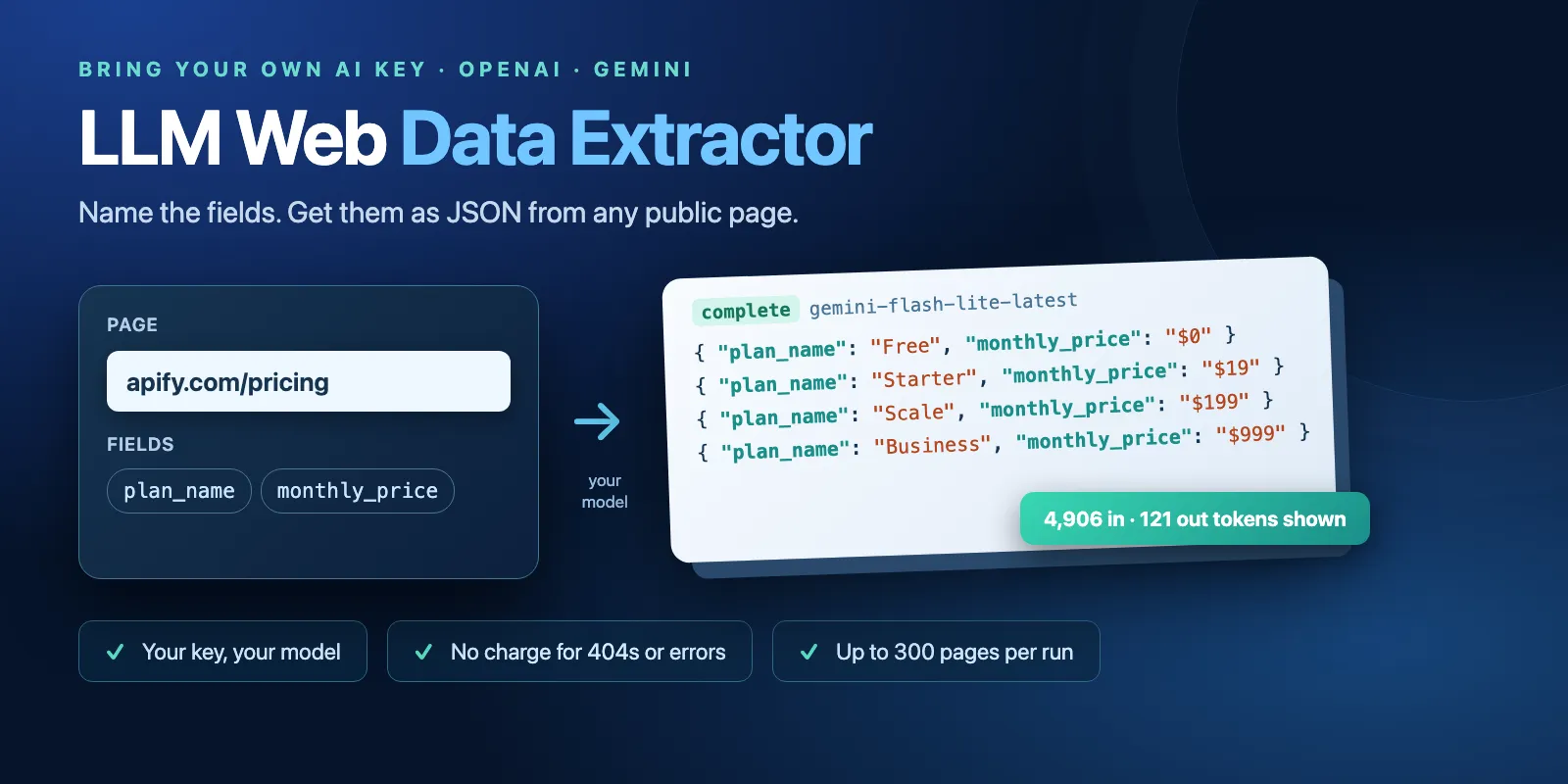
Table of contents
- What it does
- Your API key is required
- Quick start
- Use cases
- Input
- Output
- Pricing and limits
- API, export and integrations
- Troubleshooting
- FAQ
- Support
What it does
The Actor downloads each public page, turns its HTML into clean text (Markdown) and sends it to the model you choose, with your field list or JSON Schema. The model answers with JSON that matches your fields. You get one Dataset row per URL with the data, the status, the model and the input and output tokens your key used.
- Values that are not on the page come back as
null. The model is told never to guess. - List mode returns every record on a page (all plans, all products, all people) in
data.items. - A page where the model found none of your fields is marked
not_found/NO_DATA; only the $0.001 page read is charged, not the extraction.
Good fit
- The same fields (name, price, date, contact page, specs) from pages on many different sites.
- Pricing tables, product pages, team pages, event pages, job posts: anything readable in the page HTML.
- Teams that already have an OpenAI or Gemini key and want to pay their provider directly for tokens.
Not a fit / limits
- Pages that build their content with JavaScript. They are reported as
JS_REQUIREDand no model call is made. - Pages behind a login, paywall or bot protection. The Actor never logs in and never bypasses them; HTTP 401/403 pages are errors.
- Crawling a whole site. The Actor reads only the URLs you give (up to 300 per run). It does not follow links.
- Guaranteed accuracy. LLMs can make mistakes; check important values.
Your API key is required
This Actor does not include model access. You bring a key, and the provider bills its tokens to you.
| Provider | Get a key | Status |
|---|---|---|
| Google Gemini | aistudio.google.com/apikey (free tier available) | tested |
| OpenAI | platform.openai.com/api-keys | tested |
| Anthropic | console.anthropic.com/settings/keys | Anthropic: not tested with a live key; built to the public API docs |
- The key field is secret. Apify stores it encrypted; the Actor uses it only for this run and never writes it to logs, results or the run summary.
- The key is checked with a free model-info request before any page is read. A wrong key gives one
api_key_invalidrow and stops; no page is charged. - Without a key the run ends at once with one
api_key_requiredrow. No page is extracted or charged; only Apify's automatic run-start event (apify-actor-start) applies.
What the quota costs you. Each page is one model call. A typical page sends 1,000–10,000 input tokens (cap it with maxPageChars) and returns 50–500 output tokens. With the default gemini-flash-lite-latest, the Apify pricing page used 4,906 input and 121 output tokens; book product pages used about 600–1,300 input and 63–73 output tokens. Check your provider's current prices.
Quotas and rate limits are yours. Free tiers allow only a few requests per minute and per day. The Actor waits and retries on a rate limit. When your quota or credit runs out, the run keeps the pages already extracted, marks the rest skipped and ends with PARTIAL / QUOTA_LIMIT. Your provider's terms of use apply to your key. On Gemini's unpaid tier, Google may use the page text and answers to improve its products; use a paid key for private content.
Quick start
- Open the Input tab. The form is prefilled with
https://apify.com/pricingand two fields:plan_nameandmonthly_price, in list mode. - Keep LLM provider = Google Gemini (default) or pick OpenAI.
- Paste your key into Your API key.
- Click Start.
- Open the Output tab and check
statusanddata.items.
Expected result: one complete row with four plans and their monthly prices, plus the token count, in a few seconds.
Use cases
| Buyer job | Input path | Output entity | Key fields | Next integration |
|---|---|---|---|---|
| Compare competitor pricing | urls + fields, mode: list | one row per pricing page | data.items, status, fetchedAt | Google Sheets, CSV export |
| Product specs from many shops | urls + jsonSchema | one row per product page | data, truncated, status | Dataset API, webhook to your database |
| Company facts from About pages | urls + fields | one row per company page | data, pageTitle, finalUrl | CRM import via Make or Zapier |
| Track token use per page | any | one row per page | inputTokens, outputTokens, model | your cost report |
Input
Input fields
| Field | Plain name | Type | Required | Default / prefill | Allowed values | Effect | Recommendation |
|---|---|---|---|---|---|---|---|
urls | Page URLs | array of strings | yes | prefill https://apify.com/pricing | 1–300 public http(s) URLs | One model call per page | Duplicates are read once; empty lines are skipped |
fields | Fields to extract | key → description | yes, unless jsonSchema | prefill plan_name, monthly_price | up to 50 fields; type after a colon: price:number, count:integer, in_stock:boolean, tags:array | The keys of data | Short, clear descriptions help the model |
mode | One record or a list per page | enum | no | default single, prefill list | single, list | list puts all records in data.items | Use list for tables and catalogs |
provider | LLM provider | enum | no | gemini | gemini, openai, anthropic | Which API gets the key | Anthropic is not tested |
apiKey | Your API key | secret string | yes for any data | — | your provider key | Pays for tokens | Stored encrypted |
model | Model | string | no | empty = gemini-flash-lite-latest / gpt-5.4-mini / claude-haiku-5-5 | any model id your key can use | Quality, speed, token price | Reasoning models are slower and use more tokens |
jsonSchema | JSON Schema (advanced) | object | no | — | root object with properties, up to 20,000 characters | Replaces fields | For nested data and exact types |
instructions | Extra instructions | string | no | — | up to 4,000 characters | Extra hints for the model | Units, currency, what to skip |
maxPageChars | Max page characters sent | integer | no | 40,000 | 2,000–200,000 | Cuts long pages to cap your tokens | Raise it for very long pages (see Troubleshooting) |
maxConcurrency | Pages at the same time | integer | no | 3 | 1–10 | Speed | Lower it for a free-tier key |
keepBoilerplate | Keep navigation and footer | boolean | no | false | true / false | Sends menus and footers too | Only if your data is in the footer |
With no URLs the run does not start. With more than 300 URLs the run fails with INVALID_INPUT before any page is read.
Interacting settings
| When | Input A | Input B | Effective behavior | Cost/result effect |
|---|---|---|---|---|
| Both are set | jsonSchema | fields | jsonSchema wins; fields are ignored | none |
mode: list | mode | fields | Fields describe one record; the result is data.items | one charge per page, not per record |
| Long page | maxPageChars | page length | Text after the limit is cut; the row has truncated: true | more characters = more tokens on your key |
| Many URLs | urls | run timeout | 300 pages took about 18 minutes on a free Gemini key | raise the run timeout from the default 300 s |
Input examples
Pricing plans from one page (the prefill)
Expected behavior: one page is read and sent once to gemini-flash-lite-latest.
Expected output: one complete row with data.items (plan name and monthly price for each plan).
Cost note: $0.008 on Apify at the Free tier, plus about 5,000 input tokens on your key.
Typed fields from product pages
Expected output: two rows, each with data.title, data.price (a number) and data.in_stock (true or false).
Output
Output fields
| Field | Meaning | Type | Can be empty? | Example / enum |
|---|---|---|---|---|
url | The URL you gave | string | no | https://apify.com/pricing |
finalUrl | URL after redirects | string | yes, if the page was not reached | https://apify.com/pricing |
status | Row result | enum | no | complete, not_found, error, skipped, api_key_required, api_key_invalid |
data | Your fields, or items in list mode | object | yes, when no model answer | { "items": [ ... ] } |
provider | Provider used | string | no | gemini |
model | Model used | string | no | gemini-flash-lite-latest |
inputTokens | Input tokens billed to your key | integer | yes, when no model call | 4906 |
outputTokens | Output tokens billed to your key | integer | yes, when no model call | 121 |
reasoningTokens | Reasoning tokens, if the model reports them | integer | yes | 0 |
pageTitle | HTML title of the page | string | yes | Apify pricing - flexible plan + pay as you go · Apify |
pageChars | Characters of page text (Markdown) | integer | yes | 28144 |
truncated | The page text was cut at maxPageChars | boolean | yes | false |
fetchedAt | When the page was read (UTC) | string | no | 2026-10-22T05:50:56.165Z |
error | Why the row is not complete | object | yes | { "code": "NO_DATA", "message": "..." } |
Output entities and surfaces
| Situation | Where | Result shape | What to do |
|---|---|---|---|
| Normal page | Dataset (Output tab) | status: complete, data filled | Export or use data |
| Page without your data | Dataset | not_found / NO_DATA, tokens shown, $0.001 page read only | Check field names or maxPageChars |
| Page gone | Dataset | not_found / NOT_FOUND (HTTP 404/410), no model call | Fix the URL |
| Page can't be read | Dataset | error with error.code (JS_REQUIRED, HTTP_ERROR, INVALID_URL, LLM_TRUNCATED, ...) | See Troubleshooting |
| Run stopped early | Dataset + RUN_SUMMARY | rest of the rows skipped, summary PARTIAL with stopReason | Rerun the skipped URLs |
| Whole run | Key-value store RUN_SUMMARY | counts, total tokens, status, stopReason | Check after each run |
Output example
From a real prefill run (full row):
null in data means the model did not find that value on the page. It is not a zero and not an error.
Use case → fields
| Buyer job | Input path | Output entity | Key fields | Next integration |
|---|---|---|---|---|
| Pricing comparison | urls, fields, mode: list | pricing page | data.items, fetchedAt | Google Sheets |
| Product catalog | urls, jsonSchema | product page | data, status | Dataset API |
| Token cost report | any | page | inputTokens, outputTokens, model | CSV export |
Pricing and limits
Pricing unit
Pay per event:
| Event | Price | When |
|---|---|---|
Run start (apify-actor-start) | $0.005 per GB of run memory (default 1 GB = one event) | Every run, added by the Apify platform |
page-read | $0.001 | Your model answered for a page: status complete, or not_found / NO_DATA |
page-extracted | Free $0.002, Bronze $0.0018, Silver $0.0016, Gold $0.0014 | The answer had data: status complete |
A page with data costs both events: $0.003 at the Free tier, $0.0024 at Gold. A page where the model found none of your fields (NO_DATA) costs $0.001.
Not charged: 404 pages, errors (timeouts, blocked or JavaScript-only pages, model errors), skipped pages, runs without a key or with a wrong key (only the run start applies). Your LLM tokens are billed separately by your provider to your key; they are not part of the Apify price.
Stops that protect you:
- Max total charge (Apify run option): when the next page would go over it, the run stops, marks the rest
skipped/CHARGE_LIMITand endsPARTIAL. The model is not called for a page that cannot be charged. - No data at the start: if the model finds none of your fields on 10 pages before any page had data, the run stops with
PARTIAL/NO_DATA_STREAKto save your tokens. - Dead sites or provider: after 10 timeouts or connection/model errors in a row, or when no page finishes for 120 s, the run stops with
PARTIAL/SOURCE_FAILINGand marks the restskipped.
Cost examples
Measured Apify charges at the Free tier (tokens on your key are extra):
| Scenario | Input scope | Charged events | Apify charge | Stop/cap behavior |
|---|---|---|---|---|
| Prefill | 1 pricing page, list mode | 1 start + 1 page | $0.008 | — |
| Medium | 20 Wikipedia pages | 1 start + 20 pages | $0.065 | — |
| Large | 100 product pages | 1 start + 100 pages | $0.305 | ~5 min on a free Gemini key; raise the timeout |
| Maximum | 300 product pages | 1 start + 300 pages | $0.905 | ~18 min on a free Gemini key; raise the timeout |
| Few matches | 100 book pages, 2 with data | 1 start + 100 reads + 2 pages | $0.109 | ~6 min on a free Gemini key; raise the timeout |
| No key | any | 1 start | $0.005 | stops at once |
| All pages 404 | 300 URLs | 1 start | $0.005 | ~10 s, no model calls |
Limits
- Up to 300 URLs per run. Default timeout 300 s, memory 1 GB.
- Server HTML only, no JavaScript rendering, no login, no paywall or bot-protection bypass. Private and internal addresses are blocked.
- Pages up to 5 MB of HTML; text sent to the model up to
maxPageChars. - Each request to a site identifies itself as
llm-web-extractor-apify-actor.
API, export and integrations
- API: start the run with
POST https://api.apify.com/v2/acts/cliqtomedia~llm-web-extractor/runsand the same JSON as the Input tab; read rows from the run's default Dataset. - Export: JSON, CSV, Excel, XML or RSS from the Output tab or the Dataset API.
- Scheduling and webhooks: Apify schedules and webhooks work as for any Actor; pass the key in the saved input.
- No-code: Make, Zapier, n8n and Google Sheets integrations read the Dataset.
Use with AI agents (MCP)
- MCP server URL with only this Actor:
https://mcp.apify.com?tools=cliqtomedia/llm-web-extractor. - Smallest useful input:
{"urls": ["https://apify.com/pricing"], "fields": [{"key": "plan_name", "value": "Name of the pricing plan"}, {"key": "monthly_price", "value": "Monthly price"}], "mode": "list", "provider": "gemini", "apiKey": "YOUR_GEMINI_KEY"}. - Key output fields:
status(completemeans data),data(your fields ordata.items),error.code(why not complete),inputTokensandoutputTokens(tokens on your key). - Typical run: one page in 3–6 seconds for $0.008 at the Free tier. Limits: 300 URLs per run, an API key is required, pages must be public server HTML.
Troubleshooting
Rows are not_found with NO_DATA
Symptom: tokens are shown, but data is empty or all null.
Likely reason: the fields are not on the page, or they are below the maxPageChars cut (truncated: true). On long Wikipedia pages the population was after character 40,000.
Action: check the field names and descriptions; raise maxPageChars for long pages; use mode: list for tables.
Row error JS_REQUIRED
Symptom: no data and no tokens. Likely reason: the page builds its content with JavaScript; the server HTML is empty. Action: use a page that shows the data in its HTML, or a browser-based scraper for this site.
Run ends PARTIAL with QUOTA_LIMIT or RATE_LIMIT
Symptom: some rows are skipped.
Likely reason: your key ran out of quota or kept hitting the provider's rate limit.
Action: top up or wait for the reset, lower maxConcurrency, then rerun the skipped URLs.
Run ends PARTIAL with TIMEOUT
Likely reason: many pages and a slow (free-tier) key. Action: raise the run timeout in the run options, or split the URL list.
Run ends PARTIAL with SOURCE_FAILING
Symptom: many error rows with TIMEOUT, CONNECTION_FAILED, LLM_TIMEOUT or LLM_ERROR, then skipped rows.
Likely reason: the sites or your provider stopped answering.
Action: open one failed URL in a browser, check your provider's status page, then rerun the skipped URLs.
Row api_key_invalid or run fails with MODEL_UNAVAILABLE
Action: check that the key belongs to the selected provider; leave Model empty for the default, or pick a model your key can use.
FAQ
Do I need my own API key?
Yes. Without a key the run stops at once with one api_key_required row and only the run start is charged.
Is Anthropic supported?
The Anthropic option follows the public API docs, but Anthropic: not tested with a live key yet. Gemini and OpenAI are tested.
Why did a page cost tokens but only $0.001 on Apify?
The model read the page and found none of your fields (NO_DATA). Your provider bills those tokens; this Actor charges only the $0.001 page read, not the extraction.
Are the values always correct?
No guarantee: LLMs can make mistakes. The model sees only the page text, is told to use null instead of guessing, and treats the page as untrusted data. Check important values.
How fresh is the data?
Each page is downloaded during the run; fetchedAt shows when. Nothing is cached.
Support
For a bug, a question or a site that does not work, use the Actor's Issues tab on Apify or write to hello@cliqtomedia.com. Include the run ID, the provider and the error code. Never send your API key.