

Medium Article Scraper: Tags, Authors & Publications
Pricing
from $7.50 / 1,000 saved stories
Medium Article Scraper: Tags, Authors & Publications
Scrape the latest Medium stories by tag, author, publication or URL. Get title, author, date, tags, member-only flag, reading time and open-story text. No login.
Pricing
from $7.50 / 1,000 saved stories
Rating
0.0
(0)
Developer

Cliqto Media
Maintained by CommunityActor stats
0
Bookmarked
2
Total users
1
Monthly active users
5 days ago
Last modified
Share
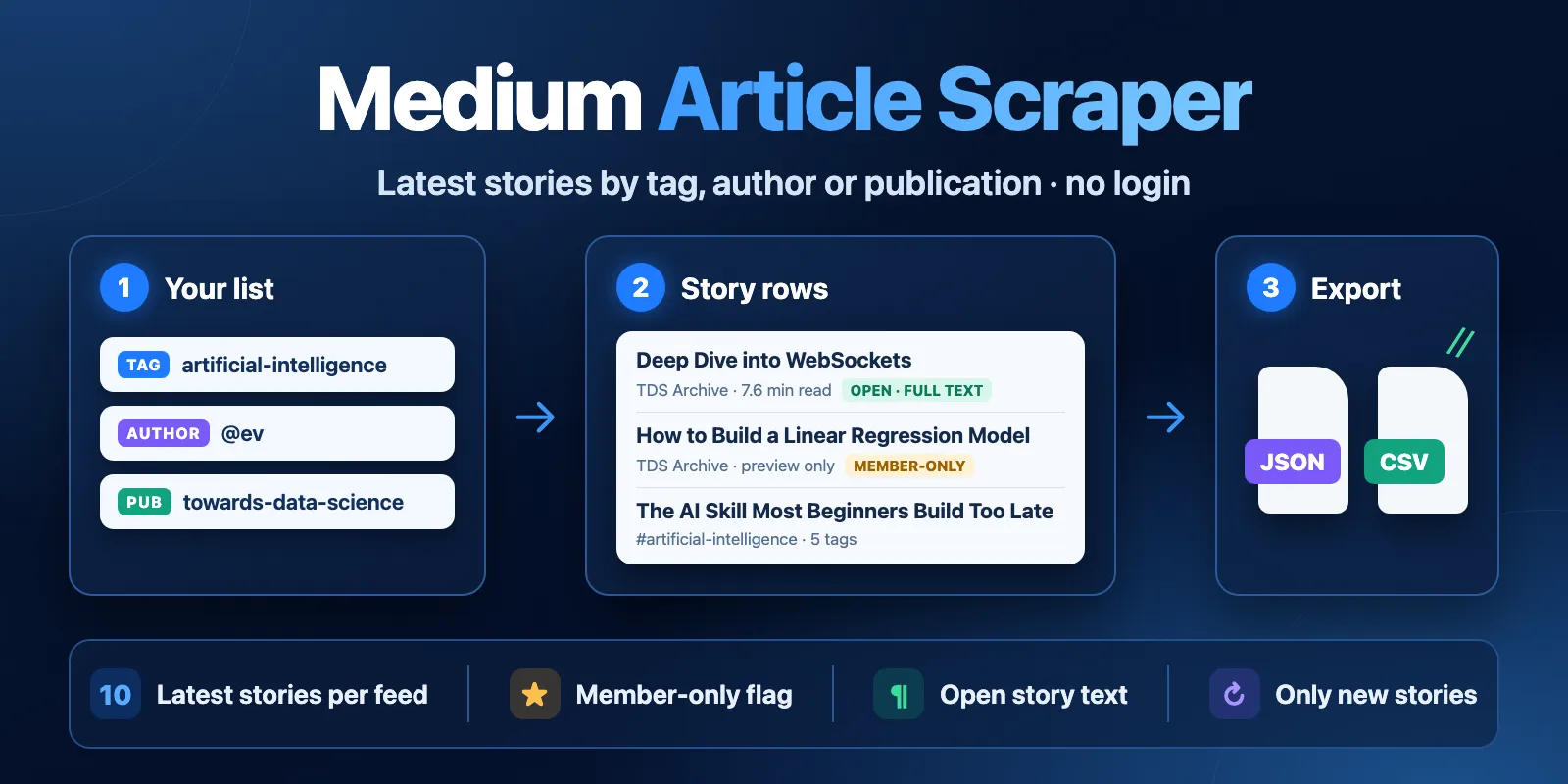
Medium Article Scraper reads the latest Medium stories by tag, author, publication or story URL. It returns title, author, publication, date, tags, member-only flag, reading time and the full text of open stories. No login, cookies or API key. The example run saves 10 stories about AI in about 5 seconds and costs $0.093 on the Free tier.
Contents
- What it does
- Data you get
- Quick start
- Input
- Input examples
- Output
- Pricing
- Use cases
- Scheduled runs and only new stories
- API, export and integrations
- Limits and partial results
- Troubleshooting
- FAQ
- Support
What it does
The Actor reads public Medium RSS feeds. Choose one mode and give a list:
- tag — topic tags, such as
artificial-intelligenceorMachine Learning; - author — usernames or profile links, such as
@evorev.medium.com; - publication — publication names or links, such as
towards-data-science; - article — story links. The Actor finds each story in its author or publication feed.
Every feed gives up to 10 latest stories. This is a Medium RSS limit: older stories and full archives are not available. One run reads up to 20 feeds and saves up to 200 stories.
Good fit
- Watch new stories on a topic, an author or a publication every day.
- Collect story metadata and open text for research, newsletters or AI tools.
- Check if a story is member-only before you share or analyze it.
Not a fit
- Full author archives or search by keyword. RSS gives only the latest 10 stories.
- Claps, responses, followers or view counts. RSS does not have them.
- Text of member-only stories. The Actor does not log in and does not bypass the paywall; you get a preview flag only.
Data you get
Each row is one story: id, url, title, subtitle, author (authorName, authorUsername, authorUrl), publication (publicationSlug, publicationName, publicationUrl), publishedAt, updatedAt, tags, isMemberOnly, contentAvailability, wordCount, readingTimeMin, imageUrl, and with includeContent also contentText and contentHtml. Every row also says where it came from (sourceType, sourceValue, feedUrl) and when (fetchedAt).
The run report RUN_SUMMARY lists every feed with its status: complete, empty, not_found, error or skipped.
This Actor is independent. It is not made or endorsed by Medium. Stories belong to their authors; check the Medium Terms of Service before you reuse the text.
Quick start
- Open Input.
- Keep the example: Mode
tag, Tagsartificial-intelligence, Max items20. - Click Start.
- Open Articles in the output. Check
title,authorName,publishedAtandtags.
Expected result: about 10 of the newest AI stories in 2–10 seconds. A tag feed has 10 stories, so maxItems: 20 saves 10.
Input
| Field | Type | Required | Default / example | Allowed values | What it does | Tip |
|---|---|---|---|---|---|---|
mode | string | yes | tag | tag, author, publication, article | Which list the run reads. Other lists are ignored. | One mode per run. Use several runs for a mix. |
tags | array of strings | in tag mode | example ["artificial-intelligence"] | 1–20 items; slug, name or medium.com/tag/... link | Reads medium.com/feed/tag/<slug>. Machine Learning becomes machine-learning. Non-Latin tags, such as 日本語, work. | Names and links of the same tag count once. |
authors | array of strings | in author mode | ["ev"] | 1–20 items; ev, @ev, medium.com/@ev, ev.medium.com | Reads the author's feed. | Different spellings of one author count once. |
publications | array of strings | in publication mode | ["towards-data-science"] | 1–20 items; slug or medium.com/<slug> / <slug>.medium.com link | Reads the publication feed. | For a custom domain, use the Medium slug, such as netflix-techblog. |
articleUrls | array of strings | in article mode | — | 1–100 links on medium.com or *.medium.com, from up to 20 different authors or publications | Finds each story in its author or publication feed. | Short /p/<id> links have no author: use the full story link. |
maxItems | integer | no | 100 (example 20) | 1–200 | Maximum saved rows for the whole run. Each row is charged. | Set it to the number of rows you want to pay for. |
includeContent | boolean | no | false | true, false | Adds contentText and contentHtml of open stories, wordCount and readingTimeMin. | In tag mode the text comes from extra feeds; see Limits. |
onlyNew | boolean | no | false | true, false | Skips stories that earlier runs with the same stateKey already saved. | Use it for scheduled runs. |
stateKey | string | no | default | 1–40 letters, digits or - | Name of the memory for onlyNew. | Use one name per watch list. |
Empty or wrong input. An empty list for the chosen mode, an unknown field, a bad link or more than 20 feeds fails the run before any feed is read. A tag that has no stories gives status empty. An author or publication that does not exist gives status not_found. Both are normal results, not errors.
Duplicates. A story that appears in two feeds is saved once.
Input examples
Latest stories for several tags
Expected: up to 30 rows, 10 per tag, newest first inside each tag. isMemberOnly is null, because a tag feed shows only a short snippet.
Publication stories with full text
Expected: up to 20 rows. Open stories have contentAvailability: "full", contentText and readingTimeMin. Member-only stories have isMemberOnly: true and contentAvailability: "preview_member_only" with no text.
Daily watch list of authors
Expected: the first run saves the latest stories. Later runs save only stories that are new since the last run, often 0 rows.
Check specific stories
Expected: one row if the story is among the 10 latest of its author or publication. Otherwise RUN_SUMMARY.articles says not_in_feed or feed_not_found, and no row is charged.
Output
Output fields
| Field | Type | Can be empty? | Example | Meaning |
|---|---|---|---|---|
id | string | no | aac387e10cb6 | Medium story ID. |
url | string | no | https://medium.com/data-science/deep-dive-...-aac387e10cb6 | Story link without tracking parameters. |
title | string | no | Deep Dive into WebSockets ... | Story title. |
subtitle | string | yes | One thing I have noticed ... | Subtitle or snippet from the feed. |
authorName | string | yes | clara | Author name shown on Medium. |
authorUsername | string | yes | ev | Medium username, when the feed or link shows it. |
authorUrl | string | yes | https://medium.com/@ev | Author profile link. |
publicationSlug | string | yes | towards-data-science | Publication slug for publication stories. |
publicationName | string | yes | TDS Archive | Publication name from the feed. |
publicationUrl | string | yes | https://medium.com/data-science | Publication link. |
publishedAt | string (ISO date) | yes | 2025-02-03T11:02:00.000Z | Publish time. |
updatedAt | string (ISO date) | yes | 2025-02-03T11:02:00.167Z | Last update time from the feed. |
tags | array of strings | no (can be []) | ["websocket", "software-development"] | Story tags. |
isMemberOnly | boolean | yes | false | true — member-only, preview only; false — open story; null — unknown (tag feed without text). |
contentAvailability | string | no | full | full, preview_member_only, not_requested or unknown. |
wordCount | integer | yes | 1837 | Words in the open text. Only when the text is full. |
readingTimeMin | number | yes | 7.6 | Estimated reading time in minutes (words ÷ 265 plus images). Only when the text is full. |
imageUrl | string | yes | https://cdn-images-1.medium.com/...jpeg | First image of the story. |
contentText | string | yes | WebSockets are ... | Plain text of an open story. Only with includeContent. |
contentHtml | string | yes | <p>WebSockets are ...</p> | HTML of an open story. Only with includeContent. |
sourceType | string | no | publication | Feed type: tag, author or publication. |
sourceValue | string | no | towards-data-science | Your input value after cleanup. |
feedUrl | string | no | https://medium.com/feed/towards-data-science | Feed that gave the row. |
fetchedAt | string (ISO date) | no | 2026-10-15T00:20:38.167Z | When the Actor read the feed. |
null means "not in the source" or "not known". It never means 0.
Output example
Trimmed: contentText and contentHtml are shortened.
Where to find results
| Situation | Where | What you see |
|---|---|---|
| Normal run | Dataset views Articles and Content | One row per story. |
| No stories (empty tag, unknown author) | Dataset is empty; RUN_SUMMARY | Feed status empty or not_found, run SUCCEEDED. |
| Stopped early (Medium limit, time or budget) | Dataset and RUN_SUMMARY | Saved rows stay. status: "partial" and errorCode explain why. |
| Wrong input or feed failure | Run status and RUN_SUMMARY | FAILED with errorCode and a short message. |
Pricing
This Actor uses pay per event. You pay for:
| Event | Free | Bronze | Silver | Gold and higher |
|---|---|---|---|---|
| Actor start (once per run) | $0.003 | $0.003 | $0.003 | $0.003 |
| Saved story (one Dataset row) | $0.009 | $0.0085 | $0.008 | $0.0075 |
Platform usage is included. Stories that are skipped as duplicates, by onlyNew, or not found are not charged. A run with 0 saved stories costs only the start fee.
| Scenario | Input | Rows | Free tier price |
|---|---|---|---|
| Example run | 1 tag, maxItems: 20 | 10 | $0.093 |
| 10 publications with text | 10 publications, includeContent | 100 | $0.903 |
| Biggest run | 20 tags, maxItems: 200 | up to 200 | up to $1.803 |
| Nothing new | onlyNew, no new stories | 0 | $0.003 |
To cap the cost, set maxItems or a maximum charge for the run in Apify. When the cap is reached, the run stops with partial and CHARGE_LIMIT and keeps the saved rows.
Use cases
| Goal | Input | Key fields | Next step |
|---|---|---|---|
| Topic monitoring | tags + onlyNew on a schedule | title, url, publishedAt, tags | Send new rows to Slack, email or a sheet. |
| Content research | publications + includeContent | contentText, wordCount, readingTimeMin | Feed open text to an LLM or a search index. |
| Author tracking | authors | title, publishedAt, isMemberOnly | Keep a list of new posts by people you follow. |
| Link check | articleUrls | isMemberOnly, contentAvailability | See if a story is open before you share it. |
Scheduled runs and only new stories
Create a schedule in Apify (for example, every day). Turn on onlyNew and give the list a stateKey. The Actor keeps the IDs of stories it saved in a named key-value store medium-articles-seen-<stateKey>. The next run with the same stateKey skips them and charges only new rows. Rows from a run that stopped early are remembered too, so you never pay twice for one story.
A feed shows only 10 stories. For a busy tag (new stories every few minutes) run more often, or some stories will pass between runs.
API, export and integrations
- Export: download the Dataset as JSON, CSV, Excel, XML or RSS from the run page.
- API: start the Actor with the Apify API and read
/datasets/{id}/items?view=overview. - Schedules and webhooks: use Apify schedules for daily runs and webhooks or integrations (Make, Zapier, n8n) to send new rows on.
Use with AI agents (MCP)
- MCP server with only this Actor:
https://mcp.apify.com?tools=cliqtomedia/medium-articles-scraper. - Smallest input:
{"mode": "tag", "tags": ["artificial-intelligence"], "maxItems": 10}. - Key output fields:
title,url,authorName,publishedAt,contentText(only withincludeContent, open stories). - A typical run takes 2–10 seconds. 10 rows cost $0.093 on the Free tier.
- Limits: one mode per run, up to 20 feeds and 200 rows, 10 latest stories per feed.
Limits and partial results
- 10 stories per feed. Medium RSS has no paging. A run cannot go deeper than the 10 latest stories.
- 20 feeds per run. Medium allows about 25 feed reads in a short time from one IP address. After that it answers HTTP 429 for 10 minutes or more. The Actor does not try to go around this limit.
- Medium limit during a run. If Medium answers 429, the Actor stops reading. It keeps the rows saved so far and ends
SUCCEEDEDwithstatus: "partial"anderrorCode: "RATE_LIMITED". Feeds not read getskipped. If no row was saved, the run isFAILEDwithRATE_LIMITED. Runs that start at the same time can share this limit, so a big run right after another big run can stop early. - Text in tag mode. A tag feed has only a snippet. With
includeContent, the Actor reads the author or publication feed of each story to get the text, but only while the per-run request budget allows. Other rows keepcontentAvailability: "unknown". For reliable full text, useauthororpublicationmode. - Member-only stories. Only the preview.
isMemberOnly: true, no text. - Time. A run stops reading after 4 minutes (or 10 seconds before its timeout) and ends
partialwithDEADLINE. - Feed failure. If a feed fails after retries, the run is
FAILEDwithSOURCE_ERROR, but saved rows stay in the Dataset.
Troubleshooting
The run saved fewer rows than maxItems
Symptom: 10 rows with maxItems: 100.
Reason: each feed gives at most 10 stories.
Action: add more tags, authors or publications (up to 20).
partial with RATE_LIMITED
Symptom: some feeds are skipped in RUN_SUMMARY.
Reason: Medium limited feed reads from the IP address.
Action: keep the saved rows. Start a new run with the skipped feeds after 15 minutes or more.
Status not_found
Symptom: no rows, feed status not_found.
Reason: the author or publication does not exist under that name, or a custom domain is used.
Action: open the profile on Medium and copy the username or the publication slug from the address.
contentAvailability is unknown
Reason: tag mode with includeContent, and the request budget ended before the author feed of this story was read.
Action: read the story's author or publication in a separate run.
FAQ
Do I need a Medium account?
No. The Actor reads public RSS feeds. It does not log in and does not use cookies.
Can I get claps or responses?
No. Medium RSS does not include them, and the Actor reads only RSS.
Can I get older stories?
No. Each feed shows only the 10 latest stories. Use onlyNew on a schedule to build your own history over time.
Why is a story missing in article mode?
The story is not among the 10 latest of its author or publication feed. RUN_SUMMARY.articles shows not_in_feed.
Is the text of member-only stories included?
No. The Actor does not bypass the Medium paywall.
Support
For help, open an issue on this Actor's Issues tab in Apify Store. Share the run ID and your input. Remove tokens and private information.


