

News Article Extractor: RSS, URLs & Clean Text
Pricing
from $1.80 / 1,000 article extracteds
News Article Extractor: RSS, URLs & Clean Text
Extract clean article text, author, publish date, tags and image from news links, or get the newest articles from up to 50 news sites through their RSS feeds and sitemaps. Text or Markdown, only-new mode for schedules.
Pricing
from $1.80 / 1,000 article extracteds
Rating
0.0
(0)
Developer

Cliqto Media
Maintained by CommunityActor stats
1
Bookmarked
2
Total users
1
Monthly active users
7 days ago
Last modified
Share
News Article Extractor turns news article links, news sites, RSS/Atom feeds and news sitemaps into clean article text with title, author, publish date, language, tags and main image.
Use it for media monitoring, research datasets and AI pipelines. The smallest run is one article link: you get one row with the article text in a few seconds.
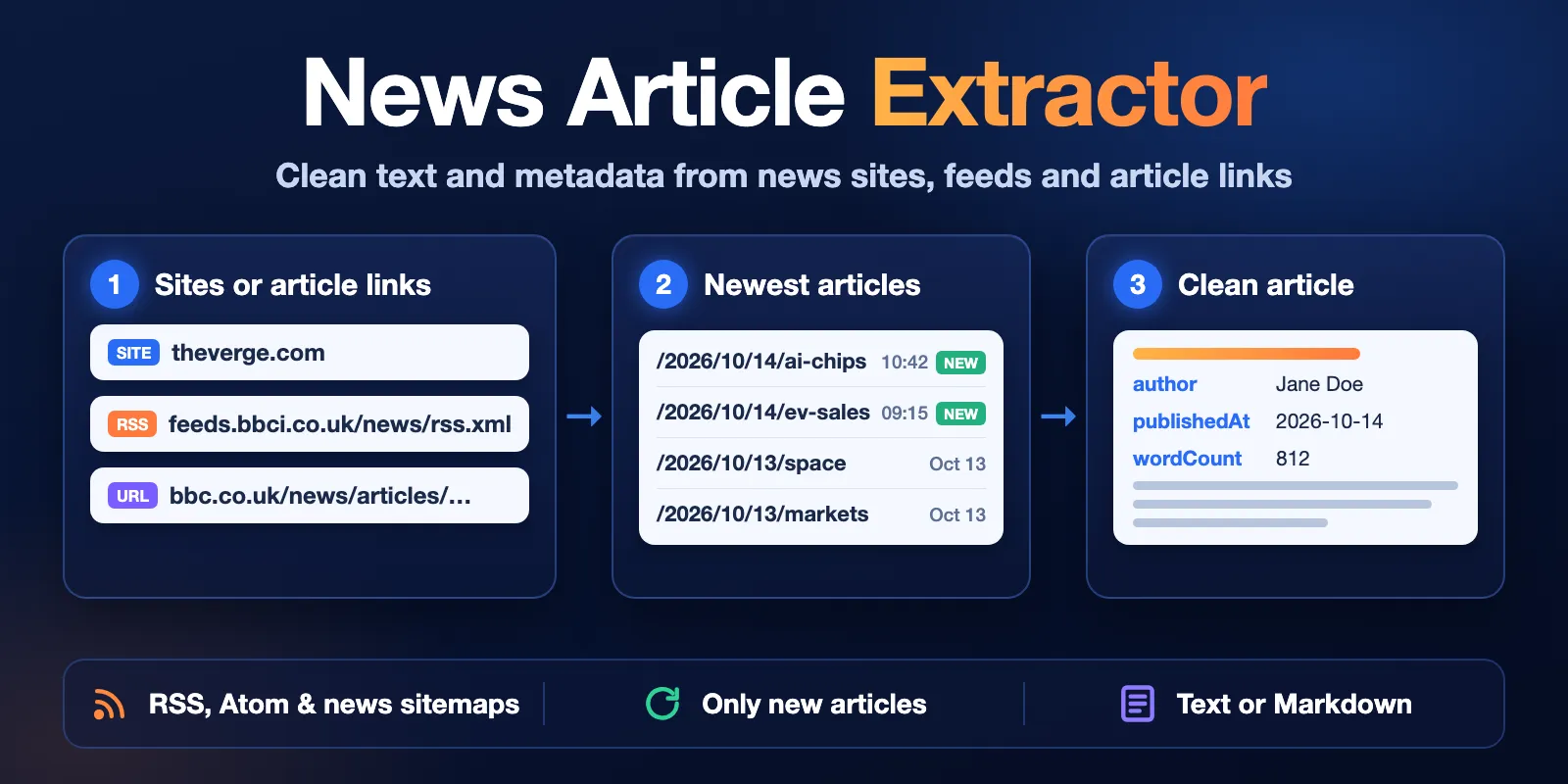
Table of contents
- What it does
- Quick start
- Input
- Output
- Pricing and limits
- API, schedules and AI agents
- Troubleshooting
- FAQ
- Support
What it does
The Actor works in two ways, and you can use both in one run:
- Article links (
articleUrls): it opens each link and returns the article body without menus, ads, bylines, photo captions and newsletter boxes. - News sites (
siteUrls): give a homepage likehttps://www.theverge.com. The Actor finds the site's RSS/Atom feed or news sitemap, takes the newest articles and extracts each one. You can also give the feed or sitemap URL directly.
Every article becomes one Dataset row. The body comes as plain text, Markdown or both.
Good fit
- Daily or hourly news monitoring: schedule the Actor with Only new articles and get only articles you have not received before.
- Building a text dataset from a list of article links for analysis, summaries or RAG.
- Getting publish dates, authors and tags for a list of article URLs.
Not a fit / limits
- Paywalls and logins are not bypassed. For subscriber-only pages you get only the public part (see
isAccessibleForFree). - Sites that block automated requests (for example some large publishers with bot protection) return a
BLOCKEDerror. The Actor does not use a browser or proxies. - Sites without an RSS/Atom feed or a sitemap cannot be used in
siteUrls. Use their article links inarticleUrlsinstead. - Comments, videos and image galleries are not extracted.
Quick start
- Open the Input tab.
- Keep the prefilled news site
https://www.theverge.comin News sites, RSS feeds or sitemaps, or add your own article links to Article URLs. - Keep Max articles from sites at the prefilled
10. - Click Start.
- Open the Output tab. The Articles view shows title, author, date and site; Full text shows the article body.
Expected result: 12 rows in a few seconds: the 2 prefilled BBC article links plus the 10 newest articles from the site, each with title, publishedAt and text.
Input
Input fields
| Field | Plain name | Type | Default | Allowed values | What it does |
|---|---|---|---|---|---|
articleUrls | Article URLs | array of URLs | empty | up to 500 public http(s) links | Each link is extracted. maxArticles and dateFrom do not apply here. |
siteUrls | News sites, RSS feeds or sitemaps | array of URLs | empty | up to 50 | Homepage, RSS/Atom feed or sitemap. The Actor finds the feed itself for a homepage. |
maxArticles | Max articles from sites | integer | 20 (prefill 10) | 1–500 | Total articles taken from all siteUrls, newest first, sites take turns. |
dateFrom | Only articles published after | string | none | 2026-10-01 or 7 days | Skips site articles older than this date. Articles without a date are skipped when it is set. |
onlyNew | Only new articles | boolean | false | true / false | Remembers delivered article URLs and skips them in the next runs. |
stateKey | Memory name for 'Only new' | string | default | letters, digits, -, _ | Keeps separate memory for different schedules. |
outputFormat | Article body format | string | text | text, markdown, both | Which body fields are filled. |
minWords | Minimum words | integer | 50 | 0–5000 | Pages with fewer words are skipped (site pages) or reported as TOO_SHORT (article links). |
At least one of articleUrls or siteUrls is required. The same article found twice (also through AMP or canonical links) is returned once.
Input examples
Newest articles from several news sites
Expected behavior: the Actor reads both feeds and takes up to 20 newest articles from the last 2 days, alternating between the sites.
Scheduled monitoring without repeats
Expected behavior: the first run returns the newest articles. Next runs return only articles that appeared since the last run. A run with nothing new ends with status not_found and no article charges.
A list of article links as Markdown
Expected behavior: two rows with the article body in markdown. A link that fails is listed in the run summary with an error code; the other links still return rows.
Output
Output fields
| Field | Meaning | Can be empty? |
|---|---|---|
url | Article URL after redirects | no |
canonicalUrl | Canonical URL declared by the page | falls back to url |
title | Headline | rarely null |
author | Author name(s), comma-separated | null when the page names no author |
publishedAt / modifiedAt | Publish and update time, ISO 8601 UTC | null when unknown |
lang | Language code, e.g. en, en-GB | null when not declared |
siteName | Publisher name | can be null |
description | Short summary | can be null |
tags | Publisher keywords and sections | empty array when none |
image | Main image URL | can be null |
text | Body as plain text, paragraphs separated by a blank line | null when outputFormat is markdown |
markdown | Body as Markdown with headings, links and lists | null when outputFormat is text |
wordCount | Words in the body | no |
isAccessibleForFree | Publisher paywall flag: false = subscriber-only page, only the public part returned | null when not declared |
discoveredVia | input, rss, atom or sitemap | no |
feedUrl | Feed or sitemap where the article was found | null for articleUrls |
fetchedAt | When the page was fetched | no |
Output example
This example is trimmed (fields modifiedAt, description, image, fetchedAt and most of text are left out).
Run summary and statuses
Every run also saves RUN_SUMMARY in the Key-value store (the Run summary link in Output). It has status, reason, counts of extracted and skipped pages, feeds found per site and failed URLs with error codes.
| Status | What it means | What to do |
|---|---|---|
complete | All requested articles were extracted | Use the Dataset |
partial | Some rows were extracted, but some links failed, a site had no feed or the spending limit was reached | Check failedUrls and reason |
not_found | The sources worked, but no new or matching articles were found (for example with onlyNew or dateFrom) | Nothing to fix; no articles were charged |
error | No article could be extracted because sites failed or had no feed. The run is marked as failed | Check the first error code in the status message |
Common error codes: NOT_FOUND (404), BLOCKED (403, bot protection or login), TIMEOUT, HTTP_5xx, NOT_AN_ARTICLE (section page, video page, feed or file), TOO_SHORT, NO_FEED_FOUND, PRIVATE_URL, INVALID_URL.
The run also stops early, keeping every article already saved, with one of these reasons: DEADLINE (10-minute limit), CHARGE_LIMIT (your spending limit), TOO_MANY_FAILURES (8 network failures in a row), TOO_MANY_UNREACHABLE_SITES (6 sites in a row did not respond; the remaining sites get the warning NOT_SCANNED and are not charged). With saved articles the status is partial, without them error.
Pricing and limits
Pricing unit
You pay per event. Platform usage is included.
| Event | When it is charged | Free plan | Bronze | Silver | Gold+ |
|---|---|---|---|---|---|
| Actor start | Once per run (one per GB of memory, at least one) | $0.003 | $0.003 | $0.003 | $0.003 |
| Article extracted | One row in the Dataset | $0.0021 | $0.002 | $0.0019 | $0.0018 |
| Site scanned | One entry of siteUrls searched for feeds, once per run, also when the site has no feed or does not respond | $0.002 | $0.002 | $0.002 | $0.002 |
| Article URL failed | One entry of articleUrls that the site answered with an error, a non-article page or a page shorter than minWords | $0.0005 | $0.0005 | $0.0005 | $0.0005 |
Free: duplicates, skipped site pages (too short, older than dateFrom, not an article), articles already returned with onlyNew, invalid and private URLs, URLs skipped after repeated network failures.
A valid run with no new or matching articles pays only the start and the sites scanned. Set a spending limit in the run options: the Actor stops before it and ends with status partial, reason CHARGE_LIMIT.
Cost examples (Free plan prices)
| Scenario | Input | Charged events | Price |
|---|---|---|---|
| Two article links | 2 articleUrls | start + 2 articles | $0.0072 |
| Prefilled run | 1 site, maxArticles 10 | start + 1 site + 10 articles | $0.026 |
| Daily digest | 5 sites, maxArticles 100 | start + 5 sites + 100 articles | $0.223 |
| Hourly check, nothing new | 5 sites, onlyNew | start + 5 sites | $0.013 |
| Large batch | 500 articleUrls, 480 extracted, 20 failed | start + 480 articles + 20 failed | $1.02 |
Limits
- Up to 500
articleUrls, 50siteUrlsand 500 articles from sites per run. - A run works for at most 10 minutes and stops with status
partial(reasonDEADLINE) when time runs out. Split very large lists into several runs. - Memory is set automatically: 512 MB, or 1 GB when you ask for more than 200 articles.
- Public pages only. Private network addresses and links with passwords are rejected.
API, schedules and AI agents
- API: start the Actor with the Apify API and read rows from the default Dataset.
- Export: download the Dataset as JSON, CSV, Excel or XML from the Output tab.
- Schedules: create a schedule in Apify Console with
onlyNew: trueand astateKeyper schedule to receive only new articles.
Use with AI agents (MCP)
- MCP server with only this Actor:
https://mcp.apify.com?tools=cliqtomedia/news-article-extractor(see Apify MCP server). - Smallest useful input:
{"articleUrls": [{"url": "https://www.bbc.co.uk/news/articles/cm2d6e62p49do"}]} - Key output fields:
title,publishedAt,author,text(ormarkdown),url. - A run with one site and 10 articles usually finishes in under a minute and costs about $0.026 on the Free plan. Up to 500 article links or 50 sites per run.
Troubleshooting
A site returns BLOCKED
Symptom: failedUrls shows BLOCKED for every link of one site.
Likely reason: the site uses bot protection or requires login.
Action: this Actor cannot read that site. Blocked links are charged as failed URLs ($0.0005 each), so remove such sites from scheduled runs.
NO_FEED_FOUND for a site
Symptom: the site warning says NO_FEED_FOUND.
Likely reason: the homepage does not link a feed and robots.txt lists no sitemap.
Action: find the feed URL yourself (often /feed, /rss or /rss.xml) and put it in siteUrls, or use article links in articleUrls.
Fewer articles than maxArticles
Likely reason: the feed has fewer recent items, dateFrom or onlyNew removed some, or the site's pages were videos or short teasers. The run summary shows skipped counts. When a site returns many skipped pages in a row, the Actor stops reading it (warning TOO_MANY_SKIPPED).
The text contains extra lines
Some sites mix related links or author bios into the article body. The Actor removes common bylines, captions and newsletter boxes, but layouts differ. Report the URL in Issues.
FAQ
Do I need an API key or login?
No. The Actor reads public pages only.
Does it bypass paywalls?
No. For subscriber-only pages it returns the public part and isAccessibleForFree: false.
How do I get only new articles every day?
Set onlyNew to true and run the Actor on a schedule. Use a different stateKey for each schedule. You are charged only for articles you have not received yet.
Why is publishedAt null?
The page and the feed did not give a publish date. When dateFrom is set, such site articles are skipped.
Support
For bugs, questions or feature requests, open an issue in the Issues tab of this Actor. Include the run ID, your input (without secrets) and the error code from RUN_SUMMARY. Never send tokens, cookies or passwords.


