

OnlyFans Free Trial Checker
Pricing
from $4.25 / 1,000 trial link checkeds
OnlyFans Free Trial Checker
Check OnlyFans free trial links and see the offered trial period. Paste a session JSON, add links, and get up to 100 results per run.
Pricing
from $4.25 / 1,000 trial link checkeds
Rating
0.0
(0)
Developer

Cliqto Media
Maintained by CommunityActor stats
1
Bookmarked
1
Total users
0
Monthly active users
7 days ago
Last modified
Categories
Share
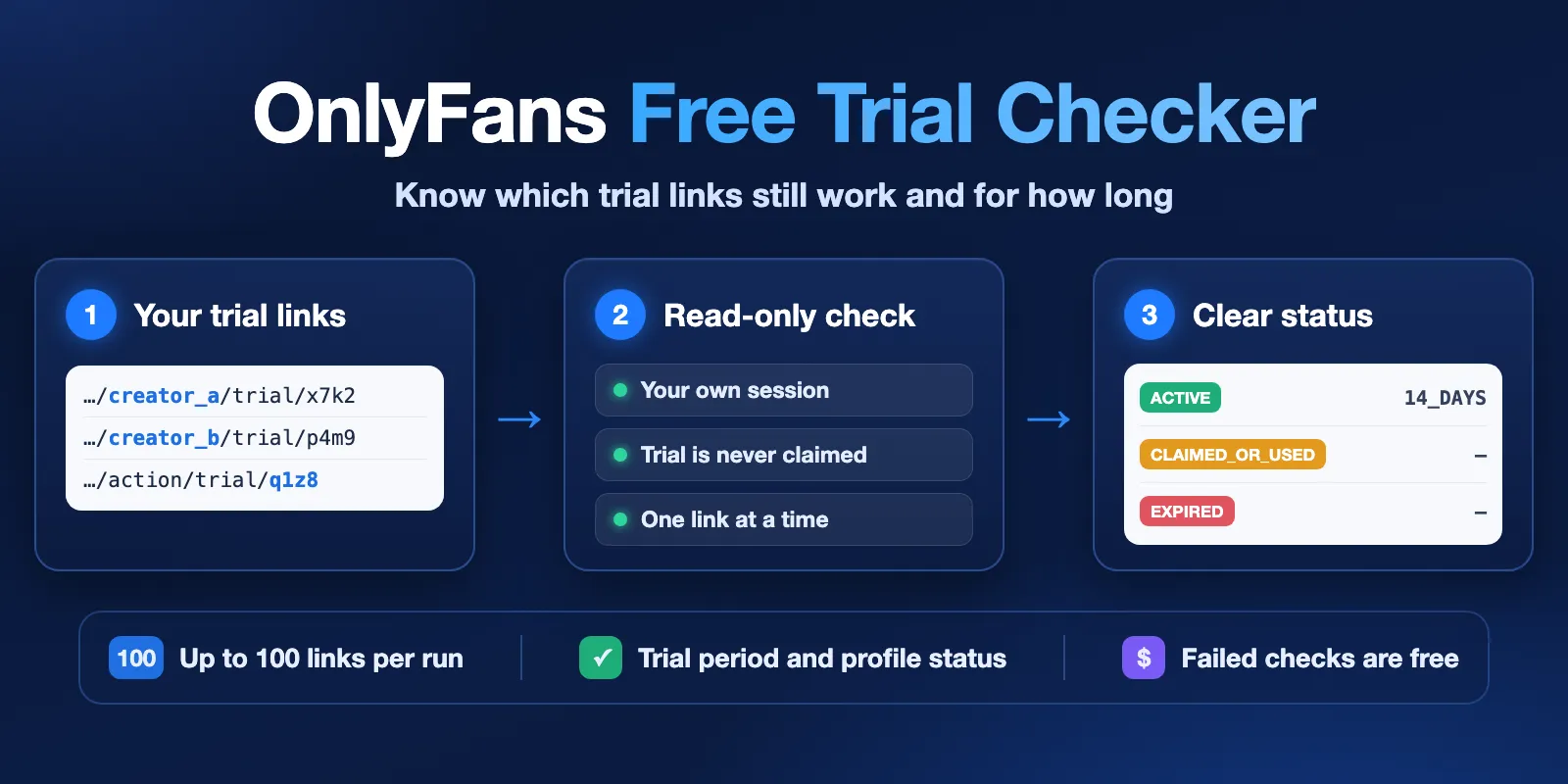
OnlyFans Free Trial Checker checks the OnlyFans free trial links you already have. For each link it returns the trial status, the offered trial period (for example 14_DAYS), the profile status and the profile username. It works with your own OnlyFans session and never claims the trial.
Use it to keep a trial-link catalog clean: turn off expired links and update trial periods. The smallest run is one link plus your session JSON. It takes about a minute and costs about $0.013.
Unofficial Actor. It is not made by or linked to OnlyFans. It does not activate trials, confirm subscriptions or change your account.
Table of contents
- What it does
- Quick start
- Input
- Output
- Pricing and limits
- API and AI agents
- Privacy
- Troubleshooting
- FAQ
- Support
What it does
The Actor opens OnlyFans in a temporary browser with your session. It then reads each trial offer the same way the site does before you press Confirm. It saves one result per different valid link and never presses Confirm.
Good fit
- You run a catalog or list of OnlyFans free trial links and need to know which still work.
- You want the offered trial period (1, 3, 7, 14 days, 1–12 months) for each active link.
- You want to find links whose profile is gone, restricted or not available.
Not a fit / limits
- It does not find new trial links, scrape profiles or download content.
- It needs an active session from your own OnlyFans account. It does not log in for you or solve CAPTCHA.
- It does not return the link's expiration date or the number of claims left.
- Up to 100 links per run, checked one at a time.
Quick start
- Install OF-DL Auth Helper in Chrome (steps below).
- Sign in to OnlyFans in your normal Chrome window.
- Open the extension and click Copy auth.json.
- Open the Actor's Input tab and paste the whole JSON into OnlyFans session: OF-DL auth.json (secret).
- Add your links to Trial links (max 100).
- Click Start. The default run settings use 1,024 MB of memory and a 30-minute timeout.
- Open Output when the run finishes.
Expected result: one row per link with trialStatus, duration and profileStatus.
Paste the JSON as text; no file upload is needed. Never paste your password or a login code.
Make the session last longer
- Copy
auth.jsonfrom a separate Chrome profile or an incognito window (allow the extension in incognito onchrome://extensions). Sign in there only for the Actor. - After you copy it, close that window without clicking Log out. Log out ends the session you just copied.
- Do not use the same session anywhere else at the same time: no second run, no other tool, no open OnlyFans tab with that login.
- For longer life, add your own proxy in the country where you sign in (see Connection).
Install OF-DL Auth Helper in Chrome
- Download
OF-DL_Auth_Helper-chrome-0.0.11.zipfrom the release page above and unzip it. - Open
chrome://extensions, turn on Developer mode. - Click Load unpacked and select the unzipped folder.
Only the auth copy feature is needed. Leave chat features and user scripts off. The extension can read your OnlyFans session, so install it only from the linked project.
Save the setup for later
Click Save as a new task, keep the Task private, and start the Task next time. Apify keeps secret fields encrypted, so you do not paste the JSON again while OnlyFans accepts that session. The Actor removes the input copy from each run after reading it; the Task's saved input stays.
Input
| Field | Plain name | Required | Default | Allowed values | Effect |
|---|---|---|---|---|---|
trialUrls | Trial links (max 100) | yes | — | 1–100 HTTPS OnlyFans trial links | Links to check |
sessionExport | OnlyFans session: OF-DL auth.json (secret) | yes, or the three Advanced fields | empty | OF-DL auth.json text as is | Your session |
sessionCookies | Cookies (Advanced) | with sessionXbc and sessionUserAgent | empty | auth_id and sess in cookie-header form | Alternative session |
sessionXbc | X-BC token (Advanced) | with the other two | empty | token from the same browser session | Alternative session |
sessionUserAgent | Browser User-Agent (Advanced) | with the other two | empty | exact User-Agent of that browser | Alternative session |
proxyUrl | Your own proxy URL (secret) | no | empty | http://user:pass@host:port | One proxy IP for the run; wins over Apify Proxy |
proxyConfiguration | Apify Proxy | no | off | group (for example RESIDENTIAL) and country | One Apify Proxy IP for the run |
browserTimezone | Browser timezone | no | empty | IANA name, for example America/New_York | Browser clock zone |
browserLanguage | Browser language | no | empty | for example en-US | Browser language and Accept-Language |
Use either the session JSON or all three Advanced fields, not both. If USER_ID is in the JSON it must match auth_id.
Length limits (characters): USER_AGENT 512, X_BC 4,096, COOKIE 16,384, USER_ID 256. The whole session JSON may be up to 128 KiB (UTF-8). Longer values are rejected before the browser starts, without echoing them.
Supported link shapes (replace the placeholders):
Links must use HTTPS. Query strings, fragments and other websites are rejected. Repeated links are checked once and not charged.
Connection: proxy, timezone and language (optional)
Leave these empty and the run uses a direct connection, as before.
Best choice: a static residential (ISP) proxy in the country where you sign in to OnlyFans, one proxy per account. Paste it into Your own proxy URL as http://user:pass@host:port. The field is secret; the address and login never appear in logs or results.
Apify Proxy: turn it on, pick a group (for example RESIDENTIAL) and the country where you sign in. City is not supported. It adds $0.14 once per run and $0.0025 per confirmed result (see Pricing). In our test one session on RESIDENTIAL US checked 2,160 links in 23 runs and stayed signed in. Apify keeps one proxy session for the run, but a residential IP can change after about 30 minutes, so a static ISP proxy is steadier.
If both are filled, Your own proxy URL is used. If the proxy does not connect, the run stops; unchecked links are free. The Actor never falls back to a direct connection.
Timezone and language. They should match the proxy IP:
- Read the timezone through the same proxy, not from your own computer. In a terminal:
curl -x http://user:pass@host:port https://ipinfo.io/json. Or set the proxy in a separate browser profile and open ipinfo.io/json or whoer.net (no sign-up). A page opened without the proxy shows your own location, which is wrong here. - Copy
timezone(for exampleAmerica/New_York) into Browser timezone. - Put the main language of
countryinto Browser language:US→en-US,GB→en-GB,DE→de-DE.
With Apify Proxy and a country, empty fields are filled for you: US → America/New_York and en-US (also CA, GB, IE, AU, DE, FR, ES, IT, NL). With your own proxy nothing is filled; set both.
Output
Each accepted link gets one Dataset row.
| Field | Meaning | Example / values |
|---|---|---|
inputUrl | The link as you entered it first | https://onlyfans.com/action/trial/<code> |
trialStatus | Offer state | ACTIVE, ACTIVE_DURATION_UNKNOWN, EXPIRED, CLAIMED_OR_USED, INVALID_OR_NOT_FOUND, NOT_AVAILABLE_TO_SESSION, INACTIVE_AMBIGUOUS, UNKNOWN |
duration | Offered trial period; empty unless ACTIVE | 1_DAY, 7_DAYS, 14_DAYS, 1_MONTH, 12_MONTHS |
profileStatus | Profile availability for your session | AVAILABLE, UNAVAILABLE, RESTRICTED, UNKNOWN |
username | Profile username when it is known | synthetic_profile |
id | Numeric profile ID of the trial's creator, when returned | 123456789 |
terminalCode | Exact reason for the result | TRIAL_ACTIVE_DURATION_CONFIRMED |
checkedAt | Check time, UTC | 2026-10-15T00:00:00.000Z |
recordKey | Stable result ID for matching across runs |
This shortened example uses invented data; the JSON export has extra fields that explain each result.
duration is the offered access period, not the link's expiration date. ACTIVE does not guarantee that a later claim will succeed. UNKNOWN means the check could not confirm the state. It does not mean the link is inactive.
The key-value store record RUN_SUMMARY has totals, runStatus, the stop reason and the connection used (proxy.mode: none, apify or custom, and proxy.country). A run with an expired or missing session still ends as Succeeded: RUN_SUMMARY.runStatus is STOPPED_AUTH and every row is a free SESSION_* result. Read runStatus, not only the Apify run status.
Pricing and limits
Pay per event. See the Pricing tab for the applied price.
| Event | FREE | BRONZE | SILVER | GOLD+ |
|---|---|---|---|---|
Confirmed result (trial-link-checked) | $0.005 | $0.00475 | $0.0045 | $0.00425 |
| Actor start (per 1 GB of memory) | $0.008 | $0.008 | $0.008 | $0.008 |
Extra per confirmed result through Apify Proxy (link-checked-via-apify-proxy) | $0.0025 | $0.0025 | $0.0025 | $0.0025 |
Once per run through Apify Proxy (run-via-apify-proxy) | $0.14 | $0.14 | $0.14 | $0.14 |
- Only confirmed trial or profile results are charged. Failed checks, CAPTCHA, 403, 429, timeouts, wrong and repeated links are free. An unavailable profile is charged only when the source confirms it.
- The start event is charged once per run for each GB of memory (1 GB by default). A run with no session costs only the start: $0.008. With an expired session it is $0.008 direct or with your own proxy, and $0.148 with Apify Proxy (start + run via Apify Proxy).
- Platform usage is included. You pay only the events above.
- Apify Proxy traffic is paid by the Actor, so a run through Apify Proxy adds $0.14 once (charged after the start-up check reached OnlyFans through the proxy, also when the session turns out expired) and $0.0025 per confirmed result. If every proxy IP refuses, the $0.14 is not charged. With your own proxy URL or no proxy there is no extra charge; you pay your proxy provider yourself.
- When your maximum charge is reached, the Actor stops and saves the remaining links as free unchecked rows.
| Scenario | Links | Typical charge (FREE) |
|---|---|---|
| One link | 1 | $0.013 |
| Full run | 100 | $0.508 |
| One link, Apify Proxy | 1 | $0.156 |
| Full run, Apify Proxy | 100 | $0.898 |
| Expired session | any | $0.008 |
Speed. Links are checked one at a time with a 10-second pause between them to protect your session. Plan about 12 seconds per link: 100 links take about 20 minutes. If OnlyFans limits requests, the Actor waits 30, 60 and then 120 seconds before it tries the same link again. Up to 10,000 requests or 150 MB per run. One session should run one run at a time.
OnlyFans login checks, limits or page changes can stop a run. Results can differ between sessions, locations and times.
API and AI agents
- API: start a run with
POST https://api.apify.com/v2/acts/cliqtomedia~onlyfans-free-trial-checker/runsand the input JSON above. Optional connection fields:proxyUrl, or"proxyConfiguration": {"useApifyProxy": true, "apifyProxyGroups": ["RESIDENTIAL"], "apifyProxyCountry": "US"}, plusbrowserTimezoneandbrowserLanguage. Poll the run, then read the default Dataset and theRUN_SUMMARYrecord. - Export: Dataset as JSON, CSV or Excel from the Output tab or API.
- Tasks: save the input as a private Task and start it from the API or Console.
Use with AI agents (MCP)
- MCP server with only this Actor:
https://mcp.apify.com?tools=cliqtomedia/onlyfans-free-trial-checker. - Smallest input:
{"trialUrls": ["https://onlyfans.com/action/trial/<trial-code>"], "sessionExport": "<OF-DL auth.json>"}. A session is always required. - Key output fields:
trialStatus(offer state),duration(offered period),profileStatus(profile availability),terminalCode(exact reason), andRUN_SUMMARY.runStatus(STOPPED_AUTH= refresh the session). - One link takes about 1 minute and costs about $0.013; 100 links take about 20 minutes, so poll the run instead of waiting on one call.
Privacy
Your session gives access to your OnlyFans account. Use a session you own and links you may check.
Keep session JSON and Advanced values out of chat, email, screenshots and support tickets. A working trial link can also be sensitive, so keep Dataset access private.
Apify encrypts secret input fields. The Actor uses them only in a temporary browser that closes when the run ends. It never writes session values to logs, results or reports, and it removes the run's input copy after reading it. Complete erasure from browser and system memory cannot be guaranteed.
Troubleshooting
The session is not accepted
RUN_SUMMARY.runStatus is STOPPED_AUTH and rows show SESSION_* or LOGIN_REQUIRED; links after the stop are free UNPROCESSED_SESSION_FAILURE rows. The session has ended or is wrong. Sign in to OnlyFans in Chrome and copy a new auth.json.
STOPPED_AUTH appears only on a clear sign: OnlyFans answers that login is required, or a session check shows the login is gone. A plain 401/403 page (for example "Access denied") gives that link a free SOURCE_HTTP_FAILURE row and the run checks the session at once. If the session is still fine, the run ends as STOPPED_LIMIT with stopReason SOURCE_HTTP_FAILURE: wait and run the unchecked links again with the same session.
The Actor asks you to keep one login method
Both login methods have values. Keep the session JSON and clear all Advanced fields, or the reverse.
OnlyFans asks for a browser check or limits requests
A short request limit (429) or a plain 401/403 with a healthy session is retried on the same link after 30, 60 and 120 seconds; the run goes on if OnlyFans answers again. If it still refuses, the run ends as STOPPED_LIMIT (stopReason RATE_LIMITED or SOURCE_HTTP_FAILURE) and the rest are free; wait and run them again.
For a browser check: runStatus is STOPPED_CHALLENGE, sessionHealthAfter is CHALLENGE and stopReason is CAPTCHA_CHALLENGE or CLOUDFLARE_CHALLENGE; unchecked links are free UNPROCESSED_SESSION_FAILURE rows. Open OnlyFans in Chrome, follow the site's instructions yourself and wait before the next run. The Actor does not solve CAPTCHA.
A result shows PARSER_SOURCE_DRIFT or UNKNOWN
The page did not give a readable result. This is a free failed check. Check the link manually and send the run ID to support if it continues.
A result shows SECURITY_REDIRECT_BLOCKED
The page tried to leave onlyfans.com, and the Actor blocked it. Only that link gets a free TECHNICAL row with retryable: false. The run checks the other links as usual and is not stopped: runStatus is COMPLETED_WITH_PARTIALS, not STOPPED_SECURITY. Embedded frames, pop-ups and downloads to other sites are blocked quietly and do not change the result. diagnostics.blockTrigger (MAIN_FRAME, SUBFRAME, POPUP, DOWNLOAD or HTTP_REDIRECT) and diagnostics.blockedHost (site name only) show what was blocked. STOPPED_SECURITY is used only for a real threat: the page tries to change data (for example a non-GET request), or the start-up session check itself is sent off onlyfans.com before any link is checked.
A result shows BROWSER_CRASH
The browser stopped during the check. The Actor starts a new browser (up to 2 times per run), checks the session again and retries that link once, then goes on with the rest. If the new browser also fails on that link, only that link gets a free TECHNICAL row. The new browser starts with the cookies OnlyFans last set, not the older ones from the input. If a new browser cannot start, its session check is unclear, or the limit is used up (a third crash), the run ends with runStatus FAILED_INTERNAL and the rest are free UNPROCESSED_CIRCUIT_BREAKER rows. This is not a session problem: run the unchecked links again with the same session.
sessionHealthAfter is UNKNOWN
No later answer showed the session state (for example the run stopped on a timeout). There is no extra session check at the end of a run. The results are still valid and runStatus is not STOPPED_AUTH. Only STOPPED_AUTH with SESSION_* rows means the session must be refreshed. If the start-up check is unclear, nothing is checked and runStatus is STOPPED_LIMIT; try again later with the same session.
The run stopped because of the proxy
The log shows that the proxy is not available, unchecked links are free and RUN_SUMMARY.proxy.mode is custom or apify. Check the proxy address, port, login and that it allows HTTPS. The Actor does not switch to a direct connection by itself; clear the proxy fields if you want one.
Fewer links were checked
Open RUN_SUMMARY and read stopReason. UNPROCESSED_DEADLINE means the run timeout ran out (also while the browser was restarting); give the run more time or fewer links. Check the session, timeout, maximum charge and the number of valid different links. Split larger lists into batches of up to 100.
FAQ
Does this activate a free trial? No. The Actor reads the offer before confirmation and never claims it.
Can I run it without an OnlyFans account? No. You need an active session from your own account.
Can I keep using the same login? Yes, while OnlyFans accepts it. Save the setup as a private Task.
Can I check thousands of links? Yes, in sequential runs of up to 100 links with the same session, one run at a time. About 300 links per hour.
Support
Use the Actor's Issues tab. Include the run ID, terminalCode, RUN_SUMMARY.stopReason, and whether you used session JSON or Advanced setup. Never include session values, real trial links or account screenshots.


