

OpenTable Reviews & Restaurants Scraper, No Login
Pricing
from $0.68 / 1,000 reviews
OpenTable Reviews & Restaurants Scraper, No Login
Get OpenTable guest reviews with overall, food, service, ambience and value ratings, dined date and restaurant replies, or search restaurants by city with cuisine, price band, rating, review count, address and phone. No login.
Pricing
from $0.68 / 1,000 reviews
Rating
0.0
(0)
Developer

Cliqto Media
Maintained by CommunityActor stats
0
Bookmarked
2
Total users
1
Monthly active users
a day ago
Last modified
Categories
Share
Paste OpenTable restaurant links and get their guest reviews with overall, food, service, ambience and value ratings, the dined date and the restaurant's reply, or search OpenTable restaurants by city and get cuisine, price band, rating, review count, address and phone. No login, cookies or API key.
Use it to track what diners say about your restaurant or your competitors, or to build a restaurant list for a city. The smallest run is one restaurant link with 20 reviews: it takes about 20 seconds and costs about $0.041.
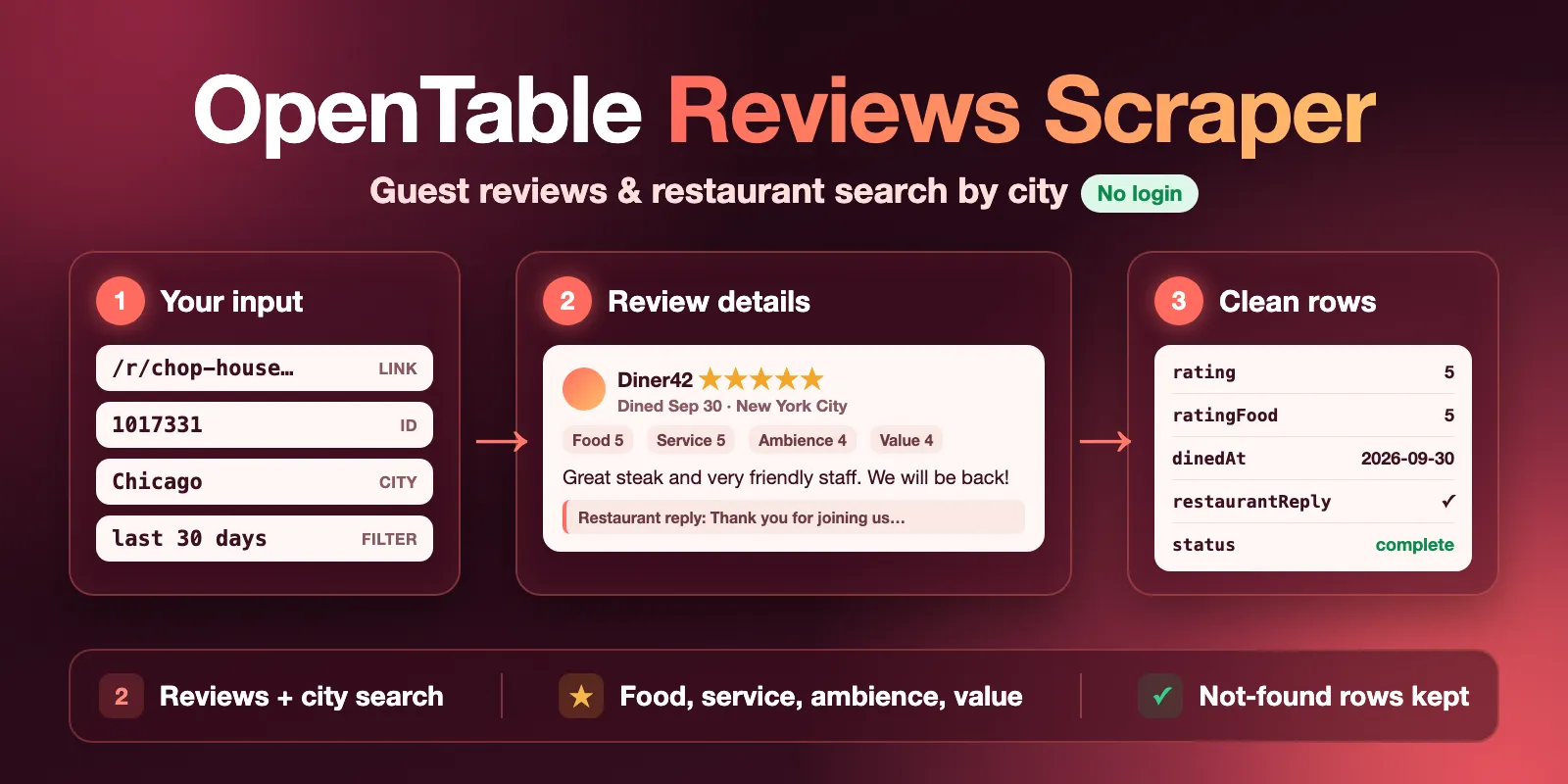
Table of contents
- What it does
- How it works
- Quick start
- Use cases
- Input
- Output
- Pricing
- Limits
- API, export and integrations
- Troubleshooting
- FAQ
- Support
What it does
The Actor reads public pages of OpenTable, the restaurant booking site. It has two modes:
- Reviews — you add restaurant links or IDs. For each restaurant you get one restaurant row with its details, then its reviews, newest first (or highest / lowest rated first).
- Search — you add a city or area. You get the restaurants OpenTable lists there, one row per restaurant, with details from each restaurant page.
All rows go to one Dataset with two views: Reviews and Restaurants. A view chooses the columns; it does not filter rows, so filter by type (review or restaurant) when you export. A run summary goes to the Key-value store as RUN_SUMMARY.
This Actor is not made by OpenTable and is not connected to OpenTable. It reads only what OpenTable shows to every visitor without login.
Good fit
- Restaurant owners and marketing teams who watch their own and competitors' OpenTable reviews, ratings and replies.
- Analysts who compare restaurants in a city by cuisine, price band, rating and review count.
- Scheduled monitoring: with
reviewsSincea run reads only new reviews and stops at the first older one.
How it works
- The Actor reads OpenTable's public pages and its reviews feed over plain HTTPS, the same data any visitor sees without login. No browser starts while OpenTable lets these requests in, so runs are fast.
- In Reviews mode it opens each restaurant page, saves the restaurant row, then reads its reviews page by page until your limits or your
reviewsSincedate. In Search mode it reads OpenTable's restaurant list for your location and, if details are on, opens each restaurant page. - If OpenTable refuses these requests, at the start or later in the run, the Actor tries a fresh session, then US residential addresses, and then a real Chrome browser for the rest of the run. Plain HTTP gets up to 4 residential sessions; Chrome then gets one more residential address and 30 seconds for its first answer, so a run refused everywhere stops in about a minute and a half. This is included in the price. A server error at OpenTable (HTTP 5xx) is retried 3 times and then stops the run; it does not switch routes.
- It saves review and restaurant rows to the Dataset, with
statuson each restaurant row, and a run summary asRUN_SUMMARY. Itsroutefield says how OpenTable was read:http(no browser) orbrowser(Chrome was needed).
Quick start
- Open the Input tab.
- Keep What to scrape (
mode) as Reviews of restaurant URLs. - In Restaurant URLs or IDs (
restaurantUrls) keep the example link or paste your own, e.g.https://www.opentable.com/r/brooklyn-chop-house-new-york. - Keep Max reviews per restaurant (
maxReviewsPerRestaurant) at the prefilled 20. - Click Start.
- Open the Output tab, view Reviews, and check
rating,textanddinedAt.
Expected result: one restaurant row and 20 review rows, in about 20 seconds.
Use cases
| Buyer job | Input path | Output entity | Key fields | Next integration |
|---|---|---|---|---|
| Read guest feedback for a restaurant | restaurantUrls, maxReviewsPerRestaurant | review | rating, ratingFood, ratingService, text, dinedAt | Export CSV or Excel |
| Check how a restaurant answers reviews | restaurantUrls, sortReviewsBy: "lowest" | review | rating, restaurantReply, restaurantReplyAt | Spreadsheet or BI tool |
| Get new reviews every week | restaurantUrls, reviewsSince: "7 days" | review | reviewId, submittedAt, rating, text | Apify schedule + API |
| Build a restaurant list for a city | mode: "search", location | restaurant | name, cuisine, priceBand, rating, reviewCount, phone | CRM or map |
Input
Input fields
| Field | Plain name | Type | Required | Default / prefill | Allowed values | Effect | Example | Recommendation |
|---|---|---|---|---|---|---|---|---|
mode | What to scrape | string | no | default reviews, prefill reviews | reviews, search | Reviews of the links below, or restaurants for a location | "search" | If you fill only location, the Actor switches to Search; if only links, to Reviews |
restaurantUrls | Restaurant URLs or IDs | array of strings | in Reviews mode | prefill: 1 New York link | up to 200; /r/<name> links, /restaurant/profile/<id> links, links with ?rid=, numeric IDs, any OpenTable country site | Which restaurants to read | ["https://www.opentable.com/r/brooklyn-chop-house-new-york", "1017331"] | One run reads the first 40; the rest are listed as not_started (free). Duplicates are read once |
location | Location | string | in Search mode | none | up to 200 characters | City, neighborhood or area to search | "Chicago" | Use the name you would type on OpenTable |
maxReviewsPerRestaurant | Max reviews per restaurant | integer | no | default 100, prefill 20 | 1–10,000 | Most reviews for each restaurant | 500 | Each returned review is one paid event |
maxItems | Max results | integer | no | empty: 1,000 reviews (Reviews) or 30 restaurants (Search) | Reviews 1–50,000; Search 1–1,000 | Most rows in the whole run | 30 | In Search with details, keep it at 38 or less for details on every row |
sortReviewsBy | Review order | string | no | newest | newest, highest, lowest | Which reviews come first | "lowest" | Use lowest to find complaints |
reviewsSince | Only reviews since | string | no | none | a date like 2026-01-31, an ISO time, or 30 days, 2 weeks, 6 months, 1 year | Only reviews submitted on or after this time | "30 days" | With newest order the run stops at the first older review, so you pay only for new ones |
includeRestaurantDetails | Include restaurant details | boolean | no | true | true, false | Search only: open each restaurant page for address, phone, hours and sub-ratings | false | Turn off for a faster list with name, cuisine, price band, rating and review count |
Empty input: the Console fills in the prefill. Through the API, an input with no links and no location fails with a clear invalid_input message; only the start is charged.
Interacting settings
| When | Input A | Input B | Effective behavior | Example | Cost/result effect |
|---|---|---|---|---|---|
| Many restaurants | maxReviewsPerRestaurant | maxItems | The run stops at whichever limit comes first | 10 links × 500, maxItems 1,000 | At most 1,000 review events |
| Monitoring | reviewsSince | sortReviewsBy: "newest" | Reading a restaurant stops at the first older review | "7 days" | No new reviews → only the start and restaurant rows |
reviewsSince with another order | reviewsSince | sortReviewsBy: "highest" | Older reviews are skipped but still read | "30 days" + highest | Slower; you still pay only for returned reviews |
| Search with details | includeRestaurantDetails: true | maxItems above 38 | Rows past the page limit come with search-list data, status: "partial" and a warning | maxItems 60 | Same restaurant price per row |
| Both filled | restaurantUrls | location | mode decides which one is used | mode: "search" | The other field is ignored |
Input examples
Reviews of one restaurant (prefill)
Expected behavior: the Actor opens the restaurant page and reads its 20 newest reviews.
Expected output: 1 restaurant row and 20 review rows with rating, text, dinedAt, restaurantReply.
Limit or cost note: about 20 seconds and about $0.041 (start $0.022 + restaurant $0.003 + 20 × $0.0008).
Restaurants in a city
Expected behavior: the Actor reads OpenTable's restaurant list for Chicago and opens each restaurant page.
Expected output: 30 restaurant rows with name, cuisine, priceBand, rating, phone.
Limit or cost note: about 40 seconds and about $0.11 (start $0.022 + 30 × $0.003).
Output
Output fields
Review rows (type: "review"):
| Field | Meaning | Type | Can be empty? | Example / enum | Source / notes |
|---|---|---|---|---|---|
type | Row type | string | no | review | — |
restaurantId, restaurantName, restaurantUrl | The restaurant this review is about | integer / string | no | 1017331 | — |
reviewId | OpenTable review ID | string | rarely | OT-1017331-261886-120047159362 | Use it to remove duplicates between runs |
rating | Overall rating 1–5 | number | yes, if the diner gave none | 5 | — |
ratingFood, ratingService, ratingAmbience, ratingValue | Sub-ratings 1–5 | number | yes | 4 | null = not rated, not 0 |
noise | The diner's noise answer | string | yes | QUIET, MODERATE, ENERGETIC, DO_NOT_RECALL | — |
text | Review text | string | yes | "loved the ambiance…" | HTML entities decoded, line breaks kept |
dinedAt | When the diner ate there | string | yes | 2026-09-30T18:30:00-04:00 | Restaurant local time with offset |
submittedAt | When the review was submitted | string | yes | 2026-10-01T21:53:34Z | UTC |
reviewerName, reviewerMetro, reviewerReviewCount, reviewerIsVip | Public reviewer profile | string / integer / boolean | yes | Diner1, Chicago, 8, false | Public display name only |
restaurantReply, restaurantReplyAt | The restaurant's public reply | string | yes, when there is no reply | — | — |
helpfulUp, helpfulDown | Helpful votes | integer | yes | 0 | — |
verified, fromPreviousConcept | Verified diner; written for an earlier concept | boolean | yes | true, false | — |
photoCount | Number of photos | integer | no | 0 | Photos are not downloaded |
source, fetchedAt | Always opentable; read time (UTC) | string | no | 2026-10-14T15:29:52.739Z | — |
Restaurant rows (type: "restaurant"):
| Field | Meaning | Type | Can be empty? | Example / enum | Source / notes |
|---|---|---|---|---|---|
status | Row result | string | no | complete, partial, not_found, error | See Output entities |
restaurantId, name, url | Restaurant identity | integer / string | null only on not_found / error | Brooklyn Chop House - Downtown | — |
cuisine, cuisines | Main cuisine; all cuisines | string / array | yes | Steakhouse | — |
priceBand, priceLevel, currencySymbol | Price per person | string / integer / string | yes | $31 to $50, 3, $ | — |
rating, ratingFood, ratingService, ratingAmbience, ratingValue | Average ratings 1–5 | number | yes | 4.1 | Based on recent reviews, as on the OpenTable page |
ratingNoise, ratingCount, ratingDistribution | Noise 1–3; recent reviews counted; stars 1–5 | number / integer / object | yes | {"1": 9, …, "5": 74} | Details only |
reviewCount | All-time written reviews | integer | yes | 3055 | — |
address, street, city, state, postalCode, country, countryCode | Address | string | yes | 150 Nassau St, New York, NY 10038, United States | — |
neighborhood, metro, latitude, longitude | Area and position | string / number | yes | TriBeCa, 40.71 | — |
phone, website | Contacts | string | yes | (212) 619-1200 | Details only |
hours, diningStyle, dressCode, executiveChef, paymentOptions | Restaurant facts | string / array | yes | Fine Dining | Details only |
description, reviewSummary, awards, imageUrl | Text, OpenTable review summary, awards, photo | string / array | yes | — | Details only |
permanentlyClosed | OpenTable marks it as closed | boolean | yes | false | — |
detailsIncluded | The restaurant page was read | boolean | no | true | false = search-list data only |
searchLocation, searchPosition | Search mode: location and position | string / integer | yes | Chicago, 1 | null in Reviews mode |
input, error | Your input entry; why the row is not complete | string | yes | Not found on OpenTable | Set on partial, not_found, error |
null means OpenTable did not give the value. It never means 0.
Output entities and surfaces
| Situation | Dataset/API/KVS/live view | Result shape | User action |
|---|---|---|---|
| Normal item | Dataset, views Reviews and Restaurants | One restaurant row, then its review rows; or one restaurant row per search result | Open, export or call the Dataset API |
| No reviews or no search results | Dataset + RUN_SUMMARY | Restaurant row without reviews, or no rows; run SUCCEEDED with a warning | Check the link, reviewsSince or location |
| Restaurant not on OpenTable | Dataset | restaurant row with status: "not_found", input, error | Check the link |
| Link that is not OpenTable | Dataset | restaurant row with status: "error" (free) | Fix the link |
| Details skipped or restaurant page failed (Search) | Dataset | status: "partial", detailsIncluded: false, error | Run again with a smaller maxItems |
| More than 40 restaurants (Reviews) | RUN_SUMMARY | Run SUCCEEDED with status: "partial"; extra restaurants not_started (free), warning | Start another run with the rest |
| OpenTable blocked, did not answer or kept answering HTTP 5xx | RUN_SUMMARY, run status | Run FAILED with stopReason: "SOURCE_ERROR"; rows saved before the block stay | Try again later |
| Max charge, timeout or abort | RUN_SUMMARY | Run SUCCEEDED, status: "partial", saved rows stay | Raise the limit and run again |
Output example
This is one full review row from the prefill run; the text is shortened and the reviewer name is replaced. restaurantReply: null means the restaurant did not reply. A field is null when OpenTable does not show it for this review.
Use case → fields
| Buyer job | Input path | Output entity | Key fields | Next integration |
|---|---|---|---|---|
| Watch guest feedback | restaurantUrls | review | rating, ratingFood, ratingService, text, dinedAt | CSV or Excel export |
| Track replies to bad reviews | restaurantUrls, sortReviewsBy: "lowest" | review | rating, restaurantReply, restaurantReplyAt | Spreadsheet or BI tool |
| Collect only new reviews | restaurantUrls, reviewsSince | review | reviewId, submittedAt, text | Apify schedule + Dataset API |
| Compare restaurants in a city | mode: "search", location | restaurant | cuisine, priceBand, rating, reviewCount, phone | CRM or map |
Pricing
Pricing unit
The Actor uses pay-per-event pricing. You pay for:
| Event | When | Price (free plan) | Price (Gold plan and higher) |
|---|---|---|---|
| Actor start | Once per run, 2 events (the Actor always runs with 2 GB) | $0.022 per run | $0.022 per run |
| Review | Each review saved | $0.0008 | $0.00068 |
| Restaurant | Each restaurant row saved (search result, or the restaurant of the reviews you asked for) | $0.003 | $0.0026 |
| Restaurant not found | A link or ID that OpenTable does not have (not_found row) | $0.0015 | $0.0015 |
Bronze and Silver plans pay prices between these. The start fee scales with run memory: $0.011 per GB, and the Actor always runs with 2 GB, so $0.022 per run. Platform usage (compute) and the residential address used when OpenTable refuses the Actor's own are included; you do not pay them separately.
Free: links that are not OpenTable (error rows) and restaurants left not_started. A partial restaurant row is charged as a normal restaurant row. A run with no results (no reviews since your date, or a city with no restaurants) costs only the start, $0.022. A failed run charges only the rows it saved before the failure, plus the start.
Cost examples
| Scenario | Input scope | Expected item/event count | Base charge | Optional charge | Stop/cap behavior |
|---|---|---|---|---|---|
| Prefill | 1 link, 20 reviews | 1 restaurant + 20 reviews | $0.022 start | $0.003 + 20 × $0.0008 = $0.019 | about 20 s |
| One restaurant, 1,000 reviews | 1 link, maxReviewsPerRestaurant 1,000 | 1 + 1,000 | $0.022 | $0.003 + $0.80 | |
| Weekly check, no new reviews | 1 link, reviewsSince: "7 days" | 1 restaurant | $0.022 | $0.003 | stops at the first older review |
| City list | location, maxItems 30 | 30 restaurants | $0.022 | 30 × $0.003 = $0.09 | about 40 seconds |
| City with no results | location OpenTable does not know | 0 | $0.022 | none | SUCCEEDED with a warning |
Set Maximum cost per run in the run options to cap your spend: the Actor stops before it goes over, keeps what it saved, and marks the run partial.
Limits
- No reservations, table availability, menus or review photos (only
photoCount). - Only public data. The Actor does not log in and does not return private diner data.
- OpenTable shows at most 10,000 reviews of one restaurant in one order. For more, run again with another
sortReviewsBy. - One run opens at most 40 OpenTable pages, because OpenTable blocks more. In Reviews mode that is 40 restaurants per run (reviews themselves do not count). In Search mode with details, about 38 restaurants get full details; the rest come with search-list data only.
- Search returns at most 1,000 restaurants per run (the
maxItemsmaximum). OpenTable may list fewer unique restaurants for a big city. - If OpenTable refuses every address the Actor tries in about a minute and a half, the run fails with a clear message; it does not return an empty result as success. Residential use per run is capped (after a plain-HTTP refusal, Chrome gets one residential address for about the first page); past the cap the run goes on from its own address and may stop early with the rows read so far.
API, export and integrations
- API: start a run with
POST https://api.apify.com/v2/acts/cliqtomedia~opentable-reviews-scraper/runsand read rows from the run's default Dataset (Apify API docs). - Export: download the Dataset as JSON, CSV, Excel or XML from the Output tab.
- Scheduling: create an Apify schedule with
reviewsSince(for example"7 days") to get only new reviews every week. UsereviewIdto remove duplicates.
Use with AI agents (MCP)
-
MCP server URL with only this Actor:
https://mcp.apify.com?tools=cliqtomedia/opentable-reviews-scraper(Apify MCP docs). -
Smallest useful input:
{"mode": "reviews", "restaurantUrls": ["https://www.opentable.com/r/brooklyn-chop-house-new-york"], "maxReviewsPerRestaurant": 20} -
Key output fields:
type(revieworrestaurant),rating(overall 1–5),text(review text),dinedAt(visit date),status(restaurant row result:complete,partial,not_found,error). -
The prefill run takes about 20 seconds and costs about $0.041. Limits: up to 40 restaurants per run, up to 10,000 reviews per restaurant in one order,
maxItemsup to 1,000 in Search mode.
Troubleshooting
The run failed with "OpenTable could not be read"
Symptom: the run is FAILED and RUN_SUMMARY has stopReason: "SOURCE_ERROR".
Likely reason: OpenTable refused every address the Actor tried in about a minute and a half, or did not answer in time.
Check: open RUN_SUMMARY and see how many rows were saved before the failure.
Action: start the run again a few minutes later. Rows saved before the failure stay in that run's Dataset.
Some restaurants are not_started
Symptom: the warning says some restaurants were not started.
Likely reason: you added more than 40 restaurants. One run opens at most 40 OpenTable pages.
Check: RUN_SUMMARY.restaurants lists every input with its status.
Action: start another run with the restaurants that are not_started. They are free.
Search rows have no phone or address
Symptom: rows have status: "partial" and detailsIncluded: false.
Likely reason: maxItems is above 38 with details on, or one restaurant page could not be read.
Check: the row error field says which case it is.
Action: run again with maxItems 38 or less, or search a smaller area.
A restaurant has fewer reviews than reviewCount
Symptom: reviewsSaved in RUN_SUMMARY is lower than reviewCount.
Likely reason: reviewCount counts all written reviews ever; OpenTable shows at most 10,000 in one order, and reviewsSince or maxItems can stop earlier.
Action: raise the limits or run again with another sortReviewsBy.
FAQ
Do I need an OpenTable account, cookies or a proxy?
No. The Actor reads public pages without login, cookies or API key. You do not set a proxy: if OpenTable refuses the Actor's own address, it switches to a US residential address by itself, at no extra charge.
Which OpenTable sites work?
Links from any OpenTable country site, for example opentable.com, opentable.co.uk or opentable.ca, and numeric restaurant IDs. Search works with the location names OpenTable knows.
Why does Search find fewer restaurants than OpenTable says?
OpenTable's list pages change and overlap while you read them. For big cities the Actor may get fewer unique restaurants than the total OpenTable shows; it says so in a warning. Search a smaller area for a fuller list.
How fresh is the data?
Every row is read live during the run; fetchedAt shows when. Ratings on restaurant rows are OpenTable's averages of recent reviews.
Support
For bugs, questions or feature requests, open an issue on the Issues tab of this Actor. Add the run ID, the input mode and the error text. Never send API tokens, passwords or account data.


