
Phone Number Validator & Formatter - Bulk E.164, No Login
Pricing
from $0.68 / 1,000 phone number checkeds
Phone Number Validator & Formatter - Bulk E.164, No Login
Validate and format phone numbers in bulk with Google libphonenumber metadata: valid/possible, E.164, international and national formats, country, number type (mobile, fixed line, VoIP, toll-free), time zones and original carrier. Offline, no login, no API key.
Pricing
from $0.68 / 1,000 phone number checkeds
Rating
0.0
(0)
Developer

Cliqto Media
Maintained by CommunityActor stats
0
Bookmarked
2
Total users
1
Monthly active users
11 days ago
Last modified
Categories
Share
Paste a list of phone numbers in any notation, or point the Actor at an Apify dataset. For each number it tells you if the number is valid and returns its E.164 form, country, line type (mobile, fixed line, VoIP, toll-free), time zones and the carrier the number range was given to. It runs offline on Google's libphonenumber metadata: no login, no API key.
Built for sales ops, marketing and developers who need clean numbers before a CRM import or an SMS campaign. The smallest run takes about 5 seconds: four numbers with the default country set to United States. You pay a small start fee plus a fixed price per checked number (see Pricing).
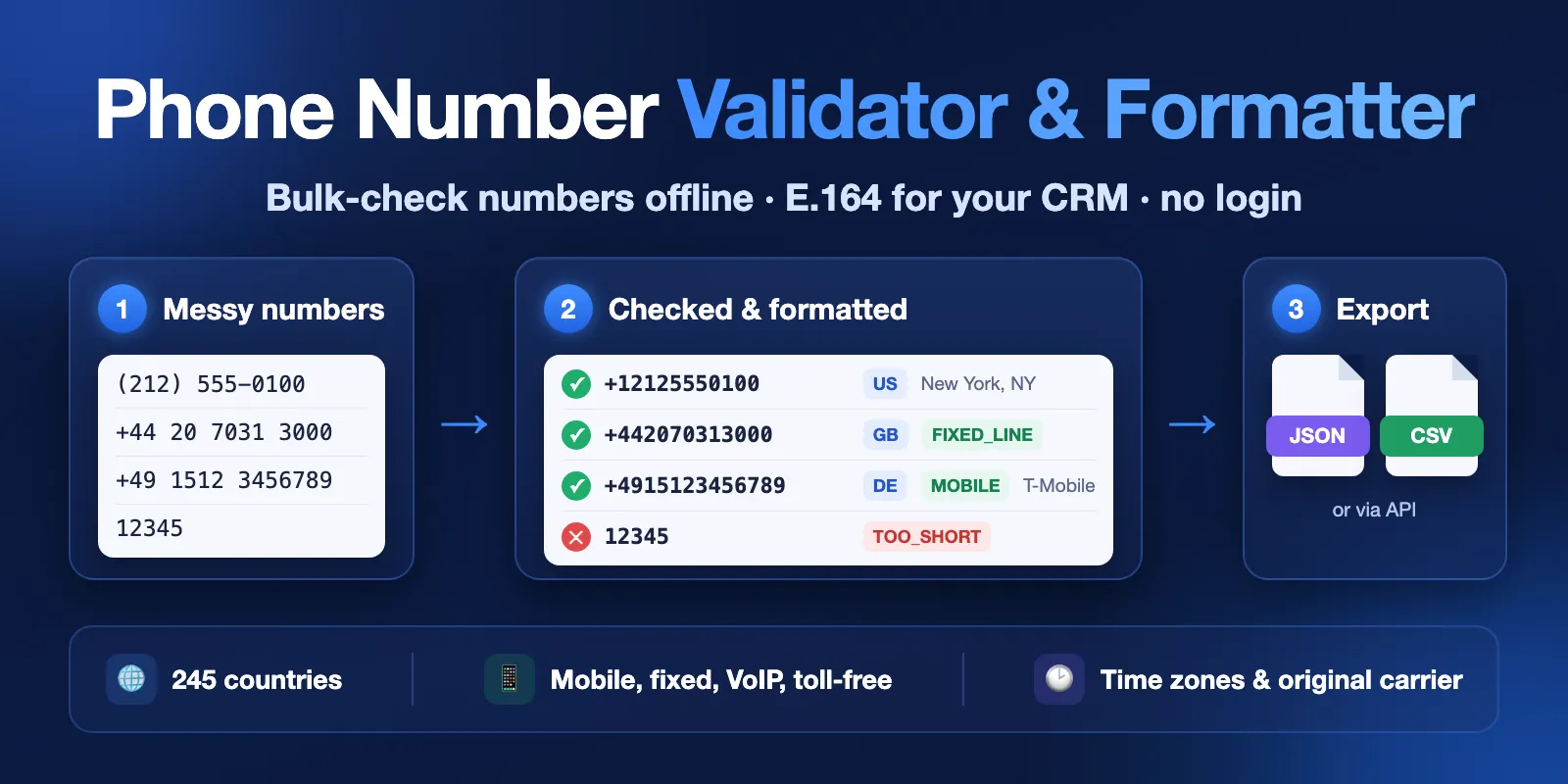
Table of contents
- What it does
- Quick start
- Input
- Output
- Pricing and limits
- Use cases
- API, export and integrations
- Troubleshooting
- FAQ
- Related Actors
- Support
What it does
The Actor reads each phone number, removes spacing, brackets, tel: links and HTML tags copied from web pages, and checks the number against the numbering plan of its country. A valid number gets the formats you choose (E.164 such as +16502530000, international, national, RFC 3966) and the details known from its prefix. A bad number gets a short reason code, such as TOO_SHORT or NOT_A_NUMBER, and a plain-English message.
All checks use the metadata of Google's libphonenumber (through the phonenumbers Python library, Apache-2.0). Nothing is sent to an outside service, so results are fast and the same on every run.
Good fit
- Turn a messy CRM export or web form list into E.164 numbers for a CRM, dialer or SMS tool.
- Remove numbers that cannot exist (too short, too long, unknown country code) before you pay for calls or messages.
- Split a list by country, line type (mobile or fixed line) or time zone to plan calls.
- Check the
phonefield of a dataset made by a lead or maps scraper.
Not a fit / limits
- It does not check if a number is active, reachable or on WhatsApp. "Valid" means the number fits an assigned range of its country's numbering plan. No HLR lookup, calls or SMS are made.
- It does not find who owns a number (no names, emails or addresses).
carrierByPrefixis the operator the number range was first given to. Ported numbers keep the old operator here. The data has no carrier for US and Canadian numbers.- No Do-Not-Call or TCPA checks: those need paid external databases.
- Up to 50,000 numbers per run.
Quick start
- Open the Input tab.
- Paste numbers into Phone numbers (
phones), one per line. The form already has four examples. - Keep Default country (
defaultCountry) as United States, or choose the country of numbers written without+. - Click Start.
- Open the Output tab. In the Overview view, check
statusande164for each number.
Expected result: one row per number, in the same order as the input. Valid numbers have status valid and an e164 value. Bad numbers have status invalid or unparseable and a reason.
Input
Input fields
| Field | Plain name | Type | Required | Default / prefill | Allowed values | Effect | Example | Recommendation |
|---|---|---|---|---|---|---|---|---|
phones | Phone numbers | array of strings | One of phones or inputDatasetId | Prefill: 4 example numbers | Up to 50,000 numbers | Numbers to check. A line with several numbers separated by , ; or a tab is split. Empty lines are skipped | "(212) 555-0100" | Any notation works. Put each number on its own line |
defaultCountry | Default country | string (ISO code) | No | No default. Prefill: US | 245 country and territory codes (use GB for the United Kingdom) | Country for numbers written without + and a country code | "US" | Set it when your list has national numbers. Leave it empty if every number starts with + |
outputFormats | Output formats | array | No | E164, INTERNATIONAL, NATIONAL | E164, INTERNATIONAL, NATIONAL, RFC3966 | Which formatted fields valid numbers get | ["E164"] | Keep E164 for CRMs and SMS tools |
deduplicate | Check each number once | boolean | No | false | true, false | The same number written differently gets one row. Skipped duplicates are free | true | Use for merged lists from several sources |
inputDatasetId | Input dataset | string | One of phones or inputDatasetId | Empty | ID of a dataset you can read | Reads numbers from that dataset, in addition to phones | "aBcD1234efGH5678" | Use for the output of a lead or maps scraper |
phoneField | Phone field in the dataset | string | No | phone | Top-level field name | Field with the number. A field with a list of numbers also works | "phone" | Check the field name in the dataset first |
With no numbers at all, the run fails with INVALID_INPUT and a message. Without deduplicate, each number gets its own row, repeats included. Empty lines are skipped, and a value longer than 250 characters gets one unparseable row.
Interacting settings
| When | Input A | Input B | Effective behavior | Example | Cost/result effect |
|---|---|---|---|---|---|
A number has no + | phones | defaultCountry | The default country is used and defaultCountryApplied is true | (212) 555-0100 with US → +12125550100 | Without a default country the row is unparseable, reason MISSING_COUNTRY_CODE |
| A number starts with an international prefix | phones | defaultCountry | Only the prefix of the default country is understood: 011 for the US, 00 for most of Europe | 00 44 20 7031 3000 with US → invalid, TOO_LONG; with GB or DE → +442070313000 | Write +44 … to be safe |
| Both sources are set | phones | inputDatasetId | Numbers from phones come first, then dataset numbers | — | 50,000 numbers in total at most; a bigger dataset is checked up to that limit |
| Duplicates | deduplicate | any | The first spelling is kept, later ones are counted in duplicatesSkipped | +1 650 253 0000 and (650) 253-0000 with US | Skipped duplicates are not charged |
Input examples
Clean a short list
Expected behavior: four rows. Three numbers are valid; 12345 is invalid with reason TOO_SHORT.
Expected output: e164, regionCode, numberType, timezones for valid numbers.
Limit or cost note: 4 checked numbers plus one start fee.
Check a scraper dataset
Expected behavior: dataset items are read until 50,000 numbers are found (at most 100,000 items). A bigger dataset is checked up to that limit and the run ends PARTIAL with reason INPUT_LIMIT. The run stops with an error if, after the first 200 items, fewer than 10% of the items read have a value in phoneField, or (with deduplicate) fewer than 10% have a different number. This protects you from a run on the wrong field or on a list of repeats. If the numbers get that rare later in the dataset, reading stops there, the numbers found are checked and the run ends PARTIAL with reason SPARSE_DATASET. With deduplicate, repeats count toward the 50,000 numbers. When you set a maximum total charge, only as many dataset numbers are read as that charge can pay for. With deduplicate, a run stopped by the charge limit can check a few numbers less than the limit allows, because two different spellings read as new can turn out to be the same number.
Output
Each checked number is one item in the default dataset. The Overview view shows the main columns; the Status and reasons view shows why numbers failed.
Output example
This is one full item from the first input example. All fields are described in the table below. null means the metadata has no value for this number (here: no carrier for a London fixed line), not an error.
Output fields
| Field | Meaning | Type | Can be empty? | Example / enum | Source / notes |
|---|---|---|---|---|---|
input | The number as you gave it | string | No | +44 20 7031 3000 | Not changed |
inputIndex | Position in the input, from 1 | integer | No | 2 | Dataset numbers follow phones |
status | Result | string | No | valid, invalid, unparseable | unparseable: no number could be read |
valid | Fits an assigned range of the country | boolean | No | true | libphonenumber isValidNumber |
possible | Has a possible length for the country | boolean | Yes, for unparseable | true | Length check only |
reason | Short reason code for a bad number | string | Yes, for valid numbers | TOO_SHORT, TOO_LONG, INVALID_LENGTH, NOT_IN_NUMBERING_PLAN, POSSIBLE_LOCAL_ONLY, INVALID_COUNTRY_CODE, MISSING_COUNTRY_CODE, MISSING_OR_INVALID_COUNTRY_CODE, NOT_A_NUMBER | |
error | Plain-English reason | string | Yes, for valid numbers | Too few digits for this country. | |
e164 | E.164 format | string | Yes, only valid numbers have it | +442070313000 | Only when chosen in outputFormats |
international | International format | string | Yes | +44 20 7031 3000 | Only when chosen |
national | National format | string | Yes | 020 7031 3000 | Only when chosen |
rfc3966 | tel: link format | string | Yes | tel:+44-20-7031-3000 | Only when RFC3966 is chosen |
countryCode | Country calling code | integer | Yes | 44 | Also set for invalid numbers when the code is known |
regionCode | ISO country code | string | Yes | GB | 001 for global services |
country | Country name | string | Yes | United Kingdom | Valid numbers only |
location | City or region of the prefix | string | Yes | London | Mostly fixed lines; empty when it would only repeat the country |
numberType | Line type | string | Yes | MOBILE, FIXED_LINE, FIXED_LINE_OR_MOBILE, TOLL_FREE, PREMIUM_RATE, SHARED_COST, VOIP, PERSONAL_NUMBER, PAGER, UAN, VOICEMAIL, UNKNOWN | US and Canada numbers are FIXED_LINE_OR_MOBILE |
carrierByPrefix | Operator the range was first given to | string | Yes | T-Mobile | Mostly mobile numbers; not the current operator |
timezones | IANA time zones | array of strings | Yes | ["Europe/London"] | |
extension | Extension | string | Yes | 12 | From ext. 12, x12 |
defaultCountryApplied | The default country was used | boolean | No | false | |
source | Data source | string | No | libphonenumber (offline) | |
checkedAt | Check time (UTC) | string | No | 2026-10-13T12:00:00Z |
Output entities and surfaces
| Situation | Dataset/API/KVS/live view | Result shape | User action |
|---|---|---|---|
| Normal item | Dataset, view Overview | One row per number | Export or use e164 |
| Bad number | Dataset, view Status and reasons | Row with status invalid or unparseable, reason, error | Fix the number or the default country |
| Partial result | Key-value store RUN_SUMMARY | status PARTIAL, reason CHARGE_LIMIT (your maximum charge) or INPUT_LIMIT (50,000 numbers or 100,000 dataset items per run) or SPARSE_DATASET (fewer than 10% of the dataset items read have a number), notProcessed | Raise the maximum charge, or filter or split the dataset |
| Wrong input | Run status FAILED, status message, RUN_SUMMARY | status INVALID_INPUT, message | Fix the input field named in the message |
RUN_SUMMARY also has counts by status, line type and country, emptySkipped, duplicatesSkipped, chargedEvents, datasetReadStopped (true when the charge limit, the run limit or a sparse dataset stopped reading the input dataset; notProcessed is then null, because the rest of the dataset was not counted) and the library metadata version.
Moving from another validator
The values come from the same libphonenumber metadata as other offline validators; only field names differ: phoneNumberE164 or e164Format → e164, isValid → valid, isPossibleNumber → possible, type → numberType, carrier → carrierByPrefix, geocoding → location.
Pricing and limits
Pricing unit
This Actor uses pay-per-event pricing:
| Event | When it is charged | Free plan | Bronze | Silver | Gold |
|---|---|---|---|---|---|
| Actor start | Once per run | $0.0025 | $0.0025 | $0.0025 | $0.0025 |
| Phone number checked | One output row: a valid, invalid or unparseable number | $0.0008 | $0.00075 | $0.0007 | $0.00068 |
Invalid and unparseable numbers are charged: the check was done and the row tells you what is wrong. Empty lines and skipped duplicates are free. A run with wrong input (no numbers, unknown country, more than 50,000 numbers in phones, wrong dataset field) fails before any number is checked and costs only the start fee. Platform usage is included in these prices.
If you set a maximum total charge for the run, the Actor stops when it is reached. The rows already saved stay in the dataset, and RUN_SUMMARY shows PARTIAL with the number of numbers not checked. When the limit stops the reading of an input dataset, datasetReadStopped is true and the rest of the dataset is not read or counted (notProcessed is null).
Cost examples
| Scenario | Input scope | Expected item/event count | Base charge | Optional charge | Stop/cap behavior |
|---|---|---|---|---|---|
| Quick check | 4 numbers | 4 rows | $0.0025 + 4 × $0.0008 = $0.0057 | none | — |
| Form leads | 1,000 numbers | 1,000 rows | $0.0025 + 1,000 × $0.0008 = $0.8025 | none | Stops at your charge limit |
| CRM export | 50,000 numbers | 50,000 rows | $0.0025 + 50,000 × $0.0008 = $40.0025 | none | Stops at your charge limit |
Prices are for the Free plan; Bronze, Silver and Gold plans pay the lower price per number shown above.
Limits
- 50,000 numbers per run (
phonesand dataset together). More than 50,000 inphonesfails withINVALID_INPUT; split the list. A bigger dataset is checked up to the limit (PARTIAL,INPUT_LIMIT). - Up to 100,000 dataset items are read; the run stops early on a dataset where the phone field is (almost) empty or repeats.
- Inputs longer than 250 characters are
unparseablewith reasonTOO_LONG. - Run time at the default 512 MB memory: about 4 seconds for 2,500 numbers and about 85 seconds for 50,000. Reading 50,000 items of an input dataset adds about 25 seconds. At the minimum of 256 MB, 50,000 numbers take about 2 minutes.
Use cases
| Buyer job | Input path | Output entity | Key fields | Next integration |
|---|---|---|---|---|
| Clean numbers before a CRM import | phones + defaultCountry | One row per number | valid, e164, reason | Export CSV, map e164 to the CRM phone field |
| Check numbers found by a scraper | inputDatasetId + phoneField | One row per number in the dataset | e164, regionCode, numberType | Join back by input |
| Keep only mobile numbers for SMS | phones | One row per number | numberType, e164 | Filter numberType = MOBILE or FIXED_LINE_OR_MOBILE |
| Plan call times by region | phones | One row per number | timezones, location | Sort or group by timezones |
API, export and integrations
- API: start a run with the input JSON above and read the dataset items. Use
?view=overviewfor the main columns. - Export: download the dataset as CSV, Excel, JSON or XML from the Output tab.
- Dataset input: set
inputDatasetIdto the dataset ID of another run to check its numbers without copying them.
Use with AI agents (MCP)
- MCP server URL with only this Actor:
https://mcp.apify.com?tools=cliqtomedia/phone-number-validator. - Smallest useful input:
{"phones": ["+1 650 253 0000", "(212) 555-0100"], "defaultCountry": "US"}. - Key output fields:
status(valid, invalid or unparseable),e164(number to store),regionCode(country),numberType(mobile or fixed line),reason(why a number is bad). - A run of a few numbers finishes in about 5 seconds and costs $0.0025 plus $0.0008 per number on the Free plan. At most 50,000 numbers per run.
Troubleshooting
Numbers without a country code are unparseable
Symptom: reason is MISSING_COUNTRY_CODE.
Likely reason: the number has no + and no default country is set.
Check: look at input for a missing +.
Action: set defaultCountry, or add + and the country code to the numbers.
A valid-looking number is invalid with TOO_LONG
Symptom: a number like 00 44 20 7031 3000 is invalid with defaultCountry US.
Likely reason: 00 is not the international prefix of the United States (it is 011), so the digits are read as a US number.
Check: compare the prefix with the default country.
Action: write +44 …, or set the default country to the country the list came from.
NOT_IN_NUMBERING_PLAN for a real number
Symptom: the length is right but valid is false.
Likely reason: the range is not in the metadata version used by this build, or the number is a fictional example (for example US 555-01xx numbers are reserved, but the metadata accepts some of them).
Action: check the metadata version in RUN_SUMMARY. Treat the result as "not in an assigned range", not as "disconnected".
The run failed with INVALID_INPUT
Symptom: run status FAILED, no rows.
Likely reason: no numbers, more than 50,000 numbers in phones, an unknown country code, or a dataset whose field is (almost) empty.
Action: read the status message; it names the field to fix.
FAQ
Do I need a login or an API key?
No. The check runs inside the Actor with open-source metadata. You only need an Apify account to start the run.
Does valid mean the number is active?
No. It means the number fits an assigned range of its country. A valid number can still be disconnected or unused. The Actor does not call, text or ping numbers.
Why is carrierByPrefix empty for US numbers?
The metadata has no carrier data for the US and Canada, where numbers move freely between operators. For other countries it is the operator the range was first given to, mostly for mobile numbers.
Why do I pay for invalid numbers?
Each row is a finished check with an answer: invalid numbers are the ones you want to find. Empty lines and skipped duplicates are free.
How fresh is the data?
Each build uses one version of the libphonenumber metadata, shown in RUN_SUMMARY as metadataVersion. New number ranges appear after the library and the Actor are updated.
Related Actors
- Bulk Email Verifier — clean the email column of the same lead list.
- Website Contact Scraper — find phone numbers on company websites, then check them here.
Support
For a bug, question or feature request, open an issue on the Issues tab of this Actor. Include the run ID, the input mode (phones or dataset) and the reason or status message you see. Do not post full private contact lists.
Phone metadata: Google libphonenumber through python-phonenumbers, Apache License 2.0. See NOTICE.


