

Website Contact Scraper | Contacts & Social Links
Pricing
from $0.60 / 1,000 website results
Website Contact Scraper | Contacts & Social Links
Website contact scraper extracts public emails, phone numbers and organization social links from up to 100 websites, with page-level sources and clear scan status.
Pricing
from $0.60 / 1,000 website results
Rating
0.0
(0)
Developer

Cliqto Media
Maintained by CommunityActor stats
0
Bookmarked
2
Total users
1
Monthly active users
9 days ago
Last modified
Categories
Share
Website Contact Scraper finds public emails, phone numbers, and social links on company websites. Add 1–100 website URLs or domains. Each result shows the source pages and whether the small scan finished or stopped early. A run costs $0.00065 to start, plus $0.00060 per chargeable website result. Contacts are not guaranteed.
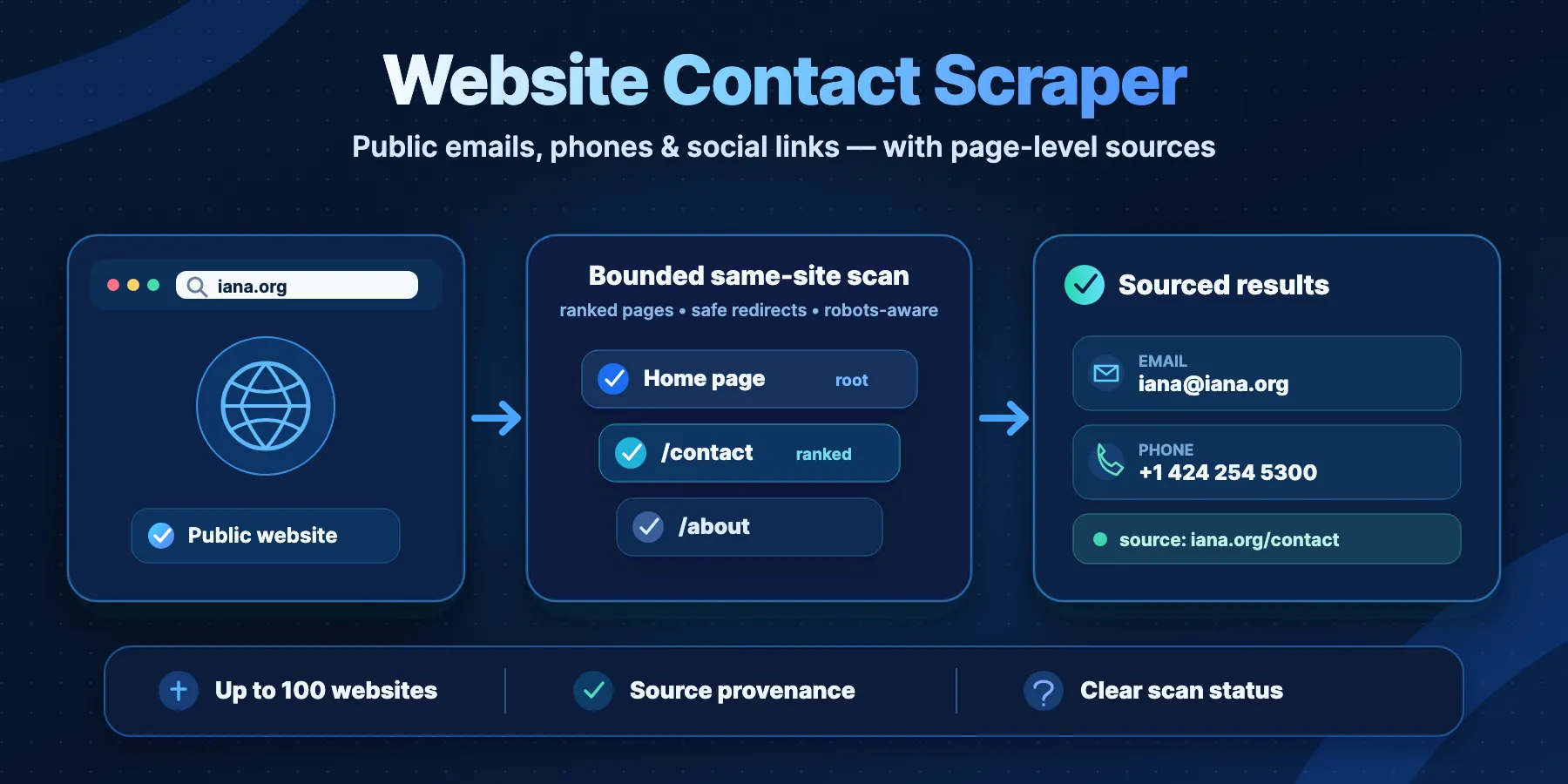
Table of contents
- What this website contact scraper returns
- How it works
- Quick start
- Input
- Output
- Statuses and scan completeness
- Supported contact signals
- Use cases
- Limits and safety boundaries
- Pricing
- API and export
- Troubleshooting
- FAQ
- Related Actors
- Support
What this website contact scraper returns
Each accepted website produces one Dataset row with:
- Public emails found in visible text,
mailto:links, supported page attributes, JSON-LD, and conservative(at)/(dot)obfuscation. - Phone numbers found in
tel:links and page text, normalized when the number can be represented in a canonical international format. - Organization-like social links for LinkedIn, X/Twitter, Facebook, Instagram, YouTube, TikTok, GitHub, Threads, Telegram, WhatsApp, and Pinterest when those profile URLs are declared by the website.
- Source provenance for each accepted email, phone, and social link, including the page URL and extraction method.
- Scan evidence such as attempted pages, HTTP status, bytes read, per-page extraction counts, elapsed time, and safe error codes.
- Finding and coverage fields that distinguish “contacts found” from “the configured scan finished completely.”
The Actor does not verify email deliverability, does not open social profiles, and does not infer that a social account belongs to the website owner. Social rows are explicitly labeled first_party_declared_unverified.
How it works
- The Actor normalizes each submitted public HTTP/HTTPS website and rejects unsafe URL forms before crawling.
- It resolves the hostname and rejects private, loopback, link-local, documentation, multicast, and other unsafe destinations before connecting.
- It optionally checks
robots.txt, then reads the homepage. - It ranks same-site links such as contact, about, team, legal, support, and sitemap-discovered pages and checks only the selected bounded set.
- It deduplicates accepted contacts while preserving every observed source page and writes one terminal Dataset row per normalized website.
The crawl is intentionally shallow. Candidate pages discovered from the homepage or sitemap are checked at depth 1; links discovered on those candidate pages are not recursively followed.
Quick start
- Open the Actor's Input tab. The new form suggests IANA, a small public site with contact details.
- Keep that URL for your first run. No login or source credentials are needed.
- Keep the other input settings, then click Start.
- Open Output and the default Dataset. Check
contacts, theirsources,status, andscanCompleteness.
The JSON below uses the same input and settings as that form. The example produces one website row with sourced contacts. Public websites can change, so check the returned status each time.
You can also submit bare domains such as iana.org. Duplicate normalized websites are combined into one result row while inputIndexes keeps the original input positions represented by that row.
Input
| Field | Type | Default | Allowed values | What it controls |
|---|---|---|---|---|
startUrls | array | required | 1–100 items | Public website homepages or bare domains. |
startUrls[].url | string | required in each item; no runtime default | 1–2048 characters | Public HTTP/HTTPS URL or bare domain, such as iana.org. |
maxPagesPerSite | integer | 5 | 1–10 | Maximum selected pages per website, including the homepage. |
maxConcurrency | integer | 5 | 1–10 | Websites processed in parallel. |
siteTimeoutSeconds | integer | 30 | 10–90 | Internal time budget for one website and its selected pages. |
maxBytesPerPage | integer | 2097152 | 262144–4194304 | Maximum response body processed for one page. |
respectRobotsTxt | boolean | true | true / false | Whether selected pages are checked against robots.txt. |
siteTimeoutSeconds is the source-work deadline. A larger Apify platform run timeout does not increase this per-website budget.
Only startUrls has a UI prefill: [{"url":"https://www.iana.org/"}]. It has no runtime default. API input {}, null, an empty startUrls list, or more than 100 entries fails the run. A malformed individual URL becomes an INVALID_INPUT row; valid entries can still run. The five optional fields have the runtime defaults shown above. Their UI uses those defaults. Out-of-range numeric settings fail input validation. Keep the documented JSON types; the runtime uses defaults for omitted or non-numeric optional values and for a non-boolean respectRobotsTxt.
Settings that work together
| Settings | Effect |
|---|---|
maxPagesPerSite + siteTimeoutSeconds | Whichever limit stops the site first wins. Raising the page cap does not extend the time budget. |
maxBytesPerPage + site byte limit | Each page has its own cap. The site also has a 10 MiB processed-byte budget; size limits can cause partial results. |
respectRobotsTxt + page selection | Disallowed pages are not read when this is true. Setting it to false does not disable URL or network safety. |
maxConcurrency + run cost cap | Concurrency changes how many sites run at once, not the number of billable sites. Allow for the start event and all valid unique websites. |
For a homepage-only check, use maxPagesPerSite: 1. A contact page may then be missed. This is a small-scan setting, not a filter or a monitoring mode.
URL rules
Accepted inputs are public http:// or https:// website URLs and bare domains that can be normalized safely. Credentials in URLs, unsupported schemes, unsupported ports, IP-literal targets, URL fragments, and destinations that resolve to unsafe network ranges are rejected.
Output
The default Dataset contains one terminal row per accepted normalized website. A shortened example from the IANA prefill looks like this:
All top-level row fields below are present. Arrays may be empty. error uses null; missing contacts use empty arrays, not invented values. finalUrl can be an empty string. No raw HTML is returned and rows have no observation timestamp field.
| Field | Type | Meaning / empty behavior |
|---|---|---|
siteId | string | Stable site_ ID from the first 24 hex characters of a SHA-256 hash of the normalized host. |
inputIndexes | integer array | Zero-based input positions represented by this row. |
websiteUrl | string | Safe normalized website URL. Query strings and fragments are omitted. |
finalUrl | string | Safe final page URL; empty when no usable page was read. |
status | string enum | Finding outcome; see the status table. |
scanCompleteness | string enum | COMPLETE, PARTIAL, or NOT_STARTED. |
pagesScanned, pagesLimit | integer | Successfully read pages and configured page cap. |
stopReason | string enum | Why the bounded scan ended; see below. |
statusInfo | string | Short explanation of findings, coverage, and result billing. The separate start charge still applies. |
contacts | object | Always contains emails and phones arrays. |
socialLinks | object array | Declared social profiles; may be empty. |
pages | object array | Page evidence; empty before any content-page attempt. |
metrics | object | Request, page, byte, retry, and time counters. |
error | object or null | Safe error; null if no error is recorded. |
runSummaryKey | string | Always RUN_SUMMARY. |
Contact and social fields
These fields describe each entry in contacts.emails[] and contacts.phones[]:
| Field | Type | Meaning |
|---|---|---|
id | string | Stable email_ or phone_ hash ID from the normalized observation. |
kind | string enum | email or phone. |
value | string | Lowercase email or canonical phone number. A phone can have an empty value when its international form is unclear. |
displayValue | string | Display text for the observation; use it when a phone value is empty. |
role | string enum | role for a known role inbox, otherwise unknown; not a person classification. |
confidence | string enum | high, medium, or low; extraction confidence, not deliverability or ownership. |
sources | object array | Source pages for this deduplicated value. |
sources[].pageUrl | string | Safe source URL. |
sources[].method | string enum | mailto, tel, jsonld, attribute, text, inline_data, or obfuscated_text. |
Each socialLinks[] entry has id (string, stable social_ hash), platform (string), url (string), relationship (always first_party_declared_unverified), confidence (high, medium, or low), and sources (array). Its sources contain pageUrl (string) and method (anchor_href, jsonld, or another observed extraction method). Social URLs are not opened.
Pages, metrics, and errors
| Field | Type | Meaning |
|---|---|---|
pages[].url | string | Safe attempted page URL. |
pages[].role | string enum | root, contact, about, team, legal, support, footer, or sitemap. |
pages[].depth | integer | Root 0; selected linked page 1. |
pages[].httpStatus | integer | Response status, or 0 when unavailable. |
pages[].contentType | string | Response content type, or empty when unavailable. |
pages[].bytes | integer | Bounded response bytes. |
pages[].success | boolean | Whether usable page content was read. |
pages[].extractionTruncated | boolean | A safe parser window stopped extraction. |
pages[].extractionCounts.emails, .phones, .socialLinks | integer | Accepted observations on that page. |
pages[].error | object or null | Same safe error shape as row error. |
metrics.requests, .robotsRequests, .sitemapRequests | integer | Tracked fetches; a fetch may include a redirect or a retry. |
metrics.pagesAttempted, .pagesSucceeded | integer | Content-page attempts and successes. |
metrics.bytes, .retries, .elapsedMs | integer | Bounded bytes, successful-fetch retries, and elapsed milliseconds. |
error.code, pages[].error.code | string enum | INVALID_URL, UNSAFE_ADDRESS, DNS_FAILED, TLS_FAILED, HTTP_ERROR, CONTENT_TOO_LARGE, TIMEOUT, ROBOTS_DISALLOWED, AUTH_REQUIRED, CHALLENGE, RATE_LIMITED, NOT_HTML, REDIRECT_LIMIT, or FETCH_FAILED. |
error.message, pages[].error.message | string | Short safe error text. |
error.retryable, pages[].error.retryable | boolean | Whether the failure can be transient. |
Output links and run summary
The Output tab exposes results, a link to default Dataset items, and runSummary, a link to the default Key-value store record RUN_SUMMARY. These are links, not extra Dataset fields. A valid no-contact website still has a row. A failed run before scanning can have an empty Dataset; check its summary.
RUN_SUMMARY fields | Type / meaning |
|---|---|
status, terminal, stopReason | String (RUNNING, SUCCEEDED, SUCCEEDED_WITH_MIXED_RESULTS, or FAILED), boolean, and string (IN_PROGRESS, COMPLETED, ABORTED, CHARGE_LIMIT, or ERROR). |
startedAt, finishedAt | UTC ISO date strings; finishedAt is null until terminal accounting. |
received, valid, duplicates, processed, unprocessed, uniqueSites, results | Integer input and row counts. |
unprocessedInputIndexes, failedInputIndexes | Integer arrays of input positions; may be empty. |
statusCounts, scanCompletenessCounts, stopReasonCounts | Objects mapping the documented enums to integer counts. |
domainEmpty, usefulResults, technicalFailures, blockedResults, rateLimits, limitReached | Integer outcome counts. Check row fields for the exact cause. |
chargeableResults, chargedResults, chargeLimitReached | Integer row counts and boolean cap flag. These count website-result, not the separate start event. |
firstResultElapsedMs | Integer milliseconds, or null before the first result. |
transport | Always direct-http. |
pagesAttempted, pagesSucceeded, requests, bytes, retries | Integer totals across sites. |
limits | Object with maxPagesPerSite, maxConcurrency, siteTimeoutSeconds, maxBytesPerPage (integers) and respectRobotsTxt (boolean). |
resourceError | Optional object on invalid run resources: code=INVALID_RESOURCES and a safe string message. Input counts are preserved. |
The Actor output also links directly to Dataset results and the Key-Value Store RUN_SUMMARY. The summary reconciles input counts, result statuses, completeness, pages, requests, bytes, retries, useful results, and charged website-result events.
Statuses and scan completeness
status answers what was found. scanCompleteness answers how much of the configured bounded scan completed. They are intentionally separate.
status | Meaning |
|---|---|
CONTACTS_FOUND | At least one accepted email, phone, or organization-like social link was found. |
NO_CONTACTS_FOUND | The checked public pages completed without an accepted contact. This does not prove the entire website has none. |
PARTIAL | Some usable work completed, but page/source errors or parser limits prevented a complete configured scan. |
LIMIT_REACHED | No useful contact was found before a page, time, or response-size limit stopped more work. |
BLOCKED | Access was blocked, rate-limited, challenged, or disallowed by robots.txt. |
UNREACHABLE | The public page could not be fetched safely. |
NO_PUBLIC_HTML | The root response was not supported public HTML. |
INVALID_INPUT | The submitted target was invalid or unsafe. |
A result can be CONTACTS_FOUND + PARTIAL. For example, contacts may be found before the five-page cap is reached. In that case the Actor preserves the useful findings while stopReason=PAGE_LIMIT states that more candidate pages were not checked.
Common stopReason values include COMPLETED, PAGE_LIMIT, SITE_TIMEOUT, RESPONSE_SIZE_LIMIT, SOURCE_BLOCKED, PAGE_ERROR, PARTIAL_EXTRACTION, NO_CONTACTS_FOUND, UNREACHABLE, INVALID_INPUT, and NO_PUBLIC_HTML.
Supported contact signals
Emails
The Actor accepts syntactically plausible public email addresses from page text, mailto: links, supported attributes, JSON-LD, inline page data, and conservative (at) / (dot) text. It normalizes case and deduplicates repeated observations while retaining page-level provenance.
It does not perform mailbox verification, SMTP checks, enrichment, or deliverability scoring.
Phone numbers
Phone observations come from tel: links and number-like text with telephony context. Valid international numbers are normalized to a canonical value when possible. Repeated formats on multiple pages are merged with their sources.
Social links
The Actor recognizes profile-like links for supported social platforms and filters obvious post, video, login, share, and other non-profile destinations. The destination is not fetched, and ownership is not independently verified.
Use cases
- Add public website contact fields to a company or domain list.
- Find a company’s published support, sales, press, or general email inboxes.
- Collect public phones and declared social profiles with source-page evidence.
- Audit where a previously collected public contact appears on a company site.
- Prepare structured website-contact data for CRM, research, or internal enrichment workflows that need explicit empty/partial/error semantics.
Limits and safety boundaries
The Actor uses direct HTTP and deliberately avoids browser automation. That keeps the scan bounded and inexpensive, but JavaScript-only contacts may not be visible. Login walls, CAPTCHAs, anti-bot challenges, rate limits, and server blocks can produce blocked or partial results.
Hard product boundaries include:
- maximum 100 submitted websites per run;
- maximum 10 selected pages per website;
- maximum 10 websites processed concurrently;
- per-website internal deadline of 10–90 seconds;
- configured per-page body cap up to 4 MiB and an additional bounded per-site byte budget;
- same-site navigation only, with safe redirects and DNS revalidation;
- no form submission, login, CAPTCHA bypass, arbitrary path guessing, or social-profile fetching;
- no claim of whole-site completeness beyond the pages actually checked.
SSRF protections reject unsafe resolved addresses before connection and repeat the safety decision on retry/redirect resolution. Cross-site redirects are not followed.
Pricing
The Actor uses Apify pay-per-event pricing with two events. Apify charges one standard apify-actor-start event when a run starts; at this Actor's fixed 512 MB memory, that is one start event. The primary billing unit remains one website-result event for a terminal website row after at least one usable public page was read. Invalid inputs and websites where no usable public page can be read do not trigger the website-result event, but a run can still incur the standard start event.
The currently applied rates are $0.00065 per Actor start and $0.00060 per chargeable website result. Platform usage is included; it is paid by the developer. There are no optional paid features.
| Scenario | Events | Charge |
|---|---|---|
| One website with contacts | 1 start + 1 result | $0.00125 |
| One readable website with no contacts | 1 start + 1 result | $0.00125 |
| One invalid, blocked, or unreachable site with no usable page | 1 start; no result | $0.00065 |
| Ten chargeable websites in one run | 1 start + 10 results | $0.00665 |
| 100 chargeable websites in one run | 1 start + 100 results | $0.06065 |
Partial results are charged only after a usable public page was read. A run that fails can still have a start charge and charges for earlier saved usable results. Contact filters and change-only monitoring are not supported. Repeating an unchanged site is a new scan and can charge again.
Set a finite maxTotalChargeUsd in Run options or the API. It includes the start charge. Before scanning, the Actor requires enough total budget for the start plus all valid unique websites at the maximum result price. A lower cap fails before website access; the platform start can still be charged. For one valid site at these rates, allow at least $0.00125. This maximum estimate is not the amount actually billed: sites with no usable page have no result event. See the Store Pricing tab for current prices.
API and export
Use the Actor run API with the same JSON input. Keep your Apify token private. Omit a build selector to use the current default. A successful request starts a run; check its final status and default Dataset ID before reading data.
Open the default Dataset in Console, or use the Dataset items API. JSON preserves nested sources. CSV or Excel exports may flatten fields, so keep JSON when source arrays matter. Existing Apify schedules can run the same input again; this Actor stores no monitoring baseline. Each scheduled run follows the same billing rules.
Troubleshooting
| Symptom | What to check | Safe action |
|---|---|---|
| Empty Dataset or failed run | RUN_SUMMARY, input list, resource error, and run cost cap | Provide 1–100 URL objects, use 512 MB, and allow the start plus result budget. |
NO_CONTACTS_FOUND | The checked page URLs and scan completeness | Open the source site; it may publish contacts elsewhere or only through JavaScript. |
CONTACTS_FOUND with PARTIAL, or LIMIT_REACHED | stopReason, page count, size, and elapsed time | Keep the useful values. Raise a permitted limit only if more checking is needed. |
BLOCKED | Robots policy, challenge, login, or rate-limit error | Respect the restriction. This Actor does not bypass it. |
UNREACHABLE | DNS, TLS, availability, or unsafe destination | Correct the public URL. Retry a transient failure once; repeated runs cost again. |
| Missing or unclear phone | displayValue, confidence, and source | Read the source; the Actor does not guess a country or verify the number. |
FAQ
Can I enter domains without https://?
Yes. A bare public domain such as iana.org is normalized to HTTPS first. The Actor can fall back to HTTP for that bare-domain case when the HTTPS fetch fails and the fallback remains safe and allowed.
Does it crawl the whole website?
No. It intentionally checks a small ranked set of same-site pages within maxPagesPerSite. This makes limits and coverage explicit and keeps one slow or large website from turning into an unbounded crawl.
Does it render JavaScript?
No. The Actor uses direct HTTP. Contacts that only appear after client-side JavaScript rendering can be missed.
Does it verify email addresses?
No. An email means the address was observed on a public page through a supported extraction method. It does not mean that the mailbox exists or accepts mail.
Why can CONTACTS_FOUND also be PARTIAL?
Because a finding and scan coverage are different facts. The Actor can find a valid public email on the first pages and then stop at a page/time/source limit. The contact remains useful, while scanCompleteness=PARTIAL avoids claiming the configured scan finished completely.
What happens when no contact is found?
If all discovered pages inside the configured bounds are checked successfully, the row is NO_CONTACTS_FOUND. If a limit or page/source failure stopped more work, the row uses partial/limit semantics instead of presenting an empty result as complete.
Can I export results?
Yes. Apify Dataset output can be consumed through the Console, API, or standard Dataset export formats. The Actor also exposes a direct output link to the default Dataset items endpoint.
Does it respect robots.txt?
By default, yes. respectRobotsTxt=true checks the selected pages against the site’s robots policy. You can disable that option, but network-safety controls remain active regardless.
Is social-profile ownership verified?
No. Social URLs are observations declared by the first-party website. Each result is labeled first_party_declared_unverified, and the destination is not opened to confirm ownership.
Can I use it for personal data?
The Actor only reads public website content within its technical scope. You are responsible for having a lawful purpose and following applicable privacy, marketing, and data-protection rules for any downstream use of the output.
Related Actors
- Website Metadata & Open Graph Scraper — collect page titles and meta tags alongside your contact list.
- Website JSON-LD Structured Data Scraper — read declared structured objects when you need more than contact fields.
Support
Use this Actor's Issues tab for bugs or questions. Include the run ID, build number, input count, and the affected status or error code. Send a small public example if needed. Do not share tokens, cookies, credentials, private URLs, or a full sensitive Dataset.


![Website Email & Social Media Scraper [Fast Lead Gen] avatar](https://images.apifyusercontent.com/11olqVuuWLpoNS5XMPlHW1gKNh25bdQv6wUUvwO_g1o/rs:fill:76:76/cb:1/aHR0cHM6Ly9hcGlmeS1pbWFnZS11cGxvYWRzLXByb2QuczMudXMtZWFzdC0xLmFtYXpvbmF3cy5jb20vQ0UzdXRQY05XdzNMYjAyS3AtYWN0b3ItZW9lWklvNjhOYzV6eDNxdkgtUGY1TW5kcGNNby1hcGlmeV9zY3JhcGVyX2ljb25fMTc4NTA2ODQyNzQ5OC5qcGc.webp)


